logo elektroda
logo elektroda
X
logo elektroda

ESP32 and touch display - part 2 - how to draw pixels, lines, shapes, performance issue

p.kaczmarek2  6 3666 Cool? (+10)
📢 Listen (AI):
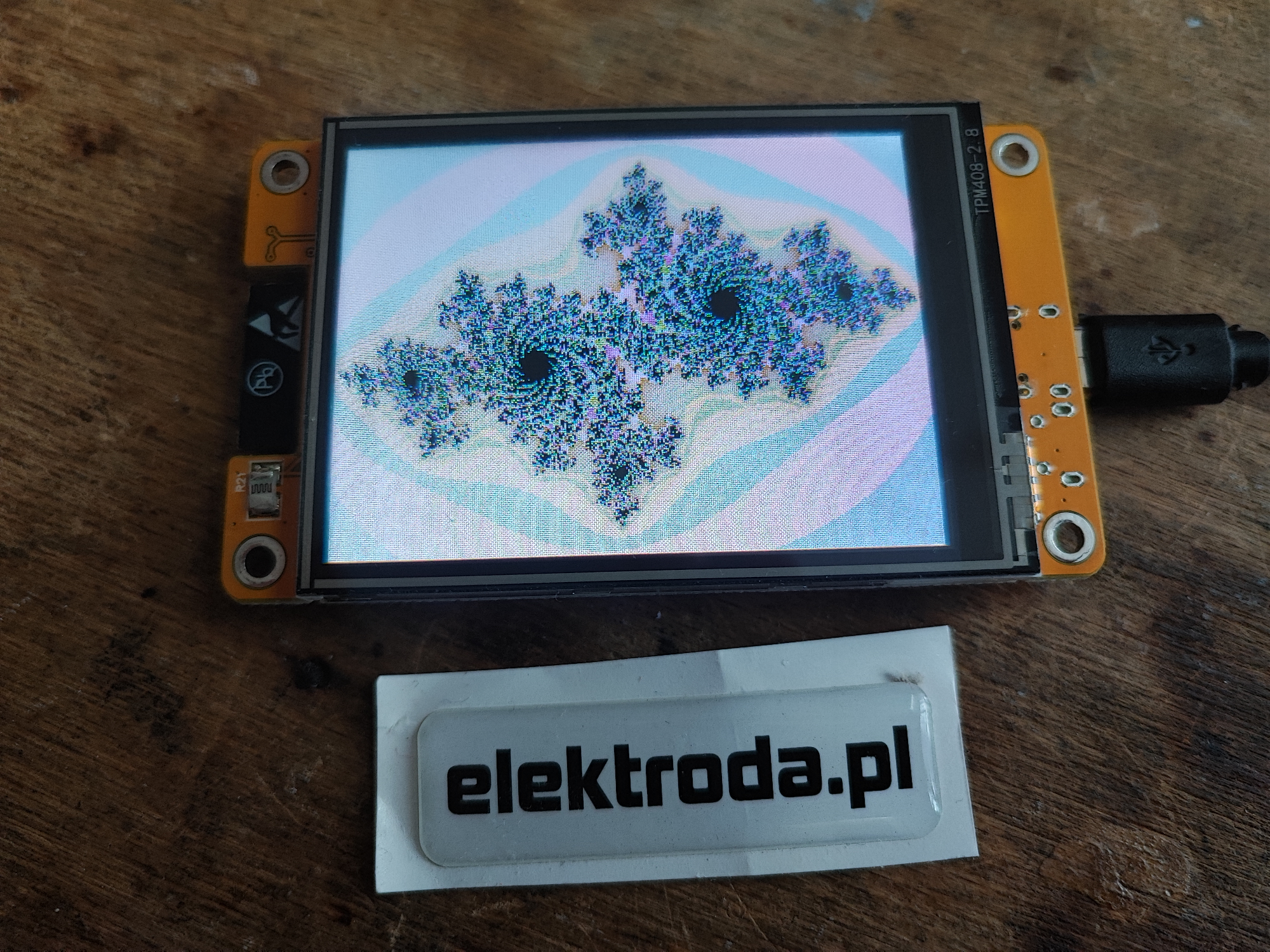
ESP32-2432S028R display showing a Julia set fractal .
Today we continue our adventure with the ESP32-2432S028R board. In the previous installment we ran the display and touchscreen, so today we will use that. We'll see what options and shapes we have available for drawing and then we'll consider what are ways to draw efficiently so that the refresh rate of the screen is high. We'll consider several ways of drawing here, including refreshing only what has changed and using DMA.

Previous topic in the series:
https://www.elektroda.pl/rtvforum/topic4058635.html#21111347

Basic colours and shapes .
First of all, we have two types of functions here - draw (functions that draw without filling) and fill (functions that draw and fill a shape with colour). Details can be found in the documentation:
https://www.arduino.cc/reference/en/libraries/tft_espi/
Based on the documentation, I have collected the different drawing functions in one place. We can draw various shapes, fill them with or without colour, fill them with gradients and for some even round the corners. The code should be self-explanatory, the first arguments are usually the position, the following ones - it depends, refer to the documentation or Visual Code hints.
Code: C / C++
Log in, to see the code
.
Result:


.
We can use these functions to create our own animations and interfaces, but this is not necessary - later on we will learn about LVGL, which will do all the work for us.

Julia's Fractal and drawing speed .
We've already gained some knowledge about drawing itself, now how about something more advanced. Let's see how a fractal will look on this display. What a fractal is - I won't discuss that here, but in a nutshell, a little calculation can give surprising results:
Code: C / C++
Log in, to see the code
.
I implement the drawing in two loops, that is, for each pixel.
The result, however, is not the most interesting:
ESP32-2432S028R display showing a Julia set fractal .
The film nicely shows that the whole thing, however, is quite slow to calculate and draw:


.
It would probably be possible to optimise this, e.g. by creating a graphic to a bitmap and then calling the display of that bitmap once....

Can you draw faster? Bouncy Circles demo .
This is where an example from the author of the library we are using himself comes to the rescue.
Source:
https://github.com/Bodmer/TFT_eSPI/blob/maste.../DMA%20test/Bouncy_Circles/Bouncy_Circles.ino
Let's analyse this code:
Code: C / C++
Log in, to see the code
.
Here we see that the author ... draws the top half of the screen separately and the bottom half separately:
Code: C / C++
Log in, to see the code
.
The function that draws first separately, without display, clears a given bitmap (of a given half of the screen) and draws our circles on it (without display):
Code: C / C++
Log in, to see the code
.
After that, the display on the screen already takes place - the drawn half of the screen from the bitmap is sent to it directly via DMA:
Code: C / C++
Log in, to see the code
.
Then the author updates the wheel positions, but this is less important for us:
Code: C / C++
Log in, to see the code
.
Here a video of how it works would be useful, but it's lost to me for now, I'll have a moment then I'll fill it in .
The most important two functions here are initDMA and pushImageDMA.
The name of the function already suggests to us that it uses DMA - Direct Memory Access, or fast, direct memory access. But how does it work?
You can peek into the source code to find the answer to that question:
Code: C / C++
Log in, to see the code
.
The above fuction just adds the DMA transfer to the queue. Then the rest of the code executes normally, and during this time pixels are sent to the display at the same time.

Demo clock .
Of course, not every program, however, is implemented with DMA. Without DMA it is also possible to display interesting animations.
Consider here a clock demo, the demo comes from:
https://git.wiyixiao4.com/Learning/TFT_eSPI/s...xamples/320%20x%20240/TFT_Clock/TFT_Clock.ino
Let's have a look at the source code:
Code: C / C++
Log in, to see the code
.
The code snippet above is mainly the function setup , it is executed once. Nevertheless, almost the entire clock is drawn in it - without the hands. This is not the case, as in practice there is no need to draw it more than once. In order to optimise here, the loop loop only successively deletes the old hands (paints them with the background colour) and then draws the new ones. Let's see:
Code: C / C++
Log in, to see the code
.
In addition, the refresh is further split, because, for example, when the seconds hand moves and the hour hand stands still, the hour hand does not need to be redrawn.
The auxiliary functions remain:
Code: C / C++
Log in, to see the code
.
The result:


.


Summary
Here I first showed the basics of drawing itself (the smallest building blocks, drawing shapes, etc.) and then I also presented different drawing methodologies. One can:
- either draw the whole thing inefficiently, the worst way is to do it pixel by pixel (see the example with the fractal)
- or harness the DMA to the whole, e.g. by dividing the screen into 2 parts, so that when one part is sent, the other part is already rendering (example 'bouncy circles')
- or draw a static background once and erase dynamic objects one by one the background colour and then redraw (example of a clock).
All these methods have their pros and cons, but it is rather clear that the first approach is the simplest and also the least efficient. It all depends on what you want to draw and in what form.
Have you encountered the problem of drawing efficiency? How have you solved it at your place? Feel free to comment. .


About Author
p.kaczmarek2
p.kaczmarek2 wrote 14405 posts with rating 12338 , helped 650 times. Been with us since 2014 year.

Comments

LA72 24 Jun 2024 20:28

But you are not cranking with your ESP32 material. I can see many interesting applications for myself. It is a pity that man has so little time for all the hobbies. [Read more]

p.kaczmarek2 24 Jun 2024 21:42

It is really worth taking an interest in ESP32, both boards and examples are really plentiful. Virtually every more typical application already has a ready-made solution. It's not the same as it was when... [Read more]

p.kaczmarek2 25 Jun 2024 09:59

Ok, I found this lost video of the bouncy circles demo) : . Please note what a smooth animation this is! The number of frames per second relative to the fractal example is mind-blowing. Maybe it's... [Read more]

katakrowa 27 Jun 2024 14:24

. I've never done a project on the ESP32 or with this screen but it seems to me that there's nothing to get excited about here. After all, games on the 80286 ran smoothly.... Here we have a processor... [Read more]

p.kaczmarek2 27 Jun 2024 16:52

You see @katakrowa , I started from PICs by soldering the boards myself, or from Arduino, so for me such a display, let alone a touchscreen one, is still progress, but at the same time I don't claim that... [Read more]

katakrowa 27 Jun 2024 17:36

I didn't mean to detract from your discoveries with ESP just wanted to point out that there are some old as the world ways to handle graphics with animation. It is, of course, about buffering. I started... [Read more]

FAQ

TL;DR: For ESP32 users driving a 320x240 TFT, a full 16bpp frame is about 156,600 bytes, and “getting there pixel by pixel” is the slow path. This FAQ shows how TFT_eSPI shapes, sprites, partial redraws, and DMA double buffering improve refresh rate and reduce flicker on the ESP32-2432S028R touch display. [#21134579]

Why it matters: If your ESP32 animation looks slow, the bottleneck is often how you send pixels, not only how you calculate them.

Method How it works Thread evidence Practical result
drawPixel() per pixel Writes each pixel directly to the display Julia demo uses nested x/y loops and is described as quite slow Worst refresh rate for full-frame graphics
Sprite buffering Draws into RAM first, then sends a larger block Bouncy Circles uses 2 sprites, each half-screen Much smoother animation
DMA double buffering CPU renders one buffer while SPI/DMA sends the other Two half-screen sprites plus pushImageDMA() Best overlap of rendering and transfer
Static background + partial redraw Draw background once, erase and redraw only moving parts Clock redraws hands instead of the whole dial Lower flicker and less work per frame

Key insight: The thread’s main lesson is simple: optimize the update path first. On ESP32 TFT projects, buffering, partial redraws, and DMA usually matter more than raw CPU speed for smooth graphics. [#21134505]

Quick Facts

  • The DMA demo defines DWIDTH 240 and DHEIGHT 320, then allocates two sprites of half-screen size. The code notes that a full 240 * 320 sprite would need about 150 Kbytes of RAM. [#21130469]
  • The Bouncy Circles example animates 42 circles (CNUMBER 42) and updates the screen in two halves, which lets rendering and transfer overlap. [#21130469]
  • The Julia demo uses a maximum of 256 iterations per pixel and draws every pixel with tft.drawPixel(x, y, color), which makes the display update visibly slow. [#21130469]
  • One commenter estimates a full 320x240x16bpp frame at about 156,600 bytes and roughly 3 MB/s for 20 frames/second, framing why transfer strategy matters on SPI displays. [#21134297]
  • The clock demo schedules updates every 1000 ms and redraws only the hands, not the whole dial, which cuts flicker and repeated work. [#21130469]

How do I draw pixels, lines, triangles, circles, ellipses, arcs, and rounded rectangles on an ESP32-2432S028R using the TFT_eSPI library?

Use TFT_eSPI drawing calls directly after tft.init() and tft.setRotation(). The thread shows drawPixel, drawLine, drawTriangle, fillRect, fillCircle, fillEllipse, drawArc, drawRoundRect, and fillRoundRect, plus gradient fills with fillRectVGradient. The examples run on an ESP32-2432S028R with the display rotated through values 0 to 3, and most shape calls use position first, then size, then color. [#21130469]

What is DMA in TFT_eSPI, and how does pushImageDMA speed up screen updates on an ESP32 display?

DMA is a transfer method that sends prepared pixel data to the TFT while normal code keeps running. "DMA is a transfer method that moves display data directly from RAM to SPI hardware, reducing CPU waiting and enabling parallel refresh." In the thread, pushImageDMA() queues a transfer after setAddrWindow(), and the author notes that pixels are sent to the display while the rest of the program continues. [#21130469]

Why is drawing a Julia fractal pixel by pixel with tft.drawPixel() so slow on an ESP32 touch display?

It is slow because the code performs both heavy math and one display write per pixel. The Julia demo loops over the full screen width and height, runs up to 256 iterations per point, converts the result to RGB565, and then calls tft.drawPixel(x, y, color) for every pixel. Later comments stress that direct per-pixel screen writes often consume more time than the fractal math itself. [#21134579]

What's the best way to improve ESP32 display refresh rate: per-pixel drawing, sprite buffering, or DMA double buffering?

DMA double buffering is the strongest method discussed, with sprite buffering next and per-pixel drawing last. The thread explicitly contrasts the slow Julia drawPixel() approach with the smoother two-sprite DMA demo, then points to the two-buffer LVGL model where one buffer draws while the other transfers. That overlap reduces idle time on the MCU and the SPI bus. [#21134505]

How can I split a 320x240 TFT screen into two halves and update each half with sprites for smoother animation?

Create two half-screen sprites and update them one after the other. 1. Allocate two sprites sized DWIDTH by DHEIGHT / 2. 2. Render the top half with drawUpdate(0) and the bottom half with drawUpdate(1). 3. Send each half with tft.pushImageDMA(0, sel * DHEIGHT / 2, DWIDTH, DHEIGHT / 2, sprPtr[sel]). The demo uses 240x320 dimensions and moves sprite 1’s viewport upward so coordinates still match the lower half. [#21130469]

What is double buffering, and why does it help when rendering graphics on an SPI TFT display?

Double buffering means drawing into one RAM buffer while the other buffer is being sent to the display. "Double buffering is a graphics technique that alternates two image buffers, so rendering and display transfer can happen in parallel with fewer visible artifacts." The thread recommends two global buffers over one stack buffer, especially when DMA can send one frame while the CPU fills the next. [#21134505]

How does the TFT_eSPI Bouncy_Circles DMA example work, and which parts of the code are responsible for the smooth animation?

It works by rendering circles into half-screen sprites, then sending each sprite by DMA. The key parts are tft.initDMA(), creation of two sprite buffers, drawUpdate(0) and drawUpdate(1), and pushImageDMA() for each half. The example animates 42 circles, tracks FPS with interval = 100, and updates positions only after the bottom half is drawn, which keeps motion smooth and organized. [#21130469]

Why does drawing a static background once and only redrawing moving objects reduce flicker in an ESP32 clock demo?

It reduces flicker because the code avoids repainting unchanged graphics every second. In the clock demo, the dial, hour markers, and text are drawn once in setup(), while loop() erases only old hand positions with the background color and draws new ones. The second hand updates every 1000 ms, and the hour and minute hands are erased only when needed, which cuts redundant screen writes. [#21130469]

How can I rewrite a Julia fractal demo for ESP32 so it renders into a RAM buffer first and then sends the whole frame to the ILI9341 display?

Render each pixel into a uint16_t RGB565 buffer, then push the whole image in one transfer. The thread’s suggested pattern is: 1. Allocate a full-screen buffer globally. 2. Fill screenBuffer[320 * y + x] inside the Julia loops. 3. Call a function that uses setAddrWindow(0, 0, 320, 240) and pushColors(screenBuffer, 320 * 240, true). The author then recommends two global buffers if you want DMA overlap instead of a single buffered flush. [#21134505]

pushImageDMA vs pushColors vs drawPixel in TFT_eSPI — which approach is better for fast graphics on ESP32?

pushImageDMA is best for fast full-region updates, pushColors is a buffered bulk-write option, and drawPixel is the slowest path for large images. The thread shows drawPixel() struggling with a Julia fractal, presents pushImageDMA() as the smooth-animation path, and a commenter proposes a pushColors(screenBuffer, 320 * 240, true) full-frame flush as a major improvement over direct pixel writes. [#21134297]

What is a Julia fractal in the context of TFT graphics demos, and why is it useful for testing drawing performance?

A Julia fractal is a math-generated image that stresses both computation and pixel output, so it makes a good graphics benchmark. In the thread, each screen point iterates complex-number equations up to 256 times, then maps the result to 16-bit color and displays it. That combination exposes whether your bottleneck is math, per-pixel drawing overhead, or frame-transfer strategy. [#21130469]

How do screen rotation settings in TFT_eSPI affect gradient fills and drawing coordinates on the ESP32-2432S028R?

Rotation changes the coordinate system, so the same drawing call lands in a different orientation. The example explicitly cycles through tft.setRotation(0), 1, 2, and 3 while calling fillRectVGradient(10, 10, 100, 200, ...), showing that gradient placement and text coordinates follow the current rotation. If your layout appears shifted or flipped, check rotation first before changing shape coordinates. [#21130469]

What memory limits should I watch for when creating full-screen or half-screen TFT_eSprite buffers on an ESP32?

Watch RAM use first, because sprite buffers scale directly with pixel count. The DMA example comments that a full 240 * 320 sprite needs about 150 Kbytes, which is why it creates two half-screen sprites instead of one full-screen pair. A later comment also warns against placing a full 320*240 screen buffer on the stack and recommends global buffers instead. [#21134505]

How can LVGL use one buffer or two buffers on ESP32, and what performance difference should I expect when DMA is available?

LVGL can run with one draw buffer or two, but two buffers are faster when DMA is available. The thread quotes LVGL’s model directly: one buffer forces drawing to wait until transfer finishes, while two buffers let the MCU draw into one buffer as the other is sent in the background. That means rendering and refreshing become parallel instead of serialized. [#21134505]

What methods have people used to solve ESP32 display drawing efficiency problems in practice, especially with SPI touchscreens and animated graphics?

The thread shows three practical methods: DMA sprite buffering, static-background redraw, and full-frame RAM buffering. One commenter also suggests classic buffering and even multithreaded ideas for dual-core ESP32, but both agree on the core rule: “any will be better than getting there pixel by pixel.” For SPI touchscreens and animated graphics, the shared recommendation is to batch updates and avoid direct single-pixel writes. [#21134579]
Generated by the language model.
%}