


logo elektroda
logo elektroda
X
logo elektroda

THOMSON 22HR5434 TV: Issues with Switching from Cable to Terrestrial TV and Resetting

Borys523 13527 13
ADVERTISEMENT
Treść została przetłumaczona polish » english Zobacz oryginalną wersję tematu
  • #1 17010153
    Borys523
    Level 10  
    Posts: 28
    Rate: 13
    THOMSON 22HR5434 TV: Issues with Switching from Cable to Terrestrial TV and Resetting
    Hello. I am asking for help in solving the problem with the Thomson HR 5434 TV set. The TV is functional. He worked on cable tv all the time. Now I want to change to terrestrial tv and I need to change installation to digital terrestrial tv. I would like to return to the initial settings as when purchasing. To be able to choose the installation. Unfortunately, the reset option in the OPTIONS settings menu does not happen. Maybe someone has an idea how to reset this TV to be able to start the installation from scratch as when buying a new TV.
    Greetings to all professionals.
  • ADVERTISEMENT
  • #3 17010428
    kazikszach
    Level 39  
    Posts: 3990
    Help: 511
    Rate: 1092
    First answer the question, and looking for factory settings is rather in Setup.
  • ADVERTISEMENT
  • #4 17011261
    Borys523
    Level 10  
    Posts: 28
    Rate: 13
    _PREDATOR_ wrote:
    Is it possible to change the language to pl?


    The Polish language is set. The first time you installed the cable network, the audio language and subtitles were set.

    Added after 11 [minutes]:

    kazikszach wrote:
    First answer the question, and looking for factory settings is rather in Setup.

    I go to the menu-configuration-channels and there I have the option to choose update channels, search automatically, tune, manually analog. I made the updates, it was tv. He found only analogue stations, giving the option of automatic search, finds only analogue channels. Digital zero.
  • ADVERTISEMENT
  • #6 17012052
    Borys523
    Level 10  
    Posts: 28
    Rate: 13
    Zdzisław1980 wrote:


    Unfortunately, digital channels do not jump. After connecting an external decoder, it finds digital channels, directly connected antenna finds only analog channels. In the TV specification it is written that it has a built-in DVB-T decoder. Mpeg-4. Is it possible that these decoders are not present despite the description in the technical data.
    In the attachment I send the specification of this model.
    Best regards.
    Attachments:
    • ProductCard.pdf (537.53 KB) You must be logged in to download this attachment.
    • THOMSON 22HR5434 TV: Issues with Switching from Cable to Terrestrial TV and Resetting Capture _2018-02-04-14-12-16.png (213.8 KB) You must be logged in to download this attachment.
    • THOMSON 22HR5434 TV: Issues with Switching from Cable to Terrestrial TV and Resetting Capture _2018-02-04-14-12-30.png (303.36 KB) You must be logged in to download this attachment.
  • #7 17012130
    mirex
    Level 43  
    Posts: 21794
    Help: 1950
    Rate: 1987
    But what "unfortunately"?
    What exactly did you do ?!
    Show us the "Setup" menu for this TV.
  • #8 17013052
    Borys523
    Level 10  
    Posts: 28
    Rate: 13
    The options are Polish. Country Poland. Eastern Europe. The installation carried out automatic channel search as well as manual search only finds analogue channels. After connecting the decoder finds digital programs, without a decoder the antenna is directly connected to the tv. Only analogue channels. Does this tv have a DBV-T decoder for digital terrestrial television according to specification. Does anyone know this tv model.
    Best regards.
  • #9 17013070
    mirex
    Level 43  
    Posts: 21794
    Help: 1950
    Rate: 1987
    I am speaking for the last time - you will be kind to show us the "Setup" menu of this TV, will we keep drinking like that for another week? ;)
    Borys523 wrote:
    After connecting the decoder, it finds digital programs

    What decoder? Will you tell us or not? ;)
    After all, you use the same cable installation all the time.
  • ADVERTISEMENT
  • #10 17014857
    Borys523
    Level 10  
    Posts: 28
    Rate: 13
    Menu dumps.
    After connecting another LG 32 KL 450 TV to the antenna
    the TV has digital channels. Hence my question is whether this Thomson TV has a built-in DBV-T tuner as they give the specification in the specification, because each time it finds only analogue.
    Attachments:
    • THOMSON 22HR5434 TV: Issues with Switching from Cable to Terrestrial TV and Resetting 20180205_144121_HDR.jpg (2.92 MB) You must be logged in to download this attachment.
    • THOMSON 22HR5434 TV: Issues with Switching from Cable to Terrestrial TV and Resetting 20180205_144058_HDR.jpg (2.79 MB) You must be logged in to download this attachment.
    • THOMSON 22HR5434 TV: Issues with Switching from Cable to Terrestrial TV and Resetting 20180205_143025_HDR.jpg (2.92 MB) You must be logged in to download this attachment.
    • THOMSON 22HR5434 TV: Issues with Switching from Cable to Terrestrial TV and Resetting 20180205_142949_HDR.jpg (2.24 MB) You must be logged in to download this attachment.
    • THOMSON 22HR5434 TV: Issues with Switching from Cable to Terrestrial TV and Resetting 20180205_143643_HDR.jpg (2.49 MB) You must be logged in to download this attachment.
    • THOMSON 22HR5434 TV: Issues with Switching from Cable to Terrestrial TV and Resetting 20180205_143731_HDR.jpg (2.81 MB) You must be logged in to download this attachment.
    • THOMSON 22HR5434 TV: Issues with Switching from Cable to Terrestrial TV and Resetting 20180205_143745_HDR.jpg (2.9 MB) You must be logged in to download this attachment.
    • THOMSON 22HR5434 TV: Issues with Switching from Cable to Terrestrial TV and Resetting 20180205_143829_HDR.jpg (2.95 MB) You must be logged in to download this attachment.
    • THOMSON 22HR5434 TV: Issues with Switching from Cable to Terrestrial TV and Resetting 20180205_143842_HDR.jpg (2.33 MB) You must be logged in to download this attachment.
    • THOMSON 22HR5434 TV: Issues with Switching from Cable to Terrestrial TV and Resetting 20180205_143042_HDR.jpg (2.66 MB) You must be logged in to download this attachment.
  • #11 17015094
    _kli_
    Level 41  
    Posts: 5262
    Help: 754
    Rate: 1027
    Borys523 wrote:
    Unfortunately, digital channels do not jump. After connecting an external decoder, it finds digital channels, directly connected antenna finds only analog channels. In the TV specification it is written that it has a built-in DVB-T decoder. MPEG-4. Is it possible that these decoders are not present despite the description in the technical data

    Rather unlikely that the tv deviated from the specifications. Unless you came across a copy offered for another market. According to the above specification, it has dvb-t mpeg-4.
    The manual is written quite briefly, but I understand that TV scans the analog and digital tuner once, because ...
    Thomson wrote:
    Finding only analogue channels by the LCD search function can be caused by a weak DVB-T signal

    Borys523 wrote:
    Unfortunately, the reset option in the OPTIONS settings menu does not happen. Maybe someone has an idea how to reset this TV

    Did you do that ...?
    Thomson wrote:
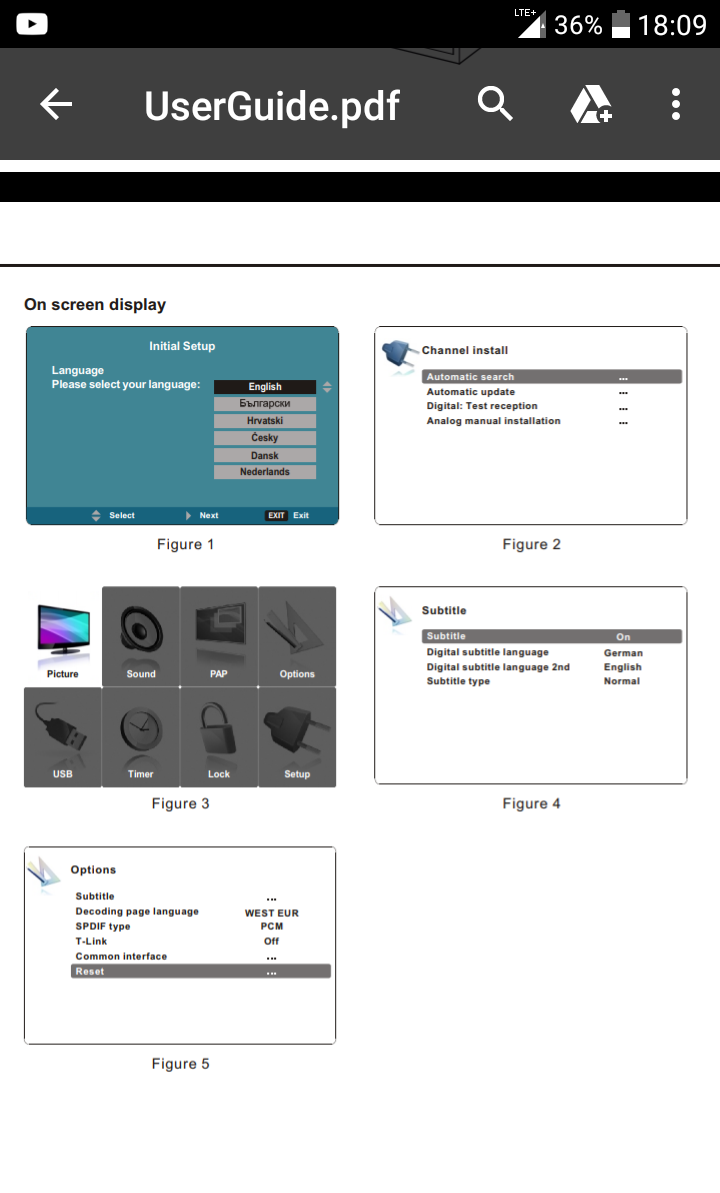
    1. Press the button Menu on the remote control to select an option Options > reset (Options> Reset) (See fig. 5).
    2. Press the button OK / RIGHT to use the option.
    3. By buttons LEFT / RIGHT select an option OKAY and press the button OKAY to start zeroing

    http://www.thomsontv.pl/serwis/do-pobrania?serie=0&product=17
    http://www.thomsontv.pl/resources/Product/17/pl-PL/UserGuide.pdf
    http://www.thomsontv.pl/resources/Product/17/pl-PL/UserGuide2.pdf
  • #12 17015249
    Borys523
    Level 10  
    Posts: 28
    Rate: 13
    Thanks for the advice. I already did
    Thomson wrote:
    1. Press the Menu button on the remote control to select Options> Reset (See fig. 5).
    2. Press the OK / RIGHT button to use the option.
    3. Use the LEFT / RIGHT buttons to select OK and press the OK button to start zeroing

    Nothing happens but only analog programs ..
    I still have such a question, and it may be that even if it has a built-in tuner, there is an option that it is somehow weak and can not find digital channels without the help of an external tuner. What else can be the reason. Good antenna. A second LG TV installs digital channels seamlessly.
  • Helpful post
    #13 17015539
    _kli_
    Level 41  
    Posts: 5262
    Help: 754
    Rate: 1027
    Borys523 wrote:
    Nothing happens just analog programs

    In what sense is nothing happening? Cannot do the initial configuration on tv or is it only analog after reset?
    Do you receive cable and terrestrial from the same installation?
    After selecting "Configuration" -> "Source Labels" -> TV, is it impossible to select eg "terrestrial tv" divided into digital and analogue?
    Is there a similar breakdown in the "Channel search" option?
    You should check if the TV is receiving a digital signal using the "Digital: Test signal reception" option after entering the appropriate frequencies that the antenna receives. Do you know these frequencies? If not, what transmitter should the antenna be positioned on?
    Borys523 wrote:
    What else can be the reason. Good antenna. A second LG TV installs digital channels without any problems

    Differentiated sensitivity of both TV heads. Perhaps the signal is not very strong and of good quality. In such a situation, it is enough for LG to program, but THOMSON may be more demanding.
    In case of further problems, please contact technical support:
    http://www.thomsontv.pl/kontakt/pomoc-techniczna
  • #14 17016655
    Borys523
    Level 10  
    Posts: 28
    Rate: 13
    _kli_ wrote:
    Borys523 wrote:
    Nothing happens just analog programs

    In what sense is nothing happening? Cannot do the initial configuration on tv or is it only analog after reset?
    Do you receive cable and terrestrial from the same installation?
    After selecting "Configuration" -> "Source Labels" -> TV, is it impossible to select eg "terrestrial tv" divided into digital and analogue?
    Is there a similar breakdown in the "Channel search" option?
    You should check if the TV is receiving a digital signal using the "Digital: Test signal reception" option after entering the appropriate frequencies that the antenna receives. Do you know these frequencies? If not, what transmitter should the antenna be positioned on?
    Borys523 wrote:
    What else can be the reason. Good antenna. A second LG TV installs digital channels without any problems

    Differentiated sensitivity of both TV heads. Perhaps the signal is not very strong and of good quality. In such a situation, it is enough for LG to program, but THOMSON may be more demanding.
    In case of further problems, please contact technical support:
    http://www.thomsontv.pl/kontakt/pomoc-techniczna


    Thanks to everyone for help, I did this:
    I have entered the configuration.
    Best regards.

Topic summary

✨ The discussion revolves around issues faced by a user with the Thomson 22HR5434 TV when attempting to switch from cable to digital terrestrial TV. The user seeks to reset the TV to factory settings to facilitate this transition, but encounters difficulties as the reset option in the settings menu does not function. Despite confirming that the TV has a built-in DVB-T decoder, the user reports that only analog channels are found during the channel search, even after multiple attempts at both automatic and manual tuning. Other users suggest checking the setup menu and signal reception, while some express skepticism about the TV's tuner capabilities. Ultimately, the user successfully navigates the configuration settings after receiving assistance.
Generated by the language model.

FAQ

TL;DR: For THOMSON 22HR5434, use a 3‑step reset and re-scan; if it still finds only analogue, “Finding only analogue channels … can be caused by a weak DVB‑T signal.” [Elektroda, kli, post #17015094]

Why it matters: This solves “how do I switch from cable to terrestrial and get digital channels back?” for owners troubleshooting scans and resets.

Quick-Facts

Quick Facts

How do I factory‑reset the THOMSON 22HR5434 to re-run installation?

Open Menu > Options > Reset. Press OK/RIGHT to select Reset. Choose OK and press OK to start. After reboot, go through First Installation and re-scan for channels. This is the documented 3‑step procedure for this chassis. [Elektroda, kli, post #17015094]

Why does the scan find only analogue channels?

Weak or marginal DVB‑T signal is the prime cause. “Finding only analogue channels by the LCD search function can be caused by a weak DVB‑T signal.” Improve antenna alignment, cabling, or amplification, then re-scan. [Elektroda, kli, post #17015094]

Does the 22HR5434 really have a DVB‑T MPEG‑4 tuner?

Yes. The series specification includes DVB‑T with MPEG‑4 decoding. Market variants exist, but the cited documentation and discussion confirm DVB‑T support for this line. [Elektroda, kli, post #17015094]

How do I switch the TV from cable to terrestrial input?

Go to Configuration > Source Labels > TV. Select terrestrial TV, then run Channel search. This ensures the scan targets the correct tuner path before reinstallation. [Elektroda, kli, post #17015539]

How can I check if the TV is receiving a digital multiplex at all?

Use Digital: Test signal reception. Enter the known DVB‑T frequency for your transmitter and check the level/quality readout. If levels are low, fix the antenna or cabling before rescanning. [Elektroda, kli, post #17015539]

Can an external DVB‑T decoder work when the TV shows no digital channels?

Yes. In the thread, an external decoder and another LG TV received digital channels while the Thomson showed none. That indicates borderline signal or tuner sensitivity differences. [Elektroda, Borys523, post #17012052]

After reset, it still finds only analogue—what next?

Confirm the source is set to terrestrial TV, then use Digital: Test signal reception on the expected frequencies. If quality is poor, improve the antenna or add attenuation/amplification as needed, then rescan. [Elektroda, kli, post #17015539]

What menu options help distinguish analogue vs digital scanning?

Under Configuration, use Source Labels to select TV and terrestrial mode. Then in Channel search, use Digital-related options and the Digital test to verify reception before a full scan. [Elektroda, kli, post #17015539]

I get 0 digital channels—does that prove the tuner is faulty?

Not necessarily. The user reported “digital zero,” yet external gear worked. This points to marginal signal or configuration, not immediate hardware failure. Try signal tests and source selection first. [Elektroda, Borys523, post #17011261]

Could my unit be a different market version without DVB‑T?

It’s unlikely, but possible if sourced for another market. Verify the label and region settings. If features mismatch local specs, contact support. [Elektroda, kli, post #17015094]

What regional settings should I use before scanning?

Set Language to Polish and Country to Poland (or your country). The thread example used Poland/Eastern Europe with Polish language selected before scanning. [Elektroda, Borys523, post #17013052]

How-to: run a clean terrestrial scan that includes digital muxes

  1. Menu > Options > Reset > OK to confirm.
  2. Configuration > Source Labels > TV > select terrestrial TV.
  3. Channel search > use Digital: Test signal reception, then run Auto Search. [Elektroda, kli, post #17015539]

Why did my LG TV find channels but the Thomson did not?

Tuner sensitivity varies. As one expert noted, signal may be adequate for LG but not for the Thomson’s head-end. Improve antenna setup to raise quality margin. [Elektroda, kli, post #17015539]

Do I need separate cabling for cable vs terrestrial?

If both share one installation, ensure the selected source matches the active feed. Using the wrong source label or search mode will miss DVB‑T services. [Elektroda, kli, post #17015539]

What’s an edge case that can still block digital channels?

Antenna delivers strong analogue but noisy or filtered DVB‑T. In that failure case, analogue appears while digital reads as absent. Correct the antenna or filters, then rescan. [Elektroda, kli, post #17015539]
Generated by the language model.
ADVERTISEMENT