FAQ 
TL;DR: A single 8-byte compound packet ships voltage, current, power and energy every 5 s—“This must be configurable” [Elektroda, crg1darkspr1te, #20342236; p.kaczmarek2, #20347227].
Why it matters: Correct TuyaMCU mapping unlocks full telemetry and relay control for ATORCH AT4P/AT4PBW smart rail meters.
Quick Facts
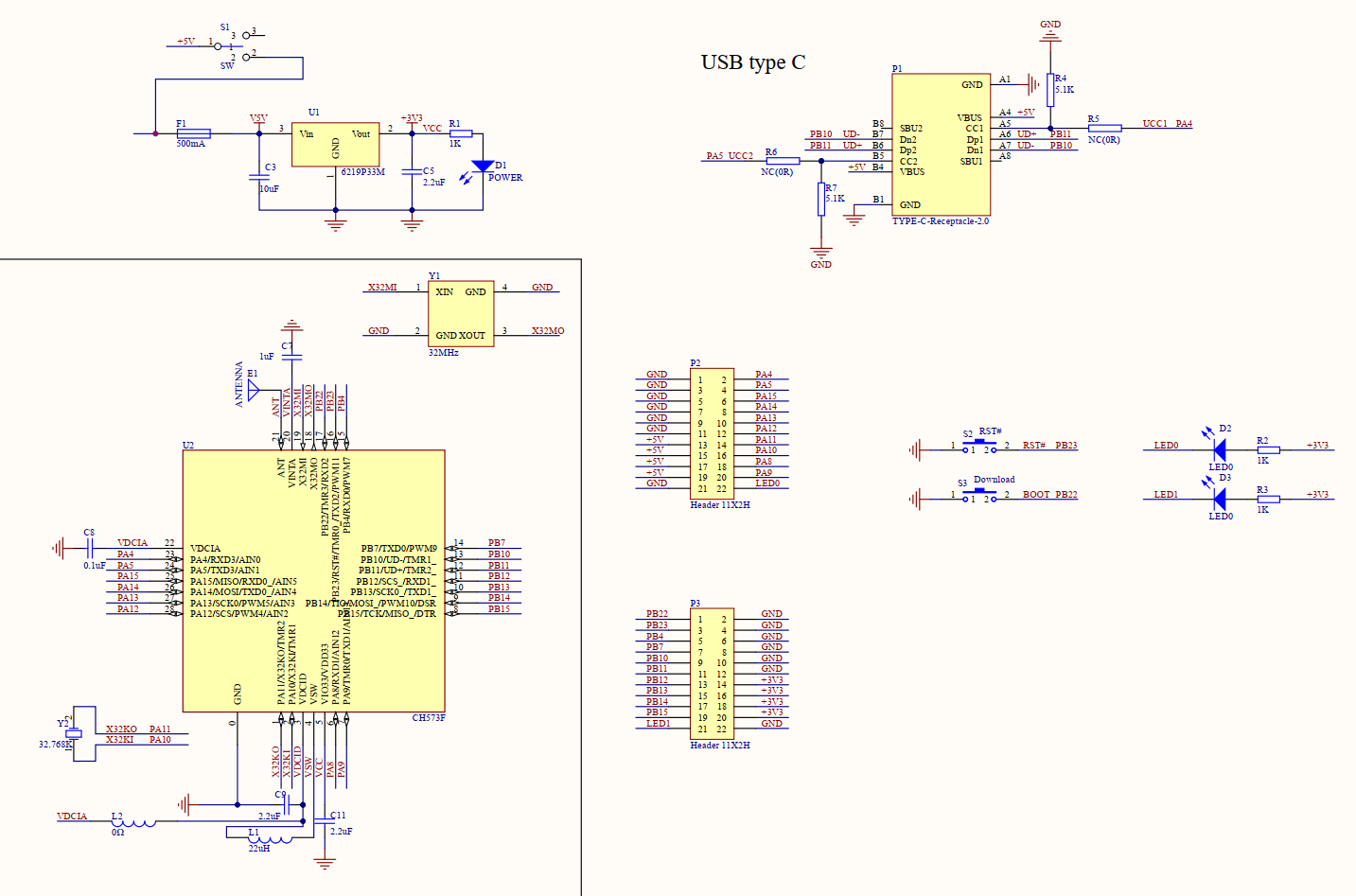
• MCU combo: BK7231N Wi-Fi + CH573F sub-MCU + BL0924 metering chip [Elektroda, crg1darkspr1te, post #20335741]
• Default UART speeds: 115 200 bps (AT4PWP v1.04), 9 600 bps (AT4PBW v1.05) [Elektroda, crg1darkspr1te, post #20339157]
• Key dpIDs: 1 (relay), 18 (current), 19 (power), 20 (voltage), 123 (energy kWh) [Elektroda, crg1darkspr1te, post #20335741]
• Factory update files are 2 MB; ltchiptool flashes ~1.1 MB section [Elektroda, dr3amr, post #21221696]
• Typical accuracy: ±1 V, ±0.02 A after calibration [Elektroda, crg1darkspr1te, post #20336287]
How do I bring a bricked AT4P/AT4PBW back online?
- Desolder the CB3S module.
- Flash a known-good 2 MB backup (e.g., v1.09) with ltchiptool via FT232RL [Elektroda, dr3amr, post #21221696]
- Resolder, power-cycle, and the device re-enters pairing.
Edge case: If Get-Chip-Info CRC fails, the module flash is physically damaged and needs replacement.
What autoexec.bat lines give full telemetry on v1.04 hardware?
Use
startDriver TuyaMCU
startDriver NTP
tuyaMcu_setBaudRate 115200
setChannelType 1 toggle
setChannelType 2 Voltage_div10
setChannelType 3 Power
setChannelType 4 Current_div1000
setChannelType 5 Frequency_div100
linkTuyaMCUOutputToChannel 1 bool 1
…repeat for dpIDs 20,19,18,133,135,134,123 as in sample
[Elektroda, crg1darkspr1te, post #20335741]
My AT4PBW only shows dpID 6; how can I decode the raw 16-byte 0x11 packet?
Why does OpenBeken lose Wi-Fi after I press “Wifi reset” on LCD?
Can OpenBeken drive the LCD directly?
How do I expose all readings to Home Assistant fastest?
What antenna mod improves weak Wi-Fi?
Is BLE usable on CB3S inside AT4P?
How do I request real-time weather data packets (0x21)?
Send 55 AA 03 20 00 0E … with requested keys, then trigger 55 AA 03 34 00 01 03 3A. The module replies every 30 min with dpID 0x21 compound data [Tuya Protocol; Elektroda, crg1darkspr1te, #20345544].
Does firmware v1.1.1 really disable 5-second reporting?
AI summary based on the discussion. May contain errors.










Comments
Very good job, did you figure dpIds yourself? From what I can see, there was no compound device-specific packet types? For example, this device: Hiking DDS238-2 Smart Meter had one custom packet... [Read more]
The dplds were pulled from the logs once i figured that the baud rate had to be changed (many a time i fotgot to add that and assume wiring at fault, lmao) most stick to the listed ones for power/current/voltage/frequency... [Read more]
I found more, this one passed my eyes but brain did not see, when i unpacked/decrypted the factory firmware i found a .json file with ID's in it that match this hardware { "gw_bi":... [Read more]
So on the next device (type AT4PBW, Mcu ver 1.05) i am not getting any feedback at all, in the logs there are quite a few issues Info:TuyaMCU:TUYAMCU received: 55 AA 03 00 00 01 01 04... [Read more]
Having a full communication dump from the original firmware can help a lot in such cases. It is easier to investigate when you know what's supposed to happen. Info:TuyaMCU:TUYAMCU received:... [Read more]
Attached is a realterm hex dump of the device with factory firmware. I reset the device the recorded the provisioning from both the TX and RX of the signal , attached is capture(TX of tuyamcu) and capture2... [Read more]
Any more information on those captures? Current voltage, power, etc? Lots of data here https://obrazki.elektroda.pl/5760334200_1671363689_thumb.jpg Some of packets looks like custom data: ... [Read more]
Ok, I finally got openbk to build for the N device i have , lots of face palm moments my side getting build env up, I like to use platformio for my ide on win/linux and normally not a issue but as I also... [Read more]
You don't need to do the capture via UART, you could launch OpenBeken and then do test with 60W bulb and 10W bulb and show me what OpenBeken receives, I think. [Read more]
I have flash the lastest bin file but it seems the device wont go past the ez-pair screen (not accepting the ok from bk device? ) if i do the command tuyaMcu_sendQueryState i will get this in the logs... [Read more]
So i did some more digging and found this https://developer.tuya.com/en/docs/iot/tuya-cloud-universal-serial-port-access-protocol And they mentioned the Commands in use, I noticed a few on there not... [Read more]
0x21 also seems to be specific to this device. I am not sure about the structure of 0x21 packet yet. Sample whole packet: 55AA002100400108772E74656D702E300004000000160C772E68756D69646974792E3000040000004608772E706D32352E3000040000002607772E6171692E3000040000006C30 71... [Read more]
The packet 0x21 is response to the command 55 aa 03 34 00 01 03 3a , proactively request weather data , and the breakdown of 0x21 is as follows this is found on the link i posted before ... [Read more]
I will try to add parsing of that data to OpenBeken later today. Will commit soon: https://obrazki.elektroda.pl/1114962300_1671636492_thumb.jpg [Read more]
I have been able now to read voltage/current from the device and then manually calculate power , here is my patch , drv_tuyaMCU.c else if (sectorLen == 4) { iVal = data[ofs +... [Read more]
This is not the correct way to do that. Please see this commit: https://github.com/openshwprojects/OpenBK7231T_App/commit/5a03649f7261413fba0d2c0794894c347381a5a8 https://obrazki.elektroda.pl/7852314300_1671699832_thumb.jpg... [Read more]
@ElektrodaBot I have a wifi problem before it works well but after the last power outage the wifi does not work and the green light no longer lights up I tried all the parameters like setting to zero and... [Read more]
It definitely sounds like the power outage may have caused some damage to your WiFi equipment. Let's try to troubleshoot the issue step by step. 1. Power Cycle : Although you've mentioned setting things... [Read more]
the AT4P HD smart account. the problem everything works well overvoltage amperage cuts off at the request of people the red light comes on except the wifi and the two green lights Added after 1 [minutes]:... [Read more]