logo elektroda
logo elektroda
X
logo elektroda

[CBU]BK7231N GEYA GRD9L-W Wifi MCB Controller Din Rail Auto Circuit Breaker Recloser

jkwim  6 1464 Cool? (+1)
📢 Listen (AI):

TL;DR

  • A GEYA GRD9L-W WiFi MCB controller with BK7231N/CBU module was detached from its breaker and flashed from Tuya firmware to OpenBeken for MQTT control.
  • Bridge Relay Forward/Reverse on P15/P17, relay enable on P14, button on P26, WiFi LED on P24, and hall inputs on P16/P22/P20 mapped the motorized mechanism.
  • The Tuya config shows version 1.0.5, BK7231N, channel 1 for the bridge outputs, and hall sensors that changed state during switch motion.
  • Manual toggling works, but the red LED and the original physical-position sensing still need scripting, so the emulation is not fully finished.
Generated by the language model.
Wanted to incorporate the following device into my MQTT Network:
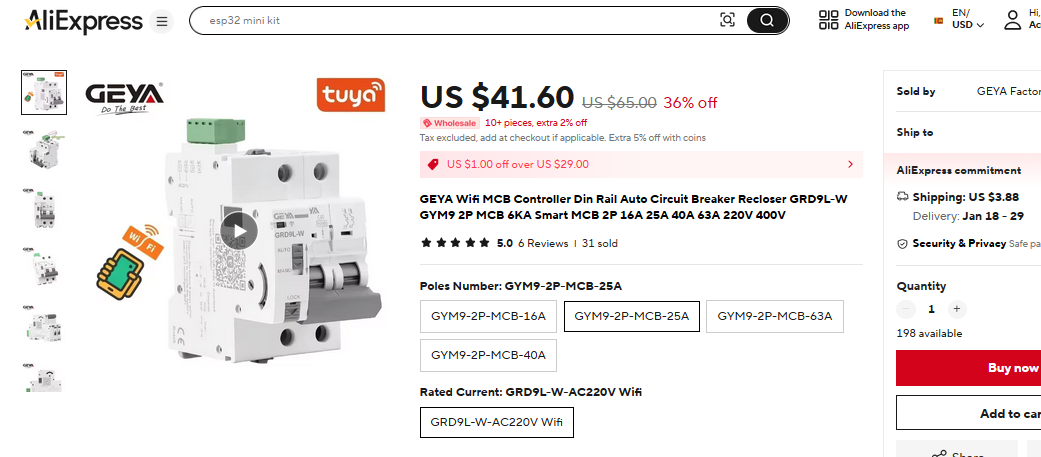
https://vi.aliexpress.com/item/1005006309773987.html

View of GEYA Wifi MCB Controller Din Rail Auto Circuit Breaker on AliExpress.

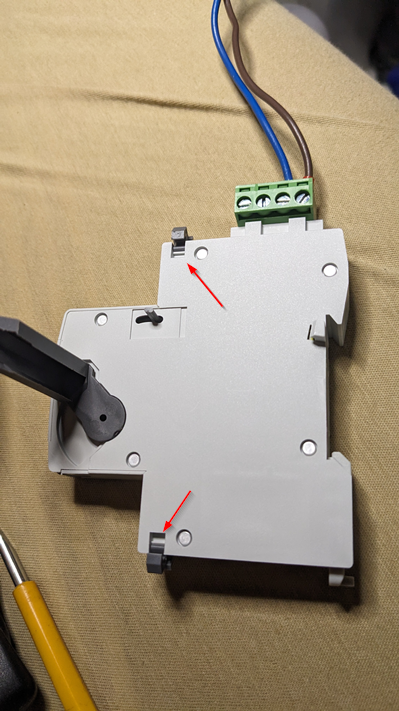
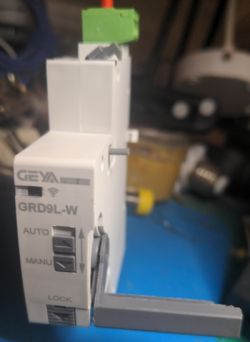
Actually I wanted to detach the device and use with a RCB. Detaching was simple as there were two retaining latches at the top and the bottom.
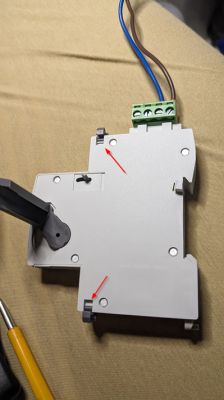
Back of a device with two clips and connected wires
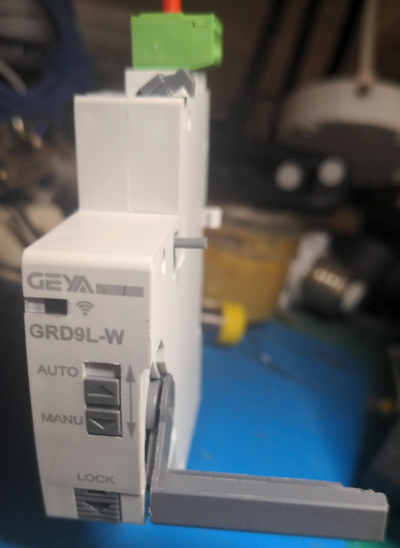
Electrical switch with AUTO, MANU, and LOCK buttons
It came with Tuya Firmware V1.0.5

I was able to use cloutclutter to flash with OpenBeken using following profile:

     > 1.0.5 - BK7231N / oem_bk7231n_cutout_self_switch
   
[?] Select the brand of your device: EARU
 > EARU

[?] Select the article number of your device: EAWCT-J Circuit Breaker with energy meter v1.0.5
 > EAWCT-J Circuit Breaker with energy meter v1.0.5


Tuya configuration file looked like this:

{
   "back_vol_lv":"0",
   "bt1_pin":"26",
   "remote_ctrl_mode":"0",
   "rl1_drvtime":"100",
   "hall_mid_pin":"20",
   "net_trig":"2",
   "rl_on1_pin":"15",
   "jv":"1.0.0",
   "netled1_lv":"1",
   "netled_reuse":"0",
   "bt1_type":"0",
   "temp_fun_en":"0",
   "hall_on_pin":"16",
   "hall_off_pin":"22",
   "nety_led":"1",
   "rl_off1_pin":"17",
   "bt1_lv":"0",
   "reset_t":"5",
   "netled1_pin":"24",
   "hall_off_lv":"0",
   "rl_on1_lv":"1",
   "hall_mid_lv":"0",
   "module":"CBU",
   "ch_cddpid1":"9",
   "hall_on_lv":"0",
   "ch1_stat":"2",
   "back_vol_pin":"14",
   "rl1_type":"2",
   "ch_num":"1",
   "rl_off1_lv":"1",
   "netn_led":"0",
   "ch_dpid1":"1",
   "crc":"127"
}


Suggested config for OpenBeken was like this:
Device configuration, as extracted from Tuya: 
- Button (channel 1) on P26
- Bridge Relay On (channel 1) on P15
- Bridge Relay Off (channel 1) on P17
- WiFi LED on P24
Device seems to be using CBU module, which is using BK7231N.
And the Tuya section starts at UNCOMMON POSITION 0


I really do not understand what the following statement means:
And the Tuya section starts at UNCOMMON POSITION 0

Since the device is a motorized device there are forward and reverse relays:
"rl_on1_pin":"15",
"rl_off1_pin":"17",
After experimenting I figured out that
Bridge FORWARD
Bridge REVERSE
GPIO configuration will make this work.

Then there is this PIN which controls the Automatic/Manual control.
If I set it to ON, then above Forward/Reverse actions work.
"back_vol_pin":"14",

I set PINs 15/17 (Bridge) as Channel 1 and PIN 14 (Relay) as Channel 2

Screenshot of a GUI interface with two Toggle buttons set to OFF.
So far so good.

Then there are 3 PINs for a Hall Effect Sensor (guessed from the naming) of pins):
"hall_on_pin":"16",
"hall_off_pin":"22",
"hall_mid_pin":"20",

I configured these as dInput as Channels 4,5,6 and I was able to observe the transitions when the relays are operated.
              on-16 6        | 0  |  1 | SWITCH ON
            /                |    |    |
           /                 |    |    |
          O---- mid-20 5     |1->0|1->0|
           \                 |    |    |
            \                |    |    |
              off-22 4       | 1  | 0  | SWITCH OFF


Switch OFF to ON Transition:
Info:MQTT:Channel has changed! Publishing 1 to channel 1 
Info:DRV:Bridge Driver: 681406 : FORWARD PULSE
Info:GEN:No change in channel 1 (still set to 1) - ignoring

Info:GEN:CHANNEL_Set channel 5 has changed to 1 (flags 0)

Info:MQTT:Channel has changed! Publishing 1 to channel 5 
Info:GEN:CHANNEL_Set channel 4 has changed to 1 (flags 0)

Info:MQTT:Channel has changed! Publishing 1 to channel 4 
Info:GEN:CHANNEL_Set channel 6 has changed to 0 (flags 0)

Info:MQTT:Channel has changed! Publishing 0 to channel 6 
Info:DRV:Bridge Driver: 682006 :PULSE Complete. HOLD
Info:GEN:CHANNEL_Set channel 5 has changed to 0 (flags 0)

Info:MQTT:Channel has changed! Publishing 0 to channel 5


Switch ON to OFF Transition
Info:MQTT:Channel has changed! Publishing 0 to channel 1 
Info:DRV:Bridge Driver: 727234 : REVERSE PULSE
Info:GEN:No change in channel 1 (still set to 0) - ignoring

Info:GEN:CHANNEL_Set channel 6 has changed to 1 (flags 0)

Info:MQTT:Channel has changed! Publishing 1 to channel 6 
Info:GEN:CHANNEL_Set channel 5 has changed to 1 (flags 0)

Info:MQTT:Channel has changed! Publishing 1 to channel 5 
Info:GEN:CHANNEL_Set channel 4 has changed to 0 (flags 0)

Info:MQTT:Channel has changed! Publishing 0 to channel 4 
Info:DRV:Bridge Driver: 727834 :PULSE Complete. HOLD
Info:GEN:CHANNEL_Set channel 5 has changed to 0 (flags 0)

Info:MQTT:Channel has changed! Publishing 0 to channel 5


Then there is LED PIN:
"netled1_pin":"24",
and a Button PIN:
"bt1_pin":"26",

The LED has two colors. When using the Auto position with Tuya App the Green/Red status colors were shown. However I was not able to identify how to obtain the RED LED.
When I moved the arm manually to off position it seems to trigger the RED LED but if I operate the arm using the web GUI, the RED LED does not get litup when in OFF Position.
Still playing with this.

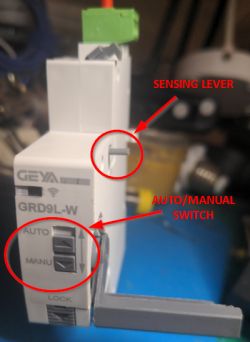
When AUTO/MANUAL SWITCH is moved DOWN (MANUAL) I see the following which confirms that PIN26 is assigned to that switch

Info:GEN:26 Button_OnInitialPressDown
Info:GEN:26 Button_OnLongPressHoldStart


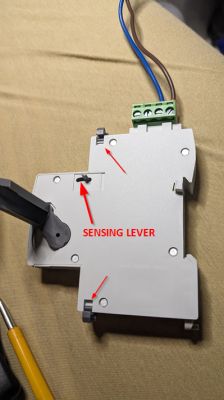
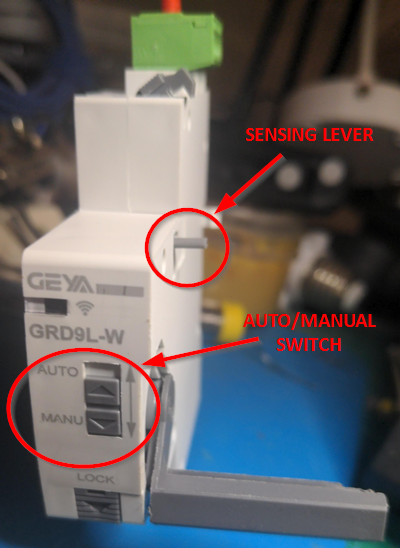
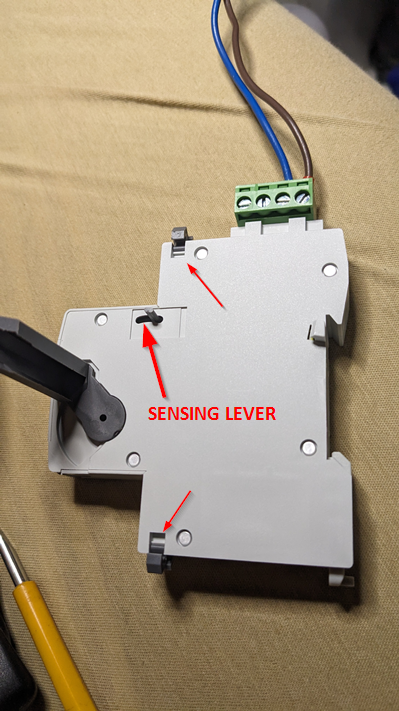
There is a SENSING LEVER which engages with a mechanism in the attached breaker to detect the ON/OFF position from the breaker also. However I could not figure out yet on how it is detected.
Switch with sensing lever and auto/manual switch
Circuit breaker box with a sensing lever on the casing.

So I want to put these together in a script to make it work like original setup.

May need some help.
1. Probably I need to match Button 26 with Relay 14. That is the AUTO/MANUAL switch enables/disables the FWD/REVERSE relay operation
2. Figure out how to programmatically turn on RED LED
3. Make use of the HALL EFFECT SENSOR inputs to detect the current state? Suppose there was a manual operation of the switch and when software becomes active how can I detect the actual physical state of the switch?

Added after 9 [hours] 47 [minutes]:

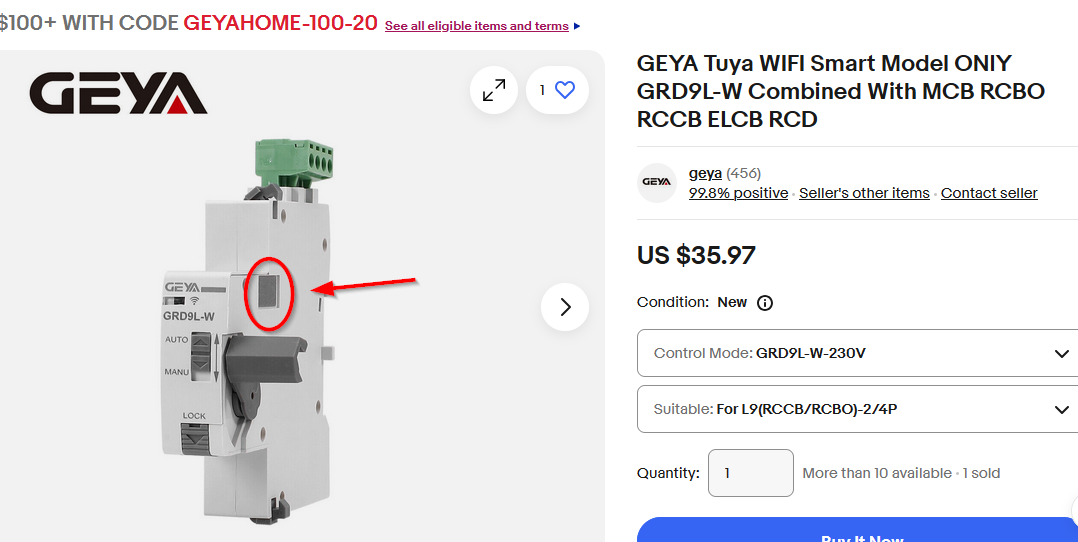
I found the same product with no position sensor on eBay:
https://www.ebay.com/itm/395819581447

Geya GRD9L-W switch with WiFi module, with a button clearly indicated in the image.

About Author
jkwim wrote 186 posts with rating 25 , helped 4 times. Been with us since 2022 year.

Comments

divadiow 30 Dec 2024 09:58

cool. please post your template JSON from the web application so I can add to the device list. https://obrazki.elektroda.pl/6256771300_1735549084_thumb.jpg [Read more]

jkwim 31 Dec 2024 06:41

I am not sure whether we should publish it yet as I am still trying to figure out things. This is my test config. { "vendor": "Tuya", "bDetailed":... [Read more]

divadiow 31 Dec 2024 06:51

Ah ok, sure. Will hold off for now. [Read more]

jkwim 31 Dec 2024 07:04

Objective: To detect the position of the AUTO/MANUAL Switch. https://obrazki.elektroda.pl/8667231700_1735625090_thumb.jpg If I configure "bt1_pin":"26", as Btn Then when I switch... [Read more]

divadiow 31 Dec 2024 09:10

I don't know enough about this kind of device and the use of the BridgeREV/BridgeFWD pin functions to be of any real help There are 5 other devices in the device list that appear to make use of Bridgexx.... [Read more]

jkwim 31 Dec 2024 14:20

Thanks. In fact I picked up the Bridgexx usage from one of these threads. The Bridge Relay is actually a relay which holds (latches) its position without consuming power hence not dispersing heat. My... [Read more]

FAQ

TL;DR: With 8 mapped pins and a 600 ms pulse window, this OpenBeken setup solves MQTT control for a BK7231N-based GEYA GRD9L-W actuator; as the poster notes, "The ON/OFF action works." It is for users integrating a DIN-rail motorized breaker actuator while still needing boot-state detection, AUTO/MANUAL interlock handling, and sensor-based feedback. [#21370659]

Why it matters: This FAQ turns an unfinished forum reverse-engineering thread into a structured pin map and decision guide for reliable OpenBeken + MQTT integration.

Wariant Czujnik położenia Piny sprzężenia zwrotnego Integracja z MQTT
GEYA GRD9L-W z wątku Tak hall_on=16, hall_mid=20, hall_off=22 Lepsze wykrywanie stanu i rozruchu
Wersja eBay wspomniana w wątku Nie Brak potwierdzonego czujnika Prostsze sterowanie, słabsza telemetria

Key insight: BridgeFWD on pin 15 and BridgeREV on pin 17 make the motorized lever move correctly, but reliable automation still depends on interpreting hall sensor transitions and the one-way AUTO/MANUAL event seen on pin 26. [#21364908]

Quick Facts

  • The device used a CBU module with BK7231N and shipped with Tuya firmware V1.0.5, then was flashed with Tuya Cloudcutter using the EARU EAWCT-J Circuit Breaker with energy meter v1.0.5 profile. [#21364908]
  • The working OpenBeken test map used 8 GPIO assignments: pin 14 as Rel;2, 15 as BridgeFWD;1, 17 as BridgeREV;1, 16/20/22 as digital inputs, 24 as LED, and 26 as dInput_NoPullUp;3. [#21370063]
  • The relay drive time in the extracted Tuya config was 100 ms, while the observed OpenBeken bridge logs showed pulse completion after about 600 ms in both switching directions. [#21364908]
  • The hall feedback used 3 signal pins and showed a clear pattern: ON state matched on=1, off=1, mid returns low after motion, while OFF state matched on=0, off=1 during transition history shown in logs. This makes the sensor cluster useful for physical-state reconstruction. [#21364908]

How do I flash a GEYA GRD9L-W DIN rail WiFi MCB controller with OpenBeken using Tuya Cloudcutter on BK7231N firmware 1.0.5?

Use Tuya Cloudcutter with the BK7231N profile for firmware 1.0.5. 1. Select BK7231N / oem_bk7231n_cutout_self_switch. 2. Choose brand EARU. 3. Choose article EAWCT-J Circuit Breaker with energy meter v1.0.5, then flash OpenBeken. The poster confirmed this worked on a CBU-based unit and extracted a valid Tuya config afterward. [#21364908]

What does "the Tuya section starts at UNCOMMON POSITION 0" mean when extracting a config for a CBU BK7231N device?

It means the extractor found the Tuya configuration block at offset 0 instead of the more usual stored position. In this thread, it was only reported by the tool; no failure, corruption, or corrective action was described. The practical result was still usable because the extracted JSON exposed valid pins such as 15, 17, 24, and 26, and the device flashed successfully. [#21364908]

Which OpenBeken pin roles should I assign for rl_on1_pin and rl_off1_pin on this GEYA recloser so the motorized lever works correctly?

Assign rl_on1_pin 15 as BridgeFWD and rl_off1_pin 17 as BridgeREV. The poster tested normal GPIO roles first, then reported that Bridge FORWARD and Bridge REVERSE made the actuator work correctly. In the later template JSON, those same pins were mapped as BridgeFWD;1 on 15 and BridgeREV;1 on 17. [#21370063]

How can I use pin 14 in OpenBeken to control or inhibit the AUTO/MANUAL function on the GEYA GRD9L-W?

Use pin 14 as a separate control line that enables or inhibits remote motion. The extracted Tuya config named it back_vol_pin 14, and the poster observed that when this pin is ON, the forward and reverse actions work. In the test setup, pin 14 was placed on channel 2 as Rel;2, specifically to block or allow BridgeFWD and BridgeREV activity. [#21364908]

What is a BridgeFWD and BridgeREV configuration in OpenBeken, and how does it differ from a normal relay output?

BridgeFWD and BridgeREV are the correct outputs for a two-direction motorized latch, not a simple on/off load. "BridgeFWD/BridgeREV" is an OpenBeken output pair that drives a latching bridge mechanism in two opposite directions, using short pulses instead of a continuously held state. The poster confirmed standard bridge roles moved the lever correctly, while ordinary relay-style mapping did not express the forward/reverse motion as clearly. [#21364908]

How should I interpret the hall_on_pin, hall_off_pin, and hall_mid_pin signals to detect the physical ON/OFF position of the breaker?

Treat the three hall pins as a position sensor set and watch their transition pattern, not a single static level. The poster mapped hall_on_pin 16, hall_mid_pin 20, and hall_off_pin 22 as digital inputs and saw state changes during motion. In OFF→ON, channel 6 went 0, channel 5 pulsed 1 then 0, and channel 4 stayed 1. In ON→OFF, channel 6 went 1, channel 5 pulsed 1 then 0, and channel 4 went 0. [#21364908]

Why does pin 26 on this BK7231N device generate events when switching from AUTO to MANUAL but not when moving from MANUAL to AUTO?

Because pin 26 appears to generate a pulse in one direction, not a maintained two-state level. As Btn, AUTO→MANUAL produced Button_OnInitialPressDown and Button_OnLongPressHoldStart. As dInput, AUTO→MANUAL produced a 0→1 transition sequence, but MANUAL→AUTO produced no reported event. The poster also noted the same switch must be toggled 6 times for pairing, which supports pulse-like behavior rather than clean slider-state reporting. [#21370076]

What is the best pin type to use for pin 26 in OpenBeken for an AUTO/MANUAL slider switch: Btn, dInput, or dInput_NoPullUp?

dInput_NoPullUp is the best current choice for testing, but it does not solve one-way detection. The posted template mapped pin 26 as dInput_NoPullUp;3, while earlier tests showed Btn logged press events and dInput logged a short AUTO→MANUAL pulse. No configuration in the thread delivered a clean event in both directions, so dInput_NoPullUp is best treated as the least-assumptive monitoring mode. [#21370063]

How can I write an OpenBeken script that links the AUTO/MANUAL switch state on pin 26 to pin 14 to block remote switching over MQTT?

Use pin 26 as an event source and latch its last detected pulse into channel 2 on pin 14. 1. Read pin 26 on every change. 2. Treat the observed 0→1→0 pulse as MANUAL and set channel 2 to inhibit motion. 3. Only allow MQTT writes to channel 1 when channel 2 indicates AUTO. The poster explicitly wanted pin 26 linked to pin 14 because pin 14 inhibits remote operation, but the script logic was not yet implemented in the thread. [#21370659]

What is a latching bridge relay in a motorized circuit breaker recloser, and why is it used instead of a continuously powered relay?

A latching bridge relay holds position without continuous power, so it reduces heat while keeping the mechanism where it was last driven. "Latching bridge relay" is a relay arrangement that moves a mechanism with a short forward or reverse pulse, then mechanically holds position without constant coil power. The poster stated this was the reason the device used BridgeFWD and BridgeREV behavior instead of a normal always-powered relay output. [#21370659]

How do I detect the actual breaker state at boot in OpenBeken after a power interruption if the lever may have been moved manually?

Read the hall sensor inputs at boot and infer the physical lever state before accepting MQTT commands. The thread identified three feedback pins: 16 for hall_on, 20 for hall_mid, and 22 for hall_off. The poster’s main boot-time requirement was to recover state after a supply interruption, especially if the lever had been moved manually. The edge case is clear: software state can be stale even when the mechanism is physically safe. [#21370659]

Why does the dual-color status LED show green in OpenBeken but not reliably show red when the breaker is switched OFF through the web UI?

Because only the confirmed LED pin and one color path were identified. The poster mapped netled1_pin 24 and could drive the visible LED, but could not find how Tuya lit the red state. Red appeared when the arm was moved manually to OFF, yet not when OFF was commanded from the web UI. That suggests the second color depends on another condition or pin combination not decoded in the thread. [#21364908]

What’s the difference between the GEYA-style recloser version with a position sensor and the eBay version without one when integrating with MQTT?

The version from the thread offers feedback signals; the eBay version apparently does not. The poster showed a GEYA-style unit with a sensing lever and three hall-related pins, which supports state detection and startup reconciliation. About 9 hours and 47 minutes later, the poster found an eBay listing for the same product family with no position sensor, making MQTT control simpler but state verification weaker. [#21364908]

Which existing OpenBeken BridgeFWD/BridgeREV device templates or forum threads are most useful as references for configuring a motorized breaker controller?

Five existing OpenBeken threads were pointed out as the best starting references because they already use BridgeFWD and BridgeREV patterns. The reply listed these topic IDs: 3940050, 20855531, 3990985, 4005835, and 3957566. The responder explicitly said those five other devices in the device list appeared to make use of Bridgexx, so their templates and discussions are the closest forum analogs. [#21370175]

What safety and reliability considerations matter when detaching a Tuya WiFi breaker actuator and using it with a separate RCB in an MQTT-based setup?

The key concerns are blocking remote motion in MANUAL mode, recovering true state after power loss, and never trusting MQTT state alone. The poster detached the actuator mechanically with two retaining latches, then aimed to pair it with a separate RCB. A safe design should use pin 14 as an inhibit, hall inputs 16/20/22 for state feedback, and reject remote switching whenever the AUTO/MANUAL mechanism on pin 26 indicates manual intervention or cannot be read reliably. [#21370659]
Generated by the language model.
%}