logo elektroda
logo elektroda
X
logo elektroda

Efficient hosting of a simple HTML page on a microcontroller - GZip compression in HTTP

p.kaczmarek2  4 1278 Cool? (+3)
📢 Listen (AI):

TL;DR

  • OpenBeken hosts a small Vue-based web app directly from LittleFS on a BK7231 microcontroller.
  • The web app compresses files in the browser before upload, stores them as .gz in LittleFS, and the firmware adds the HTTP `Content-Encoding: gzip` header when serving them.
  • The project covers 11 files up to 38kB each, totaling 167kB, which drops to about 40kB after gzip compression.
  • This cut storage use by more than four times and sped up transfers with practically zero firmware changes, though BK7231 flash space can still clash with OTA and larger builds can remove LFS.
  • The article also mentions LFS profiling, external flash support, larger working buffers, and Berry scripts executed server-side as further improvements.
Generated by the language model.
.
OpenBeken has long had integration of the LittleFS file system allowing files to be stored and managed directly in the microcontroller's Flash memory. This allows you to conveniently create device-specific configuration panels, such a panel itself is implemented in HTML and its communication with the firmware is done through a REST interface, which I have already presented in the topic OpenBeken as a mini HTTP hosting - writing pages in Javascript, Tasmota's REST API etc . Here, in turn, I would like to show some very simple but efficient optimisation that I have recently implemented for this system.

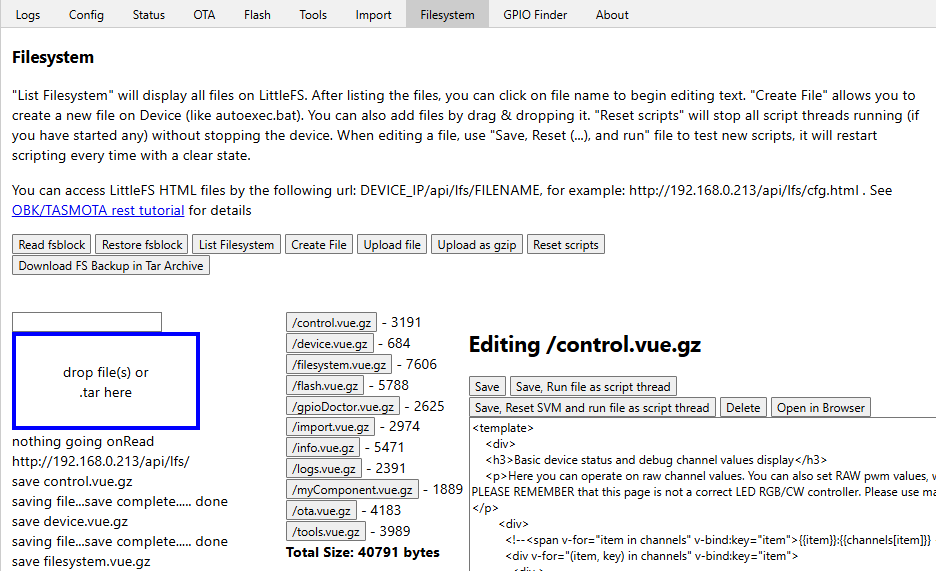
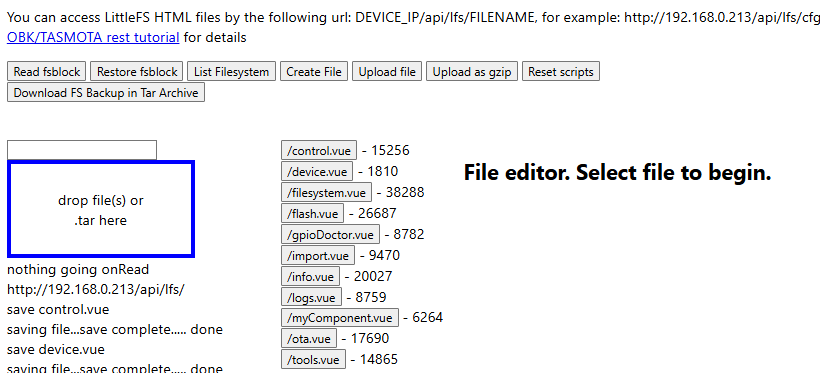
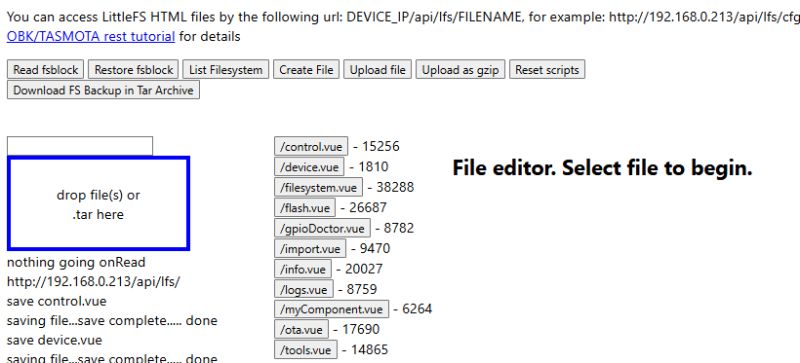
One of the goals of the exercise is to efficiently host a simple Web application written in VUE - all directly on the device. Let's see what we are dealing with - 11 files, sizes up to 38kB.
.
That's 167kB in total, a lot for a flash memory file system. On the BK7231 we already have trouble with this, as it interferes with the section from the OTA and for larger builds the update removes the LFS. However, there is a solution...

HTTP has a built-in and generally supported mechanism to reduce the size of transmitted data based on Gzip compression. It requires packing the transferred bytes with this compression and adding the appropriate parameter to the packet header:

	poststr(request, "Content-Encoding: gzip");
.
Worse, however, is the fact that you now have to compress the sent data on the server side, doesn't it?
This is where the second optimisation comes in. Our microcontroller is only supposed to host the page, it doesn't need to edit it, so we can compress the files before putting them in LittleFS .
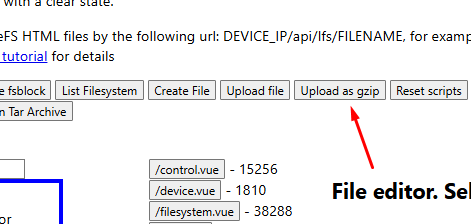
I've created a helpful button in the web app for this, meaning the compression is done in the browser rather than on the MCU:
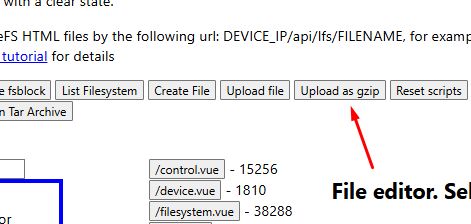
.
Let's see the implementation of the compression:
Code: Javascript
Log in, to see the code
.
There really is only enough - Javascript does the rest. The MCU itself doesn't even know that a gz file is being uploaded. Zero changes to the firmware.

However, you still need to change the sending of files from the MCU to the browser. Here you just need to detect the gz extension and add the information to the HTTP header:
Code: C / C++
Log in, to see the code
.
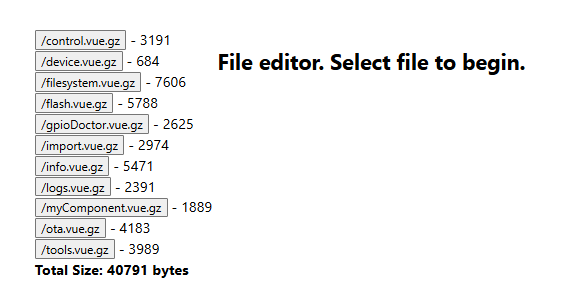
It's time to see how much memory this will save us:
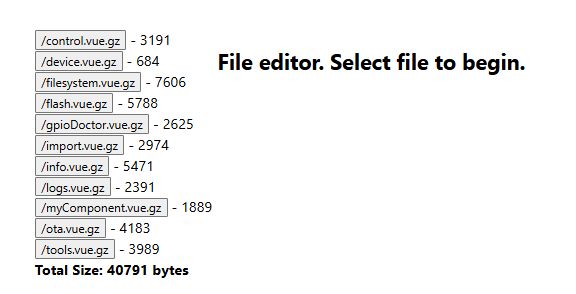
.
167kB versus 40kB is a very big difference - that's more than four times less! In this way, it is not only possible to save space in the flash memory, but also to speed up the transfer, because less data is sent faster. All this at practically zero cost.

You could end here, but I will take this opportunity to present some other side ideas and improvements I have concerning the LFS.
1. LFS profiler .
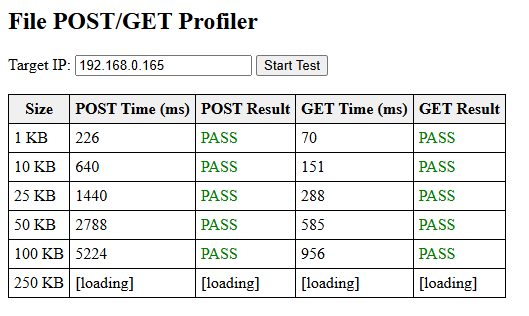
This simple program checks the timing of sending and receiving files from the LFS via HTTP GET and POST requests. The times and results of the operations are shown in the table. Below are the results for LFS on an external flash drive connected by software.
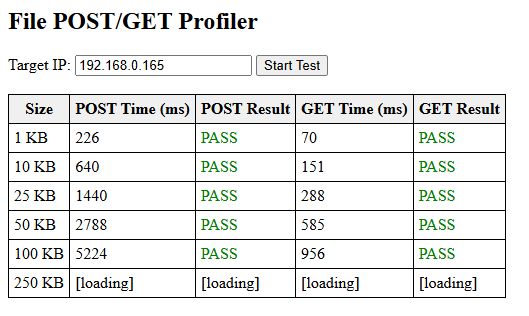
.
2. Supporting an external Flash bone .
At the moment I have realised this based on software SPI, as the hardware SPI is not derived on the WB3S/CB3S, only on the CBU...
Additional Flash memory for measurements for free? Communication protocol, write, read, erase .
3. LFS optimisation .
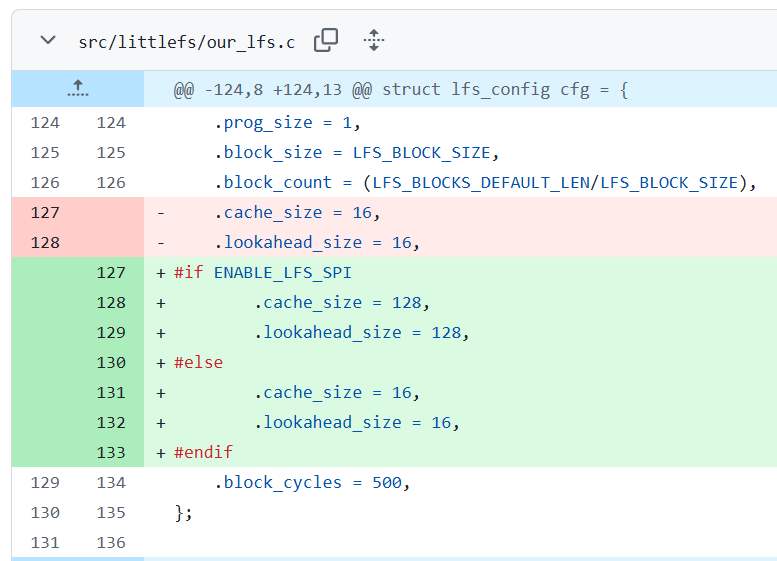
One of the simpler LFS optimisations is to increase the size of the working buffer. This allows faster read/write operations (more bytes are processed at once) at the cost of slightly higher RAM usage:
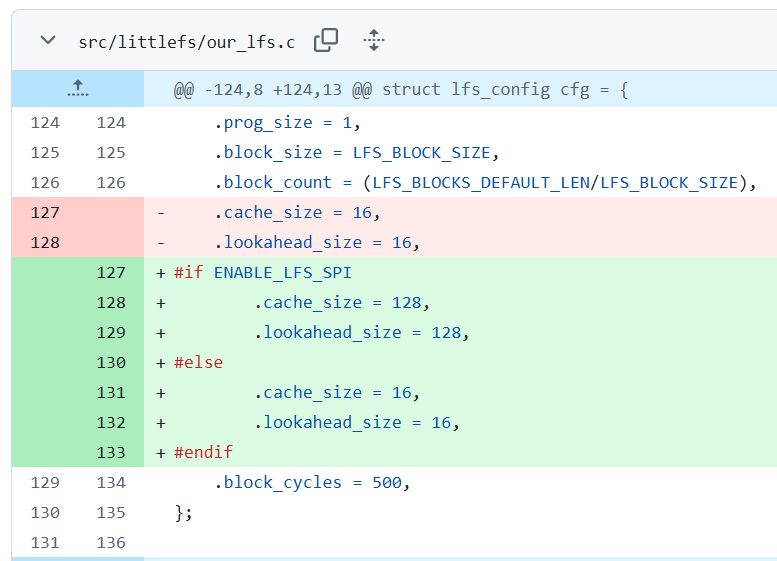
.
4. Execution of Berry scripts on the "server side" .
Another interesting possibility implemented in the firmware is to use Berry as a PHP equivalent. My system allows its scripts to be inserted into HTML code. The scripts are then executed at the GET/POST request handling stage, all on the source MCU. Below is an excerpt from the associated test:
Code: C / C++
Log in, to see the code
.
Berry in the PHP role will be discussed in a separate topic.

In summary , that famous one simple trick for hosting larger pages and scripts on the MCU is to store an already compressed version of the file and serve it with the appropriate header. The MCU essentially doesn't have to do anything here, well, except for that one HTTP header field what it says about compression.
In further topics I will show what I have used such a system for and what I have managed to host.


About Author
p.kaczmarek2
p.kaczmarek2 wrote 14408 posts with rating 12345 , helped 650 times. Been with us since 2014 year.

Comments

sq3evp 10 Jul 2025 12:22

What is the size of the compressed page? How much does the binary take to handle? Interesting theme and all in all will probably work. Simple pages don't take up much in memory. [Read more]

p.kaczmarek2 10 Jul 2025 15:08

. The 'Web App' page used for the experiment is an overlay on OpenBeken and communicates with the firmware via a tiny sized REST interface. Normally it is downloaded from Github with GH Pages, but it... [Read more]

sq3evp 10 Jul 2025 16:00

A simple page with a simple button will already be easier and lighter. Some text and bardz simple pages can probably be realised? [Read more]

p.kaczmarek2 10 Jul 2025 16:09

Simple examples of a button page on my firmware were discussed here: OpenBeken as a mini HTTP host - writing pages in Javascript, Tasmota's REST API etc . It shows how such a page on the MCU communicates... [Read more]

FAQ

TL;DR: If you need to host a larger HTML or Vue app on OpenBeken, store pre-gzipped files in LittleFS: this cut storage from 167 kB to 40 kB, and the author calls it "one simple trick" for fitting richer web UIs on an MCU without runtime compression. It solves flash-space limits for device-hosted panels and small web apps. [#21601601]

Why it matters: Pre-compressing static assets lets small OpenBeken devices serve richer interfaces while preserving MCU CPU time and reducing transfer size.

Approach Files stored in LittleFS MCU compression work Result
Raw HTML/JS/CSS files 167 kB None Higher flash usage
Pre-compressed .gz files + HTTP gzip header 40 kB None at request time Over 4× less storage

Key insight: The MCU does not need to gzip files on the fly. It only needs to detect .gz files and send the correct HTTP header so the browser decodes them automatically.

Quick Facts

  • The example web app used 11 files, with the largest files reaching about 38 kB each, which is enough to pressure internal flash on BK7231-class devices. [#21601601]
  • The measured storage drop was from 167 kB uncompressed to 40 kB after gzip, a reduction of roughly 127 kB for the same app payload. [#21602879]
  • Adding gzip serving to existing firmware required only a dozen lines of code and about 100 bytes of binary growth, because compression happens before upload. [#21602879]
  • On BK7231, larger builds can collide with the OTA area, and an update may remove the LFS partition when the stored web app is too large. [#21601601]

How can I host a larger HTML or Vue web app on an OpenBeken microcontroller without running out of LittleFS space?

Store the web app as pre-compressed .gz files in LittleFS instead of raw HTML, CSS, and JavaScript. In the shown OpenBeken example, that reduced total storage from about 167 kB to 40 kB for 11 files. This approach fits richer Vue-based interfaces into limited flash and avoids runtime compression on the MCU. It also reduces transfer size when the page loads in a browser. [#21601601]

What is LittleFS and why is it useful for storing HTML, JavaScript, and configuration panels in MCU flash memory?

"LittleFS is a flash file system that stores and manages files directly in MCU flash memory, letting embedded firmware keep static assets such as HTML, JavaScript, and device-specific configuration panels on the device itself." In OpenBeken, it lets the device host its own UI and communicate with firmware through a REST interface. That makes standalone setup pages practical without an external web server. [#21601601]

How do I use pre-compressed .gz files with HTTP so a microcontroller can serve web pages without compressing them on the fly?

Use a simple three-step flow. 1. Compress the site files before uploading them to LittleFS. 2. Store the compressed files with a .gz extension. 3. When the MCU serves a .gz file, send the HTTP header Content-Encoding: gzip. The thread shows browser-side compression in JavaScript and firmware-side detection of the .gz suffix, so the device serves compressed content without doing gzip work during each request. [#21601601]

Why does adding the "Content-Encoding: gzip" header make such a big difference when serving files from a BK7231 device?

That header tells the browser the payload is already gzip-compressed, so it can decode the file correctly after download. Without that header, a .gz file stored in LittleFS would not be interpreted as the original HTML or JavaScript asset. On a BK7231 device, this matters because it shifts the heavy work off the MCU while still delivering a much smaller payload over HTTP. [#21601601]

How much space can GZip save when hosting a web app on OpenBeken, and what were the before-and-after sizes in this example?

In this example, gzip reduced the hosted web app from about 167 kB to about 40 kB. That is a savings of roughly 127 kB, or more than four times less flash usage. The thread presents this as the key reason a richer OpenBeken web app can fit inside LittleFS on devices with tight storage limits. [#21602879]

What changes are needed in OpenBeken firmware to detect .gz files and send the correct HTTP headers?

You only need a small detection step and a conditional HTTP setup path. The thread checks whether the file path ends with gz, then calls a gzip-aware HTTP setup function instead of the normal one. The stored file contents stay untouched, and the firmware only adds the correct response header when it sees a .gz asset. [#21601601]

How much extra firmware size does GZip file serving add to an existing MCU HTTP server?

It adds very little. The thread estimates that adding gzip file serving to existing firmware costs about a dozen lines of code and roughly 100 bytes of binary size. That small increase is possible because the MCU does not compress data itself; it only detects .gz files and returns the right header. [#21602879]

Why can hosting a web page from LittleFS interfere with OTA updates on BK7231 devices?

It can interfere because the LittleFS area competes with space needed by the OTA section in flash. The thread states that on BK7231, larger builds already create trouble, and an update can remove the LFS when the stored web app is too large. Large static sites therefore increase the risk of losing on-device files during firmware updates. [#21601601]

What is the best way to compress website files before uploading them to LittleFS in OpenBeken?

Compress them in the browser before upload. The thread shows a JavaScript upload flow that uses CompressionStream('gzip'), creates a new file with the .gz suffix, and then uploads that file to the device. This keeps compression off the MCU, requires no change to the file contents after upload, and fits the stated goal of zero runtime compression cost on the microcontroller. [#21601601]

How does browser-side compression with JavaScript CompressionStream compare with doing GZip compression directly on the microcontroller?

Browser-side compression is the lighter design for this use case because the MCU only hosts static files. The thread explicitly says the microcontroller does not need to edit the page, so compressing before upload avoids server-side gzip work completely. The author summarizes the result as "Zero changes to the firmware" for upload handling, because JavaScript performs the compression before the file reaches LittleFS. [#21601601]

What is an LFS profiler and how can it help measure HTTP GET and POST performance for files stored in LittleFS?

An LFS profiler is a simple test program that measures how long file transfers take through HTTP GET and POST when files live in LittleFS. The thread says it records operation times and results in a table, which helps compare storage setups and spot bottlenecks. The shown results came from LFS on an external flash device connected through software-based access. [#21601601]

How does increasing the LittleFS working buffer affect read/write speed and RAM usage on a microcontroller?

Increasing the LittleFS working buffer speeds up reads and writes because the system processes more bytes at once. The trade-off is higher RAM usage, even though the optimization itself is simple. The thread presents this as one of the easier LittleFS tuning methods when you want faster file operations from MCU-hosted storage. [#21601601]

What is Berry in OpenBeken, and how does it work as a PHP-like server-side scripting option inside HTML pages?

"Berry is a scripting language used here as a server-side engine that can be embedded into HTML, executed during GET or POST handling, and used to generate dynamic page output directly on the MCU." The thread shows an example where <?b echo(2+2)?> inside HTML becomes Hello 4 after processing. That makes Berry a lightweight PHP-like option for dynamic embedded pages. [#21601601]

Which OpenBeken modules support external flash more easily, and why is hardware SPI availability different on WB3S, CB3S, and CBU?

The thread says external flash support is easier on the CBU because hardware SPI is available there. On WB3S and CB3S, the author states that hardware SPI is not broken out, so the current implementation uses software SPI instead. That hardware difference affects how easily you can attach extra flash for LittleFS expansion. [#21601601]

What is the simplest way to build a lightweight button-and-text control page on an MCU and connect it to the firmware through a REST API?

Build a very simple HTML page and let it call the firmware through a small REST interface. The thread confirms that OpenBeken already uses this pattern for device pages and points to earlier examples with buttons and a practical custom control page. If you keep the UI minimal, a button-and-text page stays lighter than a richer 11-file web app and is easier to fit in flash. [#21602941]
Generated by the language model.
%}