


logo elektroda
logo elektroda
X
logo elektroda

Seeking Compatible Drivers for AN-WF500 LG Wi-Fi Adapter on Windows 7 x64

fazinho 13740 12
ADVERTISEMENT
Treść została przetłumaczona polish » english Zobacz oryginalną wersję tematu
  • #1 16634388
    fazinho
    Level 13  
    Posts: 239
    Help: 4
    Rate: 25
    Board Language: polish
    Hello.
    As in the subject, I am looking for a driver for this adapter. Unfortunately, tips from this site: link do not work on this particular model.
    Best regards and waiting for answers.
  • ADVERTISEMENT
  • ADVERTISEMENT
  • #3 16634428
    fazinho
    Level 13  
    Posts: 239
    Help: 4
    Rate: 25
    Board Language: polish
    These drivers do not work.

    The device is detected as: Remote Download Wireless Adapter
    Hardware IDs:
    USB \ VID_043E & PID_3101 & MI_02 & REV_0001
    USB \ VID_043E & PID_3101 & MI_02
  • #5 16634538
    fazinho
    Level 13  
    Posts: 239
    Help: 4
    Rate: 25
    Board Language: polish
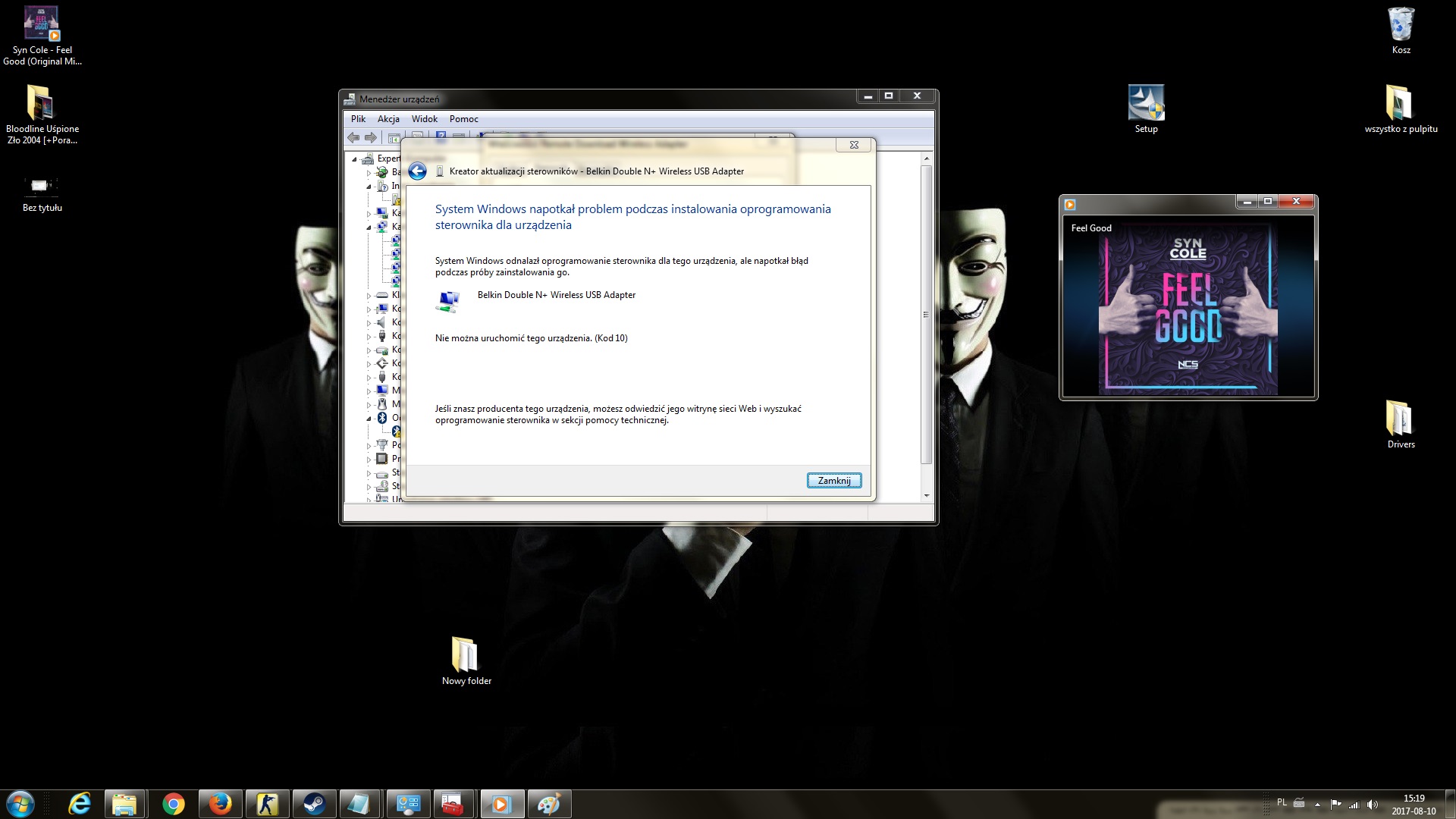
    This driver does not work. Error message 10, an error occurred while installing the driver. The device cannot start.
  • #6 16634574
    Kolobos
    IT specialist
    Posts: 85151
    Help: 17158
    Rate: 10417
    Board Language: polish
    Did you add the ID to the .inf file?
  • ADVERTISEMENT
  • #7 16634588
    fazinho
    Level 13  
    Posts: 239
    Help: 4
    Rate: 25
    Board Language: polish
    Can you suggest how? I did it this way:

    ;-----------------------------------------------------------------
    ; x64 (AMD64, Intel EM64T) - WinVista
    ;
    [Belkin.NTamd64.6.0]
    	%BCM430ND_DeviceDesc% = BCM43XNMD_NT60, USB\VID_043E&PID_3101
    	%BCM430NDX_DeviceDesc% = BCM43XNMD_NT60, USB\VID_043E&PID_3101
    ;-----------------------------------------------------------------
  • #8 16634839
    Kolobos
    IT specialist
    Posts: 85151
    Help: 17158
    Rate: 10417
    Board Language: polish
    Yes, but change only one entry, not two. Then select the driver update in the device manager and indicate the directory as the source.
  • #9 16634902
    fazinho
    Level 13  
    Posts: 239
    Help: 4
    Rate: 25
    Board Language: polish
    Seeking Compatible Drivers for AN-WF500 LG Wi-Fi Adapter on Windows 7 x64

    I have done so now and nothing. When manually entering the path to the driver, it does not find any drivers, and after manually forcing the installation receives such a message. And after that these drivers are for AN-WF100.
    AN-WF500- USB \ VID_043E & PID_3101
    AN-WF100- USB \ VID_043E & PID_3001
  • #11 16634967
    fazinho
    Level 13  
    Posts: 239
    Help: 4
    Rate: 25
    Board Language: polish
    Unfortunately it does not work throws error code 10, this device cannot start. I dismantled this adapter on the layout it says it is bcm43242
  • ADVERTISEMENT
  • #13 16635044
    fazinho
    Level 13  
    Posts: 239
    Help: 4
    Rate: 25
    Board Language: polish
    Unfortunately it doesn't work, these are bluetooth drivers. Okay, I won't bother with it anymore, because there are probably no drivers for this model yet.

Topic summary

✨ The discussion revolves around finding compatible drivers for the LG AN-WF500 Wi-Fi adapter on Windows 7 x64. The original poster reports that suggested drivers from various sources do not work, leading to error messages during installation. Several users provide links to potential drivers and suggest modifying the .inf file to include the correct hardware IDs. However, attempts to install these drivers result in error code 10, indicating the device cannot start. The conversation highlights the challenges in locating suitable drivers for this specific model, with some users concluding that there may be no available drivers for the AN-WF500 yet.
Generated by the language model.

FAQ

TL;DR: For LG AN‑WF500 on Windows 7 x64, 1 error code (Code 10) was reported; "This device cannot start." No working PC driver confirmed in the thread. [Elektroda, fazinho, post #16634538]

Why it matters: If you’re trying to reuse an LG TV Wi‑Fi dongle on a PC, this FAQ explains what works, what doesn’t, and safer alternatives—fast.

Quick Facts

What driver actually works for the LG AN‑WF500 on Windows 7 x64?

None confirmed. Multiple tries ended with Code 10 and the user stopped after concluding there are no suitable drivers yet. If you need Wi‑Fi now, a standard USB adapter is the safer choice. [Elektroda, fazinho, post #16635044]

What are the AN‑WF500 hardware IDs I should look for?

Device Manager showed it as “Remote Download Wireless Adapter” with USB\VID_043E&PID_3101&MI_02. Use this VID/PID when checking .inf files or matching drivers. [Elektroda, fazinho, post #16634428]

Is the AN‑WF500 the same as the older AN‑WF100?

No. AN‑WF500 reports PID 3101; AN‑WF100 reports PID 3001. That difference breaks most driver matches, so AN‑WF100 guides don’t carry over cleanly. “Two PIDs were discussed: 3001 and 3101.” [Elektroda, fazinho, post #16634902]

Why am I getting “Code 10: This device cannot start” in Device Manager?

Windows accepted the attempt but the device failed to initialize, returning Code 10. This typically happens when the driver doesn’t truly support the device despite a forced match. It’s an expected failure mode here. [Elektroda, fazinho, post #16634538]

What chipset is inside the AN‑WF500?

A teardown report in the thread notes BCM43242 on the module. That suggests Broadcom lineage, but a matching Windows 7 x64 driver for this USB VID/PID pairing was not confirmed. [Elektroda, fazinho, post #16634967]

Can I make it work by editing the driver .inf file (INF‑mod)?

You can try adding your VID_043E&PID_3101 to one matching line in the .inf, then update the driver via Device Manager and point to the folder. Keep expectations low; failures were reported. [Elektroda, Kolobos, post #16634839]

How do I perform the INF‑mod test quickly?

  1. Open the target .inf and add USB\VID_043E&PID_3101 to one relevant model line.
  2. Save, disable driver signing if needed, and open Device Manager.
  3. Update driver, browse to the modified folder, and install. “Change only one entry, not two.” [Elektroda, Kolobos, post #16634839]

Are the AN‑WF100 guides or drivers usable for AN‑WF500?

They were referenced, but when forced, the install didn’t hold for AN‑WF500. The post also notes the AN‑WF100’s different PID, so expect mismatches. [Elektroda, fazinho, post #16634902]

What does “modify the .inf” actually mean?

It means inserting your device’s hardware ID into the driver’s model list so Windows considers it compatible. It’s a hack for testing, not a guarantee of function. “Add your card ID to the driver inf file.” [Elektroda, Kolobos, post #16634489]

Why won’t the Broadcom Bluetooth pack fix my Wi‑Fi adapter?

That package targets Bluetooth, not Wi‑Fi. It was tried and didn’t help the AN‑WF500’s Wi‑Fi function. Driver type must match the device’s role. [Elektroda, fazinho, post #16635044]

Should I keep troubleshooting or just buy a different adapter?

If time matters, buy a standard USB Wi‑Fi dongle. As one reply put it, Wi‑Fi cards are inexpensive, and chasing mismatched drivers wastes hours. [Elektroda, Kolobos, post #16634985]

How does Windows identify this dongle before any driver is installed?

It appears as “Remote Download Wireless Adapter” with the VID/PID shown. Use that to guide any INF edits or searches. [Elektroda, fazinho, post #16634428]

Is the AN‑WF500 actually intended for PCs?

No. An expert in the thread clarified it’s a TV Wi‑Fi card, not a generic PC adapter. That’s why driver support is elusive. “It’s a wifi card for the tv.” [Elektroda, Kolobos, post #16634489]

What’s the most common failure edge case when forcing a driver here?

Windows may accept the INF but the device still won’t start, yielding Code 10. This indicates initialization failure despite a match. [Elektroda, fazinho, post #16634538]
Generated by the language model.
ADVERTISEMENT