logo elektroda
logo elektroda
X
logo elektroda

Connecting & Displaying Database on Website: XAMPP, Fatal Error, MySQL, Apache, strona.php

hubert85 5964 14
ADVERTISEMENT
Treść została przetłumaczona polish » english Zobacz oryginalną wersję tematu
  • #1 16808925
    hubert85
    Level 8  
    Hello
    I got a job at school to create a database and display it on the website. I made the database but trying to display it on the website I can't connect. Apache and Mysql are enabled. The error that is displayed to me

    Fatal error: Uncaught Error: Call to undefined function mysql_connect () in C: \ xampp \ htdocs \ strona.php: 2 Stack trace: # 0 {main} thrown in C: \ xampp \ htdocs \ strona.php on line 2

    Thank you in advance for your help.

    Code: PHP
    Log in, to see the code
  • ADVERTISEMENT
  • #2 16809331
    adamz74
    Level 33  
    MySQL databases are not enabled in PHP. There can be several reasons, the most common:
    - php_mysql.dl and libmysql.dll libraries missing or unavailable (wrong path in php.ini - extension_dir = "C: \ PHP \ ext"),
    - commented line in php.ini - extension = php_mysql.dll


    https://www.youtube.com/watch?v=hcVI83ymuWg

    Greetings!
  • #3 16809564
    hubert85
    Level 8  
    The same error is still there
  • #4 16809980
    arnoldziq
    VIP Meritorious for electroda.pl
    hubert85 wrote:
    The same error is still there

    I suggest you run PHPInfo from Xampp and check if and what MySQL support is installed.

    Among other things, something like this should be 'shown':

    Connecting & Displaying Database on Website: XAMPP, Fatal Error, MySQL, Apache, strona.php
  • ADVERTISEMENT
  • #5 16809994
    Anonymous
    Level 1  
  • ADVERTISEMENT
  • #7 16810534
    hubert85
    Level 8  
    adamz74 wrote:
    One more thing ... from PHP 5.5.0, mysql_connect () is considered obsolete and probably has been removed since version 7.0.0.

    You can use mysqli http://php.net/manual/en/book.mysqli.php instead


    I changed xampp to an older version and now I get this error

    Warning: mysql_fetch_assoc() expects parameter 1 to be resource, boolean given in C:\xampp\htdocs\strona.php on line 6


    code same as above
  • #8 16811246
    arnoldziq
    VIP Meritorious for electroda.pl
    I suggest using a code like this:
    Code: PHP
    Log in, to see the code


    Another observation; I do not know how my colleague has set the database engine, but the use of Polish characters in the names of tables / record fields is not always properly supported. Maybe there is a problem here.
  • ADVERTISEMENT
  • #9 16812076
    hubert85
    Level 8  
    arnoldziq wrote:
    I suggest using a code like this:
    Code: PHP
    Log in, to see the code


    Another observation; I do not know how my colleague has set the database engine, but the use of Polish characters in the names of tables / record fields is not always properly supported. Maybe there is a problem here.


    Now such a problem comes up
    Notice: Undefined variable: polaczenie in C:\xampp\htdocs\stronaa.php on line 5
    
    Warning: mysql_query() expects parameter 2 to be resource, null given in C:\xampp\htdocs\stronaa.php on line 5
    Blad zapytania:
  • #10 16812453
    adamz74
    Level 33  
    Undefined variable $ connection.
    mysql_query () expects the resource id as the 2nd parameter.

    In this case, it means you have a typo in the variables you are using.

    $ connection != $ connection
  • #11 16812844
    hubert85
    Level 8  
    it doesn't go with the other variable either and it's the same Error
  • #12 16813322
    arnoldziq
    VIP Meritorious for electroda.pl
    hubert85 wrote:
    it doesn't go with the other variable either and it's the same Error
    I suggest my colleague paste here exactly the code that my colleague is currently using.
    Because such comments do not bring anything new to the discussion.

    BTW: Sorry for the typo. You know; autism, dyslexia, dysorthography :)
  • #13 16813938
    hubert85
    Level 8  
    Code: PHP
    Log in, to see the code


    In the attachment I am adding the database file
    Attachments:
    • zadanie (1).zip (1.53 KB) You must be logged in to download this attachment.
  • Helpful post
    #14 16814226
    arnoldziq
    VIP Meritorious for electroda.pl
    And so:
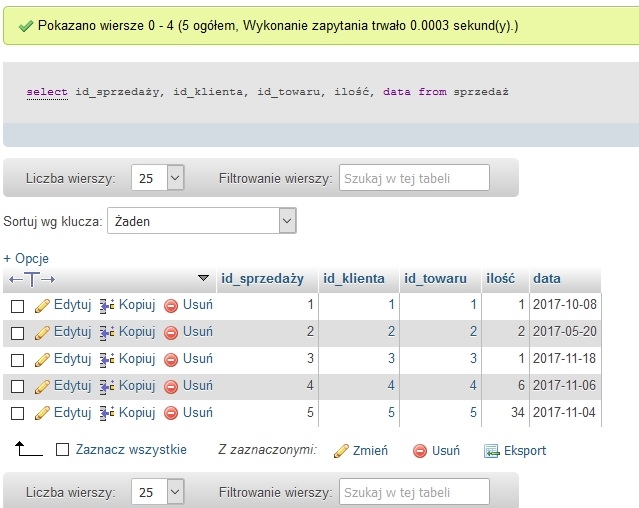
    Execution of the inquiry:
    Code: SQL
    Log in, to see the code
    in phpAdmin it returns correctly.
    Connecting & Displaying Database on Website: XAMPP, Fatal Error, MySQL, Apache, strona.php
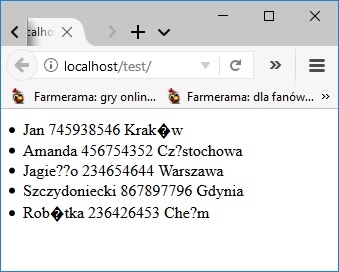
    However, as I suspected; calling the script with the same query displays the following message:
    PHP wrote:
    Query Error: You have an error in your SQL syntax; check the manual that corresponds to your MySQL server version for the right syntax to use near '?y, id_klienta, id_towaru, ilo??, data from `Sprzedaż?` at line 1

    Which means exactly what I wrote a few posts earlier; Polish letters in the names of variables, arrays, fields, etc. is not a good idea: /
    Code used:
    Code: PHP
    Log in, to see the code

    However, the use of a code that avoids the use of Polish characters in the query;
    Code: PHP
    Log in, to see the code
    gives a good effect in my opinion:
    Connecting & Displaying Database on Website: XAMPP, Fatal Error, MySQL, Apache, strona.php
  • #15 16814417
    hubert85
    Level 8  
    Thank you :D You are great.
    Thank you to the rest of the speakers too ;)

Topic summary

✨ The discussion revolves around a user's difficulty in connecting a MySQL database to a website using XAMPP, encountering a "Fatal error: Call to undefined function mysql_connect()" message. Responses suggest checking PHP configuration, specifically the php.ini file for missing MySQL extensions and ensuring the correct version of PHP is used, as mysql_connect() is deprecated in PHP 5.5.0 and removed in PHP 7.0.0. Users are advised to switch to mysqli functions. The user later experiences issues with undefined variables and incorrect parameters in mysql_query(), leading to further troubleshooting. The final resolution involves avoiding Polish characters in database queries, which resolves the issues encountered.
Generated by the language model.

FAQ

TL;DR: PHP removed mysql_connect() in 7.0.0; fix by migrating to mysqli. “Use mysqli instead.” [Elektroda, adamz74, post #16810435] Why it matters:** This resolves fatal connection errors in XAMPP sites and gets your database listing working fast for school or production.

Quick Facts

How do I fix “Call to undefined function mysql_connect()” in XAMPP?

You’re running PHP ≥7.0 where mysql_ functions were removed. Replace mysql_connect(), mysql_query(), and mysqlfetch with mysqli or PDO. Update connection code, credentials, and query execution accordingly. Quote: “Use mysqli instead.” This change removes the fatal error and aligns with supported APIs introduced alongside PHP 5.5.0 deprecation. [Elektroda, adamz74, post #16810435]

Does XAMPP’s MySQL require a password by default?

Yes. Attempting to connect without supplying the MySQL user password causes connection failures in XAMPP. Set a password in your MySQL user and include it in your PHP connection code. Forgetting the password remains a common early roadblock when moving from phpMyAdmin tests to PHP scripts. [Elektroda, Anonymous, post #16809994]

How can I check if PHP has MySQL/MySQLi support enabled?

Run phpinfo() from your XAMPP stack and inspect the MySQLi section to confirm client API, driver, and loaded modules. This output verifies whether MySQL support is compiled/loaded and helps distinguish code issues from configuration problems. It is the quickest sanity check before changing code. [Elektroda, arnoldziq, post #16809980]

Which php.ini settings control legacy MySQL extensions?

Legacy mysql_* used extension=php_mysql.dll and a correct extension_dir path (for example, C:\PHP\ext). If these are missing or commented out, PHP will not load the old driver. However, prefer mysqli over re‑enabling the deprecated extension on modern PHP. [Elektroda, adamz74, post #16809331]

Why do I get “mysql_fetch_assoc() expects parameter 1 to be resource, boolean given”?

Your previous mysql_query() failed and returned false, so mysql_fetch_assoc() received a boolean instead of a resource. Check SQL syntax, connection state, and switch to mysqli which returns objects or false. Always validate the query result before fetching rows. [Elektroda, hubert85, post #16810534]

Why does “Undefined variable: polaczenie” appear and how do I fix it?

You have a variable name mismatch. Ensure your connection variable is defined and consistently named where you pass it to mysql_query()/mysqli_query(). Even a minor typo breaks the link between connection and query execution. Correct the name everywhere it appears. [Elektroda, adamz74, post #16812453]

My query works in phpMyAdmin but fails in PHP—why?

Non‑ASCII identifiers (like Polish letters) in table or column names can break queries in scripts. Rename identifiers to plain ASCII and keep UTF‑8 for data, not object names. After adjusting identifiers, the same SELECT executed correctly from PHP. [Elektroda, arnoldziq, post #16814226]

Should I downgrade XAMPP just to keep using mysql_*?

No. mysql_* was deprecated in PHP 5.5.0 and removed in 7.0.0, and downgrading introduces new issues and technical debt. Migrate to mysqli or PDO to restore compatibility and security. Quote: “You can use mysqli … instead.” [Elektroda, adamz74, post #16810435]

Quick how‑to: connect and display rows using mysqli

  1. Create a mysqli connection with host, user, password, and database.
  2. Run a SELECT query using ASCII identifiers; check for errors before fetching.
  3. Loop through mysqli_fetchassoc() and echo sanitized fields to HTML. This avoids mysql* removal issues and identifier encoding traps. [Elektroda, adamz74, post #16810435]

What charset/collation tips help with Polish data?

Keep table and column names in ASCII. Store Polish characters in data using UTF‑8. If legacy names contain diacritics, alias or rename them to ASCII to prevent PHP query failures while keeping content intact. This change fixed errors in the thread’s example. [Elektroda, arnoldziq, post #16814226]

What does phpinfo() show when MySQLi is correctly enabled?

phpinfo() displays a MySQLi section with client API version, enabled directives, and driver details. Seeing this confirms PHP can talk to MySQL without loading the removed mysql_* extension, guiding you to focus on code, not modules. [Elektroda, arnoldziq, post #16809980]

Is there a minimal checklist to avoid boolean query results?

Yes: verify connection credentials, validate SQL syntax, avoid non‑ASCII identifiers, and check query return values before fetching. A single failure yields false and triggers downstream warnings. Quote: “Query Error: You have an error in your SQL syntax…” [Elektroda, arnoldziq, post #16814226]

What’s the fastest way to confirm MySQL credentials work?

Log into phpMyAdmin with the same username and password you plan to use in mysqli. If login succeeds, reuse those credentials in your PHP connection code. XAMPP requires a password, so blank passwords will fail. [Elektroda, Anonymous, post #16809994]

Why did switching to an older XAMPP not solve everything?

Downgrading suppressed the fatal error but exposed new warnings like boolean results to fetch functions. That indicates underlying SQL or identifier issues, not just versioning. Migrating to mysqli and fixing schema names is the durable path. [Elektroda, hubert85, post #16810534]

What’s a safe pattern to display query results on a page?

After a successful mysqli_query(), fetch rows with mysqli_fetch_assoc() and escape output for HTML. Avoid diacritics in identifiers, and handle empty results gracefully. This pattern produced correct output once identifiers were ASCII‑only. [Elektroda, arnoldziq, post #16814226]

What key version facts should I remember?

Statistic: mysql_* was deprecated in PHP 5.5.0 and fully removed in 7.0.0, so mysqli/PDO are required for PHP 7+. Planning your code around mysqli avoids breakage when upgrading XAMPP or PHP versions. [Elektroda, adamz74, post #16810435]
Generated by the language model.
ADVERTISEMENT