FAQ
TL;DR: PicoClaw is a Go-based AI agent that uses "under 10 MB RAM" and boots in <1 second on 0.6 GHz hardware. It talks to external LLMs via API and compiles to a single binary for RISC‑V/ARM64/x86. [Elektroda, p.kaczmarek2, post #21839127]
Why it matters: It brings assistant-class AI to $10 Linux boards for IoT, labs, and secure, isolated deployments.
Quick Facts
- Single-file static binary; no external runtime or dependencies needed. [Elektroda, p.kaczmarek2, post #21839127]
- Memory footprint: <10 MB RAM during operation; starts in <1 s on 0.6 GHz CPU. [Elektroda, p.kaczmarek2, post #21839127]
- Cross‑ISA support: RISC‑V, ARM64, and x86 for boards, PCs, and servers. [Elektroda, p.kaczmarek2, post #21839127]
- Works with OpenRouter, Anthropic, OpenAI, and more via API backends. [Elektroda, p.kaczmarek2, post #21839127]
- Targets low-cost hardware; workable from about $10 for RISC‑V Linux boards. [Elektroda, p.kaczmarek2, post #21839127]
What is PicoClaw in simple terms?
PicoClaw is a lightweight AI assistant written in Go. It calls external large language models through an API and runs as a single standalone binary with no extra dependencies. It aims at tiny Linux systems yet scales to PCs and servers. [Elektroda, p.kaczmarek2, post #21839127]
How fast does PicoClaw start and on what CPU?
It boots in under one second on a weak 0.6 GHz processor. This speed helps short‑lived tasks and low-power setups. The design favors quick startup and small memory use, which benefits cron jobs and on-demand chat actions. "Boots in less than 1 second." [Elektroda, p.kaczmarek2, post #21839127]
Which hardware architectures does PicoClaw support?
The architecture supports three major ISAs: RISC‑V, ARM64, and x86. That means it runs on cheap RISC‑V boards, common ARM SBCs, laptops, desktops, and servers. A single binary per target keeps deployment simple across fleets. [Elektroda, p.kaczmarek2, post #21839127]
Does PicoClaw run models locally or use the cloud?
It uses external LLM services via API. You choose a provider such as OpenRouter, Anthropic, or OpenAI. This keeps local RAM and CPU use tiny, but requires network access and valid API credentials for responses. [Elektroda, p.kaczmarek2, post #21839127]
What can I actually do with PicoClaw on a $10 board?
Use it as an interactive console assistant, a single‑query CLI tool, or a chat-bot gateway for Telegram, Discord, or DingTalk. You can also schedule reminders or automations through cron, ideal for IoT hubs and labs. [Elektroda, p.kaczmarek2, post #21839127]
Is it secure enough to isolate from my main PC?
Yes, its low hardware requirements reduce isolation cost. You can dedicate a cheap micro‑server to run the agent, limiting lateral risk. Network only the needed APIs and messengers. This is a practical security win for many users. [Elektroda, p.kaczmarek2, post #21839127]
How does PicoClaw compare to OpenClaw and NanoBot?
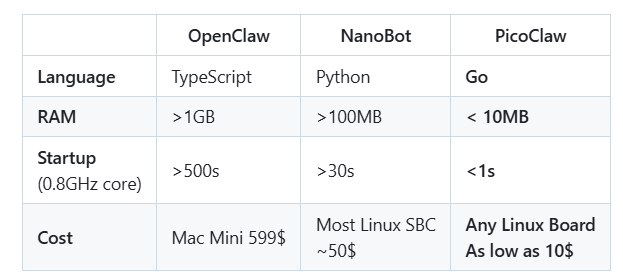
According to the comparison, OpenClaw uses TypeScript and >1 GB RAM, NanoBot uses Python and >100 MB RAM, while PicoClaw uses Go and <10 MB RAM. Startup time improves to <1 s, slashing latency and power. [Elektroda, p.kaczmarek2, post #21839127]
What is “auto‑bootstrapping” in this project?
Auto‑bootstrapping means the AI agent helped generate much of the base code during refactoring under human supervision. The team rebuilt with lessons from nanobot and OpenClaw to reach fast startup and tiny memory use. [Elektroda, p.kaczmarek2, post #21839127]
What’s the CLI experience like?
You can run PicoClaw in an interactive console session or send a single query from the shell. This suits scripts, CI tasks, and quick lookups. The simple binary design means zero virtualenvs, runtimes, or containers required. [Elektroda, p.kaczmarek2, post #21839127]
How do I hook it to messengers?
It integrates as a chat-bot gateway with Telegram, Discord, or DingTalk. Configure your chosen backend API keys and bot tokens, then route messages to the agent. Expect low idle use and quick cold starts for replies. [Elektroda, p.kaczmarek2, post #21839127]
Can I schedule jobs, reminders, or automations?
Yes. PicoClaw supports scheduled tasks via cron. You can run prompts or workflows on a timetable, such as daily summaries or device checks. Fast startup helps keep schedules punctual even on minimal CPUs. [Elektroda, p.kaczmarek2, post #21839127]
What’s an LLM, and which ones work here?
An LLM is a large language model that generates text. PicoClaw connects to LLMs provided by services like OpenRouter, Anthropic, and OpenAI through their APIs. You pick the backend for cost, speed, or capability. [Elektroda, p.kaczmarek2, post #21839127]
What is cron and why is it mentioned?
Cron is a Unix scheduler that runs commands at specified times. PicoClaw supports cron-triggered tasks, enabling unattended reminders and automations. This pairs well with its sub‑second starts and low memory impact. [Elektroda, p.kaczmarek2, post #21839127]
Are there edge cases where PicoClaw won’t respond?
Yes. If the external LLM API is offline, rate‑limited, or your key is invalid, responses will fail. Network isolation that blocks those services will also stop replies. Local compute remains fine but answers depend on the API. [Elektroda, p.kaczmarek2, post #21839127]
How do I install and try PicoClaw quickly?
- Download the PicoClaw binary for your ISA (RISC‑V, ARM64, or x86).
- Export your chosen LLM provider API key as an environment variable.
- Run in interactive mode or send a single CLI query to test replies. [Elektroda, p.kaczmarek2, post #21839127]
Do you see a use for such a lightweight agent implementation?
Yes. It enables safe isolation on $10 hosts, rapid cron jobs, and resilient IoT assistants. Labs can standardize on tiny binaries across RISC‑V, ARM64, and x86. The external API tradeoff is real but manageable with tokens and quotas. [Elektroda, p.kaczmarek2, post #21839127]