logo elektroda
logo elektroda
X
logo elektroda

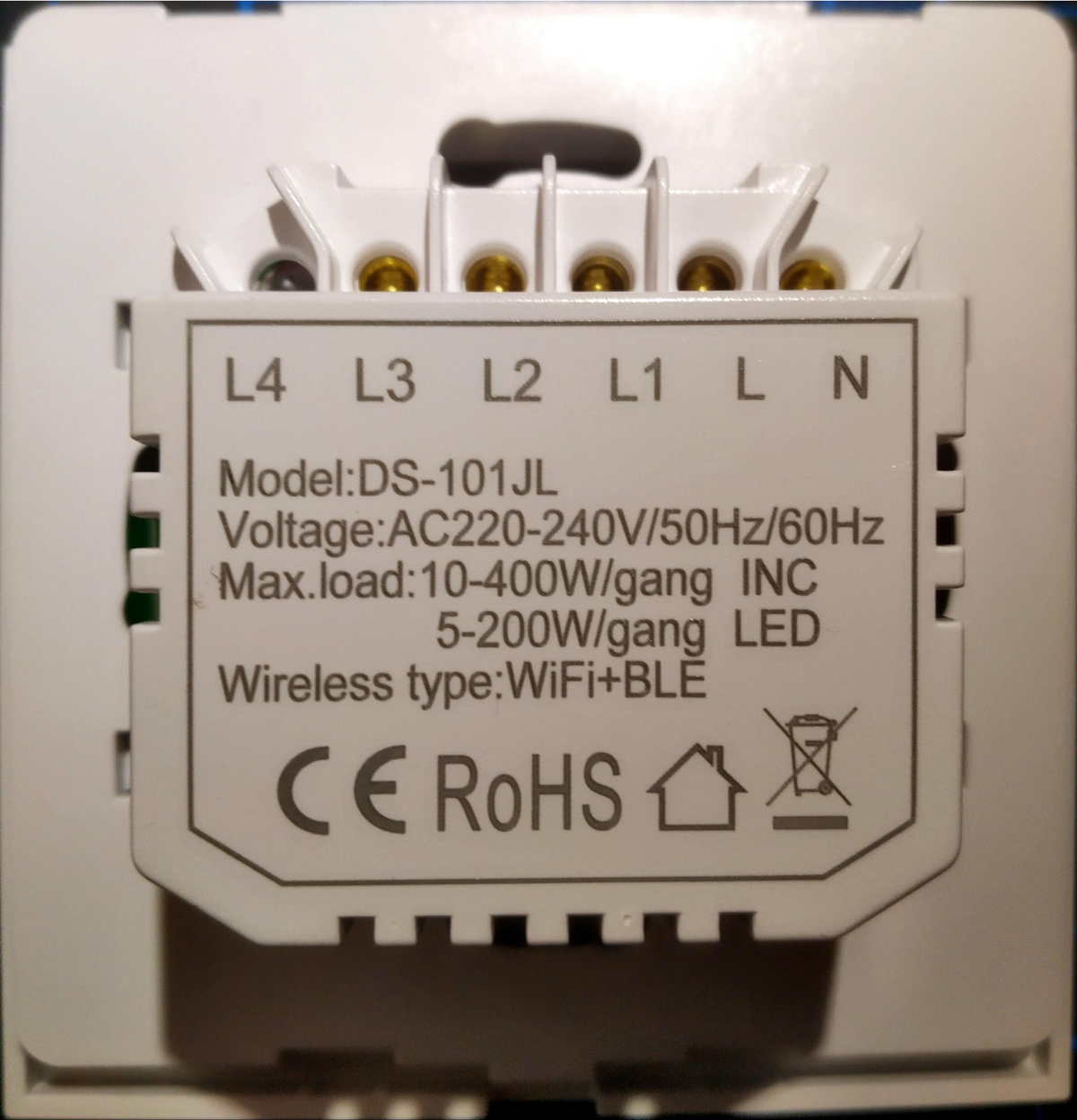
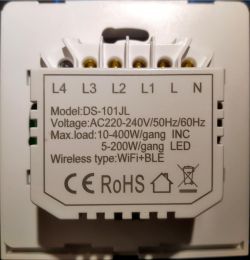
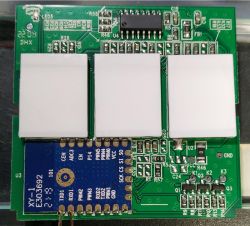
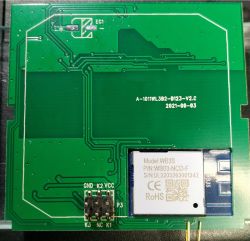
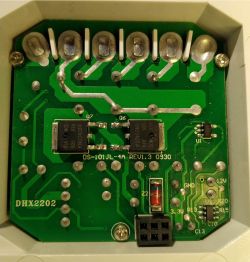
[BK7231T - WB3S] DS-101JL 3-Gang No Neutral Smart Switch

jkwim  18 5895 Cool? (+1)
📢 Listen (AI voice):

TL;DR

  • BK7231T/WB3S DS-101JL 3-Gang No Neutral Smart Switch uses a TuyaMCU for the touch buttons.
  • Cloudcutter matched Tuya firmware 1.0.7 to the oem_bk7231s_rnd_switch and oem_bk7231s_rnd_zero_dctrl_switch profiles, then flashed OpenBK7231T.
  • A second unit with Tuya FW v1.1.15 used the lonsonho-x801a-1-gang-switch profile and `sudo ./run_flash.sh -p tuya-generic-2-ch-smart-relay -f OpenBK7231T_UG_1.17.113.bin`.
  • TuyaMCU channel mapping still isn't working; status only shows heartbeat_valid=0 and product_information_valid=0, so the dpid list remains unknown.
AI summary based on the discussion. May contain errors.


This was my first BK7231T Device, bought some time back.

Full description of the product is here in this post:
Link
I will pull them in to this post in next comment for easy reference

My first attempt to use cloudcutter is here:
Link

Since I was new to cloudcutter, I was naive to abandon it at that point.

However since I had since played with few more types of Tuya Beken devices and had success with them, I decided to revisit the device and found success!

I cannot recall when I refreshed the cloudcutter repository but I found that now there are two profiles which match firmware BK7231T 1.0.7 and the following profile did the trick.


   1.0.7 - BK7231T / oem_bk7231s_rnd_switch
 > 1.0.7 - BK7231T / oem_bk7231s_rnd_zero_dctrl_switch

[?] Select the brand of your device: Tuya Generic
   DETA
 > Tuya Generic

[?] Select the article number of your device: 2-CH Smart Relay
 > 2-CH Smart Relay
   GR-W-105 Water Shutoff Valve v1.0.7

Update 2023/06/03:
I had a second device, same model but had Tuya FW v1.1.15.
Following profile worked for this device:

   1.1.5 - BK7231T / oem_bk7231s_4_speed_controller
 > 1.1.5 - BK7231T / oem_bk7231s_rnd_zero_dctrl_switch
 

[?] Select the brand of your device: Lonsonho
 > Lonsonho
   Rabit
   Tuya Generic

[?] Select the article number of your device: X801A 1-Gang Switch
 > X801A 1-Gang Switch
   X802A-L 2-Gang Switch
   X804A 4 Gang Smart Wifi Switch


And the SSL PSK verion 02 issue was no longer observed


Using PSK v1 - Received PSK ID version 01

[I 230514 14:32:09 web:2271] 200 POST /v1/url_config (10.42.42.17) 96.55ms
[LOG] Client request PATH: /d.json - QS: a=tuya.device.active&et=1&t=51&uuid=qVeI94pcVtbt&v=4.4&sign=edb5e0e15ad1c03089e0daedc2b1ec13


Flashed the device using the profile

"device_slug": "tuya-generic-2-ch-smart-relay"

Update 2023/06/03:
For the device with Tuya FW v1.1.5 I used the following:
"device_slug": "lonsonho-x801a-1-gang-switch"


sudo ./run_flash.sh -p tuya-generic-2-ch-smart-relay -f OpenBK7231T_UG_1.17.113.bin


I now need help with configutaion of the device.

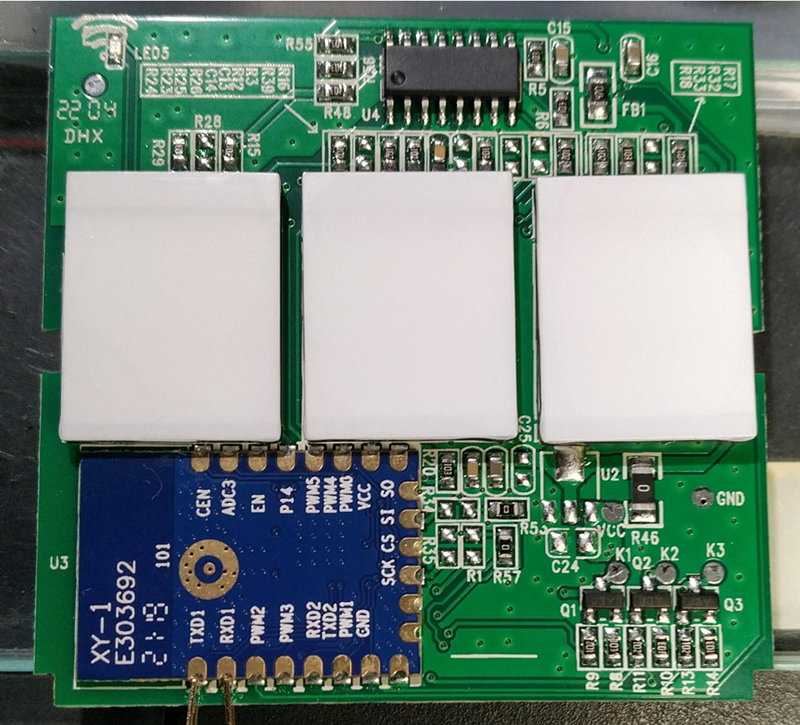
Since there is a TuyaMCU controlling the touch switches, I need some help with the autoexec.bat to confiure it.

I am new to this TuyaMCU stuff.

I have understood how the mapping works with following example:


// start MCU driver
startDriver TuyaMCU
tuyaMcu_setBaudRate 115200

// Switch 1 on/off channel
setChannelType 1 toggle
// map dpid1 to channel1, var type 1 (boolean)
linkTuyaMCUOutputToChannel 1 1 1


However I am clueless as to how to find dpid's from a particular MCU.

I tried starting the TuyaMCU as above but my status messages only contain:


ExtraDebug:TuyaMCU:TuyaMCU heartbeat_valid = 0, product_information_valid=0, self_processing_mode = 1, wifi_state_valid = 0, wifi_state_timer=0


Seems like the basic communication with the TuyaMCU is not yet working right?

About Author
jkwim wrote 186 posts with rating 25 , helped 4 times. Been with us since 2022 year.

Comments

p.kaczmarek2 15 May 2023 19:10

Hello, it seems we live in a small world: https://obrazki.elektroda.pl/7053239600_1684170480_thumb.jpg This device is not TuyaMCU: https://obrazki.elektroda.pl/7093646900_1684170493_thumb.jpg... [Read more]

jkwim 15 May 2023 21:04

When I click on Download Tuya Dump this what I get, no pop up to save the file. https://obrazki.elektroda.pl/9649405300_1684173876_thumb.jpg If I click again: https://obrazki.elektroda.pl/3744171000_1684174010_thumb.jpg... [Read more]

p.kaczmarek2 15 May 2023 21:12

Hmmm so please submit this dump here and I can try decoding it for you. It will contains config, as long as this device has supported firmware version and was not cleared by user ("Clear Flash" butto... [Read more]

jkwim 15 May 2023 21:15

Here is the dump [Read more]

p.kaczmarek2 15 May 2023 21:18

Success! https://obrazki.elektroda.pl/3066379900_1684178213_thumb.jpg Description: Tuya key values: { "rl1_lv":"1", "netled_lv":"0", "bt_type":"0", "bt1_pin":"24", "led1_pin":"14", "net_trig":"4", "cd_flag2":"1", "backlit_select":"0", "nety_led":"0", "netled_pin":"1", "md":"0", "random":"0", "wfb64":"1", "stat":"0", "token":"null", "region":"null", "reg_key":"null", "dns_prio":"0{nc_tp", "ssid":"Y2xvdWRjdXR0ZXJmbGFzaA==", "passwd":"YWJjZGFiY2Q=", "regi{key":"F0Qi7FDuXn1jOaZt", "lckey":"EoemPJqsyIl5Vb6r", "h_url":"http", "h_ip":"10.42.42.1", "hs_url":"null", "hs_ip":"2", "bt1_lv":"0", "module":"WB3S", "led3_pin":"11", "rl2_pin":"9", "led3_lv":"0", "cyc_dpid":"17", "led2_pin":"26", "bt2_lv":"0", "rl1_pin":"6", "mxcl_led_m":"0", "rl3_pin":"7", "rl3_lv":"1", "rand_dpid":"18", "led_dp":"15", "jv":"2.0.2", "led2_lv":"0", "bt3_lv":"0", "reset_t":"10", "rl2_lv":"1", "ch_flag1":"1", "ch_flag3":"1", "inch_dp":"19", "bt3_pin":"8", "dctrl_select":"0", "ch_cddpid1":"7", "init_conf":"14", "led1_lv":"0", "zero_select":"0", "bt2_pin":"10", "ch_cddpid2":"8", "ch_cddpid3":"9", "backlit_dp":"16", "ch_num":"3", "reuse_led_m":"0", "ch_dpid3":"3", "netn_led":"1", "ch_dpid1":"1", "ch_dpid2":"2", "crc":"73", "regi":"null", "hs_psk":"https", "hs_psk_ip":"18.195.249.137", "mqs_url":"null", "mqs_ip":"null", "mq_url":"10.42.42.1", "mq_ip":"10.42.42.1", "ai_sp":"null", "mq_psk":"m2.tuyaeu.com", "mq_psk_ip":"3.120.92.134", "time_z":"+01", "s_time_z":"[[1648342800", "wx_app_id":"null", "wx_uuid":"null", "dy_tls_m":"1", "cloud_cap":"1025... [Read more]

jkwim 15 May 2023 21:29

Got it using import option in Webapp: STARTUP stopDriver * // kill driveClearIO // clear old GPIO/channels lfs_format // clear LFS StartupCommand "" // clear rs backlog setPinRole... [Read more]

p.kaczmarek2 15 May 2023 21:40

Strange, but ok, remove the empty "StartupCommand" and it should be ok. I will look into it in a moment. Added after 6 [minutes]: Ok, I've found the issue. It was related to empty command being... [Read more]

jkwim 15 May 2023 21:44

Inverted the LEDs to my liking: 1. The Blue annoying WiFi LED will be off after WiFi has connected 2. Buttons will be light Red when OFF, bright Blue when ON { "vendor": "Tuya", ... [Read more]

p.kaczmarek2 15 May 2023 22:03

Thanks. I will update Templates List tomorrow. Please submit all new devices you'll receive as well. [Read more]

jkwim 16 May 2023 21:19

I tried the drag & drop operation of the above dump on BK GUI Flash Tool but was not successful: https://obrazki.elektroda.pl/6875320700_1684264810_thumb.jpg [Read more]

p.kaczmarek2 16 May 2023 21:49

Please attach the dump file so I can check myself. [Read more]

jkwim 16 May 2023 21:53

Previously attached: https://www.elektroda.com/rtvforum/viewtopic.php?p=20581700#20581700 [Read more]

p.kaczmarek2 16 May 2023 22:27

The previously attached file works, as shown in my screenshot next to your post. Maybe your flasher is outdated and you need to download latest version? [Read more]

jkwim 03 Jun 2023 00:54

Version 1.1.0b worked fine. Thanks for all the additional features now: https://obrazki.elektroda.pl/9735636900_1685746490_thumb.jpg [Read more]

p.kaczmarek2 03 Jun 2023 08:09

Flasher also has a work-in-progress IP scanner now built-in. [Read more]

jkwim 03 Jun 2023 08:14

Yes I tried it. There are improvements to be made I suppose with respect to possibly identifying the device info from http pages. However that's not a show stopper for the tool to be practical for the... [Read more]

p.kaczmarek2 03 Jun 2023 08:45

I am not sure if the latest version is released, but latest version is first using Tasmota status packet and then uses response to determine whether it's OBK or Tasmota. What could be improved there? [Read more]

jkwim 03 Jun 2023 17:44

Two issues that I have found. https://obrazki.elektroda.pl/4847711700_1685806934_thumb.jpg 1. Tool determines tha device as a Tasmota but no information is collected/shown. 2. Instead of Tasmota... [Read more]

FAQ

TL;DR: 3-gang DS-101JL users can flash WB3S/BK7231T with Cloudcutter; the expert fix was "This device is not TuyaMCU". Use the matching 1.0.7 or 1.1.5 profile, then import the GPIO template for relays, buttons, LEDs, and WiFi LED. [#20581710]

Why it matters: Correctly identifying direct GPIO control avoids wasted TuyaMCU debugging and gives a working OpenBeken setup for this no-neutral wall switch.

Alternative Firmware/profile Brand path Article path Result
Tuya FW 1.0.7 oem_bk7231s_rnd_zero_dctrl_switch Tuya Generic 2-CH Smart Relay Flash worked
Tuya FW 1.1.5/1.1.15 oem_bk7231s_rnd_zero_dctrl_switch Lonsonho X801A 1-Gang Switch Flash worked

Key insight: The DS-101JL WB3S version uses BK7231T GPIO pins directly for 3 relays, 3 buttons, 3 LEDs, and 1 WiFi LED. Do not configure TuyaMCU unless your hardware revision proves it uses a serial MCU.

Quick Facts

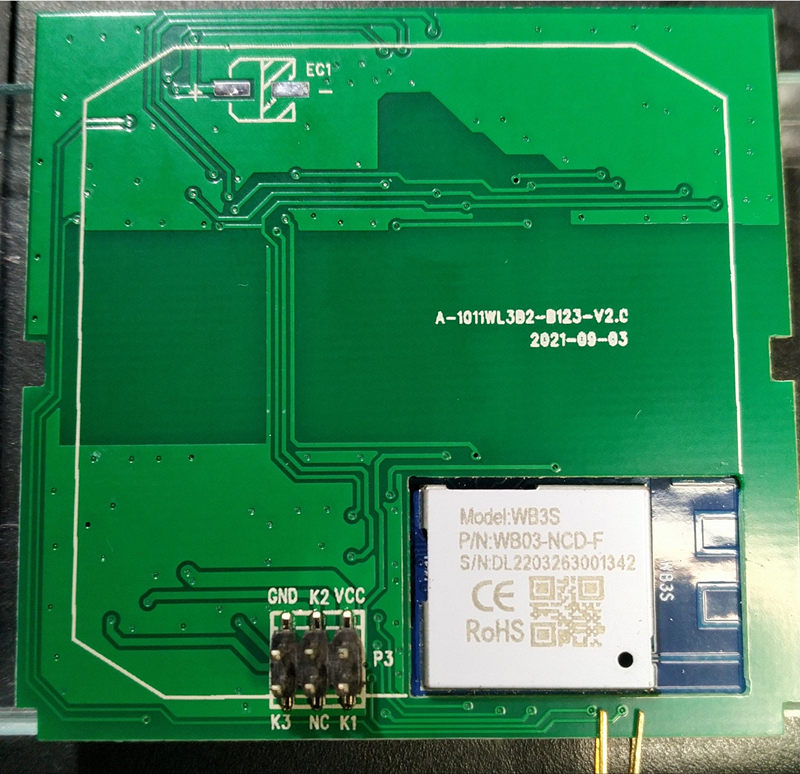
  • Module and chip: the Tuya dump identified module: WB3S, chip: BK7231T, and Tuya firmware swv: 1.0.7. [#20581710]
  • Channel hardware: relays use P6, P9, and P7; touch buttons use P24, P10, and P8. [#20581710]
  • Indicator hardware: channel LEDs use P14, P26, and P11; the WiFi LED uses P1. [#20581710]
  • Cloudcutter success was confirmed with OpenBK7231T_UG_1.17.113.bin and the slug tuya-generic-2-ch-smart-relay. [#20581409]
  • BK7231GUIFlashTool version 1.1.0b decoded the dump successfully after an older drag-and-drop attempt failed. [#20604007]

How do I flash a DS-101JL 3-gang no-neutral smart switch with a WB3S/BK7231T module using Tuya Cloudcutter?

Flash it with Cloudcutter by selecting the matching BK7231T firmware profile, then run the OpenBeken flash command. 1. Choose the Cloudcutter profile for Tuya firmware 1.0.7 or 1.1.5. 2. Select the matching brand and article path. 3. Run sudo ./run_flash.sh -p tuya-generic-2-ch-smart-relay -f OpenBK7231T_UG_1.17.113.bin for the 1.0.7 case. The thread confirmed success after earlier Cloudcutter attempts failed. [#20581409]

Which Tuya Cloudcutter profile works for a DS-101JL BK7231T switch running Tuya firmware 1.0.7?

Use the 1.0.7 - BK7231T / oem_bk7231s_rnd_zero_dctrl_switch profile. The working selection path was brand Tuya Generic and article number 2-CH Smart Relay. The flash command used profile slug tuya-generic-2-ch-smart-relay. The reported target firmware file was OpenBK7231T_UG_1.17.113.bin. [#20581409]

Which Tuya Cloudcutter profile should I use for a DS-101JL BK7231T switch running Tuya firmware 1.1.5 or 1.1.15?

Use 1.1.5 - BK7231T / oem_bk7231s_rnd_zero_dctrl_switch for the reported 1.1.15 device. The working Cloudcutter path was brand Lonsonho and article X801A 1-Gang Switch. The user reported this on 2023-06-03 after flashing a second same-model DS-101JL unit. The device slug was lonsonho-x801a-1-gang-switch. [#20581409]

How do I configure the GPIO pins in OpenBeken for a DS-101JL 3-gang smart switch after flashing?

Configure OpenBeken with direct GPIO roles, not TuyaMCU mappings. Set P6, P9, and P7 as relays for channels 1, 2, and 3. Set P24, P10, and P8 as buttons for channels 1, 2, and 3. Set P14, P26, and P11 as LEDs for channels 1, 2, and 3. Set P1 as WifiLED_n or WifiLED, depending on your desired polarity. [#20581710]

What is TuyaMCU, and why might a DS-101JL switch look like it uses TuyaMCU when it actually only has a touch button controller?

TuyaMCU is not required for the shown DS-101JL hardware revision. "TuyaMCU" is a Tuya serial-control architecture that links a WiFi module to a separate microcontroller, using datapoint IDs instead of direct GPIO pin roles. The expert inspection said the SOIC chip was just a touch button controller. That explains why TuyaMCU heartbeat stayed invalid. [#20581468]

How can I extract the original Tuya configuration dump from OpenBeken for a BK7231T device?

Use the OpenBeken web app Flash page and click the button for the Tuya configuration dump. The expert instructed users to open the web app, go to Flash, and use Download Tuya Dump. The resulting file contains the Tuya config if the firmware version is supported and the user has not cleared flash. [#20581691]

Why does the OpenBeken web app show an error when clicking Download Tuya Dump, and what should I try next?

Retry after a short wait, because the first click can fail without saving the dump. The reported case showed an error on the first attempt and another error on the second click. After about 59 minutes, the same download worked. If it still fails, check whether the Tuya section survived and whether Clear Flash erased it. [#20581576]

How do I use BK7231GUIFlashTool to decode a Tuya dump and generate an OpenBeken template?

Drag and drop the Tuya dump onto BK7231GUIFlashTool, then copy the generated OpenBeken template. "BK7231GUIFlashTool" is a desktop flashing and decoding tool that reads BK7231 dumps, extracts Tuya configuration, and generates OpenBeken templates for supported devices. In this case, it decoded pins and reported the Tuya section at uncommon position 0. [#20581710]

What is the correct OpenBeken template pin mapping for the DS-101JL 3-gang no-neutral switch with WB3S?

Use this DS-101JL mapping: P1 WifiLED_n;0, P6 Rel;1, P7 Rel;3, P8 Btn;3, P9 Rel;2, P10 Btn;2, P11 LED;3, P14 LED;1, P24 Btn;1, and P26 LED;2. The decoded template named vendor Tuya, model DS-101JL, chip BK7231T, and board WB3S. [#20581710]

How can I invert the WiFi LED and button LEDs on a DS-101JL switch in OpenBeken?

Invert the LED roles by changing the template to WifiLED;0 and LED_n for channel LEDs. The user set P1 to WifiLED;0, P11 to LED_n;3, P14 to LED_n;1, and P26 to LED_n;2. This made the blue WiFi LED turn off after WiFi connected, while buttons showed red when off and bright blue when on. [#20581762]

Why does OpenBeken show 'Invalid command StartupCommand' when importing a generated startup script?

The error came from an empty StartupCommand generated during import. The workaround was to remove the empty StartupCommand line. The maintainer then identified a JavaScript issue: an empty command had length 0 but was not undefined. He stated the issue should be fixed after that finding. [#20581744]

What is a WB3S module, and how is it related to the BK7231T chip used in Tuya smart switches?

WB3S is the module used by this DS-101JL switch, and it contains the BK7231T platform. "WB3S" is a Tuya WiFi module that hosts the BK7231T chip, exposing GPIO pins used for relays, buttons, and LEDs in this switch. The decoded dump explicitly reported module: WB3S and chip: BK7231T. [#20581710]

OpenBeken vs Tasmota: which firmware is better for BK7231T Tuya devices like the DS-101JL smart switch?

OpenBeken is the demonstrated working firmware for this BK7231T DS-101JL thread. The switch was flashed with OpenBK7231T_UG_1.17.113.bin, then configured with an OpenBeken template. The later tool discussion only compared scanner detection of OBK versus Tasmota status packets. It did not show a working Tasmota setup for this BK7231T switch. [#20581409]

How do I troubleshoot BK7231GUIFlashTool drag-and-drop dump decoding when the tool says it cannot parse the file?

Update BK7231GUIFlashTool first, because version mismatch caused the shown failure. The same previously attached dump worked for the maintainer, but the user’s drag-and-drop attempt failed. After updating to version 1.1.0b, decoding worked. This is the key failure case: a valid dump can still fail in an outdated flasher. [#20604007]

What safety precautions should I follow when working on a no-neutral 3-gang mains-powered smart wall switch?

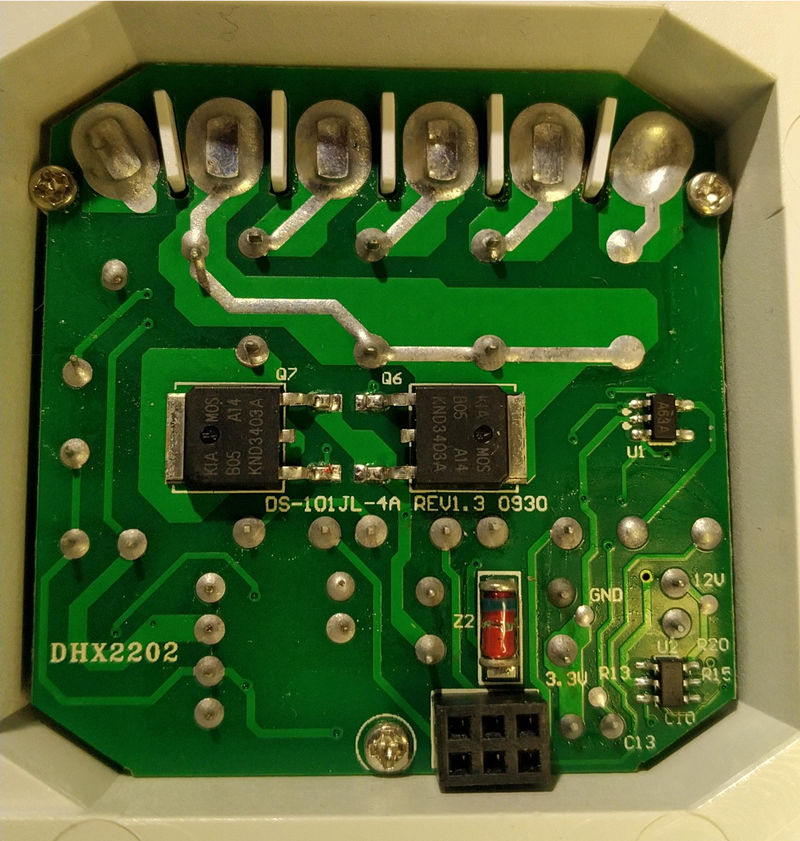
Treat the DS-101JL as a mains-powered wall switch and disconnect power before opening or wiring it. The thread identifies it as a 3-Gang No Neutral Smart Switch, meaning it installs in a live lighting circuit without a neutral wire. Do not touch the PCB while energized. Confirm relay channels P6, P9, and P7 only after safe isolation. [#20581710]
AI summary based on the discussion. May contain errors.
%}