logo elektroda
logo elektroda
X
logo elektroda
Dostępna jest polska wersja

Czy wolisz polską wersję strony elektroda?

Nie, dziękuję Przekieruj mnie tam

How to configure TuyaMCU initial switch state? dpID and script methods for OpenBeken

p.kaczmarek2  2 3711 Cool? (+4)
📢 Listen (AI):

TL;DR

  • Configuring TuyaMCU relay initial state in OpenBeken for a HomeMate Wi‑Fi + Bluetooth Smart 4 Gang Touch Switch.
  • Uses dpID 14 "Memory Status" or an OpenBeken script that restores channel states from flash and saves changes with OnChannelChange handlers.
  • The Tuya enum accepts 0 for always off, 1 for always on, and 2 for remember last state; tuyaMcu_sendState 14 4 sets it.
  • Some devices lack the memory dpID, and MQTT or Home Assistant can overwrite state unless configured carefully.
Generated by the language model.
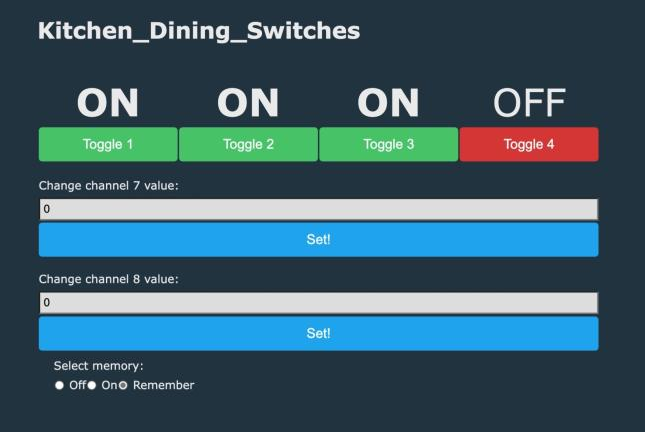
Room switch interface with four buttons and memory option
Some of TuyaMCU switches and relay controllers allow user to set the initial relay state after power on; the initial relay state can be on (contact closed), off (contact open) or memory (retains previous state from before power loss). Usually this setting is configurable via certain dpID, here I will show you how to configure it via OpenBeken. Futhermore, here I will also show a possible OBK work-around for TuyaMCU devices that do not support this feature natively.

For the sake of an example, I will use here HomeMate Wi-Fi + Bluetooth Smart 4 Gang Touch Switch, see link for information:
https://www.elektroda.com/rtvforum/topic3906443.html
Here is a basic OBK config for this device:


startDriver TuyaMCU

setChannelType 1 toggle
setChannelType 2 toggle
setChannelType 3 toggle
setChannelType 4 toggle
setChannelType 13 toggle

setChannelType 7 TextField
setChannelType 8 TextField
setChannelType 9 TextField
setChannelType 10 TextField

// for easier use, map the dpID to the same channel index
// linkTuyaMCUOutputToChannel	[dpId] [tuyaVarType] [channelID]
linkTuyaMCUOutputToChannel 1 1 1
linkTuyaMCUOutputToChannel 2 1 2
linkTuyaMCUOutputToChannel 3 1 3
linkTuyaMCUOutputToChannel 4 1 4
linkTuyaMCUOutputToChannel 7 2 7
linkTuyaMCUOutputToChannel 8 2 8
linkTuyaMCUOutputToChannel 9 2 9
linkTuyaMCUOutputToChannel 10 2 10
linkTuyaMCUOutputToChannel 13 1 13

Here are dpID roles:

0 Object { dpName: "Switch 1", dpId: 1 }
1 Object { dpName: "Switch 2", dpId: 2 }
2 Object { dpName: "Switch 3", dpId: 3 }
3 Object { dpName: "Delay-off Schedule", dpId: 19 }
4 Object { dpName: "Switch 4", dpId: 4 }
5 Object { dpName: "Timer 1", dpId: 7 }
6 Object { dpName: "Timer 2", dpId: 8 }
7 Object { dpName: "Test Bit", dpId: 24 }
8 Object { dpName: "Timer 3", dpId: 9 }
9 Object { dpName: "Timer 4", dpId: 10 }
10  Object { dpName: "Master Switch", dpId: 13 }
11  Object { dpName: "Memory Status", dpId: 14 }

The OBK config just maps dpIDs onto OBK channels and sets their types. For more information, see our commands documentation:
https://github.com/openshwprojects/OpenBK7231T_App/blob/main/docs/commands.md
See also channel types docs:
https://github.com/openshwprojects/OpenBK7231T_App/blob/main/docs/channelTypes.md

Method 1 - TuyaMCU dpID
First, let's assume that we are lucky and our TuyaMCU device has a dpID setting for initial power on state. In case of HomeMate Wi-Fi + Bluetooth Smart 4 Gang Touch Switch we have:

11  Object { dpName: "Memory Status", dpId: 14 }

If you don't know if your device has such dpID, you can try capturing original Tuya firmware communication with the MCU via UART and toggling the memory setting in Tuya app (if present), you can use our TuyaMCU analyzer for that:
https://github.com/openshwprojects/TuyaMCUAnalyzer
If you have already flashed OBK and don't have Tuya firmware backup, you can also try using OBK tuyaMcu_sendQueryState command to request the full device dpID state and look for the memory dpID there. Here is a sample result (trimmed other dpIDs) from the HomeMate Wi-Fi + Bluetooth Smart 4 Gang Touch Switch:

Info:TuyaMCU:TUYAMCU received: 55 AA 03 07 00 05 0E 04 00 01 02 23 
Info:TuyaMCU:TuyaMCU_ProcessIncoming[ver=3]: processing command 7 (State) with 12 bytes
Info:TuyaMCU:TuyaMCU_ParseStateMessage: processing dpId 14, dataType 4-DP_TYPE_ENUM and 1 data bytes
Info:TuyaMCU:TuyaMCU_ParseStateMessage: raw data 1 byte: 
Info:MAIN:Time 113, idle 190098/s, free 67840, MQTT 1(1), bWifi 1, secondsWithNoPing 1, socks 2/38 
Info:TuyaMCU:TUYAMCU received: 55 AA 03 00 00 01 01 04 

In case of this particular TuyaMCU device, dpID responsible for memory status is dpID 14, the type of variable is enum.
The following enum can have three values:
- 0, means "initial state is always off"
- 1, means "initial state is always on",
- 2, means "remember last state"
To set it from OpenBeken, you can use the following command:

// tuyaMcu_sendState [dpID] [VarType] [Value]
tuyaMcu_sendState 14 4 1

Here the dpID is 14, type is 4 (TuyaMCU enum) and value is 1. Value can be 0, 1 or 2.
Of course, TuyaMCU driver should be run first, device should be already configured. Futhermore, you may need to disable MQTT for the time of the testing because MQTT/HA may overwrite TuyaMCU state if not configured correctly.
If you want to enable memory of relays status, use:

// tuyaMcu_sendState [dpID] [VarType] [Value]
tuyaMcu_sendState 14 4 2

This is of course a very basic approach. You can also put that setting on GUI.

Here is a full autoexec.bat with memory setting mapped to GUI:

startDriver TuyaMCU

setChannelType 1 toggle
setChannelType 2 toggle
setChannelType 3 toggle
setChannelType 4 toggle


setChannelType 7 TextField
setChannelType 8 TextField
setChannelType 9 TextField
setChannelType 10 TextField
setChannelType 14 OffOnRemember

linkTuyaMCUOutputToChannel 1 1 1
linkTuyaMCUOutputToChannel 2 1 2
linkTuyaMCUOutputToChannel 3 1 3
linkTuyaMCUOutputToChannel 4 1 4
linkTuyaMCUOutputToChannel 7 2 7
linkTuyaMCUOutputToChannel 8 2 8
linkTuyaMCUOutputToChannel 9 2 9
linkTuyaMCUOutputToChannel 10 2 10
linkTuyaMCUOutputToChannel 14 4 14

The most important things happen here:

linkTuyaMCUOutputToChannel 14 4 14
setChannelType 14 OffOnRemember

This maps dpID 14 of type enum (4) to channel 14 (so it's easier to remember), and also it sets the type of channel 14 to OffOnRemember so the correct widget is shown on OBK gui.
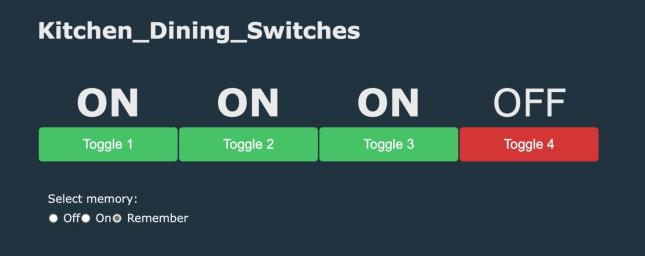
Here is the result in OBK:
Kitchen and dining switches with memory settings

Method 2 - Manual OBK state save
In case of non-TuyaMCU devices, remembering the previous state is very easy in OpenBeken. You can just do go to Config->Startup and set the value for each channel there.
For TuyaMCU, however, you might want to choose the manual approach. Here is the full autoexec.bat:

startDriver TuyaMCU

setChannelType 1 toggle
setChannelType 2 toggle
setChannelType 3 toggle
setChannelType 4 toggle


setChannelType 7 TextField
setChannelType 8 TextField
setChannelType 9 TextField
setChannelType 10 TextField
setChannelType 14 TextField

linkTuyaMCUOutputToChannel 1 1 1
linkTuyaMCUOutputToChannel 2 1 2
linkTuyaMCUOutputToChannel 3 1 3
linkTuyaMCUOutputToChannel 4 1 4
linkTuyaMCUOutputToChannel 7 2 7
linkTuyaMCUOutputToChannel 8 2 8
linkTuyaMCUOutputToChannel 9 2 9
linkTuyaMCUOutputToChannel 10 2 10
linkTuyaMCUOutputToChannel 14 4 14


delay_s 1
echo Restoring states: $CH201 $CH202 $CH203 $CH204
setChannel 1 $CH201
delay_s 0.1
setChannel 2 $CH202
delay_s 0.1
setChannel 3 $CH203
delay_s 0.1
setChannel 4 $CH204

// when channel 1 changes, save it to flash channel 201
addEventHandler OnChannelChange 1 setChannel 201 $CH1
// when channel 2 changes, save it to flash channel 202
addEventHandler OnChannelChange 2 setChannel 202 $CH2
// when channel 3 changes, save it to flash channel 202
addEventHandler OnChannelChange 3 setChannel 203 $CH3
// when channel 4 changes, save it to flash channel 204
addEventHandler OnChannelChange 4 setChannel 204 $CH4

This is the extended version of autoexec.bat from before.
Let's analyze the additions:

delay_s 1
echo Restoring states: $CH201 $CH202 $CH203 $CH204

In the code above we print to console the values of flash memory channels, the flash memory channels are starting from $CH200, when you write to this channel, it's saved in flash memory. Echo prints formatted string to console.

setChannel 1 $CH201
delay_s 0.1
setChannel 2 $CH202
delay_s 0.1
setChannel 3 $CH203
delay_s 0.1
setChannel 4 $CH204

In the code above we set channels 1, 2, 3 and 4 (mapped to TuyaMCU) to saved values from flash, every time with delay, to avoid overloading the MCU.


// when channel 1 changes, save it to flash channel 201
addEventHandler OnChannelChange 1 setChannel 201 $CH1
// when channel 2 changes, save it to flash channel 202
addEventHandler OnChannelChange 2 setChannel 202 $CH2
// when channel 3 changes, save it to flash channel 202
addEventHandler OnChannelChange 3 setChannel 203 $CH3
// when channel 4 changes, save it to flash channel 204
addEventHandler OnChannelChange 4 setChannel 204 $CH4

And finally, in the code above, we set the channel change callbacks to save the value in flash every time that the channel changes.


What if I want to set the initial state to constant 1 instead of 'last remembered'?
The previous paragraph covered remembering last state, if you want just to set it to fixed, let's say, 1, you can do:

setChannel 1 1
delay_s 0.1
setChannel 2 1
delay_s 0.1
setChannel 3 1
delay_s 0.1
setChannel 4 1


Summary
There are two ways to setup remembering the last relay state on most TuyaMCU devices - it can be done via Tuya dpID, the same way it works with Tuya firmware, or it can be done manually in OBK.
Some TuyaMCU devices might don't have a 'memory' dpID, or the following dpID may not be known, in such scenario you can just script the OBK to remember the given channel state on change and restore it on reboot. It will also work good and furthermore there is no need to worry about flash wear, as we have a special flash write optimization system where a flash erase is used only once per many write cycles. Let me know which solution you've chosen, I will try to help if any problem arise.


About Author
p.kaczmarek2
p.kaczmarek2 wrote 14622 posts with rating 12639 , helped 655 times. Been with us since 2014 year.

Comments

DCG 23 Sep 2023 09:12

thanks for this detailed document & instructions. this helped for two devices which had TuyaMCU [Read more]

tecnolobo 29 Sep 2023 15:24

Thank you very much. This example helped me understand some other doubts I had regarding my project. I will start implementing and testing. Regarding the issue of recording in flash memory, even... [Read more]

FAQ

TL;DR: For 4-channel TuyaMCU switches, "remember last state" can be configured two ways in OpenBeken: send enum dpID 14 with value 0, 1, or 2, or restore saved relay states from flash with a startup script. This FAQ helps OpenBeken users set reliable power-on behavior after power loss. [#20743842]

Why it matters: Correct power-on state prevents unwanted relay activation, speeds recovery after outages, and gives TuyaMCU devices predictable startup behavior.

Method Best use case Core command or logic Key values Main limitation
Native TuyaMCU dpID Device exposes memory setting tuyaMcu_sendState 14 4 X 0=Off, 1=On, 2=Remember Requires a known memory dpID
OBK flash restore script No native memory dpID Save to $CH201+, restore on boot delay_s 1, then 0.1 s gaps Needs scripting and careful timing

Key insight: Use the native TuyaMCU memory dpID first. If your device lacks that dpID, OpenBeken can still restore the last relay state by saving channel changes to flash and replaying them on boot. [#20743842]

Quick Facts

  • The example HomeMate switch exposes 11 listed dp roles, including dpId 14 named Memory Status and dpId 13 named Master Switch. [#20743842]
  • In the sample state reply, OpenBeken parses dpId 14 as dataType 4 (DP_TYPE_ENUM) with 1 data byte inside a 12-byte State message. [#20743842]
  • The memory enum uses 3 values: 0 = always off, 1 = always on, 2 = remember last state. [#20743842]
  • The manual restore script waits 1 s after boot, then inserts 0.1 s delays between relay writes to channels 1–4. [#20743842]

How do I configure the initial power-on relay state on a TuyaMCU switch in OpenBeken using a dpID like Memory Status?

Use the TuyaMCU memory dpID and send it an enum value from OpenBeken. In the HomeMate 4-gang example, Memory Status is dpId 14, type 4, where 0=Off, 1=On, and 2=Remember. Run the TuyaMCU driver first, confirm the device is already mapped, then send the wanted state with tuyaMcu_sendState. If you want GUI control, map dpId 14 to channel 14 and set that channel to OffOnRemember. [#20743842]

What is a TuyaMCU dpID, and how does it control features such as switch state memory in OpenBeken?

A TuyaMCU dpID is a device data point that represents one MCU feature, such as a relay, timer, or memory mode. In the example device, dpId 1–4 control four switches, and dpId 14 controls Memory Status. OpenBeken links each dpID to a channel with linkTuyaMCUOutputToChannel, then reads or writes that feature by dpID number and variable type. That lets OpenBeken control startup behavior exactly as the Tuya MCU expects. [#20743842]

How can I find which dpID on my TuyaMCU device is responsible for power-on state or memory mode?

Find it by observing the original Tuya firmware or by querying the MCU state from OpenBeken. The thread shows two paths: capture UART traffic while toggling the memory option in the Tuya app, or run tuyaMcu_sendQueryState after flashing OBK and inspect returned dpIDs. On the HomeMate example, that process revealed dpId 14 named Memory Status. If no memory dpID appears, use the manual OBK restore script instead. [#20743842]

What is the tuyaMcu_sendQueryState command in OpenBeken, and how do I use it to discover TuyaMCU state values?

tuyaMcu_sendQueryState asks the TuyaMCU to return its current dpID state table. 1. Start the TuyaMCU driver. 2. Run tuyaMcu_sendQueryState from the OpenBeken console. 3. Read the log for dpID numbers, types, and raw values. In the sample log, OpenBeken receives command 7 (State), then parses dpId 14, dataType 4, and 1 data byte. That is how the thread identifies the memory-setting datapoint. [#20743842]

How do I send the correct tuyaMcu_sendState command to set dpID 14 to Off, On, or Remember Last State on a HomeMate 4-gang TuyaMCU switch?

Send tuyaMcu_sendState 14 4 X, where X is the required enum value. Use 0 for always off, 1 for always on, and 2 for remember last state. For example, tuyaMcu_sendState 14 4 1 forces power-on to On, while tuyaMcu_sendState 14 4 2 enables memory. The thread identifies 14 as the Memory Status dpID and 4 as the TuyaMCU enum type for this HomeMate 4-gang switch. [#20743842]

What's the difference between using a native TuyaMCU memory dpID and using an OpenBeken script to restore the last relay state?

The native dpID method writes the startup mode directly into the TuyaMCU, while the OBK script saves relay values and replays them after boot. Native control is simpler and uses one enum setting, such as dpId 14 = 2 for memory. The script method is a fallback for devices with no memory dpID. It stores states in flash channels like $CH201–$CH204, waits 1 s, then restores channels 1–4 with 0.1 s gaps. [#20743842]

How do I map a TuyaMCU enum dpID to an OpenBeken GUI control like OffOnRemember?

Map the enum dpID to a channel, then assign that channel the OffOnRemember type. In the thread, the needed lines are linkTuyaMCUOutputToChannel 14 4 14 and setChannelType 14 OffOnRemember. That links dpId 14 with enum type 4 to channel 14, so the OBK GUI shows the correct three-state control. The author calls this the most important part of the GUI mapping. [#20743842]

Why should I add delays between setChannel commands when restoring multiple TuyaMCU relay states after boot?

Add delays so you do not overload the MCU with back-to-back writes during startup. The example waits 1 s before restore, then inserts 0.1 s between setChannel 1, 2, 3, and 4. That spacing reduces command bursts when OpenBeken pushes saved relay states to the TuyaMCU. Without those delays, the restore sequence can become less reliable on multi-channel devices because all writes arrive too quickly. [#20743842]

How do flash memory channels like $CH200, $CH201, and higher work in OpenBeken for saving relay states?

Flash memory channels start at $CH200, and OpenBeken saves them to flash when you write values there. The example uses $CH201, $CH202, $CH203, and $CH204 to keep the last states of relay channels 1–4. On boot, the script prints those values with echo and restores them back to active channels. The thread also notes that OpenBeken uses flash-write optimization, so one erase serves many write cycles. [#20743842]

What is an addEventHandler OnChannelChange script in OpenBeken, and how does it help save switch states automatically?

addEventHandler OnChannelChange is an OpenBeken event hook that runs a command whenever a channel changes value. In the example, channel 1 saves to $CH201, channel 2 to $CH202, channel 3 to $CH203, and channel 4 to $CH204. That means every relay change is stored automatically, so the next reboot can restore the latest known state from flash without manual intervention. [#20743842]

How can I make a TuyaMCU device always power on with all relays set to 1 instead of restoring the previous state?

Set each mapped relay channel to 1 during startup instead of reading saved flash values. The thread shows a direct sequence: setChannel 1 1, delay 0.1 s, setChannel 2 1, delay 0.1 s, then the same for channels 3 and 4. This forces all four relays to power on in the On state every boot. Use this method when you want a fixed startup state, not remembered state. [#20743842]

Why can MQTT or Home Assistant overwrite TuyaMCU state during testing, and how should I avoid that while configuring OpenBeken?

MQTT or Home Assistant can push their own retained or synchronized values back to the device and undo your test setting. The thread warns that MQTT and HA may overwrite TuyaMCU state if they are not configured correctly. During testing, disable MQTT first, then verify that your tuyaMcu_sendState command or startup script works as intended. This isolates the MCU behavior from automation-side state restoration. [#20743842]

Which autoexec.bat lines are needed to restore relay states from flash on reboot for a 4-channel TuyaMCU switch?

You need a restore block plus four save handlers. 1. After your channel mappings, add delay_s 1 and echo Restoring states: $CH201 $CH202 $CH203 $CH204. 2. Restore channels 1–4 from $CH201–$CH204 with 0.1 s delays. 3. Add four addEventHandler OnChannelChange lines that save each relay back into its flash channel. That combination recreates remembered startup on a 4-channel TuyaMCU switch. [#20743842]

How do I use TuyaMCUAnalyzer to capture UART communication from original Tuya firmware and identify the memory-status dpID?

Use TuyaMCUAnalyzer while the original Tuya firmware is still on the device, then toggle the memory option in the Tuya app and inspect the UART traffic. The thread recommends this method when you do not yet know whether a memory dpID exists. Watch for the datapoint that changes when you switch between Off, On, and Remember. That changing datapoint is the best candidate for the memory-status dpID. [#20743842]

What troubleshooting steps should I follow if my TuyaMCU device has no obvious memory dpID or the remembered state does not restore correctly in OpenBeken?

First, query the MCU state and look for a memory-style enum dpID. If none appears, switch to the OBK flash-restore script. Then verify four things: the TuyaMCU driver starts correctly, your relay dpIDs are mapped to the right channels, MQTT is disabled during tests, and restore writes include 0.1 s delays. If the device still fails, use a fixed startup script such as setChannel 1 1 through setChannel 4 1 to confirm that channel control itself works. [#20743842]
Generated by the language model.
%}