BW2L eWeLink RGBCW LED bulbs, including EW-A60-15W and EW-E14, are flashed to run without the cloud and pair with Home Assistant.
The WiFi module uses a BL602 chip, and its flashing pads are on the back side, so the module must be desoldered before programming.
The bulbs cost about $4-5 each, and both E14 and E27 versions appear to use the same GPIO order for PWM color control.
After flashing, a BL602 access point appears, the module is soldered back, and full RGBCW control works.
LED-plate heat makes resoldering harder, so flux, leaded solder, and careful VDD/GND short checks are important.
Generated by the language model.
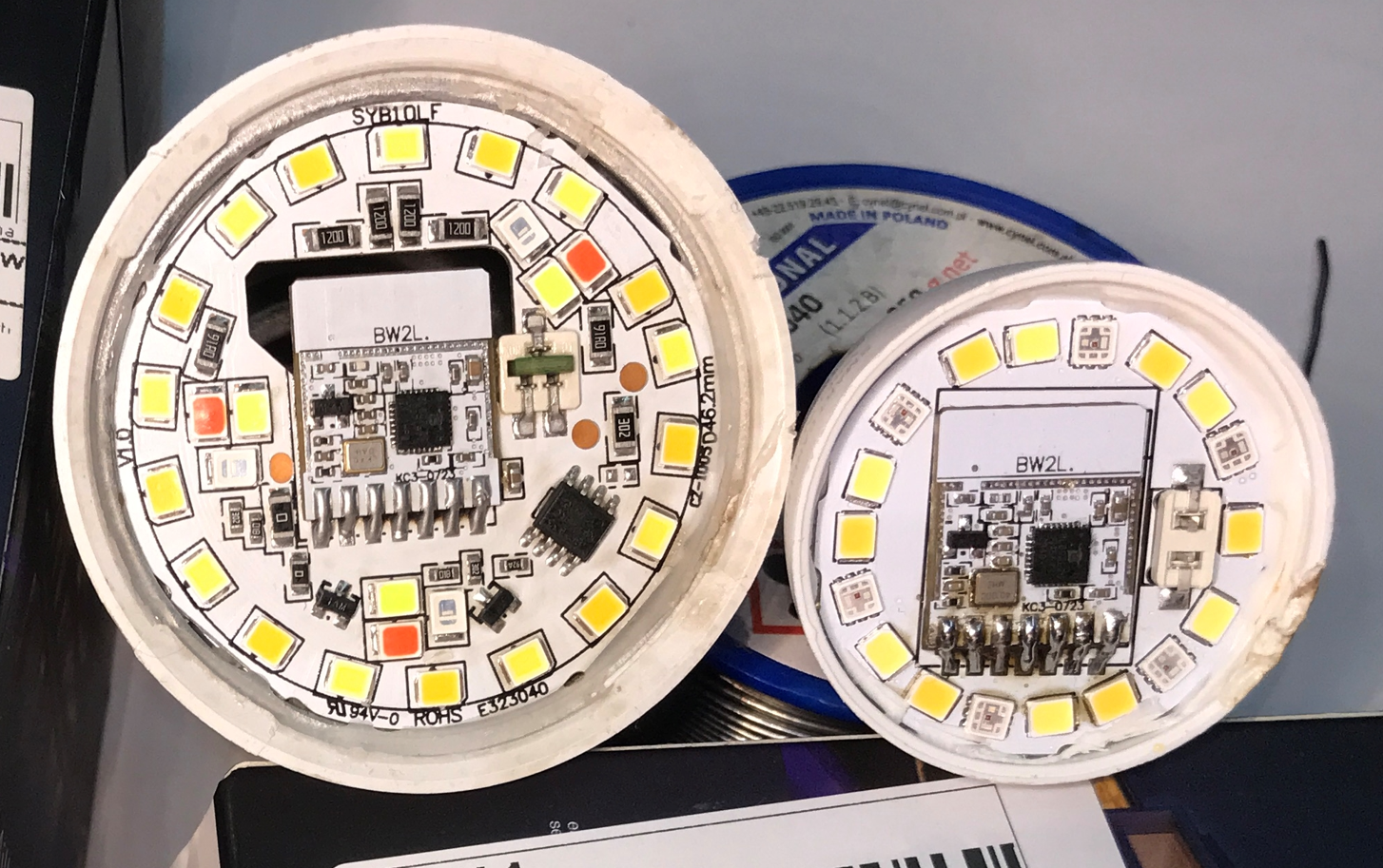
eWeLink RGBCW LED bulbs series is often using BW2L WiFi module based on BL602 chip. Those bulbs are easy to disassemble, although flash pins are only accessible on the back side of the module, it has to be desoldered before flashing. Here I will show you how you can do it step by step, so the bulb can be run free from the cloud and paired with Home Assistant.
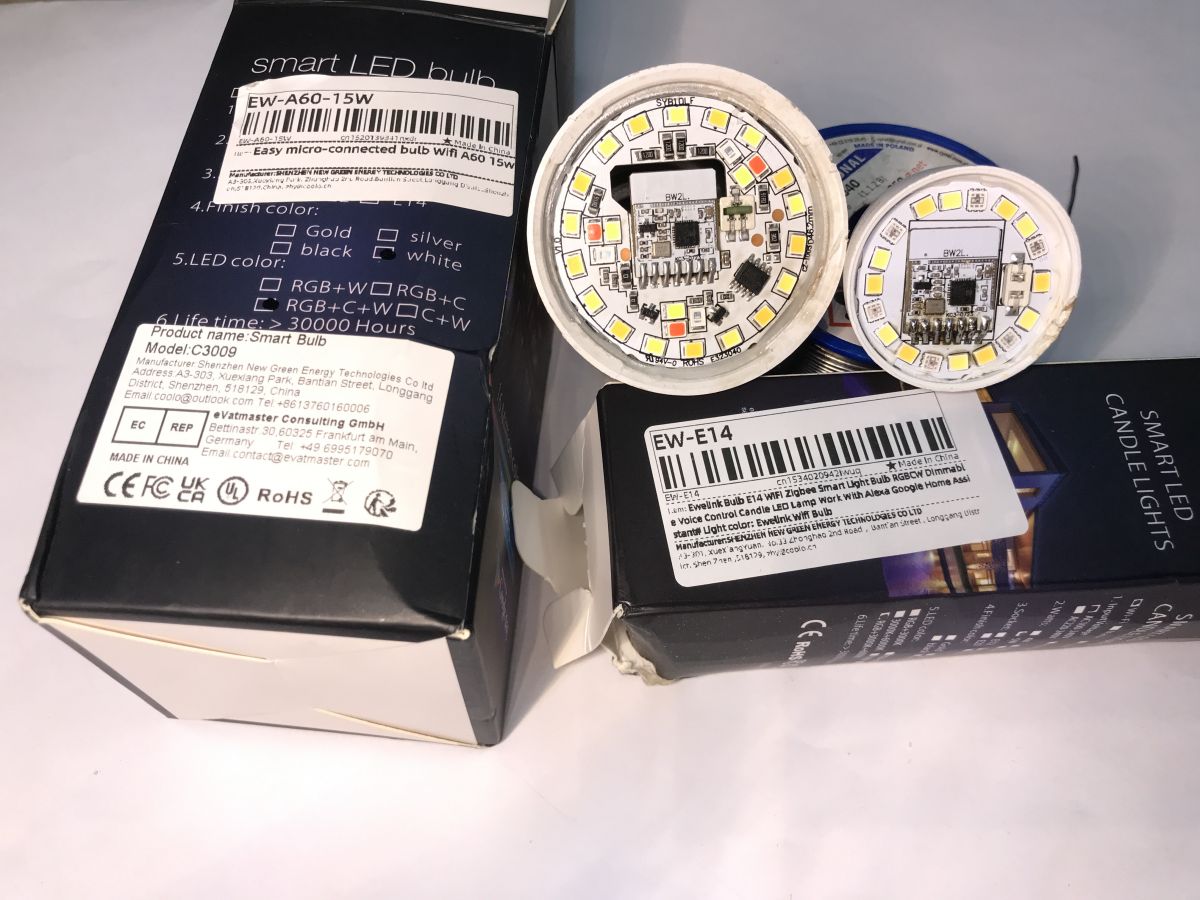
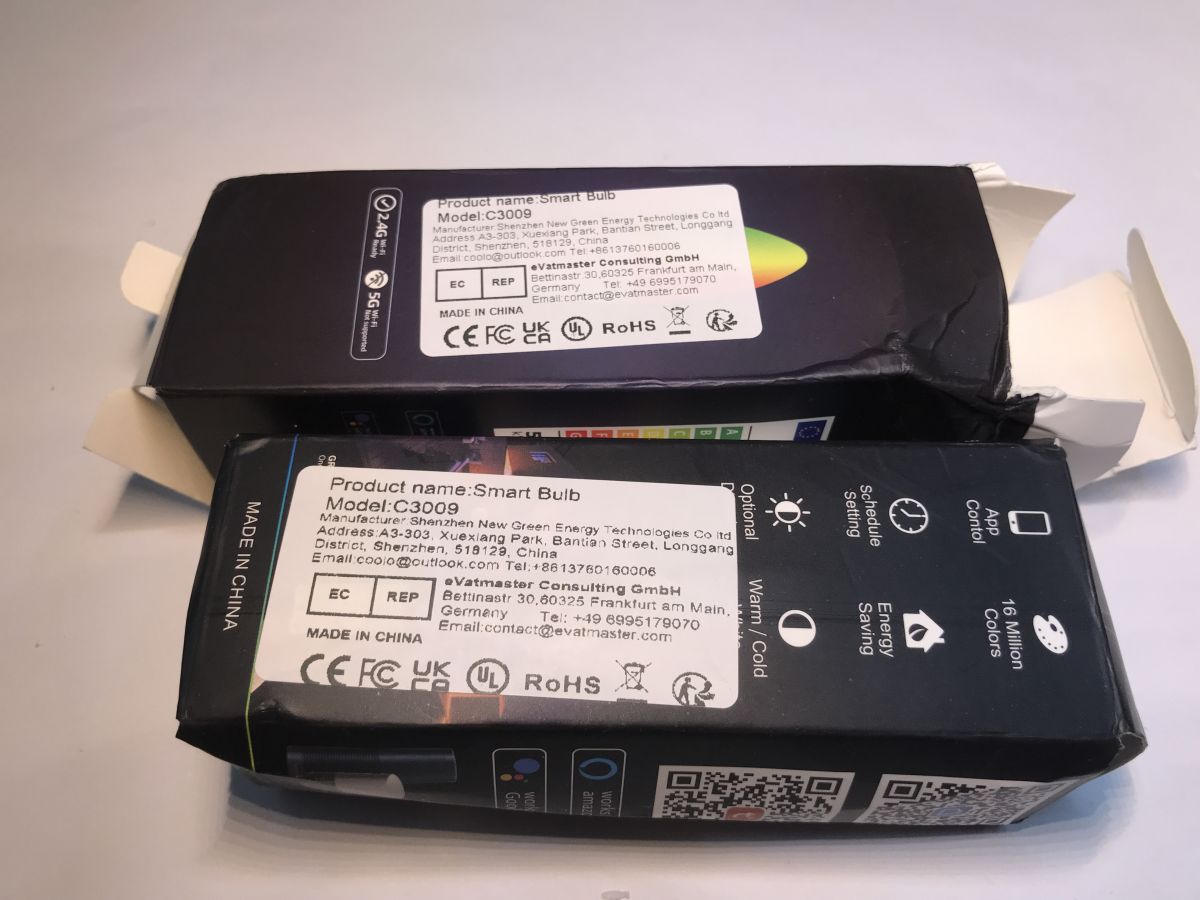
So, let's consider bulbs used for this demonstration.
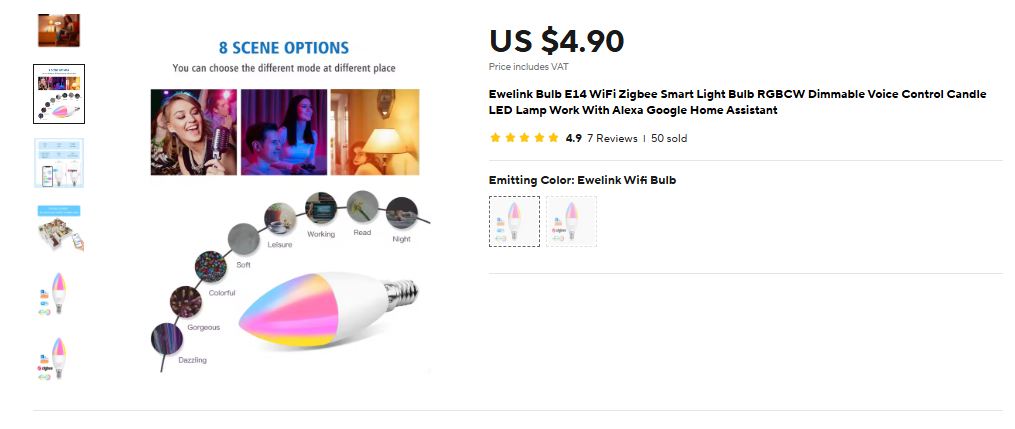
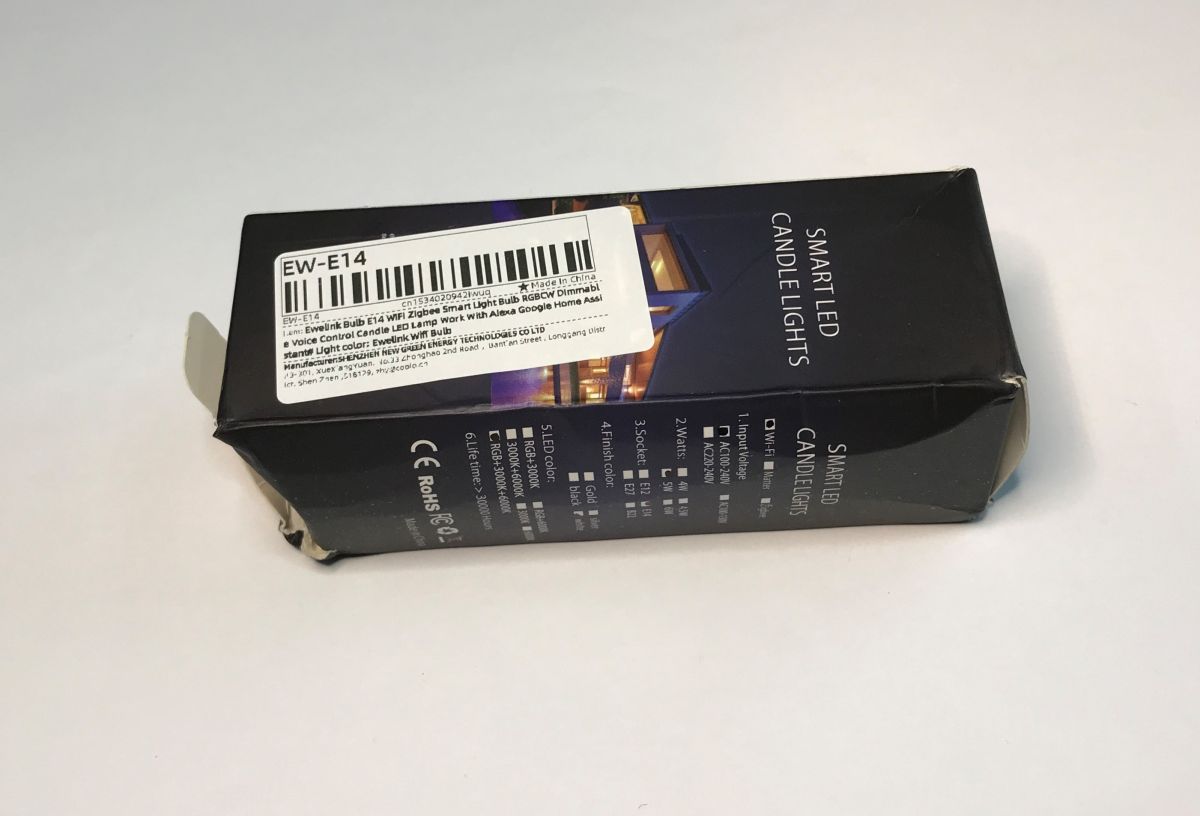
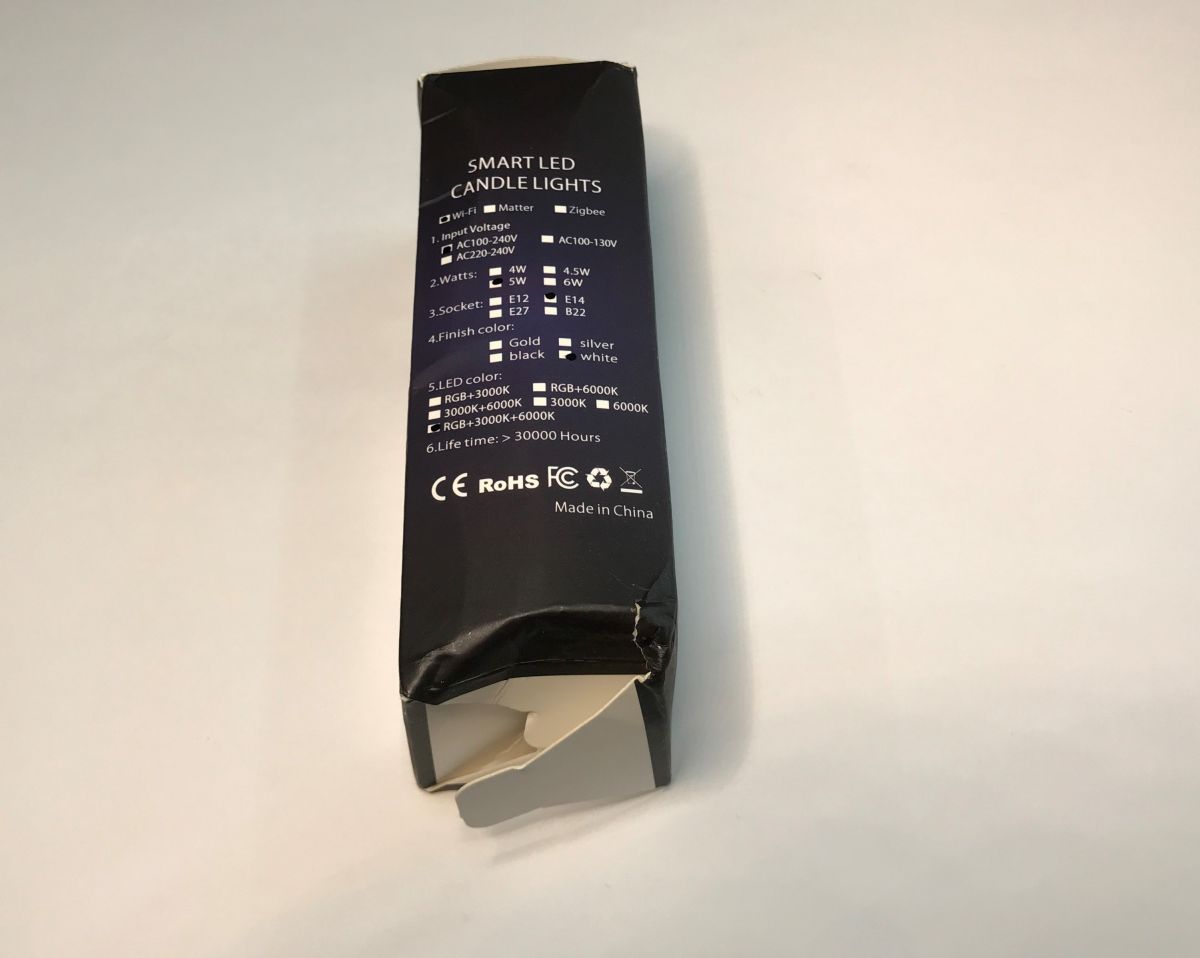
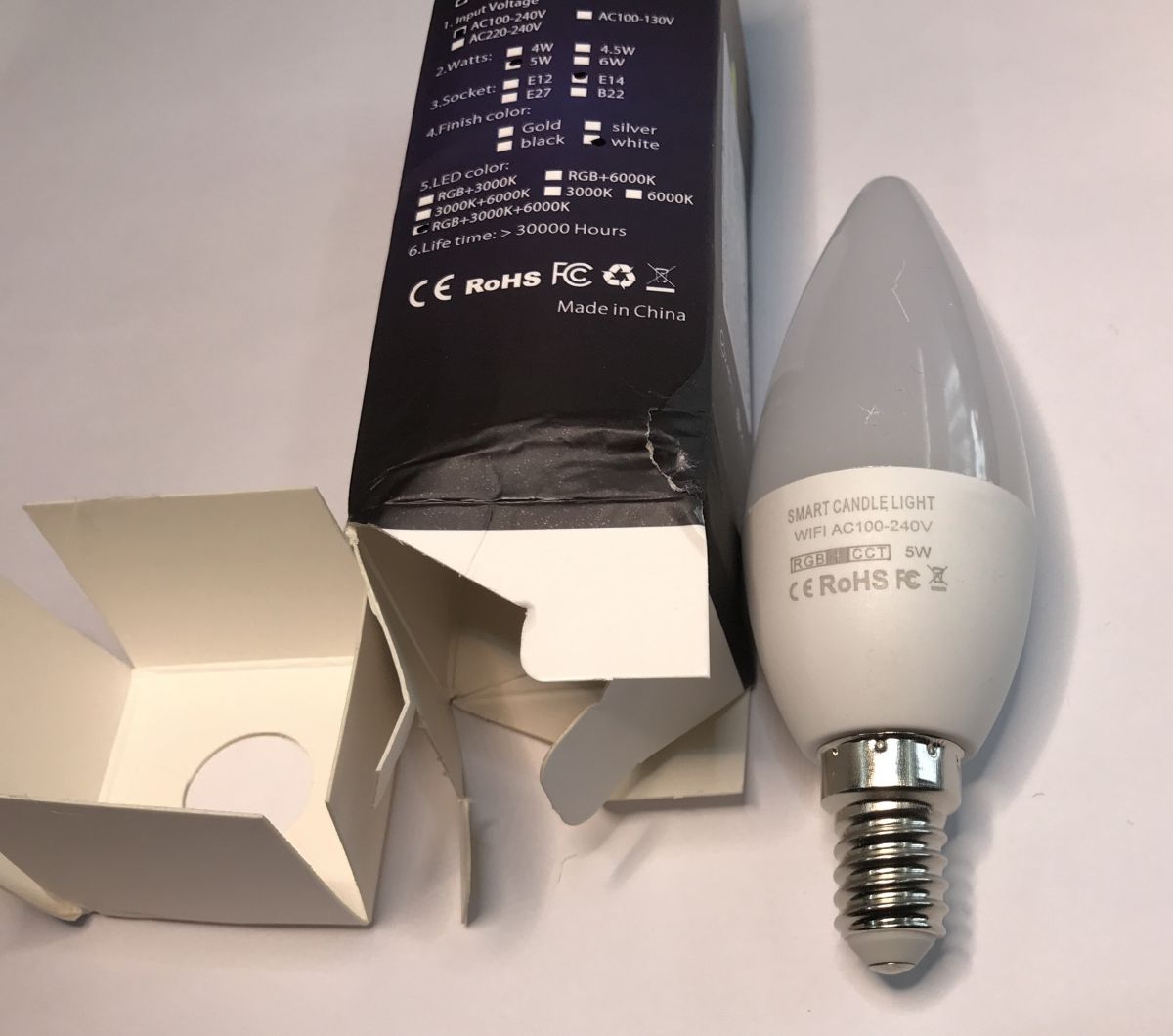
They can be bought for like 4-5$ each:
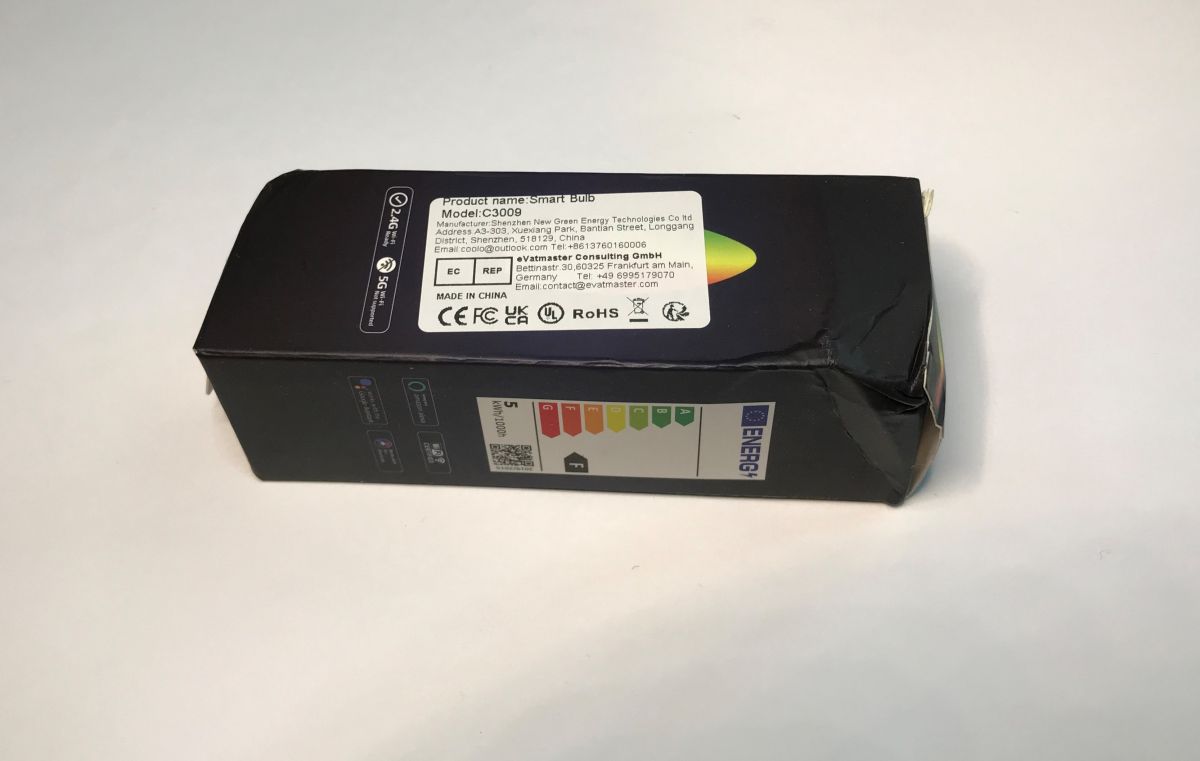
The bulb models are EW-A60-15W and EW-E14, the first one is using E27 format.
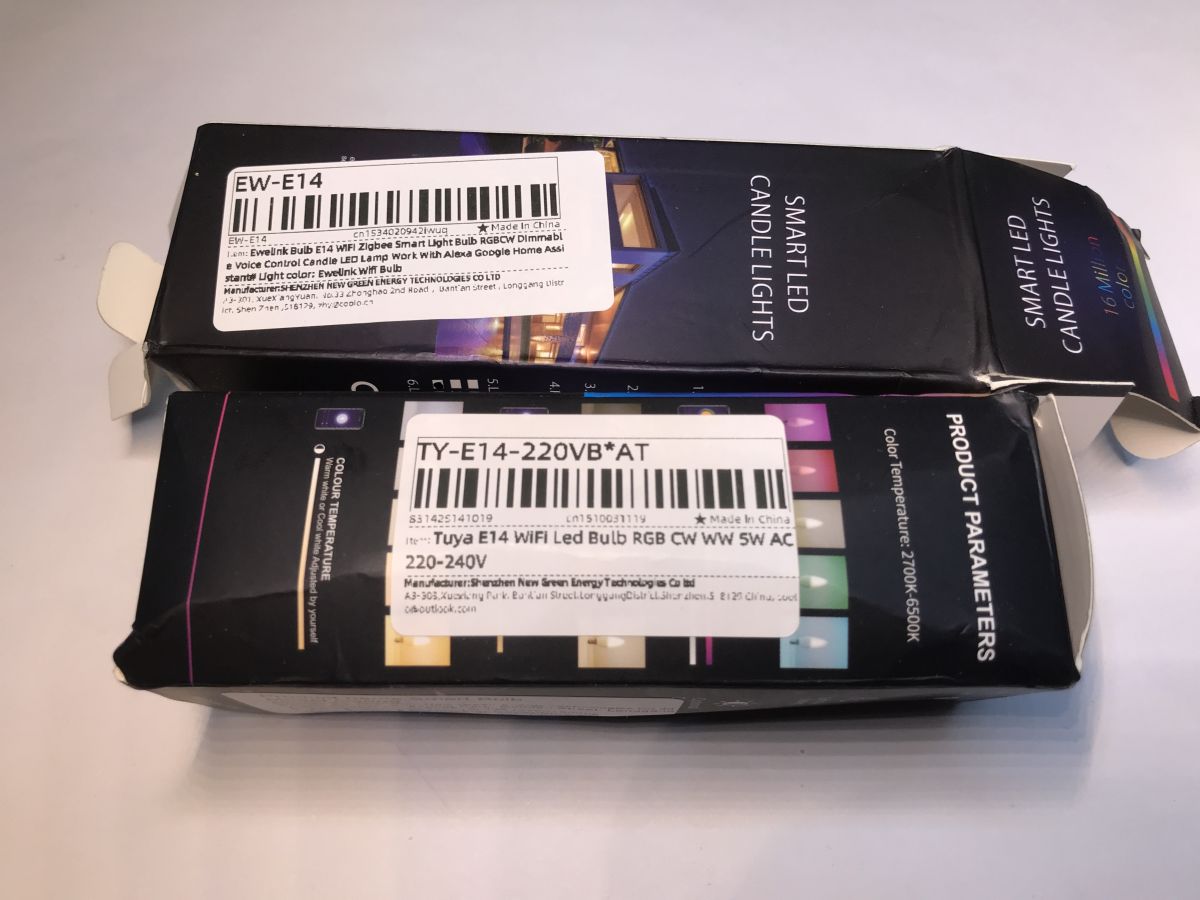
They are also marked as C3009, but this is meaningless, because also Tuya bulbs are using the same marking. Even the one with LN882H:
So, to sum up:
- model name "EW-" prefix (as in eWeLink) is important
- C3009 is also used by Tuya and can be ignored
- this guide is specifically for BW2L eWeLink lamps
It's time to unpack one and flash it:
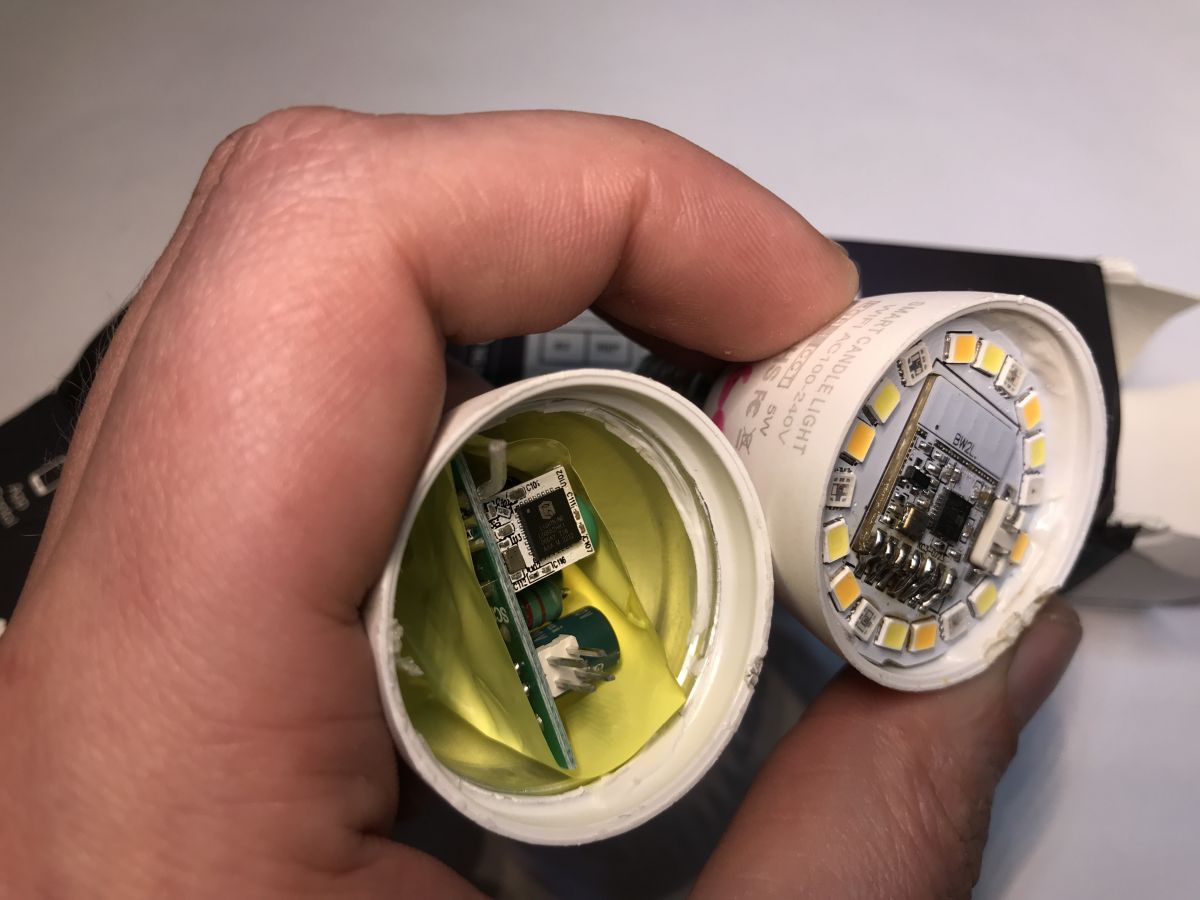
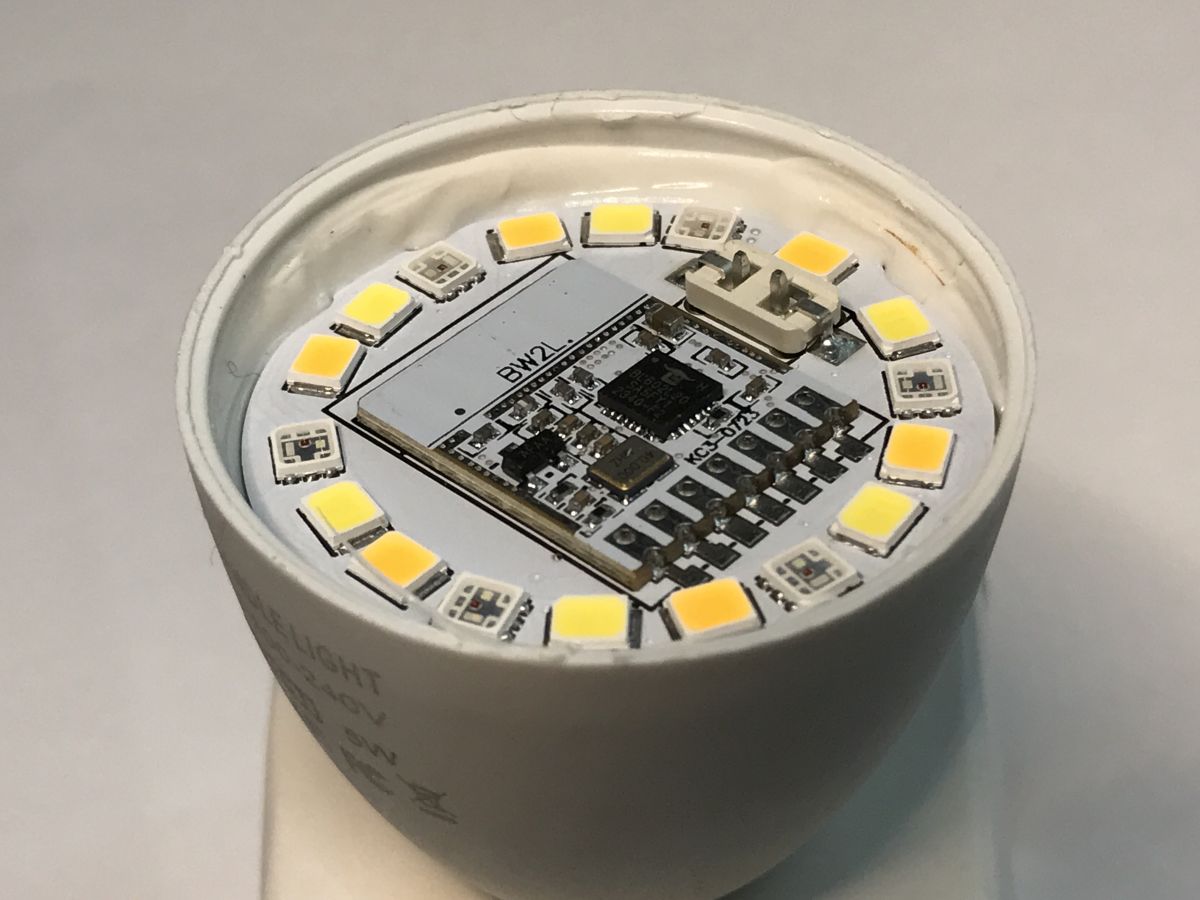
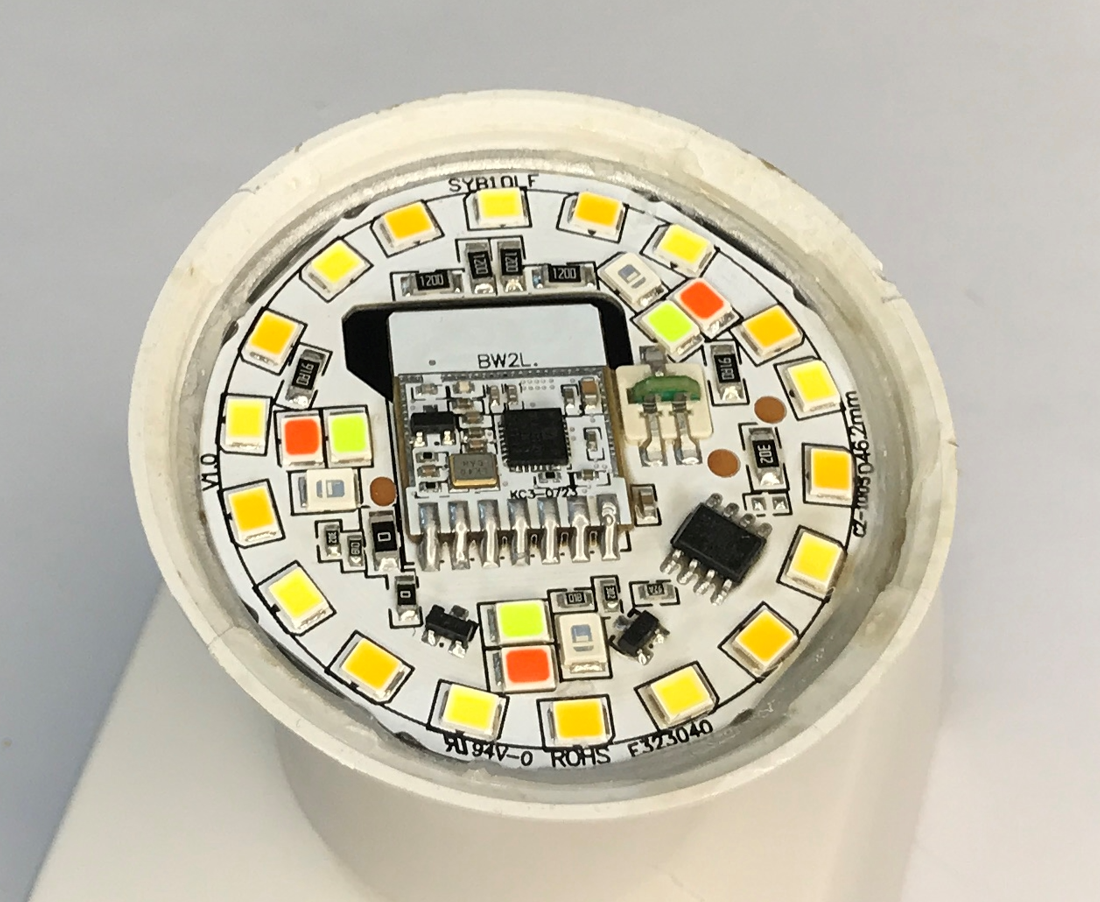
Initial teardown You only need to remove the dome. The WiFi module is on the LEDs board. You can pry the dome with flat screwdriver.
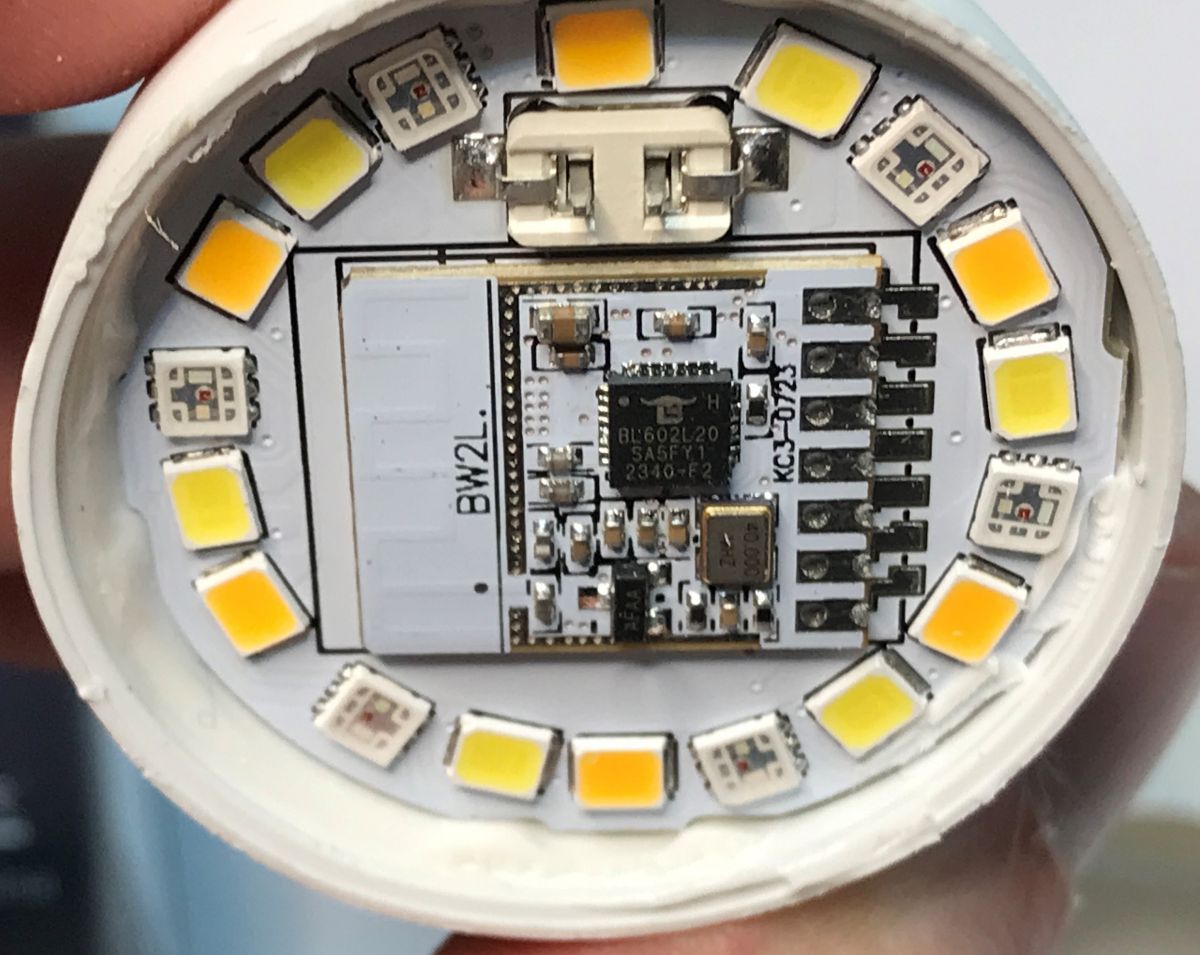
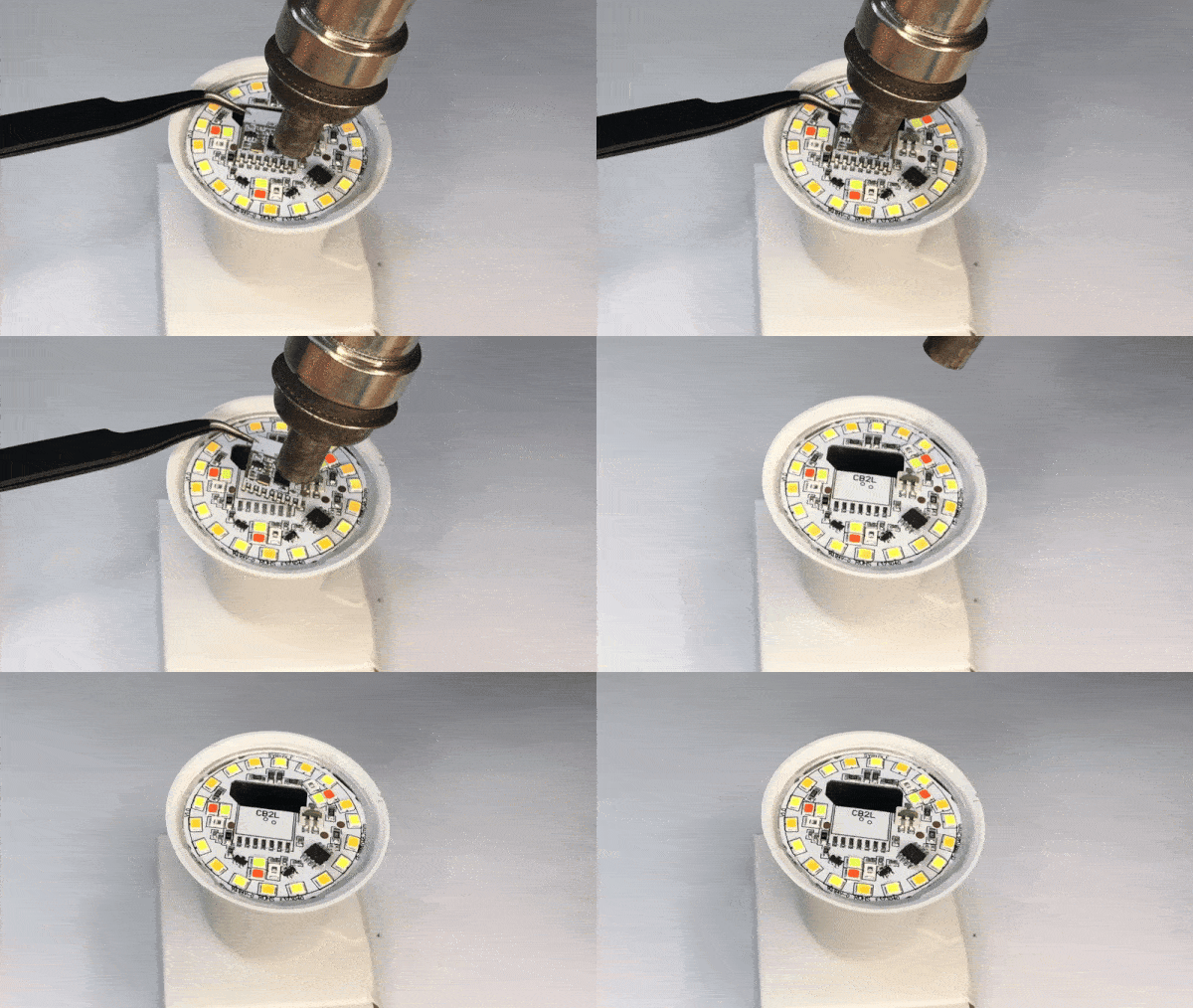
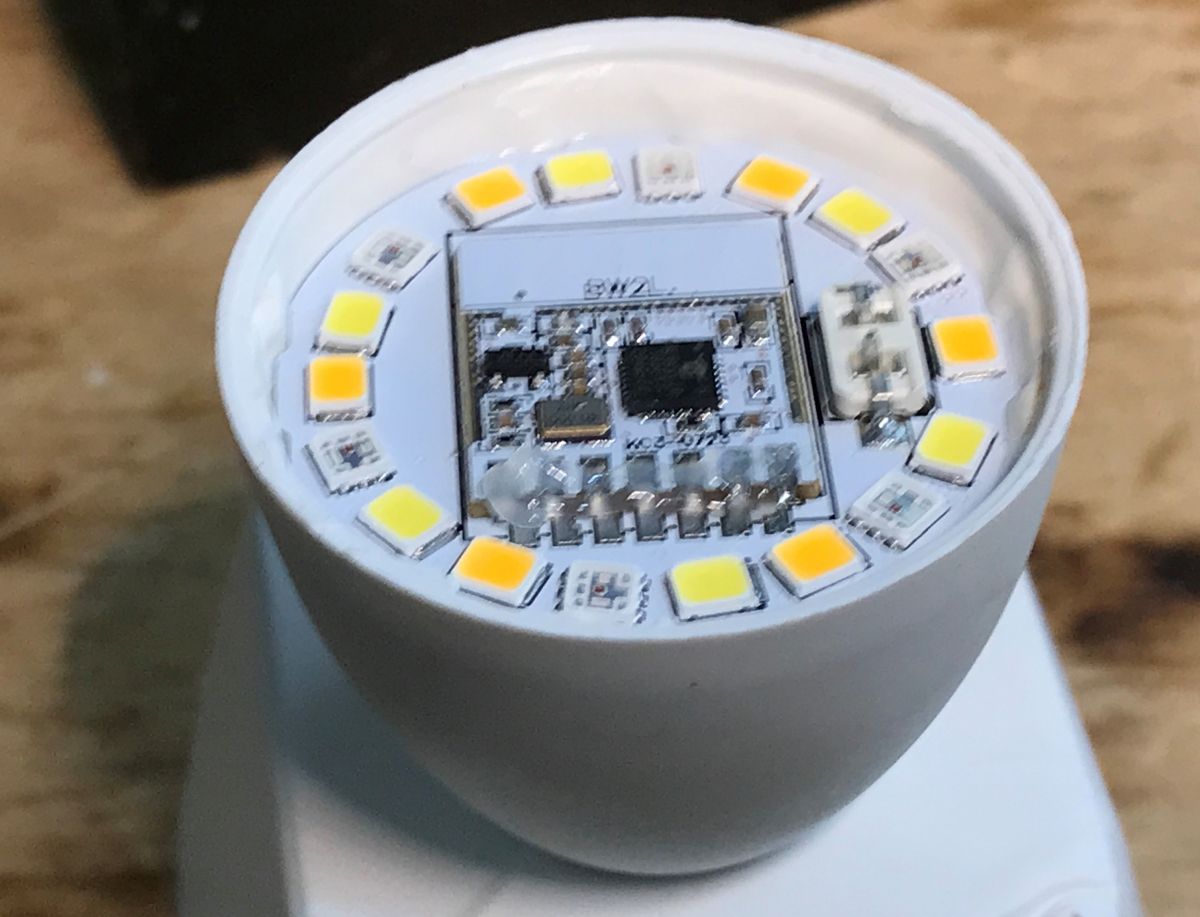
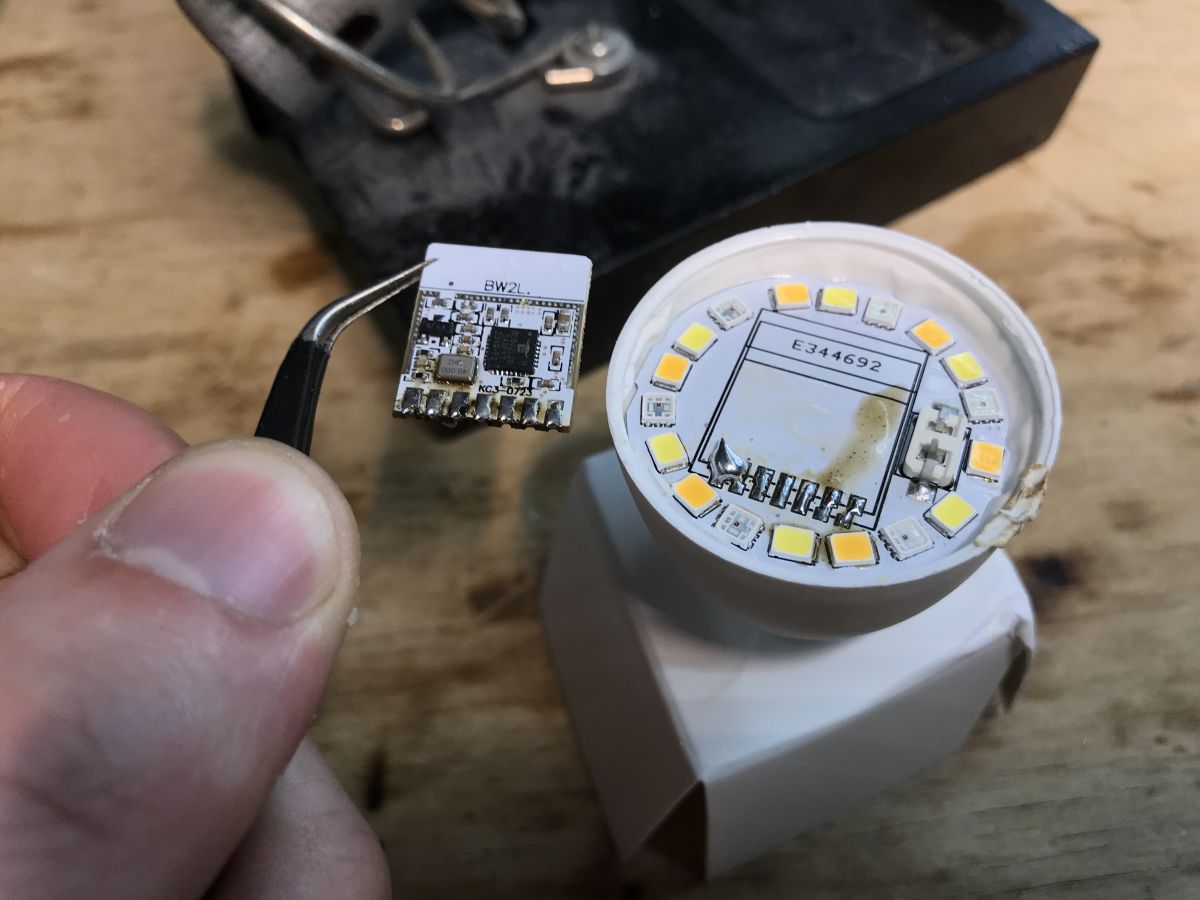
Desoldering module Module flashing pins are on the back, so you need to desolder it. There are two methods.
- hot air method - recommended. Just add flux and heat up pads and lift the module once solder melts:
- "tricky" method - if you add flux to the pads, and then add some leaded (Pb) solder, you can heat them up together until module is loose and can be easily removed
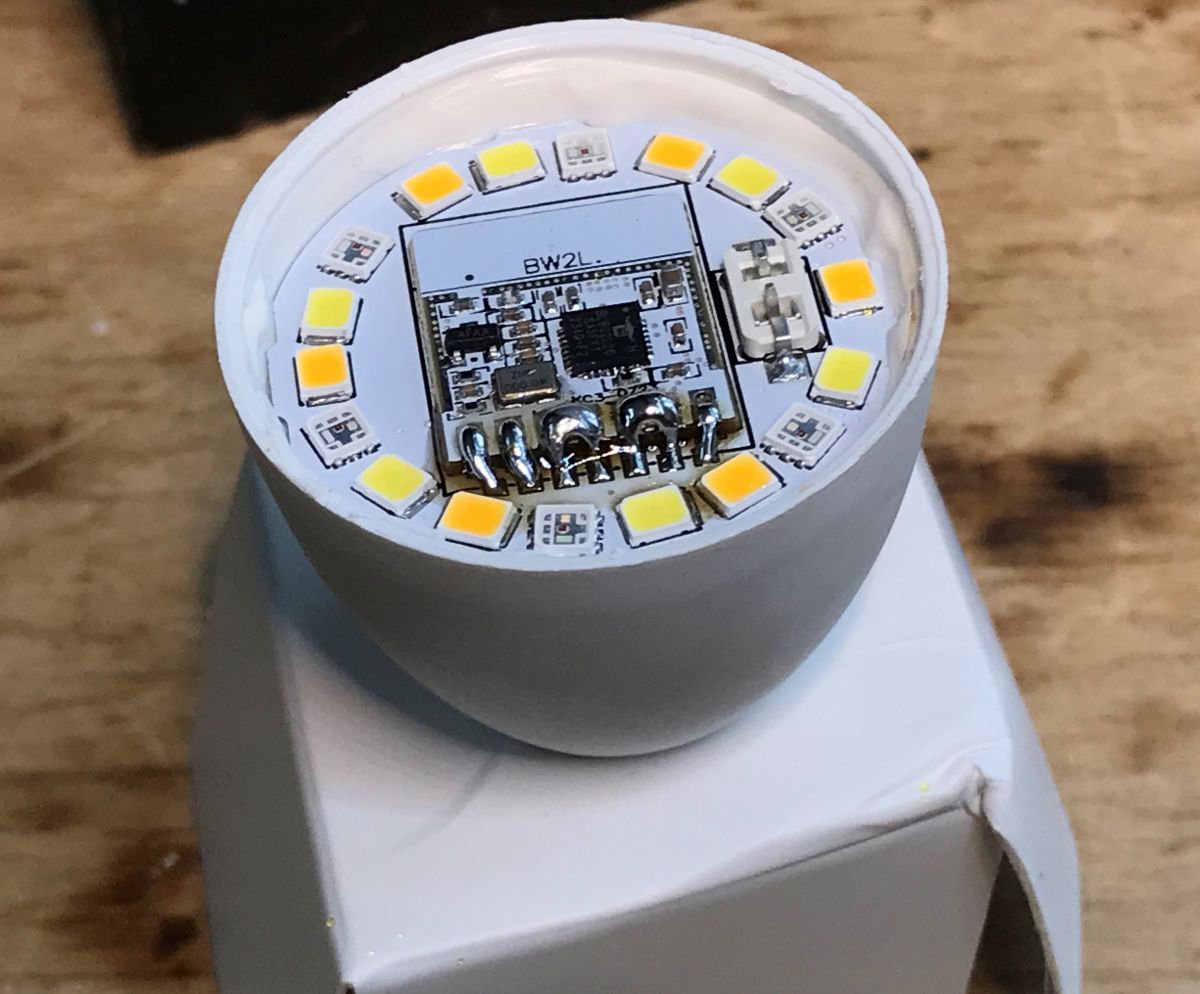
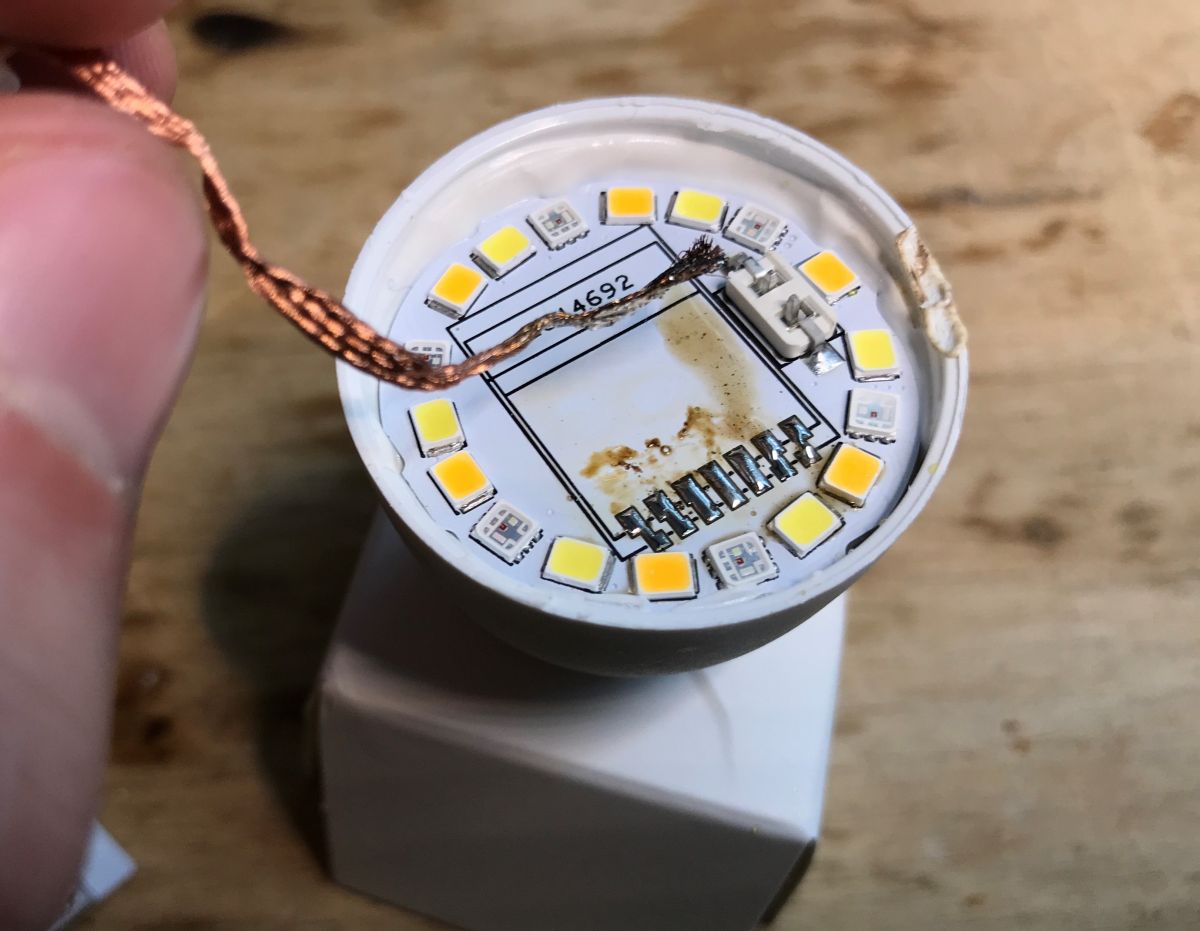
For both methods, remember to clear later the pads with some solder wick:
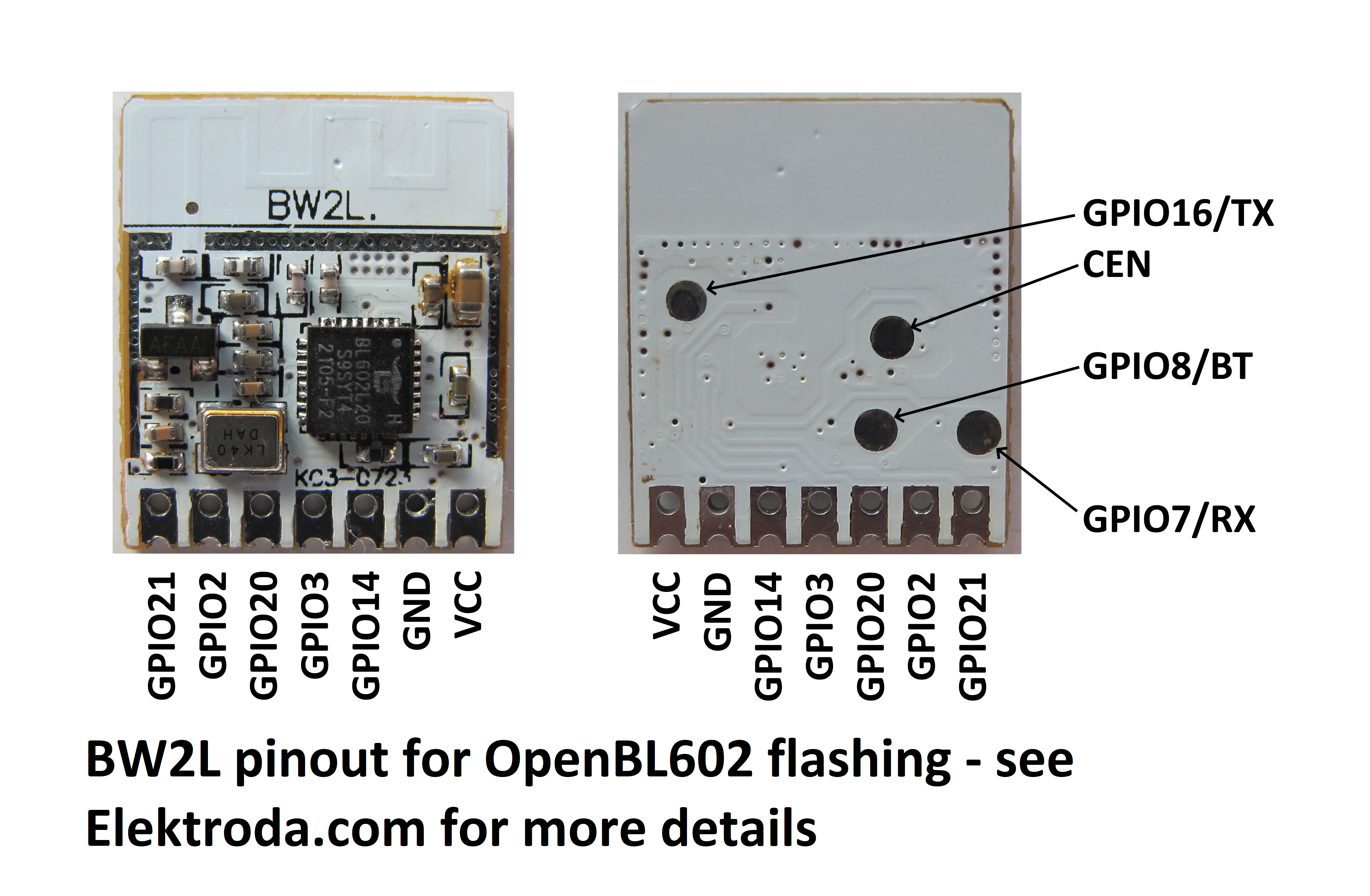
BW2L pinout BW2L pinout is shown on this image made by @divadiow :
As you can see, required flashing pads are on the back, that's why we're desoldering it.
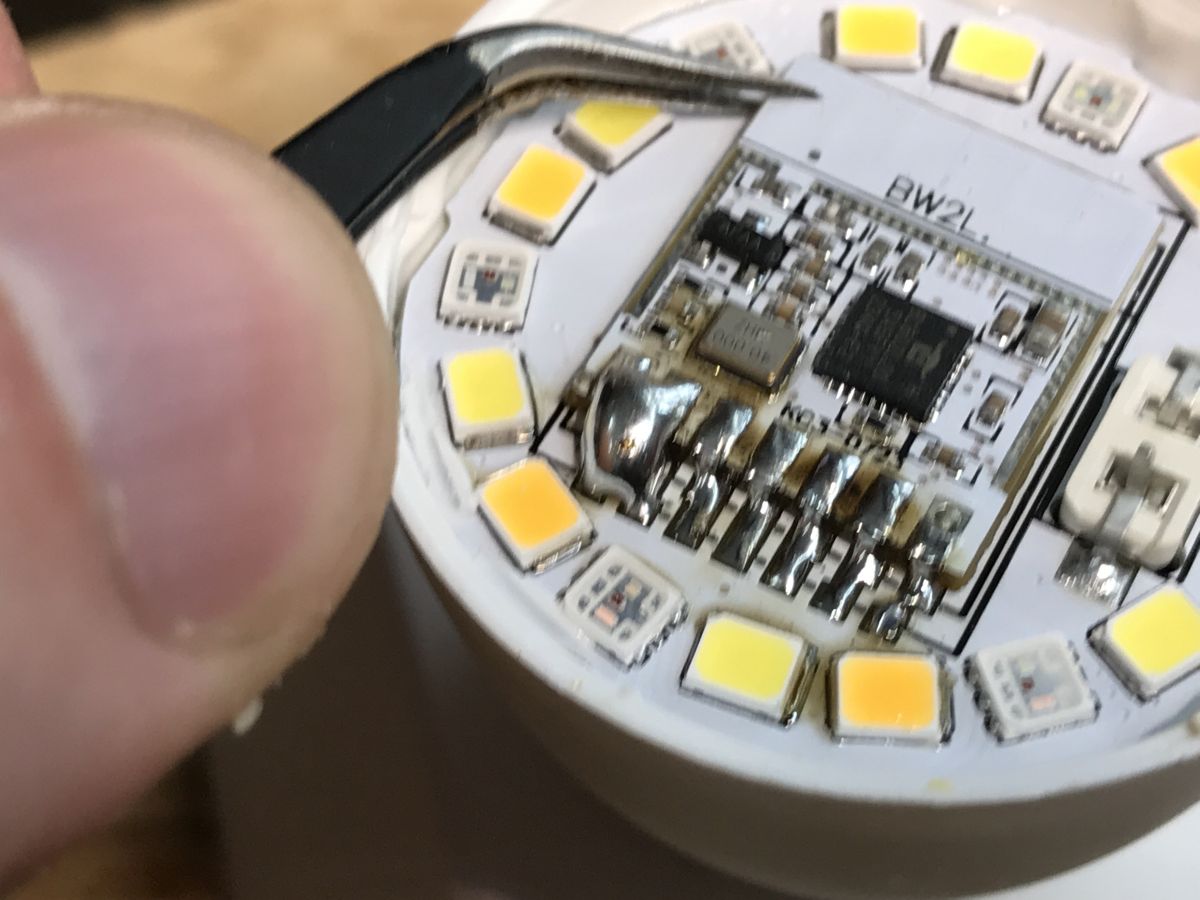
Soldering module back to bulb Soldering module back may be a bit harder than usual, because the LED plate is able to dissipate large amounts of heat. That's how LEDs are cooled. Still, with some Pb solder (leaded solder has lower melting point) and flux it's still possible to do it. Try to heat each pad for a longer moment and apply solder. That's how it turned out for me:
Make sure to check for shorts, especially on VDD and GND!
OBK template Considering that the bulb is using RGBCW and LEDs are controlled via PWM pins, and there is no more than 5 available GPIOs on the BW2L, there is really not many options in which pins can be arranged. You just need to figure out which color is which, but from what I've tested, both E14 and E27 bulbs are using the same GPIO order:
Code: JSON
Log in, to see the code
Final result Here's short presentation of working bulb:
Summary That's how you can flash the eWeLink bulbs and run them free from the cloud. Later you can also pair them with Home Assistant.
The procedure seemed hard, but in my opinion these bulbs are relatively easy to flash compared to some other models. The WiFi module is easily accesible and desoldering it is not that hard. I saw many other bulb models which required full bulb disassemble in order to flash, which is much more problematic and troublesome, as the bulb can be damaged permanently.
Has anyone else tried flashing eWeLink bulbs? Let me know and share your experience. I can also help with any bulb firmware change, feel free to post if you need any help.
About Author
p.kaczmarek2 wrote 14665 posts with
rating 12679 , helped 656 times.
Been with us since 2014 year.
what a crazy coincidence, I got an EW-A60-15W recently too ;)
This was the cause of a little pain for me because I couldn't seem to get the hot air temp right for it to free, even with additional... [Read more]
p.kaczmarek2
11 Mar 2025 22:48
Which hot air station do you use?
I've also had some issues due to, as said in first topic, the good heat dissipation of those boards. Even with soldering back the module, I had to clear up solder bridges... [Read more]
divadiow
11 Mar 2025 23:22
the basic 858D type. but I made a pb sausage before that and probably added too much additional solder. Should have stopped and wicked some off before hot air.
I haven't done much/any testing. I did... [Read more]
p.kaczmarek2
12 Mar 2025 10:58
858D is good, I've tested it here: https://openshwprojects.github.io/hotair/450c.html
I've ordered this GU10 eWeLink and I already have one Tuya GU10 waiting for teardown. So we'll be able to make a... [Read more]
divadiow
13 Mar 2025 10:09
place your bets. BL602 on main PCB or small ESP module 🤔
or maybe BL602 small module not yet seen [Read more]
p.kaczmarek2
13 Mar 2025 12:02
Why do you think ESP? Was there an instance of eWeLink device with ESP recently? I haven't seen anything like it. I've been getting eWeLink devices with ESP only in the past, like few years ago.
I guess... [Read more]
insmod
13 Mar 2025 12:52
https://www.elektroda.com/rtvforum/topic4099946.html
While not a bulb, it does have an ESP32 module. [Read more]
divadiow
13 Mar 2025 13:21
I've these two. Not bulbs tho either
SONOFF/eWeLink basic breaker ESP8285
https://obrazki.elektroda.pl/5353117500_1741867714_thumb.jpg https://obrazki.elektroda.pl/8104778600_1741867714_thumb.jpg... [Read more]
p.kaczmarek2
13 Mar 2025 14:41
Interesting, eWeLink gateways were never a scope of my testing, so I may be wrong here. Altough much would also depend on the manufacturing date, because the old batches were certainly using ESP very often.... [Read more]
divadiow
13 Mar 2025 15:13
ah dunno.
Matter bulbs?
Sonoffs that may have CKW04 but I dont think I could find SDK, maybe I didn't look hard enough. eg
https://www.elektroda.com/rtvforum/topic4086605.html
https://github.com/openshwprojects/OpenBK7231T_App/issues/374
'Musical'... [Read more]
p.kaczmarek2
13 Mar 2025 15:24
Matter bulbs seem to have a high risk of a locked ESP32, so that may not be efficient...
Have you seen any "musical bulb" with mic/speaker that is WiFi-based, and not a Bluetooth one? G9 is a good idea,... [Read more]
oh yeh! maybe it changed. oh well
Added after 3 [minutes]:
I ordered B02-BL-A60 [Read more]
p.kaczmarek2
14 Mar 2025 12:20
I don't know what went wrong, I did my best not to order duplicates, but I still got another 15W E27 eWeLink bulb today.
I was sure that I ordered only one 15W, but second was 10W, but who knows... or... [Read more]
divadiow
17 Mar 2025 08:04
that's without MQTT or powersave which I'll enable now
https://obrazki.elektroda.pl/9332939900_1742195057_thumb.jpg [Read more]
p.kaczmarek2
19 Mar 2025 11:43
GU10 eWeLink bulb arrived, last time to place your bets - do you think it will be BW2L @divadiow ? [Read more]
EW-GU10-E , also marked as C3009
https://obrazki.elektroda.pl/3742209700_1742383358_thumb.jpg
It has BW2L. Looks like a perfect GU10 bulb for flashing without full disassembly/
https://github... [Read more]
FAQ
TL;DR: These $4–5 eWeLink RGBCW bulbs are practical for DIY reflashing because, as the thread notes, "the WiFi module is easily accessible." This FAQ helps Home Assistant and OpenBeken users flash BW2L/BL602 bulbs by removing the module, wiring the rear pads, testing the AP first, and soldering it back safely. [#21475737]
Why it matters: These bulbs let you replace cloud control with local firmware without fully dismantling the lamp body.
Bulb / variant
Module seen in thread
Access for flashing
Main difficulty
EW-A60-15W
BW2L / BL602
Good after dome removal
Rear pads require desoldering
EW-E14
BW2L / BL602
Similar to EW-A60
Same rear-pad limitation
EW-GU10-E
BW2L / BL602
Best access in thread
Still needs module removal
Zigbee eWeLink bulb
BZ2L / BL702
Different path
Usually no need to reflash
Key insight: The critical constraint is not opening the bulb; it is that BW2L flashing pads sit on the module’s back side. If you can remove and reinstall that module cleanly, the rest of the workflow is straightforward.
Quick Facts
The main thread covers EW-A60-15W, EW-E14, and later EW-GU10-E eWeLink bulbs, all reported with BW2L modules built around BL602. [#21486426]
The author says these bulbs can be bought for about $4–5 each, which makes them low-cost candidates for OpenBeken and Home Assistant experiments. [#21475737]
A later dump from a GU10 unit shows factory firmware FWLED-CK0205PWM-LIGHT-BL602L_v1.1.1, build time 20220610.104115.018, and the device then offers an update to 1.5.0. [#21489845]
A second E27 order intended as a different lamp arrived as another 15W E27 variant, EW-A60-15W-E, showing that model suffixes can change even within similar retail listings. [#21479288]
The thread also identifies newer non-bulb eWeLink hardware with ESP parts, including an ESP8285 85V–250V / USB5V switch, alongside discussion of newer BL602 and Beken designs. [#21477982]
How do I flash an eWeLink RGBCW bulb with a BW2L module based on BL602 step by step?
You flash it by opening the bulb, removing the BW2L module, programming it on the bench, and testing before reassembly. 1. Pry off the dome and expose the LED board. 2. Desolder the BW2L, solder wires to the rear flashing pads, then read or burn firmware with the BL602 workflow. 3. Confirm the BL602 access point appears, then solder the module back and check for shorts on VDD and GND. The thread demonstrates this on EW-A60-15W and EW-E14 RGBCW bulbs intended for cloud-free use with Home Assistant. [#21475737]
What is the BW2L module, and how is it used inside eWeLink EW-A60-15W, EW-E14, and EW-GU10-E bulbs?
"BW2L is a Wi‑Fi module that hosts a BL602 chip, with rear-side flashing pads used for firmware access." In this thread, it appears on the LED board of eWeLink EW-A60-15W, EW-E14, and later EW-GU10-E bulbs. It handles the smart control side of these RGBCW lamps and exposes only five practical GPIOs for the PWM LED channels discussed in the OpenBeken template. The author reports the same GPIO template worked on all eWeLink BW2L bulbs found so far. [#21486426]
Why do I need to desolder the BW2L module before flashing an eWeLink BL602 bulb?
You need to desolder it because the required flashing pads are on the module’s back side. The thread explicitly shows that the BW2L pinout places the programming contacts underneath, so you cannot reach them while the module remains soldered to the LED board. That is why the author treats desoldering as part of the normal workflow, not as an optional repair step. Once removed, you can wire the pads directly and follow the BL602 flashing procedure. [#21475737]
What's the best way to remove a BW2L module from the LED board: hot air or the added Pb solder method?
Hot air is the recommended method, but the added Pb solder method works if you control heat carefully. The thread lists two options: hot air with flux on the pads, or a “tricky” method that adds leaded solder so all joints stay molten long enough to lift the module. A later reply shows the main failure mode: too much heat or time can shift the BL602 chip itself. Use flux first, remove excess solder if it pools, and stop if the board absorbs heat too slowly. [#21476028]
Why is soldering the BW2L module back onto the bulb's LED plate so difficult, and how can I avoid lifting or shifting the BL602 chip?
It is difficult because the LED plate acts as a heat sink and pulls heat away from the pads. The author says the board dissipates large amounts of heat, and another user reports overheating long enough to blow the BL602 out of place. Use flux, a small amount of Pb solder, and heat each pad longer instead of flooding the area. Wick away excess solder before hot air work, align the module low on the contacts, and inspect VDD and GND for shorts before power-up. [#21476028]
Where are the BW2L flashing pads and pinout for BL602, and which backside pads do I need for flashing?
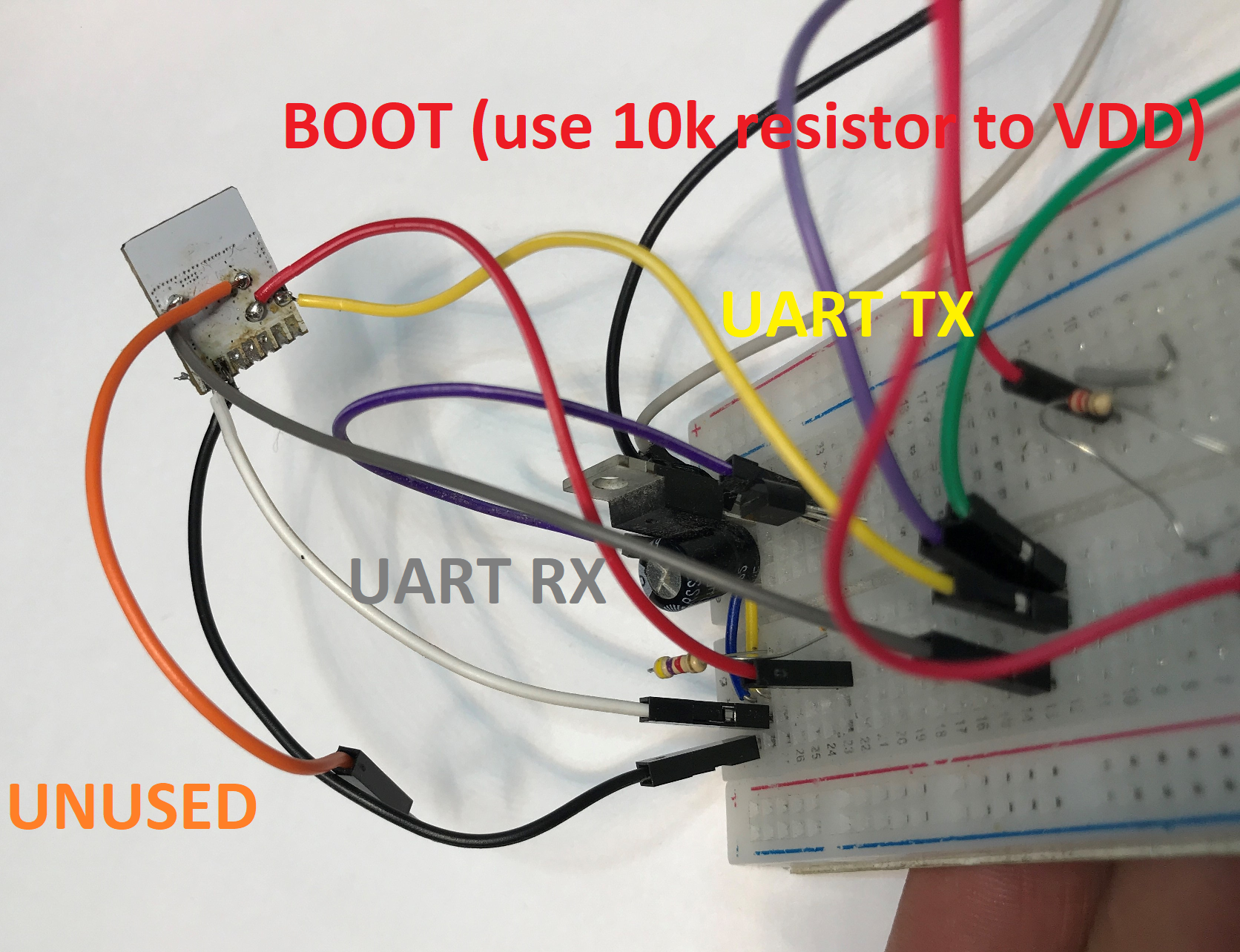
The BW2L flashing pads are on the back of the module, not on the exposed top side. The thread’s pinout image and follow-up wiring note show that you must use the rear pads assigned for BL602 flashing, which is exactly why the module gets removed first. The author directs readers to the BW2L backside pad map and to the linked BL602 flashing guide for the exact wire roles. In practice, the back-side access is the key physical requirement of this whole procedure. [#21475737]
How can I verify that a flashed BL602 bulb is working before I solder the module back into the eWeLink bulb?
Verify it by checking that the BL602 access point appears before resoldering the module. The author states this as a required checkpoint after flashing and before reinstalling the BW2L on the LED board. That test confirms the module still boots and the new firmware is alive, which helps you avoid reheating the lamp again if something failed. It is the fastest bench test in the thread and should happen before any final soldering. [#21475737]
What OBK GPIO template works for eWeLink BW2L RGBCW bulbs, and how do I map the PWM pins to the correct LED colors?
The working OpenBeken template uses five PWM-capable GPIOs: 2→PWM5, 3→PWM1, 14→PWM2, 20→PWM3, 21→PWM4. The thread says there are not many placement options because BW2L exposes no more than five available GPIOs for an RGBCW lamp. You still must identify which color each PWM channel drives, but the author reports both E14 and E27 bulbs used the same GPIO order. Later, he adds that the same template also worked on every eWeLink BW2L bulb found so far, including GU10. [#21486426]
How do eWeLink bulbs marked C3009 differ from Tuya bulbs with the same marking, and why is the EW model prefix more important?
C3009 is not a reliable identifier, while the EW- model prefix is. The author says C3009 also appears on Tuya bulbs, including units with a different LN882H-based design, so that marking can be ignored for this guide. By contrast, EW-A60-15W, EW-E14, and EW-GU10-E are the useful identifiers because they track the eWeLink family actually shown with BW2L hardware. If you want this flashing method, prioritize the eWeLink EW prefix over the shared C3009 board label. [#21475737]
What is BLDevCube, and how is it used to read, back up, and burn firmware on BL602 or BL702 devices?
"BLDevCube is a Bouffalo Lab flashing utility that reads, backs up, and burns firmware on BL602- and BL702-based devices through their programming pins." In the thread, the author links a dedicated BL602/BL702 guide and tells readers to use it for detailed wiring and flashing steps after soldering temporary wires to the BW2L pads. The intended use here is practical: back up the original flash first, then burn replacement firmware, then test that the module boots before reinstalling it in the bulb. [#21475737]
Why does the board under some eWeLink BW2L bulbs say CB2L, and what does that imply about earlier Beken-based variants?
It implies the hardware platform may have been reused from earlier Beken-oriented designs. The author notes an “interesting thing” that the board is marked CB2L, then comments that it “used to be a Beken chip.” A later reply expands that idea, saying the same bulb template and packaging appear across several variants, including one with a UAM022 Beken module. So the CB2L marking suggests board-family reuse, not a guarantee of the actual module currently fitted. [#21476028]
How does the eWeLink GU10 bulb compare with the EW-A60 and EW-E14 bulbs for flashing difficulty and module access?
The GU10 looks easier to flash than the EW-A60 and EW-E14 because it offers excellent access without full bulb teardown. When the EW-GU10-E arrived on March 19, 2025, the author reported it also used BW2L and looked like a “perfect GU10 bulb for flashing without full disassembly.” That is a stronger access claim than the earlier A60 and E14 write-up, where you still remove the dome and then desolder the module from the LED board. The same GPIO template also worked on the GU10. [#21486388]
What firmware was flashed onto the eWeLink Zigbee bulb with the BZ2L/BL702 module, and how well does it work for Zigbee control afterward?
The thread does not identify a flashed replacement firmware or confirm post-flash Zigbee performance. The only concrete Zigbee statement is that an eWeLink Zigbee bulb arrived with BZ2L and BL702, and a flash backup was posted. When another user later asked what firmware had been flashed and whether Zigbee still worked, the author did not name any flashed image. Instead, he said there is no real need to flash Zigbee versions if the goal is normal Zigbee use. [#21497991]
How should I handle an eWeLink Zigbee bulb with BZ2L and BL702 if I want to use it with Zigbee2MQTT instead of reflashing it?
Do not reflash it first; pair it directly with Zigbee2MQTT. The author answers this case clearly: there is “no real need” to flash Zigbee versions of IoT devices because they can already join Zigbee2MQTT without firmware changes. That makes the Zigbee bulb different from the Wi‑Fi BW2L/BL602 lamps in the same thread, where reflashing is the path to local control. If your goal is standard Zigbee operation, treat reflashing as unnecessary extra risk. [#21515396]
Which newer eWeLink devices still use ESP or ESP32 modules, and how do they compare with newer BL602 or Beken-based designs for custom firmware work?
The thread cites several newer or not-recent eWeLink devices with ESP-family chips, but the recent bulb trend discussed here favors BL602 or Beken variants. Examples mentioned include an eWeLink device with ESP32, a SONOFF/eWeLink basic breaker with ESP8285, and an ESP8285 85V–250V / USB5V switch. The author also says older eWeLink batches from about 5 years ago often used ESP, while newer batches he sees now frequently use non-ESP chips such as BL602, Beken, or even T34 in related brands. For custom firmware work, that means chip family now varies much more by product and manufacturing batch. [#21478103]








Comments
what a crazy coincidence, I got an EW-A60-15W recently too ;) This was the cause of a little pain for me because I couldn't seem to get the hot air temp right for it to free, even with additional... [Read more]
Which hot air station do you use? I've also had some issues due to, as said in first topic, the good heat dissipation of those boards. Even with soldering back the module, I had to clear up solder bridges... [Read more]
the basic 858D type. but I made a pb sausage before that and probably added too much additional solder. Should have stopped and wicked some off before hot air. I haven't done much/any testing. I did... [Read more]
858D is good, I've tested it here: https://openshwprojects.github.io/hotair/450c.html I've ordered this GU10 eWeLink and I already have one Tuya GU10 waiting for teardown. So we'll be able to make a... [Read more]
place your bets. BL602 on main PCB or small ESP module 🤔 or maybe BL602 small module not yet seen [Read more]
Why do you think ESP? Was there an instance of eWeLink device with ESP recently? I haven't seen anything like it. I've been getting eWeLink devices with ESP only in the past, like few years ago. I guess... [Read more]
https://www.elektroda.com/rtvforum/topic4099946.html While not a bulb, it does have an ESP32 module. [Read more]
I've these two. Not bulbs tho either SONOFF/eWeLink basic breaker ESP8285 https://obrazki.elektroda.pl/5353117500_1741867714_thumb.jpg https://obrazki.elektroda.pl/8104778600_1741867714_thumb.jpg... [Read more]
Interesting, eWeLink gateways were never a scope of my testing, so I may be wrong here. Altough much would also depend on the manufacturing date, because the old batches were certainly using ESP very often.... [Read more]
ah dunno. Matter bulbs? Sonoffs that may have CKW04 but I dont think I could find SDK, maybe I didn't look hard enough. eg https://www.elektroda.com/rtvforum/topic4086605.html https://github.com/openshwprojects/OpenBK7231T_App/issues/374 'Musical'... [Read more]
Matter bulbs seem to have a high risk of a locked ESP32, so that may not be efficient... Have you seen any "musical bulb" with mic/speaker that is WiFi-based, and not a Bluetooth one? G9 is a good idea,... [Read more]
probably https://www.aliexpress.com/item/1005005137735499.html https://obrazki.elektroda.pl/7493939500_1741904457_thumb.jpg [Read more]
Isn't it this bulb? [Read more]
oh yeh! maybe it changed. oh well Added after 3 [minutes]: I ordered B02-BL-A60 [Read more]
I don't know what went wrong, I did my best not to order duplicates, but I still got another 15W E27 eWeLink bulb today. I was sure that I ordered only one 15W, but second was 10W, but who knows... or... [Read more]
that's without MQTT or powersave which I'll enable now https://obrazki.elektroda.pl/9332939900_1742195057_thumb.jpg [Read more]
GU10 eWeLink bulb arrived, last time to place your bets - do you think it will be BW2L @divadiow ? [Read more]
I'm sticking to ESP [Read more]
EW-GU10-E , also marked as C3009 https://obrazki.elektroda.pl/3742209700_1742383358_thumb.jpg It has BW2L. Looks like a perfect GU10 bulb for flashing without full disassembly/ https://github... [Read more]