logo elektroda
logo elektroda
X
logo elektroda

- Instruction for an alarm clock with a ladybug - how to turn off the cyclical a

MES Mariusz 55446 12
ADVERTISEMENT
Treść została przetłumaczona polish » english Zobacz oryginalną wersję tematu
  • #1 17295132
    MES Mariusz
    Level 36  
    Posts: 5452
    Help: 8
    Rate: 222
    Hello.

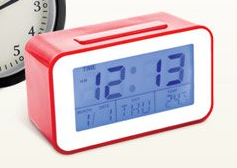
    I am looking for instructions for an alarm clock from Biedronka (model: 160019-EL):
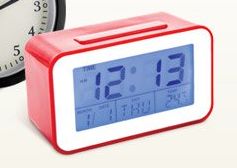
    - Instruction for an alarm clock with a ladybug - how to turn off the cyclical a

    The least intuitive "badziew" I had in my hand. I have no idea how to deactivate (turn off) the cyclical alarm clock.
    I'm looking for instructions. I am eager to write there how to do it.
  • ADVERTISEMENT
  • ADVERTISEMENT
  • #3 17295227
    MES Mariusz
    Level 36  
    Posts: 5452
    Help: 8
    Rate: 222
    I saw those from Conrad, but it is not the same. For me there is no bell button that activates / deactivates alarms.
    Soft and functions seem different.
  • ADVERTISEMENT
  • #4 17295526
    bubu1769
    Level 43  
    Posts: 8040
    Help: 1173
    Rate: 2344
    And what do you generally understand by the concept of a cyclical alarm?
  • #5 17295587
    MES Mariusz
    Level 36  
    Posts: 5452
    Help: 8
    Rate: 222
    Alarm clock (everyday, independent of the date. Because from what I guess, alarm clocks are two (cyclical, and on a specific date).
  • ADVERTISEMENT
  • Helpful post
    #6 17295629
    bubu1769
    Level 43  
    Posts: 8040
    Help: 1173
    Rate: 2344
    I found the instructions :D
    This watch has an alarm clock function and a funk reminder for birthdays on a given day.
    Attachments:
    • Zegar cyfrowy 1600 19-E-B.pdf (1.55 MB) You must be logged in to download this attachment.
  • #7 17295645
    MES Mariusz
    Level 36  
    Posts: 5452
    Help: 8
    Rate: 222
    "Squeeze 5 x set to reset the alarm", oh mother ... Developer had a fantasy ... A massacre ...
    I will check and let me know if it works :-)

    PS. How did you find this manual?
  • #8 17295649
    bubu1769
    Level 43  
    Posts: 8040
    Help: 1173
    Rate: 2344
    Google -> I typed the number you provided -> and some reference was to the hamster instructions :D
  • #9 17295652
    MES Mariusz
    Level 36  
    Posts: 5452
    Help: 8
    Rate: 222
    I after a few lines from the edge gave up (links to other clocks). In any case, congratulations and thanks!
  • #10 17295660
    bubu1769
    Level 43  
    Posts: 8040
    Help: 1173
    Rate: 2344
    I'm just giving up on the other side of Google :D
  • #11 18386509
    kwantor
    Level 38  
    Posts: 4263
    Help: 352
    Rate: 1225
    Thanks, for the shemat - what a wonderful service :)
  • #12 19069688
    Lukas.Troch
    Level 2  
    Posts: 2
    Rate: 24
    bubu1769 wrote:
    I found instructions :D
    This watch has an alarm clock function and a birthday reminder function for the day.


    Thanks for this instruction. I was just looking for how to turn off this alarm because it woke me up every night because I accidentally activated it, but how to turn it off was a massacre. Who with them came up with the idea of this 5x set, I don't know hehe. Regards ?
  • #13 21168218
    asikwojciechowska
    Level 1  
    Posts: 1
    Rate: 3
    Use the MODE button to enter the alarm settings and press 5x SET to deactivate the alarm.

Topic summary

✨ The discussion revolves around the Biedronka alarm clock model 160019-EL, with users seeking instructions on how to deactivate its cyclical alarm feature. Initial responses included links to similar products, but users noted differences in functionality. The cyclical alarm is described as an everyday alarm independent of specific dates. A user eventually found the manual, revealing that to deactivate the alarm, one must press the SET button five times after entering alarm settings using the MODE button. This unconventional method was met with frustration and humor from users.
Generated by the language model.

FAQ

TL;DR: 5 presses disable the daily alarm: "Use MODE, then press 5× SET to deactivate" [Elektroda, asikwojciechowska, post #21168218] For Biedronka’s “ladybug” clock (model 160019-EL), this FAQ shows how to stop unwanted beeps and manage date reminders [Elektroda, MES Mariusz, #17295132; Elektroda, bubu1769, #17295629].

Why it matters: It prevents surprise night alarms and clarifies a non-intuitive 5-press control.

Quick facts:

  • Model: 160019-EL (Biedronka “ladybug” alarm clock) [Elektroda, MES Mariusz, post #17295132]
  • Two functions: daily alarm and one-day birthday reminder [Elektroda, bubu1769, #17295629; Elektroda, MES Mariusz, #17295587].
  • To turn alarm off: MODE → Alarm screen → press SET 5× [Elektroda, asikwojciechowska, #21168218; Elektroda, MES Mariusz, #17295645].
  • If DCF-enabled: uses DCF77 at 77.5 kHz; works up to ~2,000 km from Mainflingen (DCF77).
  • Typical power for similar Conrad/TFA desk clocks: 2× AAA 1.5 V cells (Zegar cyfrowy DCF Conrad – instrukcja (PL); Zegar cyfrowy TFA – instrukcja (PL)).

Quick Facts

How do I turn off the cyclical (daily) alarm on the Biedronka 160019-EL?

Use the alarm menu, then the 5-press sequence.
  1. Press MODE until you enter the alarm settings screen.
  2. Press SET five times in a row.
  3. Return to the time display. This deactivates the daily alarm (“reset the alarm”) [Elektroda, asikwojciechowska, #21168218; Elektroda, MES Mariusz, #17295645].

Is there a dedicated bell button to toggle the alarm?

No. This model lacks a bell on/off button, so you must use the MODE + 5× SET workflow [Elektroda, MES Mariusz, #17295227; Elektroda, asikwojciechowska, #21168218].

How can I tell if the alarm is currently active?

Similar desk clocks show a bell or alarm indicator on the display when enabled (Zegar cyfrowy DCF Conrad – instrukcja (PL); Zegar cyfrowy TFA – instrukcja (PL)). Check after using the 5× SET sequence in the alarm screen [Elektroda, asikwojciechowska, post #21168218]

Where can I download a manual for 160019-EL or a close equivalent?

Search the model number on Google; that’s how users found related docs [Elektroda, bubu1769, post #17295649] Similar references: Conrad DCF and TFA clock manuals (functions overlap), though the OP noted differences [Elektroda, bubu1769, #17295217; Elektroda, MES Mariusz, #17295227]. See: Zegar cyfrowy DCF Conrad – instrukcja (PL); Zegar cyfrowy TFA – instrukcja (PL).

Does this clock support radio-controlled time (DCF77)?

Unconfirmed for 160019-EL. Linked Conrad/TFA manuals are DCF models; your unit may differ [Elektroda, bubu1769, #17295217; Elektroda, MES Mariusz, #17295227]. If DCF-enabled, it uses DCF77 at 77.5 kHz with ~2,000 km reach (DCF77).

What batteries does it use?

Check the battery compartment. Similar Conrad/TFA desk clocks use 2× AAA 1.5 V cells (Zegar cyfrowy DCF Conrad – instrukcja (PL); Zegar cyfrowy TFA – instrukcja (PL)). Replace when the display fades or buttons misbehave.

Can I snooze the alarm, and for how long?

If your unit offers Snooze, similar models use an approx. 5-minute interval (Zegar cyfrowy TFA – instrukcja (PL)). Snooze behavior may vary; confirm with your display and manual links [Elektroda, bubu1769, post #17295217]

How do I fully reset the clock if settings are stuck?

Similar Conrad/TFA models offer a RESET button or full power-off to clear time and alarms (Zegar cyfrowy DCF Conrad – instrukcja (PL); Zegar cyfrowy TFA – instrukcja (PL)). If present, use RESET; otherwise remove batteries briefly.

Which retailers or brands have similar models I can reference?

This unit is from Biedronka (model 160019-EL) [Elektroda, MES Mariusz, post #17295132] Users referenced Conrad and TFA manuals for overlapping features, but not identical firmware [Elektroda, bubu1769, #17295217; Elektroda, MES Mariusz, #17295227].
Generated by the language model.
ADVERTISEMENT