
logo elektroda
logo elektroda
X
logo elektroda
Dostępna jest polska wersja

Czy wolisz polską wersję strony elektroda?

Nie, dziękuję Przekieruj mnie tam

7012B mp5 radio - Updated firmware and nothing but black screen...

Bokey 35253 17
ADVERTISEMENT
  • #1 18601788
    Bokey
    Level 1  
    I updated the firmware on my 7012B mp5 player and now it has a black screen... what do I do?
  • ADVERTISEMENT
  • #2 18652558
    Tiziano27
    Level 1  
    Bokey wrote:
    I updated the firmware on my 7012B mp5 player and now it has a black screen... what do I do?

    Hello, I have the same problem. Have you solved the problem?
    Somebody can help me???
    Thanks to all
  • #3 18858143
    crealster
    Level 2  
    If this happened after an update you bricked the unit and must flash the BIOS with the correct bin file.

    Dodano po 4 [godziny] 1 [minuty]:

    This is a dump for 7012B (CF-5201MB-C200S-12V 2019.05.22 REV:02)
    Attachments:
    • 7012b.bin (8 MB) You must be logged in to download this attachment.
  • #4 18896099
    pilito2013
    Level 1  
    alguém por favor tem a última atualização dele, o meu é de 2018, e está tudo travado?
  • ADVERTISEMENT
  • #5 18913497
    shterionov
    Level 1  
    crealster wrote:
    If this happened after an update you bricked the unit and must flash the bios with the correct bin file.

    Dodano po 4 [godziny] 1 [minuty]:

    This is a dump for 7012B (CF-5201MB-C200S-12V 2019.05.22 REV:02)


    hi probably a long time since the comment but how should the bin file be installed ?
  • #6 18940324
    greatnick89
    Level 1  
    Hello. I need this dump in img format.
    Can You Help me?
  • #7 18981404
    Repkin Alexey
    Level 1  
    Спасибо!
  • #8 18997178
    Geomi
    Level 1  
    Hello, I updated 7012bi, put the file on a blank SD card, inserted it, and pressed update. Worked good and changed my settings a bit.
  • ADVERTISEMENT
  • #9 19051768
    CBRTricolor
    Level 1  
    GearBest Update is f..... us all... Black screen after update.. How can I put that bin? How to flash BIOS in this radio?

    Thanks
  • #10 19130912
    crealster
    Level 2  
    shterionov wrote:
    crealster wrote:
    If this happened after an update you bricked the unit and must flash the bios with the correct bin file.

    Dodano po 4 [godziny] 1 [minuty]:

    This is a dump for 7012B (CF-5201MB-C200S-12V 2019.05.22 REV:02)


    hi probably a long time since the comment but how should the bin file be installed ?


    You will have to flash the unit with a programmer. A CH341A Programmer works fine.
  • #11 19714248
    bob_Marley
    Level 1  
    Just made an account here to say that the above solution works! Follow a guide for the CH341A and flash the .bin and it boots again..
  • ADVERTISEMENT
  • #12 19794386
    williamhowe328
    Level 1  
    need help myself
    HD MP5 I installed
    soft version: V7.52BT-FK-TP
    info: ZCD-7089-6905C-IC
    MCU: V04.57

    I can't P-Link and when I use USB with my iPhone 12, it will say CONNECT IN and do nothing.
  • #14 20071963
    kostasfilias
    Level 1  
    Is there any software update on 7012B? can't find anything
  • #15 20072127
    crealster
    Level 2  
    kostasfilias wrote:
    Is there any software update on 7012B? Can't find anything


    Nothing that's worth the risk.
  • #16 21143486
    samvideoproducoess
    Level 1  
    usei um imagens errada no meu mp5

    Added after 57 [seconds]:

    como faço para corrigir
    v7.52bt-fk-tp

    Added after 39 [seconds]:

    sumiu tudo
  • #17 21143672
    damiancz
    Moderator of Car Radios
    Archived topic - discussion has not taken place for over a year. Only add a reply if you have advice to add.
  • #18 21317566
    memish
    Level 11  
    hello friends,
    I need software for MP5 Player.
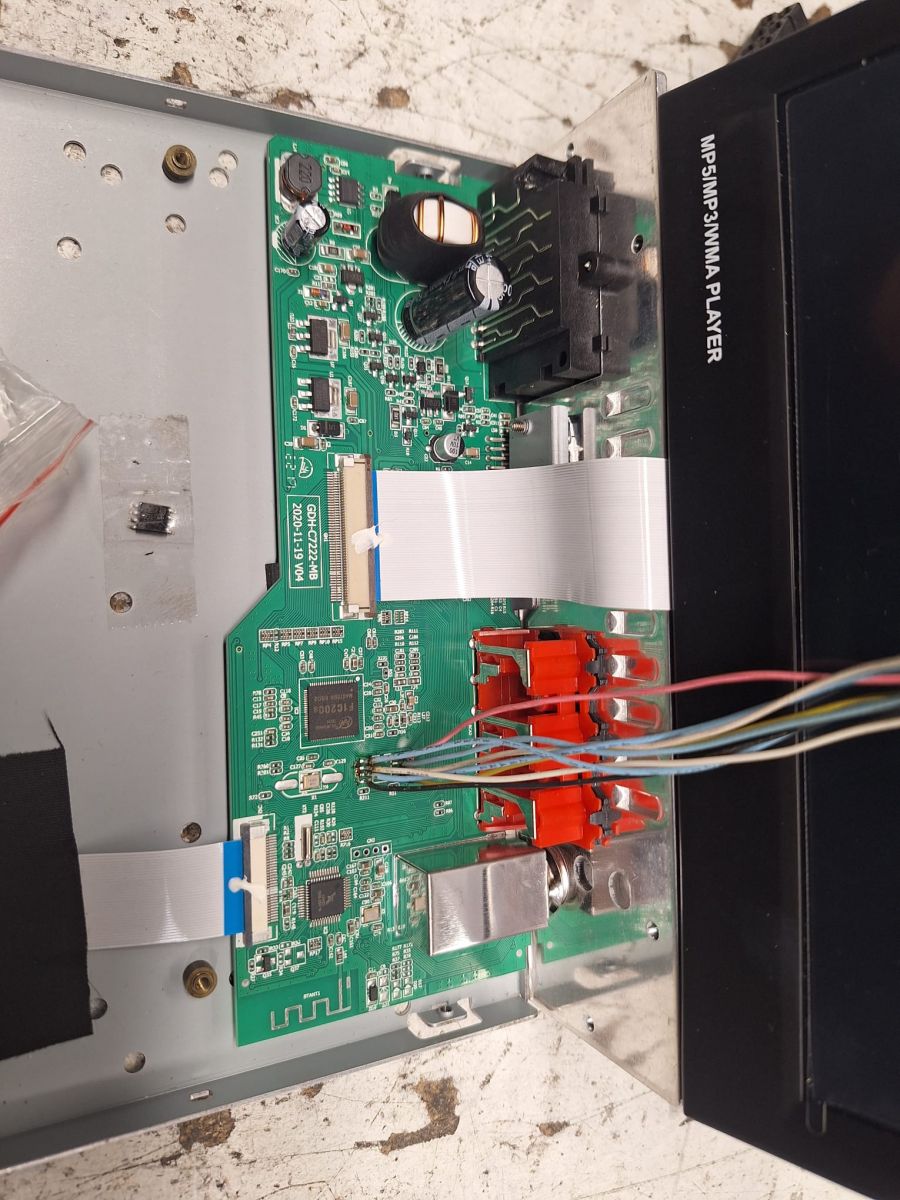
    Main board: GDH-C7222-MB.
    Flash: 25L6436 MP5 player motherboard labeled GDH-C7222-MB.

Topic summary

✨ Users reported that updating the firmware on the 7012B MP5 player often results in a black screen, effectively bricking the device. The primary solution involves reflashing the BIOS using the correct .bin firmware file. This process typically requires a hardware programmer such as the CH341A to flash the unit's BIOS chip directly. Some users requested firmware dumps in .img format and guidance on installing the .bin files. Attempts to update via SD card or USB have mixed results, with some reporting success and others experiencing device freezes or black screens. Additional related hardware includes mainboards like GDH-C7222-MB and flash memory chips such as 25L6436. The discussion also references software versions like V7.52BT-FK-TP and MCU version V04.57. Users caution about the risks of incorrect firmware images causing complete system failure.

FAQ

TL;DR: After a failed update, 7012B black screens often need the 2019.05.22 REV:02 dump; "must flash the BIOS with the correct bin file." Hardware flashing restores the unit. [Elektroda, crealster, post #18858143]

Why it matters: This FAQ helps owners of 7012B/HD MP5 head units unbrick black screens and avoid risky firmware updates.
Quick Facts

How do I fix a 7012B that shows a black screen after firmware update?

The update bricked the unit. You need to flash its SPI BIOS with a hardware programmer. "A CH341A Programmer works fine." Use a correct .bin that matches your exact board revision. This method restores the display and boot sequence. [Elektroda, crealster, post #19130912]

How do I flash the .bin to the radio with a CH341A?

  1. Open the unit and attach an SOIC8 clip from the CH341A to the SPI flash at 3.3 V.
  2. Read and back up the original contents, then erase the chip.
  3. Write the correct .bin, verify, reassemble, and power up. Follow a standard CH341A guide while matching your board’s dump. [Elektroda, crealster, post #19130912]

Where can I find a working 7012B firmware dump?

A shared dump targets 7012B with CF-5201MB-C200S-12V, dated 2019.05.22, REV:02. Match your board before writing. Using a mismatched image can break features or brick again. Verify IDs on the PCB silkscreen and use the exact dump. [Elektroda, crealster, post #18858143]

The GearBest update bricked my radio. What should I do next?

Recover by flashing the correct .bin with a hardware programmer. Use a CH341A and verify the write. This fixes black screens caused by wrong or unsafe update packages. Do not attempt more SD updates on a non-booting unit. [Elektroda, crealster, post #19130912]

Is there any safe software update for the 7012B?

"Nothing that’s worth the risk." Many units differ internally, so a random update can brick them. Only update if you have a board-matched package and a verified recovery method. Otherwise, leave a working unit as is. [Elektroda, crealster, post #20072127]

Can I update the 7012B via SD card instead of opening it?

Some units accept SD updates successfully, and one user reported a normal update with minor setting changes. If the unit is already black-screened, SD updates will not help; use a programmer. Always confirm the file matches your board. [Elektroda, Geomi, post #18997178]

My 2018 unit is frozen. Is there a latest update I should install?

Do not chase a generic “latest” update. These devices vary by board and display drivers. Without a board-matched package, you risk another brick. The practical advice is to avoid updates unless needed and fully recoverable. [Elektroda, crealster, post #20072127]

Which versions have reported USB issues like P‑Link with iPhone?

A user with Soft V7.52BT-FK-TP, Info ZCD-7089-6905C-IC, MCU V04.57 saw “CONNECT IN” and no function with iPhone 12. The thread shows no fix. Use Bluetooth audio or alternate inputs if USB integration fails. [Elektroda, williamhowe328, post #19794386]

I used the wrong image and everything disappeared (sumiu tudo). How do I recover?

Reflash a matching .bin with a programmer and verify the write. Wrong images wipe partitions or break features. Identify your board and only use its exact dump to restore the system. Back up whatever remains before writing. [Elektroda, crealster, post #19130912]

Can I get the dump in .img format instead of .bin?

Use the .bin with your CH341A software. A confirmed recovery used a .bin and the unit booted again. .img is not required for hardware flashing, which writes raw SPI contents. [Elektroda, bob_Marley, post #19714248]

How do I identify my exact board to avoid the wrong firmware?

Open the device and read the PCB silkscreen and flash chip. Example: GDH-C7222-MB with a 25L6436 SPI flash was reported. Match dumps to these identifiers to prevent mismatches and feature loss. [Elektroda, memish, post #21317566]

Can I unbrick without opening the radio?

No. A black screen after an update indicates the boot flash needs rewriting. Use a hardware programmer on the SPI flash. Software-only methods work only if the device still boots to update mode. [Elektroda, crealster, post #19130912]

What risks or edge cases should I watch for during recovery?

Using a wrong image can erase functions or leave a blank system. One report noted “sumiu tudo” after flashing the wrong images. Always confirm board ID and version before writing any dump. [Elektroda, samvideoproducoess, post #21143486]

Does flashing actually work for people here?

Yes. A user followed a CH341A guide, flashed the .bin, and the unit booted again. This confirms the hardware-flash path works when the correct dump is used. [Elektroda, bob_Marley, post #19714248]
ADVERTISEMENT
