logo elektroda
logo elektroda
X
logo elektroda

Removing Trojan: Wirus Behavior Win32/Hive.ZY - Step-by-Step Guide & Tips

Kenzi2004 10752 11
ADVERTISEMENT
Treść została przetłumaczona polish » english Zobacz oryginalną wersję tematu
  • #1 20174477
    Kenzi2004
    Level 4  
    Posts: 25
    Rate: 3
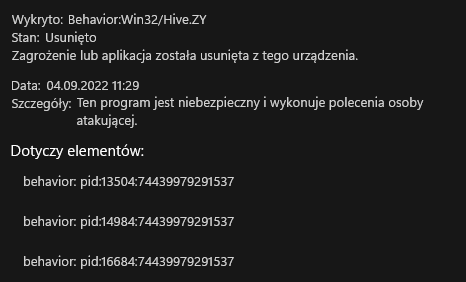
    How can I remove this Trojan? Removing Trojan: Wirus Behavior Win32/Hive.ZY - Step-by-Step Guide & Tips every now and then it shows up and disappears.
    Attachments:
    • FRST.txt (57.15 KB) You must be logged in to download this attachment.
    • Addition.txt (65.73 KB) You must be logged in to download this attachment.
  • ADVERTISEMENT
  • #2 20174504
    Kolobos
    IT specialist
    Posts: 85152
    Help: 17159
    Rate: 10419
    Masz podany pid na screenie, zobacz w Process Explorer co to za procesy.

    Zrob skan przy pomocy mbam i usun to co wykryje.

    Co masz w tym katalogu: C:\Users\piotr\opera.exe?

    Fixlist.txt:
    CustomCLSID: HKU\S-1-5-21-3038905591-2620332228-2955037719-1001_Classes\CLSID\{23aaa06e-abab-4e7e-a0ac-6982ed6a6041}\localserver32 -> C:\Users\piotr\AppData\Local\GamerHash\GamerHashLauncher.exe => Brak pliku
    AlternateDataStreams: C:\ProgramData\rsEngine.config.backup:CF02139FF4 [3442]
    AlternateDataStreams: C:\ProgramData\WindowsHook.exe:18D95AD24A [3442]
    AlternateDataStreams: C:\ProgramData\Microsoft\Windows\Start Menu\desktop.ini:B1DA6C571C [3442]
    AlternateDataStreams: C:\ProgramData\Microsoft\Windows\Start Menu\Programs\desktop.ini:41964AA945 [3442]
    AlternateDataStreams: C:\ProgramData\Microsoft\Windows\Start Menu\Programs\Epic Games Launcher.lnk:BE32D07BC5 [3442]
    AlternateDataStreams: C:\ProgramData\Microsoft\Windows\Start Menu\Programs\GIMP 2.10.32.lnk:BFDD4D0564 [3442]
    AlternateDataStreams: C:\ProgramData\Microsoft\Windows\Start Menu\Programs\Malwarebytes.lnk:C5D586BE93 [3442]
    AlternateDataStreams: C:\ProgramData\Microsoft\Windows\Start Menu\Programs\Mobirise.lnk:B91EF75835 [3442]
    AlternateDataStreams: C:\ProgramData\Microsoft\Windows\Start Menu\Programs\Notepad++.lnk:159ADC9AA1 [3442]
    AlternateDataStreams: C:\ProgramData\Microsoft\Windows\Start Menu\Programs\SideQuest.lnk:CAA93E51EC [3442]
    AlternateDataStreams: C:\ProgramData\Microsoft\Windows\Start Menu\Programs\Visual Studio Installer.lnk:C2E9D79AC5 [3442]
    HKLM-x32\...\Run: [SunJavaUpdateSched] => C:\Program Files (x86)\Common Files\Java\Java Update\jusched.exe [711328 2022-06-16] (Oracle America, Inc. -> Oracle Corporation)
    HKU\S-1-5-21-3038905591-2620332228-2955037719-1001\...\Run: [Opera GX Stable] => C:\Users\piotr\AppData\Local\Programs\Opera GX\launcher.exe [2474448 2022-09-01] (Opera Norway AS -> Opera Software)
    HKU\S-1-5-21-3038905591-2620332228-2955037719-1001\...\Run: [Opera GX Browser Assistant] => C:\Users\piotr\AppData\Local\Programs\Opera GX\assistant\browser_assistant.exe [3291288 2021-02-01] (Opera Software AS -> Opera Software)
    HKU\S-1-5-21-3038905591-2620332228-2955037719-1001\...\Run: [MicrosoftEdgeAutoLaunch_102D77BE86092CD11F3B00AB05EA0725] => "C:\Program Files (x86)\Microsoft\Edge\Application\msedge.exe" --no-startup-window --win-session-start /prefetch:5 [3795360 2022-09-02] (Microsoft Corporation -> Microsoft Corporation)
    GroupPolicy: Ograniczenia ? C:\Users\piotr\AppData\Local\Programs\Opera GX\launcher.exe [2474448 2022-09-01] (Opera Norway AS -> Opera Software) -> --scheduledautoupdate --component-name=assistant --component-path="C:\Users\piotr\AppData\Local\Programs\Opera GX\assistant" $(Arg0)
    Task: {F2CC2531-76BA-45F7-8478-88D684F7A1EA} - System32\Tasks\Opera GX scheduled Autoupdate 1651281726 => C:\Users\piotr\AppData\Local\Programs\Opera GX\launcher.exe [2474448 2022-09-01] (Opera Norway AS -> Opera Software)
    2022-06-16 17:30 - 2022-07-28 16:54 - 000263168 _____ () C:\ProgramData\WindowsHook.exe
  • ADVERTISEMENT
  • #3 20174606
    wilczek12322
    Level 1  
    Posts: 1
    Rate: 1
    I'm getting this from today too? Do you know how to solve it?
  • ADVERTISEMENT
  • #4 20174635
    Kolobos
    IT specialist
    Posts: 85152
    Help: 17159
    Rate: 10419
    Probably some false alarm.
  • #5 20174781
    Anonymous
    Level 1  
  • #6 20174783
    W.W
    Level 12  
    Posts: 43
    Help: 1
    Rate: 9
    False alarm showing after latest Microsoft Defender update, need to wait for new update.
  • #7 20174794
    sendiiiiii
    Level 1  
    Posts: 1
    Rate: 1
    It also pops up for me, every now and then a notification and when I click on it, in the settings you can see the virus for 5 seconds and it disappears over and over again. So there's nothing to worry about?
  • ADVERTISEMENT
  • #8 20174863
    ZiPeK25
    Level 9  
    Posts: 9
    Rate: 1
    This is a Windows Defender virus definition update error. We have to wait for Microsoft's reactions and updates. More info is on Reddit
  • #9 20175043
    hvbix1489
    Level 1  
    Posts: 1
    Rate: 1
    so there's nothing to be afraid of? can I get a link to this reddit?
  • #11 20175901
    gulson
    System Administrator
    Posts: 29231
    Help: 148
    Rate: 5984
    Lots of people visit here.

    hvbix1489 wrote:
    so there's nothing to be afraid of? can i get a link to this reddit?

    There is nothing to be afraid of and the next update solves the problem.
  • #12 20176313
    LeDy
    Level 43  
    Posts: 19001
    Help: 1981
    Rate: 2898
    I had this too and wrote a topic but at the moment I turn it on and nothing came up.
    Has there been a fix?
    The fix came out, for me at 16.41 and after the problem.

Topic summary

✨ The discussion revolves around the Trojan Win32/Hive.ZY, which users report as intermittently appearing and disappearing, often flagged by Windows Defender. Initial responses suggest checking processes using Process Explorer and running scans with Malwarebytes (mbam) to remove detected threats. Some users speculate that the alerts may be false positives resulting from a recent Windows Defender update, with many experiencing similar issues. Links to external resources indicate that the problem is widely recognized and that a fix is anticipated in future updates. Overall, users are reassured that there is no immediate cause for concern regarding the Trojan's presence.
Generated by the language model.

FAQ

TL;DR: "The fix came out, for me at 16:41"—one Defender update cleared Behavior:Win32/Hive.ZY alerts. This FAQ shows how to update, verify processes, and scan if needed. [Elektroda, LeDy, post #20176313]

Why it matters: For Windows Defender users seeing recurring Hive.ZY pop-ups, this clarifies it’s a false positive and how to resolve it fast.

Quick Facts

  • Root cause: a faulty Defender intelligence update triggered false positives; Microsoft rolled out a corrected update the same day. ["Windows Defender is reporting a false positive threat Behavior:Win32/Hive.ZY — it's nothing to be worried about"]
  • Symptom: notifications repeat, and the entry vanishes from History after ~5 seconds. [Elektroda, sendiiiiii, post #20174794]
  • Resolution: install the next Defender update; “There is nothing to be afraid of and the next update solves the problem.” [Elektroda, gulson, post #20175901]
  • Thread consensus: “False alarm showing after latest Microsoft Defender update, need to wait for new update.” [Elektroda, W.W, post #20174783]
  • Extra assurance: run Malwarebytes (MBAM) and remove anything detected; check PIDs with Process Explorer. [Elektroda, Kolobos, post #20174504]

What is "Behavior:Win32/Hive.ZY" in Windows Defender?

It’s a behavior-based detection name used by Microsoft Defender. On September 4, 2022, a bad definition update caused widespread false positives for this signature. Microsoft shipped a corrected intelligence update later that day to stop the alerts. ["Windows Defender is reporting a false positive threat Behavior:Win32/Hive.ZY — it's nothing to be worried about"]

Is the Hive.ZY alert a real virus or a false positive?

It’s a false positive linked to a recent Defender update. As one expert noted, “False alarm showing after latest Microsoft Defender update, need to wait for new update.” Install the latest Defender intelligence update and the pop-ups should stop. [Elektroda, W.W, post #20174783]

Why does the alert appear and then disappear from History?

Affected users report the item shows in Windows Security for about 5 seconds, then disappears. That transient entry reflects the false-positive behavior and not an active infection. Update Defender to the latest intelligence to resolve. [Elektroda, sendiiiiii, post #20174794]

How do I fix or remove "Behavior:Win32/Hive.ZY" pop-ups?

Update Microsoft Defender’s intelligence to the latest version.
  1. Open Windows Security > Virus & threat protection > Protection updates.
  2. Select Check for updates and install the latest definitions.
  3. Restart the PC or Defender, then re-open apps and re-check. This cleared the false alerts for users. ["Windows Defender is reporting a false positive threat Behavior:Win32/Hive.ZY — it's nothing to be worried about"]

Can I safely ignore the notifications while waiting for the fix?

Yes. The thread confirms it’s a false alarm tied to a definition issue. As one moderator stated, “There is nothing to be afraid of and the next update solves the problem.” Keep Defender enabled and update when prompted. [Elektroda, gulson, post #20175901]

Should I run Malwarebytes or other scanners just in case?

If you want extra assurance, run Malwarebytes (MBAM) and remove anything it detects. This is optional for the Hive.ZY false positive, but it’s a good sanity check. Update Defender afterward and observe if alerts stop. [Elektroda, Kolobos, post #20174504]

How can I tell which process triggered the alert (PID)?

Match the PID from the Defender notification with the process in Process Explorer. Verify the full file path. Investigate unusual locations, such as an unexpected executable in your user folder. Remove or scan any suspicious files you find. [Elektroda, Kolobos, post #20174504]

When did Microsoft push the fix?

Community reports indicate the corrected update landed later that day. One user wrote, “The fix came out, for me at 16.41 and after the problem.” After installing, the pop-ups stopped. [Elektroda, LeDy, post #20176313]

Which actions most commonly triggered the Hive.ZY pop-ups?

Many reports tied the false alert to launching web browsers and everyday apps. The Defender definition error caused benign processes to be flagged until the corrected update arrived. Update definitions to stop the behavior. ["Windows Defender is reporting a false positive threat Behavior:Win32/Hive.ZY — it's nothing to be worried about"]

What if the alert continues even after updating Defender?

Treat that as an edge case. Verify with Process Explorer and run a Malwarebytes scan. Remove anything detected. If detections persist, investigate the specific process path and consider professional support. [Elektroda, Kolobos, post #20174504]

Is my data at risk from this specific false positive?

No. The issue stems from an incorrect Defender intelligence update, not an actual Trojan. After updating the definitions, the false alerts cease, and no compromise is indicated. Keep real-time protection enabled. ["Windows Defender is reporting a false positive threat Behavior:Win32/Hive.ZY — it's nothing to be worried about"]

Where can I read more or confirm ongoing status?

See the linked coverage and community thread. The post includes Windows Central’s article and a related Reddit discussion tracking the issue and resolution. [Elektroda, ThethaETX, post #20175054]

When did the spike in alerts start for users?

Reports began around noon local time on September 4, 2022. Users described continuous Defender notifications starting “since 12 o’clock,” until the corrected update rolled out. [Elektroda, Anonymous, post #20174781]
Generated by the language model.
ADVERTISEMENT