


logo elektroda
logo elektroda
X
logo elektroda

Brak Możliwości Aktualizacji Windows 10: Addressing Update Issues

s77050634 1437 13
ADVERTISEMENT
  • #1 20814085
    s77050634
    Level 2  
    Posts: 3

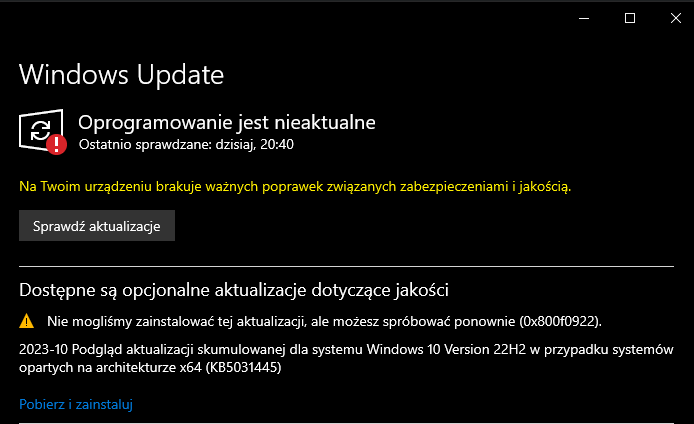
    Screenshot of the Windows Update section showing the software is outdated and missing important security and quality updates.

    Witam, posiadam problem taki jak wyżej - Brak możliwości aktualizacji Windowsa 10, jest tak już od dobrego miesiąca, próbowałem wszystkiego, wpisywałem jakieś różne kody błędów, które wyskakiwały i nic, również wpisywałem "Na Twoim urządzeniu brakuje ważnych poprawek związanych zabezpieczeniami i jakością.", ale to również nie pomogło, co robić?
  • ADVERTISEMENT
  • #2 20824315
    konsum
    Level 27  
    Posts: 1496
    Help: 99
    Rate: 289
    What interesting thing did you find from the error code?
  • #3 20824355
    sq3evp
    Level 39  
    Posts: 6340
    Help: 210
    Rate: 833
    Here is a description of the probable causes of the origin and repair of the Windows 10 error - 0x800f0922 update error
  • ADVERTISEMENT
  • #4 20826487
    s77050634
    Level 2  
    Posts: 3

    I tried everything, I will add from myself that I also formatted the system, at first everything seemed fine, unfortunately after restarting the computer, again failed to do the update
  • #5 20827099
    Kolobos
    IT specialist
    Posts: 85152
    Help: 17158
    Rate: 10418
    Download manually and try to install.
  • ADVERTISEMENT
  • #6 20827133
    s77050634
    Level 2  
    Posts: 3
    What do you have in mind?
  • #7 20827200
    konsum
    Level 27  
    Posts: 1496
    Help: 99
    Rate: 289
    You have the update number, look for it on the MS website
  • ADVERTISEMENT
  • #9 20827286
    sq3evp
    Level 39  
    Posts: 6340
    Help: 210
    Rate: 833
    Gentlemen, sometimes it is worth fixing the problem with WinUpdate - if there is a problem with the service, it may also crash manually.
    Even SCCM will not cope if the service does not work properly on the computer, even though the installation is done using Power Shell scripts.
  • #10 20827294
    marshall7
    Level 13  
    Posts: 138
    Help: 7
    Rate: 16

    My WinUpdate unfortunately did not help in some situations. Interestingly, this version of Windows turned out to be defective. Only after reinstalling to another one it started working...
  • #11 20827325
    sq3evp
    Level 39  
    Posts: 6340
    Help: 210
    Rate: 833
    You talk interestingly - what could be defective?
    Only some libraries, as long as you don't have a situation where reinstallation is a problem, you can create a new system as a shortcut.
  • #12 20827376
    marshall7
    Level 13  
    Posts: 138
    Help: 7
    Rate: 16
    sq3evp wrote:
    You talk interestingly - what could be defective?


    I have no clue about purple. After a long fight, I gave up because it was faster for me to upload the new system...
    Anyway, it annoyed me so much that I think I switched to Linux...
  • #13 20827701
    sq3evp
    Level 39  
    Posts: 6340
    Help: 210
    Rate: 833
    marshall7 wrote:

    Anyway, it annoyed me so much that I think I switched to Linux...


    And so it happens :)
    A friend of mine told how his father, who was constantly messing around with Windows, installed Lunix and he was fine - his father didn't play games, he only used the browser for movies and browsing websites, and both of them were happy.
  • #14 20827889
    marshall7
    Level 13  
    Posts: 138
    Help: 7
    Rate: 16
    Because unless someone is forced (for example by work) to use Windows applications, I see no reason why they should insist on using Windows, which will sooner or later start to fidget. If only because he doesn't grimace :D

    Not to stray too far from the topic, formality: author, maybe switch to Linux? :D

Topic summary

✨ The discussion revolves around a user experiencing persistent issues with Windows 10 updates, specifically the inability to update for over a month. Despite attempts to resolve the problem through various error codes and even formatting the system, the issue remains unresolved. Suggestions from other participants include manually downloading updates from the Microsoft Update Catalog, checking for service issues with Windows Update, and considering a complete reinstallation of the operating system. Some users also mention switching to Linux as a viable alternative due to frustrations with Windows update failures.
Generated by the language model.

FAQ

TL;DR: Windows 10 22H2 is the final version; support ends 14 Oct 2025. "Windows 10, version 22H2 is the final version..." To fix "can't update" errors like 0x800f0922, identify the KB and use Microsoft's update page for details and direct downloads. ["Windows 10, version 22H2 update history"]

Why it matters: This helps Windows 10 users who can’t install updates diagnose errors fast and apply the right fix.

Quick Facts

  • Windows 10, version 22H2 receives security updates through 14 Oct 2025; check known issues before retrying. ["Windows 10, version 22H2 update history"]
  • Manual installs use standalone .msu packages from Microsoft Update Catalog; match the exact KB and architecture. ["Microsoft Update Catalog"]
  • Error 0x800f0922 is linked to causes detailed in the guidance shared in-thread; follow that repair flow. [Elektroda, sq3evp, post #20824355]
  • If the Windows Update service is faulty, manual installs and even SCCM deployments can still fail. [Elektroda, sq3evp, post #20827286]
  • Typical cumulative update downloads are approx. 300–900 MB for x64 packages; ensure enough bandwidth and space. ["Microsoft Update Catalog"]

How do I fix Windows 10 update error 0x800f0922?

0x800f0922 indicates the update failed. Start with the Microsoft guidance linked in the thread, which outlines causes and repairs. Follow the recommended checks, then retry the update. If needed, proceed with a manual install of the specific KB after reviewing its notes. [Elektroda, sq3evp, post #20824355]

What did “download manually” mean in this thread?

It means installing the specific update outside Windows Update using Microsoft’s standalone package. Use the update’s KB number to find and download the correct installer directly, then run it as administrator. This bypasses the standard Windows Update pipeline. [Elektroda, Lukas6432, post #20827212]

Where do I manually download a Windows 10 update (KB)?

Use Microsoft Update Catalog. How-To: 1. Note the failed update’s KB number. 2. Search that KB on Microsoft Update Catalog and pick your OS/architecture (x64, x86, ARM64). 3. Download the .msu and run it, then restart if prompted. ["Microsoft Update Catalog"]

Why might a manual .msu install still fail?

A broken Windows Update service can break manual installs too. "Even SCCM will not cope if the service does not work properly." Fix the Windows Update service first, then retry manual installation. This prevents repeated failures across methods. [Elektroda, sq3evp, post #20827286]

I reinstalled Windows, and updates still fail—what next?

That suggests a persistent issue beyond user data. Capture the exact error code shown by Windows Update. Share it when asking for help and align your fix to that code’s guidance. Then try a targeted reinstall of the specific KB. [Elektroda, s77050634, post #20826487]

Are there known issues with the latest cumulative update?

Yes. Review the Windows 10, version 22H2 update history page. It lists each month’s KB, known issues, and any required steps or workarounds. Use those notes before retrying your install. ["Windows 10, version 22H2 update history"]

How large are typical updates, and which file do I choose?

Cumulative update .msu files are typically 300–900 MB for x64. Choose the package that matches Windows 10 22H2 and your architecture (x64 or ARM64). Prefer entries labeled Cumulative Update for Windows 10 Version 22H2. ["Microsoft Update Catalog"]

Can SCCM or PowerShell installs bypass Windows Update errors?

Not if the local Windows Update service is misconfigured or failing. "Even SCCM will not cope if the service does not work properly." Repair the service first, then deploy via SCCM or PowerShell. [Elektroda, sq3evp, post #20827286]

What should I check before trying the update again?

Run the Windows Update Troubleshooter, then reboot. Ensure stable internet, correct date and time, and sufficient free disk space. Temporarily disable VPNs or proxies. Retry Windows Update, and if needed, use the specific KB’s .msu from Microsoft. ["Troubleshoot problems updating Windows"]

How do I find the error code for a failed update?

Open Settings > Windows Update > Update history to view failed attempts and codes. Capture the exact code (for example, 0x800f0922) and the KB number. Use that info to pick the right fix or manual package. ["Troubleshoot problems updating Windows"]

Is reinstalling Windows always the fix for update problems?

No. One user resolved issues only after installing a different Windows build. Another reported formatting didn’t help. Reinstalling can work, but target the root cause first to avoid repeated reinstalls. [Elektroda, marshall7, post #20827294]

Should I consider Linux if Windows Update keeps failing?

If you don’t rely on Windows-only apps, Linux can be simpler to maintain. A user suggested switching when updates became frustrating, especially for browsing and media use cases. [Elektroda, marshall7, post #20827889]

What details help others diagnose my update failure?

Share the exact error code and the KB number. This lets helpers map fixes precisely to your failure. It avoids generic advice and speeds resolution. [Elektroda, konsum, post #20824315]

How do I pick the right file in Microsoft Update Catalog?

Match OS version (Windows 10 22H2), architecture (x64 or ARM64), and the exact KB. Check the Release Date and choose the latest cumulative update for your build. Then download the .msu and install. ["Microsoft Update Catalog"]
Generated by the language model.
ADVERTISEMENT