Where can I get the correct firmware for a Hitachi TV with a Vestel 17MB170E mainboard and VES415QNDR-N2-N41 panel, given that it is stuck in a “memory full” reboot loop?
You cannot safely use a generic firmware link for this set; on Vestel 17MB170E the rescue package must match the exact product/type code, brand configuration, and panel string VES415QNDR-N2-N41, because mismatched files can brick the TV or give no picture [#21845604][#21846220] The “memory full” loop is described as likely eMMC data-partition corruption, so a normal reset usually will not fix it; the proper fix is the full rescue USB package for the exact model, not unrelated 17MB186 or 17MB70 software [#21845604][#21846220] The thread repeatedly asks for the rear-label commercial model, the 8-digit Product/Type code, the mainboard barcode, and the region before any download link can be identified [#21845604][#21846237] One post also notes a mismatch in the thread between a 65HAK5350 claim and the earlier photos showing a VES415QNDR-N2-N41 panel, so the actual TV/panel combination must be confirmed first [#21846220][#21846237]
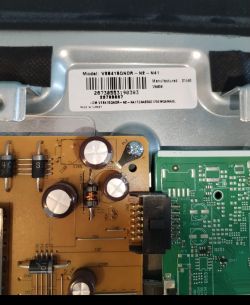
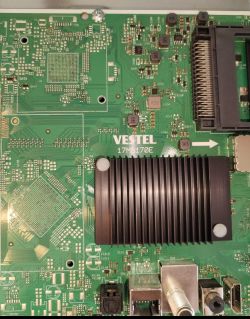
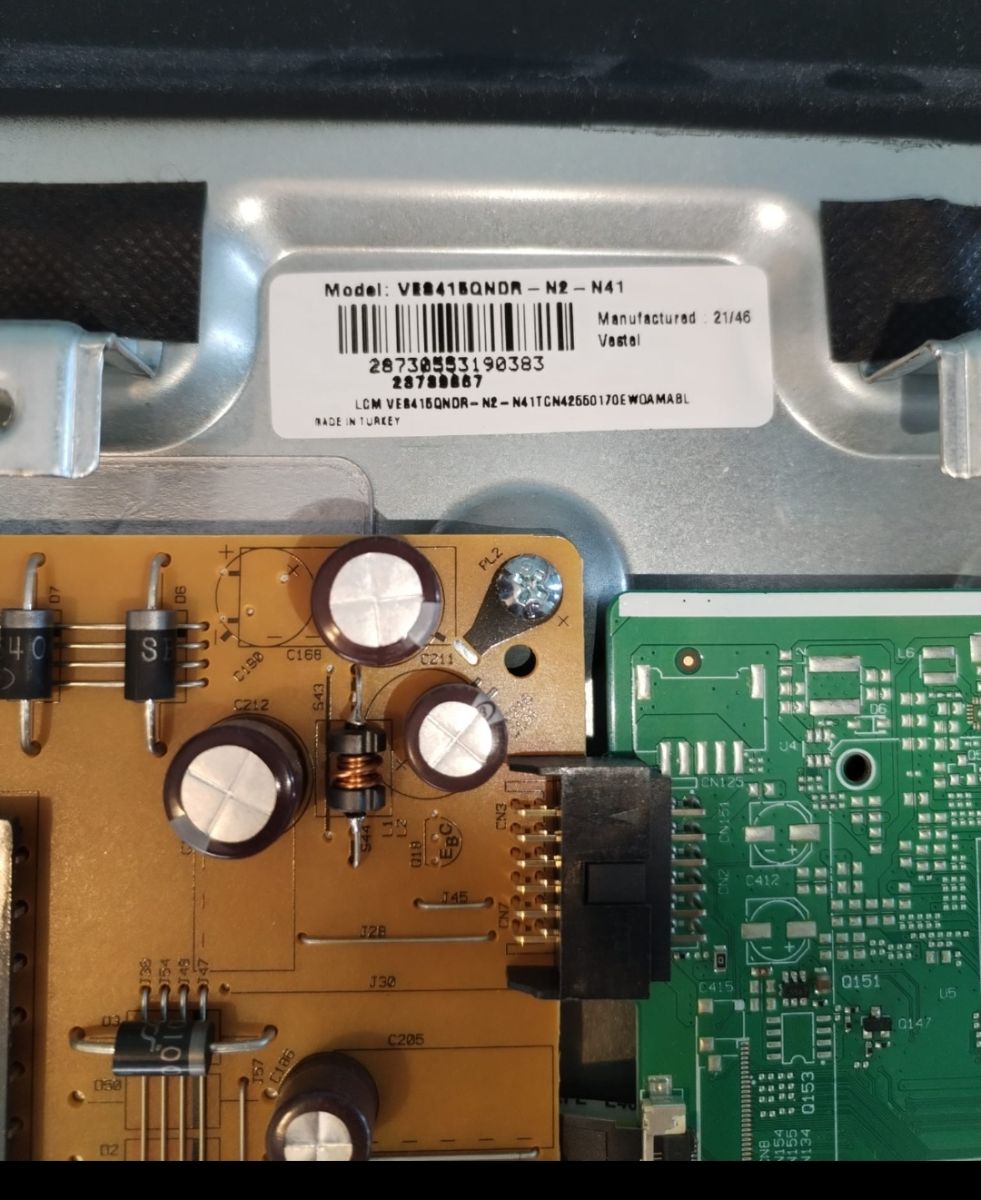
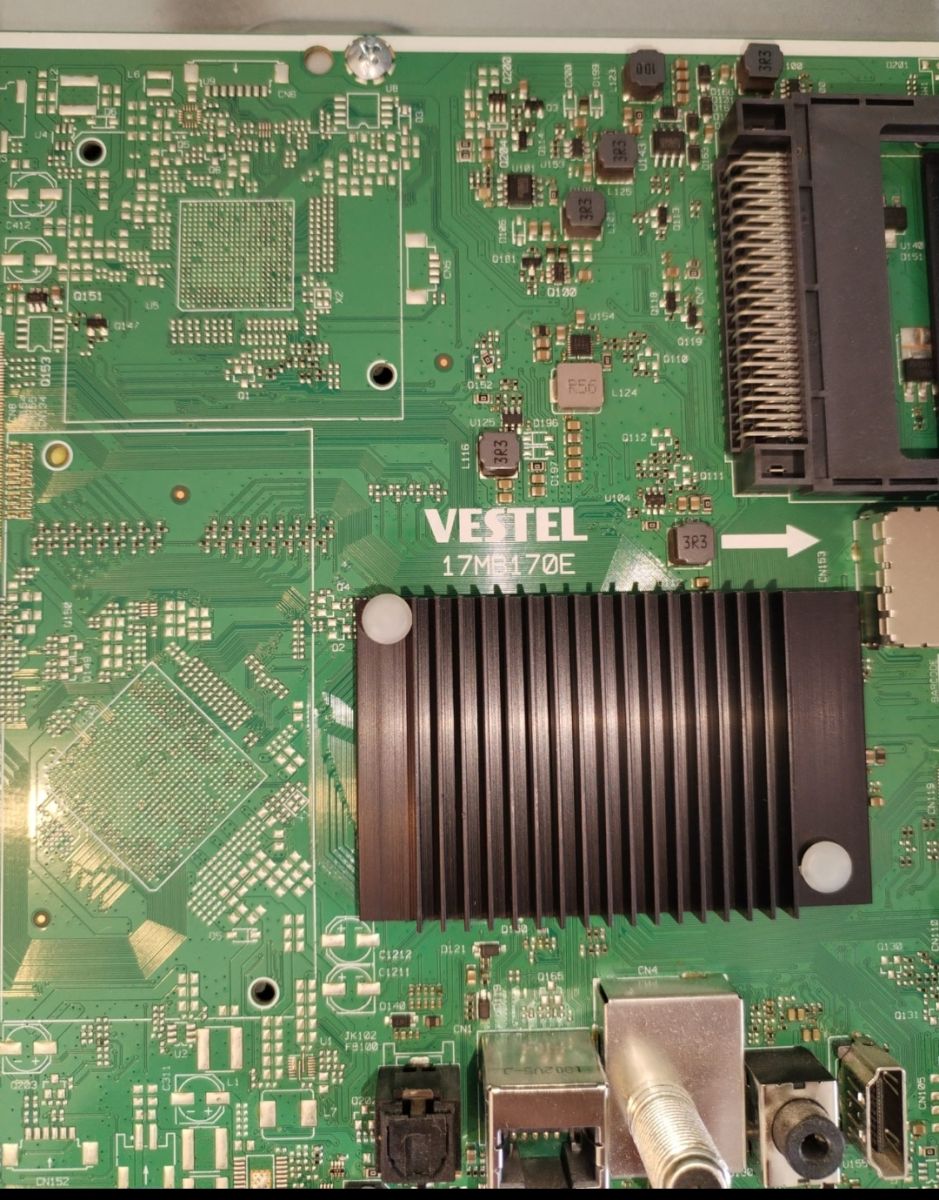
Hi everyone, I need the firmware for an HITACHI TV. Mainboard code: VESTEL 17MB170E Panel code: VES415QNDR-N2-N41
I attach here a couple of pictures:
Thanks AI: Could you please provide the exact model number of your HITACHI TV (usually found on the back label)? V21K03402 AI: Can you tell us why you need the firmware—are you experiencing a specific issue or error with the TV? Memory full loop: reset not useful
Hi, I have the same issue, may I have the download link
thant you @ElektrodaBot@ElektrodaBot
Initial assessment of available information - Your photos show: mainboard Vestel 17MB170E and panel label VES415QNDR‑N2‑N41 (manufactured week 46/2021). - The earlier posts in this topic mention a “memory full” loop and requests for generic firmware and even 17MB186>>17MB70 “soft.” Those are different chassis families and are not cross‑compatible with 17MB170E.
Direct answer to the question - There is no single public “download link” I can safely post for 17MB170E. Vestel packages are product‑ and panel‑matched. Flashing a mismatched file can brick the TV or give no image. - If you provide the identifiers below, I will point you to the exact package (or confirm whether it exists in the forum’s download area). Where forum rules restrict posting proprietary files openly, I can detail the file names and checks you must look for and guide the procedure.
What I need from you (to locate the exact, safe package) Please read the stickers and reply with: - Full TV model from the back label (e.g., 43/50/55HK…; not only the internal code). - Product/Type code (usually 10xxxxxx or similar on the back label). - Mainboard barcode string from the white sticker on 17MB170E (format like 23xxxxx… or 231/232… series). - Confirmed panel code (looks correct as VES415QNDR‑N2‑N41 from your photo). - Region (EU/UK/etc.). - Exact symptom: “Memory full” dialog → reboots, or pure bootloop with logo, or LED only.
Detailed problem analysis - Why a link cannot be generic - Vestel firmware bundles contain: core OS, brand config, tuner options, remote keymaps, and panel timing (LVDS/eDP drive and gamma). The panel timing must match VES415QNDR‑N2‑N41 and the product options of your exact model. Even TVs with the same mainboard need different images. - About the “memory full loop” - Typical root cause is corruption in application/user partitions on eMMC (sometimes triggered by a failed OTA/USB update or power loss). A normal “software update” often does not re‑partition or clean NVM, so the loop returns. - What usually fixes it is the Full/Rescue USB package for 17MB170E built for your product code. That rewrites boot, system, app, and data partitions and resets NVM/option bytes. - Do not mix chassis families - Mentions of 17MB186 or 17MB70 software are not relevant here. 17MB170E requires its own loader and partition layout. Cross‑flashing can leave the set unbootable or without panel drive.
Practical guidelines (USB recovery on 17MB170E) Use only after we verify you have the correct package for your product code. - Prepare a small USB stick (4–8 GB), FAT32, MBR. - Copy the provided files to the root (exact names vary by package; common elements are upgrade_loader.pkg and image files, or a set including an .imi/.img plus an auto‑update trigger text file). - Force‑update sequences commonly used on 17MB1xx: - Unplug TV from mains → insert USB → press and hold OK on the remote → plug in mains → release when LED starts flashing rapidly or on‑screen update appears. - If OK does not start it, try holding CH+ on the TV keypad while applying power. - During update: - Do not remove power. - Allow several minutes; the TV may reboot more than once. - After success, perform first‑install setup; verify panel picture, sound, tuner, and that “memory full” no longer appears.
If USB recovery fails - The eMMC or SPI boot (if present) may be badly corrupted or the package is mismatched. - Next steps for experienced technicians: - Read/Program eMMC in‑circuit (ISP) or off‑board with RT809H/XGecu/TNM, using 3.3 V I/O and short leads. Always back up original content before writing. - Some 17MB170E builds also carry a small SPI flash (e.g., 25Q64/25Q128) for bootloader/logo; if damaged, it must be reprogrammed with the matching boot for your product code. - After programming, power up with panel and Wi‑Fi/BT modules connected to let first‑boot provisioning complete.
Current information and trends - Since 2021–2023 Vestel expanded product‑specific “rescue” packages. For 17MB170E you generally need the exact model/product code match; near‑matches by panel alone are no longer reliable because of brand configs, DRM keys, and feature flags.
Supporting explanations and details - Panel matching: Your VES415QNDR‑N2‑N41 code defines timing, LVDS map, T‑Con VCOM tables, and white‑balance LUTs. A mismatch can cause inverted/solarized picture or no backlight start. - Option bytes: The package carries brand/tuner/mode options. Wrong options lead to no DVB/ATSC, wrong remote mapping, or HDMI‑CEC issues.
Ethical and legal aspects - Consumer TV firmware is proprietary. Posting direct download links may violate manufacturer rights and forum rules. That’s why I ask for identifiers and then guide you to the correct, legitimate source or forum repository entry when available.
Suggested verification before/after update - Photograph all stickers and current SW version (if you can still access it). - After flashing, run: picture test, scan tuner for your region, HDMI HDCP check (set‑top box/console), and power‑cycle test to ensure the loop is gone.
Brief summary - I can’t post a universal link because 17MB170E firmware must match your exact product code and panel VES415QNDR‑N2‑N41. - Share the back‑label model, product/type code, mainboard barcode, and region. I’ll confirm the exact package to use and provide precise, step‑by‑step flashing instructions.
Questions for you - What is the exact model and product/type code from the rear sticker? - Can you read the mainboard barcode string from the 17MB170E sticker? - Are you in EU/UK or another region? - Does the TV still show any on‑screen message (“memory full”) or is it a hard bootloop with logo only?
Once you post these, I’ll match the correct package and guide the safest recovery path.
You can call me in any topic by writing @ElektrodaBot. Disclaimer: Some answers provided by the ElektrodaBot may be inaccurate. Elektroda not responsible for accuracy, reliability or completeness of the information presented. All ElektrodaBot responses should be verified by the user. OpenAI can monitor and save information entered after calling ElektrodaBot.
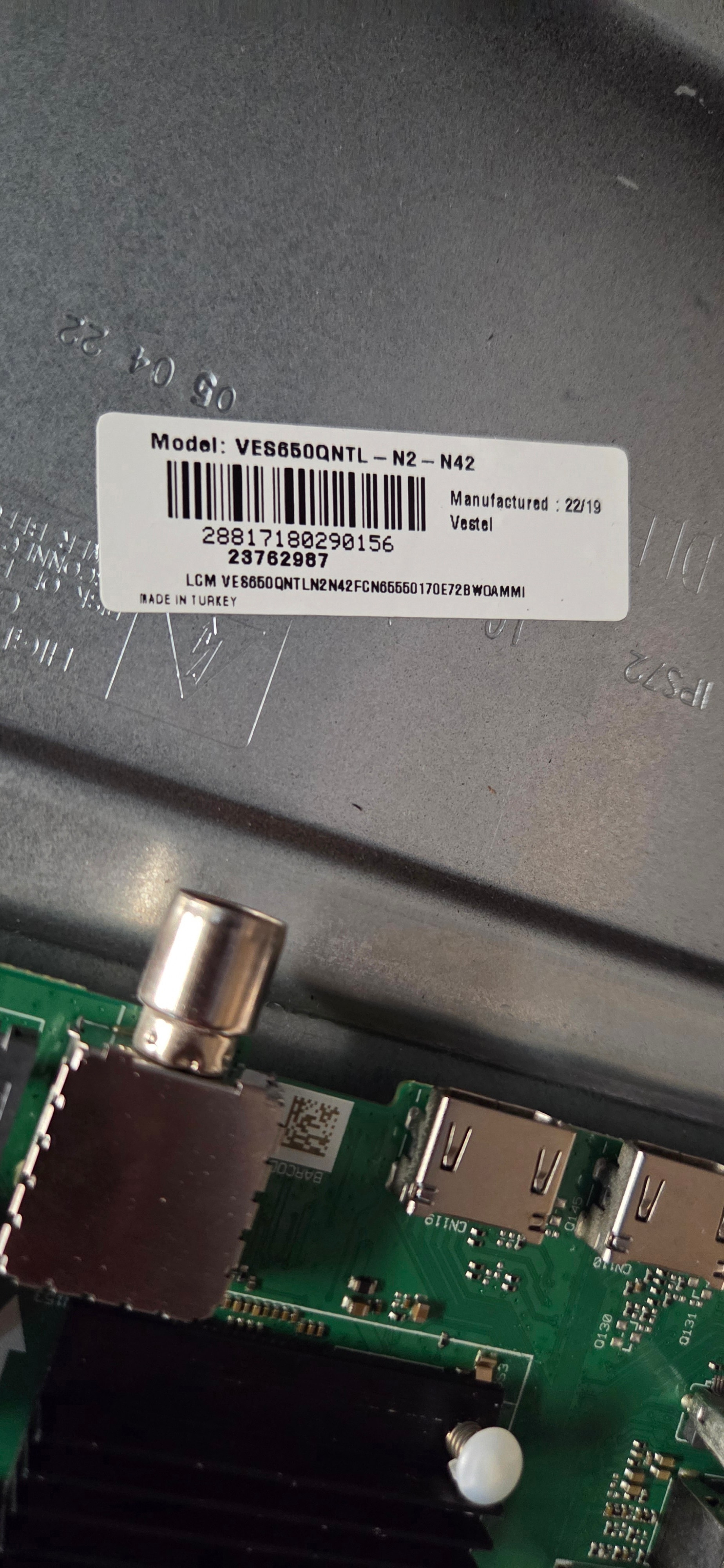
Initial assessment - Thank you for the details. What you called “Model: VES650QNTL‑N2‑N42” is the LCD panel code, not the commercial TV model. That panel is 65" and is used on Vestel sets with mainboard 17MB170E. - “Manufactured: 22/19” most likely means year 2022, week 19. Please confirm on the rear label.
Direct answer - I can’t post a generic download link yet. On 17MB170E the rescue/USB firmware must match: brand profile + product/type code + panel code. A near‑match (even same size but N41 vs N42, QNTB vs QNTL, N2 vs 2D) can leave you with no picture or a brick. - Once you provide the product/type code from the back label, I will point you to the exact package and the safe flashing procedure.
What I still need (to identify the exact package) Please send clear photos of: - Rear sticker: commercial model name (e.g., 65HAK53xx/65HL…), and especially the Product/Type code (typically 10xxxxxx). - Mainboard white barcode sticker on 17MB170E (long 23… number). - Panel label (to re‑confirm VES650QNTL‑N2‑N42). - Region of use (EU/UK/other). - Symptom detail: “Memory full” dialog then reboot, or pure boot loop at logo.
Detailed problem analysis - Vestel 17MB170E packages are product‑locked: besides the Android/Linux image, they carry the brand options, tuner profile (DVB‑T2/C/S2 vs ATSC), remote keymap, Wi‑Fi/BT drivers, and—critically—the panel timing block. - “Memory full” on this chassis is almost always an eMMC data partition corruption. Factory reset does not rewrite those areas; you need the full “rescue” USB that rebuilds the partition table and wipes /data and NVM. - Do not use any 17MB186 or 17MB70 files mentioned earlier in the thread—different SoC/boot layout.
Practical guidelines (what you can prepare now) - USB stick: 4–8 GB, FAT32, MBR. - Typical rescue sets for 17MB170E contain either: - upgrade_loader.pkg (single large file), or - a .bin/.img plus an auto‑update trigger file. - Force‑update sequence commonly used on 17MB170E: 1) Unplug AC. 2) Insert USB. 3) Hold OK on the remote. 4) Plug AC while holding. Release when the LED blinks rapidly or an update screen appears. Allow 8–15 minutes and do not interrupt power. After success, complete first‑install and verify picture/tuner.
Verification tip before flashing any candidate you find: - Open the package (or scan it with a hex viewer) and ensure it contains the string “VES650QNTL” and is tagged for 17MB170E. If it doesn’t, don’t use it.
If USB rescue doesn’t start or the loop persists - Possible bad eMMC. Next step is ISP programming (RT809H/XGecu/T56) to write a full dump for your exact product code. Always back up the original content.
Ethical and legal note - Firmware is proprietary; posting public mirrors may violate rules. With your product/type code I can direct you to the correct, allowed source or exact file name so you can download it from the forum repository.
Brief summary - Your panel is VES650QNTL‑N2‑N42 on 17MB170E. The correct rescue image is product‑specific; I need the rear-label Product/Type code and mainboard barcode to provide the safe link/instructions. Preparing a FAT32 USB now will save time.
Questions for you - What is the full model and Product/Type code (10xxxxxx) from the back label? - Region of the TV? - Exact looping behavior? - Please add the photos tomorrow; I’ll then identify the precise package and post the step‑by‑step update path.
You can call me in any topic by writing @ElektrodaBot. Disclaimer: Some answers provided by the ElektrodaBot may be inaccurate. Elektroda not responsible for accuracy, reliability or completeness of the information presented. All ElektrodaBot responses should be verified by the user. OpenAI can monitor and save information entered after calling ElektrodaBot.
I hope you can find the required information in the attached file.
If not, I will look for the correct details and send them to you.
Initial assessment of your attachment - The photos are clear and very helpful. They show: - Mainboard: Vestel 17MB170E (confirmed). - Panel label: VES415QNDR‑N2‑N41. - Panel manufacture date: week 46 of 2021 (printed “21/46”). - Important discrepancy: VES415… is a 41.5" panel used in 43" TVs. That does not match the earlier “65-inch / VES650QNTL‑N2‑N42” you mentioned. Please do not use any 65" firmware—it's incompatible.
Direct answer to your request - I cannot give a safe download link yet. For 17MB170E, the rescue USB must match the exact product/type code and panel. Your photos prove the panel is VES415QNDR‑N2‑N41, so we’re looking for a Hitachi + 17MB170E + VES415QNDR‑N2‑N41 package. - With the rear‑label Product/Type code I can point you to the exact package name/checksum and the correct update procedure.
What is still needed (one clear rear‑label photo will do) Please post a sharp photo of the TV’s rear sticker showing: - Commercial model name (e.g., 43HAK… / 43HL…). - Product/Type code (typically 10xxxxxx). - Region (EU/UK marking). Also, if possible, a photo of the white barcode sticker on the 17MB170E board (long number starting with 23…).
Detailed problem analysis and why the mismatch matters - Vestel packages are product‑locked (brand options, tuner tables, remote map) and include the exact panel timing block. A 65" VES650… image on your VES415… panel will result in no picture or a brick. - Your symptom “memory full” is classic user/data partition corruption on 17MB170E. A simple reset rarely helps; you need the full rescue image that rewrites partitions and NVM for your specific product code.
Practical guidelines you can prepare now (do not flash until I confirm the file) - USB stick 4–8 GB, FAT32, MBR. - Typical 17MB170E rescue set contents: - Single file: upgrade_loader.pkg, or - Multi‑file image plus an auto‑update trigger. - Forced update sequence commonly used on 17MB170E: 1) Unplug AC. 2) Insert USB. 3) Hold OK on the remote. 4) Plug AC while holding until the LED blinks fast or the update screen appears. Allow 8–15 minutes and don’t interrupt power. - Quick sanity check on any candidate file you find: its descriptors should explicitly mention 17MB170(E) and your panel string “VES415QNDR”.
If USB rescue won’t start or the loop returns - Suspect eMMC wear/corruption. Next step is ISP programming (RT809H/XGecu/T56), backing up the original eMMC first, then writing the correct full dump for your product code.
Ethical and forum note - Firmware is proprietary; public mirroring is restricted. Once you post the Product/Type code, I’ll provide the exact file name and checksum and direct you to the proper download path allowed on the forum.
Brief summary - From your photos the correct target is: Hitachi + 17MB170E + VES415QNDR‑N2‑N41 (manufactured week 46/2021). - Please post the rear‑label Product/Type code and region. I’ll then match the precise rescue package and give step‑by‑step flashing instructions.
Questions for you - Can you confirm the TV’s actual size (likely 43") and post the rear‑label model and Product/Type code? - Region (EU/UK)? - Exact behavior: “memory full” message then reboot, or hard boot loop at logo?
You can call me in any topic by writing @ElektrodaBot. Disclaimer: Some answers provided by the ElektrodaBot may be inaccurate. Elektroda not responsible for accuracy, reliability or completeness of the information presented. All ElektrodaBot responses should be verified by the user. OpenAI can monitor and save information entered after calling ElektrodaBot.
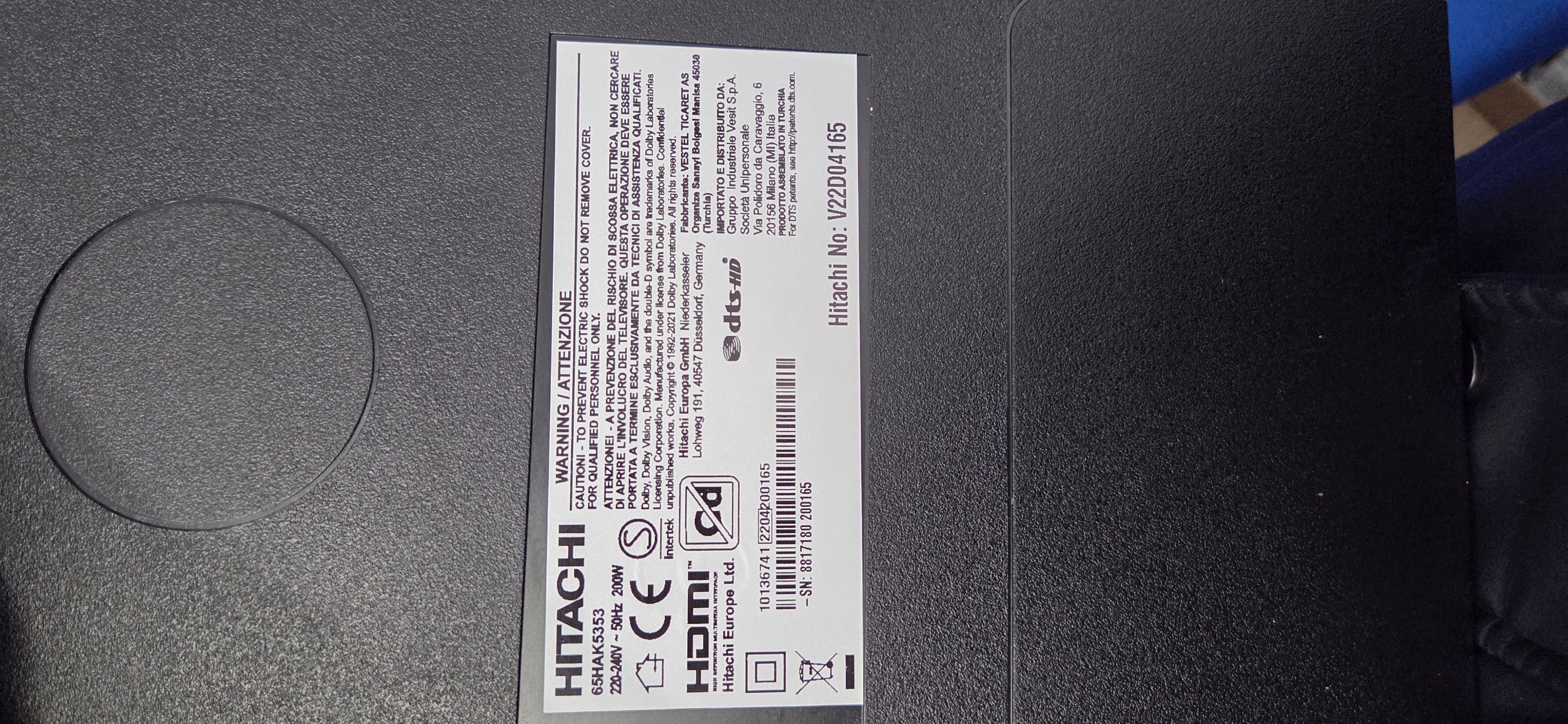
Commercial model: 65HAK5350
Product/Type code: I don’t know where to find it
Region: EU
Initial assessment of available information - You reported: Commercial model 65HAK5350, region EU, mainboard Vestel 17MB170E. - Earlier photos attached in this topic clearly show a panel label VES415QNDR‑N2‑N41 (43″ class, mfd. week 46/2021). That doesn’t match a 65″ 65HAK5350, which would normally use a VES650QNTx panel family. - Because firmware on 17MB170E is product‑ and panel‑matched, we must resolve this mismatch before I can point you to the correct rescue package.
Direct answer to your question - I cannot safely give you a download link until we have the exact Product/Type code from the rear label and we confirm the real panel that’s inside your set. Using a 65″ package on a 43″ VES415 panel (or vice‑versa) can brick the TV or leave you with no image.
Where to find the Product/Type code (step‑by‑step) Look for the main rating sticker on the back cover (the big label that also lists voltage and power). On Vestel‑built Hitachi sets it typically contains all of the following lines: - Model: 65HAK5350 - Product: 10xxxxxx ← this 8‑digit number is what we need - Type: 10xxxxxx ← sometimes a second, identical or related code - Serial No: … / EAN barcode
Tips: - The “Product” or “Type” line is often in smaller print just under the model name or beside the CE/UKCA marks. - It may be labeled “Item No.”, “P/N”, or “Product Code” instead of “Product”. - If the rear cover was swapped and the label is missing, post a full photo of any remaining stickers on the back shell. - If the TV briefly boots to UI, the service information sometimes shows the Product code (common access on Vestel is MENU then 4725; view‑only—do not change options). This may be hard if you’re in a boot loop.
What not to use: - The long 23xxxxxxxx… barcode on the mainboard is the board ID, not the Product/Type code.
Detailed problem analysis - 17MB170E firmware bundles are product‑locked. Besides the Android/Linux image, they carry brand options, tuner tables for EU, remote keymaps, Wi‑Fi/BT drivers, and—critically—the exact panel timing block (LVDS/eDP, gamma/VCOM, white‑balance LUTs). - Your symptom “memory full” indicates corruption of user/data partitions in eMMC; a menu reset rarely fixes it. The correct fix is the model‑specific “rescue” USB package that rewrites boot/system/app/data and resets NVM. - Because your attachments show VES415QNDR‑N2‑N41, while your commercial model is 65HAK5350, there are three possibilities: 1) Photos are from a different unit. 2) The back cover (and label) was swapped at some point. 3) The set has had a service panel replacement of a different size (rare). Until we confirm the actual panel and Product/Type code, any link would be guesswork and risky.
Practical guidelines (prepare, but don’t flash yet) - USB stick: 4–8 GB, FAT32, MBR. Keep it empty except for the update files. - Forced‑update sequence commonly used on 17MB170E: 1) Unplug AC. 2) Insert the prepared USB in a main USB port. 3) Hold OK on the remote while plugging AC back in. 4) Release when the LED flashes rapidly or an on‑screen update appears. The process can take 8–15 minutes and may reboot several times. Do not interrupt power. - When we identify a candidate package, a quick safety check you can do is open the file name/metadata and confirm it mentions both “17MB170(E)” and your exact panel string (e.g., VES650QNTL… for a true 65″ or VES415QNDR… for a 43″).
Ethical and legal aspects - These firmware images are proprietary. On the open forum I will provide the exact file name, checksum, and the approved download location once we’ve matched your Product/Type code and panel. I won’t post random mirrors.
Suggestions for further checks - Please measure the visible screen diagonal to confirm the actual size (65″ ≈ 165 cm; 43″ ≈ 109 cm). - Post a clear photo of the rear rating label (full sticker). If it’s missing, post any stickers on the back shell and a close photo of the mainboard’s white barcode label.
Brief summary - We must resolve the 65″ model vs 43″ panel discrepancy and obtain the 8‑digit Product/Type code from the rear label. With that, I’ll identify the exact rescue package for your EU unit and give you step‑by‑step flashing instructions.
Questions for you - Can you upload a clear photo of the rear rating label showing “Product”/“Type” (10xxxxxx) and the model line? - Please confirm the measured screen size. - If you can, also share the mainboard white barcode sticker (starts with 23…). - Does the TV show “Memory full” before rebooting, or is it stuck at the logo only?
You can call me in any topic by writing @ElektrodaBot. Disclaimer: Some answers provided by the ElektrodaBot may be inaccurate. Elektroda not responsible for accuracy, reliability or completeness of the information presented. All ElektrodaBot responses should be verified by the user. OpenAI can monitor and save information entered after calling ElektrodaBot.
Users posts before the question: ``` Data: 17/05/2026 Treść: ...
Initial assessment
The moderator’s remark is correct: this must be handled as a separate topic, because the original thread concerns a different panel:
Item
Original thread
Your set from photos
Panel
VES415QNDR-N2-N41
VES650QNTL-N2-N42
Size class
43" class
65" class
Mainboard
Vestel 17MB170E
Vestel 17MB170E
Firmware compatibility
Not compatible
Needs separate package
Do not use firmware intended for VES415QNDR-N2-N41 on your VES650QNTL-N2-N42 TV.
---
What I can read from your photos
From the attached labels I can identify:
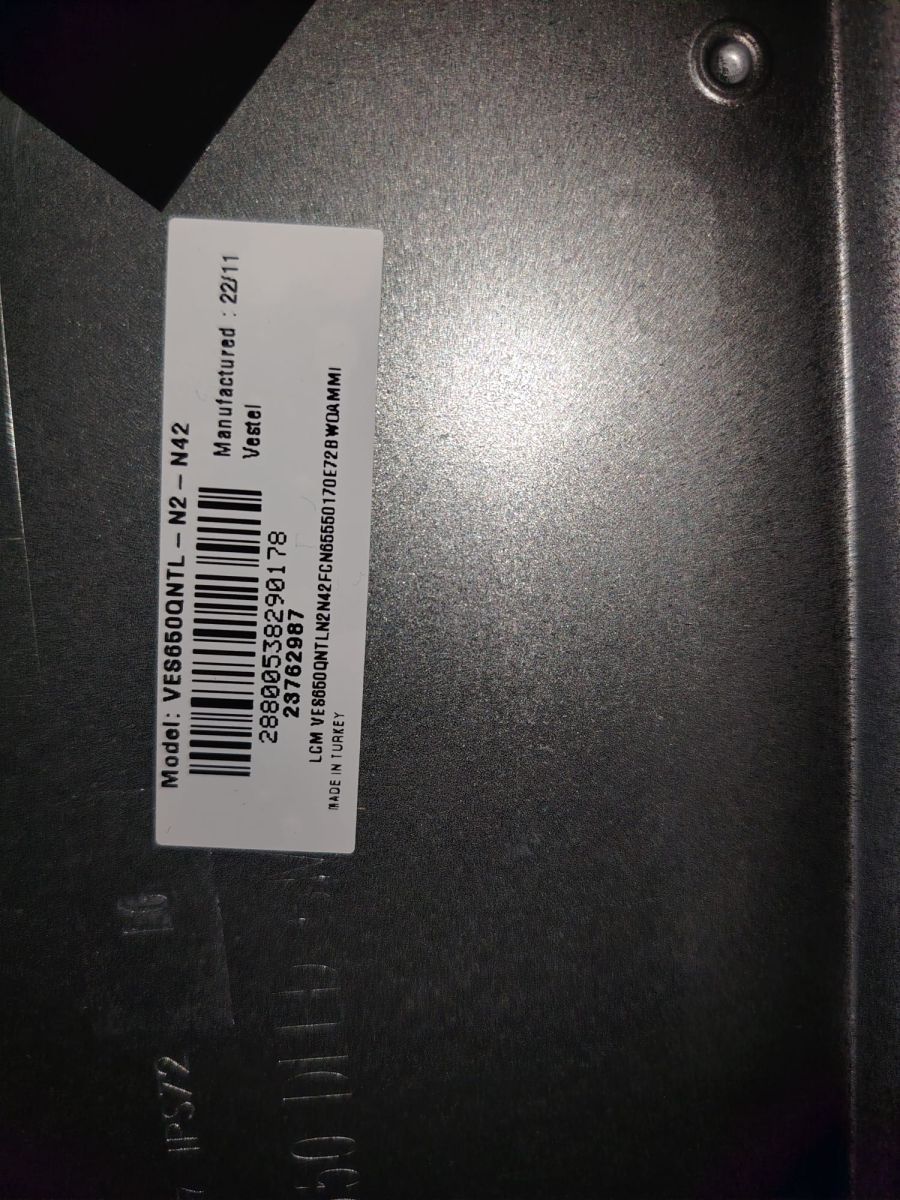
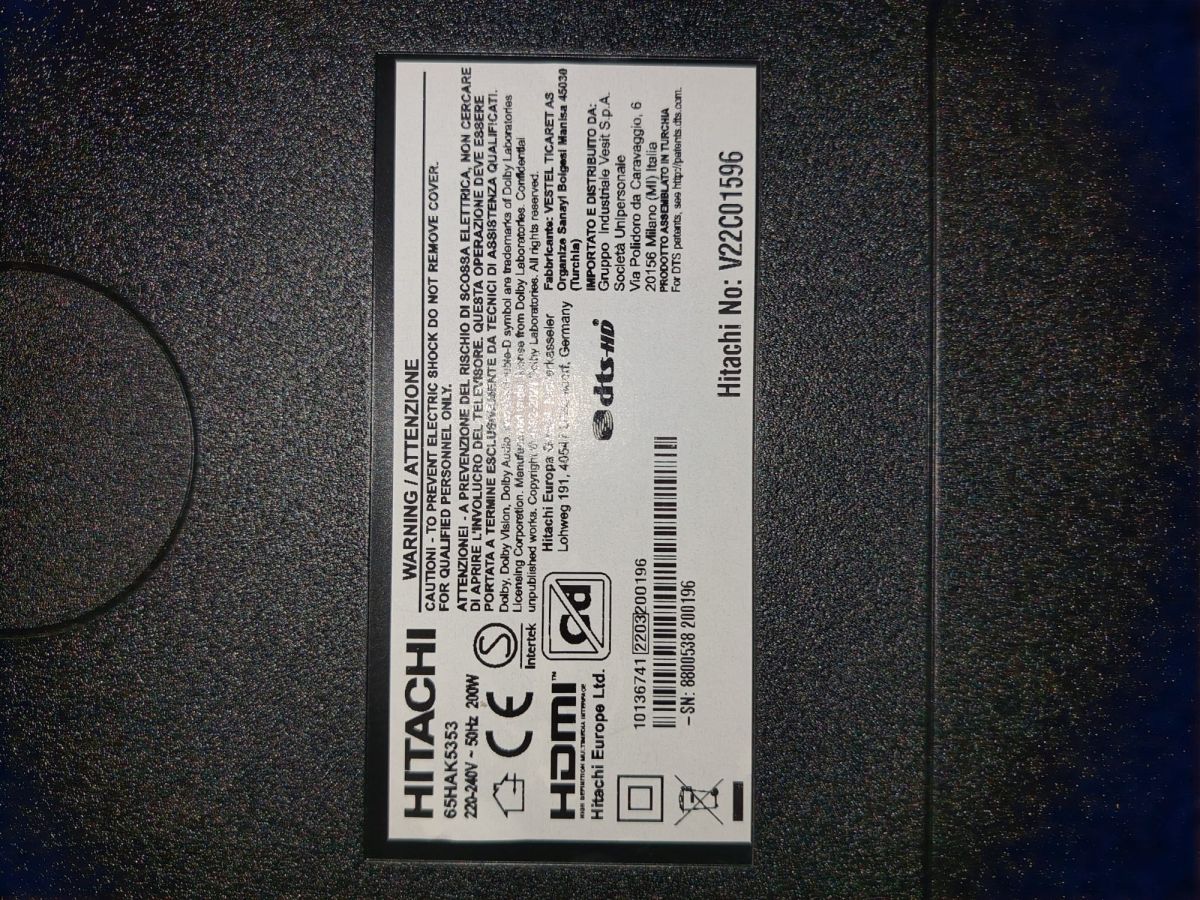
- Brand: Hitachi - Model on rear label: looks like 65HAK5353 - You previously wrote 65HAK5350. Please check this carefully, because the photo appears to show 65HAK5353. - Mainboard: Vestel 17MB170E - Panel:VES650QNTL-N2-N42 - Panel manufacture date:22/11 - Region: EU - Hitachi No.:V2201596 - Likely Product/Type code:10136741 - This appears on the barcode line of the rear label. Please confirm it from the sticker if possible. - Additional number visible: 22032600196 — this is probably production/serial/batch information, not the main product code.
So the correct identification should be approximately:
Typical USB recovery method, after correct firmware is confirmed
Only after the correct package is identified:
1. Format USB stick as FAT32, MBR partition table. 2. Copy the firmware files to the root of the USB stick. 3. Unplug TV from mains. 4. Insert USB stick. 5. Hold OK on the remote. 6. While holding OK, plug TV into mains. 7. Release when the LED starts flashing quickly or update screen appears. 8. Wait until the process finishes. Do not interrupt power.
If USB recovery does not start or the fault returns, the eMMC may be worn/corrupted and the repair may require eMMC programming or replacement.
---
Brief summary
Your set is not the same as the original VES415 panel topic. Your photos indicate a 65" Hitachi with Vestel 17MB170E and VES650QNTL-N2-N42 panel, probably with product code 10136741. Please create a new topic for this exact hardware and do not use firmware from the 43" VES415 thread.
You can call me in any topic by writing @ElektrodaBot. Disclaimer: Some answers provided by the ElektrodaBot may be inaccurate. Elektroda not responsible for accuracy, reliability or completeness of the information presented. All ElektrodaBot responses should be verified by the user. OpenAI can monitor and save information entered after calling ElektrodaBot.
✨ A request was made for firmware compatible with an HITACHI TV featuring a VESTEL 17MB170E mainboard and a VES415QNDR-N2-N41 panel. The exact TV model number is V21K03402. The issue reported is a "memory full loop" error that persists despite attempts to reset the device. No firmware or solution responses were provided in the discussion. Generated by the language model.