logo elektroda
logo elektroda
X
logo elektroda
Dostępna jest polska wersja

Czy wolisz polską wersję strony elektroda?

Nie, dziękuję Przekieruj mnie tam

Tuya IR Blaster S06 - CB3S to ESP-12F Conversion & Tasmota

jkwim  14 7902 Cool? (+2)
📢 Listen (AI):

TL;DR

  • Tuya S06 IR Blaster with a CB3S module was converted to an ESP-12F and flashed with tasmota_ir.bin to capture and replay Panasonic fan IR codes.
  • The mod relied on matching power, chip enable, and reset pins, plus added 10k pullup/pulldown resistors for Chip Enable and GPIO15.
  • SetOption58 enabled RAW reception, producing an UNKNOWN 78-bit IR frame with Hash 0x94972B6F and RawData like +3525a+830-2700Bc... .
  • The captured RAW string could be replayed directly with IRSend 0, and trailing data was trimmed by trial and error to find the minimum workable command.
  • De-soldering damaged R3 and C5, so the reset button no longer works for now and the LED8 indicator still needs further hardware tweaking.
Updated: 2023/12/27
The IR Codes captured on Tasmota with new compact encoding scheme can be played back as it is through IRSend. See the updates below


Reference Links about S06 IR Blaster:
Teardown, flashing and configuration for Smart Tuya IR Blaster S06 [CB3S]
OpenBeken configuration for WiFi universal IR remotes from aliexpress (S06, S18, IRC02) with BK7231

I have a requirement to be able to capture/send IR RAW data to make my Panasonic Fan working.

Since IR RAW feature will take some time to appear in OpenBeken, I decided to go the hard way.

I had a S06 with CB3S Module.

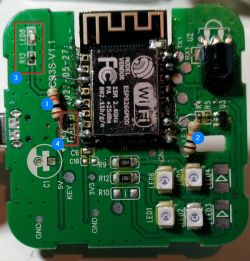
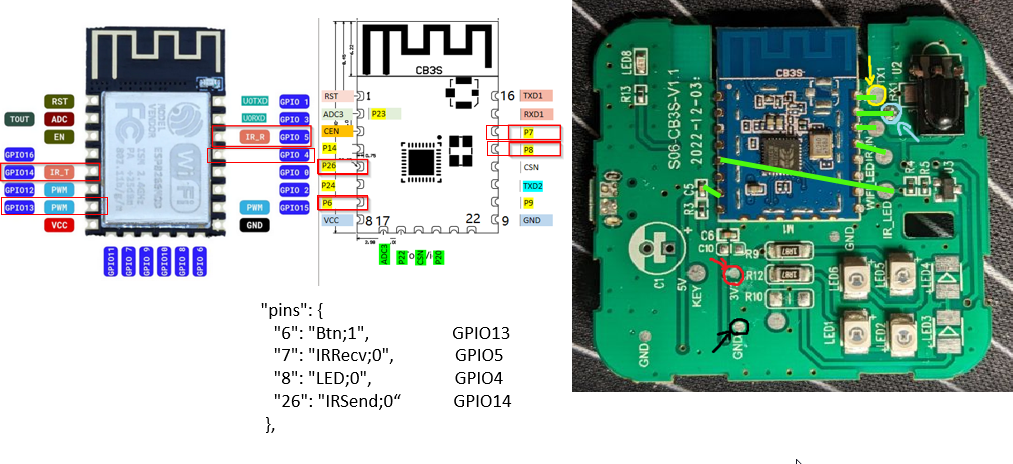
When you inspect the CB3S Module alongside ESP-12F you could see a perfect match for critical PINs like Power, Chip Enable and Reset.
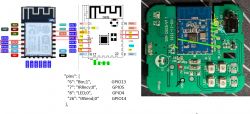
ESP-12F and CB3S modules with S06 IR Blaster board.

So I decided to replace the CB3S Module with ESP-12F Module.

I first flashed tasmora_ir.bin image on to ESP-12F (There are plenty of tutorials available on flashing ESP-12F module on the internet).

I did not do a very good job in de-soldering and soldering in the new module. It was the first time for me to use the heat gun and I accidentally blew off a tiny SMD resistor and a capacitor in the process. Hopefully I can do a better job next time :-)

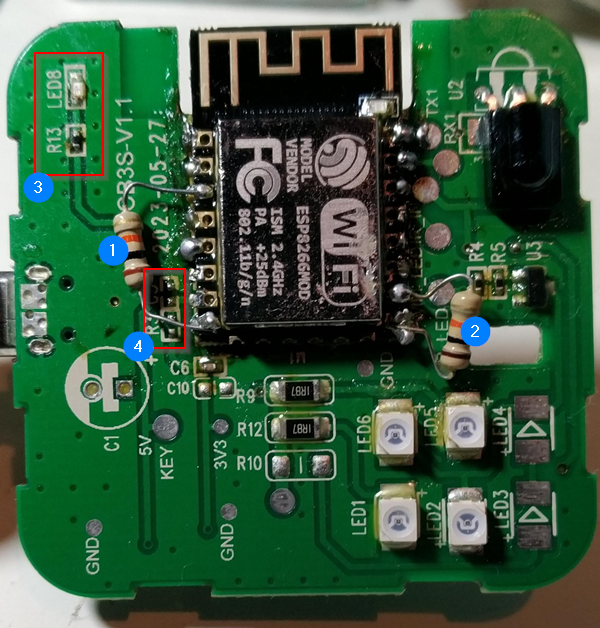
Circuit board with ESP-12F module and component labels.

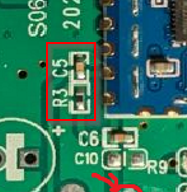
I blew up R3 & C5 [4] during the process. These are connected to RESET button on the device. For the moment the RESET button is trivial for me as I can always power cycle the device externally. Perhaps I will make some corrections later to the hardware.
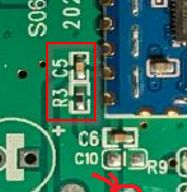
Close-up of a circuit board with a highlighted section showing electronic components.

Needed to solder 10k pullup/pulldown resistors as shown for Chip Enable [1] and GPIO15 [2] as shown.

One more issue remains. I could not get the LED8 [3] to light up. When I touch the R13 with a tweezer the LED gets lit up faintly. The output on GPIO4 where the LED is connected to toggles between 0V and 3.2V ish value correctly. Need to see whether R13 needs to be changed. Again this is a trivial matter for me at the moment.

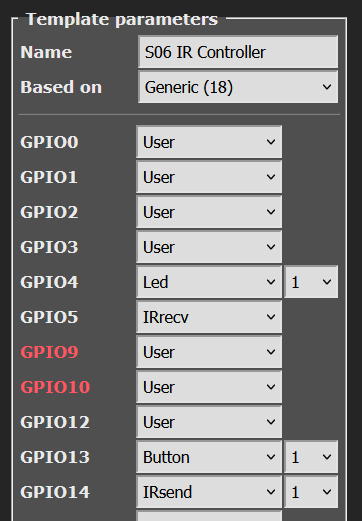
Tasmota Setup:
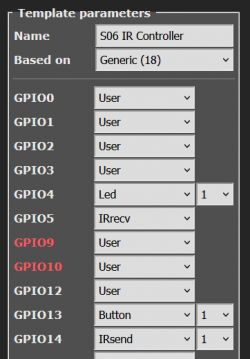
Screenshot showing template parameters settings for S06 IR controller in Tasmota.

Enabled Option58 for receiving RAW data.

21:32:50.903 CMD: SetOption58 1
21:32:50.906 RSL: RESULT = {"SetOption58":"ON"}

21:32:56.983 RSL: RESULT = {"IrReceived":{"Protocol":"UNKNOWN","Bits":78,"Hash":"0x94972B6F","Repeat":0,"RawData":"+3525a+830-2700Bc+825-935DcBcDcBeDeBeDeDeB-2695BeDeDcBeDeDeDcDc+845-2675DfBcDeD-39350+3565-3485DfBcDeDcDc+850hDeL-910D-940DeDeDcBeDeDcDeDeDeBfDcDcDfDcDeDiA-3520DcDcDeDcL-2670+855pLmDnLmDeDnDcQmLmLpDnDeDeLpDcLpQpLpLmD","RawDataInfo":[155,155,0]}}


Update:
The following conversion is not required. We can directly play back the above raw data string received

-------------------------------------------------------------------------------
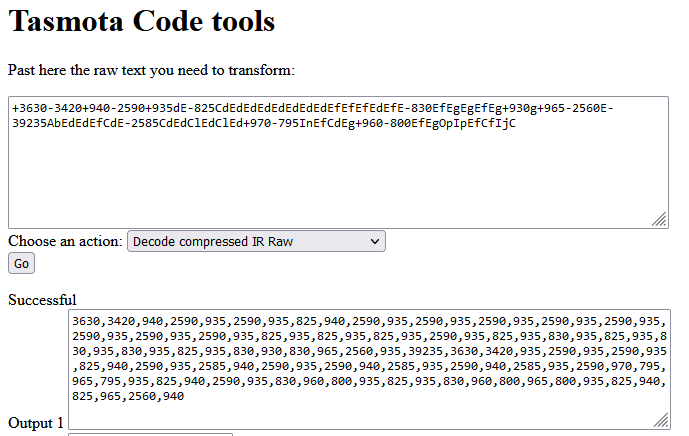
The RAW data received can be converted in to a string which can be transmitted using IRSend command using the following tool:

https://tasmota.hadinger.fr/util
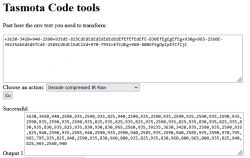
Screenshot of Tasmota Code Tools with raw IR data.
-------------------------------------------------------------------------------

Data received in following RAW Date message can be played back:
21:32:56.983 RSL: RESULT = {"IrReceived":{"Protocol":"UNKNOWN","Bits":78,"Hash":"0x94972B6F","Repeat":0,"RawData":"+3525a+830-2700Bc+825-935DcBcDcBeDeBeDeDeB-2695BeDeDcBeDeDeDcDc+845-2675DfBcDeD-39350+3565-3485DfBcDeDcDc+850hDeL-910D-940DeDeDcBeDeDcDeDeDeBfDcDcDfDcDeDiA-3520DcDcDeDcL-2670+855pLmDnLmDeDnDcQmLmLpDnDeDeLpDcLpQpLpLmD","RawDataInfo":[155,155,0]}}


IRSend 0, +3525a+830-2700Bc+825-935DcBcDcBeDeBeDeDeB-2695BeDeDcBeDeDeDcDc+845-2675DfBcDeD-39350+3565-3485DfBcDeDcDc+850hDeL-910D-940DeDeDcBeDeDcDeDeDeBfDcDcDfDcDeDiA-3520DcDcDeDcL-2670+855pLmDnLmDeDnDcQmLmLpDnDeDeLpDcLpQpLpLmD


I did a further optimization by deleting parts of the string from the end, working backwards until I find a +/- symbol. When you press the remote you might press it too longer than required. So the extra data stream can be removed like this on trial & error basis. This way you can figure out the minimum length of data string to play back. See the example of Tasmota rule for the final outcome.


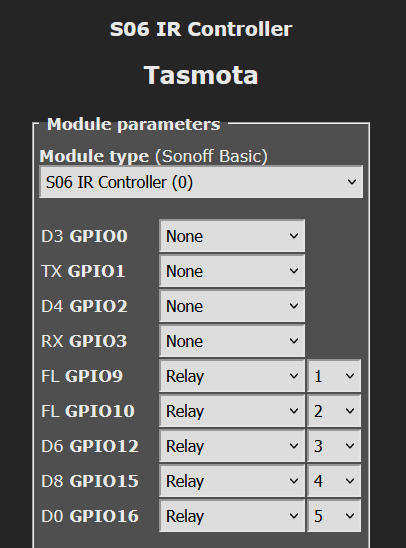
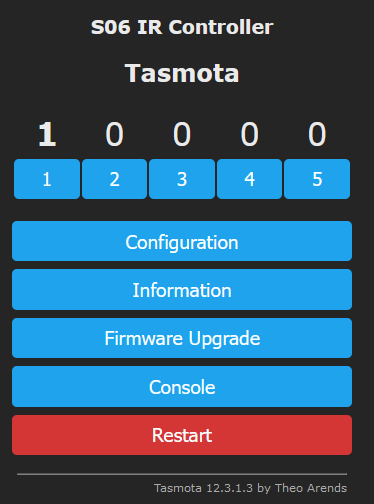
Defined 5 x Virtual Relays using unused GPIOs to be used as Buttons on WebGUI:
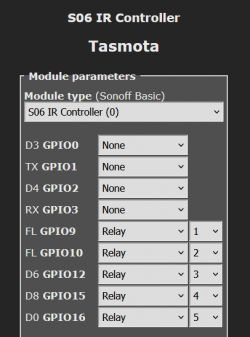
Screenshot of Tasmota configuration for S06 IR controller


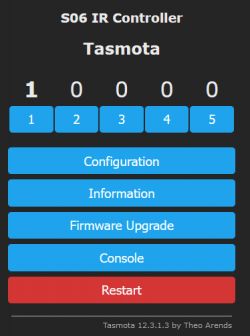
User interface of S06 IR Controller in Tasmota

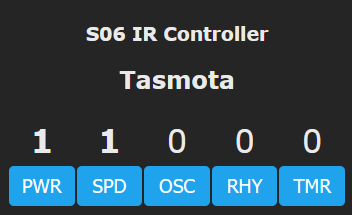
Changed the labels on the buttons:
02:36:18.449 CMD: WebButton1 PWR
02:36:18.454 RSL: RESULT = {"WebButton1":"PWR"}
02:36:29.105 CMD: WebButton2 SPD
02:36:29.110 RSL: RESULT = {"WebButton2":"SPD"}
02:36:39.275 CMD: WebButton3 OSC
02:36:39.281 RSL: RESULT = {"WebButton3":"OSC"}
02:36:53.438 CMD: WebButton4 RHY
02:36:53.443 RSL: RESULT = {"WebButton4":"RHY"}
02:37:03.340 CMD: WebButton5 TMR
02:37:03.344 RSL: RESULT = {"WebButton5":"TMR"}
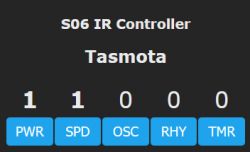

Tasmota user interface with five control buttons.

Created Tasmota Rules for button toggles (here is an example for PWR and SPEED buttons:

Rule1
ON POWER1#STATE DO IRSend 0,+3500-3550+875-2650+880dC-885CdCdC-2645EfC-890CfEfCfCdEfCfCdCfCfCfCdCdCdCgEdCfC
  ENDON
ON POWER2#STATE DO IRSend 0,+3500-3550+855-2670CdC-910+850dFdCdCdFdCdCdCdFeC-905CeCdCeCeFeCeFeFeCgCeCdC ENDON


Now the Fan can be controlled via Web URL or MQTT using POWER1, POWER2, POWER3, POWER4, POWER5 commands.


About Author
jkwim wrote 186 posts with rating 25 , helped 4 times. Been with us since 2022 year.

Comments

freebsd 26 Dec 2023 11:53

Which fan? ceiling? [Read more]

jkwim 26 Dec 2023 20:17

Like this: https://obrazki.elektroda.pl/6691978100_1703618238_thumb.jpg [Read more]

ferbulous 26 Dec 2023 20:31

Hi, did you make the stand fan smart by adding one of those ir fan controller board? As for the heat gun, you might need to cover the components around the cb3s with heat resistance tapes (kapton) to... [Read more]

jkwim 26 Dec 2023 22:32

The fan already had a remote controller with 5 buttons. https://obrazki.elektroda.pl/5005018700_1703625644_thumb.jpg I created 5 buttons on Tasmota GUI. [Well, I actually went further. I did a custom... [Read more]

ferbulous 27 Dec 2023 01:33

@jkwim try smartir (hacs) Add a new fan config with the raw ir codes for each speed Like this one for example https://github.com/smartHomeHub/SmartIR/blob/master/codes/fan/1170.json Oh wait, you’re... [Read more]

jkwim 27 Dec 2023 08:57

The only issue is that this fan has just one Speed control button on the remote. When you press the button, the speed jumps to the next setting in a round robin fashion. What this means is that without... [Read more]

freebsd 27 Dec 2023 10:14

@jkwim Have you considered using a Tuya compatible universal fan controller? Maybe you could reprogram it and adapt it to your needs. https://obrazki.elektroda.pl/5549125300_1703668434_thumb.jpg [Read more]

jkwim 27 Dec 2023 16:08

The main reason that I did all this is that this particular remote requires longer codes which OpenBK does not support at the moment. I was told that adapting Tasmota's RAW codes is in the plan. So until... [Read more]

krzbor 29 Dec 2023 11:32

If someone wants to build such a device "from scratch", I recommend my solution Link [Read more]

ferbulous 01 Jan 2024 18:14

@krzbor So that one only has 1 LED How do you add more LED to cover wider angles? Do i need specific resistors? I tried diy following this instruction but transmitting just never worked for me ... [Read more]

slarti 07 Jan 2024 22:04

@freebsd Do you have this controller? Have you tried prying it open and see which SoC it uses? This is the only WiFi controller I've seen for BLDC fans. [Read more]

jkwim 08 Jan 2024 12:56

If you are building from scratch, there is another option. For Wemos D1 Mini there is a stackable IR Shield available https://obrazki.elektroda.pl/1790719300_1704714861_thumb.jpg https://obrazki.elektroda.pl/3155490600_1704714882_thumb.jpg... [Read more]

ferbulous 14 Jan 2024 07:09

@jkwim yes, i already have the d1 mini with the ir shield. Just curious how to add more ir transmitter properly on the esp01m board [Read more]

jkwim 14 Jan 2024 16:33

Above IR Shield board has 1 x transistor and 4 x resistors to drive 4 x LEDs. If you trace the paths probably it will be 4x Resistor+LED strings in parallel driven by the transistor. Something like... [Read more]

FAQ

TL;DR: With 5 virtual buttons and one custom ESP-12F swap, this Tuya S06 became a Tasmota IR controller; “the options are endless” once RAW IR works. This FAQ helps makers capture long Panasonic fan codes, replay them with IRSend, and expose button-like controls to Alexa. [#20877567]

Why it matters: This thread shows a practical path when a stock CB3S-based S06 cannot yet handle the exact long RAW IR workflow you need.

Option Long RAW IR capture/playback Alexa path mentioned Hardware work Best fit
Tasmota on ESP-12F-converted S06 Yes; used successfully for a Panasonic fan Philips Hue multi-device emulation High; module swap and resistor changes Best when long unknown IR codes must work now
OpenBeken on original CB3S S06 Not yet sufficient for this fan's longer codes in the thread Wemo single-device only Low; no module swap Best when keeping original hardware matters more

Key insight: The biggest breakthrough was not the module swap itself. It was that newer Tasmota compact RAW strings could be sent back directly with IRSend, removing the earlier conversion step.

Quick Facts

  • The finished fan control setup used 5 WebGUI buttons mapped to fan functions: PWR, SPD, OSC, RHY, and TMR. [#20876437]
  • The ESP-12F conversion added two 10 kΩ resistors: one pull-up on Chip Enable and one pull-down on GPIO15. [#20876437]
  • The reported status LED issue showed GPIO4 toggling between 0 V and about 3.2 V, yet the LED still did not light correctly. [#20876437]
  • The captured Panasonic remote frame reported 78 bits with Protocol:"UNKNOWN" and RawDataInfo:[155,155,0], confirming a long RAW sequence rather than a named protocol. [#20876437]
  • The WS2812 add-on used 5 V from the USB connector for power and GPIO2 for the data line, turning the S06 into a dual-function IR-plus-LED device. [#20877567]

How do you convert a Tuya IR Blaster S06 from a CB3S module to an ESP-12F and run Tasmota on it?

You remove the CB3S, solder in an ESP-12F, flash a Tasmota IR build, and add the missing strap resistors. 1. Desolder the original CB3S and fit the ESP-12F on the matching power, reset, and enable pins. 2. Flash tasmota_ir.bin to the ESP-12F before or after installation. 3. Add a 10 kΩ pull-up on Chip Enable and a 10 kΩ pull-down on GPIO15, then configure Tasmota for IR receive/send. The author damaged R3 and C5 near the reset circuit during hot-air removal, so protect nearby SMD parts before heating. [#20876437]

Why did the S06 ESP-12F conversion need extra 10k pull-up and pull-down resistors on Chip Enable and GPIO15?

The ESP-12F needed correct boot and enable states that were not available after replacing the CB3S. The mod added a 10 kΩ pull-up on Chip Enable so the ESP stays enabled, and a 10 kΩ pull-down on GPIO15 so it boots in the expected mode. Without those two resistors, the module may not start reliably or may enter the wrong boot state. The post shows both resistors as required hardware changes after the swap. [#20876437]

What is Tasmota SetOption58, and how does it help with receiving RAW IR data from unknown remotes?

SetOption58 1 enables RAW IR reception in Tasmota for remotes that do not decode into a known protocol. "SetOption58 is a Tasmota configuration flag that enables receipt of raw infrared timing data, exposing unknown remotes as replayable strings instead of only named protocols." In the thread, turning it on immediately produced an IrReceived message with Protocol:"UNKNOWN", Bits:78, and a long RawData field. That made the Panasonic fan remote usable even without a recognized decoder. [#20876437]

How can I capture a long Panasonic fan IR code in Tasmota and replay it using IRSend?

Enable RAW capture, press the original remote, then send back the captured RawData string with IRSend. In the working example, Tasmota logged an unknown 78-bit frame and the same compact RAW string was replayed as IRSend 0, +3525a+830-2700.... That was enough to operate the Panasonic fan. The thread specifically says the received raw data string can be played back directly, so you do not need to decode it into a named protocol first. [#20876437]

Why can newer Tasmota compact RAW IR strings be sent back directly without converting them first?

They can be sent back directly because the newer compact RAW encoding is already accepted by IRSend. The thread was updated on 2023-12-27 to state that the earlier conversion step was no longer required. The author first mentioned a web conversion tool, then corrected the process and showed the captured RawData string being reused as-is in IRSend 0,<string>. That update removes a whole translation step and reduces failure points. [#20876437]

What’s the best way to shorten a captured Tasmota RAW IR string so it still works reliably for playback?

Trim the string from the end, test it, and stop at the shortest version that still triggers the device. The author deleted trailing sections while working backward until reaching a + or - boundary, because a human button press often captures extra repeated data. That trial-and-error method finds the minimum working payload for reliable playback. It is useful when the captured RAW string is very long or includes hold-time repeats you do not need. [#20876437]

How do you create virtual relays and WebGUI buttons in Tasmota to control fan functions like PWR, SPD, OSC, RHY, and TMR?

Define unused GPIOs as relay outputs, then rename the Web buttons and attach IR rules to each power state. The thread used 5 virtual relays and renamed them with WebButton1 PWR, WebButton2 SPD, WebButton3 OSC, WebButton4 RHY, and WebButton5 TMR. Each button then triggered a rule such as ON POWER1#STATE DO IRSend ... ENDON. That turned the Tasmota WebGUI into a five-button fan remote. [#20876437]

What is Philips Hue Bridge emulation in Tasmota, and how does it let Alexa expose multiple virtual fan buttons as separate devices?

It lets Tasmota present multiple controllable endpoints that Alexa can discover as separate devices. "Philips Hue Bridge emulation is a local device-emulation feature that makes Tasmota appear like a Hue bridge, exposing controllable endpoints without custom cloud integration." The author built a custom Tasmota image with the IR Raw driver and activated Hue Bridge emulation, then exposed the 5 fan buttons as 5 Alexa-visible devices. That allowed voice phrases like turning on “Fan Speed” to map to a specific Tasmota POWER2 ON action. [#20877404]

Tasmota vs OpenBeken for a Tuya S06 IR blaster: which is better when you need long RAW IR codes and Alexa integration?

Tasmota was the better fit in this thread because it handled the required long RAW IR workflow and multi-device Alexa exposure. The author switched away from OpenBeken specifically because the Panasonic fan needed longer codes that OpenBeken did not yet support at that time. Tasmota also offered Philips Hue multi-device emulation, while OpenBeken was described as supporting Wemo for only a single device. If you need working long RAW codes now, the thread favors Tasmota on ESP-12F. [#20878341]

How can I automate a fan remote that only has one speed button cycling 1→2→3 instead of dedicated speed buttons?

You must track state, because one IR command only advances speed in a loop instead of selecting a fixed level. The thread explains that this remote always cycles 1→2→3→1, so you cannot jump directly to speed 2 or 3 unless you already know the current setting. A practical automation needs a stored speed state and logic that sends 1, 2, or 3 presses as needed. Without state tracking, the same command becomes ambiguous after any manual remote use. [#20877567]

What is Wemo multi-device support, and why would it matter for OpenBeken-based IR or fan controllers?

It means exposing several independent virtual devices through the Wemo protocol instead of only one. "Wemo multi-device support is protocol emulation that presents several separately controllable endpoints, allowing one controller to appear as multiple smart devices to voice assistants." The thread says OpenBeken supported Wemo for a single device, which limited a multi-button fan controller. Multi-device support would let one IR blaster expose separate actions such as power, speed, oscillation, and timer to Alexa more cleanly. [#20877404]

How do you add a WS2812 LED strip to a Tuya IR Blaster S06 by wiring 5V to USB power and data to GPIO2?

You take 5 V directly from the USB power input, connect the data line to GPIO2, and route the wires through a case cutout. 1. Solder the WS2812 strip power leads to the USB connector’s 5 V supply. 2. Solder the strip data wire to GPIO2. 3. Modify the housing for cable exit, then set GPIO2 for the LED function in Tasmota. The thread also added a sixth WebGUI button labeled LEDs, making the same wall-mounted S06 handle both IR control and addressable lighting. [#20877567]

What should I check if the LED on the converted S06 doesn’t light properly even though GPIO4 is toggling between 0V and about 3.2V?

Check the LED drive path first, especially the resistor labeled R13 and any damage from rework. In the thread, GPIO4 toggled correctly between 0 V and about 3.2 V, but the LED only glowed faintly when R13 was touched with tweezers. That points to a problem in the LED path rather than in GPIO switching. Also inspect lifted pads, wrong resistor value, cracked solder joints, or nearby heat damage from the CB3S replacement. [#20876437]

How do you add more IR transmitter LEDs for wider coverage on an ESP-01M or DIY Tasmota IR board, and what resistors or transistor driver circuit should be used?

Use one transistor driver and multiple resistor-plus-LED branches in parallel from a GPIO-controlled stage. The thread notes that a D1 Mini IR shield uses 1 transistor and 4 resistors to drive 4 LEDs, likely as four parallel resistor+LED strings switched by the transistor. Replicating that circuit on a PCB should widen IR coverage more safely than tying several LEDs straight to a GPIO. If transmit never works, the driver stage is the first place to verify. [#20909130]

Where can I find out which SoC is used inside the Tuya-compatible universal BLDC fan controller, and how do I safely open and inspect it?

This thread does not identify the SoC, so the only answer given is to open the controller and inspect the board markings directly. One poster explicitly asked whether anyone had that controller, had pried it open, and had checked which SoC it used. No follow-up teardown or chip identification appears in the discussion. If you inspect one, open the housing carefully and document the PCB before disconnecting anything, because the thread provides no confirmed chip model. [#20897271]
%}