FAQ
TL;DR: If you own this BK7231N CBU battery sensor, OpenBeken works with 6 mapped pins and a 30-minute deep-sleep cycle; as one expert put it, "This device must have deep sleep." This FAQ shows the working pin map, MQTT battery fix, and practical flashing paths for the blue-PCB Tuya temperature and humidity sensor without TuyaMCU. [#20906573]
Why it matters: This device can go from useful battery sensor to fast battery drain or wrong readings if deep sleep, pin roles, or battery publishing are configured incorrectly.
| Option |
What worked in the thread |
Main limitation |
| ESPHome |
Basic flashing and most functions worked |
I2C and deep sleep were the missing parts in the initial report |
| OpenBeken |
Working CHT8305, battery, MQTT, and deep sleep |
Needs correct channels, flags, and autoexec |
| Linux BK7231GUIFlashTool |
Reported to freeze after erase on first page write |
Not reliable for one user |
| Windows BK7231GUIFlashTool |
Successfully flashed two sensors |
Requires separate Windows setup |
| OTA from ESPHome |
Possible only through a workaround with converted files |
Native Tuya OTA was reported locked |
Key insight: The breakthrough was not just flashing OpenBeken. The device became practical only after users combined the correct CHT8305 pin map, aggressive deep sleep, and Channel 4 battery publishing.
Quick Facts
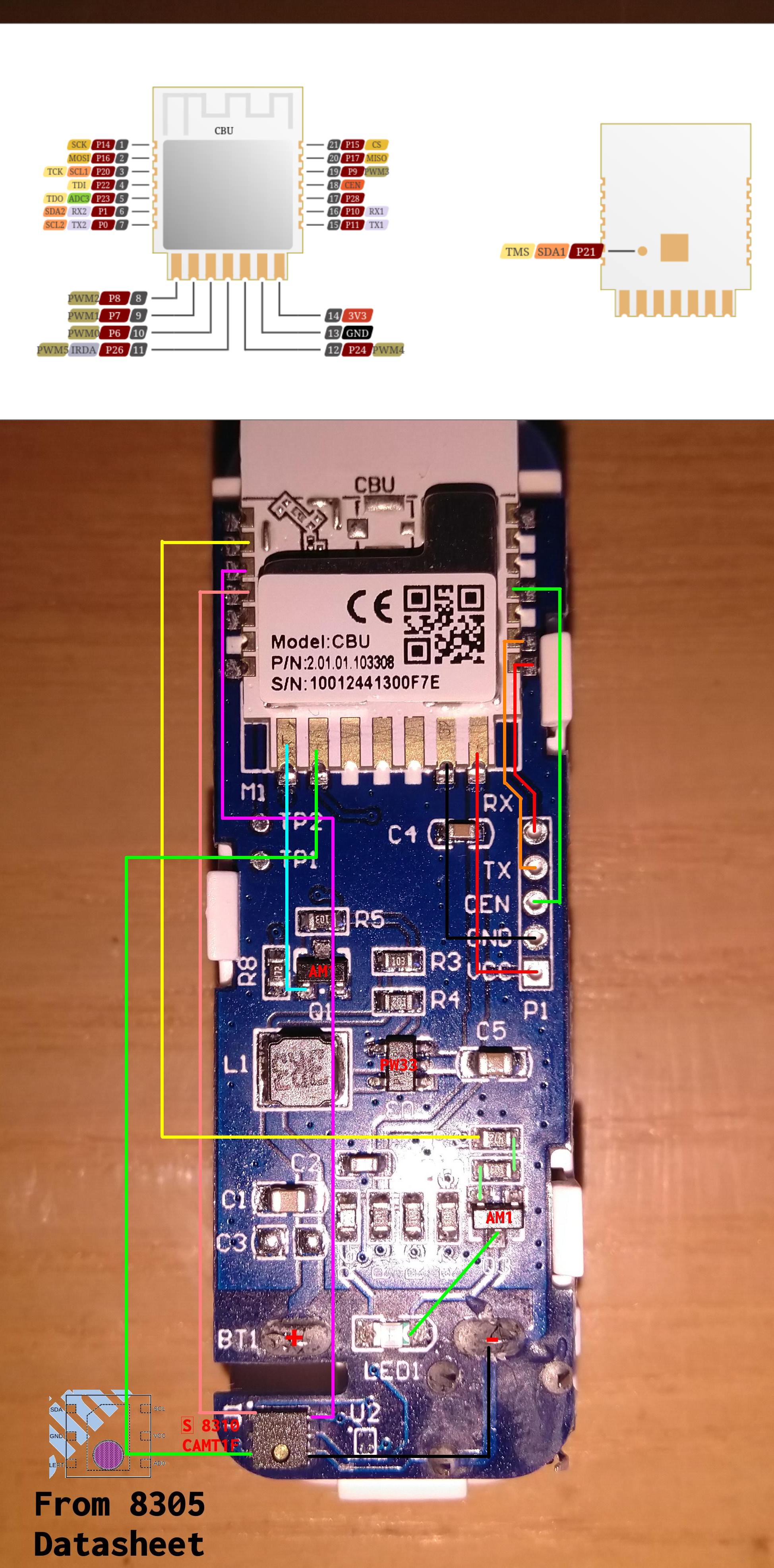
- The working OpenBeken pin map used GPIO 20 = CHT8305 SCK, GPIO 22 = CHT8305 SDA, GPIO 23 = battery ADC, GPIO 16 = LED, GPIO 14 = button, and GPIO 8 = battery relay. [#20907778]
- A proven low-power script slept the sensor for 1800 seconds after a short online window and used a 10-second extra delay only to allow manual access for edits. [#20907778]
- One tester used
DeepSleep 80 for development, then planned 15-minute sleep with sensor and battery cycles near 40 seconds to reduce battery drain. [#20918364]
- Wrong readings were dramatic: one unit showed normal values near 21.8°C and 56% RH, while another temporarily reported about -26.25°C with unstable humidity. [#20913628]
- Battery MQTT publishing returned after assigning Channel 4 to the configured battery GPIO; Home Assistant sleep-state issues improved after enabling Flag 35 and re-syncing entities. [#20935801]
How do I configure OpenBeken for the BK7231N CBU Tuya WiFi temperature and humidity sensor with a CHT8305 and no TuyaMCU?
Use the reported CBU pin map, start the CHT8305 driver, enable MQTT broadcast, and add deep sleep in
autoexec.bat. A working map used GPIO 20 for SCK, 22 for SDA, 23 for battery ADC, 16 for LED, 14 for button, and 8 for battery relay. A proven script also enabled
PowerSave, started
CHT8305, measured battery, published channels after MQTT connect, then entered sleep.
[#20907778]
Why is deep sleep mandatory on this battery-powered Tuya WiFi temperature and humidity sensor, and how should it be set up to avoid draining the batteries in a few days?
Deep sleep is mandatory because the sensor otherwise drains batteries very quickly. One expert stated, "This device must have deep sleep, otherwise it will drain batteries really, really fast." A working setup connected to Wi-Fi and MQTT, published values, then slept for 120 to 1800 seconds. For testing, users shortened sleep to 80 seconds, but the stable low-power example used 30 minutes.
[#20906573]
What is TuyaMCU, and what changes in flashing or configuration when this BK7231N sensor does not have one?
"TuyaMCU" is a secondary microcontroller that handles device logic and exchanges data with the Wi-Fi chip, usually over UART. This sensor does not have one, so configuration focuses on direct GPIO, ADC, and I2C mapping instead of Tuya serial datapoints. That simplifies hardware control, but you must configure the CHT8305 lines and power management yourself.
[#20904515]
What is the CHT8305 sensor, and how is it connected and read over I2C on this blue-PCB Tuya device?
"CHT8305" is a temperature-and-humidity sensor that communicates over I2C, using separate SDA and SCL lines for digital readings. On this board, users mapped it to GPIO 22 as SDA and GPIO 20 as SCK/SCL, then started the
CHT8305 driver in OpenBeken. The thread explicitly says the device uses I2C to talk to the CHT8305 and has no TuyaMCU in between.
[#20904515]
Which GPIO pins and channels are used on this BK7231N CBU board for the button, LED, battery ADC, and CHT8305 SDA/SCL lines?
The shared working map used GPIO 14 for the button, GPIO 16 for the LED, GPIO 23 for battery ADC, GPIO 20 for CHT8305 clock, and GPIO 22 for CHT8305 data. In the same template, GPIO 8 was set as the battery relay. The reported channels published temperature and humidity on channels 2 and 3, while battery publishing later depended on Channel 4.
[#20907778]
Why would one flashed OpenBeken sensor report correct temperature values while another identical-looking unit shows negative readings like -26°C?
Because matching-looking hardware can still behave differently during early configuration, startup, or sensor initialization. One user showed a "good" unit around 21.78°C to 21.88°C and 55.38% to 56.19% RH, while the "bad" unit reported about -26.25°C with wildly changing humidity. After redoing the configuration over several days, all sensors returned valid readings, so the issue was not confirmed as permanent hardware failure.
[#20918364]
How do I make battery voltage publish correctly over MQTT in OpenBeken on this sensor when the Web UI shows valid battery data but no voltage topic is sent?
Make sure battery handling is actively configured and exposed to MQTT. One working test used
Battery_Cycle 1,
Battery_Setup 1000 3300 2,
mqtt_broadcastItemsPerSec 20,
mqtt_broadcastInterval 1, and
publishChannels after
waitFor MQTTState 1. If Flag 36 disables driver autostart, add
startDriver Battery; otherwise the Web UI can show battery data while MQTT stays silent.
[#20922847]
What does setting Channel 4 for the configured battery GPIO do in OpenBeken, and why did it fix missing battery MQTT messages for this device?
Setting Channel 4 bound the battery input to the channel OpenBeken was expected to publish, which restored battery MQTT messages. The user who solved it reported that battery data started appearing only after assigning Channel 4 to the configured battery GPIO. Before that change, MQTT published other channels but skipped the battery value despite valid Web UI readings.
[#20935801]
How can I stop Home Assistant from showing this sleeping OpenBeken sensor as unavailable between wake cycles, and what does Flag 35 change?
Enable Flag 35 and re-sync the entity in Home Assistant. A user reported that Flag 35, described as deactivating
avty_t, stopped Home Assistant from marking the last collected values as unavailable during sleep periods. Another user confirmed the fix by enabling Flag 35, removing the MQTT item, and adding it back so Home Assistant recreated it cleanly.
[#20935801]
What is the best way to use the physical button on this BK7231N sensor to reduce deep sleep time or temporarily keep the device awake for testing?
The thread did not provide a finished button-based wake workflow. Users wanted the button to shorten sleep or keep the device online, but one report says they could not wake it reliably with the button and wished DeepSleep and PinDeepSleep could be combined. The practical workaround was adding about 10 seconds of delay before sleep, but that likely hurts battery life because Wi-Fi and MQTT already take around 10 seconds.
[#20907778]
Where can I find a working OpenBeken template for the Tuya WiFi temperature and humidity sensor with BK7231N CBU and CHT8305?
Use the pin and script shared in the thread as the working template. The clearest posted map was GPIO 8 battery relay, 14 button, 16 LED, 20 CHT8305 SCK, 22 CHT8305 SDA, and 23 battery ADC, with flags 2, 10, 27, 35, and 37 plus an
autoexec.bat that starts
CHT8305, publishes MQTT, and sleeps. No separate WebApp template was posted there.
[#20907778]
How do I flash OpenBeken on this sensor if BK7231GUIFlashTool freezes under Linux, and what are the practical alternatives?
If BK7231GUIFlashTool freezes under Linux, switch to Windows or use another supported flashing path. One user reported Linux froze while writing the first page after erase, then successfully flashed two sensors from Windows. Another practical path is standard flashing guidance plus UART if OTA is unsuitable for your firmware state. 1. Try Windows flashing. 2. If needed, use UART. 3. Verify boot and configuration before enabling deep sleep.
[#20913628]
What is the difference between ESPHome and OpenBeken for this BK7231N battery sensor, especially for I2C support, MQTT, and deep sleep behavior?
OpenBeken was the thread’s practical solution for battery use, while ESPHome was only partly working in the initial report. The ESPHome user said everything except I2C and deep sleep worked, which makes battery operation unsuitable. OpenBeken examples then showed direct CHT8305 driver startup, MQTT publishing, battery handling, and timed deep sleep from 80 to 1800 seconds.
[#20904515]
How can I flash OpenBeken OTA from an ESPHome-installed BK7231N device, and what is the workaround for Tuya OTA locks mentioned in the thread?
You cannot rely on normal Tuya OTA for this case, because the thread says it is locked against OpenBeken or Tuya RBL images. The reported workaround was using converted files from the referenced OpenBeken UF2 project. If that route fails, use direct flashing instead of OTA. The important limit is explicit: native Tuya OTA acceptance was reported blocked for these firmware formats.
[#21066328]
Where do I get the soft_i2c external component used in the ESPHome example for BK7231N, and how do I add it to an ESPHome project?
The thread does not provide the
soft_i2c files or a download location. It only shows the ESPHome line
external_components: - source: /soft_i2c, which implies a local project path rather than a built-in package. So you cannot reproduce that part from the thread alone; you would need the missing component directory from the original project source.
[#21354384]
AI summary based on the discussion. May contain errors.







Comments
I will edit your first post to add more information, but first of all, your current config is incorrect . You can't just: This device must have deep sleep, otherwise it will drain batteries really,... [Read more]
I have it working quite well. I have gathered information from multiple threads about these sensors here. Even the battery is working and showing up in HASS. "pins": { "8": "BAT_Relay;0", "14":... [Read more]
Thanks for the replies @p.kaczmarek2 and @johnypean. I got stuck at flashing as the GUIFlashTool would not work in Linux ... it would freeze when writing the first page after erasing all flash blocks. Installing... [Read more]
Are the device configs the same? Is the device hardware the same for both devices? [Read more]
Yes, I copied and pasted all settings and autoexec.bat from the first device I flashed that reports correct values. [Read more]
I played a bit with the sensors in the previous days and redid my configuration, and now all sensors return valid readings. I also started playing with the deepsleep as @p.kaczmarek2 recommended. However... [Read more]
If you activated Flag 36 - "[DRV] Deactivate Autostart of all drivers", you have to add startDriver Battery to autoexec.bat Had the same happen. [Read more]
@johnypean Nope, i don't have that enabled I have the following enabled: Flag 2 - [MQTT] Broadcast self state every N (def: 60) seconds (delay configurable by 'mqtt_broadcastInterval' and 'mqtt_broadcastItemsPerSec'... [Read more]
Hi! Thanks a lot about this post and the information given. I have one of this PCB with CBU chip. Here a resume about my configuration: https://obrazki.elektroda.pl/2744555700_1706546227_thumb.jpg... [Read more]
Solved!! Setting Channel 4 for gpio of configured battery send MQTT data. https://obrazki.elektroda.pl/7046929300_1706595312_thumb.jpg Data appear as unavailable in sleep time is solved after... [Read more]
I've got one of these devices, too. But I can't find a template in the WebApp. Could you please post your template here? [Read more]
Newbie here, anyone could be kind and post a how to, or at least post the files. Thanks in advance. [Read more]
Hello @mcexmltv , what kind of information do you need exactly? Are you asking about device configuration, or about flashing? For flashing, please see: https://github.com/openshwprojects/BK7231GUIFlashTool You... [Read more]
Thanks @pkaczmarek2 , finally had some time to do some research. Here is what I am looking for. I have ESPHome installed. How do I flash openBK OTA or do I have to use UART? If OTA is possible what... [Read more]
They have OTA locked against flashing our/Tuya RBL format but someone has found a work around (converted files...): https://github.com/BenJamesAndo/OpenBeken_uf2_firmware Let me know how it works for... [Read more]
Hi, where do I find this "soft_i2c" external component? I have an i2c device I'd like to interface to a bk7231n in ESPHome. Thanks! [Read more]