logo elektroda
logo elektroda
X
logo elektroda

Eswin ECR6600 flashing guide, datasheet, pinout, 100% local setup, Home Assistant

p.kaczmarek2  116 10101 Cool? (+7)
📢 Listen (AI):

TL;DR

  • ECR6600 WiFi+BT modules, including Tuya AXY2S and WG236 variants, get a pinout, datasheet links, and a guide for running them locally with Home Assistant.
  • Flashing uses UART0 TX0/RX0, GND, 3.3V, and ideally RST; unlike ESP chips, ECR6600 has no GPIO0 and relies on reset timing when prompted.
  • The chip pairs an Andes D10 @160MHz, up to 240MHz, with 512KB SRAM and 2MB/4MB Flash.
  • RDTool backs up the original firmware with a stub, then writes the OpenECR6600 UART binary; after reboot, the device exposes a WiFi access point for configuration.
  • The firmware release is still a March 2025 WIP, and backups should be made before cloud pairing because dumps may contain SSID and other personal data.
Generated by the language model.
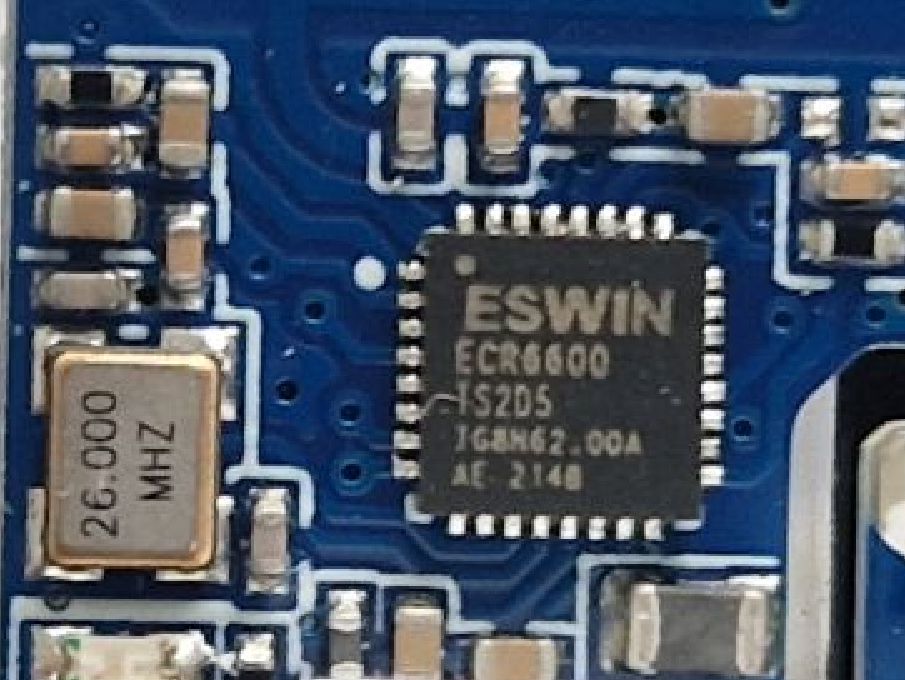
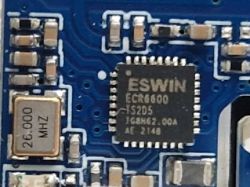
Printed circuit board with an integrated circuit and quartz crystal.
This topic covers detailed information about ECR6600 WiFi modules, datasheets, pinout, and firmware backup via UART and write procedure required to run ESWIN chips locally. Thanks to this, it's possible to pair ECR6600 devices with Home Assistant and use them free from the cloud. We'll use our Tasmota/esphome-like firmware port, as seen here.

What is ECR6600?
ECR6600 is an SoC WiFi+BT combo chip found in some IoT, featuring:
- WiFi connectivity, 2.4G, 802.11b/g/n/ax, 1T1R, DCM, HE20, MCS7, TX=+17dBm, Soft AP/Station/Direct mode
- Bluetooth connectivity, BLE 5.0, AFH, TX=+10dBm
- RF, Built-in PA, LNA, Switch, and Balun
- processor, Andes D10 @160MHz (up to 240MHz), FPU
- memory, 512KB SRAM, 48KB ROM, 32KB Cache, 2MB/4MB Flash, XIP
- peripherals, GPIOs, HS-UART, QSPI, PWM, I2C, I2S, SDIO, ADC(1MSPS), IR
- security, TRNG, Secure Boot, AES256, HASH, WPA/WPA2/WPA3, WPS, WEP
- operating temperature, -40~+105℃
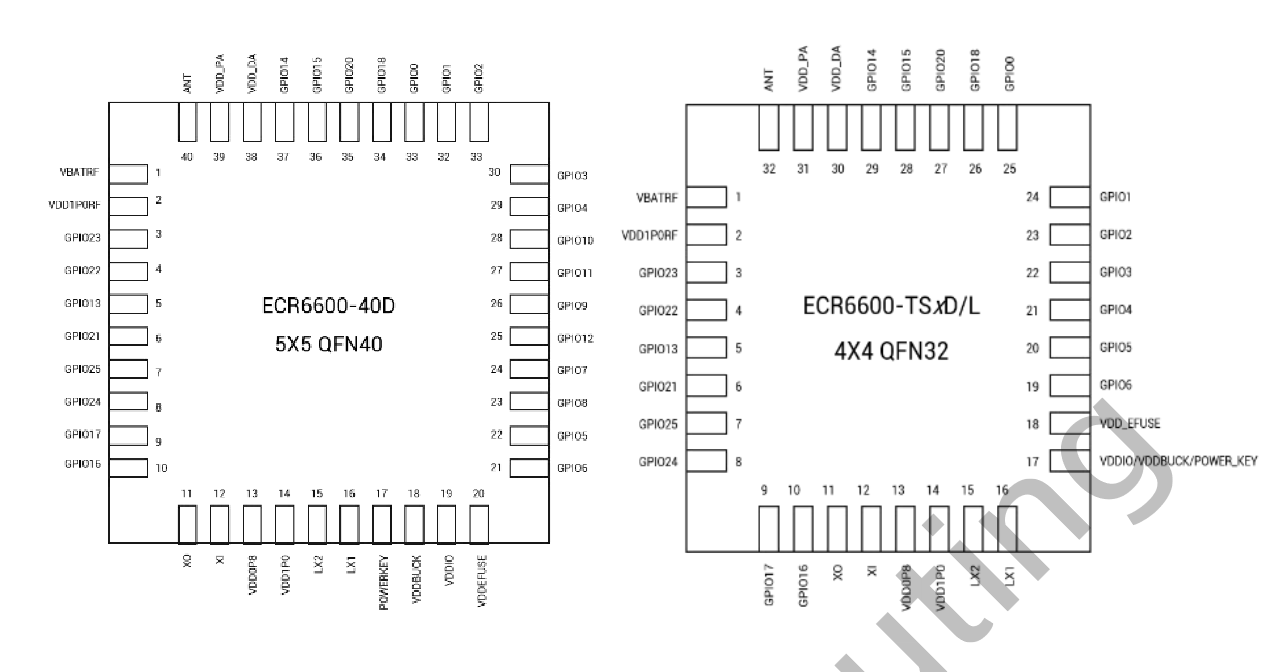
ECR6600 can be found in two surface-mount packages, ECR6600-40D (5x5 QFN40), and ECR6600-TSxD/L (4x4 QFN32):
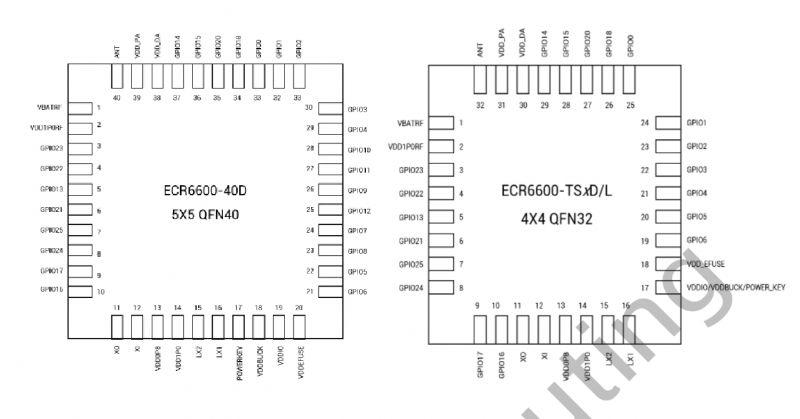
Diagrams of two ECR6600 integrated circuits in QFN40 and QFN32 packages.
See the table for the full list of variants:
VariantPackaging
ECR6600-40DQFN40 5x5
ECR6600-TS2DQFN32 4x4
ECR6600-TS2LQFN32 4x4
ECR6600-TS4DQFN32 4x4
ECR6600-TS4LQFN32 4x4


ECR6600 modules
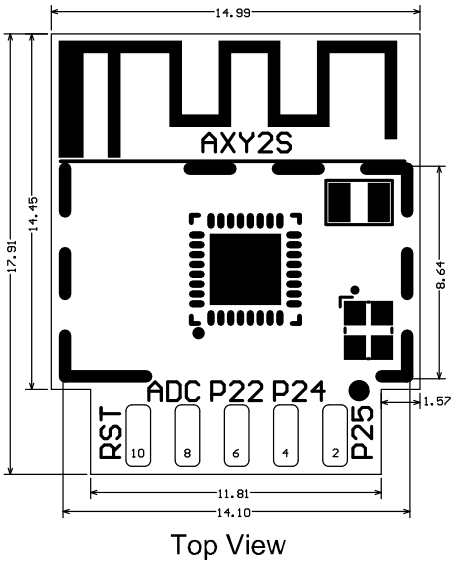
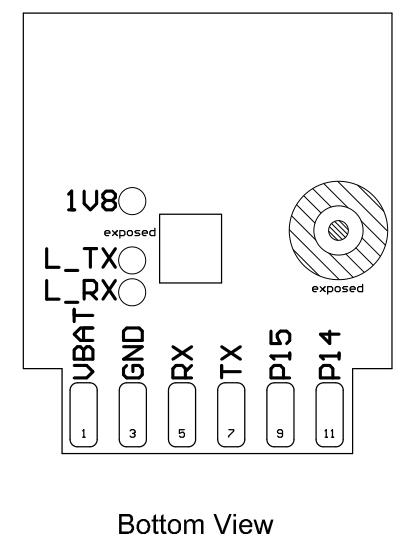
ECR6600 can be found in a form of some Tuya modules, for example, AXY2S, which is similar to Beken-based CB2S, WB2S or ESP8266-based TYWE2S.
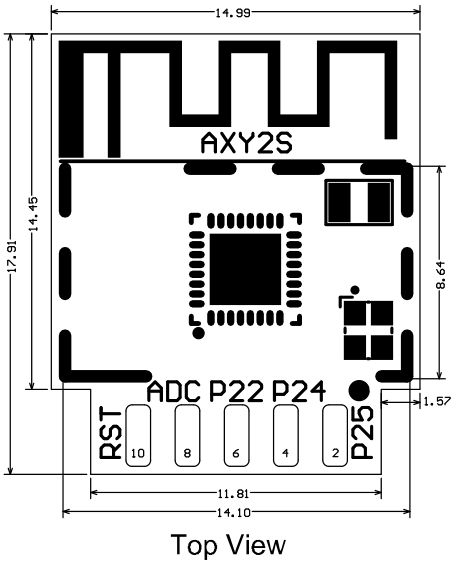
Top view schematic of an electronic module.
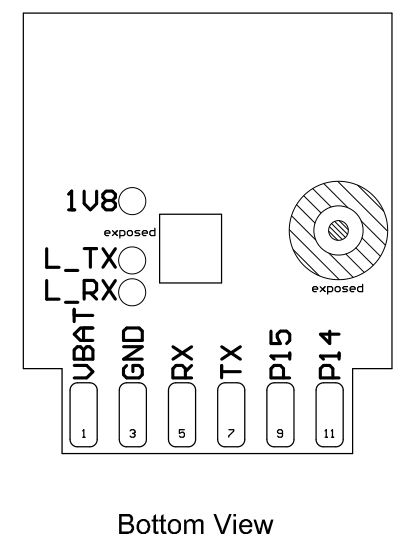
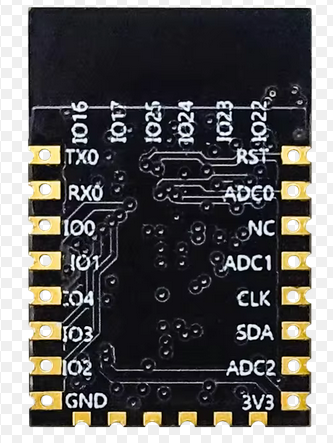
Bottom view of a PCB with pin labels.
Pinout:
Pin number Symbol Type Function
1 VBAT P Power supply pin (3.3V)
2 P25 I/O GPIO_25, hardware PWM, correspond to Pin 7 of the IC
3 GND P Power supply reference ground
4 P24 I/O GPIO_24, hardware PWM, correspond to Pin 8 of the IC
5 RX I/O GPIO_5, UART0_RXD (user serial interface)
6 P22 I/O GPIO_22, hardware PWM, Pin 4 of the IC
7 TX I/O GPIO_6, UART0_TXD (user serial interface)
8 ADC AI GPIO_20, common GPIO, which can be used as ADC. The range of input voltage is 0 to 3.3V. Correspond to Pin 27 of the IC.
9 P15 I/O GPIO_15, hardware PWM, Pin 28 of the IC
10 RST I/O Reset pin, reset at a low level. The module has been pulled to a high level and the user can control the pin externally.
11 P14 I/O GPIO_14, hardware PWM, correspond to Pin 29 of the IC

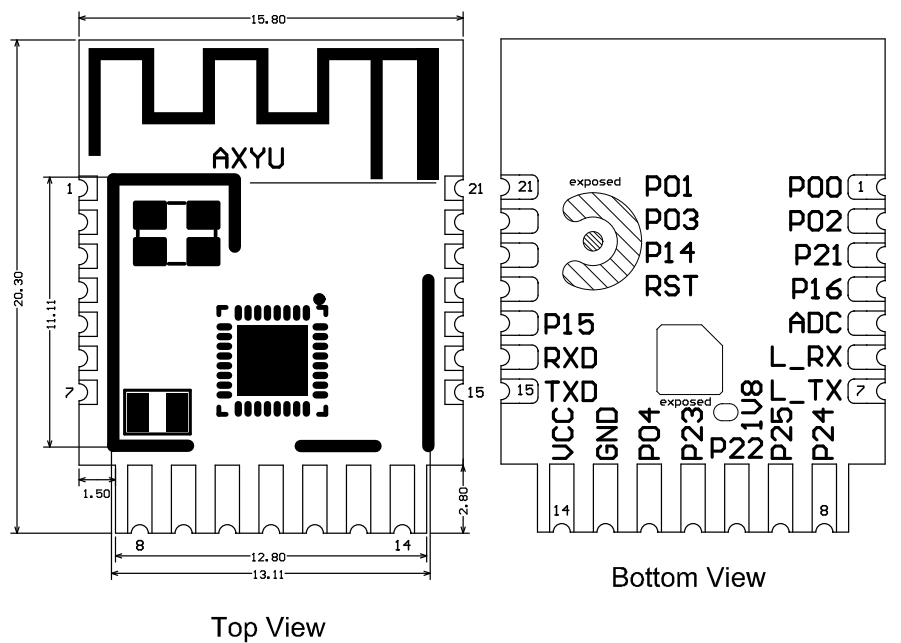
Another similar module is AXYU, which is in form of a well-known CBU.
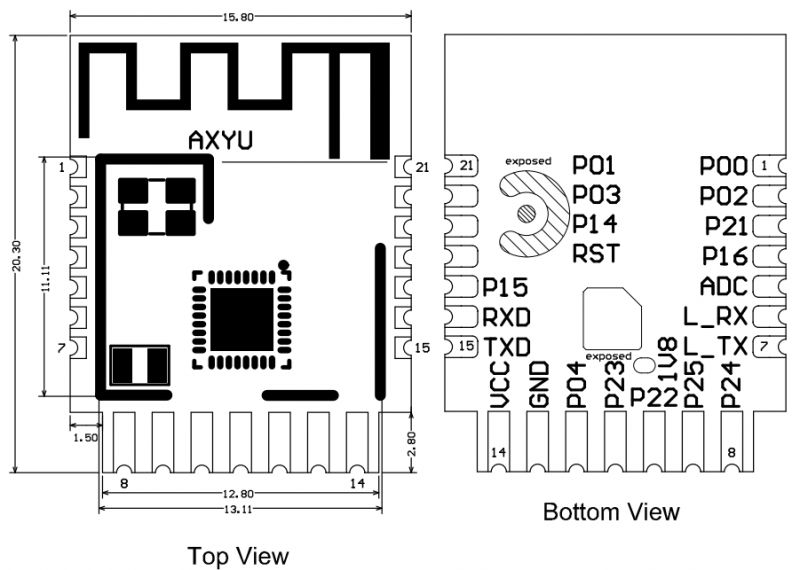
Technical drawing of an electronic module with top and bottom views.
Pinout:
Pin number Symbol Type Function
1 P00 I/O GPIO_00, common GPIO, which can be reused as SPI_SCK and corresponds to Pin 25 of the IC
2 P02 I/O GPIO_02, common GPIO, which can be reused as SPI_MOSI and corresponds to Pin 23 of the IC
3 P21 I/O GPIO_21, common GPIO, correspond to Pin 6 of the IC
4 P16 I/O GPIO_16, common GPIO, correspond to Pin 10 of the IC
5 ADC I/O GPIO_20, common GPIO, which can be used as ADC. The range of input voltage is 0 to 3.3V. Correspond to Pin 27 of the IC.
6 L_RX I/O GPIO_17, UART_Log_RXD (used to receive information about the external logs of the module), which can be configured as a common GPIO
7 L_TX I/O GPIO_13, UART_Log_TXD (used to send information about the internal logs of the module), which can be configured as a common GPIO
8 P24 I/O GPIO_24, hardware PWM, correspond to Pin 8 of the IC
9 P25 I/O GPIO_25, hardware PWM, correspond to Pin 7 of the IC
10 P22 I/O GPIO_22, hardware PWM, correspond to Pin 4 of the IC
11 P23 I/O GPIO_23, hardware PWM, correspond to Pin 3 of the IC
12 P04 I/O GPIO_04, hardware PWM, correspond to Pin 21 of the IC
13 GND P Power supply reference ground
14 VCC P Power supply pin (3.3V)
15 TXD I/O GPIO_6, UART0_TXD (user serial interface)
16 RXD I/O GPIO_5, UART0_RXD (user serial interface)
17 P15 I/O GPIO_15, common GPIO, correspond to Pin 28 of the IC
18 RST I/O Reset pin, reset at low level. The module has been pulled to a high level and the user can control the pin externally.
19 P14 I/O GPIO_14, common GPIO, correspond to Pin 29 of the IC
20 P03 I/O GPIO_03, common GPIO, which can be reused as SPI_MISO and corresponds to Pin 22 of the IC
21 P01 I/O GPIO_01, common GPIO, which can be reused as SPI_CS and corresponds to Pin 24 of the IC

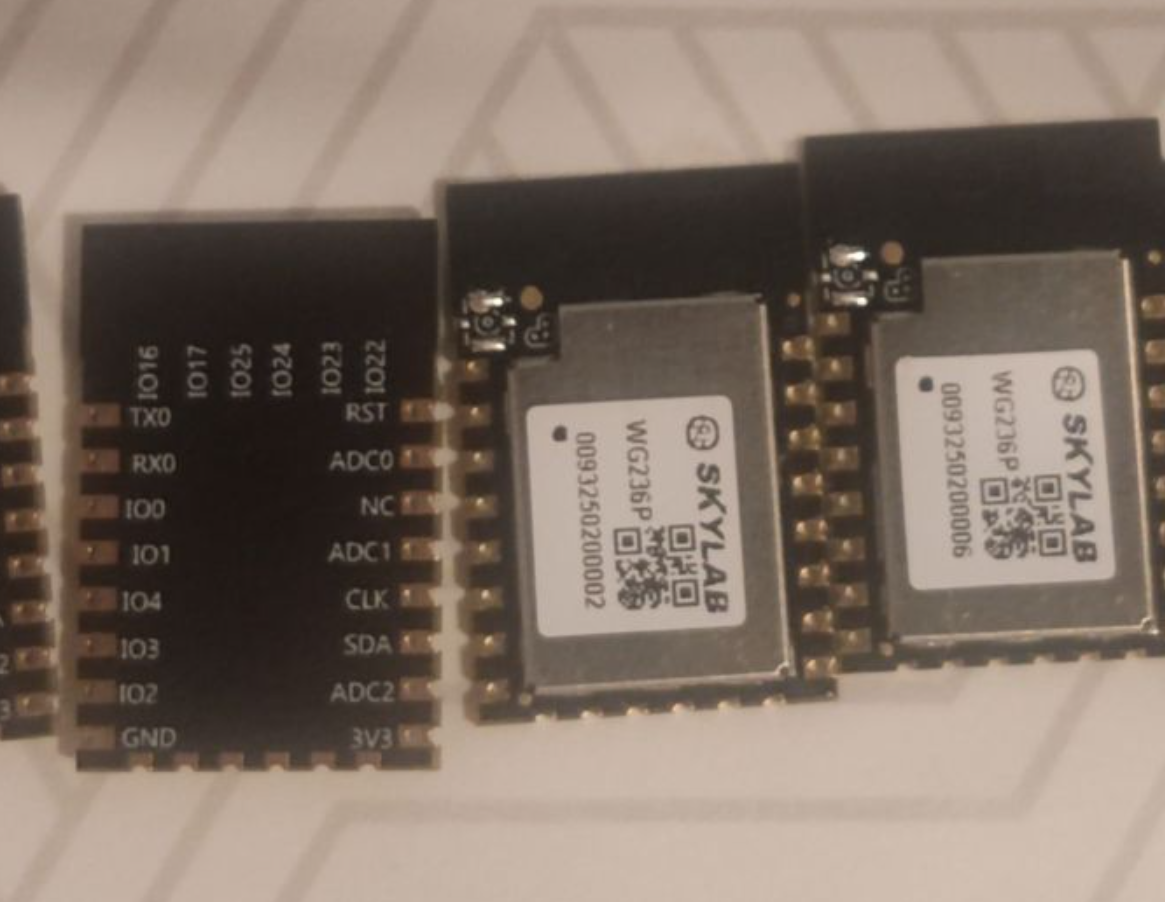
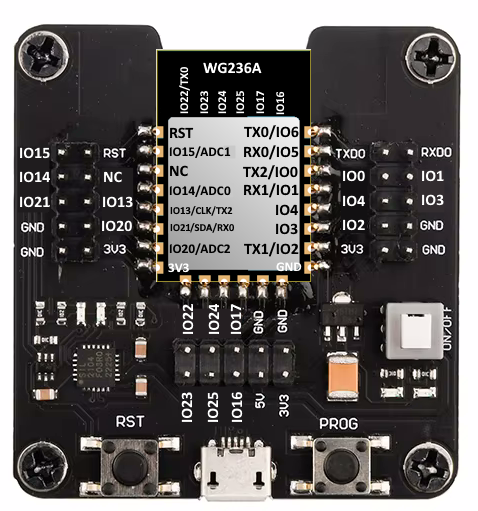
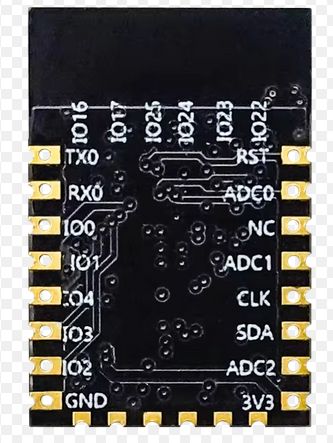
Of course, there are also non-Tuya ECR6600 modules, for example, WG236, which is in form similar to ESP12 or CB3S/WB3S/TYWE3S:
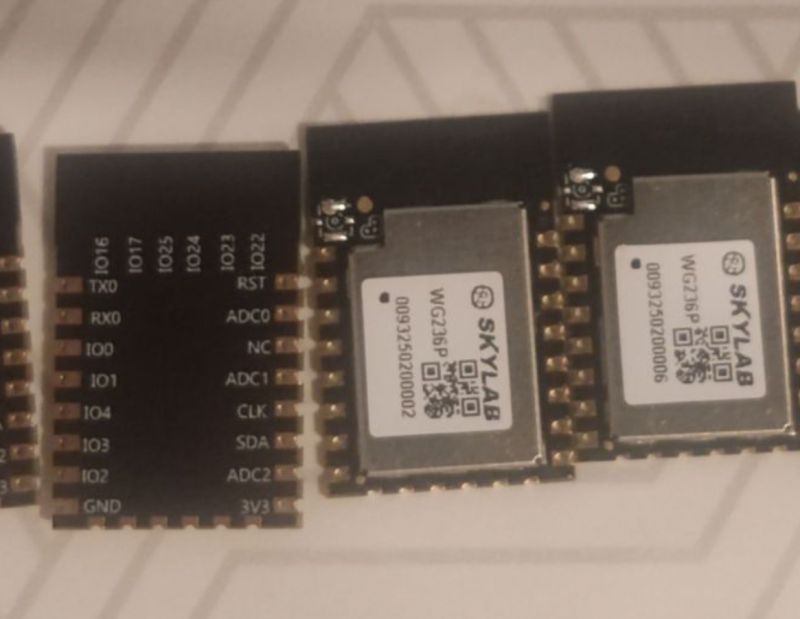
Electronic modules with SKYLAB labels and designations.
Electronic module with connectors and labeled pins.

ECR6600 devices
ECR6600 has been observed in few devices so far:
- [ECR6600][BL0937] Tuya Wifi Smart Plug With Energy Measurement
- [AXY2S] [ECR6600] Teardown LSC Connect Smart Wall Dimmer (3207304)
Please let us know if you've managed to get IoT device with ECR6600!


Important pins
For the flashing, there are just few important pins:
- IO6/TX0 - programming port
- IO5/RX0 - programming port
- IO13/TX2 - boot log output - 115200 baud - use it to check if firmware boots correctly
You may also need RST and obviously power pins (GND and 3.3V).

Connection requirements
ECR6600 connection for flashing is very similar to Beken - there is no GPIO0 like on ESP, you just need to reset when prompted.
This procedure was tested with a WG236 module using an ESP adapter, but it should work with any ECR chip.
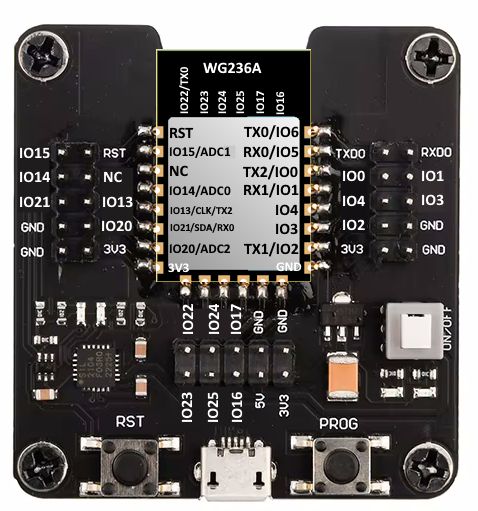
Electronic module with pin labels and connectors.
So, solder to GND, VCC and TX0 (GPIO6) and RX0 (GPIO5) according to however real device allows this if possible. Also preferably RST pin, so you can do reboot.

Update 2026
As of 2026, this platform read/write is also supported by our flash tool:
https://github.com/openshwprojects/BK7231GUIFlashTool
The connection (soldering, wires), is the same, but you can use our tool instead of the legacy one.
Please check it out and use it instead of legacy tools, let us know how it works for you!

Backup old firmware
Firmware backup is always recommended; furthermore, you can always submit a flash dump to our repository to help us:
https://github.com/openshwprojects/FlashDumps
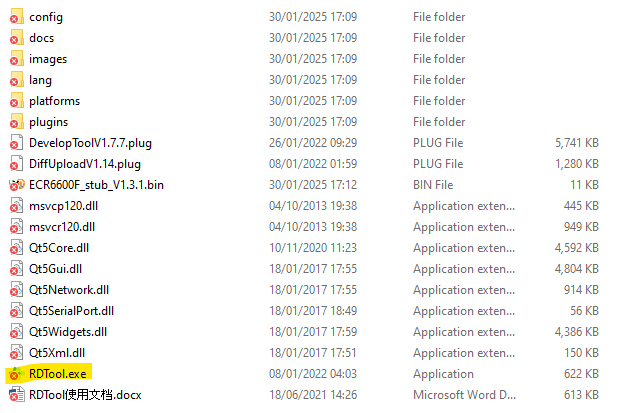
So, to backup the firmware - start by running the ESWIN RDTool.exe program after downloading and unzipping ESWIN_ECR6600_RDTool_v1.0.21.zip from https://github.com/openshwprojects/FlashTools/tree/main/TransaSemi-ESWIN
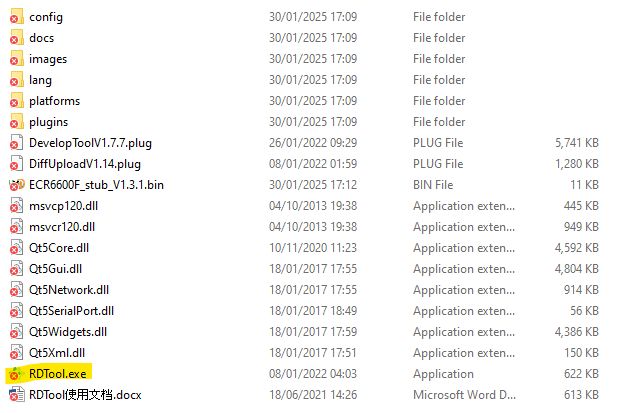
Screenshot showing the contents of a folder with files and subfolders in a file manager.
When loaded double-click the develop tool plugin.
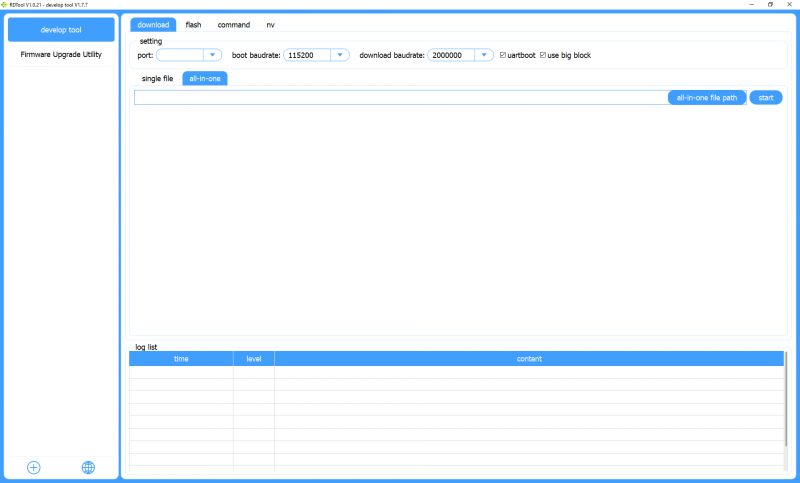
Screenshot of a firmware upgrade tool.
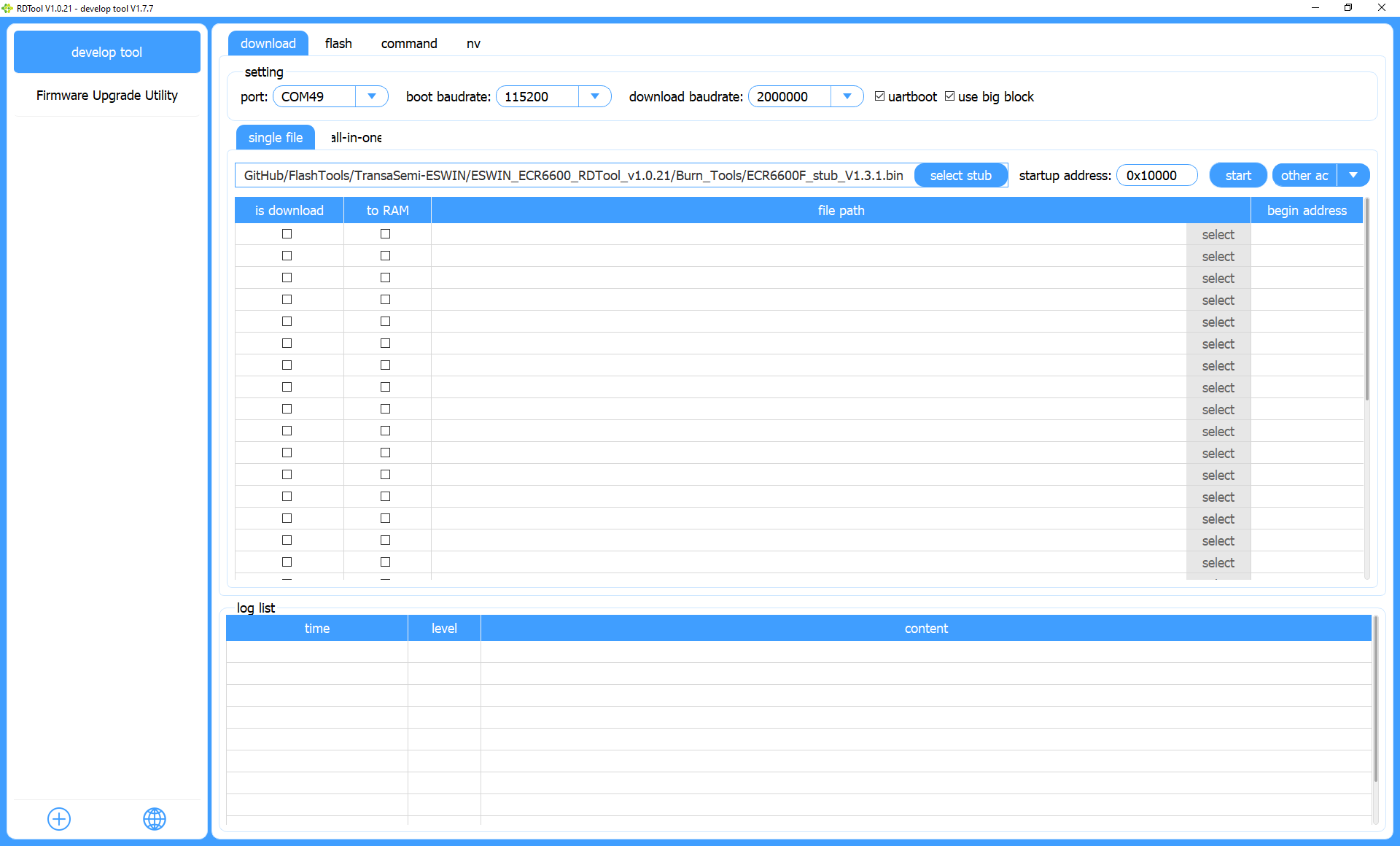
Select the single file tab and choose the file ECR6600F_stub_V1.3.1.bin from the unzipped files in the open dialog box after clicking select stub.
Ensure the startup address is 0x10000 and select the correct COM port
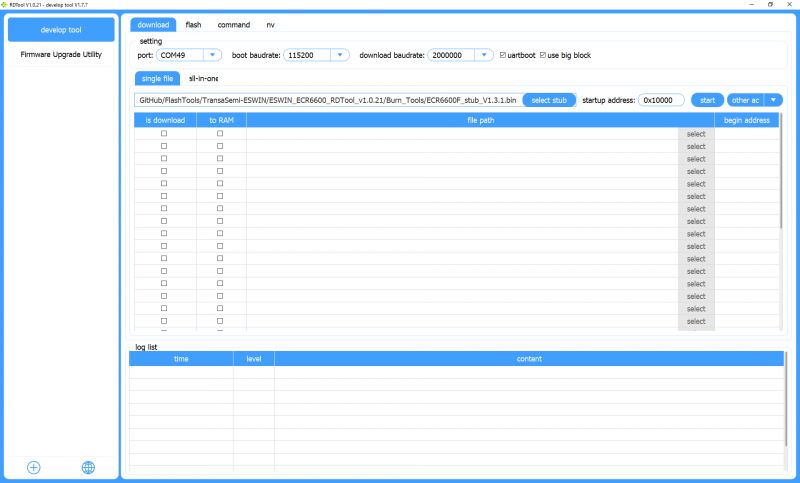
Screenshot of a firmware upgrade tool program with a list of settings and files.
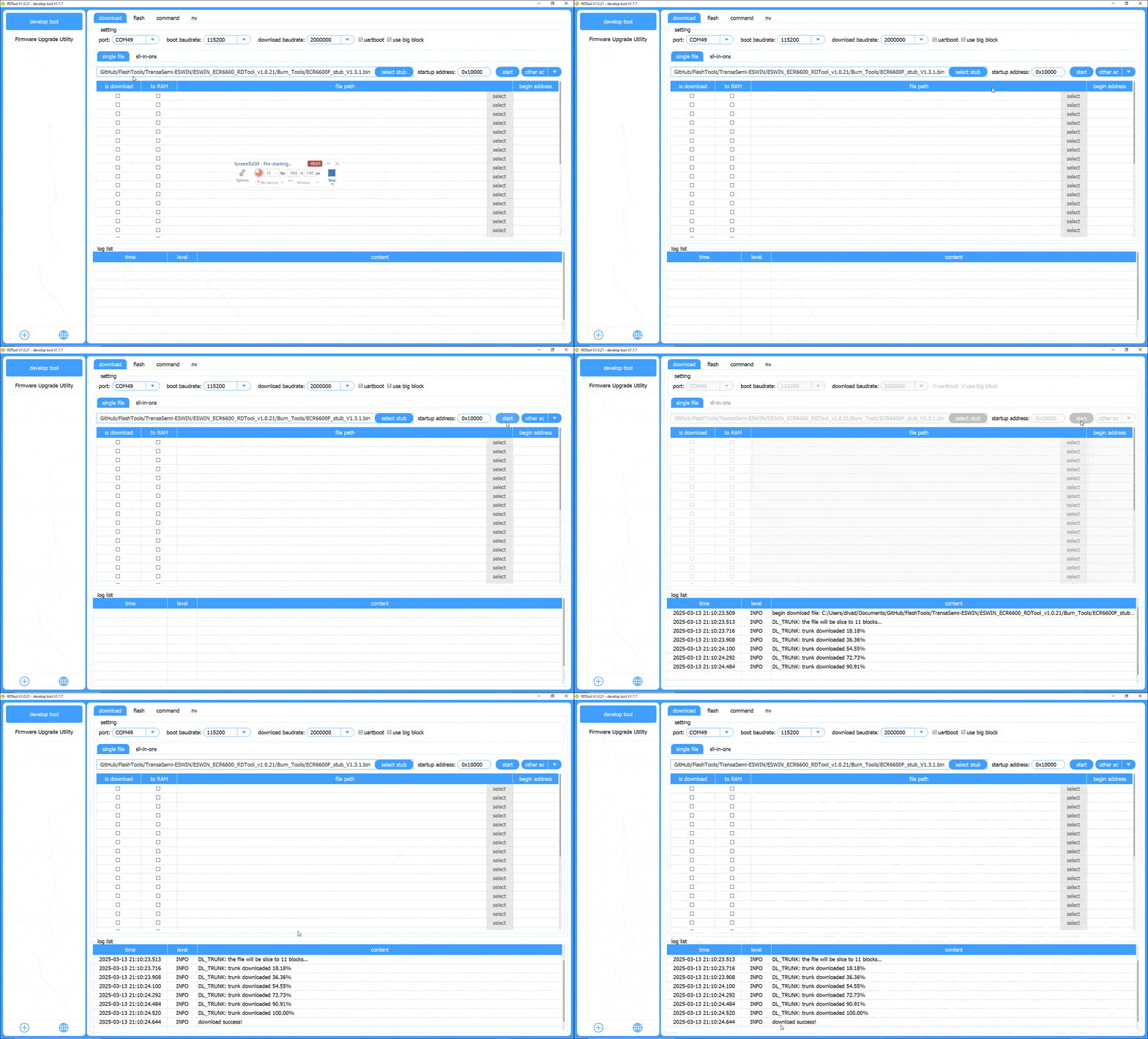
At the moment you hit start, reset (ground CEN/RST) or power-on 3.3V to the device. The window of opportunity is very small so timing is crucial.
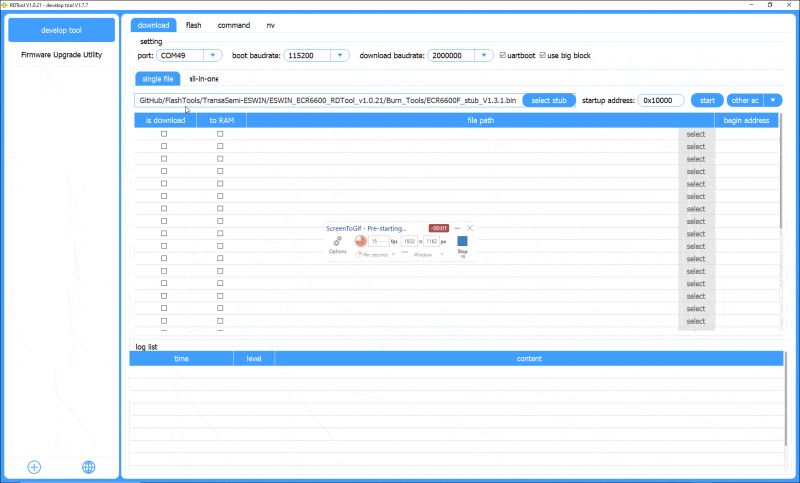
Screenshot of a firmware upgrade tool with various configuration options.
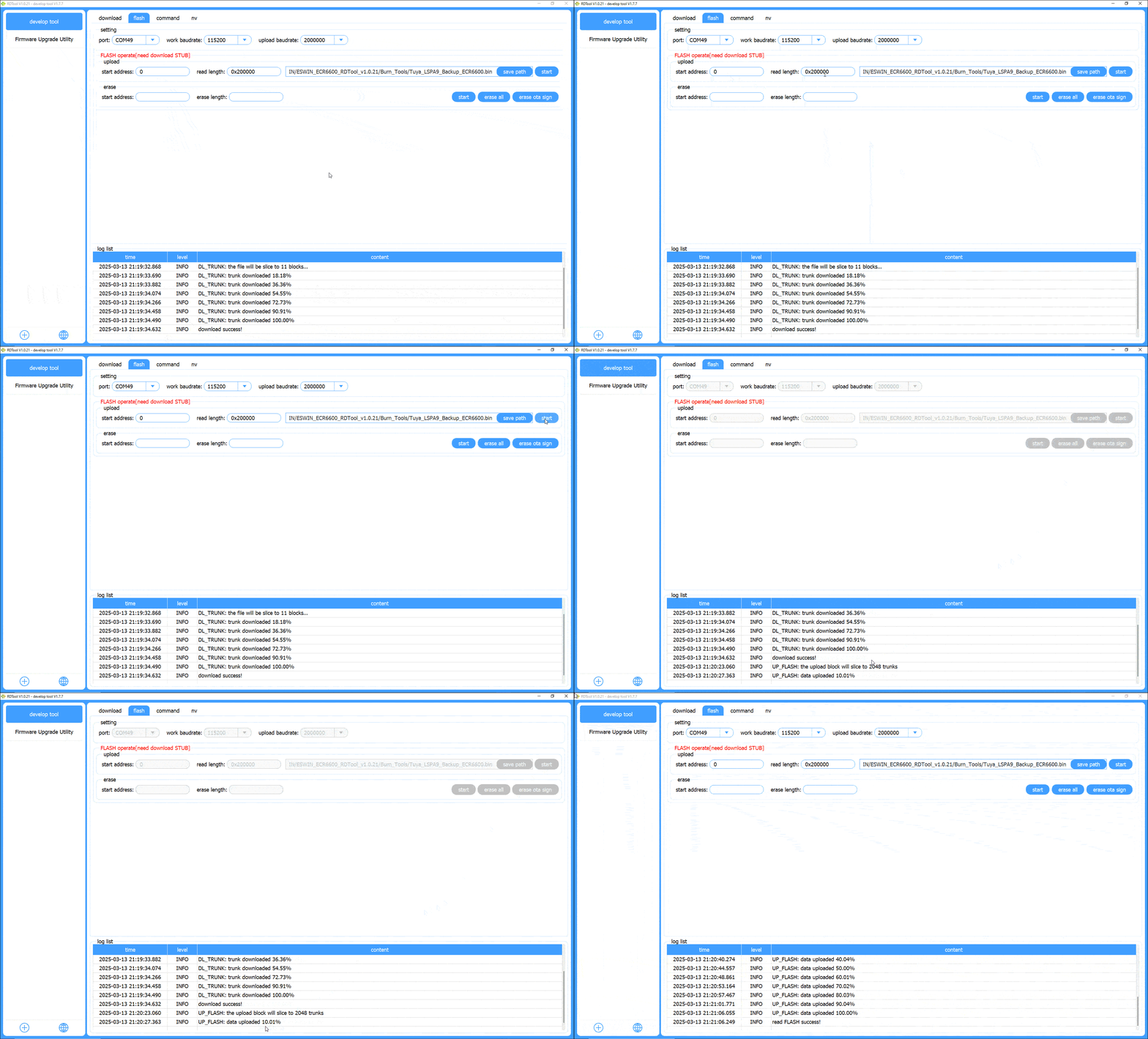
Switch to the flash tab, choose port again and enter start address of 0 and read length of 0x400000 or 0x200000, depending on your chip flash size (4MB or 2MB). If not sure, first try 0x400000, then, in case of "FLASH is not enough!" error, fall back to 0x200000. Select save path and give your backup an informative name eg; Tuya_LSPA9_Backup_ECR6600.bin. Click start next to save path to begin device flash backup to file.
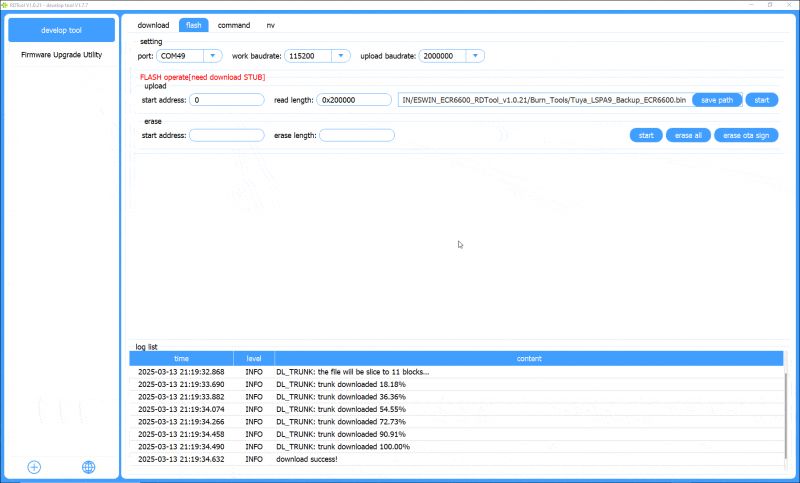
Screenshot of firmware upgrade software with progress logs.
Once backup is done, please consider sharing it with us, but be aware - it will contain your SSID and other data after pairing, so better backup firmware before connecting device to the cloud.

Flashing new firmware - OpenECR6600
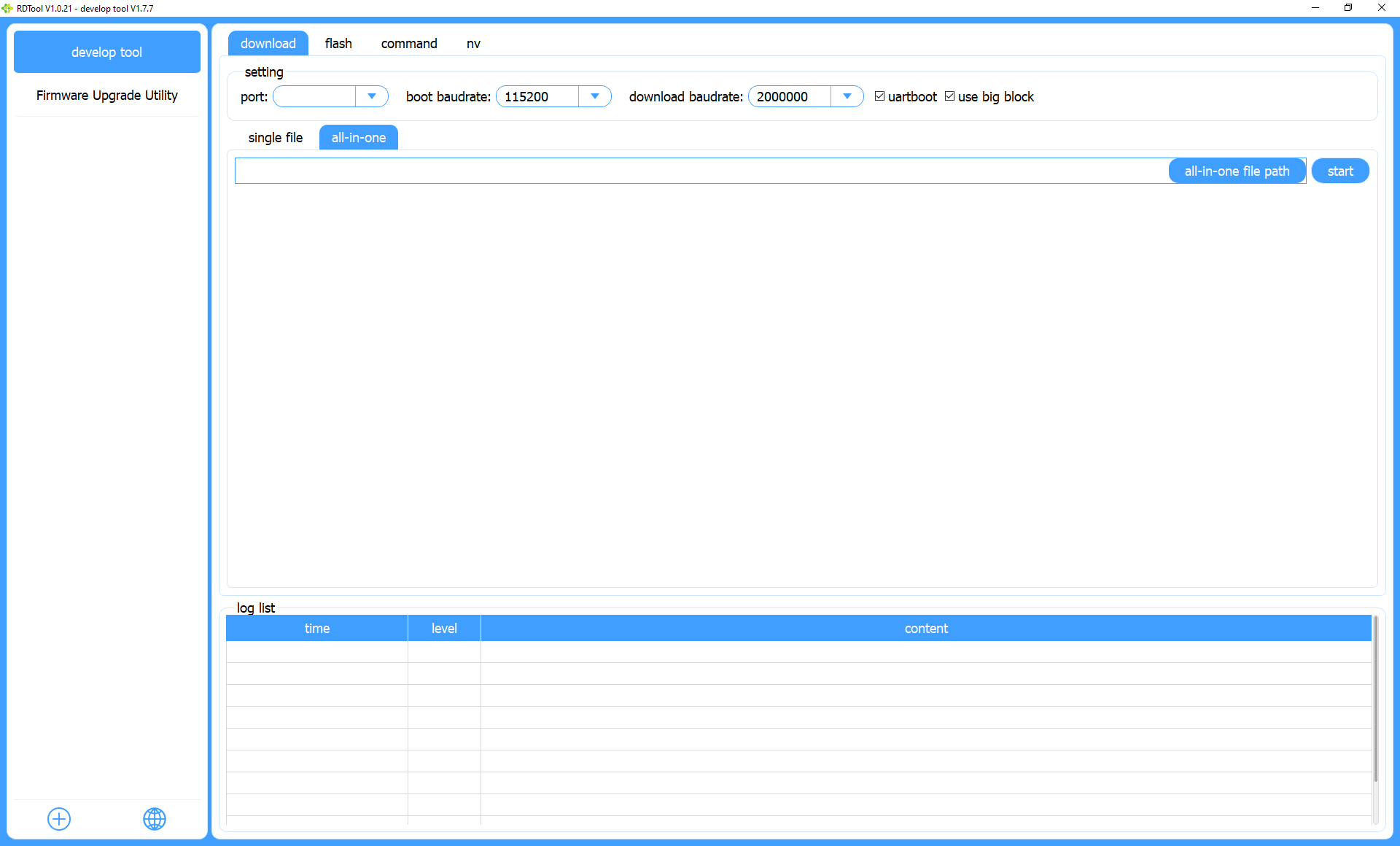
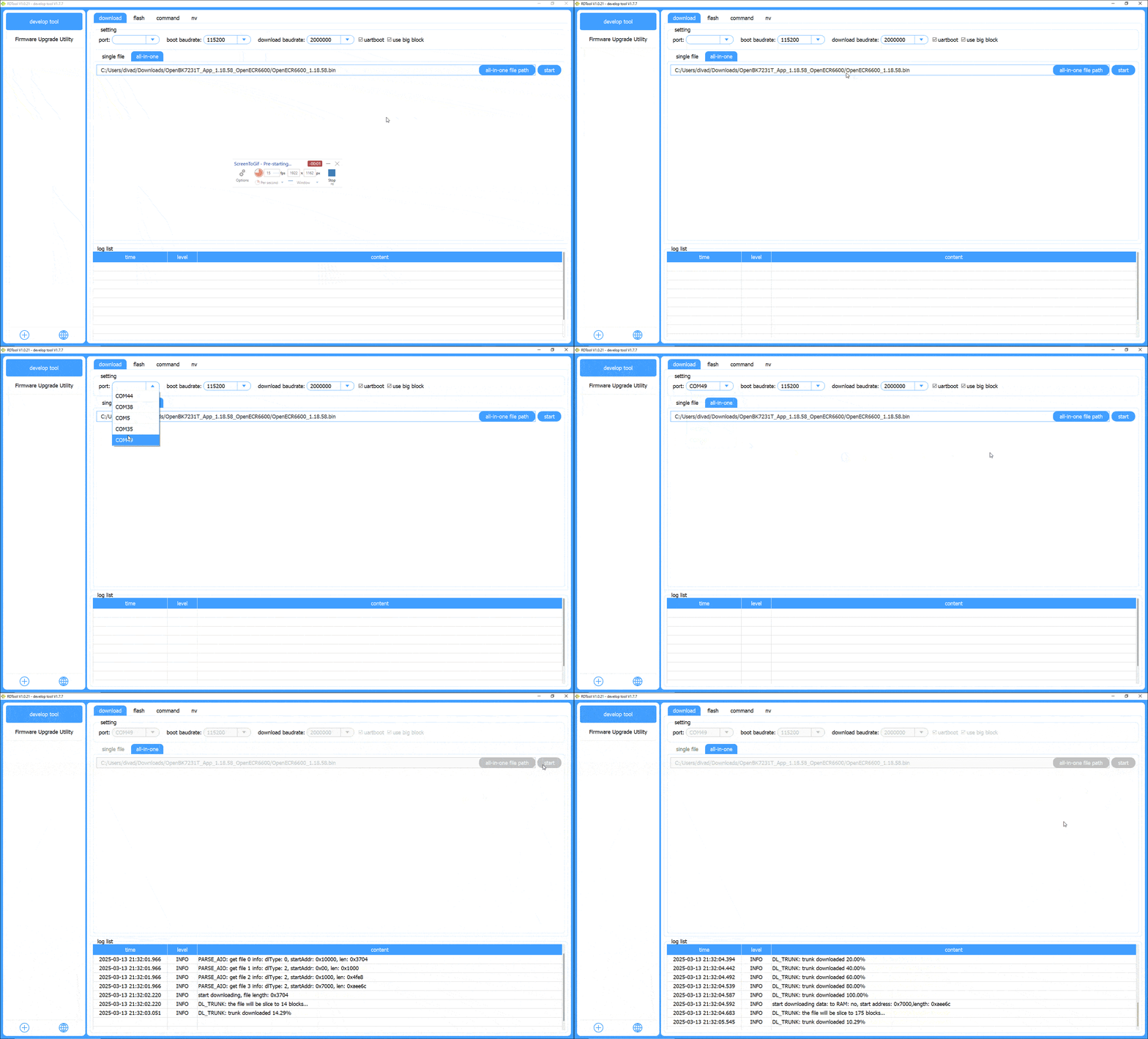
Run RDTool as above, go to the develop tool plugin but navigate to all-in-one on the download tab. Download the latest OpenECR600 UART flash binary from the release page https://github.com/openshwprojects/OpenBK7231T_App/releases/
Choose the downloaded file after selecting all-in-one file path. Click start and perform CEN/RST or power-on quickly, just like with the backup.
Flashing OBK does not require the same stub step that backup requires.
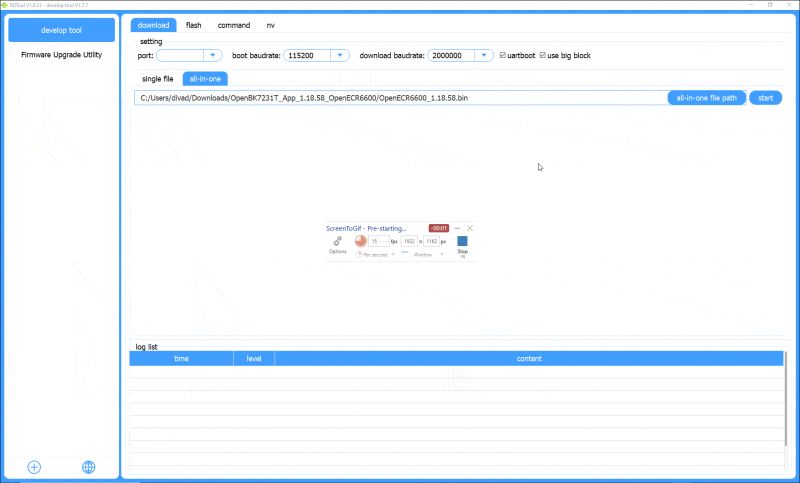
Animation showing a firmware update tool interface.
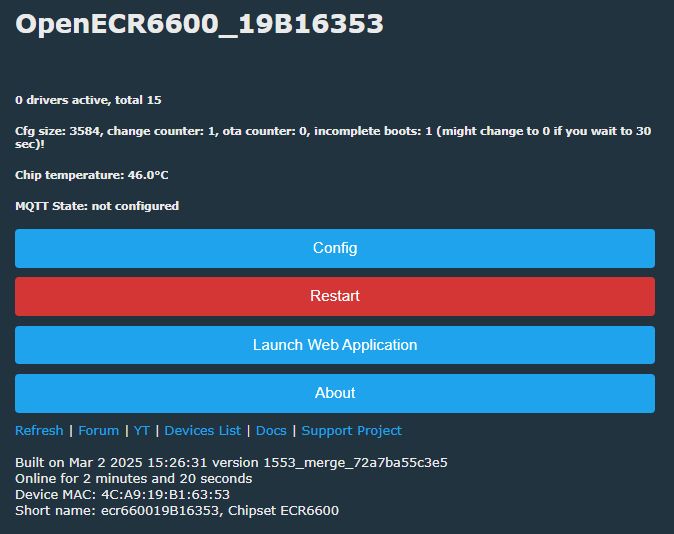
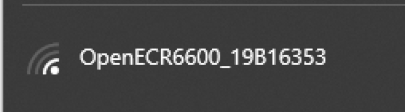
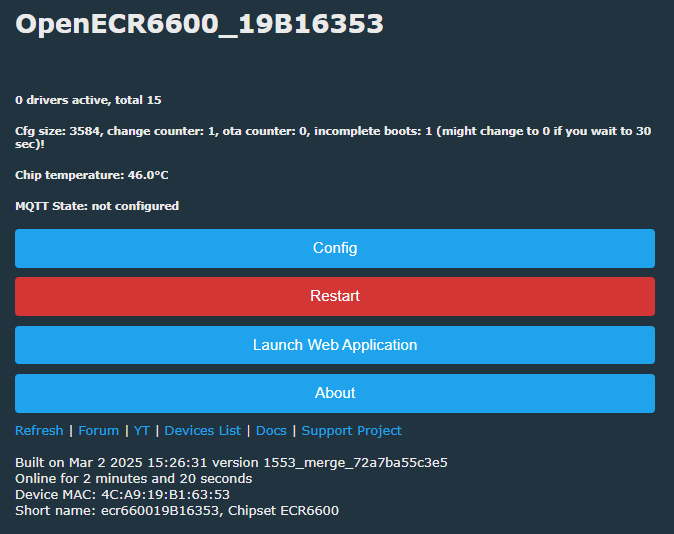
Reboot by doing power off and power on cycle. The device WiFi access point should appear, just like with Tasmota, connect to it and visit configuration page to proceed. Everything as usual.
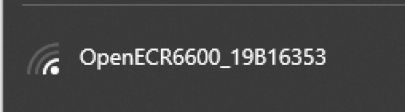
Wi-Fi network name OpenECR6600_19B16353 with signal icon.
Screenshot of the OpenECR6600 device management interface.
At the time of writing (March 2025), our firmware release for this platform is a WIP testing version, so there still may be imperfections, but we'll try to increase the stability soon...


Attachments
ECR6600 datasheet:
ECR6600 Da...t_V1.6.pdf (1.74 MB)You must be logged in to download this attachment.

ECR6600 pins functions (pinmux) table:
ECR6600 Pi...Rev4.0.pdf (1.29 MB)You must be logged in to download this attachment.

RDToolV1.0.19.rar for flashing:
RDToolV1...19.rar (57.97 MB)You must be logged in to download this attachment.

RD Tool User Guide_v2.0 guide pdf:
RD Tool Us...e_v2.0.pdf (2.18 MB)You must be logged in to download this attachment.

Hardware Reference Design User guide:
Hardware R...Rev5.0.pdf (1.96 MB)You must be logged in to download this attachment.

CDI-WX56600A-00 module documentation:
cdtech_CDI...00A-00.pdf (399.78 kB)You must be logged in to download this attachment.

ECR6600 product brief:
ECR6600-A..2D.pdf (234.32 kB)You must be logged in to download this attachment.

ECR6600_T_EVK_V2 development board schematic:
ECR6600_T_.._V2.pdf (460.83 kB)You must be logged in to download this attachment.

SkyLab WG236 V1.04 datasheet_SL-22020220 (chinese):
SkyLab_WG2...0 - 副本.pdf (493.9 kB)You must be logged in to download this attachment.

SDK OTA doc (chinese):
ECR6600 SD...指南V1.0.pdf (508.25 kB)You must be logged in to download this attachment.

Summary
This is how you can backup and flash ESR6600, this way you can also run it free from the cloud. That's how much we've found out so far, special thanks for @insmod for porting and @divadiow for research and testing. If you're reading it, and have device with ECR chip or similar, let us know! We can help you with flashing and getting your device to run 100% local.
PS: Don't forget related links:
- YT guides: https://www.youtube.com/@elektrodacom
- devices list: https://openbekeniot.github.io/webapp/devicesList.html
- project repository: https://github.com/openshwprojects/OpenBK7231T_App

About Author
p.kaczmarek2
p.kaczmarek2 wrote 14440 posts with rating 12410 , helped 650 times. Been with us since 2014 year.

Comments

spectrality 15 Mar 2025 15:33

Hi, I have Plug with ECR6600 and BL0937, same as here: https://www.elektroda.com/rtvforum/topic4106357.html Flashed lasted OpenECR, but looks like BL0937 driver is not working. Is I missing something... [Read more]

insmod 15 Mar 2025 15:45

First, have you configured pins correctly? Also attached a possible bl0937 fix, check and reply if it works for you. [Read more]

p.kaczmarek2 15 Mar 2025 16:10

I think it would be helpful to introduce this already-mentioned "Counter" role that is basically just a HAL for change counter used by BL0937. We could then just add it to GPIODoctor and use it to investigate... [Read more]

spectrality 15 Mar 2025 16:26

Tried with your attached FW version. BL0937 still not working. Pins should be assigned correctly, tested connectivity with multimeter. Attaching original plug FW [Read more]

insmod 15 Mar 2025 16:41

You didn't specify what was wrong with BL0937 originally. Well, i decided to try to check what was wrong myself. It was very simple - BL0937 driver was simply not included in the build. Wait until a... [Read more]

divadiow 15 Mar 2025 18:19

yep. same fw version as other posted [00:00:00.002]SDK version ECR6600F_V2.0.0B06P02, Release version 1.0.0 [00:00:00.027]start TUYA application [00:00:00.037]hal_wdt_init reset_time is 60000! [00:00:00.041]ctrl_int_para=... [Read more]

spectrality 15 Mar 2025 18:26

Now BL0937 driver is starting, but I'm receiving zero values. I still believe, that I have pins configured correctly. As I understood, it is not possible to extract Tuya configuration from original firmware,... [Read more]

p.kaczmarek2 15 Mar 2025 19:49

I've checked with our flash tool and got this: Tuya config extractor - magic is at 1921024 WARNING - strange nextblock header C21C5F37 WARNING - bad nextblock CRC WARNING - strange nextblock header... [Read more]

divadiow 15 Mar 2025 19:57

these are in all Tuya devices, often seen in boot log. It's used with product key and sometimes fac_pin when pairing with Tuya. There's this in the boot log for this device [00:00:00.113][01-01... [Read more]

p.kaczmarek2 15 Mar 2025 20:00

@divadiow , in our flasher, there are 3 keys: static string KEY_MASTER = "qwertyuiopasdfgh"; static byte[] KEY_PART_1 = Encoding.ASCII.GetBytes("8710_2M"); static byte[] KEY_PART_2... [Read more]

divadiow 15 Mar 2025 20:04

oh I see. hmm. im seeing what I can find. nothing guessable like 6600_2M? [Read more]

p.kaczmarek2 15 Mar 2025 20:18

It would help a lot to have Tuya SDK of ECR6600, I mean, complete, with KV_KEY_SEED define Added after 3 [minutes]: Remember how I said that first block is correctly read? These things match: ... [Read more]

insmod 15 Mar 2025 20:44

@spectrality this version should work, i even tried to simulate bl0937 myself - and i got some values. [Read more]

insmod 15 Mar 2025 21:26

I managed to get this from WBRG1 backup: { "dp3":"10", "dp5":"2", "dp30":"1", "dp39":"1", ... [Read more]

divadiow 15 Mar 2025 21:34

just looking through tuyaos-iot_3.8.3_eswin_ecr6600_wifi-ble-tuyastack https://obrazki.elektroda.pl/7758745500_1742070715_thumb.jpg does it have to have that part specified? I did build... [Read more]

p.kaczmarek2 15 Mar 2025 21:36

nice finding @insmod , but now look, if I search for this string in the dump of WBRG1 gateway, I can find it: https://obrazki.elektroda.pl/1641467500_1742070857_bigthumb.jpg The same goes for ... [Read more]

insmod 15 Mar 2025 21:38

WBR1D backup contains 8721D too, but it fails to extract anything still. That was just luck on my part [Read more]

p.kaczmarek2 15 Mar 2025 21:49

The array is used by makeSecondaryKey function. I can remove it from calculation: https://obrazki.elektroda.pl/3582146600_1742071310_bigthumb.jpg But it still fails for futher sectors. But maybe... [Read more]

divadiow 15 Mar 2025 21:54

only 2 mentions of that in plain-text in TuyaOS SDK https://obrazki.elektroda.pl/8504009500_1742071824_thumb.jpg Added after 3 [minutes]: FYI https://airtake-public-data-1254153901.co... [Read more]

FAQ

TL;DR: With 2 MB or 4 MB flash and a "very small" boot window, ECR6600 devices can be backed up over UART, flashed with OpenECR6600, and then paired locally with Home Assistant instead of Tuya cloud. This guide is for users converting Tuya plugs, dimmers, and switches to fully local control. [#21479963]

Why it matters: It gives ECR6600 owners a repeatable path from unknown Tuya hardware to local firmware, backup safety, and practical pin mapping.

Option Chip/module family Flashing method in thread Local firmware status Notable limitation
ECR6600 / AXYU / AXY2S / WG236 ESWIN ECR6600 UART with RDTool or BK7231GUIFlashTool OpenECR6600 works; Home Assistant local use confirmed Reset timing is critical
BK7231-based modules Beken CB2S/WB2S/CBU-like Similar UART workflow Used as reference platform Tuya config extraction behavior differs
ESP8266-based TYWE2S ESP8266 Mentioned as module comparison Familiar baseline for users ECR6600 has no GPIO0-style flash pin

Key insight: ECR6600 flashing is straightforward once wiring is correct: use TX0, RX0, 3.3 V, GND, and usually RST, then hit reset exactly when the tool starts. The harder part is often pin mapping or Tuya config extraction, not writing firmware.

Quick Facts

  • ECR6600 is a Wi‑Fi + BLE SoC with 2.4 GHz 802.11 b/g/n/ax, BLE 5.0, an Andes D10 at 160 MHz up to 240 MHz, 512 KB SRAM, and 2 MB or 4 MB flash variants. [#21479963]
  • The flashing UART uses IO6/TX0 and IO5/RX0; IO13/TX2 outputs boot logs at 115200 baud, which helps confirm whether firmware actually boots. [#21479963]
  • RDTool backup reads from address 0x0 with length 0x400000 for 4 MB parts or 0x200000 for 2 MB parts; if RDTool reports "FLASH is not enough!", switch to 0x200000. [#21479963]
  • AXY2S is an 11-pin Tuya-style ECR6600 module, while AXYU is a 21-pin CBU-shaped module exposing extra GPIOs such as P00, P01, P02, P03, P04, P21, P23, and dedicated L_RX/L_TX log pins. [#21479963]
  • In March 2025, a BL0937 plug issue was traced to a build error: the BL0937 driver was not included in the binary, and a rebuilt firmware fixed zero readings. [#21480949]

What is the Eswin ECR6600, and how does it compare to BK7231, ESP8266, and other Tuya Wi-Fi modules for local firmware use?

ECR6600 is a Wi‑Fi and Bluetooth SoC used in Tuya-style modules such as AXY2S and AXYU, and it can run local OpenECR6600 firmware. It offers 2.4 GHz 802.11 b/g/n/ax, BLE 5.0, 512 KB SRAM, and 2 MB or 4 MB flash. In the thread, it is compared to BK7231 modules like CB2S and WB2S and to the ESP8266-based TYWE2S because those are familiar Tuya module formats. For local use, the big practical difference is flashing: ECR6600 has no ESP-style GPIO0 boot strap and instead relies on reset timing during UART flashing. [#21479963]

How do I flash an ECR6600 device over UART with RDTool and OpenECR6600 for a fully local Home Assistant setup?

You flash it over UART, then join the new AP and finish setup like Tasmota. 1. Wire 3.3 V, GND, TX0 on GPIO6, RX0 on GPIO5, and preferably RST. 2. In RDTool, open the develop tool, use the download tab, choose the all-in-one OpenECR6600 UART binary, click Start, then reset or power-cycle the board immediately. 3. After flashing, power-cycle again, connect to the firmware access point, open the configuration page, and add it to Home Assistant locally. The thread states this was already working in March 2025, though the release was still marked WIP testing. [#21479963]

What are the important ECR6600 flashing pins, and how are TX0, RX0, IO13, RST, 3.3V, and GND used during backup and programming?

The essential pins are TX0, RX0, 3.3 V, GND, and usually RST. TX0 is IO6 and RX0 is IO5; they form the user UART used for backup and flashing. IO13 is TX2 and outputs boot logs at 115200 baud, so it helps verify whether the firmware starts after programming. RST lets you hit the short boot window without repeatedly removing power. 3.3 V powers the module, and GND is the common reference. The thread’s tested wiring used an ESP adapter on a WG236 module, but the same signal roles apply across ECR6600 modules. [#21479963]

What's the difference between BK7231GUIFlashTool and the legacy ESWIN RDTool for reading and writing ECR6600 flash?

BK7231GUIFlashTool is the newer multi-platform flasher, while RDTool is the original ESWIN utility shown in the screenshots. The main post says ECR6600 read and write support was added to BK7231GUIFlashTool in 2026, with the same soldering and UART wiring as RDTool. RDTool remains the documented legacy workflow for backup, restore, and flashing OpenECR6600. Later thread feedback showed mixed real-world results: one user reported BK7231GUIFlashTool v.228 failed with wrong-header errors, while another flashed successfully at 921600 baud. If you want the most proven path from the thread, RDTool is still the safest first choice. [#21823087]

How do I back up the original ECR6600 firmware, and which read length should I use for 2 MB vs 4 MB flash chips?

Back up first with RDTool’s stub workflow, then read the whole flash from address 0x0. In RDTool, open develop tool, go to single file, load ECR6600F_stub_V1.3.1.bin, set startup address to 0x10000, and trigger reset exactly when you click Start. Then switch to the flash tab, enter start address 0 and read length 0x400000 for 4 MB or 0x200000 for 2 MB. If you do not know the size, try 0x400000 first. If RDTool says "FLASH is not enough!", retry with 0x200000 and save the dump under a descriptive filename. [#21479963]

Why does RDTool on ECR6600 require precise reset timing, and what is the easiest way to catch the boot window reliably?

RDTool needs precise timing because the bootloader accepts the UART session only in a very short window after reset or power-up. The thread explicitly says "the window of opportunity is very small," so clicking Start alone is not enough. The easiest reliable method is to wire the RST pin and ground it exactly when RDTool starts, instead of pulling power each time. If RST is unavailable, power-cycle 3.3 V at the same moment. Using IO13 boot logs at 115200 baud also helps confirm whether you missed the window or the firmware simply failed to boot. [#21479963]

What is AXYU or AXY2S in the context of ECR6600 devices, and how do their pinouts differ from WG236-style modules?

AXY2S and AXYU are Tuya-style ECR6600 modules, while WG236 is a non-Tuya module in an ESP-12 or CB3S-like format. "AXYU is a module board that exposes the ECR6600 SoC in a CBU-shaped 21-pin footprint, with UART, ADC, PWM-capable GPIOs, and dedicated log pins for integration into Tuya devices." AXY2S is smaller, with 11 pins including VBAT, GND, RX, TX, ADC, RST, and a few PWM GPIOs. AXYU exposes many more signals, including P00–P04, P21, P23, P24, P25, TXD, RXD, L_TX, and L_RX, so it is easier to probe and repurpose. [#21479963]

Why was the BL0937 energy meter showing all zero values on OpenECR6600, and how was that issue fixed in the thread?

It showed zero because the BL0937 driver was missing from the build, not because the reported plug pinout was wrong. The user first flashed an OpenECR build and saw the driver start but every reading stayed at 0.0 V, 0.000 A, and 0.00 W. After investigation, the maintainer said the cause was simple: "BL0937 driver was simply not included in the build." A new binary was generated and uploaded, and the tester later confirmed that BL0937 then worked correctly and could be calibrated. [#21480949]

How can I verify BL0937 CF, CF1, and SEL pin assignments on an ECR6600 smart plug when the driver starts but readings stay at zero?

Verify them by checking pulse activity, not only continuity. The thread suggests adding a Counter role as a simple HAL-backed change counter, then using GPIO Doctor to see which pin actually carries BL0937 pulse traffic. That helps distinguish CF from CF1 when the driver loads but readings remain zero. One tested plug used pin 14 for BL0937CF, 15 for BL0937SEL, and 20 for BL0937CF1, but the maintainers still wanted a counter-based method to confirm assignments on future boards. If the driver runs and values stay at zero, first suspect missing pulses or swapped CF and CF1. [#21480916]

Why does Tuya config extraction from ECR6600 backups fail after the first block, and what does the thread suggest about changed secondary keys or TuyaOS 3 storage?

It fails because the first block decrypts, but later blocks fail header and CRC checks, which points to a changed secondary key or a different storage scheme. The extractor found the Tuya config magic at offset 1921024, passed the first MAGIC and CRC checks, then produced repeated "strange nextblock header" and "bad nextblock CRC" warnings. The thread’s main hypothesis was that ECR6600 changed KEY_PART_1 used by makeSecondaryKey, while a related idea was that newer TuyaOS 3 firmware stores config differently from older BK-based devices. In short, the parser understands the opening block but not the follow-up encryption logic. [#21481206]

What is KV_KEY_SEED in Tuya firmware, and why does it matter when trying to decrypt or extract configuration from ECR6600 dumps?

KV_KEY_SEED is the short seed string used to derive part of Tuya’s secondary flash-encryption key for stored configuration. "KV_KEY_SEED is a Tuya firmware configuration value that feeds key derivation for encrypted key-value storage, and changing it breaks block decryption even when the first flash header still matches." In the thread, older non-ECR examples used CONFIG_KV_KEY_SEED="8710_2M", but ECR6600 binaries appeared to contain only some known key parts, not that seed. Because decryption failed right after makeSecondaryKey was applied, the maintainers suspected ECR6600 used a different KV seed or a modified derivation path. [#21481270]

How do I restore a full ECR6600 backup in RDTool after saving the original flash image?

Restore the full dump from RDTool’s single file tab using the same stub setup as backup. 1. Open develop tool, choose single file, select the same stub, set the port, and keep startup address at 0x10000. 2. In the main file path area, choose your saved backup file, set begin address to 0x0, and check is download. 3. Click Start next to startup address and immediately reset or power-cycle the device. The thread notes that stub upload and full-flash restore then happen in one go, so you do not need a separate restore stage. [#21480971]

What is NDS32 in relation to the ECR6600 SDK, and how were people in the thread using Ghidra to analyze ECR6600 binaries?

NDS32 is the Andes CPU architecture used by ECR6600, and it is why stock reverse-engineering setups struggled with the binaries. The thread found the SDK used nds32le-elf-mculib-v3s, then built a custom Ghidra version with NDS32 processor support from an external branch. After that, users could at least open binaries and view disassembly. They searched for strings, constants like 0x13579753, and boot-log references such as the key print path to locate simple_flash and key-handling routines. The goal was to trace where ECR6600 derives or loads the Tuya secondary decryption key. [#21481465]

How can I find relay, button, and LED pins on an unknown ECR6600 switch using GPIO Doctor and boot logs without a published template?

Use GPIO Doctor for live testing, then confirm with the original firmware boot log. One maintainer advised testing unconfigured pins as outputs while the device is on mains; when a relay clicks, you found the relay pin. For buttons, the user had already identified them, and for LEDs, the thread notes they are often tied to the same logic as relays on many switches. Boot logs from the factory dump can list initialized pins, which helps narrow candidates. This method produced a full 3-gang mapping, including buttons on 0, 2, 17 and relay-related pins on 14, 15, 22, 23, 24, and 25. [#21616102]

How do I build or configure OpenBK/OpenECR6600 so SendGet can use HTTPS instead of HTTP, especially for requests to services like Google Apps Script?

You need a build that enables HTTPS in the platform SDK, because the tested SendGet path only supports plain HTTP by default. The thread confirms this directly: a user tried sending a Google Apps Script request and was told SendGET could only do HTTP unless OpenBK was built with secure support. On ECR6600 specifically, one maintainer noted that mbedTLS is enabled by default in the SDK, so HTTPS may be possible there, but no finished OpenBK HTTPS procedure was provided. The practical limitation is clear: unmodified SendGet works for http://..., not for https://... targets like Google Apps Script. [#21640832]
Generated by the language model.
%}