




logo elektroda
logo elektroda
X
logo elektroda

"LAN controller" as a simple on/off switch with an Ethernet interface

rafalll1984 19227 32
Best answers LABEL_AI_GENERATED

How can I use a LAN controller to switch a boiler on and off through its thermostat circuit, and what is the correct wiring diagram if I want a safer external relay?

Connect the relay contacts of the LAN controller in parallel with the thermostat/controller contacts so either one can switch the heater on, and for safety let the LAN controller drive an external relay (for example on a DIN rail) while only that relay’s contacts switch the heating circuit [#11419979] You do not need a relay module on the LAN controller itself for this setup [#11419979] If you want a simpler or cheaper solution, a modified router with relays/GPIO can also be used as an internet-controlled switch [#11419979][#11421445] Another proven inexpensive option is an Arduino with an ENC28J60 Ethernet module acting as a web server; one user reported a total cost of about 50–70 PLN, support for up to 8 devices, and DS18B20 temperature control [#11444430]
AI summary based on the discussion. May contain errors.
ADVERTISEMENT
Treść została przetłumaczona polish » english Zobacz oryginalną wersję tematu
  • #1 11419824
    rafalll1984
    Level 10  
    Posts: 6
    Hello,

    I suppose I’ll start by saying that when it comes to electronics, I’m a complete novice.
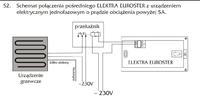
    The idea behind my project is to use a tablet or mobile phone connected to the internet to switch the central heating boiler on and off. Admittedly, the boiler is linked to a thermostat of the type euroster 2000 ale w sytuacjach kiedy wracam z pracy o różnych godzinach jest to niewystarczające. Pytając wujka Google oraz przeszukując to forum natrafiłem na parę rozwiązań typu Kit AVT966 C lub AVTMOD05 i ogólnie tego typu ze strony Link oraz użyty już w temacie "Lan kontroler" Link i Link tylko nie wiem czy idę właściwym tropem ale wydaje mi się, że tak. Najbardziej interesuje mnie w/w "Lan kontroler" który aby zrealizować jeden ze schematów połączenia z termostatem typu euroster 2000 (if I’ve understood the diagram correctly), I need a module Link . If I am mistaken, please correct me. Are there any cheaper (simpler) solutions or devices to implement my plan? Although I don’t think so. The device description also includes the following information:
    "NOTE: although the relay on the board is designed to switch small 230V AC loads,
    the board itself does not meet safety requirements (no housing, no earthing). Therefore, such loads must be connected using safe external relays, e.g. on a DIN rail, controlled by the relay located on the board." Having taken these points into account, what would the diagram look like now?

    Kind regards,
    Rafalll1984
  • ADVERTISEMENT
  • Helpful post

    Parallel relay wiring with an interposing safety relay

    #2 11419979
    Anonymous
    Anonymous  
  • #3 11420826
    druido
    Level 15  
    Posts: 151
    Help: 6
    Rate: 19
    I’d like to join in on this thread – where (under what name) did you see these routers on Allegro?
  • ADVERTISEMENT
  • Helpful post
    #5 11444430
    piotr37
    Level 11  
    Posts: 16
    Help: 1
    Rate: 1
    A good, tried-and-tested and inexpensive solution is an Arduino with an ENC28J60 Ethernet module acting as a web server. I put one together myself; it cost me between 50 and 70 zlotys.The software allows you to connect up to 8 devices, and it also features temperature control via the DS18B20.
  • ADVERTISEMENT
  • #6 11469661
    rafalll1984
    Level 10  
    Posts: 6
    Thanks to everyone for their posts.

    Mate, I like your solution with the openWRT router and GPIO, but I have a question – I hope it’s not a silly one – in piotr37’s solution, the device acts as a web server, whereas with openWRT routers, do we need to set up a mini server on it?

    Do you have much experience with these openWRT routers? I’m planning to buy a D-Link DIR-300
  • #7 11469697
    Anonymous
    Anonymous  
  • #8 11469783
    rafalll1984
    Level 10  
    Posts: 6
    And you know the answer to my first question, don't you?
  • #9 11516916
    rafalll1984
    Level 10  
    Posts: 6
    I have bought a D-Link DIR-300 router and am planning to buy a DS18B20 temperature sensor (connected via 1-Wire). I am having a problem with the relays; I would like to buy the following: Link but I don’t know if these will work with the router or how the integration would work – how should I connect them?
  • #10 11785940
    karol.tarnów
    Level 10  
    Posts: 9
    Hello, I have a question: could anyone advise me on how to connect to the LAN controller via the web? It works via Ethernet, but how can I control it from any computer and network?
  • ADVERTISEMENT
  • #11 11786040
    Anonymous
    Anonymous  
  • #12 11786515
    karol.tarnów
    Level 10  
    Posts: 9
    Hello again. I have a router with a USB port and a Cyfrowy Polsat modem. I’m a bit of a novice when it comes to this sort of thing and I can’t quite figure it out, but I really want to be able to control it remotely. Could you perhaps explain in more detail how to do this? I’d be very grateful. And if that’s too difficult to explain, perhaps you could give me a contact for a colleague? That would make it easier, I suppose.
  • #13 11787190
    Anonymous
    Anonymous  
  • #14 11790244
    karol.tarnów
    Level 10  
    Posts: 9
    Thanks mate, I’ll get a TP-Link and have a go with that, because this router’s rubbish. As for the controller, I can see it’s not very reliable either – it froze after just a few hours of use, but once I unplugged it, it came back to life and’s working again. I’ll be wary of trusting it completely.
  • #15 11791237
    lok56
    Level 13  
    Posts: 129
    Help: 2
    Rate: 34
    Hello!
    Unfortunately, a dyndns.com account costs $20–$30, which is a bit pricey. With TP-Link, there’s no choice – it’s just dyndns.com and two Chinese alternatives.
    I’m interested in this because I’ve been looking into the Lan controller + TP-Link WR-340; I need to buy a different router that supports, for example, NO-IP (www.no-ip.com).
    Best regards
  • #16 11791810
    techkom
    Level 12  
    Posts: 58
    Rate: 8
    By any chance, doesn't Dyndns offer two free domains?
    I've had an account there for quite a while; it used to be five free domains, but now I see I have two. Unless that's only for existing users and not for new ones.
  • #17 11796074
    karol.tarnów
    Level 10  
    Posts: 9
    Well, I see it’s not that simple. You buy a kit for 120 zlotys, but in reality, if you don’t know what you’re doing, it’s practically useless. That’s a shame, because I can’t manage it myself and I really wanted to control it via the web. I could buy a different router, but that just pushes me further into costs and it’s starting to make no sense, because a telemetry module is around 1,000 PLN and it’s got loads of features. Oh well, I’ll keep fiddling around – maybe it’ll work out in some miraculous way, just like they say in the shop: you plug it in and it works
  • #18 11811315
    karol.tarnów
    Level 10  
    Posts: 9
    Well, unfortunately, I’ve been fiddling with the TP-Link and it’s not working. Maybe someone else has got this sorted and is connecting via the network, and could tell me which router they’re using, because I’ve no idea anymore
  • #19 11876759
    techkom
    Level 12  
    Posts: 58
    Rate: 8
    Go to ebay.com, type in "Ethernet relay" and you'll find loads of LAN relays. For $50 including postage, you can buy a board with two relays. It has password-protected access, so you can expose an external port on your router.
  • #20 12113730
    karol.tarnów
    Level 10  
    Posts: 9
    Can anyone tell me how to change the port in Lankon, from 80 to 79?
  • #21 12126900
    karol.tarnów
    Level 10  
    Posts: 9
    Come on, help me sort out this LAN port on the controller – I can’t change it to 79 because as soon as I enter the number and click ‘Save’, everything gets reset to zero and I lose the connection
  • #22 12129806
    stkop
    Level 15  
    Posts: 121
    Help: 14
    Rate: 7
    karol.tarnów wrote:
    Come on, help me with this LAN port on the controller, because I can't change it to 79 – as soon as I enter the number and click 'Save', everything resets to zero and I lose the connection


    Maybe this is a silly question... did you ask, for example, on the forum dedicated to LK ? Didn’t you get a reply?
  • #23 12131108
    karol.tarnów
    Level 10  
    Posts: 9
    Mate, I didn’t ask because, to be honest, I can’t find the LAN controller forum, but if you know how to do it, give me a heads-up
  • #25 12139067
    karol.tarnów
    Level 10  
    Posts: 9
    Hello again – I’ve posted on this forum before, but no one’s replied. Perhaps you could offer some advice?
  • #26 13620693
    kriss032
    Level 21  
    Posts: 624
    Help: 2
    Rate: 82
    Can someone explain to me in simple terms how to access the Lan Controller V 2.0 via a web browser? I can’t get it to work – the IP address provided by the manufacturer, 192.168.1.100, isn’t working. What cable do I need? Where do I plug it in?
  • #27 13748605
    edziu
    Level 29  
    Posts: 1866
    Help: 47
    Rate: 181
    Wouldn't it have been easier to control via SMS,
    e.g. GPRS-T2
  • LAN Controller communication requires a lower IP address

    #28 13748690
    kriss032
    Level 21  
    Posts: 624
    Help: 2
    Rate: 82
    karol.tarnów wrote:
    Well, unfortunately I’ve been fiddling with the TP-Link and it’s not working. Maybe someone has got this sorted and is communicating over the network, and could tell me which router they’re using, because I’ve lost track


    I asked myself but didn’t get an answer; I’ve figured it out now. My TP-Link is a 3420 with a Play modem. The LAN Controller is connected via cable to the computer port on the TP-Link at the manufacturer-specified IP address 192.168.1.100. There was no web-based communication to configure the LAN Controller; to establish communication with it, you need to enter a lower address
    The data read by the Controller is displayed on the website http://www.pvmonitor.pl/user.php?idinst=36
  • #30 13908772
    IGS

    Level 22  
    Posts: 456
    Help: 44
    Rate: 61
    SMS control vs. Lankontroler – each has its pros and cons, but I don’t want to go into that
    I just want to point out that the GSM system with FIF mentioned is a controller, whereas the Lankontroler also has logic allowing for basic automation; there are also devices from the same manufacturer designed as GSM controllers, i.e. logic + GSM
    Company Account:
    IGS teletechnika i automatyka obiektów
    Bażyńskiego 32 lok 12, Gdańsk, 80-312 | Tel.: 58 XXX XX XX (Show) | Company Website: www.igs-systemy.pl
ADVERTISEMENT