logo elektroda
logo elektroda
X
logo elektroda

Logo! Siemens 0BA8 24RCE web interface shows blank controller display—browser or config issue?

zbyszekskibinski 2928 9
ADVERTISEMENT
Treść została przetłumaczona polish » english Zobacz oryginalną wersję tematu
  • #1 15167054
    zbyszekskibinski
    Level 33  
    I have a question about the PLC as in the title.

    Everything works OK with the exception of being able to manage the online interface, i.e. after creating a custom program for myself to manage my window blinds and room lighting, by entering the local IP address of the controller, I can access its logo page and find out the general status of the device, i.e. what mode it is in, software version, etc etc etc, but when I enter the second tab (Logo variable, or BM logo) the image of the controller appears but the display is blank and nothing can be changed with the cursor from my laptop by pressing the keys of its simulation. I have tried with several browsers and the same thing. Is it the fault of the operating system (I have Windows 7, 64bit) and supposedly this Logo is supposed to work with it, or is it the fault of the connection?

    I want to try to get into the driver settings to enter the port number where it is supposed to run over the internet so I can manage it online via a remote ddns or WAN address, thanks for your help

    Zbyszek
  • ADVERTISEMENT
  • #2 15179664
    zbyszekskibinski
    Level 33  
    Is anyone able to give any guidance m my topic? Thanks.
  • Helpful post
    #3 15184450
    Popak
    Moderator on vacation ...
    In the block messages you go into parameters, and then under message display location you select web server . Then you already see the same thing on the web page as you see on the logo display.
  • ADVERTISEMENT
  • #4 15185779
    zbyszekskibinski
    Level 33  
    Hello

    Thanks for the reply. I've searched through this Logo a bit, as well as done some reading, and for the hell of it I can't find the block 'messages ' that you are writing about. Either I'm mistaken and doing something wrong, or we're talking about two different versions of the driver. I have everything in the English version, so yes:

    I enter via tools-transfer-access-control (this is the only way I can see to get to the online communication methods).
    Later, a dialog box pops up, with the choice of connection (logo cable/ethernet/dynamic DNS etc). If it asks me whether to run, if I give 'yes' it switches on and shows the connection diagram of the program in block language, if I give 'cancel' it opens the eye with the online/offline settings.
    And there you can further select the type of collaboration/management of the controller, e.g. from a smartphone or via the web server. If I select via web server, it is possible to confirm this option, but unfortunately this does not change anything....

    So after entering the local IP, I still have a 'clean' window on the virtual logo
    So I still have the question of how to enter these options you are talking about, plus whether it is possible to set up port forwarding as in other devices, for example IP cameras.

    Sorry for the dissection, I am a beginner in this field and you have to explain like a 'cow in the middle'

    Zbyszek

    Added after 46 [minutes]:

    PS: Aha additional information, that in the online management window of the controller I selected password protection, that is, I additionally entered a new password and approved it. In the meantime I read in the manual that additionally in the options of the router you have to select the possibility of remote control online and select the port number, which I also did (although I do not see how this relates to what is happening in my case, because it does not even work over LAN anyway)
  • #5 15186852
    Popak
    Moderator on vacation ...
    First of all, install the polish for LOGO!Soft Comfort V8 from this page:
    https://www.plcs.net.pl/index.php/download/vi...ens/916-logosoft-comfort-v8-polskie-menu.html
    The message block is in the side menu where you have inputs, outputs, logic gates etc. at the very bottom. In the program creation window! Not tools-transfer-access-control.
    The best thing to do is to send the file of your program on the forum or on PW that you created. We'll see what you've come up with.
  • ADVERTISEMENT
  • #6 15188072
    zbyszekskibinski
    Level 33  
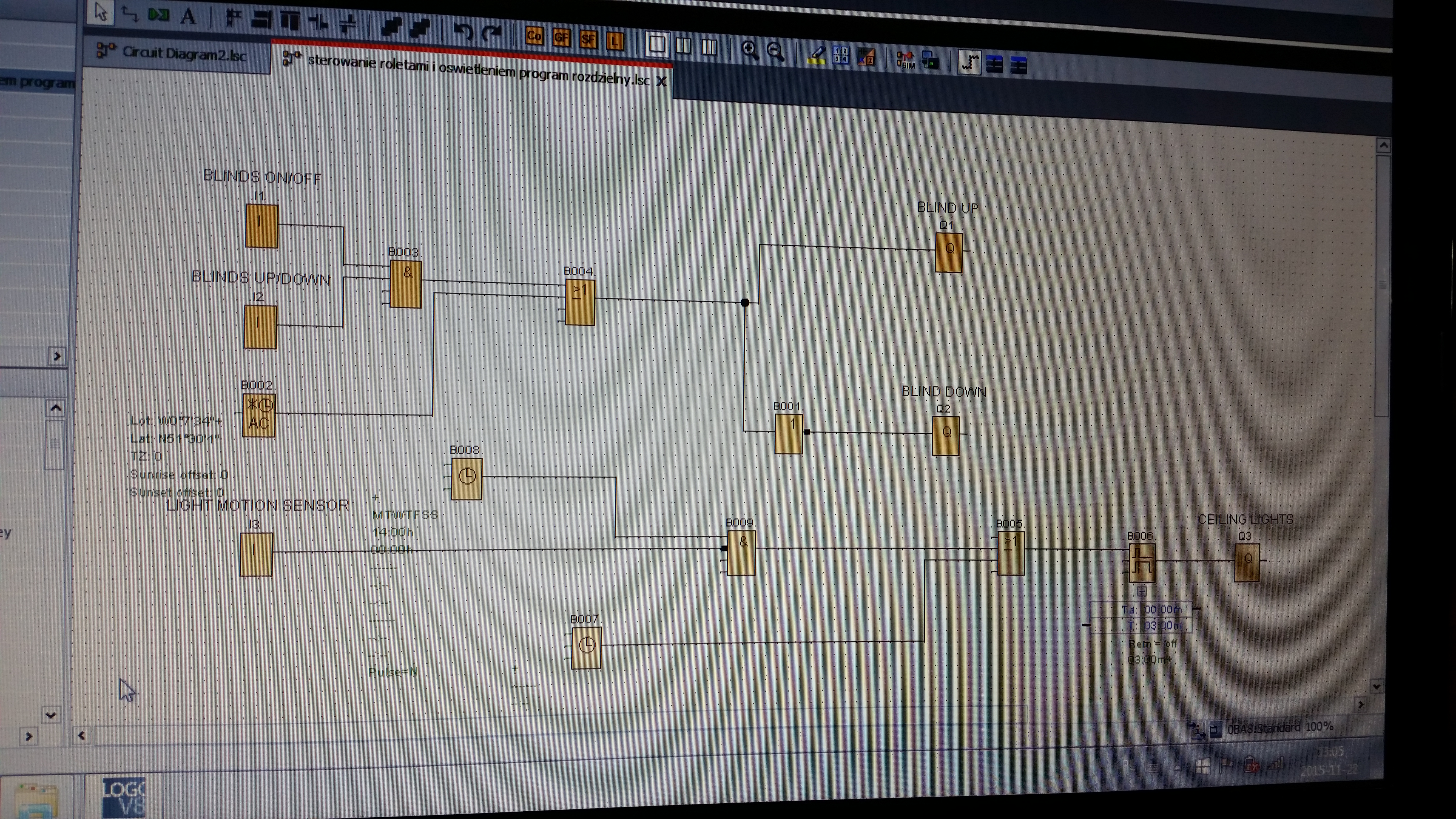
    The programme is simple, consisting of basic blocks and the simplest special blocks, i.e. I-gates, OR, a delay for switching off the lights, a weekly timer and an astronomical clock for setting the lowering and raising of the roller blinds, nothing to brag about.

    With regard to the 'messages'-in my case 'message texts'-I do not have this block in the programme. And you can't set anything in it until you add it. But adding it before one of the Q's and entering parameters into it (e.g. clock time, time of the off-delay block, etc.) and where the information is to be displayed (web server) changes nothing, the only thing that changes is that everything disappears from the display in the LOGO and I think to myself, oh great, so now this and that will be shown in the virtual logo, and here it is empty again hehe.

    hello.
  • #7 15189511
    Popak
    Moderator on vacation ...
    From what you write everything is behaving ok (symptoms) :)
    The problem is in your created program, and it is not a matter of bragging but of checking if there is a correctly created program.
    And from the description it seems that it is not.
    Send the program to the forum or to me on PW, I will see what you have copied and correct it. Then you will see if everything works ok for you and what changes I made.
    Describing it on the forum is pointless because it would be a bit of writing. :)
  • #8 15191122
    zbyszekskibinski
    Level 33  
    Ok, I am attaching the programme. Sorry for the picture, but when I tried with the logo for the attachment, the website didn't accept this file extension
    Thanks to
    Attachments:
    • Logo! Siemens 0BA8 24RCE web interface shows blank controller display—browser or config issue? program_zs.jpg (7.24 MB) You must be logged in to download this attachment.
  • ADVERTISEMENT
  • Helpful post
    #9 15191521
    Popak
    Moderator on vacation ...
    - Pack the program file with rar or zip and then give it to the forum.
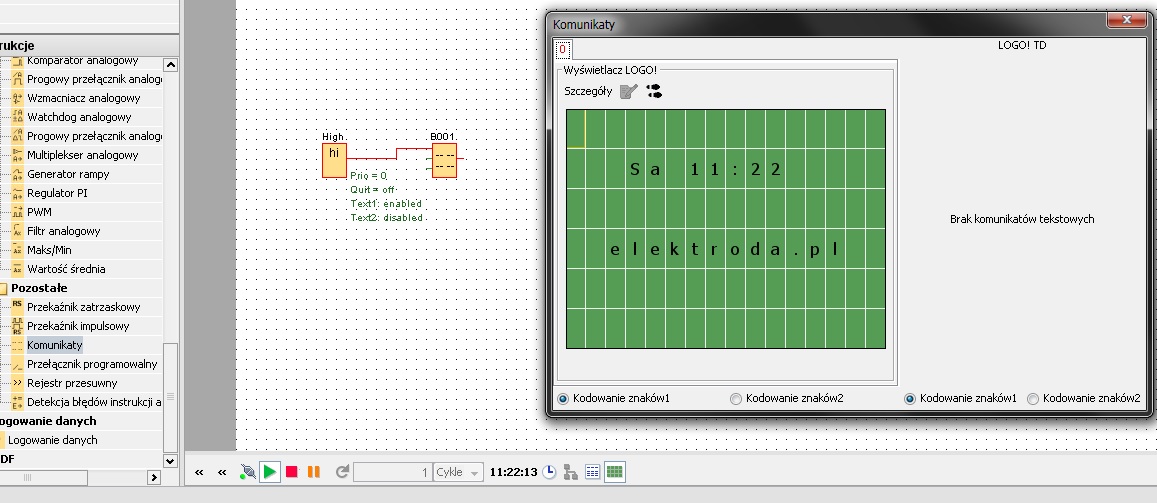
    - "Message texts" you do not link to the Q output but give a high state block and then link to the message texts. Then in the Message texts properties you select (as I wrote earlier) the web server and determine what should be displayed.
    - When it comes to changing IP, WAN, DNS etc. via a web browser, I assure you that you won't do it. There is the ability to view, display, and control e.g. on, off, more, less etc.
    That's it in a nutshell.

    Logo! Siemens 0BA8 24RCE web interface shows blank controller display—browser or config issue?
  • #10 15198045
    zbyszekskibinski
    Level 33  
    Popak wrote:

    - As for changing IP, WAN, DNS etc via a web browser I assure you that you won't. There is the ability to view, display, and control e.g. on, off, more, less etc.
    That's it in a nutshell.


    That's the poor thing about this 'logo'. Plus, the controller doesn't come with a wireless system, etc, etc. What I wanted was to be able to access the programme in the FBD online via a browser, so that I could, for example, change a block parameter for myself remotely and not just switch it on and off. This also means that on the virtual display I will have exactly the same as on the controller display, with access to the program blocks and their changes. Since I was able to assign myself the IP address, default gateway and MAC address I wanted in the LOGO display, I was hoping to redirect the ports in the controller's options, doing the same in the router, etc. etc.
    Topic exhausted then, thanks for the help.
ADVERTISEMENT