logo elektroda
logo elektroda
X
logo elektroda

COREL DRAW 7 - Problem with opening files created with this program.

Stef 8115 14
ADVERTISEMENT
Treść została przetłumaczona polish » english Zobacz oryginalną wersję tematu
  • #1 16668181
    Stef
    Level 31  
    Posts: 2167
    Help: 131
    Rate: 32
    Hello.
    I have a lot of files made with Corel 7. I absolutely need to print them now. Converting via the network to * .pdf results either in the reconstruction of the graphics only (without text) or the graphics and text breakdown, depending on the page on which I am doing it. CDR Viewer only opens graphics without text. Inkscape opens the graphic and all text is on one line.
    Or maybe an idea to install Corel Draw 7 in WIN 7, WIN 8.1 or WIN 10?
    I would like to add that the original program, original systems too. I do not count on help from Corel. I bought Pinnacle Studio 16 from them, apparently compatible with WIN 8 and 8.1. Installing this software is one big horror. I did it after two days of fighting. And I don't know by what miracle. And I did not get any help.
    I am including a sample file that I want to open and print (need to change the extension from pdf to cdr). And the second after converting to * .pdf.
    thank you in advance for your help

    Stefan
    Attachments:
    • bistabilny.pdf (15.26 KB) You must be logged in to download this attachment.
    • okefb-lhjgc.pdf (34.79 KB) You must be logged in to download this attachment.
  • ADVERTISEMENT
  • Helpful post
    #2 16671716
    Anonymous
    Level 1  
  • ADVERTISEMENT
  • #3 16671859
    Stef
    Level 31  
    Posts: 2167
    Help: 131
    Rate: 32
    Hello.
    Thank you very much for help. I didn't know you could install Corel with all the available features for a trial period. If it is really possible, I will do so and I will export all necessary files to * .pdf. I just have some objections with version compatibility. As I remember, it was a long time ago, after installing Corel 7 I had a problem with the files from the previous version. I will not write details, it was over fifteen years ago.

    anmedia Why through the network? Corel 7 does not export to pdf?

    As I already wrote, I have a legal version of COREL 7, but at the moment there is no installation option on computers with systems that I have. I would have to install the old XP on one of them and Corel 7 to it. But for a dozen or so files it does not make sense. Moreover, I am an electronics engineer, not an IT specialist, and creating a virtual disk is a taboo subject for me. That's why I opened this topic.

    anmedia And it was enough to read in this section, you would know that it is not worth packing in pinnacle, but ...

    Sorry, I didn't read. But it wouldn't do anything anyway. Pinnacle is for my Woman. I wanted to buy it an older version before Corel acquired the program. But she insisted, and what was I supposed to do?
    Just out of curiosity, in what program did you open it and saved it to * .pdf? Of course, if you want to answer.
    Thanks again for your reply. I will close the topic in a few days, I need time to install a trial version of Corel.

    best regards

    Stefan
  • ADVERTISEMENT
  • #4 16671918
    Anonymous
    Anonymous  
  • #5 16671933
    Stef
    Level 31  
    Posts: 2167
    Help: 131
    Rate: 32
    Welcome.
    Have you read my post carefully? To print, I have to open a file saved in Corel 7. And I have no how.
  • Helpful post
    #6 16672040
    Anonymous
    Level 1  
  • #7 16757602
    Stef
    Level 31  
    Posts: 2167
    Help: 131
    Rate: 32
    Hello.
    I couldn't handle this topic. I installed it on an older XP laptop that the system was assigned to. I will add that I also had problems. Motherboard with laptop accessories damaged, additional drivers only after installing Google, and here was the problem. IE displayed pages sometimes, mostly refusing to cooperate. But then everything in advance. Everything works. There will be a machine to work with Corel files and older programs .....
    Thank you for your help so far.
    Note, I installed this on an ASUS Eepc 1005HA.

    best regards

    Stefan

    ps I think that the topic can be closed, the decision is left to the Admin of the section.
  • Helpful post
    #8 16759223
    Anonymous
    Level 1  
  • #9 16759452
    Stef
    Level 31  
    Posts: 2167
    Help: 131
    Rate: 32
    Hello "anmedia"
    Thanks a lot, you helped me a lot. As much free time as possible, unfortunately, or maybe fortunately, I don't have much time at the moment. I will install Virtualny XP. I have the option of WIN 7, WIN 8.1 and WIN 10. But it will take a while, I have more important things on my mind, not just my hair.
    And referring to graphics programs. I legally have PINNACLE STUDIO 16 ULTIMATE, and as I know it is already piloted by COREL, unfortunately for several years, but no support at all.
    What Sony Movie Studio package are you offering me to buy? My Lady uses the program, it is her hobby. Not for commercial purposes.
    Thank you very much for your help once again. How do I get back? I would like to, but I have no idea.

    best regards

    Stefan
  • #10 16760186
    Anonymous
    Level 1  
  • ADVERTISEMENT
  • #11 16835334
    Stef
    Level 31  
    Posts: 2167
    Help: 131
    Rate: 32
    Hello.
    I coped, and how. I made a disk format, divided it into four partitions. Two for systems, two for data. Set to boot from CD in BIOS. I installed WINDOWS XP, installed drivers from ASUS EEE PC 1005HA motherboard (unfortunately WINDOWS XP does not detect all drivers). Then I installed WINDOWS 7 and so far it has been working for two hours. After turning on the laptop, I have the choice of starting the older version or WINDOWS 7. There is one problem that I also had before. WINDOWS 7 does not detect the sound card, there is no "sound, video and game controllers" tab in device manager and I don't know how to create it to add drivers. There is a speaker icon and a red X on the bar. WINDOWS XP is OK. Drivers are available for WIN 7 on ASUS website.
    Very important, first we install WIN XP, then WIN 7. And during the installation of XP we format the disk and partition it. Partitions must be seen as primary, so we delete the previous ones and create new ones. System cannot be installed on a dynamic partition.
    And in a moment I will install the rest of the programs and make the ISO disk.

    I would like to thank my colleague "anmedia" for the help so far.
  • #12 16836883
    Anonymous
    Level 1  
  • #13 16837690
    Stef
    Level 31  
    Posts: 2167
    Help: 131
    Rate: 32
    Hello and thank you for the hint.
    I'm not a computer guru, I'm an electronics engineer. And a very good hint "The boot loader is more of a problem than the ISO partition." . I'm starting to learn, maybe I can make it before? What I wanted works. I have a lot of time, and I think there is a way to rip it all to a DVD or other disk and recover it if necessary. Even on a different hard drive. Not data, just system and programs installed without reinstalling the system.
    Thank you very much for your help, tips.
  • #14 16842290
    Anonymous
    Level 1  
  • #15 16855486
    Stef
    Level 31  
    Posts: 2167
    Help: 131
    Rate: 32
    Hello.
    Thanks for the hint. I wrote that I have time, but for further changes. And I will use my friend's hints, but it will take a long time, I guess. As of today, I have a lot of activities, it is a pity that it does not involve remuneration.
    Again, thank you so much for your help.

Topic summary

✨ The discussion revolves around issues faced by a user trying to open and print files created with Corel Draw 7. The user experiences problems with file conversion to PDF, where graphics and text are not preserved correctly. Suggestions include installing a trial version of a newer Corel Draw, using virtual printers like Bullzip PDF Printer, and the possibility of running Corel Draw 7 on older operating systems like Windows XP. The user ultimately resolves the issue by installing Windows XP on an older laptop, allowing them to access and print the Corel files. The conversation also touches on the challenges of software compatibility and the lack of support from software manufacturers.
Generated by the language model.

FAQ

TL;DR: Need to open CorelDRAW 7 files on modern Windows? Use a Corel trial ("30 days free") and export to PDF; avoid overwriting originals. "Use trial features, then keep your sources safe." [Elektroda, Anonymous, post #16671716]

Why it matters: This FAQ helps non-IT users quickly print or migrate legacy CDR files without breaking layouts.

Quick Facts

How do I open CorelDRAW 7 files on Windows 10 or 11 fast?

Install a current CorelDRAW trial, open the CDR, and immediately Export to PDF (or AI/EPS) for printing. Avoid Save or Save As on the original file to prevent upgrading it. If fonts are missing, accept Corel’s suggested substitutions only for the export session. This path preserves layout best and requires no XP machine. "Install the latest version … 30 days free" remains the quickest path from legacy to print. [Elektroda, Anonymous, post #16671716]

Can I safely edit and re-save my Corel 7 files in a new CorelDRAW?

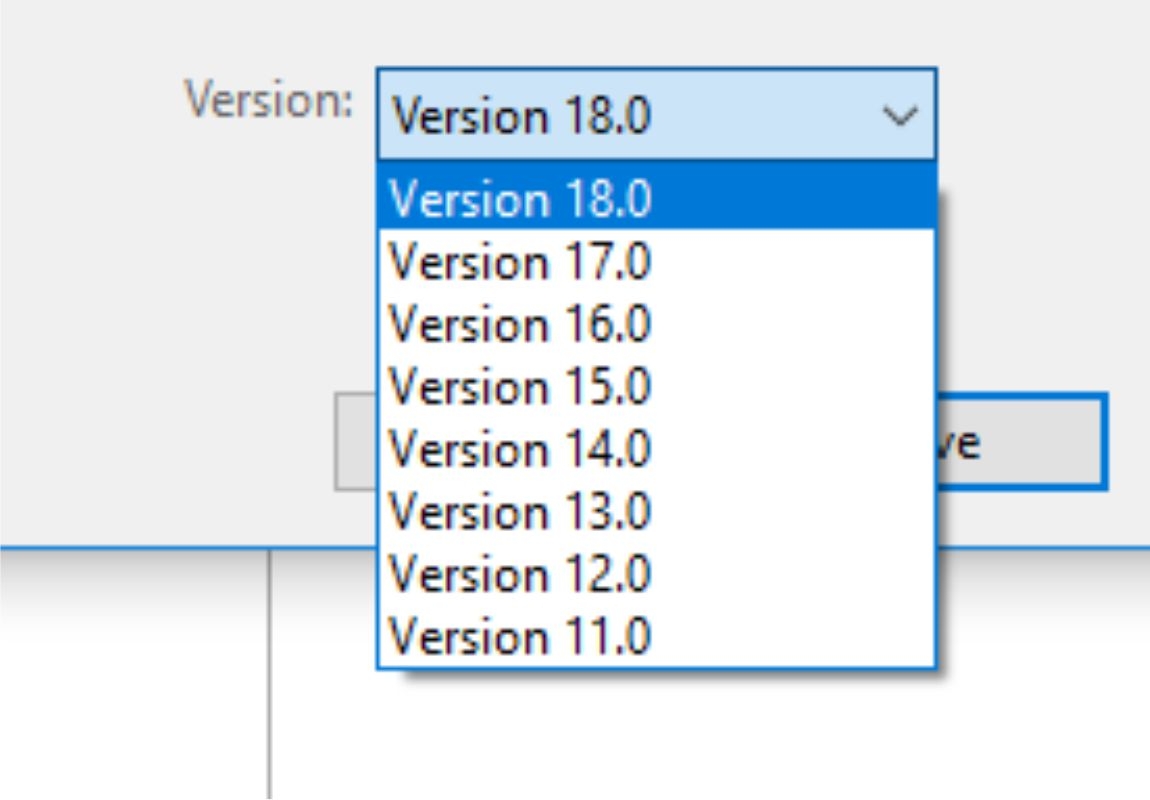
Edit if needed, but don’t overwrite your v7 masters. Newer Corel versions can back-save only to specific floors (e.g., X8 back-saves to X1). That means a v7 file saved in a new version may no longer open in v7. Safest practice: export deliverables (PDF), and archive the untouched v7 CDR separately. "Just don’t save these files" is sound advice when migrating. [Elektroda, Anonymous, post #16672040]

Why does my text disappear or shift when converting to PDF?

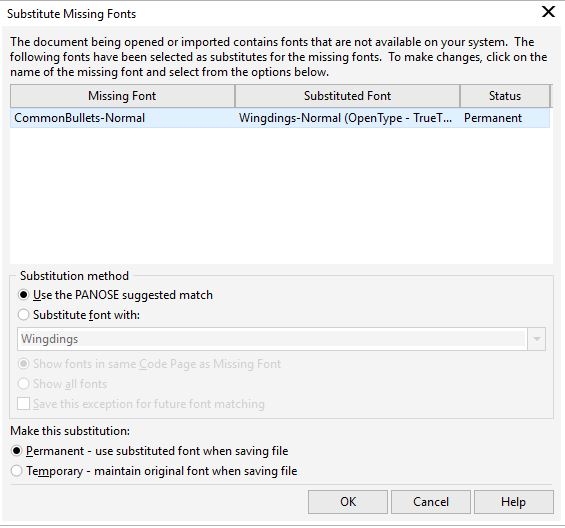
Your system lacks the original fonts. Corel flags missing fonts on open and proposes close matches. Accepting substitutes changes metrics, which shifts or reflows text. To keep layout, install the missing fonts or convert text to curves during export. In tests from the thread, converting showed graphics intact while text misbehaved due to fonts. [Elektroda, Anonymous, post #16672040]

What’s the quickest way to print my old CDRs today?

Open the file in a current Corel trial and print directly, or export to PDF and print from a standard viewer. If you only have viewers like CDR Viewer or Inkscape, expect text issues. Virtual PDF printers help once the file is open, but they don’t fix font problems. [Elektroda, Stef, post #16668181]

How do I convert CDR to PDF if Corel 7 won’t install?

Use a new Corel trial: open the CDR, then Export to PDF from the application. If you can open the file in any app, you can also print via a virtual PDF printer like Bullzip. But you must open the CDR first; viewers may drop text. [Elektroda, 65469, post #16671918]

Is there a supported way to run Corel 7 without a second PC?

Yes: set up a virtualized Windows XP environment. One helper describes Microsoft’s XP-as-a-program approach on newer Windows, launched only when needed. This avoids dual-boot and isolates old drivers and apps. It runs better on stronger hardware and keeps your daily OS clean. [Elektroda, Anonymous, post #16672040]

What is a virtual PDF printer?

It’s a driver that appears as a printer but writes PDF files instead of paper. From any application that can print, you select the virtual printer and produce a PDF. Bullzip PDF Printer is one example mentioned. It doesn’t repair missing fonts or layout. [Elektroda, 65469, post #16671918]

What is Windows XP Mode (or “Virtualny XP”)?

It’s a virtualized XP environment you install like an app on newer Windows, then run legacy software inside it. The contributor notes downloads for 32-bit and 64-bit XP and a how-to guide. It’s intended for Windows 7, but worth testing on newer systems. [Elektroda, Anonymous, post #16759223]

How can I avoid layout breakage from missing fonts?

Before export, install the exact fonts used by the CDR. If that’s impossible, accept Corel’s suggested replacements and convert text to curves on export. Keep a copy with live text for future edits. Edge case: substituted fonts can force all text onto one line in some importers. [Elektroda, Stef, post #16668181]

3-step: How do I export a Corel 7 file to PDF with a trial?

  1. Install the latest Corel trial and open your CDR.
  2. When prompted for missing fonts, accept or install originals.
  3. Use Export to PDF; do not Save/Save As over the v7 file. [Elektroda, Anonymous, post #16671716]

Does the Corel trial add a watermark or limit features?

A participant confirms the trial behaves like the full version and has no watermark restrictions. That makes it ideal for one-time migrations, printing, and exports. You still should keep backups and avoid overwriting legacy CDRs during the trial period. [Elektroda, Anonymous, post #16672040]

I only have an old netbook. Will dual-boot help?

One user succeeded by installing Windows XP first, then Windows 7 on an ASUS Eee PC 1005HA. They created primary partitions and avoided dynamic disks, gaining a boot menu for both systems. Audio drivers required extra attention under Windows 7. [Elektroda, Stef, post #16835334]

My Windows 7 won’t detect the sound card after dual-boot. Now what?

Try installing the XP driver under Windows 7 and disable driver signature enforcement if needed. A helper restored hardware by force-installing older drivers when newer Windows refused to cooperate. This can revive stubborn audio on legacy boards. [Elektroda, Anonymous, post #16836883]

What is an ISO image, and should I clone my setup?

An ISO is a sector-by-sector copy of a disk or partition used for backup or deployment. One helper warns the bootloader is trickier than the image, and 1:1 clones work best when target disks match size and health. Plan for disk integrity. [Elektroda, Anonymous, post #16836883]

How should I protect my design files long-term?

Use a two-computer strategy: keep a small XP box for legacy apps and a modern PC for daily work. Store projects on network or cloud storage with redundancy, such as NAS with RAID mirroring. If one system fails, your data remains accessible. [Elektroda, Anonymous, post #16842290]

Which browser is usable on an XP recovery machine?

Use Firefox 49, the last version supporting XP. It’s more suitable than IE on that platform and can fetch drivers or tools during recovery. This stat matters when reviving old laptops only to export and print legacy graphics. [Elektroda, Anonymous, post #16759223]
Generated by the language model.
ADVERTISEMENT