


logo elektroda
logo elektroda
X
logo elektroda

[Solved] TIA Portal V15. I can't download the program from the driver

gienekpa 10563 11
ADVERTISEMENT
Treść została przetłumaczona polish » english Zobacz oryginalną wersję tematu
  • #1 17084090
    gienekpa
    Level 10  
    Posts: 147
    Rate: 6
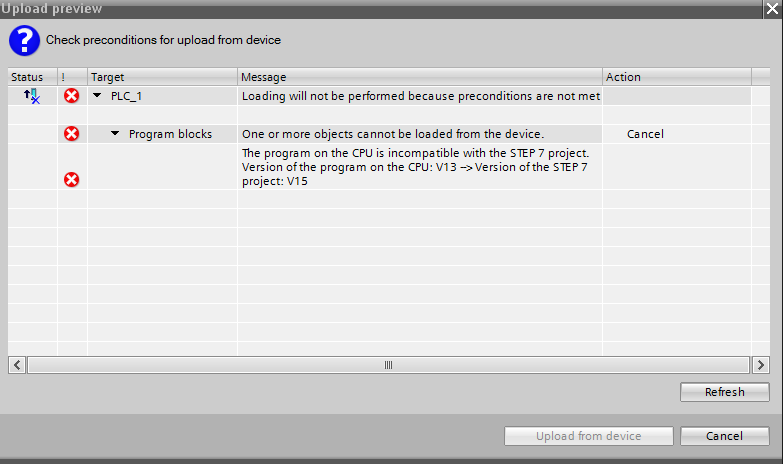
    I installed the TIA Portal V15. When I try to download a program from the driver I get this information
    TIA Portal V15. I can't download the program from the driver

    Is there any way to download the program from the driver that was written in the older version of TIA Portal?
  • ADVERTISEMENT
  • Helpful post
    #2 17084143
    Serwis_Eldamar

    Level 16  
    Posts: 238
    Help: 15
    Rate: 21
    Connect using V13
    Company Account:
    Eldamar Serwis
    Pocztowa 11b, Dziadkowice, 58-200 | Company Website: www.eldamar.com.pl
  • ADVERTISEMENT
  • #3 17084168
    Micek64
    Level 18  
    Posts: 744
    Help: 34
    Rate: 75
    Just as the colleague above writes,
    Download via V13, convert to V15 and then you can act.
  • ADVERTISEMENT
  • #4 17084261
    gienekpa
    Level 10  
    Posts: 147
    Rate: 6
    Can I use the older version if I have a license for a newer version?
  • ADVERTISEMENT
  • #5 17084281
    Micek64
    Level 18  
    Posts: 744
    Help: 34
    Rate: 75
    No,
    You must have a V13 license if you want to work on it.
  • #6 17084303
    gienekpa
    Level 10  
    Posts: 147
    Rate: 6
    Micek64 wrote:
    No,
    You must have a V13 license if you want to work on it.


    OK thanks for the information. I unnecessarily uninstalled an older version of TIA :) . I thought you only need to have a newer version. I thought that Siemens is just like any other normal driver and I was very surprised here :)
  • #7 17085684
    dzik84
    Level 17  
    Posts: 444
    Help: 30
    Rate: 17
    Micek64 wrote:
    No,
    You must have a V13 license if you want to work on it.


    Absolutely not

    License in TIA works "back"
  • #8 17085914
    Micek64
    Level 18  
    Posts: 744
    Help: 34
    Rate: 75
    Hmm,
    And I and external companies keep each TIA with its own PC license.
    But if you are sure that one latest license supports older versions then I will not argue. Nevertheless, it is very strange when it comes to Siemens that something is so compatible that it was so "back" free.
  • #9 17086286
    dzik84
    Level 17  
    Posts: 444
    Help: 30
    Rate: 17
    It is this problem of compatibility and "pulling" projects of previous versions that is the reason for this.
    People would "kill" Siemens if you bought (now) V15 and it turned out that you also have to buy V14 and V13 to work "normally".

    So normally we install several versions (preferably by downloading trials and not from DVDs, we will lose less time on updates), throw the license into the latest version and any previous one will also accept
  • #10 17086319
    Micek64
    Level 18  
    Posts: 744
    Help: 34
    Rate: 75
    Thank you, good to know!
  • #11 17224011
    elradziu
    Level 9  
    Posts: 13
    Rate: 3
    I will write only regarding confirmation of TIA Portal reverse license compatibility. I recently had such a dilemma, and the answer directly from Siemens was positive:
    Quote:
    By purchasing the V15 license, you can install and work on previous versions of the TIA Portal, i.e. V11, V12, V13, V14.


    However, it hurts the fact that you need to have all previous versions of the Tia Portal, as well as the inability to download the batch from the panel and its editing (the need to have a project).
  • #12 17291910
    gienekpa
    Level 10  
    Posts: 147
    Rate: 6
    The use of an older version to download the project from the driver solved the problem

Topic summary

✨ The discussion revolves around issues faced when attempting to download a program from a driver using TIA Portal V15, particularly when the program was created in an older version. Users suggest connecting with TIA Portal V13 to download the program, then converting it to V15 for further use. It is clarified that a license for the older version (V13) is necessary to work with projects from that version, as the licensing system does not allow backward compatibility with newer licenses. Users express surprise at the licensing requirements and the need to maintain multiple versions of TIA Portal for compatibility. Siemens' licensing policy is discussed, emphasizing the necessity of having all previous versions installed to ensure proper functionality.
Generated by the language model.

FAQ

TL;DR: V15 licenses work across 4 prior versions (V11–V14); "you can install and work on previous versions." Fix 'can't download' by uploading in the original version (e.g., V13) and converting to V15. [Elektroda, elradziu, post #17224011]

Why it matters: For Siemens TIA Portal users hitting version‑mismatch errors, this shows how to recover uploads and legally use older versions.

Quick Facts

How do I fix "can't download program from the driver/PLC" in TIA Portal V15?

Upload using the original TIA version, then convert to V15. "Download via V13, convert to V15." How‑To: 1. Install TIA Portal V13 that matches the PLC program. 2. Connect to the CPU and upload the project. 3. Open the uploaded project in V15 to convert and continue. [Elektroda, Micek64, post #17084168]

Can I use an older TIA Portal version if I only own a V15 license?

Yes. Siemens confirmed V15 licensing works backward for 4 prior versions (V11–V14). "You can install and work on previous versions." You still must install the older software to use it. The license does not convert projects on the device. [Elektroda, elradziu, post #17224011]

Do I need to keep multiple TIA versions installed side‑by‑side?

Yes, install several versions to service legacy machines. Use trial installers instead of DVDs to save update time. Keep your license on the latest TIA; previous versions on that PC accept it. This streamlines field support. [Elektroda, dzik84, post #17086286]

Which version should I use to upload from a CPU programmed in V13?

Use V13 to upload the project from the CPU. Then open it in V15 and let the converter run. After conversion, continue development in V15. This avoids the V15 download block. [Elektroda, Micek64, post #17084168]

I uninstalled older TIA versions. What now?

Reinstall the needed older version to upload the project. Your V15 license activates the older version on the same PC. Download trial installers to reduce update time versus DVDs. Then convert the project in V15. [Elektroda, dzik84, post #17086286]

Can I pull a project from an HMI panel and edit it in TIA?

No. Upload‑and‑edit from panels is blocked, and you must have the original HMI project. Siemens’ statement confirms this limitation. Keep reliable backups of HMI projects for future edits. [Elektroda, elradziu, post #17224011]

Does Siemens officially confirm backward license compatibility?

Yes. They stated a V15 license lets you work with V11–V14, covering 4 prior versions. "You can install and work on previous versions." This enables mixed‑version maintenance. [Elektroda, elradziu, post #17224011]

Will one PC license activate both V15 and V13 on the same machine?

Yes. Place the license in the latest TIA. Previous TIA versions on that PC will accept it. This avoids buying extra licenses for legacy support. [Elektroda, dzik84, post #17086286]

Why does V15 block direct upload from a CPU with an older project?

The CPU project predates your engineering version. TIA expects matching major versions for uploads. Use the matching version to upload, then convert to V15. This prevents version conflicts during online access or downloads. [Elektroda, Micek64, post #17084168]

What solved the original poster’s problem?

They used the older TIA version to download the project from the PLC. After that, they proceeded normally in the newer environment. The mismatch error no longer blocked them. [Elektroda, gienekpa, post #17291910]

Any tips to speed setup across TIA versions?

Get trial installers online rather than using DVDs. This reduces time lost on cumulative updates. Install multiple major versions side‑by‑side to cover legacy equipment quickly in the field. [Elektroda, dzik84, post #17086286]

After conversion to V15, can I keep working without the older version?

Yes. Once converted, continue in V15. "Convert to V15 and then you can act." Keep older versions installed for future uploads from legacy devices that still block V15. [Elektroda, Micek64, post #17084168]

Does this apply to versions earlier than V13, like V11 or V12?

Yes. The Siemens response covered V11, V12, V13, and V14 under a V15 license. That equals 4 prior versions and broad backward coverage. [Elektroda, elradziu, post #17224011]
Generated by the language model.
ADVERTISEMENT