


logo elektroda
logo elektroda
X
logo elektroda

Using TP-Link W9980 (no WAN port) with Optical Fiber from Orange or Alternative: Archer C7

zdzlh 9321 17
Best answers

Can I use a TP-Link W9980 without a WAN port to connect to an Orange fiber ONT, and if not, will an Archer C7 with a WAN port work?

The W9980 can be switched into Wireless Router Mode and then use its WAN port for Dynamic IP, Static IP, or PPPoE, but for Orange fiber it still needs VLAN ID 35, and that option disappears in Wireless Router Mode [#17100587][#17103026][#17103367] In practice, that means the W9980 does not work behind the ONT for Orange because it lacks VLAN support on the WAN side [#17116603] A router with a WAN port that supports VLAN 35 should work, so an Archer C7 is a reasonable choice if it has that feature [#17103367] One user reported success after replacing it with an Archer C1200, which worked immediately [#17116603]
Generated by the language model.
ADVERTISEMENT
Treść została przetłumaczona polish » english Zobacz oryginalną wersję tematu
  • #1 17100547
    zdzlh
    Level 11  
    Posts: 99
    Rate: 12
    Hello.
    I put on an optical fiber with Orange. I want to have my router so I have my cousin but I don't want to buy a new one. Can my TP-Link W9980 router without a WAN port be used to connect to ONT and log into the network? Because if not, e.g. TP_Link Archer C7 with WAN port I will have to buy it because then I would have an eye as a last resort.

    Maybe in diffrent way:

    Well, I have an old router that I used as a modem for the VDSL neostrada. TP-Link W9980 but it doesn't have a WAN port. I understand that it is not suitable for connection under ONT. If it doesn't work, will the Archer C7 with WAN work?
  • ADVERTISEMENT
  • Helpful post
    #2 17100587
    jimasek
    VIP Meritorious for electroda.pl
    Posts: 35287
    Help: 3783
    Rate: 2671
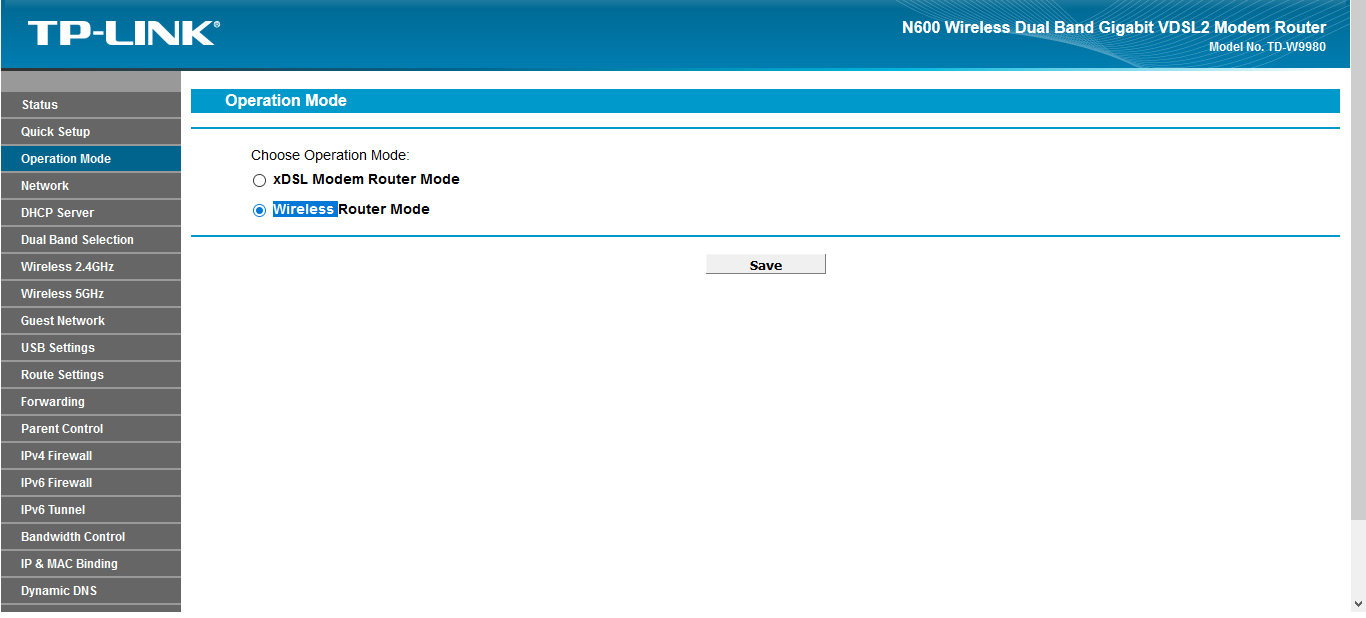
    W9980 has the ability to work as a WAN router. Anyway flip the router and you will see the LAN / WAN port. Operation mode tab and choose Wireless Router Mode.
  • #3 17100598
    zdzlh
    Level 11  
    Posts: 99
    Rate: 12
    And indeed. You're right. And will it go hooked up to ONT?
  • ADVERTISEMENT
  • #5 17100612
    zdzlh
    Level 11  
    Posts: 99
    Rate: 12
    I know. I once read this article, but I only have internet without VoIP and TV so it probably won't be a problem and the default VLAN 35 should be enough.
  • ADVERTISEMENT
  • #6 17102797
    zdzlh
    Level 11  
    Posts: 99
    Rate: 12
    So now I look, this router admits that it supports logging into the Internet in ADSL and VDSL modes only. There is no other option. Or rather, ONT this mode is completely different than any DSL. Will it still follow ONT and support 120 Mb / s?
  • #7 17102862
    jimasek
    VIP Meritorious for electroda.pl
    Posts: 35287
    Help: 3783
    Rate: 2671
    Do you have the Opeartion Mode tab?
  • #8 17103020
    zdzlh
    Level 11  
    Posts: 99
    Rate: 12
    Yes, I have this tab. It has xDSL mode and Wireless router options. I know it should be a Wireless Router. But then in the PPPoE login settings there is an option with the choice of ADSL or VDSL. There is no other choice. Unless he skips it then.
  • #9 17103026
    jimasek
    VIP Meritorious for electroda.pl
    Posts: 35287
    Help: 3783
    Rate: 2671
    With Wireless Router MOde you should have full WAN port configuration from Dynamic IP through Static IP to PPPoE which is not necessarily an ADSL protocol.
  • #10 17103030
    LucekB
    Network and Internet specialist
    Posts: 995
    Help: 143
    Rate: 137
    Operation mode> Wireless Router Mode
    Using TP-Link W9980 (no WAN port) with Optical Fiber from Orange or Alternative: Archer C7
  • #11 17103367
    makosuu
    Network and Internet specialist
    Posts: 2984
    Help: 369
    Rate: 369
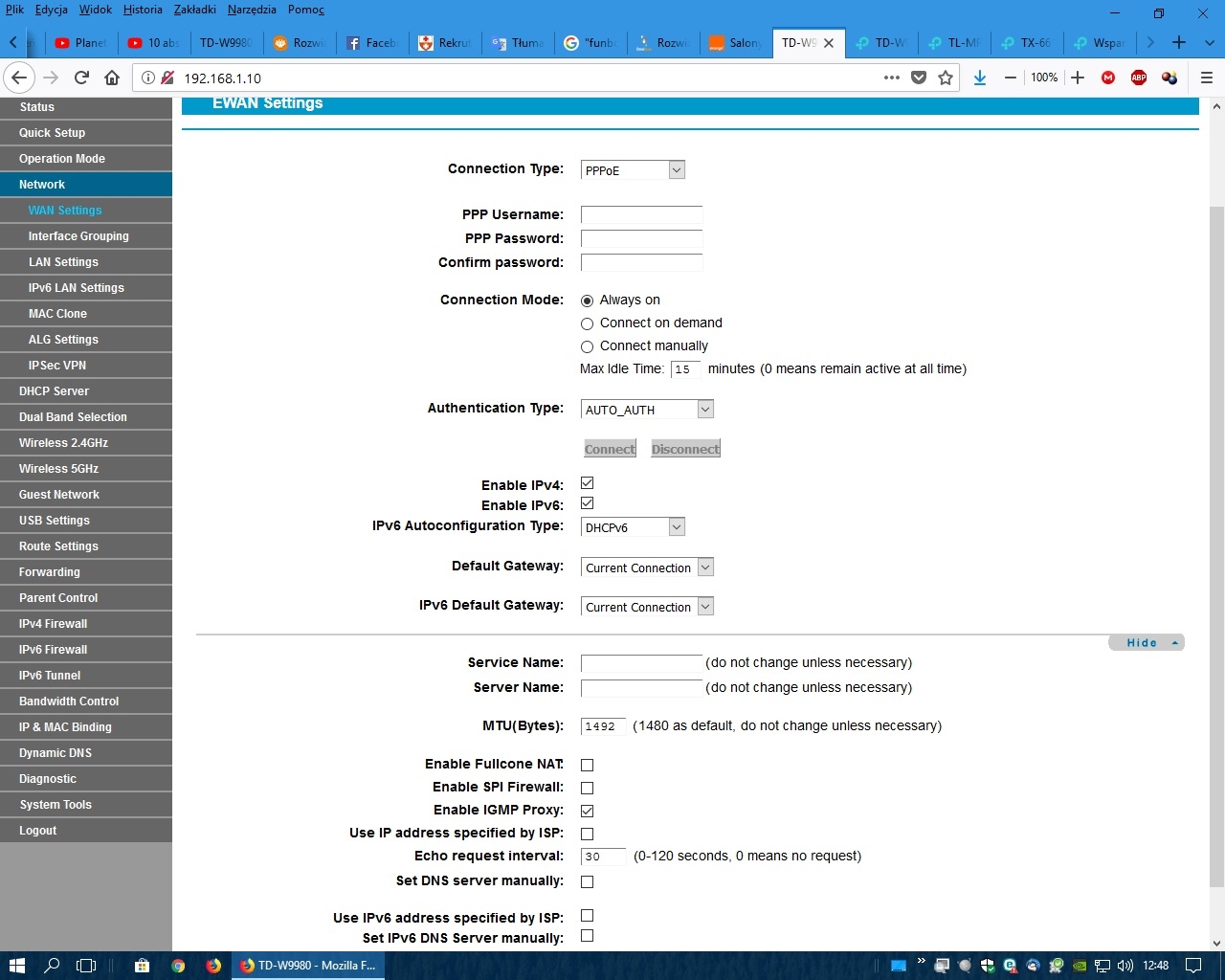
    Great, but you still have to set VLAN ID 35 to make it move, and I don't know if this router has it.
  • #12 17104134
    zdzlh
    Level 11  
    Posts: 99
    Rate: 12
    No, but it doesn't :( . When set to Wireless Router Mode, the option to select VLAN ID disappears. I pitole. I will break down.
    Using TP-Link W9980 (no WAN port) with Optical Fiber from Orange or Alternative: Archer C7
  • #13 17104853
    haring
    Level 13  
    Posts: 79
    Help: 5
    Rate: 6
    Fritz! Box 7490 does the trick, but it's already an expensive toy.
  • ADVERTISEMENT
  • #14 17105261
    jimasek
    VIP Meritorious for electroda.pl
    Posts: 35287
    Help: 3783
    Rate: 2671
    I don't understand something here. You have a fiber optic modem from your provider, you only have internet so why do you need VLANs ??? You connect the modem to the WAN port of the router and configure instead of PPPoE Dynamic IP to Tp-link in WAN Settings,
  • #15 17105407
    makosuu
    Network and Internet specialist
    Posts: 2984
    Help: 369
    Rate: 369
    You don't know the situation. This is Orange Fiber Optic and it has this terminal, ONT or what it is called there, and it requires PPPoE and VLAN 35.
  • #16 17105431
    jimasek
    VIP Meritorious for electroda.pl
    Posts: 35287
    Help: 3783
    Rate: 2671
    He wrote in the subject that he has LB !?
  • #17 17105439
    makosuu
    Network and Internet specialist
    Posts: 2984
    Help: 369
    Rate: 369
    Has ONT + Funbox 2.0 and FB wants to get rid of it.
    Funbox 2.0 has no integrated ONT, it's not Funbox 3.0.
  • #18 17116603
    zdzlh
    Level 11  
    Posts: 99
    Rate: 12
    Hello.
    I have already purchased the Archer C1200, I hooked up and runs super-cool :) :) On TP-LINK W9980 it didn't go because it doesn't have VLAN on the WAN port.

Topic summary

✨ The discussion revolves around the compatibility of the TP-Link W9980 router, which lacks a WAN port, with an Optical Network Terminal (ONT) from Orange. Users explore whether the W9980 can connect to the ONT and log into the network, with some suggesting that VLAN configuration may be necessary. It is noted that the W9980 primarily supports ADSL and VDSL modes, raising concerns about its ability to handle fiber connections. Ultimately, a user confirms the successful setup of an Archer C1200 router, which supports VLAN ID 35, indicating that the W9980 is unsuitable for this application due to its limitations in VLAN configuration.
Generated by the language model.

FAQ

TL;DR: Orange FTTH over an ONT uses VLAN 35 with PPPoE; "requires PPPoE and VLAN 35." Choose a router that tags VLANs on the WAN. [Elektroda, makosuu, post #17105407]

Why it matters: This helps Orange fiber users decide whether to reuse a TP‑Link W9980 or pick alternatives like Archer models, and how to set them up.

Quick Facts

Can a TP‑Link W9980 work with Orange fiber over an ONT?

No in this case. The W9980 lacks VLAN tagging on the WAN port when used as an Ethernet WAN, so it could not connect. The OP replaced it for that reason. [Elektroda, zdzlh, post #17116603]

Do I need VLAN 35 and PPPoE with Orange FTTH?

Yes. Orange fiber delivered via an ONT authenticates using PPPoE and VLAN ID 35. As one expert put it: "requires PPPoE and VLAN 35." This applies for Internet service, and you should prepare credentials from Orange. [Elektroda, makosuu, post #17105407]

Where do I enable WAN mode on a TP‑Link W9980?

Open Operation Mode and select Wireless Router Mode. Use the LAN/WAN labeled port for the ONT handoff. This enables standard WAN types like Dynamic IP, Static IP, or PPPoE. [Elektroda, jimasek, post #17100587]

Why cant I set a VLAN ID after switching the W9980 to Wireless Router Mode?

On this model, the VLAN option is available in xDSL mode only. After switching to Wireless Router Mode, the VLAN selection disappears, so you cannot tag the Ethernet WAN. [Elektroda, zdzlh, post #17104134]

Which replacement router actually worked here with Orange FTTH?

The TP‑Link Archer C1200 worked and was confirmed by the OP. The W9980 did not, due to no VLAN tagging on the WAN. [Elektroda, zdzlh, post #17116603]

Will an Archer C7 work with Orange fiber?

It can if its firmware tags 802.1Q VLAN on the WAN. Verify VLAN-on-WAN support before buying. If unsure, consider a model known to work here, like the Archer C1200. [Elektroda, zdzlh, post #17116603]

Is Dynamic IP enough behind the ONT, or must I use PPPoE?

Use PPPoE. Oranges ONT expects PPPoE with VLAN 35 for Internet. Choosing Dynamic IP will fail to authenticate and wont get you online. "Requires PPPoE and VLAN 35." [Elektroda, makosuu, post #17105407]

How do I switch the W9980 to Ethernet WAN mode?

  1. Go to Operation Mode and select Wireless Router Mode.
  2. Connect the ONT to the LAN/WAN port on the W9980.
  3. In WAN settings, choose your WAN type (e.g., PPPoE) and enter credentials. [Elektroda, jimasek, post #17103026]

Whats the ONT difference between Funbox 2.0 and 3.0?

Funbox 2.0 works with an external ONT. Funbox 3.0 has an integrated ONT. If you replace Funbox 2.0, your new router must connect to the separate ONT. [Elektroda, makosuu, post #17105439]

I only need Internet (no TV/VoIP). Do I still set VLAN 35?

Yes. For Internet-only service on Orange fiber, VLAN ID 35 is sufficient. Users without TV or VoIP have confirmed that VLAN 35 covers the Internet VLAN. [Elektroda, zdzlh, post #17100612]

Is there a premium all-in-one device that handles Orange FTTH requirements?

A Fritz!Box 7490 was reported to "do the trick." It is a pricier option but noted as working by a forum member. Confirm local firmware features before purchase. [Elektroda, haring, post #17104853]

My plan is 120 Mb/s. Will that change anything on the W9980?

A 120 Mb/s plan was mentioned in the thread, but throughput wasnt the blocker discussed. The main concern raised was configuration compatibility, not speed. Focus on the correct WAN mode and required tagging first. [Elektroda, zdzlh, post #17102797]

Does the W9980 have a dedicated WAN port?

It uses a combo LAN/WAN port. Flip the unit and you will see it labeled LAN/WAN. Enable Wireless Router Mode to use it as an Ethernet WAN. [Elektroda, jimasek, post #17100587]
Generated by the language model.
ADVERTISEMENT