logo elektroda
logo elektroda
X
logo elektroda

[Solved] Dell XPS 702 SSD Upgrade - Windows 7 Activation: Retrieve Original Key after Disk Change

dworak30 6930 18
Best answers

How can I recover the correct Windows 7 OEM product key or activation after replacing my laptop drive with an SSD?

No—you usually cannot retrieve a different “correct” Windows 7 key from the old disk on an OEM Dell, because the system only contains the OEM key used for activation. The practical fix is to back up the activation from the old installation with ABR (Activation Backup & Recovery) and restore it on the fresh SSD install; ABR saves the key to a TXT file and the activation certificate to an XRM-MS file, then `activation_restore` reactivates Windows on the same PC [#17213435][#17213646][#17214059] If ABR does not solve it, the thread also points to the Windows 7 OEM License Installer as a working alternative [#17213449][#17215147] If the sticker is unreadable and you need a replacement key instead, contact Microsoft or Dell with proof of purchase and a photo of the label [#17213339]
Generated by the language model.
ADVERTISEMENT
Treść została przetłumaczona polish » english Zobacz oryginalną wersję tematu
  • #1 17213284
    dworak30
    Level 5  
    Posts: 46
    Rate: 3
    Hello
    A few days ago I changed the disk in my laptop to ssd, installed the system again.
    I downloaded the system from the Internet, but I installed the version to which I have the original key, due to the fact that the sticker on the laptop was wiped from the bottom, I pulled out the win product key but after calling the hotline they told me that this key was rather bad and how I pulled it out with this program it said that in windows 7 the key is not hidden anywhere.
    I still have an old disk on which the system is normally activated after relocation, but is it possible to obtain the correct key by removing it from the system?
  • ADVERTISEMENT
  • Helpful post
    #2 17213316
    wojtasdm
    Level 27  
    Posts: 705
    Help: 105
    Rate: 105
    Try ABR: Activation Backup & Recovery
  • Helpful post
    #3 17213339
    ak6
    Level 31  
    Posts: 1643
    Help: 156
    Rate: 139
    Please contact Microsoft support office again.
    Present the situation with an illegible sticker. You will receive guidelines on what to do next to obtain a new license key. Most often, proof of purchase of the equipment and a photo of the sticker must be sent.
  • #4 17213340
    dworak30
    Level 5  
    Posts: 46
    Rate: 3
    does he take out the key or the whole system? because I don't want to make a 1: 1 copy of the system
    I read something about the program
    SLIC Toolkit V3.2 but I don't know if it will work in my case?
  • ADVERTISEMENT
  • Helpful post
    #6 17213369
    Dra98
    Moderator of Computers service
    Posts: 9177
    Help: 1316
    Rate: 1066
    To read the key from a running system, all you need is Aida -> operating system, product identifier (no), and product key.
  • #7 17213375
    dworak30
    Level 5  
    Posts: 46
    Rate: 3
    ak6 wrote:
    Please contact Microsoft support office again.
    Present the situation with an illegible sticker. You will receive guidelines on what to do next to obtain a new license key. Most often, proof of purchase of the equipment and a photo of the sticker must be sent.

    I have already contacted the recovery of the clue by microsoft costs PLN 179 after presenting the proof of purchase. However, I would like to avoid it.
  • Helpful post
    #8 17213435
    ak6
    Level 31  
    Posts: 1643
    Help: 156
    Rate: 139
    Gentlemen. If the hardware was pre-installed with the system by the manufacturer, and there are many indications, then with the key recovery programs, the friend will only recover the same key as at the beginning, because no other key was entered into the system.
    The producer used a group key which activates all its products.

    Have you reported this problem to Dell?
  • ADVERTISEMENT
  • #9 17213443
    dworak30
    Level 5  
    Posts: 46
    Rate: 3
    ak6 wrote:
    Gentlemen. If the hardware was pre-installed with the system by the manufacturer, and there are many indications, then with the key recovery programs, the colleague will only recover the same key as at the beginning, because no other key was entered into the system.
    The producer used a group key which activates all its products.

    I have not reported yet because this dell seller probably imported himself from the USA and I do not know if dell in Poland will embrace it and the company that sold it to me as new no longer exists.
    This is the OEM version and the key has been recovered from Google.
    And this ABR program? will help
  • ADVERTISEMENT
  • Helpful post
    #11 17213460
    wojtasdm
    Level 27  
    Posts: 705
    Help: 105
    Rate: 105
    Try it and you will know ...
    I will not give you a 100% guarantee, but 99% is anyway. :)
  • #12 17213522
    dworak30
    Level 5  
    Posts: 46
    Rate: 3
    Unfortunately, this method does not work, only the key available on the net
  • Helpful post
    #13 17213539
    ak6
    Level 31  
    Posts: 1643
    Help: 156
    Rate: 139
    But I wrote about it before. You will not pull the key from the sticker out of the system because it is not there.
    The only option is Microsoft or eventually Dell.

    You can't read anything from the sticker?
  • #14 17213540
    dworak30
    Level 5  
    Posts: 46
    Rate: 3
    I also have a recovery file on the old disk there is probably a clean system, but how to rip it to install the new ssd system cleanly from scratch?
  • Helpful post
    #15 17213646
    wojtasdm
    Level 27  
    Posts: 705
    Help: 105
    Rate: 105
    God ... why are you reinventing gunpowder?
    Do as I wrote to you with ABR, transfer the activation and that's it. Everything will work, it is absolutely legal, because you reinstall the system on the same computer, you do not transfer it to another one. Don't worry if it's a manufacturer's OEM key. ABR will transfer the key and the certificate of authenticity.

    Here are a few threads where they also recommend ABR:

    http://walendowski.com/2011/07/17/kopia-pliko...ywacyjnych-dla-windows-vista-i-windows-7-oem/
    https://forum.dobreprogramy.pl/t/oa-co-oznacza-przy-kluczu-aktywacyjnym/394816/6
    http://forum.pclab.pl/topic/1080232-zamazany-klucz-win7-zagadka/
    https://community.sony.pl/t5/notebooki-i-akcesoria/plyta-z-system/td-p/379471
  • #16 17213963
    dworak30
    Level 5  
    Posts: 46
    Rate: 3
    As soon as it generates the key file in the notepad, nothing else.
    Windows 7 OEM License Installer has resolved the problem the system is already active.
  • #17 17214059
    wojtasdm
    Level 27  
    Posts: 705
    Help: 105
    Rate: 105
    dworak30 wrote:
    Windows 7 OEM License Installer has resolved the problem the system is already active.


    Well then congratulations!

    dworak30 wrote:
    As soon as it generates the key file in the notepad, nothing else.


    The hands drop. Did you at least read the ABR instructions?

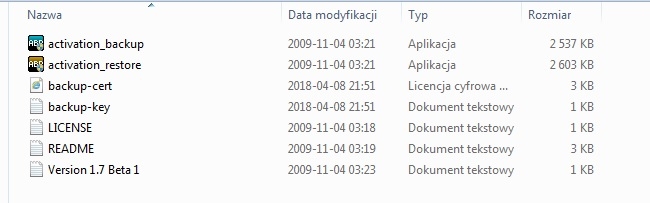
    You run "activation_backup" on the old disk, you get:

    Dell XPS 702 SSD Upgrade - Windows 7 Activation: Retrieve Original Key after Disk Change

    that is, as you wrote, "only" key in "txt" and activation information in "backup-cert" file in xrm-ms format.

    On a new disk and a fresh system you run "activation_restore" and hokus-pokus, an activated system with an OEM license.

    This is how "nothing else" looks briefly ...


    The bottom line is that it worked. Best regards!
  • #18 17214597
    dworak30
    Level 5  
    Posts: 46
    Rate: 3
    Unfortunately, such a file was not created by "backup-cert" but the txt key itself
  • #19 17215147
    dworak30
    Level 5  
    Posts: 46
    Rate: 3
    Unfortunately, such a file was not created by "backup-cert" but the txt key itself

    Added after 5 [hours] 51 [minutes]:

    The Windows 7 OEM License Installer has resolved the problem

Topic summary

✨ The discussion revolves around a user who upgraded their Dell XPS 702 laptop to an SSD and faced issues with Windows 7 activation due to a worn-out product key sticker. The user attempted to retrieve the original key using various software but was unsuccessful. Suggestions included using the Activation Backup & Recovery (ABR) tool to transfer the activation from the old disk to the new SSD, as well as contacting Microsoft support for assistance with the illegible sticker. The user also explored the possibility of using the Windows 7 OEM License Installer to resolve the activation issue. Ultimately, the user found success with the OEM License Installer, which activated the system without needing the original key.
Generated by the language model.

FAQ

TL;DR: After an SSD swap, move Windows 7 activation with ABR; forum users report 99% success — "99% is anyway." [Elektroda, wojtasdm, post #17213460]

Why it matters: This FAQ helps Dell XPS 702 owners who reinstalled Windows 7 after an SSD upgrade keep their system legally activated without a readable COA sticker.

Quick Facts

After swapping to an SSD, how do I keep Windows 7 activated on my Dell?

Use ABR (Activation Backup & Recovery) to transfer activation from the old disk. Back up on the old install, then restore after a clean install on the SSD. This keeps activation on the same machine, which remains within license terms. Community members specifically recommend ABR for OEM laptops like Dell. It avoids moving the license to another PC. Keep the backup on external media for safety. [Elektroda, wojtasdm, post #17213646]

Can I retrieve the original Windows 7 COA key from the running system?

No. OEM systems ship with a vendor group key, not the COA sticker key. "You will not pull the key from the sticker out of the system because it is not there." If you need a replacement COA, contact Microsoft or Dell for guidance. Reading the in-system key will not match the sticker. [Elektroda, ak6, post #17213539]

What exactly does ABR copy?

It copies the installed OEM key and your activation certificate. "ABR will transfer the key and the certificate of authenticity." Run the backup on the old drive and restore on the fresh Windows 7 install. This preserves OEM SLP activation tied to the laptop’s BIOS. Keep both backup files together when restoring. [Elektroda, wojtasdm, post #17213646]

What files should ABR create during backup?

ABR should create a key file (TXT) and an activation certificate file (backup-cert in XRM-MS format). After reinstalling Windows 7, run activation_restore to reapply activation. If both files exist, the restore completes quickly and the system shows as activated. This mirrors OEM activation behavior on supported hardware. [Elektroda, wojtasdm, post #17214059]

ABR only produced key.txt — what now?

That edge case occurred in the thread. ABR generated only a key file and nothing else. Using the Windows 7 OEM License Installer activated the system successfully on the same laptop. Install Windows 7 clean, launch the OEM License Installer, and follow prompts. This approach re-applied OEM SLP using the BIOS marker, and activation completed. [Elektroda, dworak30, post #17213963]

Is transferring activation with ABR legal on the same computer?

Yes. You are restoring activation on the same hardware after a disk change. "It is absolutely legal, because you reinstall the system on the same computer." ABR does not move a license between machines. It restores your existing OEM activation state and key. [Elektroda, wojtasdm, post #17213646]

Does ABR work on Windows 7 even if its page mentions Vista?

Yes. Despite the description, users confirm ABR works great on Windows 7. Follow the same backup-then-restore sequence across the disk swap. This allows quick activation without calling Microsoft. Keep backups safe until activation completes. [Elektroda, wojtasdm, post #17213356]

How do I use ABR to move activation?

  1. On the old drive, run activation_backup to save the key and certificate.
  2. Clean-install Windows 7 on the SSD.
  3. Run activation_restore on the SSD and reboot. This re-applies OEM activation in minutes. [Elektroda, wojtasdm, post #17214059]

How do I read the Windows 7 key from a running system?

Use AIDA64. Open Operating System, then read the Product Key field. Do not confuse Product ID with Product Key. This shows the installed key for documentation. Record it before you reinstall. Store it securely for reference. [Elektroda, Dra98, post #17213369]

Why did Microsoft phone activation reject the key I read from Windows?

Many OEM installs use a manufacturer group key for SLP activation. Phone activation expects a unique retail-like key. The sticker key is not stored in Windows, so the read key differs. Contact Microsoft or Dell for COA issues or replacement guidance. [Elektroda, ak6, post #17213435]

What do I need to provide Microsoft if my COA sticker is unreadable?

Contact Microsoft Support and explain the illegible sticker. They will provide next steps. Expect to submit proof of purchase and a photo of the sticker. Follow their instructions to validate or replace the license. Keep your device’s documentation handy. [Elektroda, ak6, post #17213339]

How much does Windows 7 key recovery from Microsoft cost?

A user reported PLN 179 for key recovery after providing proof of purchase. Confirm current pricing with Microsoft, as fees may change. We include this figure to help with budgeting. Consider free OEM activation transfer methods first. [Elektroda, dworak30, post #17213375]

Can I reinstall clean Windows 7 on the SSD using the old recovery partition?

Yes. Boot the old HDD, create Dell recovery media with Dell Backup and Recovery, and make a factory USB. Install the SSD, boot from that USB, and restore the factory image. Then apply activation via ABR if needed. This preserves drivers and OEM settings. [Dell Backup and Recovery (Windows 7) — Create and Restore Factory Image]
Generated by the language model.
ADVERTISEMENT