logo elektroda
logo elektroda
X
logo elektroda
Dostępna jest polska wersja

Czy wolisz polską wersję strony elektroda?

Nie, dziękuję Przekieruj mnie tam

Radio android - Radio 2 din android turns on for a moment and goes out

KrzysztofA6C5 27906 20
ADVERTISEMENT
Treść została przetłumaczona polish » english Zobacz oryginalną wersję tematu
  • #1 17216187
    KrzysztofA6C5
    Level 2  
    Hello. I am asking for help in solving the problem. I would like to install Chinese android radio in A6C5. Radio 2 din in exchange for the original audi 2 din radio. ISO plugs, plugged in, power on pins 4 and 8. The radio turns on, charges Android, the final screen turns on, but after a while it goes out. The radio turns off and cannot be started. Only after pressing the reset button the radio restarts. Where could the problem be? Somewhere, maybe I should connect additional power supply?
    Attachments:
    • Radio android - Radio 2 din android turns on for a moment and goes out IMG_20180509_114532.jpg (4.38 MB) You must be logged in to download this attachment.
    • Radio android - Radio 2 din android turns on for a moment and goes out IMG_20180512_095021.jpg (4.28 MB) You must be logged in to download this attachment.
  • ADVERTISEMENT
  • #2 17216303
    Darek A.
    Level 20  
    Power is usually on 4 and 7 +, on pin 8 minus.
    It is often the case that pins 4 and 7 are reversed depending on the radio model.
    Put the ignition switch on, start the radio and short-circuit for a test pins 4 and 7 in the ISO power connector, check if it helps, if not, the radio is somewhere.
  • #3 17811881
    _carlos-
    Level 15  
    Is the car with CAN?
  • #4 17811947
    KrzysztofA6C5
    Level 2  
    _carlos- wrote:
    Is the car with CAN?
    Yes, it's an audi.
  • #5 17812037
    _carlos-
    Level 15  
    Screen goes gray or goes blank?

    According to the description, it is to be connected:
    A4 - + 12V fixed
    A7 - ACC + 12V after the ignition switch
    A8 - ground

    You connected so?
    Take a picture of the front panel.
    What is Android installed?
  • #6 17815858
    Robert180388
    Level 9  
    I have the same problem, I dragged the cables straight from the battery and once it fires up ok and another 10 minutes a tragedy fires, I think maybe a software change would change something, maybe the fault is that I do not have a CAN module but it is not possible to buy my model. Help !!!
  • ADVERTISEMENT
  • #7 17816059
    SZYMON BYDGOSZCZ
    Level 38  
    KrzysztofA6C5 wrote:
    _carlos- wrote:
    Is the car with CAN?
    Yes, it's an audi.


    How does this relate to itself?
  • #8 17817106
    _carlos-
    Level 15  
    And did you do a factory reset?

    Robert180388 wrote:
    I think maybe changing the software would change something


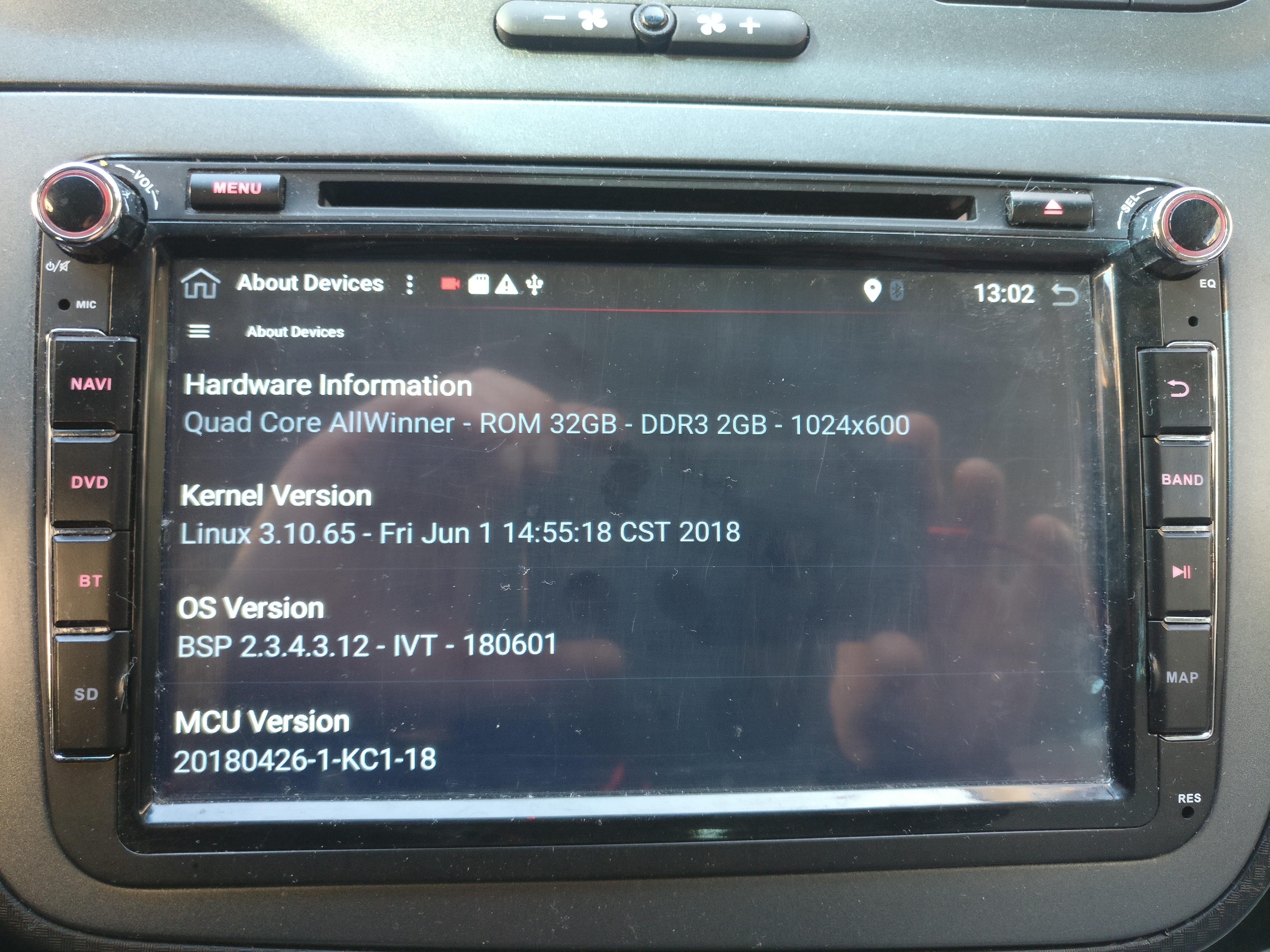
    Write what you have:
    - radio model,
    - Android version,
    - MCU version
  • #10 17879173
    _carlos-
    Level 15  
    Write what you have:
    - radio model,
    - Android version,
    - MCU version
  • ADVERTISEMENT
  • #11 17879200
    Robert180388
    Level 9  
    Radio Erisin ES7826s

    Model:
    px5 (1024x600)

    Android version
    8.0.0

    MCU version:
    MTCE_LM_V2.88_1
    Jun 12 2018 11:20:59

    Added after 49 [minutes]:

    "lm2_PX5_8.0_ota (20190105)"
    I have updated such software, there is also an option that I updated it incorrectly because I inserted the card, a message popped up and pressed install and everything or maybe something else?
  • #12 17879346
    _carlos-
    Level 15  
    I have a different model - allwinner P3 with Android 7.1.1


    Radio android - Radio 2 din android turns on for a moment and goes out

    You need to get a new Operating System and phoenixcard file to upload OS and new MCU. Write to the seller to have him send it to you.
  • #13 18272507
    Robert180388
    Level 9  
    I have downloaded the new MTU and nothing has changed :(
  • ADVERTISEMENT
  • #14 18919367
    Pojwola
    Level 2  
    I have the same problem you have mastered? Erisin ES5115v powers-lm-v2 81 1, android 8 opr5 hct4
  • #15 18920382
    Robert180388
    Level 9  
    Yes. I already pulled out that radio and put on a watch. But I connected the battery at home and it turned out that everything works as it should. It turned out that the weight must be from - the battery cannot be standard from the car or the body. Write if it worked for you, I had a match with this half of the year :)
  • #16 19419723
    robi4
    Level 17  
    I know it is over time, but in these cars the radio is turned on via the CAN bus. If the radio is dedicated to your car, a small module for connecting the CAN bus should be included with it.
  • #17 19419745
    nici
    VIP Meritorious for electroda.pl
    robi4 wrote:
    In cars, the radio is switched on via the CAN bus
    That's right, FACTORY. Others have nothing to do with it.
  • #18 19419770
    Robert180388
    Level 9  
    I solved the case, the ground cable (-) had to be straight from the battery, I figured it out only when I pulled out the radio and connected it to the battery in the room. Why did the factory cube not work? You will not understand the Chinese :)
  • #19 19419965
    _carlos-
    Level 15  
    nici wrote:
    robi4 wrote:
    In cars, the radio is switched on via the CAN bus
    That's right, FACTORY. Others have nothing to do with it.

    Not completely,
    - as not on the Can module, steering wheel control will not work
    - the radio is also turned on and off after Can.
  • #20 19420426
    SZYMON BYDGOSZCZ
    Level 38  
    _carlos- wrote:
    Not completely,
    - as not on the Can module, steering wheel control will not work
    - the radio is also turned on and off after Can.


    What nonsense ???? !!!

    A6 C5 before 2002 no CAN for analog only radio!
  • #21 19420545
    _carlos-
    Level 15  
    If the car does not have Can, it is logical that it will not connect, because there is no what. My answer concerned a specific statement.
    I don't understand why are you screaming?

Topic summary

✨ The discussion revolves around issues faced when installing a Chinese Android 2 DIN radio in an Audi A6 C5. The user reports that the radio powers on briefly but then shuts off, requiring a reset to restart. Various responses suggest checking the wiring connections, particularly the power pins (4, 7, and 8), and ensuring proper grounding directly from the battery. Some users mention the importance of a CAN bus module for functionality, while others have experienced similar issues with different models. Recommendations include verifying the radio model, Android version, and performing a factory reset. Users also discuss the necessity of a stable power supply and potential software updates to resolve the problem.

FAQ

TL;DR: In A6 C5, many Android 2‑DIN boot loops are power faults: 12 V constant/12 V ACC plus ground. “the ground cable (-) had to be straight from the battery”. Fix by wiring A4=+12V, A7=ACC, A8=GND and using battery negative. [Elektroda, Robert180388, post #19419770]

Why it matters: It helps Audi A6 C5 owners installing Android 2‑DIN units fix boot-looping/shutdown without unnecessary returns or firmware hunts.

Quick Facts

Why does my Android 2‑DIN radio boot then shut off in an Audi A6 C5?

Power instability from poor grounding causes boot loops. One A6 C5 owner fixed it by running the radio ground straight to the battery negative. Chassis or harness ground can drop voltage under load. Rewire the ground to battery, then retest boot stability. Use the factory harness for positive feeds, but isolate the ground. This simple change ended repeated on/off cycling for ES-series units. [Elektroda, Robert180388, post #19419770]

Which ISO pins supply power and ground on these head units?

ISO A-block power pins are: - A4: +12 V constant, - A7: ACC +12 V after ignition, - A8: ground. Wire them exactly as above. Verify with a multimeter before powering. If A4 and A7 are swapped in your loom, correct them. Miswiring can cause reboots or no memory retention. [Elektroda, _carlos-, post #17812037]

Can I bridge pins 4 and 7 to test if ACC is the problem?

Yes. Temporarily bridging A4 (BATT) and A7 (ACC) can confirm an ACC feed issue. Do this only for a quick test. If the radio stops rebooting, your ACC line is unstable. Then fix the ACC source or use a CAN adapter that provides ACC. How-To:
  1. Turn ignition ON and power the radio.
  2. Briefly short A4 to A7 at the ISO power block.
  3. If stable, rewire ACC to a clean switched 12 V. [Elektroda, Darek A., post #17216303]

Do I need a CAN module in the A6 C5 for an Android radio?

If your car uses CAN for radio control, a CAN adapter is recommended. Without it, steering-wheel buttons will not work. The head unit on/off can also be signaled over CAN. Many aftermarket looms include a small CAN box. Add one that matches your vehicle type. This helps deliver a stable ACC signal and proper shutdown. [Elektroda, _carlos-, post #19419965]

My A6 C5 is pre‑2002; does it use CAN for the radio?

A6 C5 models before 2002 do not use CAN for the radio. They use analog signals instead. In that case, a CAN adapter will not help power control. Wire ACC and BATT directly via the ISO harness. This is an important edge case when choosing adapters. [Elektroda, SZYMON BYDGOSZCZ, post #19420426]

I ran new power from the battery but it still reboots—what next?

Running a new positive feed may not cure reboots. One installer pulled power from the battery and the unit still cycled after minutes. Check the ground path and add a CAN module if your car uses CAN. Firmware alone may not fix a wiring fault. Focus on stable power and ground before software. [Elektroda, Robert180388, post #17815858]

How do I ground the unit to stop power cycling?

Fix the ground path. As one owner reported, “the ground cable (-) had to be straight from the battery.” How-To:
  1. Run a dedicated ground wire from the radio GND to the battery negative.
  2. Isolate or bypass the factory harness ground.
  3. Power on and verify the radio no longer cycles. [Elektroda, Robert180388, post #19419770]

Will a firmware update fix the on/off loop?

Not always. An Erisin ES7826s updated with “lm2_PX5_8.0_ota (20190105)” still powered on and off repeatedly. This shows software alone may not solve a power fault. Stabilize wiring first. Update firmware after power is clean and the unit boots consistently. Ask the vendor for full packages only when needed. [Elektroda, Robert180388, post #17879017]

Where do I get the correct OS and MCU files for an Erisin PX5 unit?

Request them from your seller. You need a complete operating system image and a PhoenixCard file to rewrite storage. Ask for the matching MCU package as well. Then follow the vendor’s flashing procedure. This path helped others when OTA updates failed. It ensures OS and MCU firmware are in sync. [Elektroda, _carlos-, post #17879346]

What info should I share when requesting firmware?

Provide three items so the seller can match files: - radio model, - Android version, - MCU version. Sharing precise versions speeds support and avoids wrong images. Include screenshots of the About page if possible. Sellers often ask for this data before sending files. [Elektroda, _carlos-, post #17817106]

What Android and MCU versions were reported for the ES7826s?

Erisin ES7826s details shared in the thread: - Model: PX5 (1024×600), - Android: 8.0.0, - MCU: MTCE_LM_V2.88_1 dated Jun 12, 2018. This example helps match compatible updates and MCU builds. Report exact strings when seeking firmware. These identifiers distinguish hardware variants. [Elektroda, Robert180388, post #17879200]

Does this issue affect other Erisin models?

Yes. Another owner of an Erisin ES5115V reported the same power‑cycling behavior. The symptoms and MCU family were similar. Grounding and ACC wiring checks apply across ES-series units. Use the same diagnostics before pursuing firmware changes. [Elektroda, Pojwola, post #18919367]

My unit only restarts after pressing RESET—what does that indicate?

That behavior shows the unit has power but crashes or shuts down soon after boot. The OP could restart only via the reset button. Treat this as a power stability problem first. Inspect ACC, BATT, and ground connections. Then test with a direct battery ground. [Elektroda, KrzysztofA6C5, post #17216187]

How can I bench‑test the radio outside the car to isolate wiring?

Power it directly from a 12 V battery on the bench. One installer found the radio worked perfectly when powered at home. This isolated the in‑car ground as the fault. Keep polarity correct and fuse the positive lead. If stable on the bench, rework vehicle power and ground. [Elektroda, Robert180388, post #18920382]
ADVERTISEMENT