logo elektroda
logo elektroda
X
logo elektroda

Audi A6 C6 - MMI Not Working: Black Screen, Buttons Unresponsive, Diagnostics Errors

leonek4 55149 26
Best answers

Why is the Audi A6 C6 MMI screen black and the buttons unresponsive, with multiple controller communication errors, and where should I check first?

The MMI is most likely down because the MOST optical bus is interrupted, so start by isolating the loop with the fiber bridge plugs and checking the modules one by one until the faulty unit is found [#17403559] A useful diagnostic is an optical bus test with damping +3 dB [#17696647] Several replies point to gateway error 00384 / optical databus open circuit and no communication with the radio, amplifier, navigation, or control head, which fits a broken optical loop [#17405624][#19686916] Water damage is a common cause on the Audi C6: one solved case found a faulty MMI module under the glove box and a flooded Bluetooth module under the passenger seat after water leaked in from under the windshield [#21869922] Another user reported a flooded radio and amplifier as the cause, so those trunk/cabin modules should also be checked for moisture and corrosion [#19947145]
Generated by the language model.
ADVERTISEMENT
Treść została przetłumaczona polish » english Zobacz oryginalną wersję tematu
  • #1 17402897
    leonek4
    Level 29  
    Posts: 1344
    Help: 104
    Rate: 636
    Board Language: polish
    Hello!
    As the topic does not start MMI. The black screen does not react to the on button.

    Diagnostics Bus Diagnostic: Standard

    Controller Electrical Optical
    19-CAN Gateway OK ERROR
    07-Control Head ERROR ERROR
    0E-Media Player 1 ERROR ERROR
    47-Sound System OK ERROR
    56-Radio ERROR ERROR
    37-Navigation ERROR ERROR
    Fuses checked. Any hint?
  • ADVERTISEMENT
  • Helpful post
    #2 17403559
    fructon
    Level 33  
    Posts: 1594
    Help: 241
    Rate: 977
    Board Language: polish
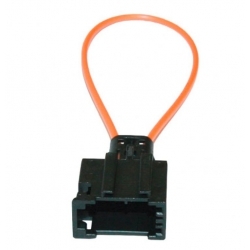
    It is possible that you have a bus interruption, you have to unplug the bridge plugs from the modules and check if they are glowing, if any signal passes, then you are fastening the bridge one by one to exclude the module causing the error. Audi A6 C6 - MMI Not Working: Black Screen, Buttons Unresponsive, Diagnostics Errors
  • Helpful post
    #3 17403994
    SZYMON BYDGOSZCZ
    Level 38  
    Posts: 3845
    Help: 340
    Rate: 1699
    Board Language: polish
    leonek4 wrote:
    Diagnostics Bus Diagnostic: Standard

    Controller Electrical Optical
    19-CAN Gateway OK ERROR
    07-Control Head ERROR ERROR
    0E-Media Player 1 ERROR ERROR
    47-Sound System OK ERROR
    56-Radio ERROR ERROR
    37-Navigation ERROR ERROR
    Fuses checked. Any hint?


    Computer mmi is flooded.
  • #4 17405624
    leonek4
    Level 29  
    Posts: 1344
    Help: 104
    Rate: 636
    Board Language: polish
    19-CAN Gateway I found a clipboard / communication is, error 00384 - Optical Databus 011 - Open Circuit - Intermittent
    47-Sound System - amplifier in the trunk / lack of communication
    07-Control Head the control panel of the gearshift wheel / it has no connection with light / no communication
    Navigation 37 in the clipboard / LEDs flash alternately / no communication
    display and on the board, otherwise I found nothing else.
    Gzie is:
    0E-Media Player 1
    Radio-56


    MMI computer which and where ???
  • #5 17408808
    leonek4
    Level 29  
    Posts: 1344
    Help: 104
    Rate: 636
    Board Language: polish
    Auto undressed but computer mmi can not find.
  • ADVERTISEMENT
  • Helpful post
    #6 17412327
    goldwinger
    VIP Meritorious for electroda.pl
    Posts: 6900
    Help: 531
    Rate: 2093
    Board Language: polish
    Replace it with a lot of buttons and two knobs
  • Helpful post
    #7 17695435
    SZYMON BYDGOSZCZ
    Level 38  
    Posts: 3845
    Help: 340
    Rate: 1699
    Board Language: polish
    leonek4 wrote:
    37-Navigation in the storage compartment / LEDs flash alternately / no communication


    Which diodes?

    What navi do you have there?

    2G HIGH, 2G BASIC or 3G?
  • Helpful post
    #8 17696647
    vwaudi
    Level 20  
    Posts: 292
    Help: 32
    Rate: 178
    Board Language: polish
    Make optical bus test with damping + 3dB
  • #9 19686495
    kubas10
    Level 25  
    Posts: 2786
    Help: 42
    Rate: 1540
    Board Language: polish
    Mmi does not work for me either, the loudspeakers are knocking and the optical bus test is attached.
    Attachments:
    • Audi A6 C6 - MMI Not Working: Black Screen, Buttons Unresponsive, Diagnostics Errors mmi.JPG (69.99 KB) You must be logged in to download this attachment.
  • Helpful post
    #10 19686916
    kubas10
    Level 25  
    Posts: 2786
    Help: 42
    Rate: 1540
    Board Language: polish
    Error in Gateway: 384 - optical data cable - permanent failure;
    information electronics and radio - no communication;
  • Helpful post
    #11 19687971
    kubas10
    Level 25  
    Posts: 2786
    Help: 42
    Rate: 1540
    Board Language: polish
    Today I unplugged the amplifier in the trunk and plugged it in and I have this status:
    Attachments:
    • Audi A6 C6 - MMI Not Working: Black Screen, Buttons Unresponsive, Diagnostics Errors mmi2.JPG (21.46 KB) You must be logged in to download this attachment.
  • Helpful post
    #12 19687974
    kubas10
    Level 25  
    Posts: 2786
    Help: 42
    Rate: 1540
    Board Language: polish
    Where to start ? I still do not connect to the radio and the mmi module, there are also no optics in the plug in the trunk near the amplifier.
  • ADVERTISEMENT
  • Helpful post
    #13 19892168
    kapusta758
    Level 1  
    Posts: 1
    Help: 1
    Rate: 5
    Board Language: polish
    And how did you solve the problem, buddy? Because I have just the same thing. When turning on, you only hear a moment as if something was read from the disk and that's it. I don't even have anyone in my town to let him check
  • Helpful post
    #14 19947145
    autotrek
    Level 9  
    Posts: 5
    Help: 1
    Rate: 17
    Board Language: polish
    Hello, gentlemen, the same problem .. I had a flooded radio and amplifier. I dried, overheated and cleaned in February. Now I only have the startup screen after turning on and it turns off immediately. Check all the elements of the navi amplifier and the radio if they were not flooded. In the Audi C6, these elements are often flooded. Can anyone tell where to buy such a bridge because I do not have any old plugs. And of course, will anyone boast about working out this fault ??
  • Helpful post
    #15 19948039
    fructon
    Level 33  
    Posts: 1594
    Help: 241
    Rate: 977
    Board Language: polish
    Just enter swiatlowod-bridge-loop-audi in the search engine
  • #16 21258123
    radekstypka
    Level 1  
    Posts: 1
    Board Language: polish
    Hello everyone!

    I am refreshing the topic as I too have been hit by a similar problem.
    In my case, after the battery problems, a little fuss was made, MMI 2g HIGH stopped working .
    Audi A6 C6 Prelift 2005.

    I scanned the optics with VCDs. The results came out as below.
    My question is. What are the components causing the errors and where to look for them?
    - 07-Operating/display unit. (control head)
    - 0E-Media Player 1

    --------------------------------------------------------------------------------
    --------------------------------------------------------------------------------
    Item designation: 4F0 910 468 A
    Component and/or version: Gateway H11 0070

    Optical data bus diagnostics: Standard

    Controller - Electrical - Optical
    19-CAN Gateway - OK
    07-Operating/indicating unit ERROR - ERROR
    0E-Media Player 1 - OK - ERROR
    77-Telephone - OK
    47-Sound system - OK - OK
    56-Radio - OK - OK
    37-Navigation - OK - OK

    --------------------------------------------------------------------------------
    --------------------------------------------------------------------------------
  • ADVERTISEMENT
  • #17 21573208
    JakubRybka
    Level 6  
    Posts: 3
    Board Language: polish
    Hello everyone, I also have the same problem, I am looking for hints, no connection on the fiber optics, I am going through the devices one by one , I have replaced the MMI controller , buttons near the gears, now the logo is showing on the display and still dark, I have done the bridges and only connected the radio and it does not work either?
  • #18 21869563
    ROGU
    Level 12  
    Posts: 45
    Rate: 30
    Board Language: polish
    Hello,
    I have a problem with the MMI. It is not working completely. It's black, nothing illuminates, nothing flashes.
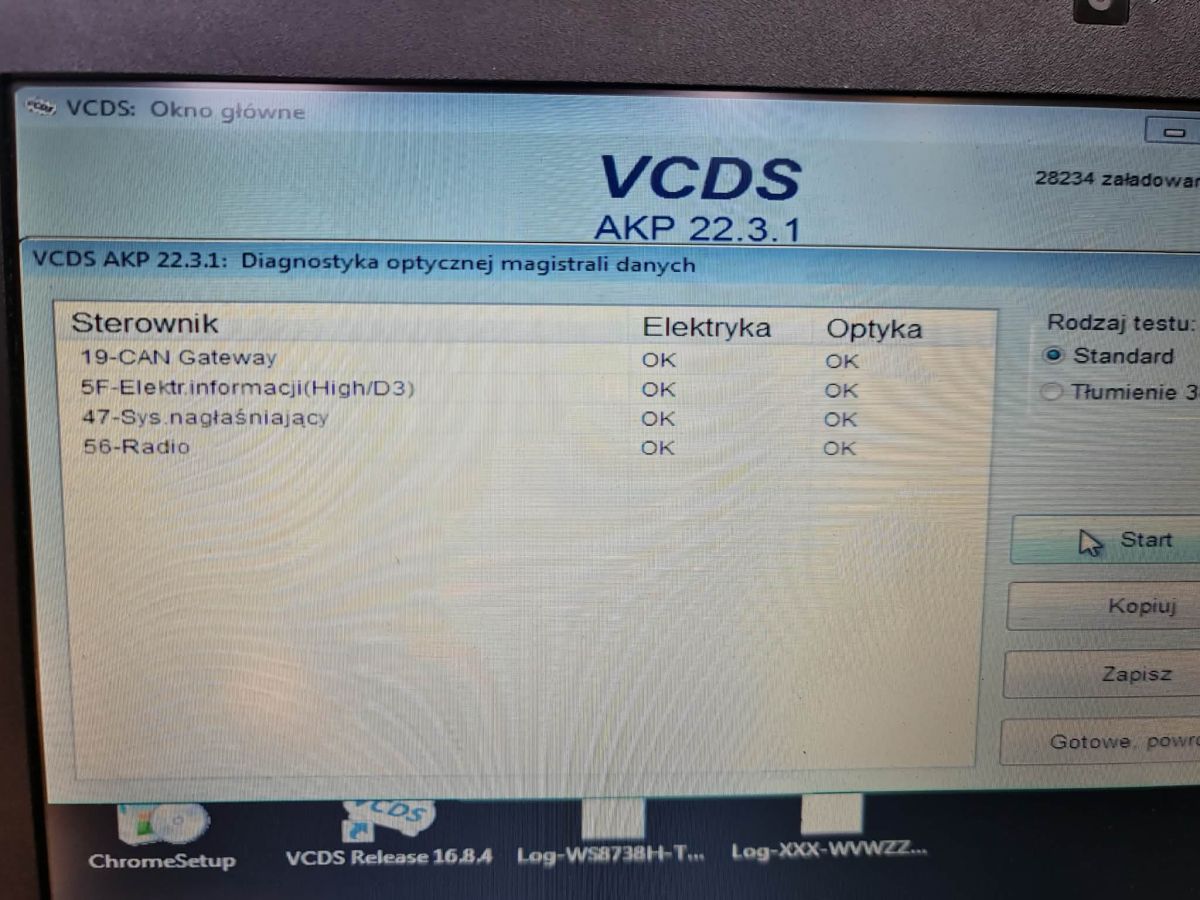
    I did a fibre optic loop test and everything OK
    In gateway 3 errors
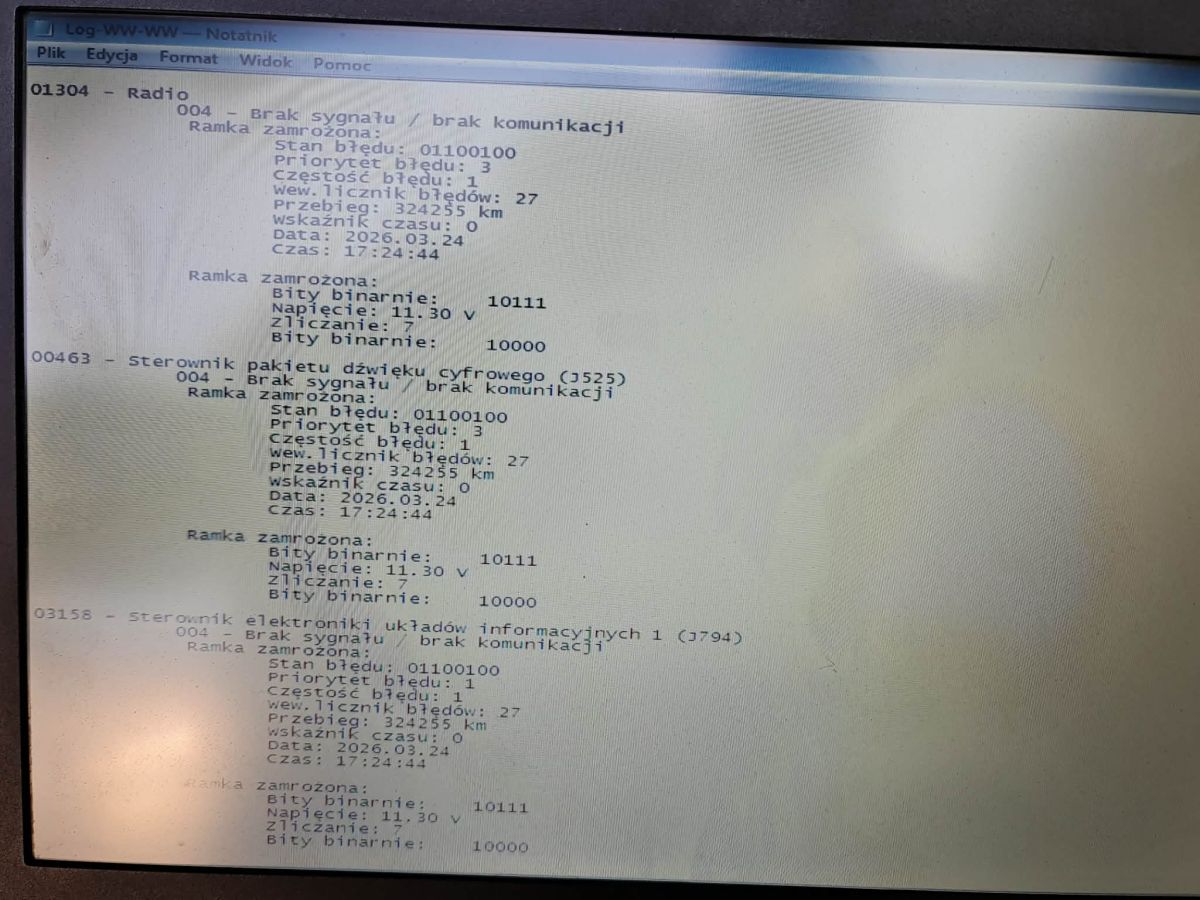
    No communication with radio 01304
    No communication with sound controller J525 00463
    No communication with information circuit controller J793 03158
    VCDS AKP 22.3.1 window showing optical data bus diagnostics results on a computer screen
    Laptop screen showing Notepad with MMI error log: no communication with radio, J525, and J793/J794 controllers.
    3d1953fb8

    Where to look for the problem? Greetings
  • #19 21869571
    kubas10
    Level 25  
    Posts: 2786
    Help: 42
    Rate: 1540
    Board Language: polish
    In my case, the module into which the memory card is inserted was defective. Mail order repair at a company that repairs navi and car audio equipment.
  • #20 21869574
    ROGU
    Level 12  
    Posts: 45
    Rate: 30
    Board Language: polish
    I saw that in your loop test there were EROR marks on the modules. At my place it is OK everywhere, yet it does not work. VCDS does not connect to the modules, in the gateway also communication errors with 3 modules. Could it be a gateway issue ?
  • #21 21869577
    kubas10
    Level 25  
    Posts: 2786
    Help: 42
    Rate: 1540
    Board Language: polish
    Do a full readout of the gateway of all modules installed in the car and you will know. Gateway rather ok because you probably have communication with the rest of the vehicle ? Remember that you have several types of data bus in the car.
  • #22 21869602
    ROGU
    Level 12  
    Posts: 45
    Rate: 30
    Board Language: polish
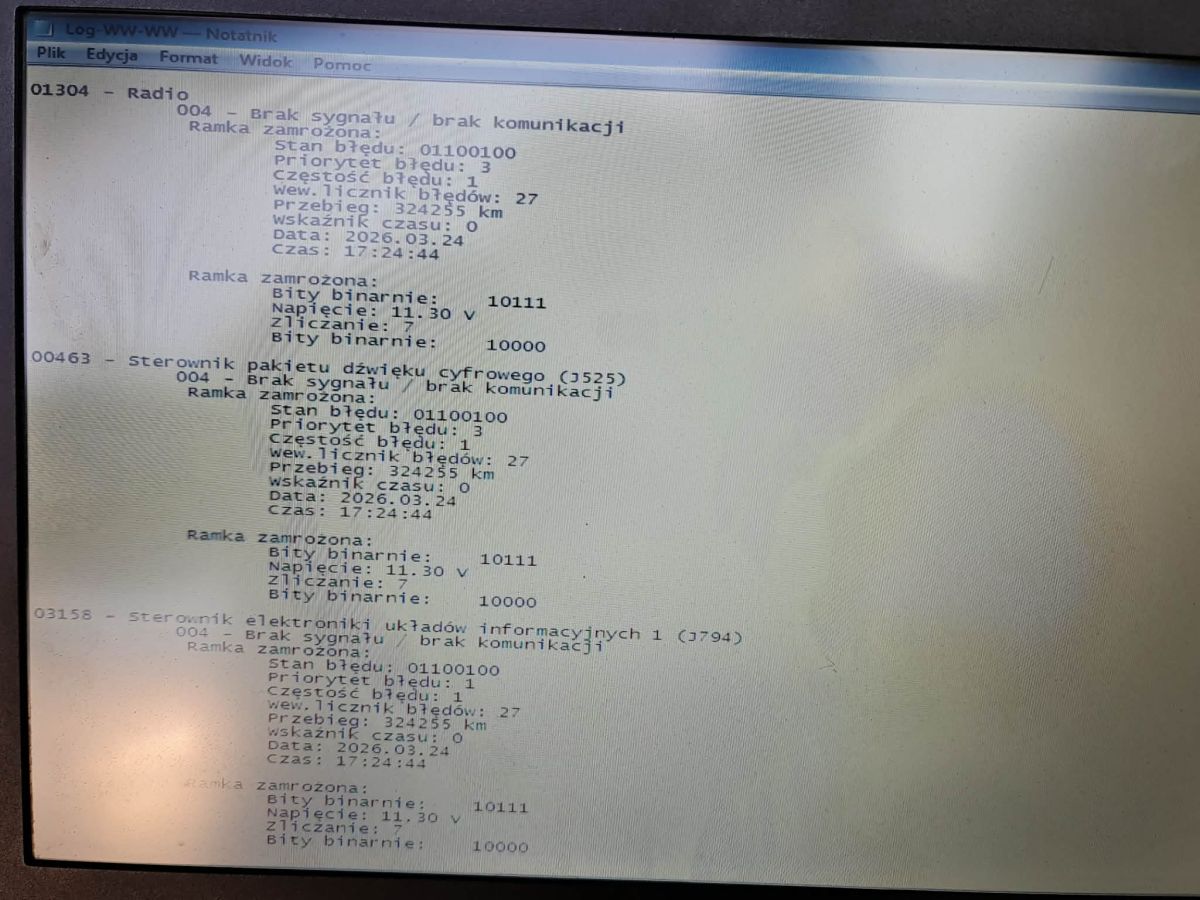
    The errors from the gateway are pictured
    Notepad log showing multiple errors: “No signal / no communication” for several modules
  • #23 21869661
    kubas10
    Level 25  
    Posts: 2786
    Help: 42
    Rate: 1540
    Board Language: polish
    Write the exact details of the car
  • #24 21869719
    ROGU
    Level 12  
    Posts: 45
    Rate: 30
    Board Language: polish
    A6 c6 2.0 tdi 2010r avant
  • #25 21869733
    kubas10
    Level 25  
    Posts: 2786
    Help: 42
    Rate: 1540
    Board Language: polish
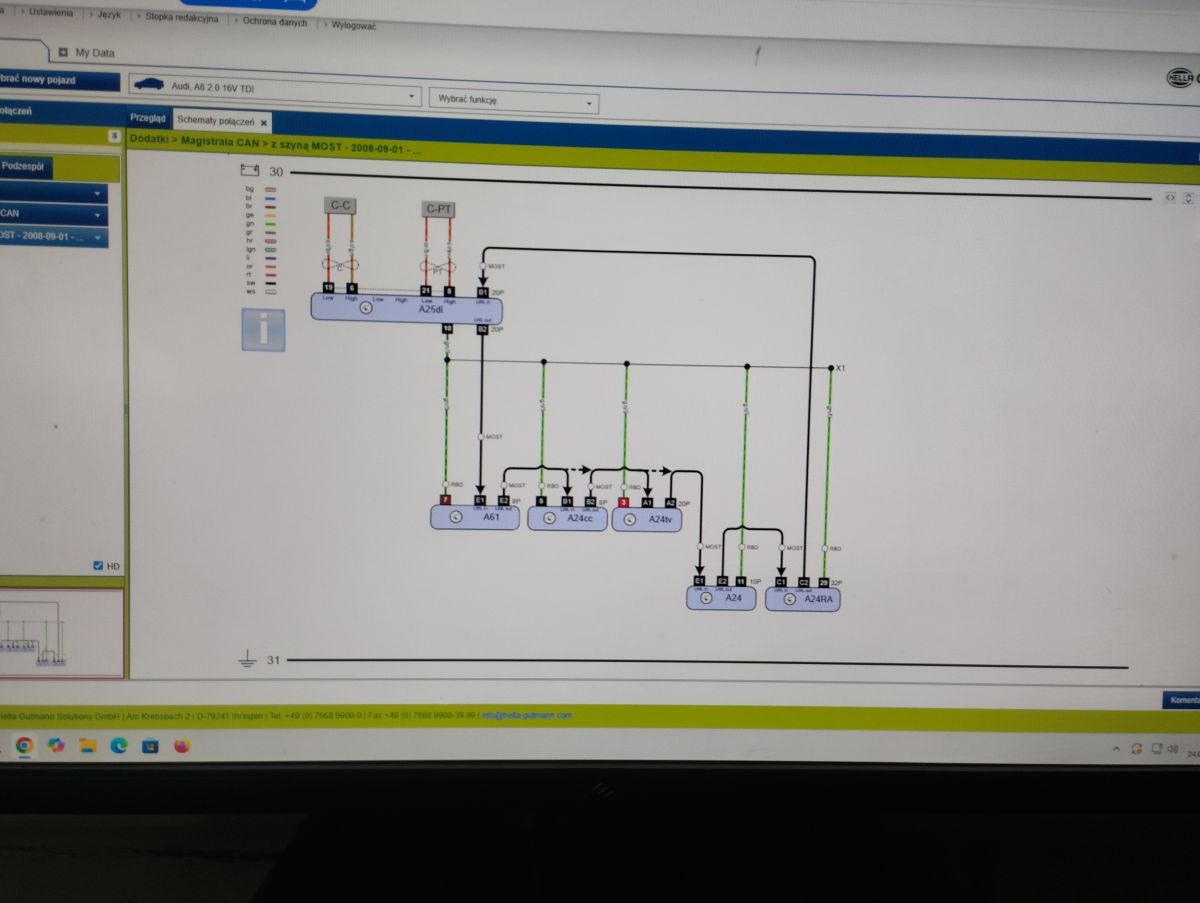
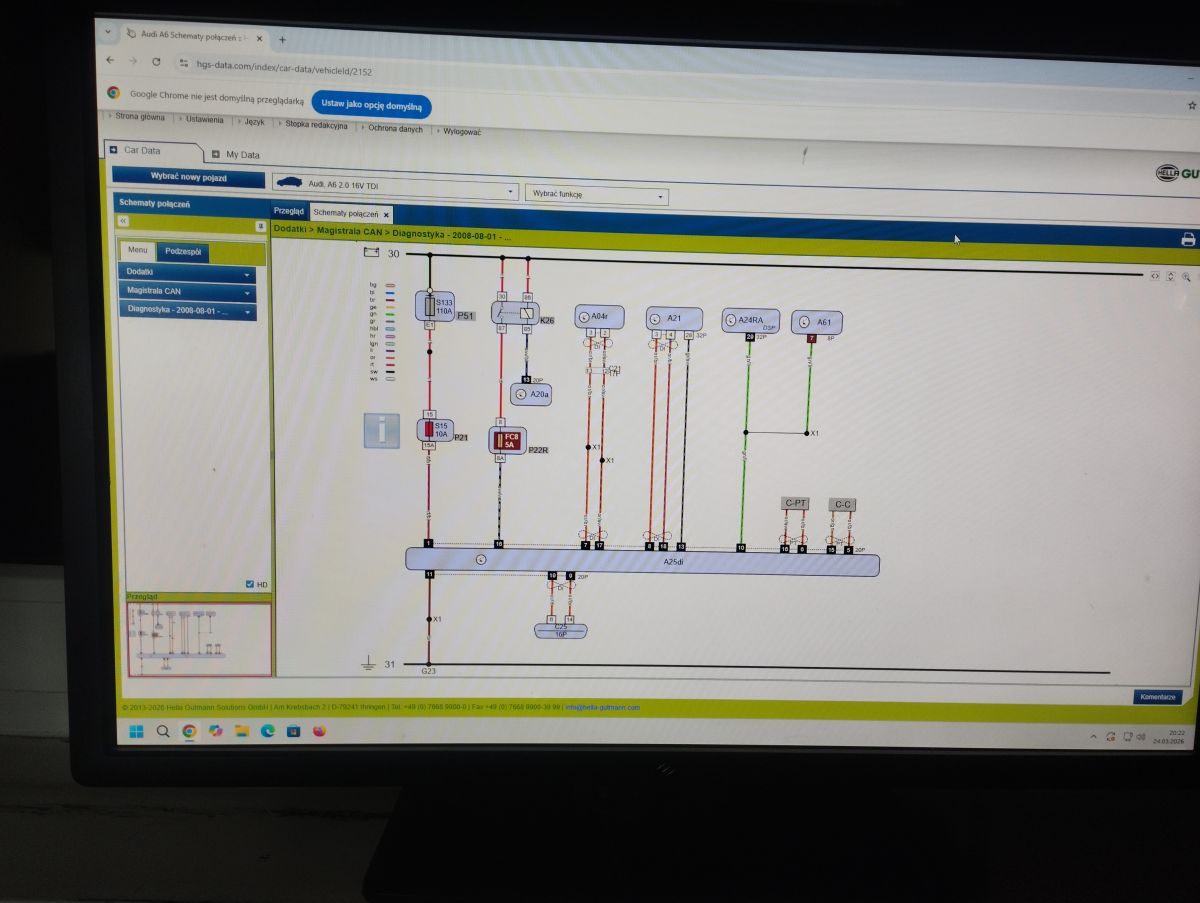
    Computer screen showing a CAN/MOST wiring diagram for an Audi, with modules labeled A25di and A61 Computer monitor showing a CAN bus and diagnostics wiring diagram for an Audi A6 in a web browser.

    Added after 1 [minute]:

    A25di is the gateway and A61 is the infotainment controller. Check that there is a connection between the two modules.

    Added after 1 [minute]:

    As far as I hit with the schematics because there are several types of hi-fi systems in this car.
  • #26 21869922
    JakubRybka
    Level 6  
    Posts: 3
    Board Language: polish
    >>17402897 Thanks for the help, already solved. It turned out to be a faulty MMI module under the passenger glove box, flooded Bluetooth module in the floor under the passenger seat, water was pouring from under the windshield into the cabin and that was the main reason for the failure.
  • #27 21869935
    ROGU
    Level 12  
    Posts: 45
    Rate: 30
    Board Language: polish
    Is the bt module under the passenger or driver seat? I saw on yt that on the driver's side (left side)

Topic summary

✨ The discussion addresses a common issue with the Audi A6 C6 MMI system, characterized by a black screen, unresponsive buttons, and multiple diagnostic errors indicating communication failures on the optical data bus. Diagnostic trouble codes reveal errors in modules such as the 07-Control Head, 0E-Media Player 1, 56-Radio, 37-Navigation, and 47-Sound System, with the 19-CAN Gateway showing intermittent open circuit faults on the optical databus. Common causes include bus interruptions, flooded or damaged radio and amplifier units (often located in the trunk), and faulty optical fiber connections. Suggested troubleshooting steps involve checking and testing optical bus continuity using bridge plugs and diodes, isolating faulty modules by disconnecting and reconnecting bridge plugs, and verifying the condition of the MMI computer and related components. Some users report partial recovery after drying and cleaning flooded units, while others recommend replacing the MMI control panel and verifying the optical fiber loop integrity with damping tests. The MMI computer location and identification remain a point of inquiry. The problem persists across different MMI versions, including 2G HIGH and BASIC, with no definitive single fix but a focus on optical bus diagnostics and hardware inspection.
Generated by the language model.

FAQ

TL;DR: In one A6 C6 case, 6/6 modules reported optical errors; "Optical data bus diagnostics: Standard." Treat this as a ring break and inspect fiber links. [Elektroda, leonek4, post #17402897]

Why it matters: For Audi A6 C6 owners and techs chasing black screens and dead buttons, this FAQ streamlines optical-bus diagnosis and fixes.

Quick Facts

Black MMI screen and dead buttons—what does a scan showing many Optical ERRORs mean?

It points to an optical ring break. In one case, all listed nodes showed Optical ERROR. Start by inspecting fiber links and connectors, then isolate modules on the ring. Power may be fine, but data light isn’t completing the loop. [Elektroda, leonek4, post #17402897]

How do I find the faulty module on the optical bus?

Bridge modules one by one and watch for light. How-To: 1. Unplug a module and insert an optical loop bridge. 2. Check if the far-end fiber glows red. 3. Reconnect modules sequentially until the ring collapses again; the last added module or its wiring is suspect. [Elektroda, fructon, post #17403559]

What does fault 00384 (Optical Databus Open Circuit) mean?

The CAN Gateway detected a break in the optical loop. The ring is incomplete or a module isn’t passing light. Inspect the affected segment, reseat connectors, and confirm power and ground at that module. Clear the fault and rescan after each change. [Elektroda, leonek4, post #17405624]

Which components are commonly water-damaged in the A6 C6?

Users report flooded radio and amplifier causing boot loops or shutdowns. If the MMI shows a logo then dies, re-check these trunk modules for corrosion. Clean, reflow, or replace as needed. “These elements are often flooded” in this model. [Elektroda, autotrek, post #19947145]

Where are 07, 0E, 56, 47, and 37 modules located?

From reports: 47 amplifier is in the trunk; 07 control head is by the gear shifter; 37 navigation sits in a storage compartment with status LEDs. Check trunk electronics and stowage areas for fiber plugs when tracing 0E Media Player 1 and 56 Radio. [Elektroda, leonek4, post #17405624]

How do I run an optical-bus test with attenuation?

Use your diagnostic tool’s optical-bus routine and add attenuation to stress the link. As one expert advised: “Make optical bus test with damping + 3dB.” This helps reveal marginal modules or poor connections during the light test. [Elektroda, vwaudi, post #17696647]

After a weak battery, my MMI 2G High died. Which nodes should I check first?

Target modules that show both electrical or optical errors. In a later scan, two nodes flagged first: 07 control head and 0E media player. Inspect their power, ground, and fiber connections, then rescan to confirm recovery. [Elektroda, radekstypka, post #21258123]

Speakers knock and MMI won’t start—where do I begin?

Start at the CAN Gateway. A permanent 00384 fault means the optical cable path is open. Check the radio and information electronics for communication. Isolate the ring with loop bridges and verify light at each step. Then clear codes and retest. [Elektroda, kubas10, post #19686916]

Nav unit LEDs flash alternately, but no communication—what’s happening?

The navigation drive has power, but it cannot talk on the optical ring. The ring is broken, or another module isn’t forwarding light. Verify the nav’s fiber connections and continue ring isolation until communication returns. [Elektroda, leonek4, post #17405624]

My scan shows 07-Control Head ERROR-ERROR. What does that imply?

Both electrical and optical paths report faults for the control head. Check the console panel harness, power, ground, and its fiber link. If the module stays offline, swap in a known-good unit to confirm. [Elektroda, radekstypka, post #21258123]

MMI shows the startup logo, then shuts off—what should I check?

Inspect trunk electronics for prior water damage, especially radio and amplifier. Clean or replace oxidized boards and reseat fiber connectors. A boot-then-die pattern suggests a module crashes the ring shortly after initialization. [Elektroda, autotrek, post #19947145]

I reseated the trunk amplifier and status changed, but it still fails. Next steps?

Confirm the presence of optical fibers at the trunk amplifier plug. If optics are missing at that connector, trace the harness backward. Keep bridging non-essential modules to keep the ring closed during testing. [Elektroda, kubas10, post #19687974]

I bridged everything and left only the radio, but MMI stays dark—why?

Radio-only tests can still fail. The gateway expects a closed optical loop, and the control head orchestrates wake-up. Use proper loop plugs across every removed node and rescan. Verify radio power, ground, and its fiber continuity. [Elektroda, JakubRybka, post #21573208]

How do I interpret Electrical OK but Optical ERROR entries?

Power and CAN reach the module, but optical communication fails. The fiber ring is open or a node isn’t relaying light. Focus on fiber continuity and bridging to restore the optical loop before replacing parts. [Elektroda, leonek4, post #17402897]

Where can I buy an optical loop bridge for testing?

Search for a “fiber-optic bridge/loop Audi.” These inexpensive loop plugs let you bypass a suspect node cleanly during testing. Insert them at each module to keep the ring closed while isolating faults. [Elektroda, fructon, post #19948039]

Is a single “MMI computer” to blame if nothing powers up?

The A6 C6 spreads MMI across several modules, so you won’t find a single box. If you can’t locate a single “MMI computer,” test the optical ring and each node in sequence to pinpoint the fault. [Elektroda, leonek4, post #17408808]
Generated by the language model.
ADVERTISEMENT