logo elektroda
logo elektroda
X
logo elektroda

Title: Need Installation Manual & Wiring Diagram for Crawford ECS950 with CDM9 Gate Controller

Scofield1 38529 8
ADVERTISEMENT
Treść została przetłumaczona polish » english Zobacz oryginalną wersję tematu
  • #1 18254145
    Scofield1
    Level 11  
    Posts: 43
    Help: 3
    Rate: 6
    Hello

    I am looking for an assembly manual/wiring diagram for the Crawford ECS950 + CDM9 gate controller.
    On the forum I found documents regarding other versions of controllers (ECS930 / ECS940), although there are differences, e.g. in the connectors.

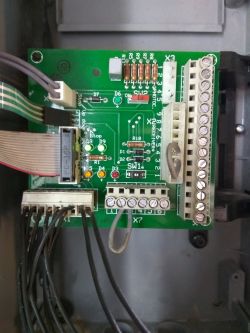
    The attached photo shows the PCB "Manoeuvring card" of this system. At first glance, you can see that the X1 connector has fewer pins than, for example, the ECS940 version.
    Title: Need Installation Manual & Wiring Diagram for Crawford ECS950 with CDM9 Gate Controller

    I'm trying to boot from disassembly, but there's a problem I can't seem to figure out. After turning on the power, the code E24 appears on the display, which according to found documents probably means: "(English) E24 Power failure. Normal error code after mains break or disengagement. Run the Door to fully open.”
    When this code is displayed, the system only responds to the "open" button. This causes the motor to start in the opening direction, but it does not stop on its own. The only option to stop the engine is to press the Stop button.

    Are any additional limit switches required for this controller?
    Where can I connect the signal from the air strip sensor?
  • ADVERTISEMENT
  • Helpful post
    #2 18259679
    lamerb
    Level 25  
    Posts: 583
    Help: 86
    Rate: 166
    Maybe the attached file will help.
    Judging by the description of the problem, you should perform position programming.
    Attachments:
    • K047862-_Wiring_diagram_CDM9_950.pdf (745.07 KB) You must be logged in to download this attachment.
  • ADVERTISEMENT
  • #3 18268075
    Scofield1
    Level 11  
    Posts: 43
    Help: 3
    Rate: 6
    Thank you very much for your help.
    The file came in very handy. I missed the jumper on X3. And after connecting the air bar sensor, I was able to carry out the programming (I followed the same steps as for the ECS940 model).
  • ADVERTISEMENT
  • #4 20882545
    knemak
    Level 1  
    Posts: 1
    Rate: 2
    Great help, thanks.
  • #5 20928995
    wgl12
    Level 10  
    Posts: 30
    Rate: 28

    Colleagues, how to program the Crawford ECS950 control panel?

    Added after 1 [minute]:

    >>18268075 Hello. Do you have any programming instructions?
  • #6 21280308
    litridavid_84
    Level 1  
    Posts: 1
    >>18259679 buenas, he visto el pdf, mi placa tiene conectado un módulo para fotocélulas, por lo que el puente en x3 no lo lleva. Pero me sale después de unas maniobras el error E04, después de eso solo sube automático hacia arriba, para bajar tiene que ser hombre presente. Podríais echarme una mano de por qué me sale ese error, y de cómo volver a programar la apertura y cierre?
    Gracias.
  • #7 21500532
    tygerq
    Level 1  
    Posts: 1
    Hello
    Unfortunately I have a problem with the lock. It works normally from the remote control, but not from the button on the control unit. Button checked, switches through. Can I also connect a normal button to the 1 button X8, or do I have to connect it to X7? Unfortunately, it does nothing but open.
  • #8 21639740
    dolencjan10
    Level 2  
    Posts: 2
    Rate: 1
    Does anyone know what mean each pin from 1 to 9 on X1
    Thanks
  • ADVERTISEMENT
  • #9 21777589
    kaarthikeyankb
    Level 1  
    Posts: 1
    Rate: 1
    Hi,
    I want know x1 pin details

Topic summary

LABEL_AI_GENERATED
Discussion about finding an installation manual and wiring diagram for the Crawford ECS950 gate controller with CDM9 control board. The board differs from ECS930/ECS940 versions, especially in connector layout and X1 pin count. The initial fault was E24 after power-up, interpreted as a mains failure/position-related error requiring door opening and position programming. A helpful file enabled programming after the missing jumper on X3 was identified and the air bar sensor was connected, allowing the user to complete setup using ECS940-style procedures. Later posts ask for programming instructions, X1 pinout details, and troubleshooting of E04, photocell module wiring, X3 jumper presence, and control-button behavior where the gate opens but does not close normally.
AI summary based on the discussion. May contain errors.
ADVERTISEMENT