logo elektroda
logo elektroda
X
logo elektroda

Where to Download Additional Games for x12 GAME BOY Console with GBA, NES Support

kolegaserdeczny 48084 13
ADVERTISEMENT
Treść została przetłumaczona polish » english Zobacz oryginalną wersję tematu
  • #1 18404890
    kolegaserdeczny
    Level 6  
    Posts: 179
    Rate: 31
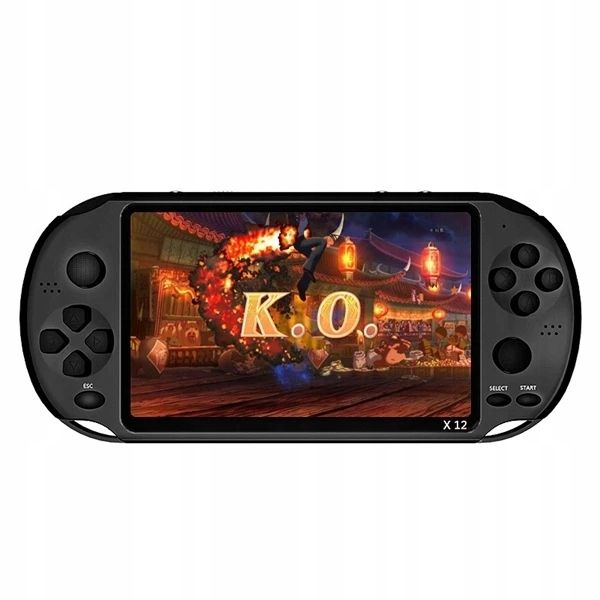
    I bought this console for a kid
    there were supposed to be 1000 games, but as it turns out there are only 7 games.
    Can I download any additional games and where???
    Links to entire games.
    I bought one
    PARAMETERS:
    Lithium battery
    Display: 5.1" (480*272) widescreen TFT 260,000 colors
    Camera: 200 million pixels
    Video: RMVB AVI MP4
    Special function: AV TV output, MP3
    Game Format: GBA, NES (8bit, 32bit)
    Audio format: MP3, WMA, OGG, WAV, AAC, APE
    Photo format: JPEG, BMP, GIF, TIF and PNG
    Where to Download Additional Games for x12 GAME BOY Console with GBA, NES Support
    Video format: RM, RMVB, AVI, MP4,3GP
  • ADVERTISEMENT
  • #2 18405486
    sosarek

    Level 43  
    Posts: 83875
    Help: 9318
    Rate: 15430
    It looks like you need to download game roms from the Internet and install them from the memory card.
    Company Account:
    Z
    Pka, Poznań, 60-850
    Helpful post? Buy me a coffee.
  • ADVERTISEMENT
  • #3 18408643
    kolegaserdeczny
    Level 6  
    Posts: 179
    Rate: 31
    And how to do it, I`m green in this field.
    Please step by step
  • ADVERTISEMENT
  • #4 18408651
    sosarek

    Level 43  
    Posts: 83875
    Help: 9318
    Rate: 15430
    There was a piece of paper in the box called the Manual? There is no information in it?
    What does the seller say?
    Company Account:
    Z
    Pka, Poznań, 60-850
    Helpful post? Buy me a coffee.
  • #5 18408682
    kolegaserdeczny
    Level 6  
    Posts: 179
    Rate: 31
    it says something like this on the box
    www.RONEBERG - TECH.COM
  • #6 18408700
    sosarek

    Level 43  
    Posts: 83875
    Help: 9318
    Rate: 15430
    On the Polish website there is information that after connecting to a PC you can download games
    https://roneberg-smart.com/dla-dzieci/161-konsola-przenosna-x12-8gb-game-boy.html
    kolegaserdeczny wrote:
    it says something like this on the box

    I didn`t ask what it wrote on the box, I just asked
    sosarek wrote:
    There was a piece of paper in the box called the Manual? There is no information in it?
    Company Account:
    Z
    Pka, Poznań, 60-850
    Helpful post? Buy me a coffee.
  • #7 18408822
    kolegaserdeczny
    Level 6  
    Posts: 179
    Rate: 31
    How to do it .
    After connecting to the PC, what next?
  • ADVERTISEMENT
  • #8 18408833
    sosarek

    Level 43  
    Posts: 83875
    Help: 9318
    Rate: 15430
    kolegaserdeczny wrote:
    After connecting to the PC, what next?

    sosarek wrote:
    There was a piece of paper in the box called the Manual? There is no information in it?

    If not, write or call the distributor - I don`t know the device, I don`t know what the menu looks like, how to report it after connecting it to the computer, etc. So what do you expect instead of taking some steps yourself?
    Company Account:
    Z
    Pka, Poznań, 60-850
    Helpful post? Buy me a coffee.
  • #9 18414261
    mario1978
    Level 13  
    Posts: 66
    Help: 3
    Rate: 22
    https://www.youtube.com/watch?v=mhKd3zIQIUM This YouTube video shows the process of adding games.
    The video shows a different console model than the one you have, but the process is the same for many such consoles.
  • #10 18417688
    kolegaserdeczny
    Level 6  
    Posts: 179
    Rate: 31
    Thanks, but who can download these games from? Does anyone have free websites for the latest games?
    Send links to download games.
  • #11 18417716
    sosarek

    Level 43  
    Posts: 83875
    Help: 9318
    Rate: 15430
    What are the newest ones?
    You want to buy new games legally - you had to buy Nintendo Switch, for example.
    Only games from 8 and 16 bit consoles will work here, you were told to download the appropriate Roms - did you ask the distributor for uploading instructions?
    Company Account:
    Z
    Pka, Poznań, 60-850
    Helpful post? Buy me a coffee.
  • #12 18427609
    kolegaserdeczny
    Level 6  
    Posts: 179
    Rate: 31
    The distributor does not respond, I have been waiting for 7 days and no contact, and I gave him my email.
    As for Nintendo Switch, you have so much money because I don`t.
  • #13 18437302
    mario1978
    Level 13  
    Posts: 66
    Help: 3
    Rate: 22
    kolegaserdeczny wrote:
    Thanks, but who can download these games from? Does anyone have free websites for the latest games?
    Send links to download games.

    Check your PM box, I provided the contact address there.
  • #14 18472252
    kolegaserdeczny
    Level 6  
    Posts: 179
    Rate: 31
    I didn`t solve the problem

Topic summary

✨ The discussion revolves around the x12 GAME BOY console, which supports GBA and NES games but initially comes with only 7 pre-installed games instead of the advertised 1000. Users seek guidance on downloading additional game ROMs and installing them on the console. Instructions include connecting the console to a PC, downloading ROMs, and transferring them to the appropriate directory on the device's memory card. Some users express frustration with the lack of support from the distributor and the challenge of finding legitimate sources for game downloads. A YouTube video is referenced for visual guidance, and a chat platform is suggested for real-time assistance. The conversation highlights the need for proper file management and the legality of ROMs.
Generated by the language model.

FAQ

TL;DR: Seeing 7 games? Add more to the x12 ("Game Format: GBA, NES (8bit, 32bit)") with the step‑by‑step below. This FAQ shows formats, legal sources, and how to load ROMs. It’s for x12 owners who want more playable titles. [Elektroda, kolegaserdeczny, post #18404890]

Why it matters: It answers how to add games safely, what works, and what doesn’t—without guesswork.

Quick Facts

Which game formats does the x12 support?

The x12 lists support for GBA and NES formats. That covers 32‑bit Game Boy Advance and 8‑bit Nintendo Entertainment System titles. Other systems are not listed. Check your unit’s menu for “GBA” or “NES” sections. The packaging notes the supported formats directly. [Elektroda, kolegaserdeczny, post #18404890]

How do I add games to the x12 step by step?

  1. Connect the x12 to your PC with USB and power it on.
  2. Open the x12’s storage, then copy .gba or .nes files onto it.
  3. Safely eject, reboot the x12, and open the Games menu to play. This mirrors the process shown in a linked how‑to video for similar consoles. [Elektroda, mario1978, post #18414261]

After I connect the x12 to a PC, what do I do next?

The device should appear as USB storage. Open it in Explorer or Finder. Copy your compatible ROMs onto the storage. Eject the device safely, then reboot the console and browse to the games. As one note puts it, “after connecting to a PC you can download games.” [Elektroda, sosarek, post #18408700]

Where can I get games legally for this console?

Use ROMs you created from cartridges you own or download homebrew/public‑domain releases. Avoid downloading commercial ROMs from websites. Nintendo states downloading game ROMs is illegal, even if you own the original. Look for projects that explicitly permit redistribution. [Nintendo, 2018]

Why do I only see 7 games when the box claimed 1000?

Your unit currently has 7 preloaded games. The “1000” claim often refers to marketing content, not actual installed titles. To add more, copy compatible GBA or NES ROMs to the device as described above. Then reboot and browse the Games menu. [Elektroda, kolegaserdeczny, post #18404890]

Can I play modern games like Nintendo Switch titles on the x12?

No. The x12 targets retro titles, not modern consoles. As one expert put it, “You want to buy new games legally - you had to buy Nintendo Switch.” Use the x12 for GBA and NES‑era games only. [Elektroda, sosarek, post #18417716]

Does it play SNES, Sega Genesis/MD, or PlayStation games?

The listed formats are GBA and NES. SNES, Genesis/MD, and PlayStation are not specified as supported. Stick to GBA (.gba) and NES (.nes) titles for reliable results. Unsupported systems will not work correctly. [Elektroda, kolegaserdeczny, post #18404890]

What file extensions should my ROMs use?

Use .gba for Game Boy Advance and .nes for NES ROMs. Keep files uncompressed; do not leave them inside .zip archives. If needed, rename files to short names without special characters. Then reboot and scan the Games menu. [Elektroda, kolegaserdeczny, post #18404890]

How should I organize folders for my ROMs?

Create clear folders like “GBA” and “NES,” or place files in the root. The console’s browser should find them in your chosen directory. After copying, eject, reboot, and navigate to the folder from the Games menu. [Elektroda, mario1978, post #18414261]

How many games can the x12 store?

Capacity depends on storage size and ROM sizes. A max‑size GBA ROM is 32 MB. Roughly 31 such games fit per GB of free space. Smaller titles, like many NES ROMs, allow far more per GB. [Game Boy Advance Game Pak]

The console doesn’t detect my copied games—how do I fix it?

Confirm you used .gba or .nes files and unzipped them. Reboot the console after copying and safe‑eject the device. Try placing files in a simpler, top‑level folder and shorten filenames. Reconnect and recopy if the transfer was interrupted. [Elektroda, mario1978, post #18414261]

The distributor isn’t replying—what should I do?

One user reported no reply after 7 days. Contact the seller again and include order details and photos. If you bought through a marketplace, open a support or return case within their timeframe. Keep your correspondence documented. [Elektroda, kolegaserdeczny, post #18427609]

Can I connect the x12 to a TV?

Yes. The unit lists AV TV‑out as a special function. Use the appropriate composite AV cable and select the TV‑out option in settings, if available. Audio continues through the AV connection. [Elektroda, kolegaserdeczny, post #18404890]

Do I need a memory card, or can I use internal storage?

You can install game ROMs from a memory card if your unit supports it. Many models also expose internal storage over USB. Use whichever the device presents in your setup process. [Elektroda, sosarek, post #18405486]
Generated by the language model.
ADVERTISEMENT