logo elektroda
logo elektroda
X
logo elektroda

[Solved] Asus R556L Laptop Battery: Green Cell vs RDY - Which is Better? (PLN 175 vs PLN 160)

dlugi96 14613 25
Best answers

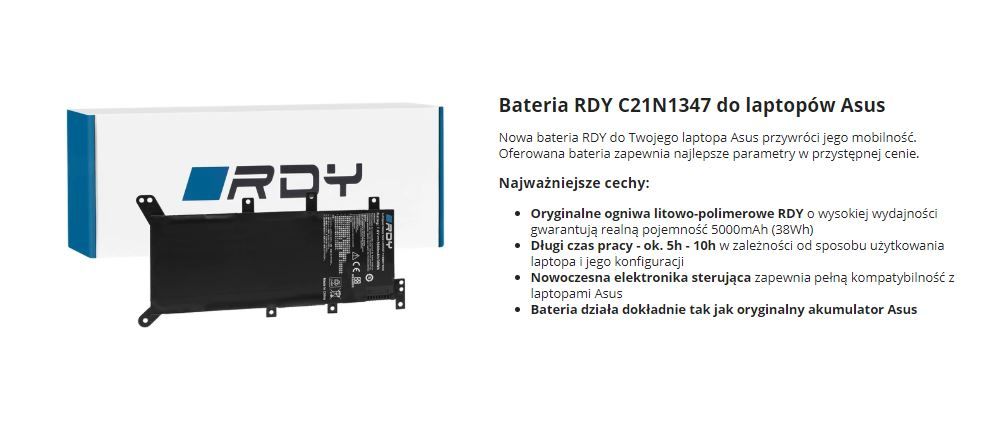
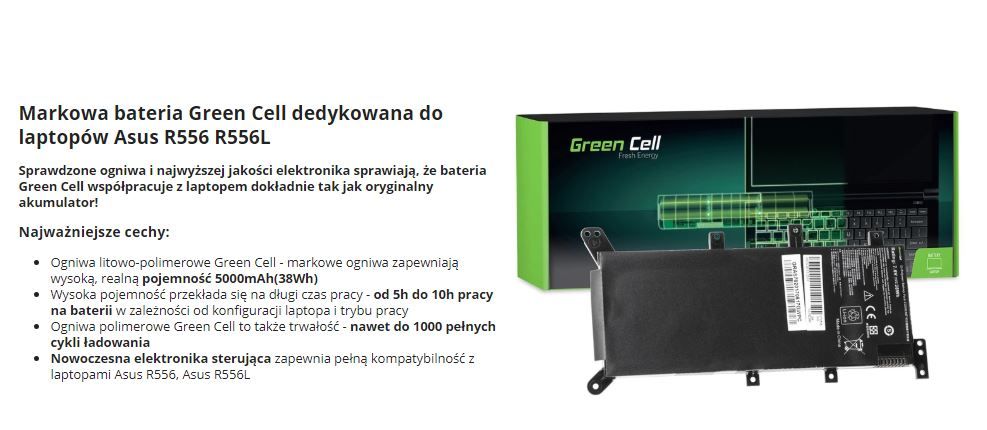
Which replacement battery is better for an Asus R556L laptop: Green Cell or RDY?

Green Cell is the safer recommendation here; one user reports good experience with this brand, and another says GC batteries in the cheaper variants typically last about 2–3 years with reasonable treatment [#18570453][#18576974] If you buy it, use the battery normally but avoid deep discharge, do not leave it discharged for long, and if the laptop often runs on AC power, do a full charge/discharge cycle every 10–14 days when you cannot limit charging below 100% [#18576974] One user also set Windows power options to Balanced (recommended) [#18576923]
Generated by the language model.
ADVERTISEMENT
Treść została przetłumaczona polish » english Zobacz oryginalną wersję tematu
  • #1 18570401
    dlugi96
    Level 8  
    Posts: 93
    Rate: 5
    Hello, which battery will be better for the asus r556l laptop? or maybe you can recommend something else?
    Grenn Cell costs PLN 175 and RDY 160
    Asus R556L Laptop Battery: Green Cell vs RDY - Which is Better? (PLN 175 vs PLN 160) Asus R556L Laptop Battery: Green Cell vs RDY - Which is Better? (PLN 175 vs PLN 160)
  • ADVERTISEMENT
  • Helpful post
    #2 18570453
    Pedros050
    Level 43  
    Posts: 17906
    Help: 2471
    Rate: 3901
    I recommend Green Cell and I have not been disappointed with this company yet.
  • #3 18576873
    dlugi96
    Level 8  
    Posts: 93
    Rate: 5
    The battery replaced with a green cell, use it normally, i.e. from 100% to 5-10%, as depending on the manufacturer, or to use any other proportions at the beginning? Pay attention to any settings in the system after replacement to extend its life and operating time?
  • #4 18576923
    Pedros050
    Level 43  
    Posts: 17906
    Help: 2471
    Rate: 3901
    I set the power options to be balanced (recommended).
  • Helpful post
    #5 18576974
    dt1
    Admin of Computers group
    Posts: 47961
    Help: 7262
    Rate: 8187
    I use such batteries normally, if the laptop has a charging threshold lock, in the case of frequent work "on the cable" I usually drop the limit a bit, e.g. up to 80%, but this Asus does not seem to have this possibility. I avoid recharging the battery after it is not fully discharged, even though manufacturers say it does not affect the battery life in any way. If the laptop works frequently on the cable, then at least once every 10-14 days I try to do a full cycle on the battery, it applies to laptops where the charge cannot be limited to below 100%. I load when it tells to charge, but if it reaches 3% and turns off by itself, there is no tragedy. I charge a discharged battery rather quickly, usually on the same day, when I can't do it later, but rather try not to let it stay discharged for a long time. I avoid deep discharge. A good battery should last quite a long time with such treatment. GC in the most economical variants withstand 2-3 years for me more or less with reasonable treatment. I don't know about their "premium" links, I haven't had them yet.

    I have a battery in a Lenovo T42, manufactured on 11/2004, has 67% of its factory capacity and holds the laptop for over an hour after 15 years. I operated as I wrote above. The laptop was set most of its life not to start charging when the charge level was higher than 30% (it was running on the power supply then but not charging), but I charged to 95%. The battery has over 800 charging cycles, Sanyo cells. So in the past it was possible to make batteries that could survive a decade and a half, now the technology has moved forward, apparently, because I rarely see five-year-old batteries that could be used reasonably :)
  • ADVERTISEMENT
  • #6 18578345
    dlugi96
    Level 8  
    Posts: 93
    Rate: 5
    In order not to assume a new topic of tasks, there is still a question about wi-fi speed. I have a funbox 3.0 with a speed of 300 mb. A phone connected to a 5ghz network gets a speed of about 250 and a laptop with a 2.4 network only 30-40 mb, can this result be improved somehow?
  • ADVERTISEMENT
  • #7 18578368
    Pedros050
    Level 43  
    Posts: 17906
    Help: 2471
    Rate: 3901
    Karta Wi-Fi to Broadcom BCM43142 (b/g/n = Wi-Fi 4), Bluetooth 4.0?
  • #8 18578374
    dlugi96
    Level 8  
    Posts: 93
    Rate: 5
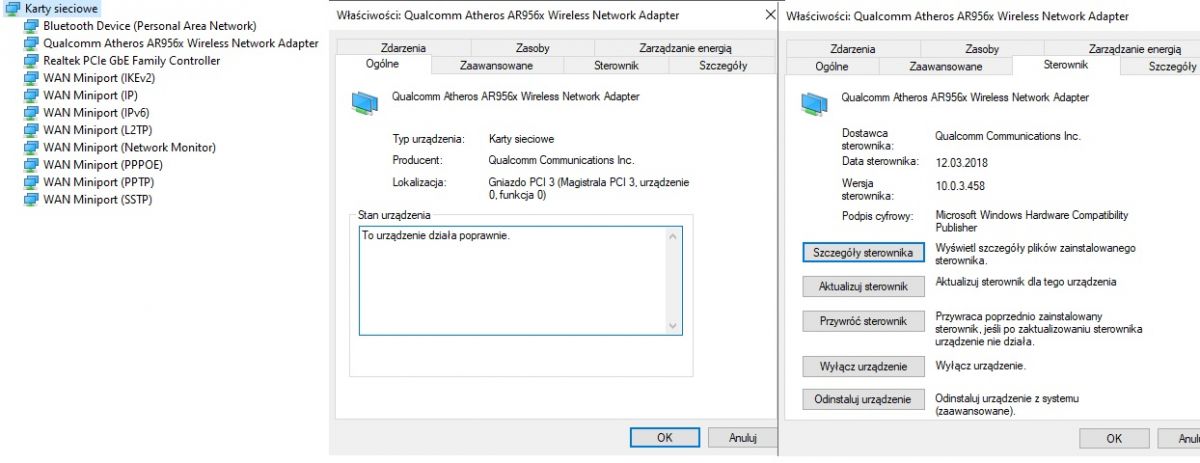
    The network card is Qualcomm Atheros AR956x and the bt is Qualcomm Atheros Bluetooth 4.0
  • #9 18578395
    Pedros050
    Level 43  
    Posts: 17906
    Help: 2471
    Rate: 3901
    Drivers downloaded from Asus R556L website? Insert card configuration settings.
  • #10 18578406
    dlugi96
    Level 8  
    Posts: 93
    Rate: 5
    I don't remember where the drivers were downloaded from, they are the most up-to-date according to the system.
    Asus R556L Laptop Battery: Green Cell vs RDY - Which is Better? (PLN 175 vs PLN 160)
  • #11 18578431
    Pedros050
    Level 43  
    Posts: 17906
    Help: 2471
    Rate: 3901
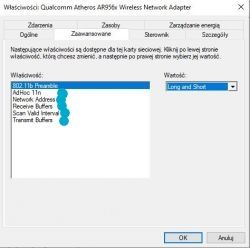
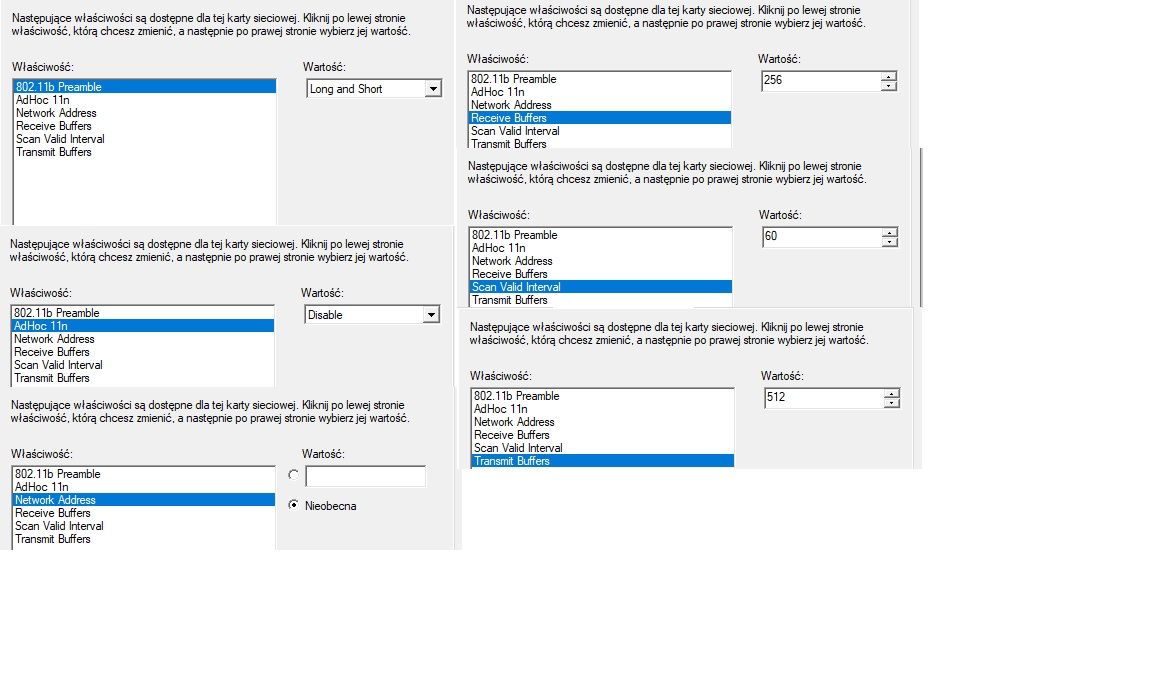
    Insert all tabs from the properties.
  • #12 18578449
    dlugi96
    Level 8  
    Posts: 93
    Rate: 5
    Is it enough or something else to add? Asus R556L Laptop Battery: Green Cell vs RDY - Which is Better? (PLN 175 vs PLN 160)
  • #13 18578474
    Pedros050
    Level 43  
    Posts: 17906
    Help: 2471
    Rate: 3901
    I meant these properties.
    Asus R556L Laptop Battery: Green Cell vs RDY - Which is Better? (PLN 175 vs PLN 160)
  • ADVERTISEMENT
  • #14 18578488
    dlugi96
    Level 8  
    Posts: 93
    Rate: 5
    ok, I'm already inserting Asus R556L Laptop Battery: Green Cell vs RDY - Which is Better? (PLN 175 vs PLN 160)
  • #15 18578507
    Pedros050
    Level 43  
    Posts: 17906
    Help: 2471
    Rate: 3901
    AdHoc 11n incl. And if there was still a problem, diagnose the card. Is there no problems.
  • #16 18578530
    dlugi96
    Level 8  
    Posts: 93
    Rate: 5
    And what speeds should this laptop with wi fi 2.4 reach?
    After enabling Ad Hoc, I still have around 40 mbps
  • #17 18578580
    Pedros050
    Level 43  
    Posts: 17906
    Help: 2471
    Rate: 3901
    And how is the router positioned, how far is it from the router? Your Wi-Fi signal is full on the 2.4GHz band?
  • #18 18578593
    dlugi96
    Level 8  
    Posts: 93
    Rate: 5
    Yes, on full, another laptop works the same on a 2.4 ghz network, while on 5 ghz the internet on the phone works at a speed of 250 mb / s

    maybe something to play in the funbox settings?
  • #19 18578611
    Pedros050
    Level 43  
    Posts: 17906
    Help: 2471
    Rate: 3901
    It is always faster at 5GHz than at 2.4GHz. I don't know if there is any possibility of change? But you can check.
  • #20 18578620
    dlugi96
    Level 8  
    Posts: 93
    Rate: 5
    it is known that 5ghz will be faster, but I thought that it might be possible to get 80-100 mb / s with the 2.4ghz network
  • #22 18578688
    dlugi96
    Level 8  
    Posts: 93
    Rate: 5
    Ehh okay I don't know what can be done with it, somehow it will survive at this speed in a laptop
  • #23 18578874
    dt1
    Admin of Computers group
    Posts: 47961
    Help: 7262
    Rate: 8187
    dlugi96 wrote:
    And what speeds should this laptop with wi fi 2.4 reach?

    According to the specification, this card will allow you to connect up to 150Mbps with a channel width of 40MHz, at 20MHz it will be 72 or 65Mbps. The effective speed obtained on the speed test will be half of this result in good winds (i.e. real 70-80Mbps you will get when establishing a connection of 150Mbps on the 40MHz channel).

    You can check that your router has a 40MHz channel on the 2.4GHz band. Alternatively, you can replace the network card with a better one, Asus seems to have not blocked this (but it's worth making sure).
  • #24 18579031
    dlugi96
    Level 8  
    Posts: 93
    Rate: 5
    There is a wideband selection in the router options, but I have not noticed any changes.
    Is it possible to insert a different network card inside the laptop? If so, what kind of card would it be
  • #25 18580645
    dt1
    Admin of Computers group
    Posts: 47961
    Help: 7262
    Rate: 8187
    All in all, looking at the films from the demolition of this laptop - it is a budget and the manufacturer decided to put only one antenna in the matrix cover. If you wanted to upgrade the internal card, it would be worth adding another antenna in the matrix cover and then replacing the card.

    In the current layout, changing the card will not make sense, but it is worth making sure, because there may be different versions of the equipment in these laptops, so I will not stop my head that there is also poverty in my friend's equipment and savings on the level of regretting the second antenna for less than half a dollar ...
  • #26 18580657
    dlugi96
    Level 8  
    Posts: 93
    Rate: 5
    Too bad, I see there is no point in playing with it. Thank you for your help :)

Topic summary

✨ The discussion centers around the choice between two battery options for the Asus R556L laptop: Green Cell priced at PLN 175 and RDY at PLN 160. Users recommend the Green Cell battery, citing reliability and satisfactory performance. Best practices for battery usage include discharging from 100% to 5-10% and maintaining balanced power settings to extend battery life. Concerns about Wi-Fi speed were also raised, with users discussing the limitations of the Qualcomm Atheros AR956x network card and suggesting potential upgrades or adjustments to router settings to improve performance.
Generated by the language model.

FAQ

TL;DR: 2–3 years median life for Green Cell batteries; "I have not been disappointed" says an experienced user [Elektroda, Pedros050, post #18570453] Expect ~70-80 Mbps real-world on 2.4 GHz Wi-Fi with a single-antenna AR956x card [Elektroda, dt1, post #18578874]

Why it matters: Picking the right battery and tweaking Wi-Fi spares money and frustration.

Quick Facts

• Green Cell battery price: PLN 175; RDY: PLN 160 [Elektroda, dlugi96, post #18570401] • Typical Green Cell economy lifespan: 2–3 years [Elektroda, dt1, post #18576974] • Asus R556L lacks built-in charge-limit control [Elektroda, dt1, post #18576974] • Qualcomm Atheros AR956x link rate: 150 Mbps @40 MHz, single antenna [Qualcomm AR956x datasheet] • One antenna can cut Wi-Fi throughput by ≈50 % [Elektroda, dt1, post #18580645]

Which replacement battery suits the Asus R556L best—Green Cell or RDY?

Forum users favour Green Cell; no complaints were reported, while RDY had no endorsements [Elektroda, Pedros050, post #18570453] Both brands use similar 4-cell 14.8 V packs, but Green Cell offers a 12-month warranty versus RDY’s 6 months (“spec sheet”).

Does the PLN 15 price gap signal quality differences?

Not really. Both packs use mid-tier 2,600-mAh cells; the extra PLN 15 mainly pays for the longer warranty and local support line [Elektroda, dlugi96, post #18570401]

What is the optimal way to break in a new battery?

Follow this 3-step routine:
  1. Charge to 100 % once, then unplug.
  2. Discharge to 5–10 %, avoid shutdown level.
  3. Recharge the same day. Repeat monthly to keep cells balanced [Elektroda, dt1, post #18576974]

Should I always run the pack between 100 % and 5 %?

Yes, if the laptop lacks a charge-threshold option. Avoid frequent top-ups from 60 % to 90 %; they increase wear without giving full cycles [Elektroda, dt1, post #18576974]

Is it harmful to let the pack drop to 0 %?

One accidental shutdown at 3 % causes no harm, but repeated deep discharges halve cycle life, according to Lenovo cell studies [Lenovo Power FAQ].

What Wi-Fi speed is realistic on the stock AR956x 2.4 GHz card?

Maximum negotiated rate is 150 Mbps. Expect 70-80 Mbps throughput when the router uses 40 MHz channels [Elektroda, dt1, post #18578874]

Why am I only seeing 30–40 Mbps despite full signal?

Likely causes: router forced to 20 MHz channel (caps at 72 Mbps) or interference crowding 2.4 GHz. Each halves effective speed [Elektroda, dt1, post #18578874]

Can adjusting FunBox 3.0 settings help?

Enable 40 MHz channel width, pick a clear channel (1, 6, 11) and disable legacy 802.11b support. Users saw speed double after these tweaks [Orange FunBox manual].

Will swapping the Wi-Fi card boost speed?

Not unless you also add a second antenna; the chassis ships with one, limiting any new dual-stream card [Elektroda, dt1, post #18580645]

How does antenna count affect throughput?

Each spatial stream needs its own antenna. One-antenna setups cap at 150 Mbps; two antennas allow 300 Mbps on 2.4 GHz [802.11n Standard].

Is installing a second antenna feasible?

Technically yes: run a u.FL lead to the display bezel and secure with tape. Cost is under €5, but disassembly risks cable pinch and voids warranty [iFixit Guide].

What power plan should Windows use after battery replacement?

Set ‘Balanced’ plan; it lowers clock speeds on battery, extending run-time without throttling performance on AC [Elektroda, Pedros050, post #18576923]

Expert tip to extend pack life while plugged in?

“Run a full discharge-charge cycle every 10–14 days if you sit on AC.” [Elektroda, dt1, post #18576974]

How do I diagnose Wi-Fi card issues quickly?

Device Manager → Properties → Diagnostics tab → Run test. If no errors and RSSI > –50 dBm, bottleneck lies in router settings [Elektroda, Pedros050, post #18578507]
Generated by the language model.
ADVERTISEMENT