Welcome.
If I find this topic useful/necessary, I'll pin it somewhere at the top, and if not, it'll go down along with the other posts in a while. Until manufacturers stop being "ashamed" of this technology and start labelling drives that use it in their documentation, a list like this might make some sense.
I have tried to confirm most of the models in the documentation, a few entries are unconfirmed (based on indications including performance tests and high platter density going hand in hand with a large cache buffer most of the time).
SMR technology is nothing very new, but coming across such a drive has been more possible for some time. This post is not intended to be a technical elaboration on this technology; if you are interested in the details of its operation, you will certainly find plenty of articles on this subject on the web. To cut a long story short - SMR drives allow for higher capacities, but the price for this is sacrificing performance.
In general, these drives are suitable as data storage, where writes are not done non-stop (due to the write mechanism). They are not particularly suitable for RAID and applications requiring high write performance (their certain shortcomings under very heavy loads will also ricochet into read speeds).
Manufacturers are very scrupulous in hiding the fact that they use SMR technology in their drives, so I will try here to list drives known to use this technology (or there are indications that they may use it).
Seagate 3.5"
Seagate 2.5"
Toshiba 3.5"
Toshiba 2.5"
Western Digital 3.5"
Western Digital 2.5"
Western Digital 2.5" USB
Hitachi (Western Digital) 3.5"
The current WD series (as of April 2020) looks like this (click image to enlarge):
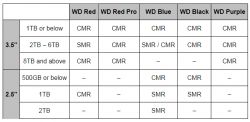
Source: Western Digital RED NAS Blog, post 22/04/2020, https://blog.westerndigital.com/wd-red-nas-drives/
Technology used in current Seagate drives: https://www.seagate.com/pl/pl/internal-hard-drives/cmr-smr-list/
Sources:
I realise that this list is rather far from complete .
If you find other drives with more or less confirmed use of SMR technology - please write in your replies with links to sources of information or at least information indicating that such a drive has a good chance of using this technology (for example, a storage density of 2TB/disc).
Also, if you find information in a reasonably credible way that confirms that a listed drive is not an SMR drive - it is also worth posting such information.
At this stage, most drives are 'certain' - wD's drives are confirmed on their blog, Toshiba's drives are confirmed by a response from a Toshiba representative to another site, and Seagate's drives are mostly confirmed from their catalogue notes, but there are also a few drives posted on a reasonable suspicion basis (which is noted in the comments). I have outlined most of the sources in the spoiler above.
If I find this topic useful/necessary, I'll pin it somewhere at the top, and if not, it'll go down along with the other posts in a while. Until manufacturers stop being "ashamed" of this technology and start labelling drives that use it in their documentation, a list like this might make some sense.
I have tried to confirm most of the models in the documentation, a few entries are unconfirmed (based on indications including performance tests and high platter density going hand in hand with a large cache buffer most of the time).
SMR technology is nothing very new, but coming across such a drive has been more possible for some time. This post is not intended to be a technical elaboration on this technology; if you are interested in the details of its operation, you will certainly find plenty of articles on this subject on the web. To cut a long story short - SMR drives allow for higher capacities, but the price for this is sacrificing performance.
In general, these drives are suitable as data storage, where writes are not done non-stop (due to the write mechanism). They are not particularly suitable for RAID and applications requiring high write performance (their certain shortcomings under very heavy loads will also ricochet into read speeds).
Manufacturers are very scrupulous in hiding the fact that they use SMR technology in their drives, so I will try here to list drives known to use this technology (or there are indications that they may use it).
Seagate 3.5"
Spoiler:
| Series | Model | Capacity | Remarks |
| Archive HDD | ST5000AS0011 | 5 TB | |
| Archive HDD | ST8000AS0022 | 8 TB | |
| Archive HDD v2 | ST6000AS0002 | 6 TB | |
| Archive HDD v2 | ST8000AS0002 | 8 TB | |
| Archive HDD Secure | ST5000AS0001 | 5 TB | |
| Archive HDD v2 Secure | ST6000AS0012 | 6 TB | |
| Archive HDD v2 Secure | ST8000AS0012 | 8 TB | |
| Barracuda Compute | ST2000DM005 | Barracuda Compute2 TB | |
| Barracuda Compute | ST2000DM008 | Barracuda Compute2 TB | |
| Barracuda Compute | ST3000DM007 | Barracuda Compute3 TB | |
| Barracuda Compute | ST4000DM004 | Barracuda Compute4 TB | |
| Barracuda Compute | ST6000DM003 | Barracuda Compute6 TB | |
| Barracuda Compute | ST8000DM004 | 8 TB | |
| Desktop HDD | ST5000DM000 | 5 TB | unconfirmed/suspected |
| Exos 5E8 | ST8000AS0003 | ST8000AS00038 TB |
Seagate 2.5"
Spoiler:
| Series | Model | Capacity | Remarks |
| Barracuda Compute | ST500LM030 | 0.5 TB | |
| Barracuda Compute | ST1000LM048 | 1 TB | |
| Barracuda Compute | ST2000LM015 | Barracuda Compute2 TB | |
| Mobile | ST1000LM035 | 1 TB | |
| Mobile | ST2000LM007 |
| |
| Mobile Secure | ST1000LM037 | 1 TB | |
| Mobile Secure | ST2000LM009 | 2 TB | |
| Mobile Secure FIPS | ST1000LM038 | 1 TB | |
| Mobile Secure FIPS | ST2000LM010 | 2 TB |
Toshiba 3.5"
Spoiler:
| Series | Model | Capacity | Remarks | |
| P300 | HDWD220UZSVA | HDWD220UZSVA2 TB | Thanks for the info @KodIT | |
| P300 | HDWD220EZSTA | HDWD220EZSTA2 TB | ||
| P300 | HDWD240UZSVA | 4 TB | ||
| P300 | HDWD240EZSTA | HDWD240EZSTA4 TB | ||
| P300 | HDWD260UZSVA | HDWD260UZSVA6 TB | ||
| P300 | HDWD260EZSTA | HDWD260EZSTA6 TB | ||
| DT02 | DT02ABA400 | DT02ABA4004 TB | ||
| DT02 | DT02ABA600 | DT02ABA6006 TB | ||
| DT02-V | DT02ABA400V | 4 TB | ||
| DT02-V | DT02ABA600V | 6 TB |
Toshiba 2.5"
Spoiler:
| Series | Model | Capacity | Remarks |
| L200 Slim Bulk | HDWL110UZSVA | ||
| L200 Slim Retail | HDWL110EZSTA | 1 TB | |
| L200 Bulk | HDWJ110UZSVA | HDWJ110UZSVA1 TB | |
| L200 Retail | HDWJ110EZSTA | HDWJ110EZSTA1 TB | |
| L200 Bulk | HDWL120UZSVA | HDWL120UZSVA2 TB | |
| L200 Retail | HDWL120EZSTA | 2 TB | |
| MQ04 | MQ04ABF100 | 1 TB | |
| MQ04 | MQ04ABD200 | 2 TB |
Western Digital 3.5"
Spoiler:
| Series | Model | Capacity | Notes | |
| Red | WD20EFAX | 2 TB | ||
| Red | WD30EFAX | 3 TB | ||
| Red | WD40EFAX | 4 TB | ||
| Red | WD60EFAX | 6 TB | ||
| Blue | WD20EZAZ | 2 TB | ||
| Blue | WD60EZAZ | 6 TB |
Western Digital 2.5"
Spoiler:
| Series | Model | Capacity | Remarks | |
| Black | WD10SPSX | 1 TB | ||
| Blue | WD9000LPZX | 0.9 TB | Very likely | |
| Blue | WD10SPWX | WD10SPWX1 TB | Very likely | |
| Blue | WD10SPZX | 1 TB | ||
| Blue | WD20SPZX | 2 TB | ||
| Blue 15mm | WD30NPZZ | WD30NPZ3 TB | Very likely | |
| Blue 15mm | WD40NPZZ | Blue 15mm WD40NPZZ4 TB | Very likely |
Western Digital 2.5" USB
Spoiler:
| Series | Model | Capacity | Remarks | |
| Blue USB | WD10SMZW | 1TB | ||
| Blue USB-C | WD10SMZM | 1 TB | ||
| Blue USB AES | WD10SDZW | 1 TB | ||
| Blue USB-C AES | WD10SDZM | 1 TB | ||
| Blue Micro USB 3.0 | WD20SDRW | 2 TB | WD Elements | |
| Blue USB | WD20SMZW | WD20SMZW2 TB | ||
| Blue USB-C | WD20SMZM | 2 TB | ||
| Blue USB AES | WD20SDZW | 2 TB | ||
| Blue USB-C AES | WD20SDZM | 2 TB | ||
| Blue 15mm USB | WD30NMZW | 3 TB | Very likely | |
| Blue 15mm USB-C | WD40NMZM | 4 TB | Very likely | |
| Blue 15mm USB | WD40NMZW | 4 TB | Very likely | |
| Blue 15mm USB | WD50NMZW | 5 TB | Very likely | |
| Blue 15mm USB AES | WD50NDZW | 5 TB | Very likely |
Hitachi (Western Digital) 3.5"
Spoiler:
| Series | Model | Capacity | Remarks | |
| Ultrastar DC HC620 | HSH721414ALE6M0 | 14 TB | ||
| Ultrastar DC HC620 | HSHH721415ALE6M0 | 15 TB | ||
| Ultrastar DC HC620 | HSH721414ALE6M4 | 14 TB | ||
| Ultrastar DC HC620 | HSHH721415ALE6M0 | 15 TB | ||
| Ultrastar DC HC620 | HSH721414ALN6M0 | 14 TB | ||
| Ultrastar DC HC620 | HSH721415ALN6M0 | 15 TB | ||
| Ultrastar DC HC620 | HSH721414ALN6M4 | 14 TB | ||
| Ultrastar DC HC620 | HSH721415ALN6M4 | 15 TB | ||
| Ultrastar DC HC620 SAS | HSHH721414AL52M0 | 14 TB | ||
| Ultrastar DC HC620 SAS | HSH721415AL52M0 | 15 TB | ||
| Ultrastar DC HC620 SAS | HSHH721414AL52M4 | 14 TB | ||
| Ultrastar DC HC620 SAS | HSH721415AL52M0 | 15 TB | ||
| Ultrastar DC HC620 SAS | HSHH721414AL42M0 | 14 TB | ||
| Ultrastar DC HC620 SAS | HSH721415AL42M0 | 15 TB | ||
| Ultrastar DC HC620 SAS | HSHH721414AL42M4 | 14 TB | ||
| Ultrastar DC HC620 SAS | HSH721415AL42M4 | 15 TB | ||
| Ultrastar DC HC650 | TBD | 20 TB | ||
| Ultrastar DC HC650 SAS | TBD | 20 TB |
The current WD series (as of April 2020) looks like this (click image to enlarge):
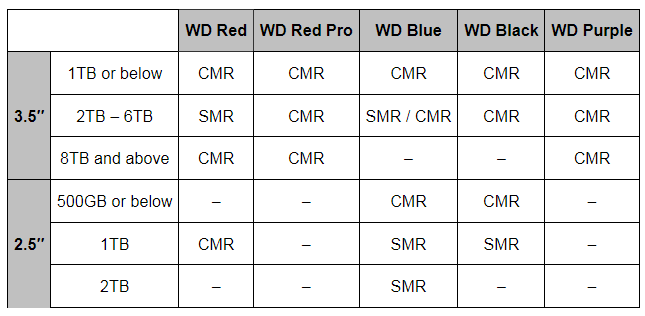
Source: Western Digital RED NAS Blog, post 22/04/2020, https://blog.westerndigital.com/wd-red-nas-drives/
Technology used in current Seagate drives: https://www.seagate.com/pl/pl/internal-hard-drives/cmr-smr-list/
Sources:
Spoiler:
Seagate Archive: https://www.seagate.com/www-content/product-c...seagate-archive-hdd/en-us/docs/100795782a.pdf
Seagate Archive, Archive v2: https://www.seagate.com/www-content/product-c...dd/en-us/docs/archive-hdd-dS1834-3-1411pl.pdf
Seagate Exos 5E8: https://www.seagate.com/files/www-content/datasheets/pdfs/exos-5e8DS1954-2-1712US-en_US.pdf
Seagate Barracuda Compute 2.5": https://www.seagate.com/www-content/product-c...op-fam/barracuda_25/en-us/docs/100807728c.pdf
Seagate Barracuda Compute 3.5": https://www.seagate.com/www-content/datasheets/pdfs/3-5-barracudaDS1900-14-2007GB-en_GB.pdf
Seagate Mobile: https://www.seagate.com/www-content/datasheets/pdfs/mobile-hddDS1861-1-1602-pl_PL.pdf
Toshiba: https://toshiba.semicon-storage.com/ap-en/com...s/news-topics/2020/04/storage-20200428-1.html
Toshiba P300: https://www.toshiba-storage.com/pl/products/toshiba-internal-hard-drives-p300/
WD: https://blog.westerndigital.com/wp-content/uploads/2020/04/2020_04_22_WD_SMR_SKUs_1Slide.pdf
WD Ultrastar DC HC620: https://documents.westerndigital.com/content/...c600-series/data-sheet-ultrastar-dc-hc620.pdf
Seagate Archive: https://www.seagate.com/www-content/product-c...seagate-archive-hdd/en-us/docs/100795782a.pdf
Seagate Archive, Archive v2: https://www.seagate.com/www-content/product-c...dd/en-us/docs/archive-hdd-dS1834-3-1411pl.pdf
Seagate Exos 5E8: https://www.seagate.com/files/www-content/datasheets/pdfs/exos-5e8DS1954-2-1712US-en_US.pdf
Seagate Barracuda Compute 2.5": https://www.seagate.com/www-content/product-c...op-fam/barracuda_25/en-us/docs/100807728c.pdf
Seagate Barracuda Compute 3.5": https://www.seagate.com/www-content/datasheets/pdfs/3-5-barracudaDS1900-14-2007GB-en_GB.pdf
Seagate Mobile: https://www.seagate.com/www-content/datasheets/pdfs/mobile-hddDS1861-1-1602-pl_PL.pdf
Toshiba: https://toshiba.semicon-storage.com/ap-en/com...s/news-topics/2020/04/storage-20200428-1.html
Toshiba P300: https://www.toshiba-storage.com/pl/products/toshiba-internal-hard-drives-p300/
WD: https://blog.westerndigital.com/wp-content/uploads/2020/04/2020_04_22_WD_SMR_SKUs_1Slide.pdf
WD Ultrastar DC HC620: https://documents.westerndigital.com/content/...c600-series/data-sheet-ultrastar-dc-hc620.pdf
I realise that this list is rather far from complete .
If you find other drives with more or less confirmed use of SMR technology - please write in your replies with links to sources of information or at least information indicating that such a drive has a good chance of using this technology (for example, a storage density of 2TB/disc).
Also, if you find information in a reasonably credible way that confirms that a listed drive is not an SMR drive - it is also worth posting such information.
At this stage, most drives are 'certain' - wD's drives are confirmed on their blog, Toshiba's drives are confirmed by a response from a Toshiba representative to another site, and Seagate's drives are mostly confirmed from their catalogue notes, but there are also a few drives posted on a reasonable suspicion basis (which is noted in the comments). I have outlined most of the sources in the spoiler above.