
logo elektroda
logo elektroda
X
logo elektroda

[Solved] User manual: GAMA 150 electricity meter - searching for documentation

CYRUS2 67041 12
ADVERTISEMENT
Treść została przetłumaczona polish » english Zobacz oryginalną wersję tematu
  • #1 20449207
    CYRUS2
    Level 43  
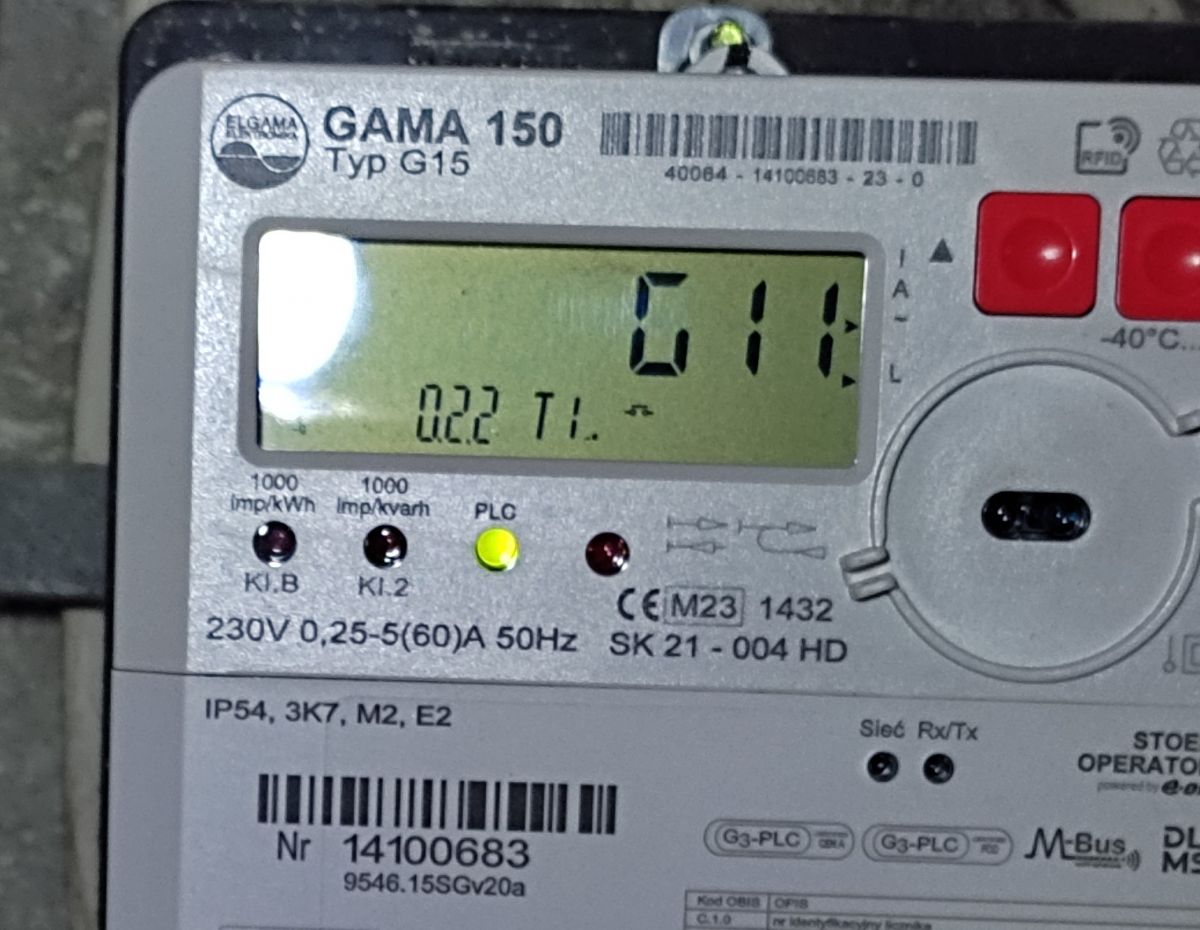
    I need the operating instructions for the GAMA 150 electricity meter.
  • ADVERTISEMENT
  • #2 20449508
    zbich70
    Level 43  
    I don`t know anything about the existence of the Gama 150 counter. As far as I know, there are only Gama 100 and 300.
  • #3 20450115
    CYRUS2
    Level 43  
    zbich70 wrote:
    I don`t know anything about the existence of the Gama 150 counter. As far as I know, there are only Gama 100 and 300.

    User manual: GAMA 150 electricity meter - searching for documentation
    I`ve had one for 12 days.
  • ADVERTISEMENT
  • #4 20451334
    zbich70
    Level 43  
    CYRUS2 wrote:
    I`ve had one for 12 days.
    So it`s a novelty, after the serial number there is "23", i.e. the year of production, and it`s only February.
    Krzysiek, why do you need this manual, what do you want to read and learn from it?
    You have two buttons to scroll through the OBIS codes (only those codes that the operator has made available) and as a recipient, that`s all you can do - press the buttons right and left and look at what the display shows.
  • #5 20451591
    CYRUS2
    Level 43  
    I want to make sure what parameters I read from the meter.
    I pressed the right buttons and scrolled through the MENU.
    I was pleasantly surprised!
    Shows active power - three decimal places.
    It even shows the power consumption.
    I can determine how much power my receivers consume in standby mode.
    But….
    Yesterday the counter showed differently than today.
    Induction hob in standby mode:
    Yesterday, apparent power 120W, active power approx. 14 W.
    Today, the apparent power is 120 W and the active power is approximately 0 W.
    I think the reason is measurement error.????
    14W for the 5-10kW level.
    (I will investigate this further)
    I even planned to buy a wattmeter,
    The meter gives better results than the wattmeter - because it shows what you pay for.
  • #6 20451661
    zbich70
    Level 43  
    CYRUS2 wrote:
    But….
    Yesterday the counter showed differently than today.
    Are you sure you`ve looked through the appropriate registers? Maybe you held the button a little longer and the counter entered the overview of not the current registers, but the average ones.
  • ADVERTISEMENT
  • #7 20451749
    CYRUS2
    Level 43  
    zbich70 wrote:
    Are you sure you`ve looked through the appropriate registers? Maybe you held the button a little longer and the counter entered the archive register review.
    Power currently consumed.
    The counter responded to turning on or off the 10W receiver.
  • #8 20451759
    zbich70
    Level 43  
    Krzychu, write down what the counter showed while scrolling the display: OBIS code -> register contents.
    Without this we will never figure out what is going on.
  • ADVERTISEMENT
  • #9 20452106
    CYRUS2
    Level 43  
    zbich70 wrote:
    Krzychu, write down what the counter showed while scrolling the display: OBIS code -> register contents.
    Without this we will never figure out what is going on.
    I don`t know the codes - for this I need, for example, instructions.
    Parameter name 17.0 T1 description = kW.
    This parameter is not described on the meter housing.

    The induction hob in standby mode has a capacitive reactive power of 0.155 kWar. (0.65A)
  • #10 20452350
    zbich70
    Level 43  
    CYRUS2 wrote:
    I don`t know the codes - for this I need, for example, instructions.
    OBIS codes are universal for all meters, no model-specific instructions are needed.
    http://fea.com.pl/kody-licznika-dwuwodniego/
    CYRUS2 wrote:
    Parameter name 17.0 T1 description = kW.
    This code is actually not on the list. This may be the equivalent of a code 16.7.0 Power P, instantaneous value only six were lost.
  • #11 20452505
    CYRUS2
    Level 43  
    zbich70 wrote:
    This code is actually not on the list. This may be the equivalent of a code 16.7.0 Power P, instantaneous value only six were lost.
    The list shows an instantaneous power of 17.0 and that`s it.
    The rest of what the counter displays also matches the list.

    I`m interested in what the counter counts and from what threshold.
  • #12 20742181
    was177
    Level 7  
    I also had GAMMA 150 installed. I would also like to see the instructions. With the right button you can scroll to code 1.8 and then there is consumption and other codes?
  • #13 20742472
    CYRUS2
    Level 43  
    was177 wrote:
    I also had GAMMA 150 installed. I would also like to see the instructions. With the right button you can scroll to code 1.8 and then there is consumption and other codes?
    All you need is a description from the counter.
    There is no energy manual.
    I`m closing the topic.

Topic summary

✨ The discussion revolves around the GAMA 150 electricity meter, with users seeking operating instructions and clarification on its functionality. Initial responses indicate uncertainty about the existence of the GAMA 150, as previous models mentioned include GAMA 100 and 300. However, users confirm they possess the GAMA 150 and share insights on its features, such as scrolling through OBIS codes to monitor active power and consumption. Some users express concerns about measurement discrepancies and seek guidance on interpreting the meter's readings. The conversation highlights the need for documentation, as users struggle with understanding specific parameters and codes displayed by the meter. Ultimately, it is noted that there is no dedicated manual available for the GAMA 150.
Generated by the language model.

FAQ

TL;DR: New in 2023 ("23" on the serial), the GAMA 150 is navigated via two buttons—"You have two buttons to scroll through the OBIS codes." This FAQ helps you read consumption and live power without a missing manual. [Elektroda, zbich70, post #20451334]
Quick Facts

Is there a user manual for the GAMA 150 electricity meter?

Users report no public manual for the GAMA 150. The display screens and OBIS descriptions act as your guide. "There is no energy manual." Use the meter’s built-in labels and standard OBIS code references to interpret what you see. [Elektroda, CYRUS2, post #20742472]

What are OBIS codes on the GAMA 150, and are they universal?

OBIS codes are the standardized IDs for meter registers. GAMA 150 follows this same convention. "OBIS codes are universal for all meters." Use a standard OBIS list to map meanings like instantaneous power (16.7.0). [Elektroda, zbich70, post #20452350]

How do I scroll through OBIS codes on a GAMA 150?

Use the two front buttons. How-To:
  1. Press the right button to scroll forward through registers.
  2. Press the left button to go back.
  3. If a register never appears, your operator has not enabled it. [Elektroda, zbich70, post #20451334]

Which OBIS code shows total energy consumption on GAMA 150?

Look for 1.8.x on the display; that family represents total active energy (consumption). For multi-tariff setups, 1.8.1 and 1.8.2 split by tariff. “1.8.0” is typically the total. [“Kody licznika dwuwodniego”]

Which screen shows instantaneous active power (kW) on GAMA 150?

Look for the display labeled 17.0 T1 with units in kW. That screen shows instantaneous active power. Use it to see real-time draw while switching appliances. [Elektroda, CYRUS2, post #20452106]

What does OBIS 16.7.0 mean on electricity meters?

OBIS 16.7.0 designates instantaneous active power P. On GAMA 150, the screen may label this as 17.0, but it reflects live kW. Track this value when diagnosing loads. [Elektroda, zbich70, post #20452350]

Why do my standby readings vary day to day on the same appliance?

You might be viewing averaged or archived registers rather than the current one. Holding a button longer can switch to those views. Ensure you browse the current register when comparing. Recheck the code before recording values. [Elektroda, zbich70, post #20451661]

Can the meter show reactive power in standby (e.g., induction hob)?

Yes. One user measured 0.155 kVar at 0.65 A with the hob in standby. Active power can read near 0 W even when apparent power is substantial. Use this to assess power factor and phantom loads. [Elektroda, CYRUS2, post #20452106]

Is the GAMA 150 better than a plug-in wattmeter for checking bills?

The meter reflects what your utility charges. A user noted, "The meter gives better results than the wattmeter—because it shows what you pay for." Use the kWh (1.8.x) and live kW screens to validate bills. [Elektroda, CYRUS2, post #20451591]

Will the GAMA 150 detect small loads like 10 W?

Yes. The display responded to toggling a 10 W receiver. This sensitivity helps isolate standby drains. Test devices one at a time while watching the live kW screen. [Elektroda, CYRUS2, post #20451749]

Is the GAMA 150 a new model compared to Gama 100/300?

Yes. A forum user confirmed a GAMA 150 installation and ownership for 12 days, indicating a current rollout. Others only knew Gama 100 and 300 earlier. [Elektroda, CYRUS2, post #20450115]

How do I confirm my GAMA 150’s production year?

Check the serial number suffix. A '23' indicates production in 2023. Users reported seeing this and installations as early as February. This helps confirm hardware recency. [Elektroda, zbich70, post #20451334]

Why can’t I find certain OBIS codes on my GAMA 150?

The operator controls visible registers. "Only those codes that the operator has made available" will appear. If a code is missing during scrolling, it is disabled on your account. [Elektroda, zbich70, post #20451334]

How can I use the meter to validate standby consumption?

Scroll to the instantaneous kW screen and note the value. Toggle a single device and observe the change. Repeat for each suspect device to find its standby impact. Record readings to compare against your bill later. [Elektroda, CYRUS2, post #20451591]
Generated by the language model.
ADVERTISEMENT

