logo elektroda
logo elektroda
X
logo elektroda

Seeking French Firmware for Saba TV Model ld40chd105 Without Serial Number

RoyalC 3141 19
Best answers

How can I find the correct French firmware for a Saba LD40CHD105 TV when I do not have the serial number and the TV is stuck on “initialisation en cours”?

The firmware must match the exact TV hardware/specifications, so the serial number is not the only requirement [#20711314] One user also said they could make a USB binary specially for this TV, but that repairing the original flash/bin requires proper tools and a defective/original bin to work from [#20712574] [#20714919] [#20717137] [#20723573] After flashing the provided USB file, the set no longer stayed on “initialisation en cours,” which suggests the file was usable for booting [#20711382] [#20723573] However, the remote control still did not work: the TV LED blinked when buttons were pressed, but nothing happened, while the local side buttons on the TV worked [#20712720] [#20713249] [#20726631] The thread did not provide a final fix for the remote-control problem.
Generated by the language model.
ADVERTISEMENT
  • #1 20709013
    RoyalC
    Level 3  
    Posts: 10
    Rate: 1

    Hello and sorry for my bad English.
    I'm searching for the French firmware for my Saba TV, but I don't have the serial number!
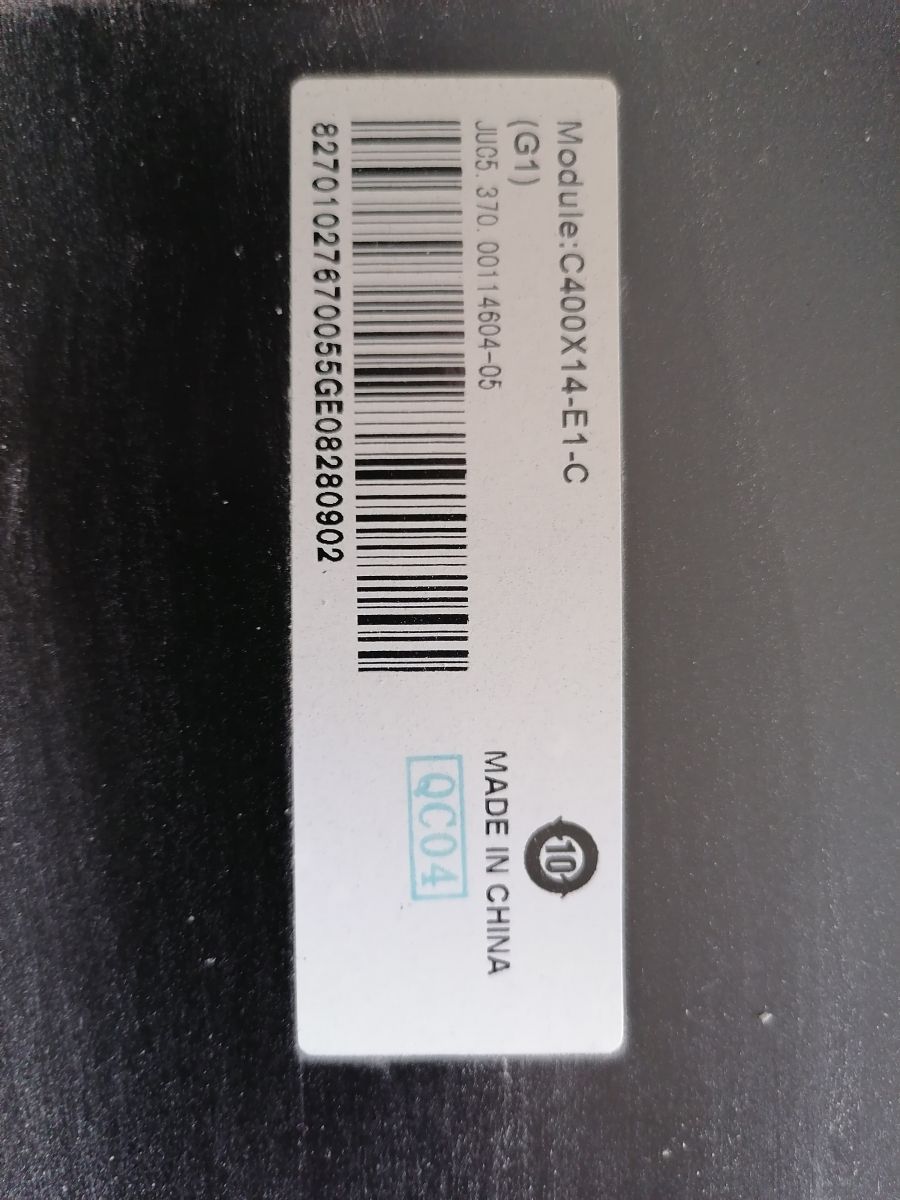
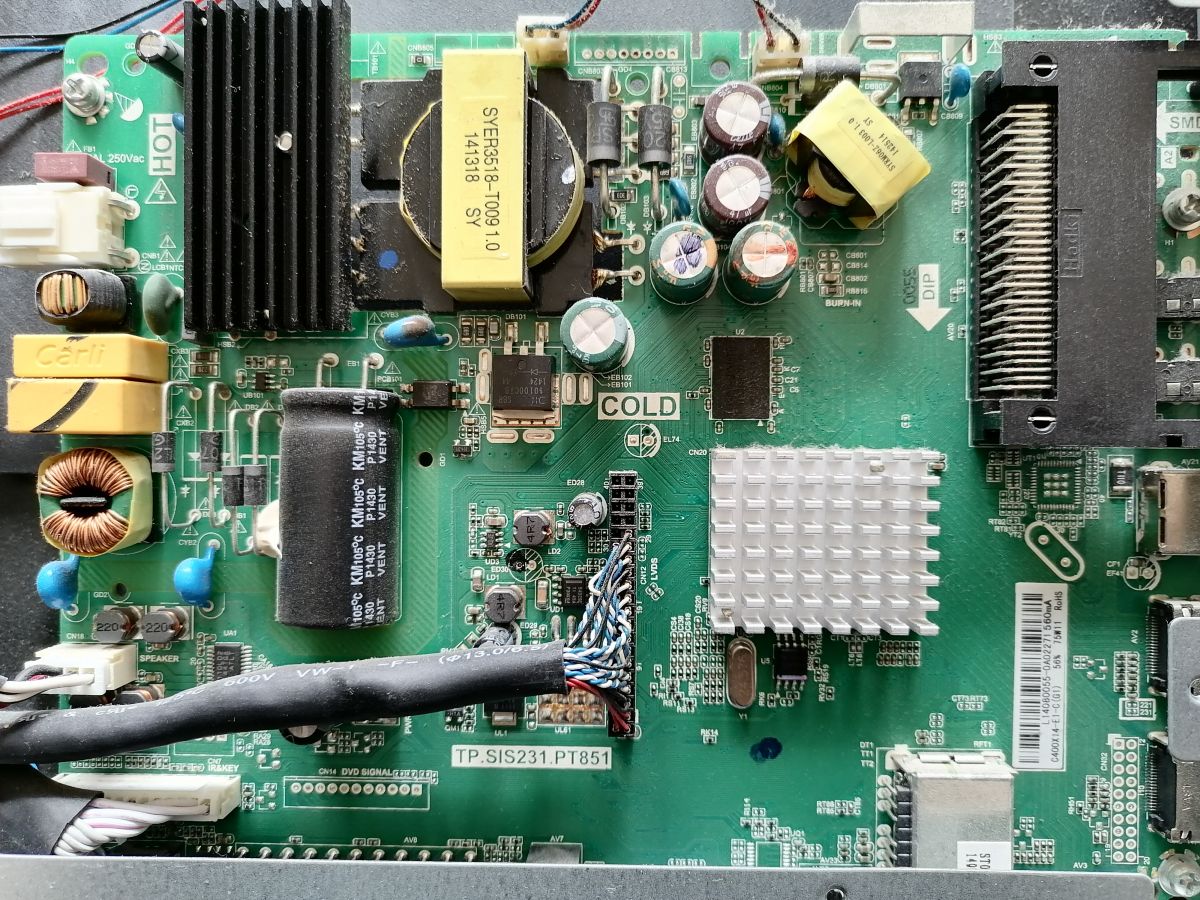
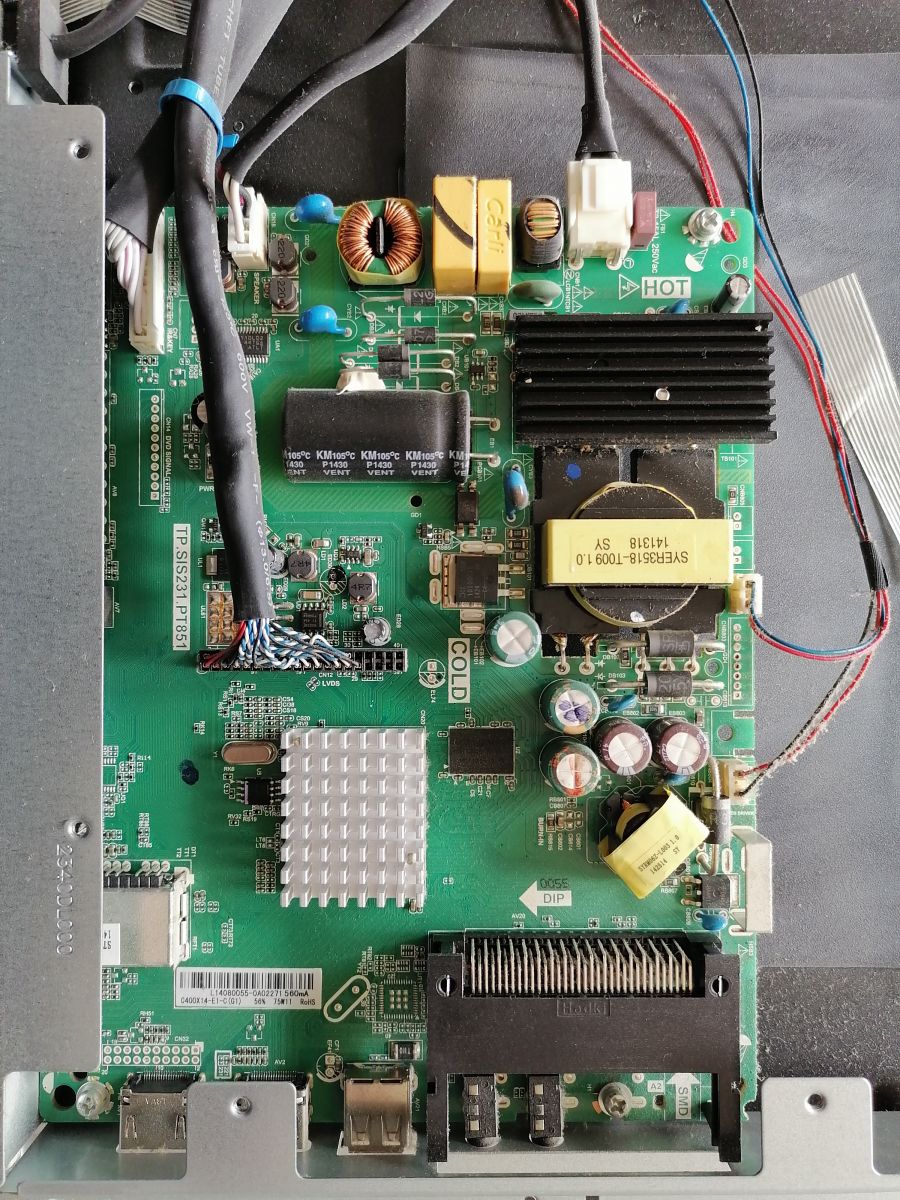
    I have opened it and here are the pictures I have taken.
    Thanks for your precious help.

    I forgot to say that my TV stays on "initialisation en cours"!
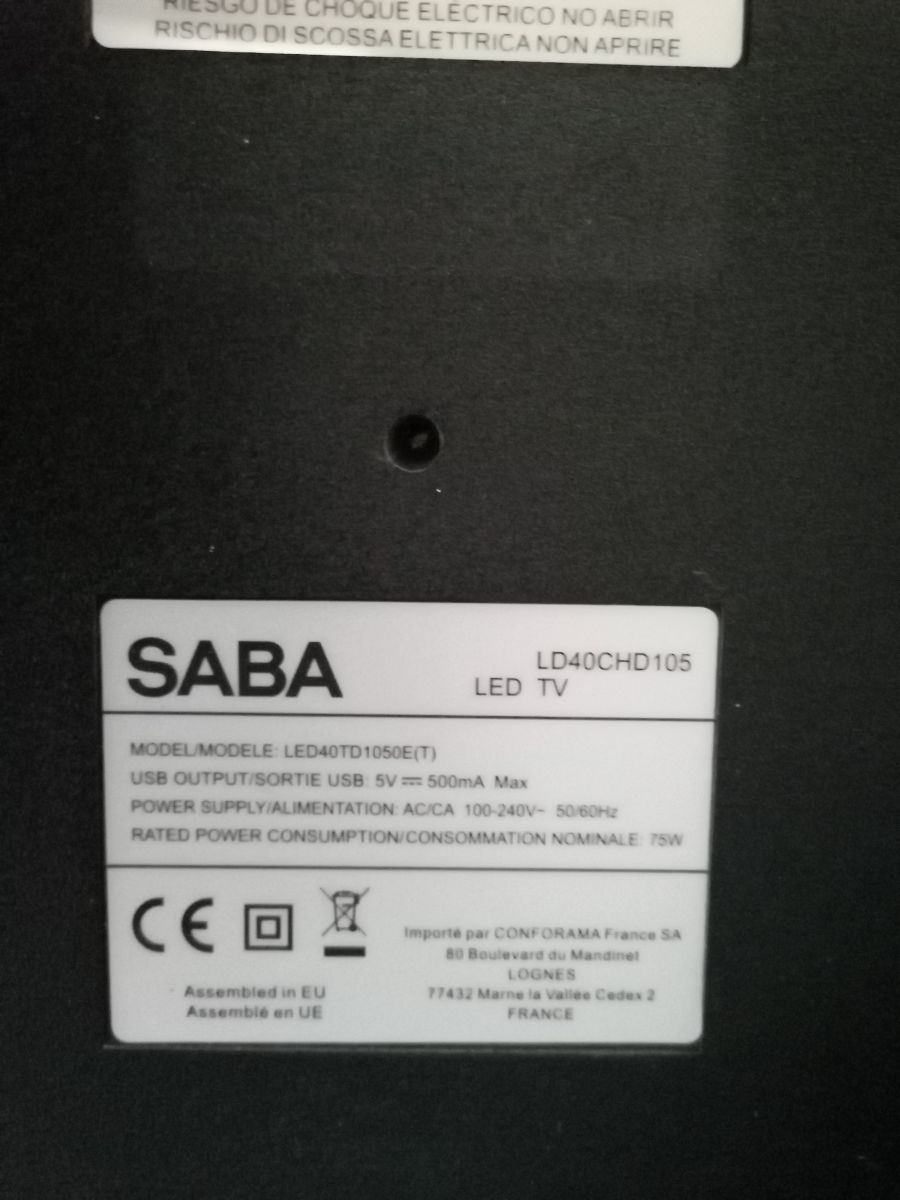
    Photo of the Saba TV nameplate with technical specifications. Label with TV module details, including a barcode and model number. TV motherboard with visible electronic components. TV motherboard with visible electronic components.
  • ADVERTISEMENT
  • Helpful post
    #2 20711314
    querij
    Level 21  
    Posts: 375
    Help: 42
    Rate: 217
    The software is for one device, with the same specifications
    Attachments:
    • CH_LSER( )_FR_V20.0326_40D1050_C400X14-E1-C(G1).rar (5.32 MB) You must be logged in to download this attachment.
  • #3 20711382
    RoyalC
    Level 3  
    Posts: 10
    Rate: 1
    great thank
    i have try , it now quit from "initialisation en cours" but my remote control is not working now !!!
    Any idea ?
    thanks for your great help
  • ADVERTISEMENT
  • #4 20711395
    querij
    Level 21  
    Posts: 375
    Help: 42
    Rate: 217
    Does the keyboard work correctly?
  • ADVERTISEMENT
  • #5 20712574
    jeloi
    Level 34  
    Posts: 1739
    Help: 284
    Rate: 578
    I can repair original defective bin.
  • ADVERTISEMENT
  • #6 20712720
    RoyalC
    Level 3  
    Posts: 10
    Rate: 1

    Hi, the keyboard of the remote control doesn't work. When I push vol+, I can see the TV LED blinking, but nothing happens.
    The keyboard of the TV is working fine.
    Thanks for your help. I appreciate it.
  • #7 20712722
    querij
    Level 21  
    Posts: 375
    Help: 42
    Rate: 217
    Local keyboard work´s?
  • #8 20713249
    RoyalC
    Level 3  
    Posts: 10
    Rate: 1

    Hi, what do you mean by local keyboard? The buttons on the side of the TV? If yes, yes they work.
    I have seen a lot of posts about this firmware, and some people have trouble with the remote control after flashing the firmware, but none give the solution!!!
    Thanks for your help.
  • #9 20713401
    querij
    Level 21  
    Posts: 375
    Help: 42
    Rate: 217

    Il s'agit du logiciel original pour ce modèle. C'est le matériel que j'ai à la maison. Seulement si vous voulez essayer la programmation flash.
  • #10 20714058
    RoyalC
    Level 3  
    Posts: 10
    Rate: 1
    Ha, okay, but I don't know how to flash memory.
    Thanks for the help.


    Added after 9 [hours] 17 [minutes]:

    >>20712574
    hi how did you do ?
  • Helpful post
    #11 20714919
    jeloi
    Level 34  
    Posts: 1739
    Help: 284
    Rate: 578
    Publish a defective bin!

    I will make your faulty usb bin!
  • #12 20714968
    querij
    Level 21  
    Posts: 375
    Help: 42
    Rate: 217
    Programing the flash?
  • #13 20716379
    RoyalC
    Level 3  
    Posts: 10
    Rate: 1

    I know how to put flash on TV (format FAT32 and put the file on a USB disk, then insert the USB disk and wait for the flash). I don't know how to correct bad firmware like Jeloi says.
  • #14 20717137
    querij
    Level 21  
    Posts: 375
    Help: 42
    Rate: 217

    You would have to have suitable tools, it is not done with a pen.
  • #15 20718965
    jeloi
    Level 34  
    Posts: 1739
    Help: 284
    Rate: 578
    For Sample. For USB
    Attachments:
    • SISEU23X8M_ 56.BIN (6.58 MB) You must be logged in to download this attachment.
  • #16 20719586
    RoyalC
    Level 3  
    Posts: 10
    Rate: 1

    Ok, I don't have those tools :(
    Thanks for your help.
  • #17 20721758
    RoyalC
    Level 3  
    Posts: 10
    Rate: 1

    >>20718965
    Is it a sample file used for example or a working one?
    Thanks
  • #18 20723573
    jeloi
    Level 34  
    Posts: 1739
    Help: 284
    Rate: 578
    RoyalC wrote:

    >>20718965
    Is this a sample file or a working file?
    Thanks
    .


    The file from the 15th post is specially made by me for your TV

    for usb.
  • #19 20724190
    RoyalC
    Level 3  
    Posts: 10
    Rate: 1
    haaaa ok thanks, does it correct the remote control ?
  • #20 20726631
    RoyalC
    Level 3  
    Posts: 10
    Rate: 1

    I have tried your file jeloi, but it doesn't correct the remote control use! When I push a remote control button, it blinks on the TV (LED blinks), but nothing else.
    Thanks for your help.

Topic summary

✨ A user is seeking French firmware for a Saba TV model ld40chd105 but lacks the serial number. After attempting to flash the firmware, the TV no longer displays "initialisation en cours," but the remote control has stopped functioning. Various responses suggest checking the functionality of the TV's local keyboard and offer assistance in repairing the firmware. Despite attempts to use a provided firmware file, the remote control issue persists, with the TV LED blinking upon button presses but no other response. The discussion includes inquiries about flashing memory and the tools required for firmware correction.
Generated by the language model.

FAQ

TL;DR: For Saba LD40CHD105 fixes, 1 device needs exact-spec firmware; "The software is for one device." This FAQ explains USB update steps and what to check if IR fails. [Elektroda, querij, post #20711314]

Why it matters: A mismatched build can boot yet disable the remote, so match specs before flashing.

Quick Facts

What’s the quickest way to escape “initialisation en cours” on a Saba LD40CHD105?

A USB firmware update resolved the loop in this case. After flashing, the TV left “initialisation en cours” and booted. However, the IR remote stopped responding afterward. Test basic navigation with the TV’s side buttons to confirm boot status. [Elektroda, RoyalC, post #20711382]

Why did my remote stop working after flashing the firmware?

Because this software targets a single device configuration. "The software is for one device, with the same specifications." If your unit differs from the firmware’s target, features like IR control can stop functioning after the update. [Elektroda, querij, post #20711314]

Do the TV’s side buttons help diagnose the problem?

Yes. In this case, the side buttons worked normally while the IR remote did nothing. That shows the TV accepted local input despite the remote issue, guiding next steps toward firmware or IR handling. [Elektroda, RoyalC, post #20713249]

How do I update the Saba firmware via USB?

Use the tested USB method for this set: 1. Format a USB drive to FAT32 and copy the update file. 2. Insert the USB into the TV and power it on. 3. Wait for the flashing process to complete before removing the drive. "Format FAT32... insert the USB disk and wait for the flash." [Elektroda, RoyalC, post #20716379]

My TV’s LED blinks when I press the remote, but nothing happens. What does that tell me?

In this case, pressing a remote button made the TV LED blink, yet no command executed. That observation came after a firmware update, indicating the set saw input but did not perform actions. [Elektroda, RoyalC, post #20712720]

Can someone repair my original BIN and generate a USB update?

Yes. An expert offered, "Publish a defective bin! I will make your faulty usb bin!" Share your dump so they can rebuild a compatible USB package for your unit. [Elektroda, jeloi, post #20714919]

Was the posted USB file custom-made for this TV?

Yes. The contributor confirmed the file in the referenced post was “specially made... for your TV” and prepared for USB flashing. That targeted build addressed the request without needing hardware programmers. [Elektroda, jeloi, post #20723573]

Did that custom file restore remote control?

No. In one case, flashing the custom USB file did not restore IR control; the TV’s LED still blinked, but no actions occurred. This edge case shows a deeper mismatch beyond that package. [Elektroda, RoyalC, post #20726631]

Do I need special tools to reprogram the flash chip directly?

Yes. "You would have to have suitable tools, it is not done with a pen." Direct flash programming requires hardware-level tools and skills beyond a simple USB stick. [Elektroda, querij, post #20717137]

If I don’t have those tools, what’s a practical next step?

Stick with USB updates and collaborate with an experienced helper. Publish your defective BIN so they can craft a corrected USB image tailored to your unit’s configuration. [Elektroda, jeloi, post #20714919]

Is this firmware unique per device or per model variant?

Treat it as device-configuration specific. As one expert put it, "The software is for one device, with the same specifications." Verify exact hardware details before flashing any build. [Elektroda, querij, post #20711314]

What should I share to help identify the right firmware?

Post clear photos of the mainboard, modules, and labels. The OP opened the TV and shared images, helping others identify hardware and advise on compatible software paths. [Elektroda, RoyalC, post #20709013]
Generated by the language model.
ADVERTISEMENT