FAQ 
TL;DR: If INEA fiber on Światłowód Inwestycje will not work with your own router, start with VLAN 20; one user on 1000/300 Mb/s reported 920/280 Mb/s and said, "everything works without any problems." This FAQ is for users replacing the ZTE H3640 behind a ZTE F601 or Huawei ONT and needing stable WAN settings. [#20962342]
Why it matters: INEA deployments in different locations can use different WAN behavior, so the right setup can be VLAN 20, auto-detect, or passive packet capture before you change hardware.
| Setup path |
Reported result |
Notes |
| Manual WAN VLAN 20 |
Worked on several Światłowód Inwestycje installs |
Confirmed on Asus, TP-Link, Redmi, EdgeRouter cases |
| WAN on auto / no manual VLAN |
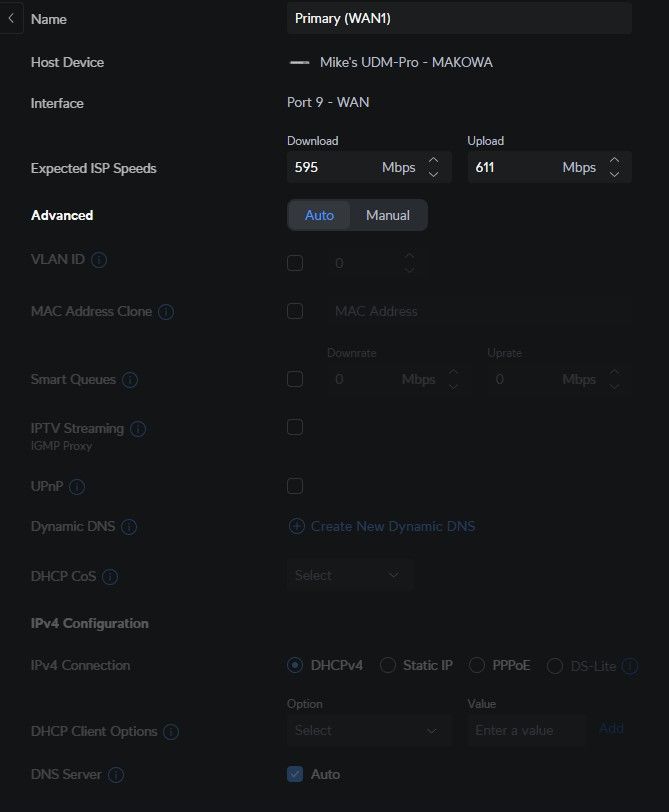
Worked on at least one UDM-Pro install |
Useful when manual VLAN trials fail |
| Passive capture with Wireshark / mirroring |
Revealed live VLANs |
Best when the ISP will not disclose settings |
| Reconnecting original ZTE router |
Restored service in one unstable EdgeRouter case |
Often gave a new IP afterward |
Key insight: There is no single universal INEA VLAN recipe in the thread. VLAN 20 solved most custom-router internet cases, but at least one user reported internet without a VLAN tag and another succeeded by leaving WAN on auto. [#21060363]
Quick Facts
- Reported real throughput on a 1000/300 Mb/s plan was about 920 Mb/s down and 280 Mb/s up, with 4-6 ms ping to Polish servers in Speedtest. [#20962342]
- In one successful replacement, an ONT power cycle of about 1 minute was enough before connecting a third-party router directly. [#20907675]
- Users explicitly noted that VLAN IDs can span 1-65535, which is why trial-and-error is slow without packet capture. [#20900765]
- A forum user in Brwinów near Warsaw reported a working Asus setup on VLAN 20 and said MAC cloning was unnecessary. [#20963306]
- One user complained that the ISP ZTE router drew about 3× the power of a Redmi AX5 and still had trouble with Sonoff Wi‑Fi switches. [#20968015]
How do I configure a third-party router to work with INEA fiber when the installation uses a ZTE ZXHN F601 ONT and ZTE ZXHN H3640 router?
Connect your router directly to the ONT, reboot the ONT, and start with DHCP on the WAN. If DHCP alone does not work, set WAN VLAN 20 and test again. Several users replaced the H3640 successfully this way on Asus, TP-Link, Redmi, and Ubiquiti hardware. MAC cloning was often unnecessary once the ONT restarted cleanly.
[#20963306]
Which VLAN ID is used for Internet access on INEA over Światłowód Inwestycje infrastructure, and why do some users report VLAN 20 while others say no VLAN tag is needed?
VLAN 20 is the most frequently reported internet VLAN in the thread, but not every installation behaved the same. One user captured traffic in Poznań Rataje and reported internet without a VLAN tag, VoIP on VLAN 20, and TV on VLAN 350. Another user with a UDM-Pro said leaving WAN on auto worked immediately. The practical conclusion is regional or platform variation, not one universal tag.
[#21055438]
What is bridge mode on an ONT or ISP router, and how does it help when replacing the INEA ZTE H3640 with your own router?
Bridge mode passes the WAN connection through without routing or NAT on the ISP router.
"Bridge mode" is a network mode that forwards traffic transparently, without the router doing local routing, NAT, or Wi‑Fi gateway functions. It helps because your own router becomes the main edge device and avoids double-router behavior. In the thread, users heard bridge mode might exist, but support responses were inconsistent.
[#20907675]
How can I use Wireshark or tcpdump to discover the WAN VLAN used by the INEA ZTE H3640 router?
Capture the H3640 startup traffic and inspect DHCP frames for 802.1Q tags. One workable method was to power the ZTE router without the ONT, connect a PC by Ethernet, start Wireshark, and watch what VLAN the router requests. Another user suggested inserting a bridge between the ONT and router and analyzing frames with tcpdump. The fastest clue is the VLAN number shown next to DHCP Discover traffic.
[#20963294]
What is TR-069 and TR-068 in the context of ISP routers like the ZTE ZXHN H3640, and how do they affect internet and VoIP configuration?
They are remote-management mechanisms that can push settings to the ISP router.
"TR-069" is a remote-management protocol that lets an ISP provision and control a customer router, including service parameters, after installation. In the thread, users suspected extra VoIP parameters arrived through TR-068 or related provisioning, which explains why knowing only the VLAN was not enough to recreate voice service on your own hardware.
[#21009396]
Why doesn’t cloning the MAC address always make a custom router work on INEA fiber after disconnecting the original H3640?
Because the blocking factor may be VLAN or session state, not MAC alone. Several users reported success without cloning any MAC address once they used the correct WAN setup, especially VLAN 20 or auto-detect. One post also showed that reconnecting the original ZTE router could restore service and lead to a new IP later, which points to a DHCP or lease-state issue rather than pure MAC filtering.
[#21320463]
What step-by-step method can I use with two Ethernet cards and a bridge connection in Windows to capture VLAN traffic between the ONT and the INEA router?
Use a transparent bridge between the ONT and H3640, then sniff the bridged interface. 1. Install two Ethernet adapters in a Windows PC and create a bridge between them. 2. Connect ONT -> PC card 1 and PC card 2 -> INEA router, then power both devices off. 3. Start Wireshark on the bridge interface, power devices on, and read VLAN tags from startup traffic.
[#21009396]
How does port mirroring on a switch compare with using a PC and two network cards for analyzing INEA router traffic?
Port mirroring on a switch is simpler and cleaner if you already own the switch. It lets you copy live traffic from the ONT-router link to a monitoring port without building a Windows bridge or relying on NIC drivers. The thread explicitly recommended mirroring as a replacement for the two-card PC method, especially for passive analysis of VLANs and service traffic.
[#21011566]
Why does my Asus GT-AX6000, TP-Link AX55, Archer C7, or Ubiquiti EdgeRouter need different WAN settings on INEA even though the ISP equipment is similar?
Because similar ONT and H3640 hardware did not guarantee identical provisioning in the field. In the thread, Archer C7 worked after a simple ONT restart, Asus GT-AX6000 and TP-Link AX55 users needed VLAN 20, and one UDM-Pro worked on auto. Different regions, access networks, or backend profiles can change whether WAN needs a tag, plain DHCP, or a clean lease reset.
[#21353167]
What could cause Internet on an EdgeRouter-X to stop working every few days on INEA until the original ZTE router is reconnected and a new IP is assigned?
The most likely cause from the thread is a WAN lease or session problem on the provider side, not local Wi‑Fi or LAN settings. One EdgeRouter-X user reported that every few days the link died, reconnecting the original ZTE restored service, and the custom router then received a new IP. MAC cloning did not fix it, which narrows the issue to DHCP state, timeout handling, or ISP-side binding behavior.
[#21320463]
How do I find the VoIP VLAN, SIP login, and password from an INEA ZTE ZXHN H3640 setup when the ISP does not provide those details?
You can usually find the VLAN by passive capture, but not the SIP password. A user who mirrored traffic reported VoIP on VLAN 20 and said the service used standard SIP, yet the registration password stayed inside the router and the helpline would not disclose it. That means your own ATA, IP phone, or softphone remains blocked unless you extract credentials from the H3640 itself.
[#21055438]
Which VLANs are used by INEA for Internet, VoIP, management, and IPTV on ZTE or Huawei ONT installations, based on user reports from different regions?
The thread shows no single national map, only field reports. Multiple users on Światłowód Inwestycje got internet working on VLAN 20. One mirrored capture from Poznań Rataje reported internet untagged, VoIP on VLAN 20, and IPTV on VLAN 350. Management traffic also appeared in captures through DHCP vendor identification, but no single management VLAN ID was confirmed across all sites.
[#21055438]
What WAN settings should I try first on a UDM-Pro, MikroTik, Asus, or TP-Link router when moving from the INEA H3640 to my own hardware?
Start with DHCP on WAN and auto VLAN detection. If that fails, set manual VLAN 20, reboot the ONT, and retry without PPPoE. On Asus and TP-Link, users reported working internet with VLAN 20 and no required MAC clone. On UDM-Pro, one user said auto worked with no manual VLAN at all. That gives you a low-risk two-step order: auto first, VLAN 20 second.
[#21353167]
Why would a router work on INEA with WAN left on auto-detect while another setup requires manually setting VLAN 20?
Because the thread shows at least two live access profiles. One user with a UDM-Pro said auto WAN worked immediately, while several others needed VLAN 20 on Asus, TP-Link, Redmi, and EdgeRouter devices. The difference can come from regional provisioning or from how a router handles untagged versus tagged DHCP on the WAN. The safest reading is that both behaviors are real on INEA-related installs.
[#21353167]
What router models are good replacements for the INEA-provided ZTE H3640 if I want stable internet, better Wi‑Fi, and support for features like WireGuard or public IP?
The strongest thread-backed replacements were TP-Link AX55, Asus GT-AX6000, Archer C7, Redmi AX5, UDM-Pro, and EdgeRouter-X. One user on a 1000/300 Mb/s plan reported about 920/280 Mb/s, 4-6 ms ping, a purchased public IP, and working WireGuard after replacing the ISP router. That makes modern Asus, TP-Link, or Ubiquiti hardware the best proven upgrade paths in this discussion.
[#20962342]
AI summary based on the discussion. May contain errors.