Hello.
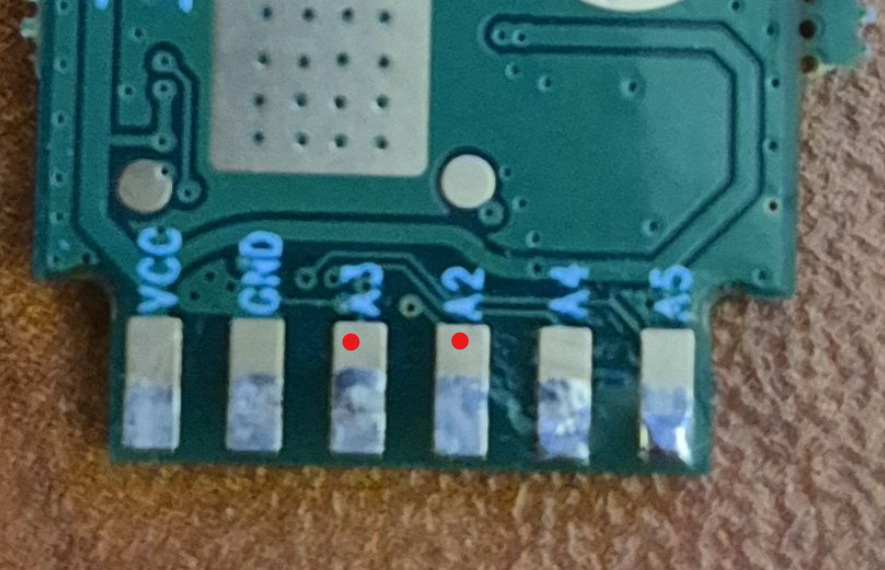
Has anyone happened to flash the board as shown in the pictures?
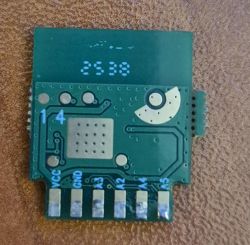
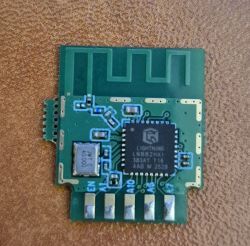
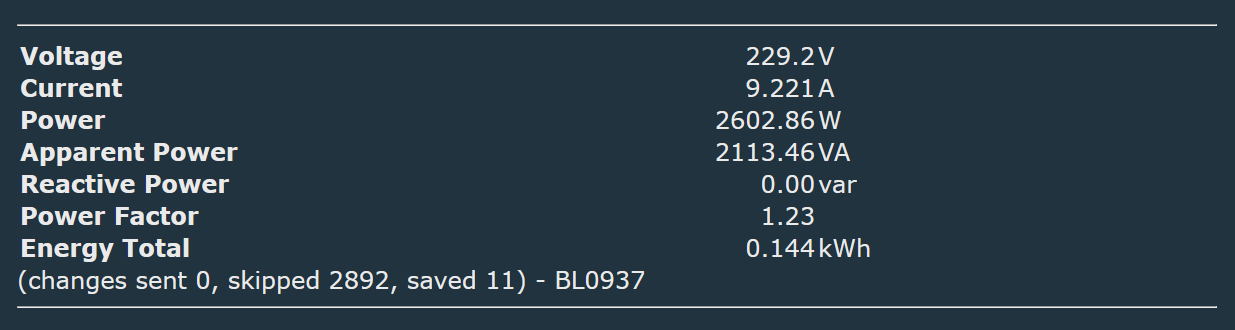
Girier socket with voltage measurement, freshly taken out of the parcel box straight from the far east.
https://pl.aliexpress.com/item/1005008248987558.html
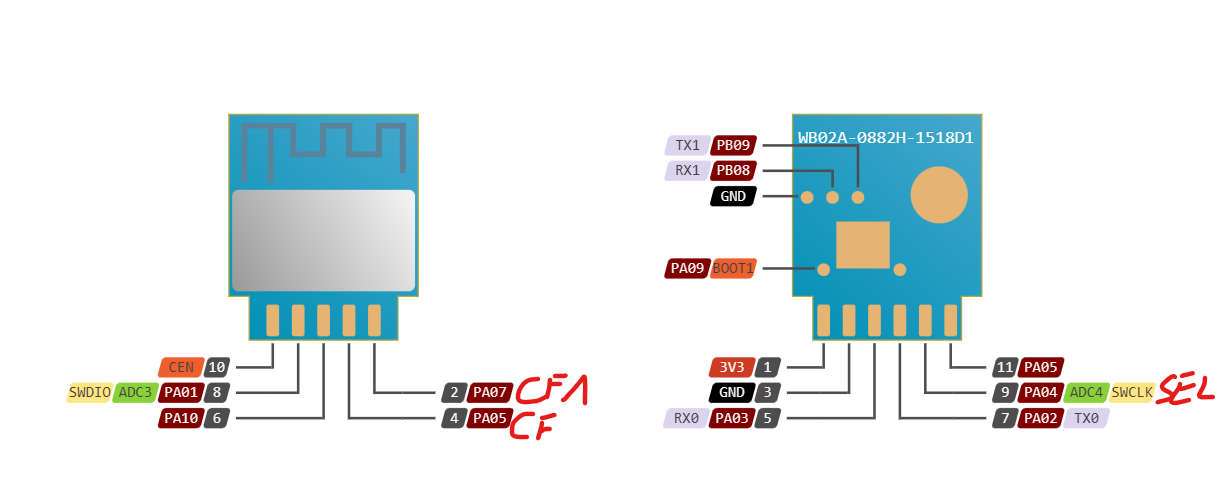
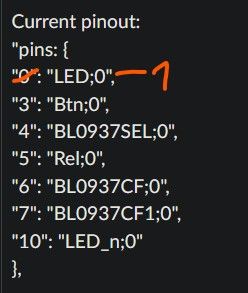
According to my measurements it came out that the connection of the programmer is as follows:
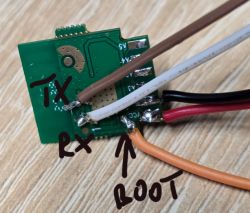
I connected via putty under COM4 at speed 921000 and I get some messages from the device, that is, it can be assumed that RX/TX are connected correctly.
When the potential Boot (GPIOA9 according to the chip's schematic) is connected under GND, the default Wi-Fi does not show up and the putty is silent.
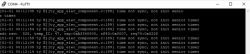
Yet when I close putty and want to download myself the firmware, I get an error:

My board looks twinned with the WB02A:
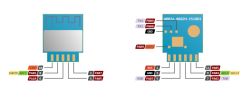
Except that it doesn't work. I have run out of ideas.
I am counting on you.
EDIT:
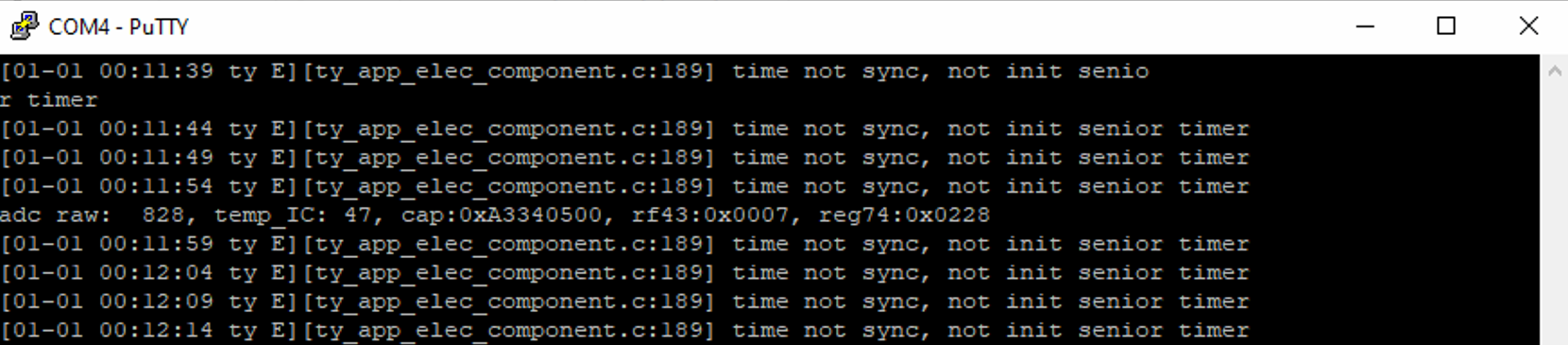
I've taken a snapshot of what putty shows when the socket gets up interestingly, it stopped showing me that default wifi....
"GPIOA_9 high level, will enter Normal mode!" meaning according to the schematic the 17th leg on the chip.... and this is the one according to the multimeter that is connected under GND at my place, then putty is silent, but python shows no transition to download mode
Has anyone happened to flash the board as shown in the pictures?
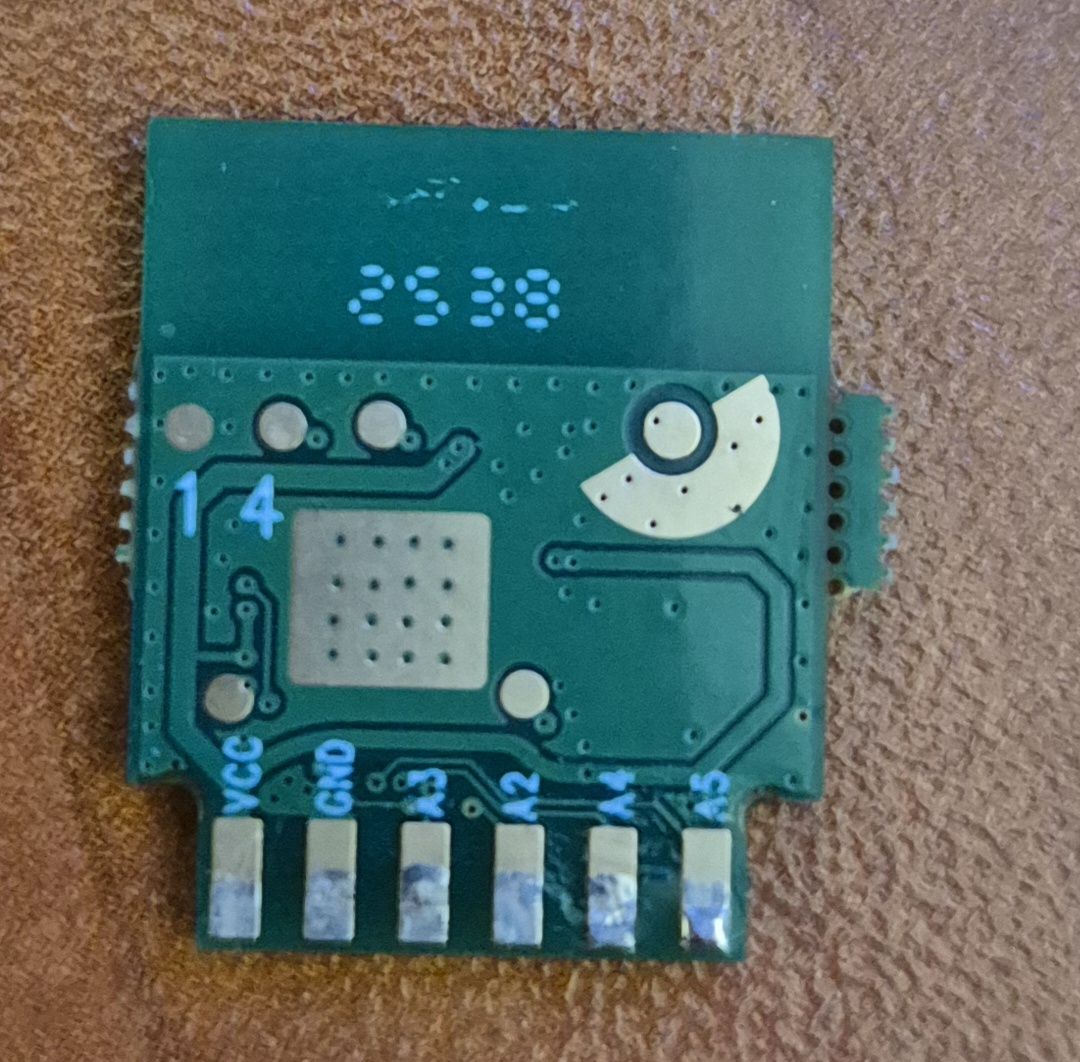
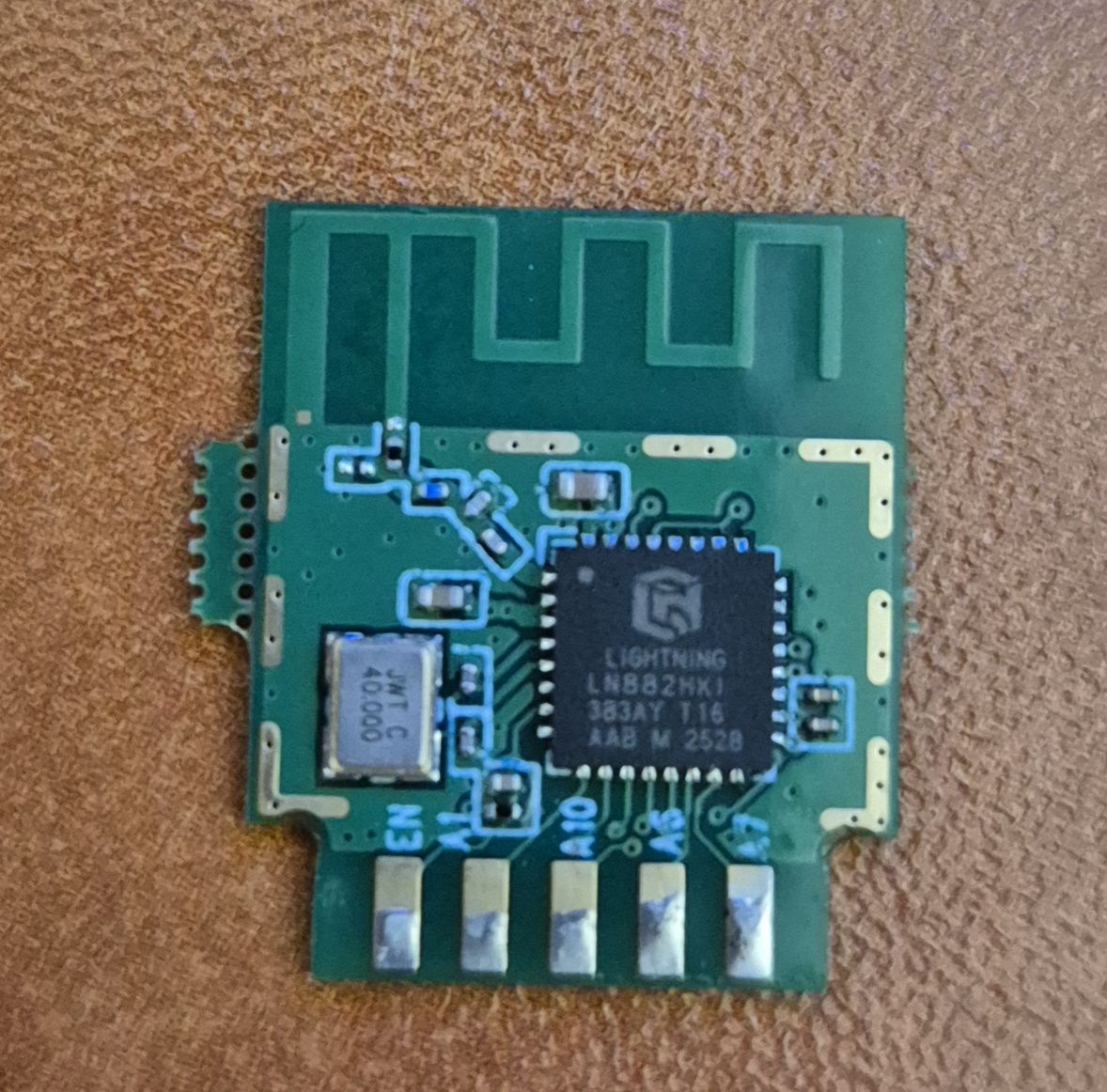
Girier socket with voltage measurement, freshly taken out of the parcel box straight from the far east.
https://pl.aliexpress.com/item/1005008248987558.html
According to my measurements it came out that the connection of the programmer is as follows:
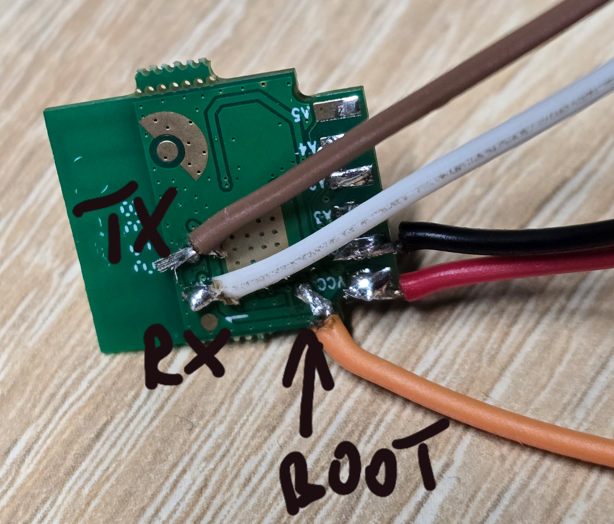
I connected via putty under COM4 at speed 921000 and I get some messages from the device, that is, it can be assumed that RX/TX are connected correctly.
When the potential Boot (GPIOA9 according to the chip's schematic) is connected under GND, the default Wi-Fi does not show up and the putty is silent.
Yet when I close putty and want to download myself the firmware, I get an error:

My board looks twinned with the WB02A:
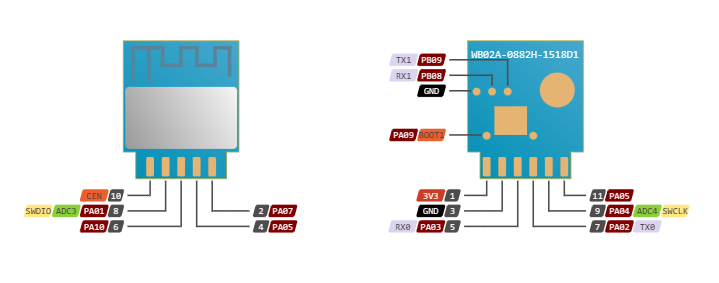
Except that it doesn't work.
I have run out of ideas.
I am counting on you.
EDIT:
I've taken a snapshot of what putty shows when the socket gets up
interestingly, it stopped showing me that default wifi....
"GPIOA_9 high level, will enter Normal mode!" meaning according to the schematic the 17th leg on the chip.... and this is the one according to the multimeter that is connected under GND at my place, then putty is silent, but python shows no transition to download mode
Quote:
bootloader build time: 13:48:19
config item not found perip_param value
-- tuya project compile time: Sep 4 2025 16:17:30--
ble mac[77:ab:36:b2:f1:20]
[BLIB_I]BLIB Ver: 1.0.3 [build time:Jan 19 2023 12:14:45][0x010003ff]
xTaskCreate, name: rw_task, priority: 9, stack size: 2048
xTaskCreate, name: worker, priority: 2, stack size: 1536
xTaskCreate, name: ty_main, priority: 3, stack size: 4096
xTaskCreate, name: IDLE, priority: 0, stack size: 1024
xTaskCreate, name: Tmr Svc, priority: 10, stack size: 2048
Before enter tuya_main, Total:168332; Free:155992
GPIOA_9 high level, will enter Normal mode!
Failed to enter ate mode! Start tuya user main.
xTaskCreate, name: tuya_app_main, priority: 4, stack size: 4096
xTaskCreate, name: TUYA_TCPIP, priority: 9, stack size: 2048
tkl_ethernetif_init
tkl_ethernetif_init
xTaskCreate, name: app_msg, priority: 4, stack size: 3072
xTaskCreate, name: wq_system, priority: 3, stack size: 5120
xTaskCreate, name: wq_highpri, priority: 4, stack size: 4096
xTaskCreate, name: sys_timer, priority: 5, stack size: 4096
----- tkl_watchdog_init
wdg shift_left_num:0x10, set num:65535, top:0x0d
xTaskCreate, name: health_monitor, priority: 5, stack size: 1536
[01-01 00:00:00 ty E][lr:0x100994df] logseq empty
[01-01 00:00:00 ty N][ty_sys.c:277] sdk_info:< TuyaOS V:3.5.6 BS:40.00_PT:2.3_LAN:3.5_CAD:1.0.5_CD:1.0.0 >
< BUILD AT:2025_05_13_16_33_11 BY ci_manage FOR tuyaos-iot AT ln882h >
IOT DEFS < WIFI_GW:1 DEBUG:1 KV_FILE:0 LITTLE_END:1 SL:0 OPERATING_SYSTEM:98 RELIABLE_TRANSFER:0 >
[01-01 00:00:00 ty N][ty_sys.c:278] name:ln_elec_plug:1.0.2
[01-01 00:00:00 ty N][ty_sys.c:279] firmware compiled at Sep 4 2025 16:17:19
[01-01 00:00:00 ty N][ty_sys.c:280] system reset reason:[0]
[01-01 00:00:00 ty N][lr:0x100c2db7] key_addr: 0x1ec000 block_sz 4096
[01-01 00:00:00 ty N][lr:0x100c3091] get key:
0x26 0x90 0x42 0x92 0xd0 0x80 0x24 0x1 0x9d 0xcc 0xd7 0x2d 0x7b 0x2f 0x2d 0xc
[01-01 00:00:00 ty N][lr:0x1009ee2d] uni_random_init...
[01-01 00:00:00 ty N][lr:0x1009f0d1] tuya_tls_rand_init ok!
[01-01 00:00:00 ty N][lr:0x100a870b] mf is open need stop fastconnect
set work mode 1, is open 0, current ln mode: 0
wifi not start, turn on first
adapt wifi start <m:1>, hw_ready:0
start rf preprocess and image cal
[WLIB_E]idx=00, iq_hex_cal=0x7F7E, i=127, q=126, iavg= 24, qavg= 59
[WLIB_E]idx=01, iq_hex_cal=0x7E7D, i=126, q=125, iavg= 45, qavg= 53
[WLIB_E]idx=02, iq_hex_cal=0x7C7C, i=124, q=124, iavg= 7, qavg= 31
[WLIB_E]idx=03, iq_hex_cal=0x797B, i=121, q=123, iavg= 81, qavg= 48
[WLIB_E]idx=04, iq_hex_cal=0x767C, i=118, q=124, iavg= 36, qavg= 78
[WLIB_E]idx=05, iq_hex_cal=0x7F7E, i=127, q=126, iavg= 39, qavg= 53
[WLIB_E]idx=06, iq_hex_cal=0x7E7D, i=126, q=125, iavg= 12, qavg= 65
[WLIB_E]idx=07, iq_hex_cal=0x7D7C, i=125, q=124, iavg= 41, qavg= 16
[WLIB_E]idx=08, iq_hex_cal=0x7B7B, i=123, q=123, iavg= 27, qavg= 70
[WLIB_E]idx=09, iq_hex_cal=0x787C, i=120, q=124, iavg= 48, qavg= 57
[WLIB_E]idx=10, iq_hex_cal=0x7F7E, i=127, q=126, iavg= 39, qavg= 51
[WLIB_E]idx=11, iq_hex_cal=0x7E7D, i=126, q=125, iavg= 12, qavg= 64
[WLIB_E]idx=12, iq_hex_cal=0x7D7C, i=125, q=124, iavg= 44, qavg= 7
[WLIB_E]idx=13, iq_hex_cal=0x7B7B, i=123, q=123, iavg= 21, qavg= 65
[WLIB_E]idx=14, iq_hex_cal=0x787C, i=120, q=124, iavg= 54, qavg= 81
[WLIB_E]idx=15, iq_hex_cal=0x7F7E, i=127, q=126, iavg= 41, qavg= 56
[WLIB_E]idx=16, iq_hex_cal=0x7E7D, i=126, q=125, iavg= 14, qavg= 56
[WLIB_E]idx=17, iq_hex_cal=0x7D7C, i=125, q=124, iavg= 52, qavg= 10
[WLIB_E]idx=18, iq_hex_cal=0x7B7B, i=123, q=123, iavg= 30, qavg= 62
[WLIB_E]idx=19, iq_hex_cal=0x787B, i=120, q=123, iavg= 55, qavg= 54
[WLIB_E]idx=20, iq_hex_cal=0x7E7F, i=126, q=127, iavg= 59, qavg= 9
[WLIB_E]idx=21, iq_hex_cal=0x7C7F, i=124, q=127, iavg= 31, qavg= 13
[WLIB_E]idx=22, iq_hex_cal=0x797F, i=121, q=127, iavg= 55, qavg= 35
[WLIB_E]idx=23, iq_hex_cal=0x7580, i=117, q=128, iavg= 14, qavg= 59
[WLIB_E]idx=24, iq_hex_cal=0x6F83, i=111, q=131, iavg= 68, qavg= 68
xTaskCreate, name: wifi_cfg, priority: 5, stack size: 2048
xTaskCreate, name: mac_task, priority: 9, stack size: 2048
[WLIB_I]cap_comp = 0, xtal_capbank_tab:[0]:40 [1]:35 [2]:35 [3]:35 [4]:50 [5]:70 [6]:70 [7]:70
[WLIB_I][original]phy_tab_1f(GN):0x4C, phy_tab_20(B):0x3C
[WLIB_I][efuse]phy_tab_1f(GN):0x60, phy_tab_20(B):0x50, efuse_comp:20
[WLIB_I][g_tx_comp]b_flag=0x00, gn_flag=0x00
[WLIB_I][g_tx_comp.b_ch ]: ch1=0,ch2=0,ch3=0,ch4=0,ch5=0,ch6=0,ch7=0,ch8=0,ch9=0,ch10=0,ch11=0,ch12=0,ch13=0
[WLIB_I][g_tx_comp.gn_ch]: ch1=0,ch2=0,ch3=0,ch4=0,ch5=0,ch6=0,ch7=0,ch8=0,ch9=0,ch10=0,ch11=0,ch12=0,ch13=0
[WLIB_I][flash]phy_tab_1f(GN):0x60, phy_tab_20(B):0x50, tx_pwr_comp_all=0, tx_pwr_comp_b=0, tx_pwr_comp_gn=0, b_ch=0, gn_ch=0
[WLIB_I]==>temp_sect:2,phy_tab_1f:0x60,phy_tab_20:0x50
[WLIB_I]<==temp_sect:2,phy_tab_1f:0x60,phy_tab_20:0x50
XTAL CAP VAL:0.
wifi stop
wifi sta start
[WLIB_I]LN882H WiFi Lib Ver: 1.1.3 [GCC] [build time:Sep 4 2025 15:54:28][0x010103ff](gitlab custom-tuya_cuke2:4cb53418)
[WLIB_I]STA_Startup.
STA startup!
[WLIB_I]Disconnected.
[WLIB_I]HwInd:UKI:0
[WLIB_I]Disconnected.
current work mode 0
No need to switch mode, mode:0
xTaskCreate, name: mf_test, priority: 4, stack size: 5120
adapt wifi start <m:2>, hw_ready:1
[01-01 00:00:01 ty N][ty_sys.c:343] mf_init succ
[01-01 00:00:01 ty N][ty_app_elec_component.c:119] ty_app_elec_start....
[01-01 00:00:01 ty N][tdd_button_gpio.c:199] tdd_gpio_button_register succ
[01-01 00:00:01 ty E][lr:0x100c6e2d] uf_open RLY_INIT err 8
[01-01 00:00:01 ty E][tfm_timing_storage.c:147] uf RLY_INIT can't open
tkl_thread_release, name: mf_test
[01-01 00:00:01 ty E][lr:0x100c6e2d] uf_open LIGHT_MODE err 8
[01-01 00:00:01 ty E][tfm_timing_storage.c:147] uf LIGHT_MODE can't open
tkl_wifi_set_lp_mode 1571, en 0, dtim 0
<-- enter ACTIVE mode
local_lp_mode_set 1540, enable ble clock gate
[01-01 00:00:01 ty N][ty_sys.c:85] read_gw_wsm.nc_tp: 1, read_gw_wsm.md: 0
set work mode 2, is open 1, current ln mode: 0
current work mode 0
No need to switch mode, mode:0
[WLIB_I]Disconnected.
[__tkl_wifi_all_ap_scan-476]wait scan (scan_cnt:0)
scan complete
[WLIB_I]Disconnected.
[__tkl_wifi_all_ap_scan-476]wait scan (scan_cnt:1)
scan complete
[WLIB_I]Disconnected.
[__tkl_wifi_all_ap_scan-476]wait scan (scan_cnt:2)
scan complete
[WLIB_I]Disconnected.
[__tkl_wifi_all_ap_scan-476]wait scan (scan_cnt:3)
reboot type(0:power-on;1:soft-rst;2:wdt-rst): 0
reboot count: 0
[ln_ty_sdk_ver: 0.0.5_alpha or 0x00000500] [build time:2022-05-17_14:57:03]
[Git info: develop_198ece8]
[BLIB Ver: 1.0.3 or 0x010003ff] [build time:Jan 19 2023 12:14:45]
scan complete
[WLIB_I]Disconnected.
[__tkl_wifi_all_ap_scan-476]wait scan (scan_cnt:4)
scan complete
AP cnt:18
[WLIB_I]Disconnected.
[WLIB_I]Disconnected.
[WLIB_I]Disconnected.
sta_disconnected 225: STA disconnected to target AP!
__tkl_wifi_disconnect_cb 225
[01-01 00:00:03 ty N][lr:0x100add45] wifi status changed to 2
[01-01 00:00:03 ty N][lr:0x100a8363] wifi soc init. pid:vd7omhudnl8oyc5j firmwarekey: ver:1.0.2
[01-01 00:00:03 ty N][lr:0x100ae255] start wifi link params validate, nc_tp:1 md:0
[01-01 00:00:03 you N][lr:0x100ae2dd] gw_wsm.nc_tp:1
[01-01 00:00:03 you N][lr:0x100ae2e7] gw_wsm.md:0
[01-01 00:00:03 ty E][lr:0x100a971f] read wf start mode err:-6
[01-01 00:00:03 ty N][lr:0x100a3335] Last reset reason: 0
[01-01 00:00:03 ty N][lr:0x100a33c5] gw_cntl->gw_wsm.stat:0
[01-01 00:00:03 ty N][lr:0x100a345f] gw_cntl->gw_if.abi:0 input:0
[01-01 00:00:03 ty N][lr:0x100a346d] gw_cntl->gw_if.product_key:vd7omhudnl8oyc5j, input:vd7omhudnl8oyc5j
[01-01 00:00:03 ty N][lr:0x100a3479] gw_cntl->gw_if.tp:0, input:0
[01-01 00:00:03 ty N][lr:0x100a348d] gw_cntl->gw_if.firmware_key:, input:
[01-01 00:00:03 ty N][lr:0x100a3a91] enter success_proc
[tkl_wifi_get_mac:1234] if: 0, mac: 20:f1:b2:36:ab:76
ble_mac: 77:ab:36:b2:f1:20
[01-01 00:00:03 ty N][lr:0x100a3aa5] serial_no:20f1b236ab76
[01-01 00:00:03 ty E][lr:0x100a971f] read wf start mode err:-6
set work mode 2, is open 1, current ln mode: 0
current work mode 0
No need to switch mode, mode:0
[WLIB_I]Disconnected.
[__tkl_wif[01-01 00:00:03 ty E][lr:0x100c6e2d] ufi_all_ap_scan-476]wait scan (scan_cnt:0)
_open temp_energy err 8
[01-01 00:00:03 ty E][tfm_timing_storage.c:147] uf temp_energy can't open
[01-01 00:00:03 ty E][lr:0x100c6e2d] uf_open day_energy err 8
[01-01 00:00:03 ty E][tfm_timing_storage.c:147] uf day_energy can't open
[01-01 00:00:03 ty E][lr:0x100c6e2d] uf_open temp_energy err 8
[01-01 00:00:03 ty E][tfm_timing_storage.c:147] uf temp_energy can't open
[01-01 00:00:03 ty E][lr:0x100c6e2d] uf_open day_energy err 8
[01-01 00:00:03 ty E][tfm_timing_storage.c:147] uf day_energy can't open
[01-01 00:00:03 ty E][lr:0x100c6e2d] uf_open over_charge err 8
[01-01 00:00:03 ty E][tfm_timing_storage.c:147] uf over_charge can't open
xTaskCreate, name: button_scan, priority: 4, stack size: 2048
[01-01 00:00:03 ty N][tdl_button_manage.c:626] tdl_button_create succ
tkl_thread_release, name: tuya_app_
scan complete
[WLIB_I]Disconnected.
[__tkl_wifi_all_ap_scan-476]wait scan (scan_cnt:1)
scan complete
[WLIB_I]Disconnected.
[__tkl_wifi_all_ap_scan-476]wait scan (scan_cnt:2)
scan complete
[WLIB_I]Disconnected.
[__tkl_wifi_all_ap_scan-476]wait scan (scan_cnt:3)
scan complete
[WLIB_I]Disconnected.
[__tkl_wifi_all_ap_scan-476]wait scan (scan_cnt:4)
scan complete
AP cnt:19
set work mode 1, is open 1, current ln mode: 0
current work mode 0
No need to switch mode, mode:0
[01-01 00:00:06 ty N][lr:0x100a98bb] cur stat:1 0x1006bed5 -->>
[01-01 00:00:06 ty N][lr:0x100a98f5] wifi netstat changed to:1 -->>
[01-01 00:00:06 ty N][lr:0x100a990b] report wifi netstat[1] to callback -->>
[01-01 00:00:06 ty N][ty_app_elec_trigger_network.c:82] --->net state change to:1
[01-01 00:00:06 ty N][lr:0x100a9449] timer stated, short timer:0x0, long timer:0x100a9289
[01-01 00:00:06 ty N][lr:0x100bcd03] bt startup attr:ff
[01-01 00:00:06 ty N][lr:0x10083b23] upd product_id type:0 vd7omhudnl8oyc5j
xTaskCreate, name: host_main_thread_hdl, priority: 8, stack size: 5120
[01-01 00:00:06 ty N][lr:0x10083ae5] ty bt sdk init success finish
[01-01 00:00:06 ty N][lr:0x1007ebe3] Start Adv
[01-01 00:00:06 you N][lr:0x100a3da3] __devos_init_evt success
[01-01 00:00:06 you N][lr:0x1007ebe3] Start Adv
[01-01 00:00:06 you N][lr:0x10083695] ble adv updated
[tkl_wifi_get_mac:1234] if: 0, mac: 20:f1:b2:36:ab:76
ble_mac: 77:ab:36:b2:f1:20
[WLIB_I]In Sniffer mode, do not reinitiate scan!
[WLIB_I]xtal_temp_cal.curr_sect=3,last_sect=2
[WLIB_I]==>temp_sect:3,phy_tab_1f:0x60,phy_tab_20:0x50
[WLIB_I]<==temp_sect:3,phy_tab_1f:0x60,phy_tab_20:0x50