logo elektroda
logo elektroda
X
logo elektroda

Roller shutter controller with bell switch - how to connect the wires correctly?

patrycjawiniarska199 342 8
ADVERTISEMENT
Treść została przetłumaczona polish » english Zobacz oryginalną wersję tematu
  • #1 21821327
    patrycjawiniarska199
    Level 2  
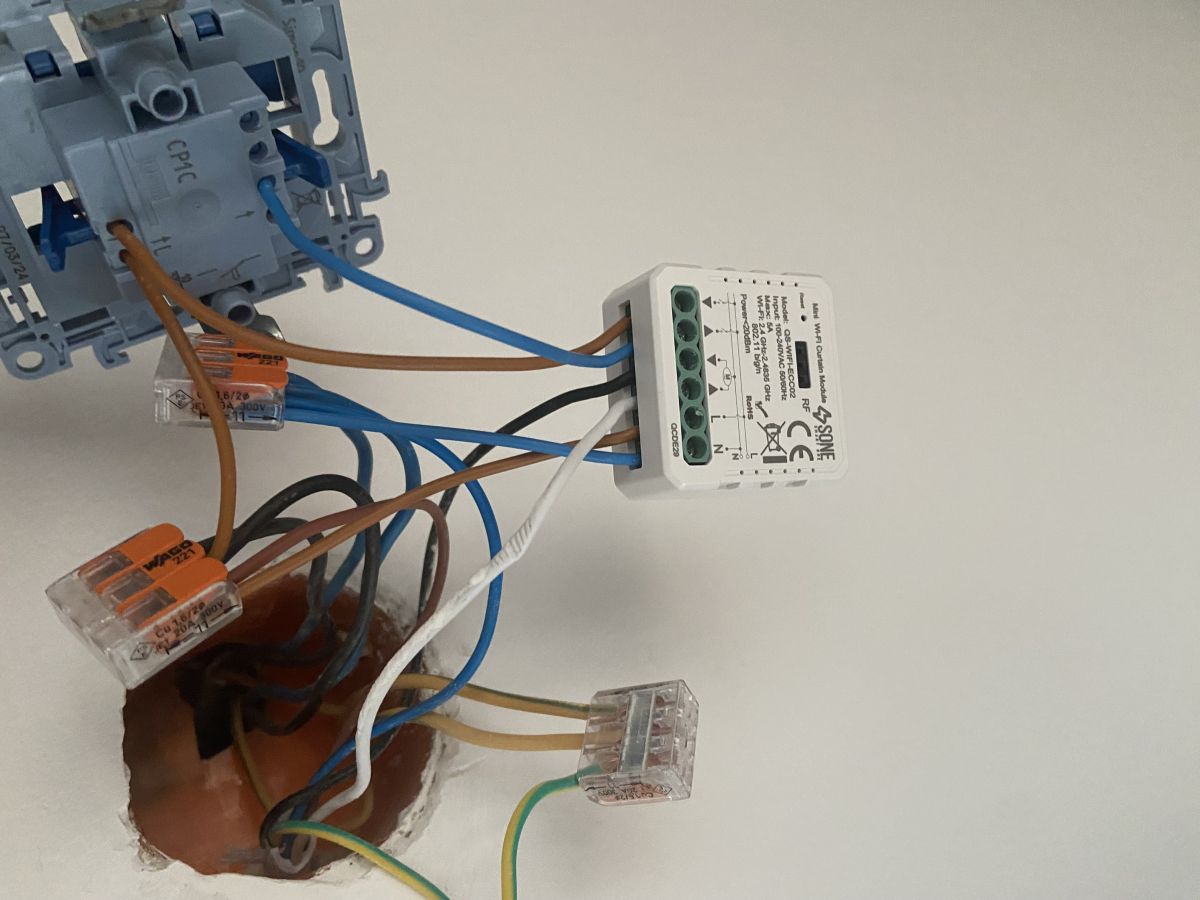
    Hello, I have a problem with a roller shutter controller and a pulse/bell switch. Despite several attempts, I am unable to connect the controller to make it work properly. Request for help. I have connected:
    Controller N -> N from mains
    Controller L -> L from mains
    Controller M up -> roller shutter motor
    Controller M down -> roller shutter motor
    Control up -> pulse/bell switch
    Control down -> pulse/bell switch
    Switch -> L from mains
    There is a phase, neutral and earth going directly to the roller shutter motor.
    I would appreciate any answers.
    Roller shutter controller wired in an electrical box with visible terminal connectors.
  • ADVERTISEMENT
  • #2 21821344
    p.kaczmarek2
    Moderator Smart Home
    I can see from the picture that you are using the QS-WIFI-ECC02 module.
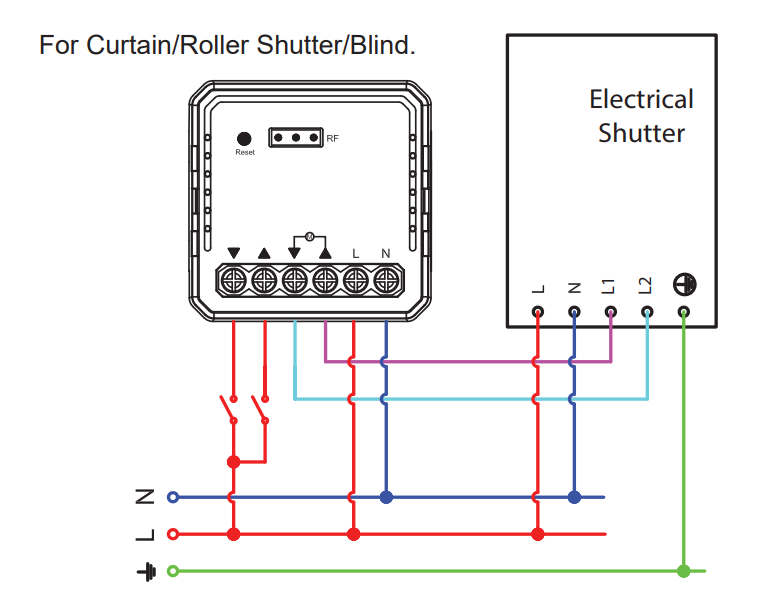
    The wiring diagram:
    Wiring diagram for QS-WIFI-ECC02 module with shutter motor and push switches
    This is probably the module:
    Interior and firmware change of the SB527 roller shutter controller - version 2023.04.13, comparison with an older version
    Do you connect as shown in the diagram? What exactly are the symptoms now - because from the post it doesn't appear - does the module pair with the app? Does the control from the app work? Do the buttons work? Because if, for example, from within the app it works but the bell buttons don't, it's clear where to look....

    Full manual attached.
    Attachments:
    • Manual+of+Mini+WIFI+Curtain+Module+QS-WIFI-ECC02.pdf (1.11 MB) You must be logged in to download this attachment.
    Helpful post? Buy me a coffee.
  • #3 21821349
    nikusert
    Level 41  
    Maybe I'm wrong, but the button looks like a regular bell button, not for controlling the roller shutter.
  • ADVERTISEMENT
  • #4 21828983
    patrycjawiniarska199
    Level 2  
    Connected according to the diagram, app paired with the controller. When attempting to close a roller shutter, a click is heard on the controller, but the roller shutter does not move from the application. Same situation with the button - you can hear a click on the controller, but the roller shutter does not move. Replacing the button with a roller shutter button did not help either. Still the same effect.
  • ADVERTISEMENT
  • #5 21829077
    dzidek1968
    Level 28  
    patrycjawiniarska199 wrote:
    Wired according to the diagram,


    According to which diagram? After all, the two buttons, UP and DOWN, are clearly drawn on the diagram. And in your case one input is connected before and the other after the single button. This won't work, you need to put on a correct roller shutter button, one with two keys (up and down)

    Added after 5 [minutes]:

    The click will be heard because you have L on one control input all the time. That's why the motor won't move the other way because there is a conflict. I hope the roller shutter has protection against power being applied to both inputs at the same time.
  • ADVERTISEMENT
  • #6 21829085
    patrycjawiniarska199
    Level 2  
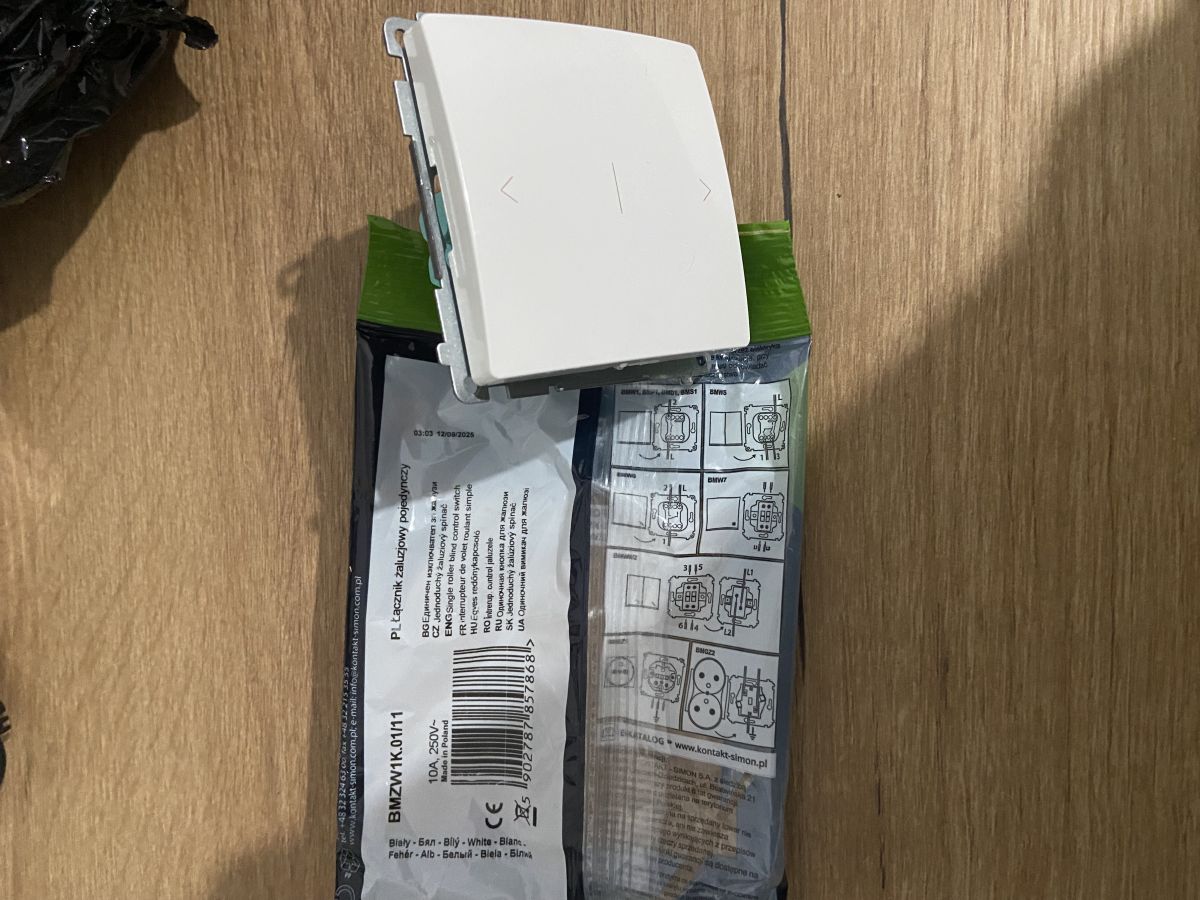
    >>21829077 Up/down louvre switch has been fitted according to the diagram and still does not work.
    Roller shutter switch up/down placed on packaging with wiring diagram
  • #7 21829086
    dzidek1968
    Level 28  
    patrycjawiniarska199 wrote:

    Phase, neutral and earth go directly to the roller shutter motor.


    Another question: why does a phase still go to the motor? After all, you have a controller in the box. Are you sure your roller shutters require an external controller and don't have one built in?
    I'm afraid this is the key question.
  • #8 21829088
    p.kaczmarek2
    Moderator Smart Home
    @dzidek1968 why do you think the button is to blame? I've been testing these modules, and in my opinion, the author would be able to disconnect the button at all for the time being, if there are doubts from it, and only test by controlling from the Tuya app.

    The controller shown in the picture (QS-WIFI-ECC02) should be able to control a correctly connected roller shutter without connecting the button, from the app itself. If the roller shutter does not respond, then either there is something wrong with the roller shutter itself, or the connection is wrong.

    [EDIT] And ok, I see you wrote a post before I posted mine, and that changes things a bit.

    @patrycjawiniarska199 and this roller shutter previously worked with the previous controller?
    Helpful post? Buy me a coffee.
  • #9 21829094
    dzidek1968
    Level 28  
    patrycjawiniarska199 wrote:
    >>21829077 Up/down louvre switch according to diagram has been fitted and still does not work.
    Roller shutter switch up/down placed on packaging with wiring diagram


    I would not use this type of switch for the controller, buy one with separate G and D buttons.
    And if you've fitted this swinging one and even when set to 0 it doesn't work over WiFi then I'd come down to:
    1. The roller shutter has its own controller,
    2. Mixed wires.

    Added after 4 [minutes]:

    p.kaczmarek2 wrote:


    @patrycjawiniarska199 and this roller shutter previously worked with the previous controller?


    Not sure if there was a previous controller there, at least I didn't notice such information. On the other hand, I think you should start by finding out if the roller shutter does not have its own controller. And you can do that by connecting it directly, with wires. There is a reason why there are 5 wires going from it.
ADVERTISEMENT