logo elektroda
logo elektroda
X
logo elektroda

[BK7231N] [CBU] Ligency RGBW+IC LED Spotlights GPIO Identification After Flashing

pborrelli  6 2175 Cool? (0)
📢 Listen (AI):

TL;DR

  • Two outdoor addressable RGBW+IC LED spotlights using a CBU module with BK7231N were flashed to OpenBeken after backing up the factory firmware.
  • GPIO doctor testing found no pin that lit the LEDs, but P24 responded as the button using "Set Input P-up."
  • Tuya’s extracted config lists CBU, SPI MISO17, SPI MOSI16, SCL14, CS15, and key1_pin 24, with the Tuya section starting at 2023424.
  • The light-control GPIO mapping remains unknown, and the board tracing plus similar forum threads still left the author stuck.
Generated by the language model.
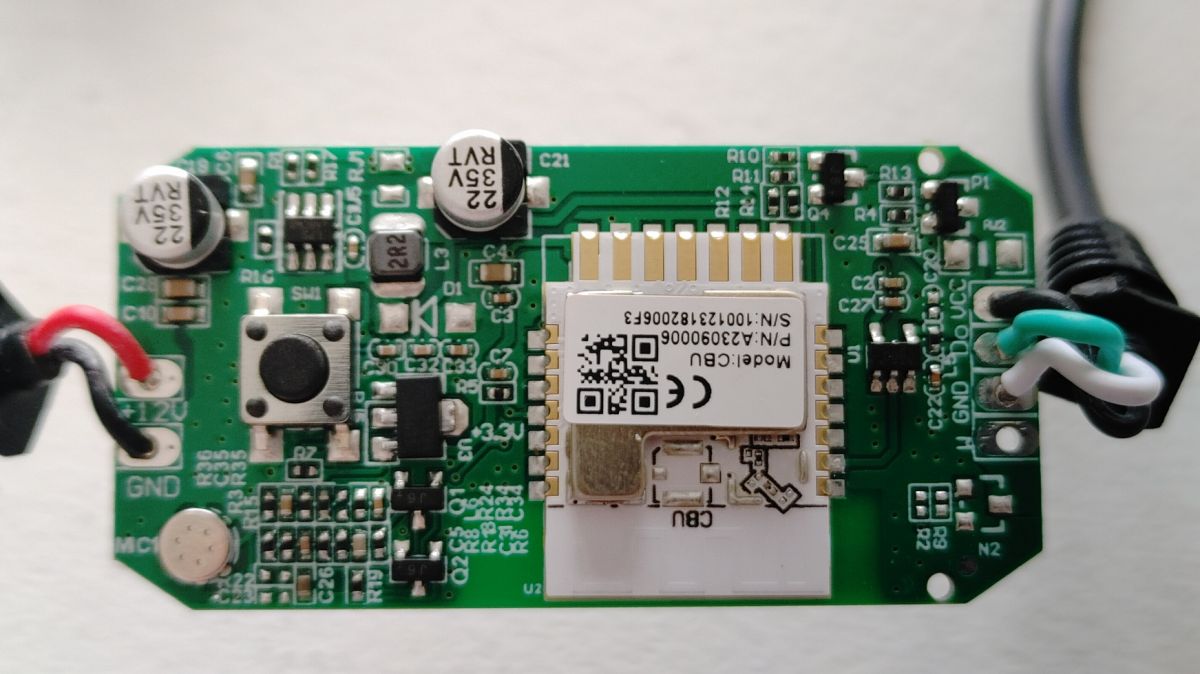
Hi all! I just got two of these outdoor addressable LED Spotlights (RGBW+IC) that use a CBU. Disassembly was a bit destructive and cracked the case that held the circuit board, but it'll still be usable when it's done.
Photo of a circuit board with a CBU module and electronic components.
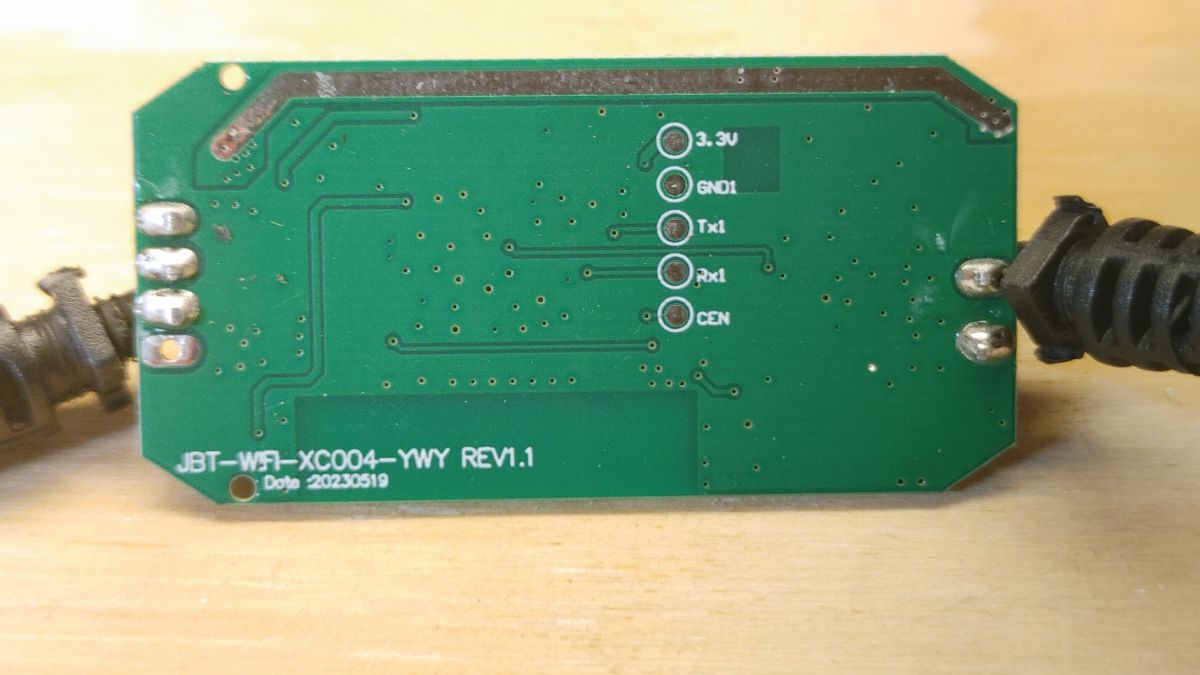
Circuit board of JBT-WF1-XC004-YWY module with pin labels
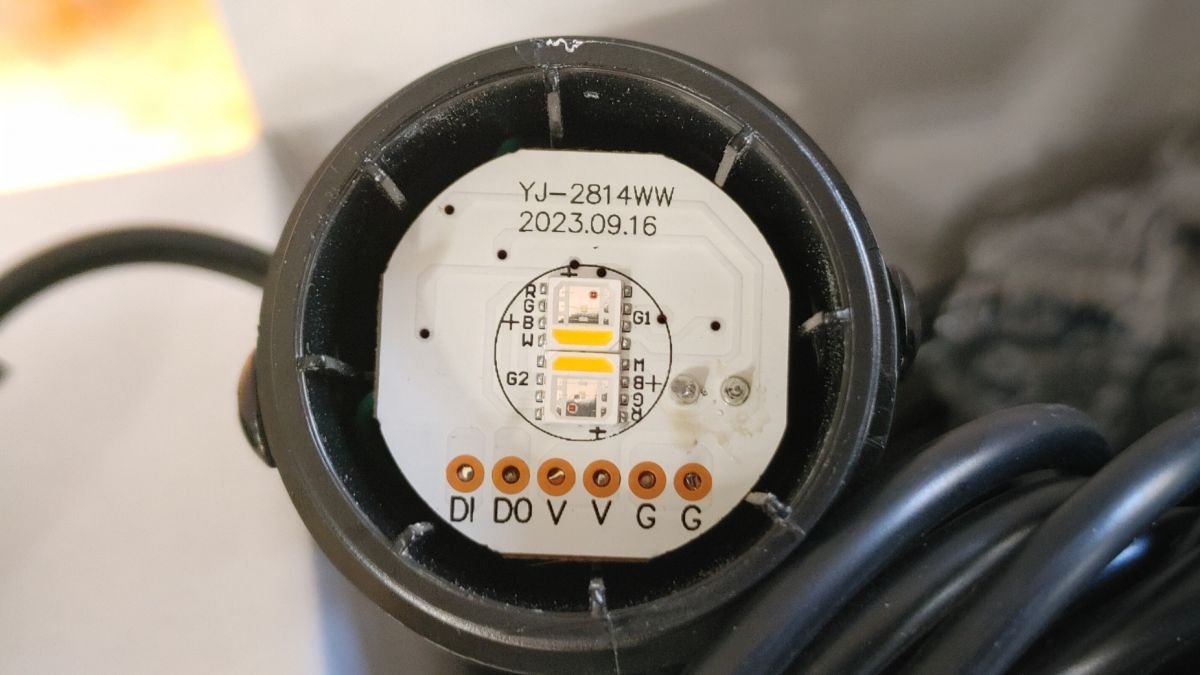
Close-up of a circuit board with markings and LED lights.
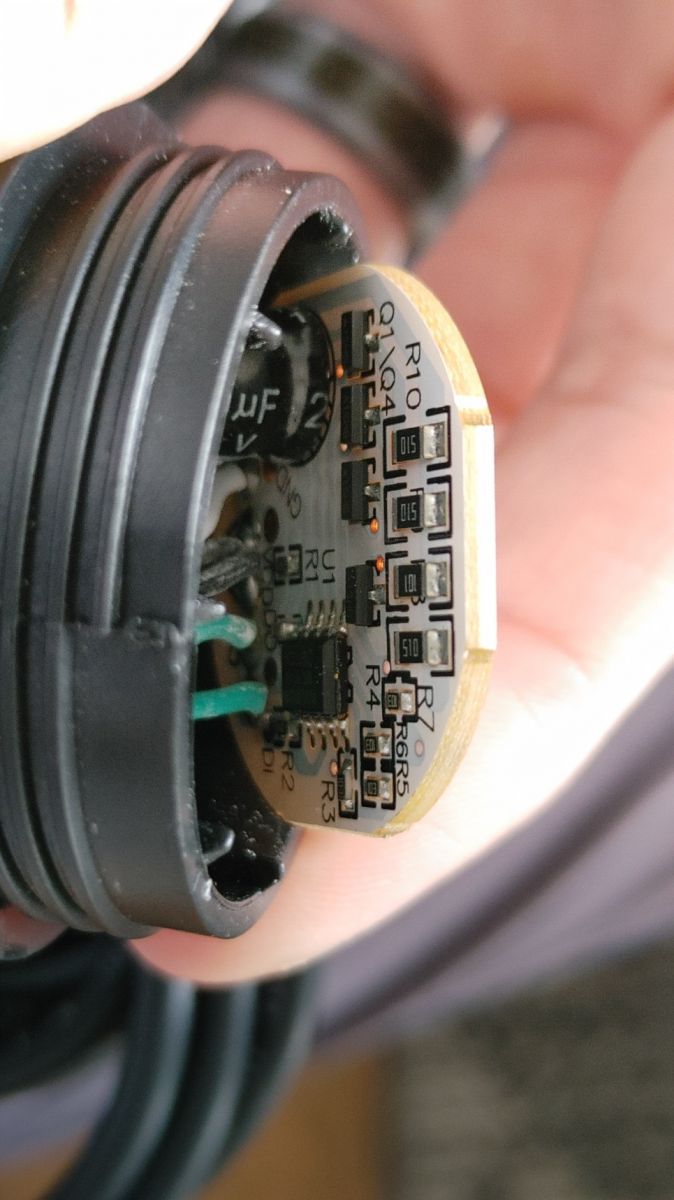
Close-up of a circuit board with electronic components.
I was successfully able to backup the factory firmware (attached) and install OpenBeken using BK Flasher, but haven't been able to make much progress since then. I can't seem to figure out how the GIPOs control the lights. I used the GPIO doctor on all the pins, but none will cause the lights to light up in any way (they did work before I flashed OpenBeken). I've only been able to identify that P24 is the button by using the "Set Input P-up," and pressing the button to see the change. Other than that, I am hitting a wall.
Text Description
Device configuration, as extracted from Tuya: 
- Microphone (TODO) on P23
- SPI MISO17
- SPI MOSI16
Device seems to be using CBU module, which is using BK7231N.
And the Tuya section starts, as usual, at 2023424

JSON Format:
{
	"Jsonver":"1.0.0",
	"brightmin":"10",
	"gmwb":"75",
	"title20":"1",
	"gmwg":"70",
	"knum":"1",
	"wfcfg":"spcl_auto",
	"colormin":"10",
	"pmemory":"1",
	"gmkb":"60",
	"k1sfunc":"5",
	"cmod":"4",
	"lednum":"12",
	"netlptime":"3",
	"micpin":"23",
	"rstbr":"50",
	"musicfunc":"1",
	"colormax":"100",
	"module":"CBU",
	"cwmaxp":"100",
	"rstmode":"1",
	"k1lfunc":"1",
	"dmod":"7",
	"brightmax":"100",
	"speedstep":"20",
	"wfct":"3",
	"expowctrl_pin":"8",
	"defbright":"100",
	"rstnum":"3",
	"rstcor":"r",
	"key1_pin":"24",
	"sensimax":"300",
	"miso":"17",
	"mosi":"16",
	"keyfunc":"1",
	"irfunc":"0",
	"expowctrl_lv":"1",
	"adclimit":"2400",
	"sensimin":"30",
	"MISO":"17",
	"wt":"20",
	"key1_lv":"0",
	"brightstep":"20",
	"remdmode":"0",
	"colorpfun":"0",
	"CS":"15",
	"gmwr":"100",
	"gmkg":"60",
	"onoffmode":"1",
	"colororder":"0",
	"brightrate":"20",
	"lptime":"3",
	"aging":"0",
	"category":"1101",
	"SCL":"14",
	"gmkr":"80",
	"defcolor":"r",
	"crc":"107",
	"}cPhAgw_di{abi":"0",
	"id":"null",
	"swv":"1.0.20",
	"bv":"40.00",
	"pv":"2.2",
	"lpv":"3.4",
	"pk":"keyfwt38nejumpuv",
	"firmk":"keyfwt38nejumpuv",
	"cadv":"1.0.5",
	"cdv":"1.0.0",
	"dev_swv":"1.0.20",
	"s_id":"null",
	"dtp":"0",
	"sync":"0",
	"attr_num":"1",
	"mst_tp_0":"9",
	"mst_ver_0":"1.0.20",
	"mst_tp_1":"0",
	"mst_ver_1":"null",
	"mst_tp_2":"0",
	"mst_ver_2":"null",
	"mst_tp_3":"0",
	"mst_ver_3":"null } )Agw_wsm{nc_tp",
	"ssid":"null",
	"passwd":"null",
	"md":"0",
	"random":"0",
	"wfb64":"1",
	"stat":"0",
	"token":"null",
	"region":"null",
	"reg_key":"null",
	"dns_prio":"0 }{uuid",
	"psk_key":"MnXfZutokIqrbtJmhnyMq6P1A0fcXxvuXcRmO",
	"auth_key":"tAOi6vMDmHSZ7VN7CvmGSE3IFbjv0AEi",
	"ap_ssid":"SmartLife",
	"ap_passwd":"null",
	"country_code":"null",
	"bt_mac":"null",
	"bt_hid":"null",
	"prod_test":"false",
	"fac_pin":"q8es5qukiuljknuj }{nc_tp",
	"lckey":"null",
	"h_url":"null",
	"h_ip":"null",
	"hs_url":"null",
	"hs_ip":"null",
	"hs_psk":"null",
	"hs_psk_ip":"null",
	"mqs_url":"null",
	"mqs_ip":"null",
	"mq_url":"null",
	"mq_ip":"null",
	"ai_sp":"null",
	"ai_sp_ip":"null",
	"mq_psk":"null",
	"mq_psk_ip":"null",
	"lp_url":"null",
	"lp_ip":"null",
	"time_z":"null",
	"s_time_z":"null",
	"wx_app_id":"null",
	"wx_uuid":"null",
	"dy_tls_m":"0",
	"cloud_cap":"0",
	"psk21_key":"null }{nc_tp"
}

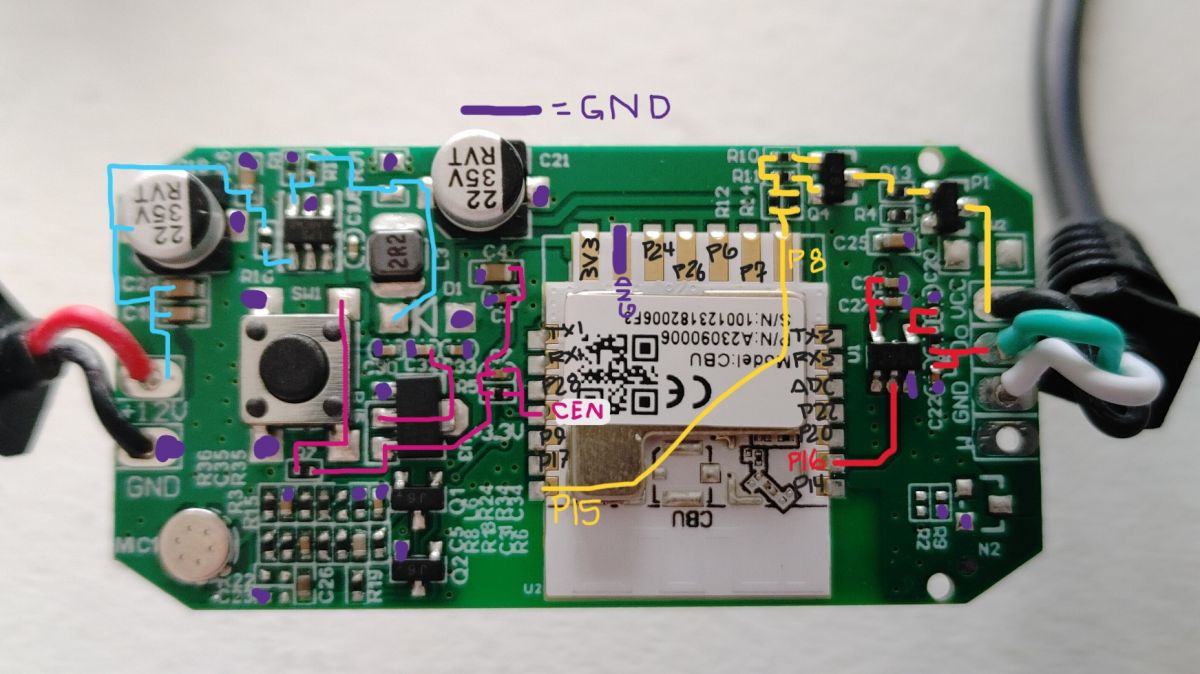
I did find out from the backup that BK Flasher identified the use of SPI, MOSI, and MISO. You'll have to forgive me, as that is getting beyond my level of knowledge and it's a bit of a foreign language. I did my best to trace out the pins on the board and what components they are connected to. Here's what I found:
Circuit board with CBU module and labeled pins and pathways.
I've spent the past three days reading and learning; these threads seem similar to my device:
[BK7231N/CBU] Casa Life ALDI Aus - Floor Lamp Mood Lamp - RGB control, SPI? MOSI? MISO?
Deciphering Pin Configuration & JSON Readout for Marlrin RGBCW Corner Floor Lamp (MOSI/MISO)
[BK7231N - CBU] Teardown of Aldi (Australia) CasaLux Smart Led Corner Lamp
If there's any recommendations or literature that informs how to make this work, please let me know. I've been searching, but haven't found the solution yet.
Attachments:
  • readResult_BK7231N_QIO_OutdoorLEDSpotlights_2024-12-1-07-27-55.bin (2 MB) You must be logged in to download this attachment.

About Author
pborrelli wrote 10 posts with . Been with us since 2022 year.

Comments

p.kaczmarek2 16 Jan 2024 07:55

This looks like individually adressable LEDs, the DO (Data Out) marking also indicates this. Have you tried our experimental SPI driver? 1. Start driver startDriver SM16703P 2. Init Driver - replace... [Read more]

pborrelli 16 Jan 2024 15:51

You Sir are a genius and a saint! I ran the SPI Driver commands and got light! Two of the four lit up, one blue and the other white. I then powered it down to get a picture of the chip on the LED board: ... [Read more]

p.kaczmarek2 16 Jan 2024 16:18

WS2814A ... well, to be honest, it's the first time ever I see this chip, but it bears a significant resemblance to WS2812 LEDs. Let's check the datasheet: https://obrazki.elektroda.pl/6439973400_1705418166_thumb.jpg... [Read more]

pborrelli 16 Jan 2024 17:44

Good to know that it's new equipment, and not just that I'm new. I cleared the assignment on P16 and did some poking and prodding and am finally getting somewhere. P8 & P15 are set to relays, and I have... [Read more]

pborrelli 17 Jan 2024 23:30

I've been doing some testing and tuning, but not much to report. I can get all four lights to light up by playing with various settings on the number of pixels and the color assignment going to each one,... [Read more]

pborrelli 15 Aug 2024 20:52

So it's been most of a year now, these sat for about seven months, but I finally picked them up again. I found a workaround that provides correct color and individual control of each LED; though it's... [Read more]

FAQ

TL;DR: For these 4-light BK7231N CBU spotlights, "Do not set any GPIO role for P16" is the key fix. Leave P16 free for SPI data, toggle P8 and P15 to power the LED section, and test with OpenBeken SM16703P. If colors remain random, ESPHome Beken_SPI_LED_Strip with sk6812 and is_wrgb: True solved correct RGBW control. [#20912797]

Why it matters: This FAQ helps OpenBeken and ESPHome users recover LED control after flashing a Ligency RGBW+IC spotlight whose addressable LEDs do not respond to normal GPIO probing.

Option What the thread showed Best use in this device
OpenBeken + SM16703P Produced light, but colors were inconsistent because the driver sent 24-bit style data to a 32-bit RGBW LED chain Fast hardware discovery and GPIO testing
ESPHome + Beken_SPI_LED_Strip Worked with chipset: sk6812 and is_wrgb: True, giving correct color and per-LED control Practical workaround for normal use

Key insight: GPIO Doctor failed because this spotlight does not use simple PWM RGBW outputs. It uses individually addressable RGBW LEDs, so power-enable pins and SPI-style data behavior matter more than direct GPIO toggling.

Quick Facts

  • The Tuya dump exposed five key mappings: key1_pin=24, expowctrl_pin=8, micpin=23, MOSI=16, and MISO=17, which gave the first reliable map of button, power control, and LED data paths. [#20911851]
  • OpenBeken's experimental test sequence used startDriver SM16703P, then SM16703P_Init 64 or SM16703P_Init 4, followed by SM16703P_SetPixel and SM16703P_Start. [#20911963]
  • The LED board was identified as WS2814A, and the thread highlighted the critical framing mismatch: WS2814A uses a 32-bit frame, while WS2812B uses 24-bit data. [#20912797]
  • Stable light output required P8 and P15 to be toggled like relays before SPI output started, while P16 had to stay unassigned in GPIO roles. [#20912961]
  • After roughly 7 months of pause, the working workaround was ESPHome Beken_SPI_LED_Strip with chipset: sk6812 and is_wrgb: True, which restored correct colors and individual control. [#21192339]

How can I identify the correct GPIOs on a BK7231N CBU Ligency RGBW+IC spotlight after flashing OpenBeken when GPIO Doctor doesn’t light the LEDs?

Use the Tuya JSON and PCB tracing first, not GPIO Doctor alone. In this spotlight, GPIO Doctor found only the button on P24, while the dump pointed to expowctrl_pin=8, key1_pin=24, micpin=23, MOSI=16, and MISO=17. That pattern indicates addressable LEDs, not plain PWM channels, so the LEDs will not react to simple per-pin toggling. Trace power-enable lines and test the SPI-style driver path instead. [#20911851]

What is the WS2814A LED chip, and how is it different from WS2812B or SK6812 in RGBW addressable lighting?

WS2814A is an addressable RGBW LED driver that resembles WS2812-family parts but uses a 32-bit frame instead of the 24-bit frame discussed for WS2812B. "WS2814A" is an addressable LED controller category that drives individually controlled pixels, adds a dedicated white channel, and expects a longer data frame than classic 3-channel RGB parts. In this thread, that extra white data path explained why partial light worked but colors stayed wrong with a 24-bit-oriented test driver. [#20912797]

How do I use the experimental SM16703P SPI driver in OpenBeken to test individually addressable LEDs on a CBU module?

Use the driver from the OpenBeken console in four commands. 1. startDriver SM16703P 2. SM16703P_Init 4 or another LED count 3. Send pixels with SM16703P_SetPixel ..., then trigger output with SM16703P_Start. The earlier test example also showed SM16703P_Init 64 and three color writes for red, green, and blue. This confirms whether the LED chain reacts to SPI-style output at all. [#20911963]

Why would a Ligency outdoor RGBW+IC spotlight light up once with SM16703P commands and then stop responding after a power cycle?

It stops because the LED section needs both correct power-enable state and a fresh data start. After reboot, the user found P8 and P15 had to be toggled first, or SM16703P_Start produced no visible output. The thread also showed inconsistent behavior after power cycling, including only 2 of 4 spotlights lighting and some lights turning off when relay states changed. That points to power-gating plus protocol mismatch, not a dead LED chain. [#20912961]

Which GPIO settings are recommended for OpenBeken SPI LED testing on this BK7231N device, especially for P8, P15, and P16?

Leave P16 unassigned, and use P8 and P15 as relay-style power controls. The direct guidance was: "Do not set any GPIO role for P16, just start driver." Later testing showed the LEDs only came alive when P8 and P15 were toggled on first. On this board, P16 behaves like the SPI data path, while P8 and P15 appear to enable power or sections of the LED hardware. [#20912797]

What does the Tuya JSON dump mean for a CBU spotlight, including fields like key1_pin, expowctrl_pin, micpin, MOSI, and MISO?

It is the factory configuration map that exposes how the BK7231N CBU firmware expected the hardware to work. In this dump, key1_pin=24 matched the pushbutton, expowctrl_pin=8 suggested external power control, micpin=23 matched the microphone input, and MOSI=16 plus MISO=17 pointed to an SPI-style peripheral path. The same dump also listed lednum=12, firmware swv=1.0.20, and module CBU. [#20911851]

Why do P8 and P15 need to be toggled like relays before the SPI-driven LEDs start working on this Ligency spotlight?

They appear to gate power to the LED subsystem or related stages. The user reported that setting P8 and P15 as relays and toggling either or both on was necessary before any light output appeared. If SM16703P_Start ran before those relays were enabled, nothing happened. That behavior fits a board where the data pin alone cannot drive LEDs until one or more power-enable lines are active. [#20912961]

How can I tell from the PCB markings and traces whether a smart spotlight uses individually addressable LEDs instead of simple PWM RGBW channels?

Look for a data-chain marking and serial LED topology, not four separate RGBW power channels. In this case, a DO marking on the LED board strongly suggested data-out chaining between LEDs, and that led directly to trying the SM16703P driver. The board then lit partially under pixel commands, confirming individually addressable behavior. A simple PWM RGBW lamp would respond to direct GPIO-to-channel testing instead. [#20911963]

What causes random colors or unpredictable LED behavior when driving WS2814A lights with a 24-bit OpenBeken SPI driver?

The random output comes from frame-length mismatch. The thread identified WS2814A as similar to WS2812 timing-wise, but using a 32-bit frame, while the OpenBeken test path behaved like a 24-bit RGB driver. That mismatch shifted color data and produced cases where only some of the 4 lights responded, sometimes blue, sometimes warm white, and without a stable pattern. The hardware was alive; the payload format was wrong. [#20912797]

Where should I probe with an oscilloscope on a WS2814A LED board to verify the data signal and timing from a BK7231N CBU module?

Probe the DO-labeled data path on the LED board. The thread explicitly suggested hooking an oscilloscope to the DO pin because that point should reveal whether the BK7231N side is sending valid timing into the addressable LED chain. That is the fastest way to separate a GPIO or power-enable problem from a protocol problem. It also helps confirm whether the 32-bit stream is being framed correctly. [#20912797]

How does the 32-bit frame used by WS2814A affect compatibility with OpenBeken’s SM16703P driver?

It makes the current test driver only partially compatible. The OpenBeken SM16703P path could still light "some random colors," but the thread noted that WS2814A needs 32-bit frames, not the 24-bit structure used by WS2812B-style RGB data. That means a driver change is needed for correct RGBW ordering and predictable per-pixel control. Without that change, test output proves activity, not full compatibility. [#20912797]

What is a CBU module in Tuya devices, and how does it relate to the BK7231N chip used in smart LED spotlights?

A CBU module is the Tuya radio-and-MCU module used here, and this thread identified it as carrying a BK7231N. "CBU" is a Tuya Wi‑Fi/Bluetooth module category that hosts the main control chip, runs the device firmware, and exposes GPIOs used for buttons, power control, and LED data interfaces. In this spotlight, the backup and JSON both confirmed a CBU with BK7231N and mapped several pins around it. [#20911851]

ESPHome Beken_SPI_LED_Strip vs OpenBeken SM16703P driver: which works better for WS2814A or SK6812-style RGBW LEDs?

ESPHome worked better for normal use in this case. OpenBeken's SM16703P driver was useful for discovery because it proved the LEDs were addressable, but colors stayed unpredictable due to the 24-bit versus 32-bit mismatch. Months later, the user reported correct color and individual LED control with ESPHome Beken_SPI_LED_Strip, using sk6812 and is_wrgb: True. That makes ESPHome the practical choice here. [#21192339]

How do I configure ESPHome Beken_SPI_LED_Strip for WS2814A by using chipset sk6812 and is_wrgb True on a BK7231N device?

Set the ESPHome platform to Beken_SPI_LED_Strip, choose chipset: sk6812, and enable is_wrgb: True. That exact combination was the workaround that restored correct colors and individual control on these WS2814-based spotlights after about 7 months of testing and pause. The user concluded that adding the white-channel data effectively pushed the full 32-bit packet the LEDs expected. [#21192339]

What literature, examples, or similar teardown threads are most useful for learning how SPI, MOSI, and MISO control addressable LEDs in Tuya-based BK7231N lights?

Start with closely related BK7231N/CBU lamp teardowns that also mention SPI, MOSI, and MISO. The original post specifically linked three useful examples: Casa Life ALDI floor lamp RGB control, Marlrin RGBCW corner lamp pin/JSON analysis, and CasaLux smart LED corner lamp teardown. Those threads helped frame this device as an addressable LED design rather than a standard PWM RGBW light, which shortened troubleshooting after 3 days of trial and reading. [#20911851]
Generated by the language model.
%}