Built a PIC16LF1459-based USB password manager that acts as a HID keyboard on demand and as a fake flash drive for editing the stored password.
The design splits USB support into separate keyboard and mass-storage branches, using usb_service, keyboard_service, and a button on RA5 to switch modes.
It stores the password in EERAM and exposes it through a single FAT12 file, while the keyboard sends bytes non-blocking from memory after the button press.
The LED indicates the current mode by flash speed, and in practice the device appears as removable storage before typing the saved text automatically.
The current version still needs more buttons and safer editing control, and it cannot protect against keylogger-style programs at the operating-system level.
AI summary based on the discussion. May contain errors.
Now you can start with the overall roadmap. We already have the two component modules running, now all we need to do is:
- separate the keyboard and flash drive into separate files respectively
- create a common loop function in the main and there decide which USB stack is running
- select a digital pin - for example RA5 - and configure it as a digital input
- in the loop, based on the reading from this pin, switch the state to the keyboard, and when the keyboard finishes sending characters, return to mass memory mode
For simplicity's sake I thought I'd give a hardware substitute to limit the effect of pin oscillation and simply use a capacitor....
In practice it got a bit more complicated. The Mass Storage Device support is based on interrupts, it is reactive, the MSD only responds when asked. For this reason it is implemented in usb_handle_transaction.
The HID Keyboard, on the other hand, is proactive - the keyboard speaks itself and sends pressed keys, it does not need to be asked.
For this reason, we have a generic usb_service handler and additionally a keyboard_service function.
Code: C / C++
Log in, to see the code
Similarly, I have separated other common functions, e.g. descriptor retrieval:
Code: C / C++
Log in, to see the code
or initialisations:
Code: C / C++
Log in, to see the code
This now tells us how separation works and how entering keyboard mode works. What's left is to exit keyboard mode and send keys. The main keyboard loop respects the delays in a non-blocking way and sends the next keys, reading them from EERAM beforehand:
Code: C / C++
Log in, to see the code
Well, and now we return to the main loop shown - this is where the end-of-writing flag is checked:
Code: C / C++
Log in, to see the code
Basically that's it. A few ifs, a button handler, iterating bytes from memory and off we go.
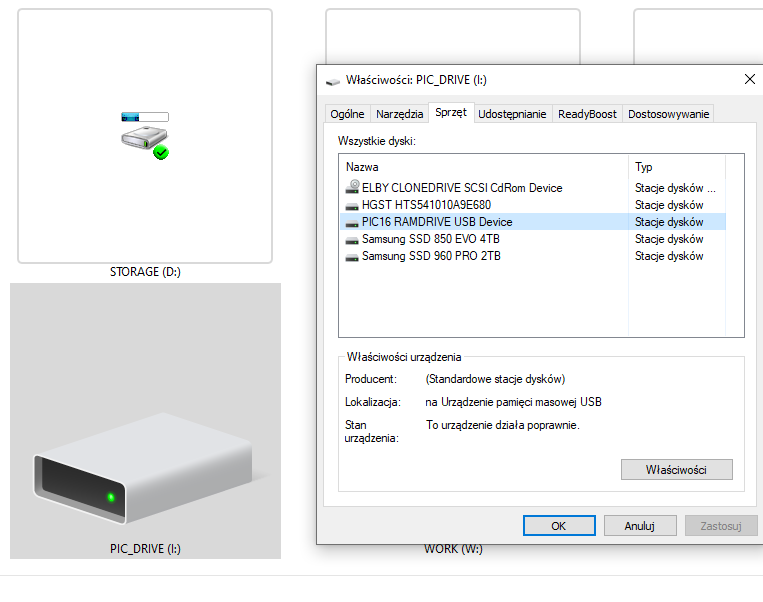
Time for the final presentation. This is what the data carrier looks like in "This Computer":
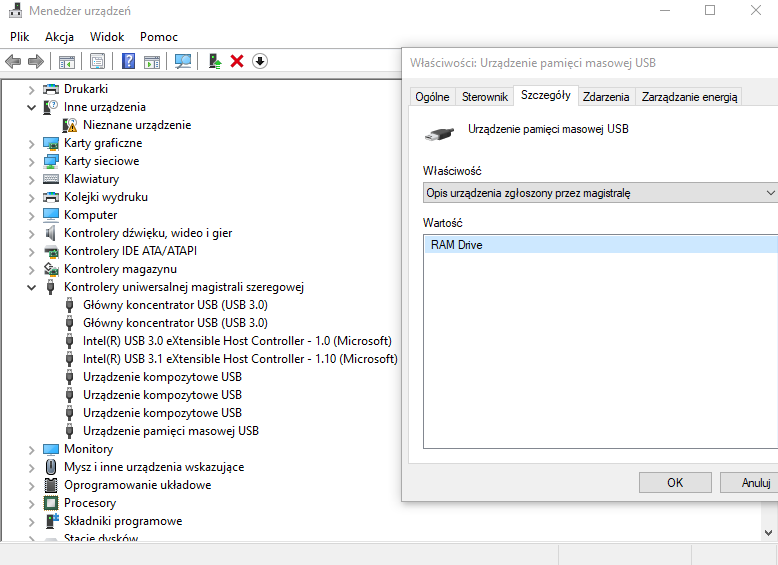
This is how it looks in the device manager:
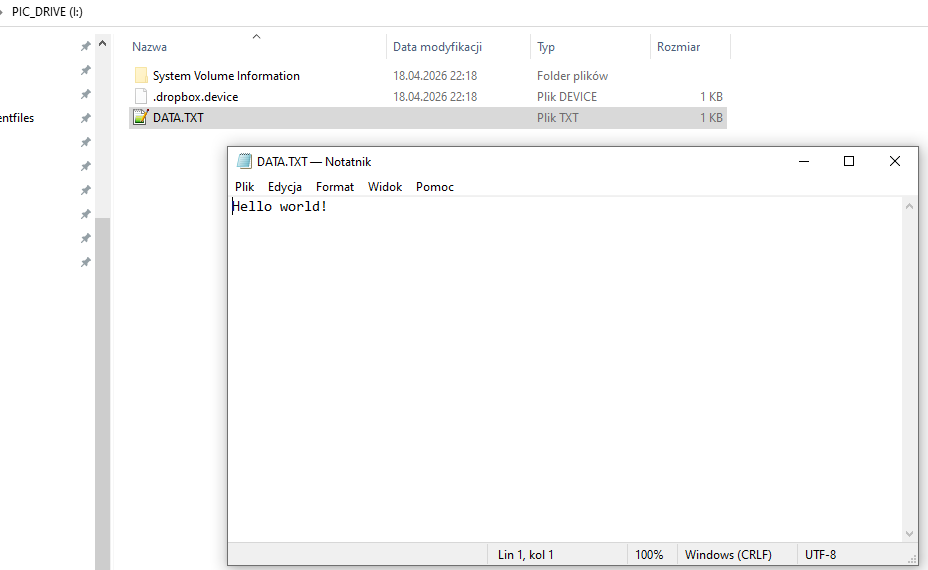
Yes when opened in Windows Explorer (interesting fact: this file from Dropbox and the system folder do not physically exist in my file table):
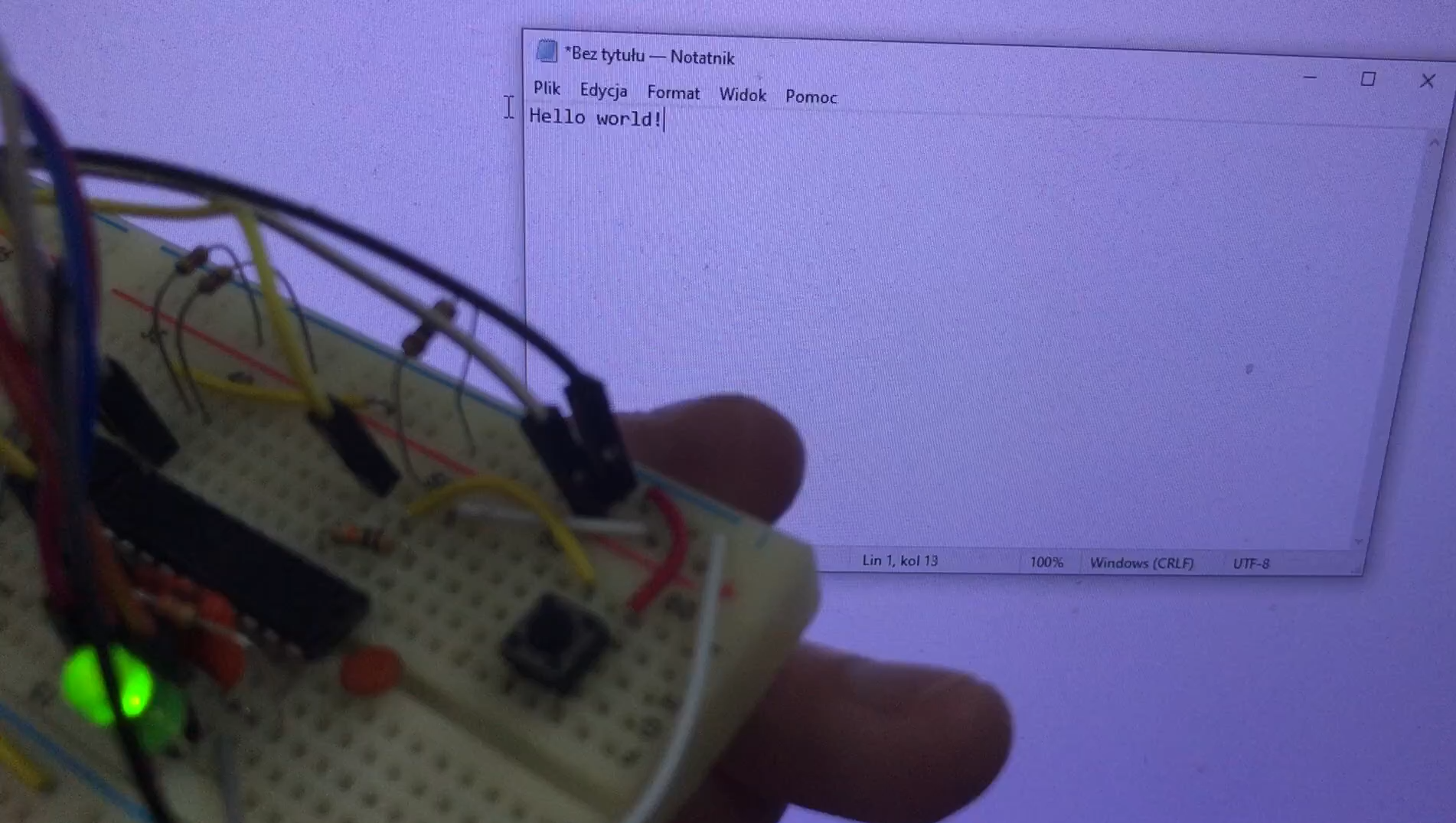
This is how the device works in practice - the video shows the button being pressed, the LED flashing and the text being entered:
... and that intrusive window from Dropbox after typing in text is a good illustration of the device reverting to storage media mode.
In summary , all the hard work boiled down to getting the HID keyboard up and running (that was relatively easy) and a pretend memory stick with FAT12 (that's a bit trickier), both of which I've covered in previous topics. Here, basically the whole thing came down to cleverly splitting the USB support into two branches and programming the keyboard to send bytes from memory and then return to media mode.
The only question that remains is - does such a developed device make sense? In the current version rather not, it would be useful to add a few more buttons and control over the content editing mode (pen drive) may be necessary. Text editing should be on-demand only, perhaps also password protected, just how do you do that without external drivers? Probably better to secure with a button. I can imagine a situation where this kind of device is such a portable password manager, allowing you to conveniently log into an account at school, work or the library. Of course there are off-the-shelf ones, but this is all about DIY. Similarly, a display would be useful.... maybe something with an I2C interface, there are enough pins for that.
Of course, this won't protect against keylogger-type programs on the computer, because they intercept at the operating system level, but that's another matter already.
Maybe this is not the end of it, and I will present another version soon. The full SDCC project is attached.
Attachments:
pic16lf1459_usb_drive_hybrid.zip(182.66 KB)
You must be logged in to download this attachment.
About Author
p.kaczmarek2 wrote 14827 posts with
rating 13015 , helped 659 times.
Been with us since 2014 year.
I did something similar on an RP2040, except with a few buttons and different passwords, and it involved configuring multiple Hikvision surveillance DVRs. Some i***ta came up with the idea that you can't... [Read more]
If we have more passwords, such a project can be helpful (unfortunately for me - in German)
https://passwordvault.de [Read more]
p.kaczmarek2
16 May 2026 12:40
@LechU Raspberrypi Pico ... @dktr RP2040 interesting projects, but on what powerful platforms .... i might try to develop what I have, specifically on a much weaker platform - an 8-bit PIC. Probably with... [Read more]
FAQ
TL;DR: To projekt dla osób, które chcą najprostszy DIY menedżer haseł USB: przechowuje tekst w 512 bajtach i po naciśnięciu przycisku wpisuje go jak klawiatura. Autor podsumował to krótko: „Basically that’s it.” Urządzenie normalnie udaje pendrive, więc hasło edytujesz zwykłym plikiem tekstowym bez sterowników. [#21902780]
Dlaczego to ważne: Ten projekt pokazuje, jak jednym mikrokontrolerem połączyć wygodną edycję hasła z automatycznym wpisywaniem go na dowolnym komputerze obsługującym USB.
Cecha
PIC16LF1459 + SDCC
RP2040 + kilka przycisków
Rola w wątku
Pełny projekt: klawiatura HID + pamięć masowa
Wspomniany wariant do wielu haseł
Wybór hasła
1 przycisk, 1 sekwencja tekstu
Kilka przycisków, różne hasła
Edycja danych
Zwykły plik tekstowy na emulowanym dysku
Nieopisane
Pokazany zakres implementacji
Kod, LED, przełączanie trybów, demo wideo
Tylko opis zastosowania
Kluczowy wniosek: Najtrudniejsze nie jest samo „wpisywanie hasła”, lecz poprawne przełączanie stosu USB między trybem klawiatury HID i pamięci masowej oraz bezpieczny powrót do trybu dysku po zakończeniu wpisywania. [#21902780]
Quick Facts
Urządzenie pracuje w 2 trybach USB: MODE_MSC jako pendrive i MODE_KEYBOARD jako klawiatura HID; LED miga wolno w MSC i szybko w trybie klawiatury. [#21902780]
Bufor wpisywanego tekstu ma granicę 512 bajtów, a znaki są czytane z pamięci przez I2C z obszaru oznaczonego jako LBA 3. [#21902780]
Deskryptory USB mają różne rozmiary zależnie od trybu: urządzenie 18 B, konfiguracja MSC 32 B, konfiguracja klawiatury 34 B. [#21902780]
Pętla klawiatury używa dwóch opóźnień po 50 taktów pętli: po wciśnięciu klawisza i po jego zwolnieniu, aby system zdążył zarejestrować znak. [#21902780]
Przycisk jest podłączony jako wejście aktywne w stanie niskim na RA5, a autor dodał kondensator, by ograniczyć skutki drgań i oscylacji sygnału. [#21902780]
1. Jak zbudować DIY menedżer haseł USB na PIC16LF1459, który pokazuje się jednocześnie jako klawiatura i pendrive?
Budujesz go z dwóch modułów USB uruchamianych naprzemiennie: HID Keyboard i Mass Storage Device. Autor rozdzielił kod klawiatury i pendrive’a do osobnych plików, a w main przełącza usb_mode między MODE_MSC i MODE_KEYBOARD. Hasło zapisujesz w zwykłym pliku tekstowym widocznym po podłączeniu jako dysk, a po naciśnięciu przycisku urządzenie odłącza i ponownie zgłasza się jako klawiatura, która wpisuje zapisane znaki. LED sygnalizuje stan tempem migania, więc bez ekranu wiadomo, który stos USB jest aktywny. [#21902780]
2. Czym jest EERAM i dlaczego użyto jej tutaj zamiast zwykłego EEPROM lub flash do przechowywania tekstu hasła?
„EERAM” jest pamięcią nieulotną, która przechowuje bajty tekstu i pozwala odczytywać je przez I2C, a w tym projekcie służy jako prosty magazyn danych dla emulowanego pendrive’a i klawiatury. Autor wcześniej pokazał zapis pojedynczego pliku do nieulotnej pamięci EERAM i tutaj wykorzystał to doświadczenie ponownie. Dzięki temu urządzenie czyta kolejne znaki hasła bezpośrednio z pamięci podczas wpisywania, zamiast trzymać cały tekst w kodzie programu. Wątek nie podaje przewagi liczbowej nad EEPROM ani flash; podaje tylko, że EERAM była już użyta i działała w tym modelu projektu. [#21902780]
3. Jak działa przełączanie między trybem klawiatury USB HID i trybem USB Mass Storage na PIC16LF1459?
Przełączanie działa przez zmianę zmiennej usb_mode i ponowną enumerację USB. Gdy przycisk na RA5 zostanie przytrzymany wystarczająco długo, kod ustawia usb_mode = MODE_KEYBOARD i wywołuje usb_detach_attach(). Po zakończeniu wpisywania oraz po zwolnieniu przycisku urządzenie wraca do MODE_MSC i znów wykonuje usb_detach_attach(). Deskryptory, inicjalizacja klas i obsługa żądań setup są rozdzielone na gałęzie zależne od bieżącego trybu, więc host widzi raz pendrive, a raz klawiaturę. [#21902780]
4. Dlaczego klawiatura USB HID potrzebuje innej pętli obsługi niż urządzenie Mass Storage zaimplementowane na przerwaniach?
Klawiatura HID potrzebuje własnej pętli, bo sama aktywnie wysyła raporty klawiszy, a pamięć masowa odpowiada dopiero na żądania hosta. Autor napisał wprost, że MSD jest reaktywne i obsługiwane w usb_handle_transaction, natomiast klawiatura jest proaktywna. Dlatego wspólna funkcja usb_service() nie wystarcza. W trybie klawiatury trzeba dodatkowo regularnie wywoływać keyboard_service(), pilnować opóźnień i wysyłać sekwencję „naciśnięcie–zwolnienie” dla każdego znaku, inaczej host nie dostanie pełnego tekstu. [#21902780]
5. Jak zapisać hasło w zwykłym pliku tekstowym na fałszywym pendrive’ie i potem kazać urządzeniu wpisać je automatycznie?
Robisz to w 3 krokach. 1. Podłącz urządzenie w trybie MODE_MSC, gdzie komputer widzi je jako pendrive z plikiem tekstowym. 2. Edytuj treść hasła w tym pliku, a dane trafią do nieulotnej pamięci używanej przez emulowany FAT12. 3. Naciśnij przycisk, aby przełączyć urządzenie do MODE_KEYBOARD; funkcja keyboard_service() czyta bajty przez I2C, zamienia ASCII na kody HID i wpisuje tekst automatycznie. Autor pokazuje, że po zakończeniu wpisywania urządzenie wraca do trybu pamięci masowej. [#21902780]
6. Czym jest FAT12 i dlaczego przydaje się przy emulacji prostego pendrive’a USB na mikrokontrolerze?
„FAT12” jest prostym systemem plików, który organizuje pliki na małym woluminie USB i pozwala komputerowi zobaczyć urządzenie jak zwykły pendrive, nawet gdy stoi za nim własna implementacja mikrokontrolera. Autor wprost pisze, że „pretend memory stick with FAT12” było trudniejszą częścią projektu. FAT12 daje tu praktyczną korzyść: Windows Explorer pokazuje plik tekstowy, więc hasło można edytować bez dodatkowego programu, sterownika lub własnego protokołu konfiguracyjnego. [#21902780]
7. Jak zrobić debounce przycisku do zmiany trybów USB i dlaczego dodano kondensator na pinie wejściowym?
Debounce zrobiono programowo i wsparto go sprzętowo kondensatorem. Kod używa trzystanowego automatu btn_state oraz licznika btn_timer, aby nie przełączyć trybu po krótkim impulsie lub odbiciach. Wejście jest aktywne stanem niskim, odczytywanym jako !(PORTA & 0x20), czyli z linii RA5. Autor dodał kondensator „dla prostoty”, żeby ograniczyć skutki oscylacji pinu i zmniejszyć ryzyko fałszywego przełączenia podczas naciskania lub puszczania przycisku. [#21902780]
8. Dlaczego urządzenie odłącza i ponownie podłącza USB po zmianie z trybu MSC na tryb klawiatury albo z powrotem?
Musi to zrobić, aby host zobaczył nowe deskryptory i nową klasę urządzenia. W jednym stanie komputer ma widzieć pamięć masową, a w drugim klawiaturę HID, więc sama zmiana zmiennej usb_mode nie wystarcza. Autor po każdym przełączeniu woła usb_detach_attach(), co wymusza ponowną enumerację. Bez tego system mógłby nadal traktować sprzęt jak poprzednią klasę USB i ignorować nowe deskryptory, raporty HID albo żądania specyficzne dla MSC. [#21902780]
9. Jak w projekcie klawiatury USB w SDCC zamienia się znaki ASCII na kody HID, łącznie ze Shift dla wielkich liter i symboli?
Projekt czyta jeden znak ASCII, mapuje go funkcją ascii_to_hid(), a potem wydziela bit Shift z najwyższego bitu wyniku. Kod robi to tak: jeśli hid_code & 0x80, ustawia modyfikator 0x02, czyli Left Shift, a sam kod klawisza maskuje do 0x7F. Następnie wysyła raport keyboard_send_report(modifier, hid_code), czeka 50 taktów pętli, wysyła raport zwolnienia keyboard_send_report(0, 0) i znów czeka 50 taktów. Dzięki temu działają wielkie litery i znaki wymagające Shift. [#21902780]
10. Jakie są ograniczenia takiego sprzętowego menedżera haseł, szczególnie wobec keyloggerów na komputerze gospodarza?
Nie chroni on przed keyloggerami działającymi na poziomie systemu operacyjnego hosta. Autor zaznacza to wprost: taki komputerowy keylogger przechwyci wpisywane znaki tak samo, jak przy zwykłej klawiaturze USB. Drugie ograniczenie jest użytkowe: obecna wersja ma w praktyce tylko jedną sekwencję tekstu i według autora „rather not” ma jeszcze pełny sens bez większej liczby przycisków, kontroli trybu edycji oraz lepszego zabezpieczenia dostępu do pliku z hasłem. [#21902780]
11. Co jest lepsze dla narzędzia USB do wpisywania wielu haseł: PIC16LF1459 z SDCC czy RP2040 z kilkoma przyciskami?
Do wielu haseł praktyczniejszy wygląda wariant RP2040 z kilkoma przyciskami, ale tylko PIC16LF1459 został tu pokazany jako pełny projekt. Drugi autor opisał własne rozwiązanie na RP2040 z 3 przyciskami i różnymi hasłami do konfiguracji rejestratorów Hikvision, gdzie nie dało się wklejać haseł. PIC16LF1459 ma za to przewagę demonstracyjną: autor pokazał pełny kod, przełączanie MSC/HID, edycję pliku i demo wideo. Jeśli celem jest jedno hasło plus pendrive konfiguracyjny, PIC już działa; jeśli wybór wielu haseł jednym kliknięciem, opis RP2040 wskazuje wygodniejszy kierunek. [#21903011]
12. Jak można rozbudować ten projekt o wiele przycisków, chroniony tryb edycji albo wyświetlacz I2C?
Najprościej dodać kilka przycisków, z których każdy wybiera inną sekwencję tekstu lub inny rekord w pamięci. Autor sam wskazuje trzy kierunki: więcej przycisków, tryb edycji uruchamiany tylko na żądanie oraz wyświetlacz z interfejsem I2C, bo „there are enough pins for that”. W praktyce oznacza to rozdzielenie normalnego trybu wpisywania od trybu widocznego jako pendrive. Autor sugeruje też, że lepiej zabezpieczyć edycję przyciskiem niż liczyć na rozwiązanie bez sterowników. [#21902780]
13. Dlaczego w Windows Explorer pojawiają się dodatkowe pliki albo foldery systemowe na emulowanym dysku USB, choć fizycznie nie są zapisane w niestandardowym obrazie FAT12?
Pojawiają się, bo system operacyjny i aplikacje traktują urządzenie jak zwykły nośnik i prezentują własne artefakty środowiska pracy. Autor zauważa wprost, że plik z Dropboxa i folder systemowy w Explorerze „nie istnieją fizycznie” w jego tabeli plików. To ważny przypadek brzegowy: wygląd zawartości w Windows nie musi oznaczać, że mikrokontroler naprawdę przechowuje wszystkie widoczne wpisy. Przy emulowanym FAT12 host może pokazywać elementy wynikające z własnych operacji, pamięci podręcznej albo integracji powłoki. [#21902780]
14. Co powoduje gubienie znaków przez DIY klawiaturę USB i jak dobrać opóźnienie startowe oraz odstępy między klawiszami dla pewnego wpisywania?
Znaki giną, gdy host nie zdąży odebrać raportów albo gdy urządzenie wyśle kolejny klawisz bez poprawnego zwolnienia poprzedniego. Autor zabezpiecza to trzema mechanizmami: czeka, aż endpoint nie będzie zajęty przez SIE, stosuje boot_delay, a potem używa kb_delay po 50 taktów pętli po naciśnięciu i po zwolnieniu klawisza. To jest praktyczny punkt strojenia. Jeśli system nadal gubi znaki, zwiększasz opóźnienia; jeśli wpisywanie jest zbyt wolne, zmniejszasz je ostrożnie, aż host nadal rejestruje pełną sekwencję. [#21902780]
15. Gdzie można zobaczyć gotowy projekt w działaniu, razem ze sprzętem, zachowaniem diody LED i demem automatycznego wpisywania hasła?
Można to zobaczyć bezpośrednio w materiale dołączonym do głównego wpisu. Autor pokazał zrzuty z „Ten komputer”, Menedżera urządzeń i Explorera Windows, a także osadził film MP4 pokazujący naciśnięcie przycisku, zmianę migania LED i automatyczne wpisywanie tekstu. W tym samym wpisie dodał też pełny projekt SDCC jako załącznik, więc wątek zawiera zarówno demonstrację działania, jak i pliki potrzebne do odtworzenia rozwiązania. [#21902780]
AI summary based on the discussion. May contain errors.








Comments
I did something similar on an RP2040, except with a few buttons and different passwords, and it involved configuring multiple Hikvision surveillance DVRs. Some i***ta came up with the idea that you can't... [Read more]
And will you show off your project ? [Read more]
If we have more passwords, such a project can be helpful (unfortunately for me - in German) https://passwordvault.de [Read more]
@LechU Raspberrypi Pico ... @dktr RP2040 interesting projects, but on what powerful platforms .... i might try to develop what I have, specifically on a much weaker platform - an 8-bit PIC. Probably with... [Read more]