A Waveshare ESP32-S3-RLCD-4.2 board combines a 400x300 RLCD display, ESP32S3 with PSRAM, ES8311 audio codec, speaker, two I2S microphones, and Li-ion charging plus 18650 holder.
The project turns it into an internet radio that boots onto Wi-Fi, syncs time via NTP, loads stream URLs from flash, and serves a setup web page in the background.
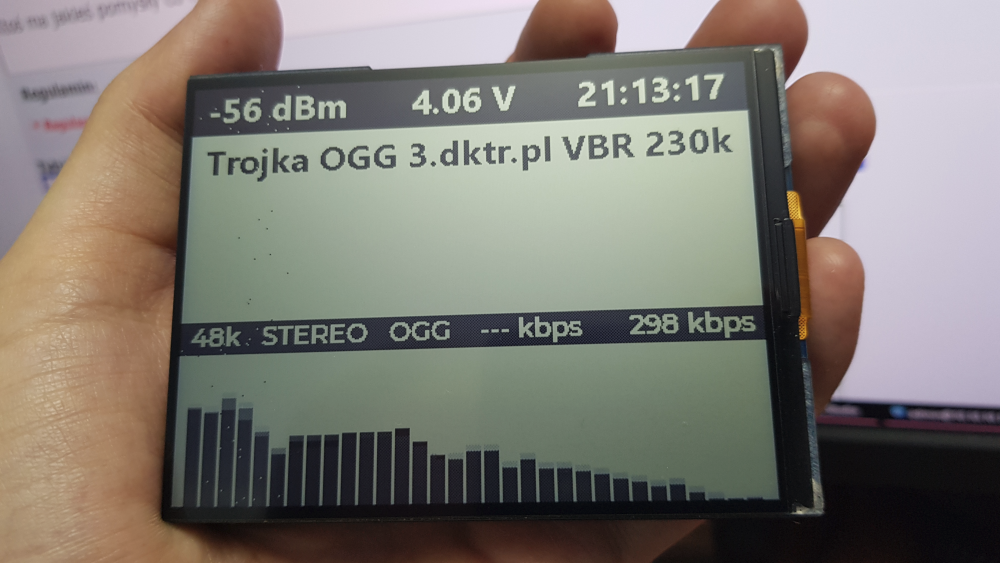
The 4.2-inch display drives a 32-bar spectrum analyser at 240 MHz over SPI, with the display running at 40 MHz.
That setup reaches about 35 FPS and produces a visibly cool audio visualizer.
Pushing SPI speed too far causes misfiring pixels and artefacts, and the display starts to 'scream' around 60 MHz.
AI summary based on the discussion. May contain errors.
An interesting PCB with a 400x300 RLCD display, ESP32S3 with PSRAM, ES8311 audio codec, speaker, two i2s microphones and li-ion charging circuit and 18650 cage can be purchased on a well-known Chinese portal and more.
https://docs.waveshare.com/ESP32-S3-RLCD-4.2 You can do many different projects on this. The first thing I did was an audio stream player from the internet - commonly referred to as an 'internet radio'.
Programming this device is great fun and allows you to learn a lot. So, quickly - the device, when switched on, is supposed to connect to the wifi network, download the time from the NTP server, read the list of stream addresses from the flash and immediately play the last selected station, and in the background, host a simple web page where you can configure the wifi and stream addresses for yourself. As the display is quite large - 4.2" I decided to stuff a 32 bar audio spectrum analyser in there, ESP driven at 240 MHz, SPI to the 40 MHz display and managed to get about 35 FPS on this analyser and it looks pretty cool. I'm sharing all the code with all the libraries used etc - zipped up the whole platform project in Visual Studio. I took the opportunity to check how it feels to do the 'interfaces' to the displays using SquareLine Studio - and it's quite convenient, I was previously 'sculpting' everything by hand. In the video you can see misfiring pixels, artefacts - but that's because I recorded it while experimenting at SPI speed - and this display "starts to scream" at around 60 MHz.
There is a firmware.bin file in the .pio directory that can be uploaded straight to the ESP without compiling the sources, when you turn it on the device will not find the saved network and will create its own, the rest of the instructions will be on the screen.
Anyone have any ideas what else can be programmed on such a gadget?
Attachments:
RLCD_PLAYER.7z(46.8 MB)
You must be logged in to download this attachment.
About Author
dktr wrote 937 posts with
rating 732 , helped 45 times.
Live in city Ostróda.
Been with us since 2003 year.
It looks great. The RLCD doesn't provide for backlighting?
It has built-in microphones, I wonder if it would be possible to do local voice control of home functions? Once integrated with some LLM, you... [Read more]
Very cool, price over 100PLN, so you need to have a more concretised application ;)
I immediately think of some notification display, some text output from ChatGPT ;)
But let's give the "expert"... [Read more]
ElektrodaBot
20 May 2026 13:28
Report: ESP32-S3 + RLCD 4,2" as a hobby and product platform for the European market
Short conclusion
This board is most interesting not as "another ESP32 with a screen" but as a small, low-power... [Read more]
gulson
20 May 2026 13:43
So there you have it, you can act. Throw in some more vibe coding, have it program ready-made modules for you, you can personalise for a particular company the functionality on the board, basically with... [Read more]
acctr
20 May 2026 13:47
A device with a monochrome LCD is unlikely to conquer the market, but, for example, for displaying weather forecasts or share prices or cryptocurrencies it could be suitable, although it would be useful... [Read more]
gulson
20 May 2026 13:49
For statuses in well-lit rooms, and these are mostly offices/factories, it would be OK.
Add physical buttons, not to mention voice control, and it makes a mini communication panel for the manual worker... [Read more]
sq3evp
20 May 2026 14:35
As listening to music and radio from the web it can probably also be :) [Read more]
krzbor
20 May 2026 22:00
I don't quite understand the concept of powering this system. Supposedly rechargeable - but a working ESP with WiFi takes its toll. The chip is not small - a bit unportable (e.g. in a pocket). If it is... [Read more]
gulson
21 May 2026 08:27
They just made a module to fit as many things/features as possible without thinking about what is useful or worrying about things like power consumption.
That's the kind of thing they design for hobbyists... [Read more]
sq3evp
21 May 2026 08:35
There are videos on the net of what can be done with it. The authors have interesting ideas. [Read more]
gulson
21 May 2026 13:03
Yes, there is some.
I was surprised by the actual resolution:
https://obrazki.elektroda.pl/9665604000_1779361400_bigthumb.jpg [Read more]
lopr_pol
21 May 2026 16:58
If it gets cheaper (display alone) to ~£50 I'll take ;) [Read more]
hetm4n
03 Jun 2026 19:35
This module is well suited to projects in bright sunlight, where conventional LCD/Oled displays are not as visible, e.g. all kinds of counters with data for motorcycles/quads etc. [Read more]
rubikrubi
21 Jun 2026 05:50
Hi,
I’m also testing the WAVESHARE ESP32-S3 4.2" RLCD board and have put together my own NTP clock project for the Arduino IDE.
The project includes, amongst other things:
- time synchronisation via... [Read more]
gulson
21 Jun 2026 11:20
Great and very dynamic!
Post it as a separate DIY project with a link to GitHub.
https://www.elektroda.pl/rtvforum/posting.php?mode=newtopic&f=85
It would be useful to have a bit more description... [Read more]
rubikrubi
21 Jun 2026 11:24
You could write an article using photos from GitHub; I’d be very grateful [Read more]
I agree with my colleague, especially as for that price you could buy an RGB display with a touchscreen, unless the cost were around 60 zł. [Read more]
FAQ
TL;DR: At 35 FPS on a 4.2-inch 400×300 RLCD, this board already proved it can do more than static dashboards; as one expert put it, "a small, low-power audio-visual terminal." This FAQ is for ESP32 makers deciding whether the Waveshare ESP32-S3-RLCD 4.2 fits internet radio, voice UI, or notification-panel projects, and where its limits appear first. [#21906910]
Why it matters: This thread maps the board into a practical middle ground between slow e-paper and brighter, higher-power TFT/OLED panels.
Display type
Strength from thread
Main limit from thread
Best-fit use
RLCD
Daylight-readable, no backlight, faster refresh
Hard to read in darkness
Notification panel, radio UI, room display
E-paper
Very efficient for infrequent updates
Too slow for animation and analyzers
Static dashboards
TFT/OLED
Fast and visually rich
Glows and uses more power
Animated HMIs and bright UI
Key insight: The board makes most sense when it acts as a terminal, not as the whole system. Let the ESP32-S3 handle display, audio I/O, and local interaction, then offload heavy AI or automation logic to another device. [#21906910]
Quick Facts
The showcased board combines an ESP32-S3 with PSRAM, a 4.2-inch 400×300 RLCD, speaker, two I2S microphones, ES8311 audio, Li-ion charging, and an 18650 battery holder, which makes it unusually dense for one PCB. [#21906506]
The author drove the ESP32-S3 at 240 MHz and the display SPI at 40 MHz, reaching about 35 FPS on a 32-bar spectrum analyzer; artifacts started appearing around 60 MHz SPI. [#21906506]
Community pricing expectations were clear: the module was described as costing over 100 PLN, while one user said the display would become much more attractive at about 50 PLN. [#21906900]
The strongest product ideas in the thread were bright-room status panels, Home Assistant voice terminals, desktop notification displays, and service HMIs where monochrome output is acceptable and glare is undesirable. [#21906919]
What is an RLCD display, and how is it different from e-paper and a regular backlit TFT for ESP32 projects?
"RLCD is a reflective LCD that uses ambient light for visibility, lacks a backlight, and refreshes faster than e-paper." In this thread, it sits between e-paper and TFT. It is more dynamic than e-paper, so it can show analyzers and animated menus. It also uses less power than a backlit TFT and does not glow in bright rooms. Its main trade-off is darkness: without external light, readability drops sharply. It is not bistable like E-Ink, so you should not assume the image holds with power removed. [#21906910]
What is SquareLine Studio, and how does it help build interfaces for an ESP32-S3 + RLCD 4.2" board?
"SquareLine Studio is a GUI design tool that builds display interfaces visually, then helps export them for embedded use." The author used it to create the board’s screen interface and said it felt much more convenient than sculpting every screen by hand. That matters on a 4.2-inch display, where layout quality affects legibility. For this project, it helped speed up menus and visualization work while the ESP32-S3 handled a 32-bar analyzer at about 35 FPS. [#21906506]
How do you build an internet radio on the Waveshare ESP32-S3-RLCD 4.2 with Wi-Fi, NTP time sync, saved stream URLs, and a web configuration page?
You build it as a boot-and-play workflow. 1. On power-up, connect to Wi‑Fi and fetch time from an NTP server. 2. Read saved stream URLs from flash and start the last selected station. 3. Serve a simple web page in the background for Wi‑Fi and stream configuration. The author implemented exactly that flow and paired it with a 4.2-inch UI plus a 32-bar spectrum analyzer. A prebuilt firmware.bin was also included for users who do not want to compile the source. [#21906506]
Why do display artifacts and misfiring pixels appear on the ESP32-S3 RLCD board when the SPI clock is pushed too high?
Artifacts appear because the display link stops transferring data reliably once the SPI clock exceeds the panel’s comfortable limit. The author recorded misfiring pixels and other visual errors while experimenting with SPI speed and said the display “starts to scream” at around 60 MHz. At 40 MHz SPI, the analyzer still worked at about 35 FPS, so the thread points to overclocked signaling, not normal operation, as the failure mode. [#21906506]
How fast can the 4.2" Waveshare RLCD realistically refresh on an ESP32-S3, and what does 35 FPS mean for spectrum analyzers and animated UI?
In this thread, a realistic proven result is about 35 FPS. The author ran the ESP32-S3 at 240 MHz and the display over 40 MHz SPI, then showed a 32-bar spectrum analyzer at roughly that frame rate. That is fast enough for smooth VU-style movement, scrolling text, and basic animated UI. It does not make the board a video display, but it clearly moves beyond e-paper behavior. The practical ceiling falls before 60 MHz SPI, where artifacts appeared. [#21906506]
What kinds of projects make the most sense for the Chinese ESP32-S3 + RLCD 4.2" board besides internet radio?
The best fits are calm, always-visible terminals. The thread repeatedly points to desktop notification displays, Home Assistant panels, room or factory status boards, weather screens, service HMIs, and simple ChatGPT text terminals. These all benefit from the RLCD’s daylight readability and non-glowing look. The board also suits educational work because it combines GUI, Wi‑Fi, audio, storage, and power management on one platform. It makes less sense for color-driven or highly mobile products. [#21906910]
How could the two I2S microphones and ES8311 audio codec be used for local voice control or a Home Assistant voice panel?
They can form a compact voice front end. Use the two I2S microphones for wake-word detection, short command capture, and room audio pickup, then use the ES8311 path plus speaker for responses, alerts, or TTS. The thread highlights a Home Assistant voice panel as one of the most natural products for this hardware. A practical setup is local wake-word and simple commands on the ESP32-S3, with Home Assistant handling the automation side and the RLCD showing status, confirmations, or room data. [#21906910]
What would be the best way to use this ESP32-S3 board as a ChatGPT or local LLM notification terminal without running the model directly on the microcontroller?
Use the ESP32-S3 as the terminal and keep the model elsewhere. The recommended split in the thread is simple: the board handles screen, microphones, speaker, buttons, and communication, while a PC, NAS, mini-PC, or similar backend handles STT, LLM, and TTS. The flow is wake-word, short speech capture, backend request, then text or audio reply on the RLCD and speaker. That keeps the microcontroller responsive and uses the 4.2-inch screen as a readable output surface instead of a compute host. [#21906910]
How does RLCD vs e-paper vs OLED compare for a low-power desktop notification display or smart-home panel?
RLCD is the compromise option. In the thread, e-paper wins on static efficiency but loses on refresh speed. TFT or OLED wins on speed and richness but glows and uses more power. RLCD lands in the middle: faster than e-paper, calmer than TFT/OLED, and easier to read in daylight. That makes it well suited to desktop notifications, room signs, and smart-home panels that stay visible for hours. Its main weakness is low-light readability unless you add some form of frontlight or external illumination. [#21906910]
Which parts of a voice assistant can run locally on ESP32-S3 with ESP-SR, and which parts are better offloaded to Home Assistant, a NAS, or a Raspberry Pi?
Local tasks should stay lightweight. The thread explicitly suggests local wake-word detection, simple command recognition, VAD-style front-end work, and UI/audio handling on the ESP32-S3. Heavy tasks such as full speech-to-text, large-language-model inference, and richer text-to-speech should move to Home Assistant or another backend like a PC, NAS, mini-PC, or Raspberry Pi-class system. That division matches the board’s strengths: microphones, speaker, Wi‑Fi, and screen on-device; heavier AI and automation logic elsewhere. [#21906910]
How do you flash the included firmware.bin from the PlatformIO project onto the ESP32-S3-RLCD board without compiling the source code?
You use the prebuilt binary included in the project. The author states that a firmware.bin file is available in the .pio directory and can be uploaded directly to the ESP32-S3 without compiling. After first boot, the device will not find saved network settings, so it creates its own network and shows the remaining setup instructions on screen. That makes the binary suitable for quick testing before you modify the PlatformIO source. [#21906506]
What hardware additions would make this board more practical as a commercial product, such as buttons, frontlight, enclosure, RS485, or PoE?
The most valuable additions are physical controls, a proper enclosure, and interface options. The thread recommends at least 3–4 buttons or, better, an encoder with a push function. It also proposes a soft frontlight or side lighting for dark rooms, plus housing that protects the RLCD and supports wall or desk mounting. For professional use, RS485, Ethernet, or PoE would widen industrial and building-automation use. The key idea is simple: the PCB is a good platform, but the product value comes from enclosure, power design, and integration. [#21906910]
Why is battery operation on an ESP32-S3 + Wi-Fi + RLCD board controversial, and when does it make more sense to treat the 18650 as backup power instead?
Battery use is controversial because Wi‑Fi and an active ESP32-S3 consume enough power to make frequent charging likely. One poster questioned the whole portable concept and argued that for Home Assistant or display duty, permanent power is often better. The same post suggests the 18650 may be more useful as a UPS-style backup than as the primary source. Even that has limits, because in many outages Wi‑Fi or internet also fails. For fixed panels, wired power usually matches the use case better. [#21907198]
What would it take to port Doom to the ESP32-S3 RLCD 4.2" board as a graphics and performance demo?
It would take a stripped-down demo mindset, not a product mindset. The thread says Doom makes sense as a “because Doom runs everywhere” port and as a test of SPI bandwidth, frame buffering, and input handling. The board already has the right ingredients for such a demo: ESP32-S3, PSRAM, a relatively fast reflective screen, and 400×300 pixels. The real target is proving graphics throughput and controls, not building a useful application. [#21906910]
How suitable is this monochrome RLCD board for weather, stock, cryptocurrency, factory status, or room information displays in bright indoor environments?
It is well suited when the message matters more than color. The thread specifically mentions weather, stock, crypto, forum notifications, factory status, and room displays as plausible uses, then notes that bright offices and factories are a strong match for RLCD. Monochrome is the obvious compromise, because you lose red/green color coding for price movement. Still, in well-lit indoor spaces, the screen’s paper-like readability and low-glare behavior can outweigh that limitation, especially for statuses, text, and simple icons. [#21906919]
AI summary based on the discussion. May contain errors.







Comments
It looks great. The RLCD doesn't provide for backlighting? It has built-in microphones, I wonder if it would be possible to do local voice control of home functions? Once integrated with some LLM, you... [Read more]
Will Doom run on this? [Read more]
Very cool, price over 100PLN, so you need to have a more concretised application ;) I immediately think of some notification display, some text output from ChatGPT ;) But let's give the "expert"... [Read more]
Report: ESP32-S3 + RLCD 4,2" as a hobby and product platform for the European market Short conclusion This board is most interesting not as "another ESP32 with a screen" but as a small, low-power... [Read more]
So there you have it, you can act. Throw in some more vibe coding, have it program ready-made modules for you, you can personalise for a particular company the functionality on the board, basically with... [Read more]
A device with a monochrome LCD is unlikely to conquer the market, but, for example, for displaying weather forecasts or share prices or cryptocurrencies it could be suitable, although it would be useful... [Read more]
For statuses in well-lit rooms, and these are mostly offices/factories, it would be OK. Add physical buttons, not to mention voice control, and it makes a mini communication panel for the manual worker... [Read more]
As listening to music and radio from the web it can probably also be :) [Read more]
I don't quite understand the concept of powering this system. Supposedly rechargeable - but a working ESP with WiFi takes its toll. The chip is not small - a bit unportable (e.g. in a pocket). If it is... [Read more]
They just made a module to fit as many things/features as possible without thinking about what is useful or worrying about things like power consumption. That's the kind of thing they design for hobbyists... [Read more]
There are videos on the net of what can be done with it. The authors have interesting ideas. [Read more]
Yes, there is some. I was surprised by the actual resolution: https://obrazki.elektroda.pl/9665604000_1779361400_bigthumb.jpg [Read more]
If it gets cheaper (display alone) to ~£50 I'll take ;) [Read more]
This module is well suited to projects in bright sunlight, where conventional LCD/Oled displays are not as visible, e.g. all kinds of counters with data for motorcycles/quads etc. [Read more]
Hi, I’m also testing the WAVESHARE ESP32-S3 4.2" RLCD board and have put together my own NTP clock project for the Arduino IDE. The project includes, amongst other things: - time synchronisation via... [Read more]
Great and very dynamic! Post it as a separate DIY project with a link to GitHub. https://www.elektroda.pl/rtvforum/posting.php?mode=newtopic&f=85 It would be useful to have a bit more description... [Read more]
You could write an article using photos from GitHub; I’d be very grateful [Read more]
https://www.elektroda.pl/rtvforum/topic4176892.html Cheers! [Read more]
I agree with my colleague, especially as for that price you could buy an RGB display with a touchscreen, unless the cost were around 60 zł. [Read more]