Can I upgrade a house's lighting to smartphone-controlled smart-home automation without tearing out the walls?
Yes, but the practical approach is to use wireless automation rather than rebuilding the wiring; Fibaro was suggested as the most sensible choice here because it should do the job without tearing down walls [#11061132] Other wireless systems mentioned were Eaton xComfort, Zamel EXTA FREE and EAE Elektronik, and xComfort was specifically noted as controllable from a computer or mobile phone [#10987656][#10987743] One user also reported installing a lighting system without changing the existing wiring [#11060220] In practice, whether you can avoid chiselling depends on how the current circuits were run, so an electrician who specializes in such systems should inspect the house on site before choosing a solution [#10987199] No exact price was given, but one reply said the cost depends on your ambitions and that without a clear purpose it becomes an expensive piece of kit [#11062086]
AI summary based on the discussion. May contain errors.
I was wondering if it’s possible to convert the electrical system in my new house to a smart system without having to tear the walls apart too much. I’m thinking of controlling the lighting in the house and garden – switching it on and off using a smartphone or iPad. Would the cost of converting the system be high? 6 rooms, 3 bathrooms, 2 kitchens, a garage, a boiler room and a garden. The total floor area of the house is 210 m².
It’s likely to be quite difficult. I’m not familiar with all the systems, but at least the vast majority of them require additional wiring to be run to the fixtures we want to control, so it might not be possible to avoid chiselling. A lot depends on the circuit layout here – if the power supply to each light fitting is routed separately to the distribution board (which is unlikely), then there shouldn’t be a problem. In fact, the only sensible advice here is to call in an electrician specialising in these matters for an on-site inspection, so they can assess how the installation has been carried out, to what extent it allows for changes, and which system would be best to use.
I did think it would be rather impossible to carry out. I’m currently at the stage of designing the garden. I intend to install lighting around the garden (12 floor lamps connected in series), lighting for the path to the house (4 floor lamps, two on each side), lighting for the garage entrance (4 driveway lights – 2 on each side) and lighting for the car park (around 12 driveway lights – 6 on each side). Everything is to be controlled in groups via a remote control using an on/off function. Could anyone recommend a suitable system or controller?
I was wondering if it’s possible to convert the electrical system in my new house to a smart system without having to tear the walls apart too much. I’m thinking of controlling the lighting in the house and garden – switching it on and off using a smartphone or iPad? Would the cost of converting the wiring be high? 6 rooms, 3 bathrooms, 2 kitchens, a garage, a boiler room and a garden. The total floor area of the house is 210 m²
I wanted to ask whether it’s possible to convert the electrical wiring in my new house to a smart system without having to tear the walls apart too much. I’m thinking of controlling the lighting in the house and garden – switching it on and off using a smartphone or iPad?
Here http://www.cpelectronics.co.uk/ there’s even more information on what you’re asking about, apart from the prices. I’m currently installing a rather clever lighting system in a dispatch hall using this company’s products. The existing wiring doesn’t need to be altered.
Seeking Polish-supported smart lighting without rewiring
I wanted to ask whether it’s possible to convert the electrical wiring in my new house to a smart system without having to tear the walls apart too much. I’m thinking of controlling the lighting in the house and garden – switching it on and off using a smartphone or iPad?
Here http://www.cpelectronics.co.uk/ there’s even more information on what you’re asking about, apart from the prices. I’m currently installing a rather clever lighting system in a dispatch hall using this company’s products. The existing wiring doesn’t need to be altered.
How about something more conventional? Something you can buy in Poland with support and a warranty. Something where you won’t be the only Pole to have ever seen this solution?
Something where you can find the prices online. Something that can be programmed in a way that’s been available since the late 20th century – that is, via a computer. Something designed for homes in Poland, not for dispatch centres in the UK.
KNX-compatible home solutions without ETS4 dependence
When will you realise that Central Europe isn’t the apple of the world’s leading nations’ eye?
If you want to keep up with the world, learn some languages; then, on the website I’ve linked to, you’ll find solutions designed for homes and individual investors, computer-programmed and compatible with KNX standards. I’m afraid they’re not interested in some ETS4 or other. Gentlemen don’t discuss money.
KNX and ETS4 remain Europes leading smart-home standard
When will you realise that Central Europe isn’t the apple of the world’s leading nations’ eye?
If you want to keep up with the world, learn some languages; then, on the website I’ve linked to, you’ll find solutions designed for homes and individual investors, computer-programmable, compatible with KNX standards . I’m sorry, that they’re not interested in some ETS4 or other . Gentlemen don’t discuss money.
HAHHHAHAHAHAHAHAH
ETS, mate, has been the software for programming KNX – formerly EIB – for over 20 years. ETS4 is the latest version. There is currently no better standard in Europe than KNX.
250 manufacturers from all over the world, including, of course, Gira, ABB and Merten. 30,000 certified KNX installers and partners worldwide. Over 7,000 KNX devices.
KNX is a system for homes and high-rises, airports and mansions. http://www.knx.org/fi/knx-award/
Go on, recommend inventions that you’ll use once, maybe twice in your life.
PS1. As for money and being a gentleman, it wasn’t me who went off to the islands in pursuit of money.
PS2 An embarrassingly low level of knowledge for someone who wants to pass himself off as a BMS expert.
PS3. Gentlemen certainly don’t wear the ‘rubbish’ you’re recommending in their ancestral palaces, mansions or flats. After all, gentlemen don’t talk about money
PS4.
Aren’t you getting a bit carried away, mate? I urge you to remain calm and level-headed. [Łukasz]
ETS is the common programming tool for KNX systems
ETS, mate, has been the software for programming KNX – formerly known as EIB – for over 20 years.
You still don’t understand what KNX means, but:
if ETS is a KNX programming tool, does that mean that nearly 300 global manufacturers affiliated with KNX use only this software? What is it about Gira, ABB and Merten that appeals to you so much, as opposed to, say, Legrand, Toshiba or Schneider?
Do they quote prices?
Quote:
Go on then, keep recommending gadgets that you’ll set up once, maybe twice in your life.
So what do you recommend, O mentor??
Fibaro recommended for smart-home upgrades without rewiring
I’m delighted to be lectured by someone who’s never even seen the ETS programme, has absolutely no idea what KNX is all about, and has never even held a KNX power supply in their hands, let alone any modules or buttons.
Quote:
If ETS is a programme for programming KNX, does that mean that nearly 300 global manufacturers affiliated with KNX use only this software?
Manufacturers also use a few others, also developed by the KNX organisation http://www.knx.org/knx-tools/ No KNX equipment manufacturer is stupid enough to release its own software for programming KNX installations.
At most, like Hager, for example, they release rudimentary devices – which, however, cost a fortune – that only allow their own devices to be programmed. Of course. In addition to the 300 manufacturers, 30,000 installers also use only ETS.
I’m impressed by the BMS expert’s knowledge.
Quote:
What is it about Gira, ABB and Merten that appeals to you so much, as opposed to, say, Legrand, Toshiba or Schneider?
Because they are, in fact, the founders of the EIB and have the most experience and the most interesting solutions – and I’m not just talking about circuit breakers here.
Given Onyx86’s needs and expectations, Fibaro would be the most sensible choice, as it’ll do the job and you won’t have to tear down any walls. Which, of course, doesn’t mean it’s the best solution, or even the optimal one.
P.S. Mate, 15kVmaciej, since you’re so keen to lecture me on KNX, I’ll set you a simple task to solve:
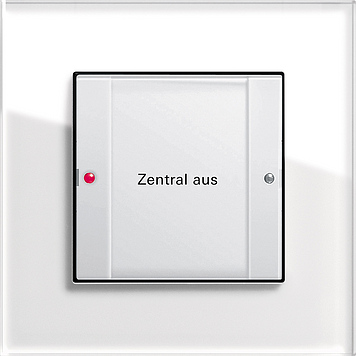
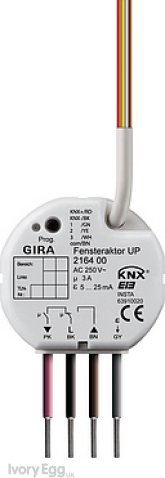
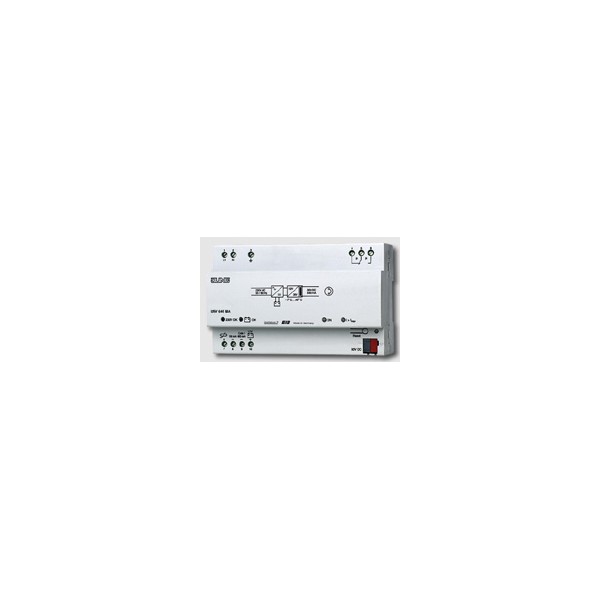
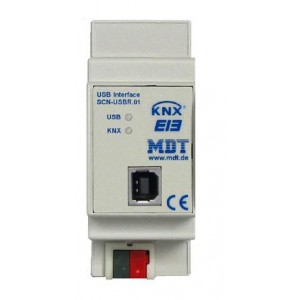
The ETS4 demo is limited to 3 KNX devices. To set up the simplest system, you’ll need - one KNX switch, e.g. this one - one actuator, e.g. this one - a KNX power supply - a USB port, e.g. this one So, four devices. The question is: what do you need to do to set up and programme such a simple installation?
For any KNX installer, this task is a piece of cake.
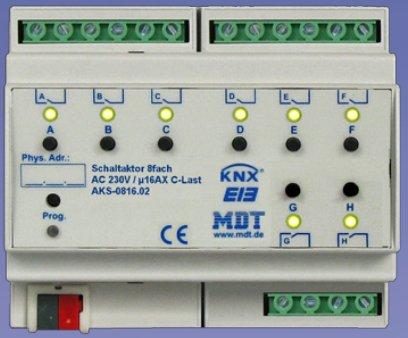
And later, how do you add something like this an 8-relay actuator
Question: what needs to be done to set up and programme such a simple installation?
1. Develop an operational algorithm. 2. Check the product specifications to ensure that these four devices are compatible and will ensure the algorithm functions correctly; also check compliance with the standards, certificates and approvals applicable in the relevant area.
3. Read the installation and configuration instructions and follow them. 4. Check to make sure everything is working, then issue an invoice
KNX devices interoperate; begin configuration with group addresses
Nonsense.
The photo shows a blind actuator – essentially a relay with changeover contacts
The switch is designed to turn the roller shutter or blind on/off, or raise or lower it. Generally speaking, it’s a trivial task that requires no development of an operational algorithm. I came up with this task specifically for that reason.
I’d start with group addresses.
Quote:
2. Check the product specifications to see if these four devices are compatible and will ensure the algorithm works correctly; also check compliance with standards,
Nonsense. The very fact that the devices bear the KNX or EIB mark means they’re compatible with the others. In practice, devices from 1990 work perfectly well with those from June 2012.
I really didn’t have to worry about devices that wouldn’t work together.
Quote:
certificates and approvals valid in the relevant area.
The task is purely theoretical. So, once again, it’s nonsense.
KNX devices generally have all the necessary certificates. In China, KNX is the official standard for IB/ID
Quote:
3. Read the installation and configuration instructions, and follow them.
In other words, connect the red wire to the red terminal, the black to the black, 230V to the power supply, and the USB cable to the computer
The question concerned starting the devices using ETS4; no physical devices are required for this.
Quote:
4. Check to make sure everything is working, then issue an invoice
Nonsense. It won’t work,
You’ve failed your KNX exam. But perhaps someone on one of the forums will advise you; you just needed to wait a bit.
Define the desired outcome before ETS4 commissioning
an operating algorithm. Do you just want to connect it, or achieve a specific end result?
Quote:
The very fact that a device bears the KNX or EIB mark means it is compatible with the others.
It depends on what we mean by ‘compatibility’, but if
Quote:
The task is purely theoretical
Quote:
The question concerned commissioning devices using ETS4
, so I don’t understand why it wouldn’t work… Because I forgot to switch on the power? Buy licensed software? I have a feeling that this question and problem are beyond my capabilities
Excluding power supply and USB preserves ETS4 device slots
Do you just want to connect them, or achieve a specific end result?
The task was simple: How to programme four devices using the ETS4 demo, given a limit of three.
ETS4 will not allow you to include more than 3 devices in a single project.
In the example given, it doesn’t matter whether it’s theoretical or practical. In both cases, everything will work, provided you know how to do it.
Until a device is programmed via ETS, it is ‘dead’ and it makes no difference whether it is connected to the mains or not.
Quote:
That depends on what we mean by compatibility,
This is actually excellent proof that you are completely ignorant when it comes to KNX.
Quote:
but if
Quote:
The task is purely theoretical
I’d have to rack my brains too much to find two KNX devices that wouldn’t work.
Do you really think I have to resort to such underhand tactics to prove that you know nothing about KNX?
Quote:
Quote:
The question was about commissioning devices using ETS4
, so I don’t understand why it wouldn’t work. Because I forgot to switch on the power? Buy a licensed copy of the software?
I wasn’t being that malicious in this case – after all, what’s the point?
You haven’t grouped the devices together or assigned them physical addresses; ETS4 actually does that automatically. You simply haven’t programmed them.
There’s no way these devices could work without using ETS, but that wasn’t the point of this task anyway.
Quote:
I have a feeling that this question and problem are beyond my capabilities
I’ve been saying this from the start.
The whole trick is that neither the power supply nor the USB port need to be included in the design. Thanks to this, they don’t take up any physical addresses, which means we can use three devices whilst having a total of five.
During diagnostics, we’ll get an error saying that the power supply is providing too little current. Connecting an 8-channel actuator isn’t a problem either, as it only takes up one physical address.
So: (physical address) 1.1.1 switch 1.1.2 actuator (roller shutter relay) 1.1.3 8-channel MDT.
1/1/1 group address, e.g. for switching on a light, to which devices with physical addresses 1.1.1 and 1.1.2 should be dragged and dropped. This is a very brief description of the solution to this task.
Although the main point was that USB and a power supply do not need to be included in the design – something anyone who has dabbled in KNX or has at least read a book on KNX, such as ELECTRICAL INSTALLATION IN THE KNX/EIB SYSTEM INPE 10. Available on Allegro for 14 zł.
I hope this will also help those who’d like to have a go with the ETS4 demo.
We only drag actuators and switches/sensors into the project.
Yes, the whole trick is to conduct the discussion without breaching the rules and regulations set out in this section, and above all, to follow the instructions of the moderators!
I’ll ask a simple question. How much does it cost just to programme the system – roughly speaking? What are your ambitions, and are you willing to spend money on it? What do you need it for? Do you have a specific purpose in mind?
If not, then it’s an expensive bit of kit.
Demo software reports insufficient current despite working configuration
During diagnostics, an error message will appear stating that the power supply is providing too little current.
I understand that we’re working with demo software and will simply ignore this error.
We seem to be at odds here regarding our understanding of compatibility and correct configuration, but I wish you continued success in discovering just how far this excellent programme will allow the system to operate whilst simultaneously signalling a configuration error
Have a look at www.controlyourhouse.pl. From there, it’s just a matter of your imagination and your needs. The important thing is that you don’t have to invest a single penny to write the software and test it thoroughly! You’ll find a simpler tool here Link , and the engineering version can be found here Link . Both are fully functional, always up to date and available for free.
Plan wiring and fixture layout for Android smartphone control
I’ve been looking through this discussion and I’m wondering how much the author of the post is willing to spend on such a solution?
Firstly, you need to draw up a diagram showing how the author envisages it from an electrical point of view.
- an electrical diagram, - the layout of the light fittings, - where the control unit is to be located, etc.
All of this can be controlled via an Android smartphone.
If you have an Android smartphone, this is how it can be done. When controlling things via a smartphone, you can manage not only the lighting but other things in the house as well.
This solution does away with the pile of remote controls you keep with your car keys – I speak from personal experience.
And most people carry their phone with them anyway – there’s no need to change the batteries, replace the casing, or hunt for a shop where you can buy a new remote or get an old one repaired, which isn’t exactly cheap.
I’ve just finished installing a control system for the lighting, amongst other things. I did it wirelessly, without having to break into the walls. If Mr Onyx is still interested, I’d be happy to share my know-how.