logo elektroda
logo elektroda
X
logo elektroda
Dostępna jest polska wersja

Czy wolisz polską wersję strony elektroda?

Nie, dziękuję Przekieruj mnie tam

Comodo Internet Security Premium: Security Agent Not Starting & Diagnostic Tool Error

nowicjusz94 6264 9
Best answers

How can I fix the "COMODO Security Agent could not be started" error when the diagnostics tool cannot repair it automatically?

Uninstall Comodo/GeekBuddy and reinstall the latest Comodo Internet Security, making sure to uncheck the add-on during setup [#15744495] [#15746314] If an update is available, install it first; otherwise remove the current version and download the newest release from Comodo's website [#12946454] Reinstalling CIS was also suggested as the basic fix [#12942986]
Summary generated by AI based on the discussion content.
ADVERTISEMENT
Treść została przetłumaczona polish » english Zobacz oryginalną wersję tematu
  • #1 12942082
    nowicjusz94
    Level 2  
    Posts: 4
    Rate: 1
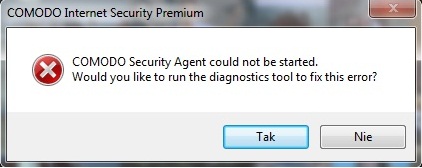
    Hello! For some time, a message pops up on my desktop:

    COMODO Internet Security Premium

    COMODO Security Agent could not be started.
    Would you like to run the diagnostics tool to fix this error?
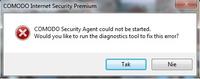
    Comodo Internet Security Premium: Security Agent Not Starting & Diagnostic Tool Error

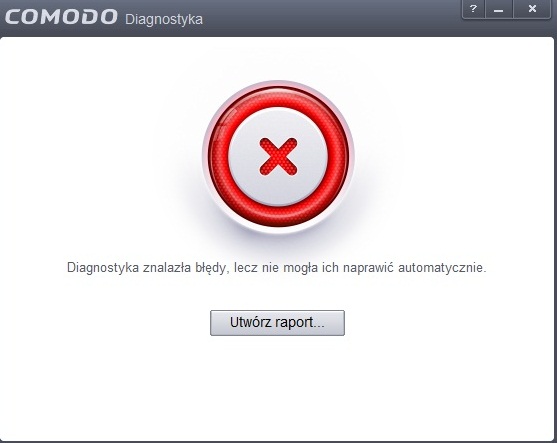
    I clicked "yes" a few times, but another message that pops up is:

    Diagnostics found errors, but she could not fix them automatically.
    Create report ...
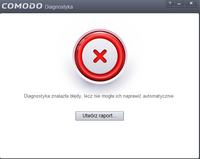
    Comodo Internet Security Premium: Security Agent Not Starting & Diagnostic Tool Error

    After creating, I get like two files, one of which I can not even read. What can I do?
    I am asking for quick help!
    Attachments:
    • Comodo Internet Security Premium: Security Agent Not Starting & Diagnostic Tool Error Bez__tytu__u.jpg (22.24 KB) You must be logged in to download this attachment.
    • Comodo Internet Security Premium: Security Agent Not Starting & Diagnostic Tool Error Bez__tytu__u2.jpg (33.5 KB) You must be logged in to download this attachment.
  • ADVERTISEMENT
  • #2 12942559
    beo
    Level 37  
    Posts: 3478
    Help: 298
    Rate: 237
    nowicjusz94 wrote:
    What can I do?
    Ask for program support.
  • ADVERTISEMENT
  • #3 12942986
    kasiunia7777
    Level 39  
    Posts: 4668
    Help: 420
    Rate: 244
    Maybe start by reinstalling Comodo Internet Security. I personally use this package for a year and a half and never have any problems.
  • ADVERTISEMENT
  • #4 12946454
    kasiunia7777
    Level 39  
    Posts: 4668
    Help: 420
    Rate: 244
    Today, the CIS amendment has just come out of your problem. If possible, update it, and if not, delete and download the latest version from the Comodo website.
  • #5 15744323
    nnwnw01
    Level 10  
    Posts: 6
    Rate: 1
    Hello, I am popping up with this message, does anyone know what to do about it? Comodo Internet Security Premium: Security Agent Not Starting & Diagnostic Tool Error
  • ADVERTISEMENT
  • #6 15744495
    Kolobos
    IT specialist
    Posts: 85171
    Help: 17167
    Rate: 10448
    Uninstall GeekBuddy.
  • #7 15745334
    nnwnw01
    Level 10  
    Posts: 6
    Rate: 1
    can not be: / is written - not available ...
  • #8 15746314
    Kolobos
    IT specialist
    Posts: 85171
    Help: 17167
    Rate: 10448
    Uninstall Comodo and install again, during the installation, uncheck the installation of this add-on.
  • #9 15747225
    nnwnw01
    Level 10  
    Posts: 6
    Rate: 1
    This message :( Comodo Internet Security Premium: Security Agent Not Starting & Diagnostic Tool Error ... and you can not delete :( Comodo Internet Security Premium: Security Agent Not Starting & Diagnostic Tool Error
  • #10 15764028
    nnwnw01
    Level 10  
    Posts: 6
    Rate: 1
    good, false alarm, it gets :)

Topic summary

✨ The discussion revolves around issues with Comodo Internet Security Premium, specifically the failure of the COMODO Security Agent to start and errors encountered with the diagnostic tool. Users suggest various solutions, including contacting program support, reinstalling the software, updating to the latest version, and uninstalling unnecessary add-ons like GeekBuddy. Some users report similar error messages and seek further assistance, indicating a common problem among users of the software.
Summary generated by AI based on the discussion content.
ADVERTISEMENT