logo elektroda
logo elektroda
X
logo elektroda

HomeMatic - How do I get started with thermostats and a LAN gateway for radiator control?

Medeis 10932 29
Best answers

How can I start with Homematic radiator thermostats, and which controller do I need if I want remote access and schedules?

If you want remote control and time schedules, you need a CCU1/CCU2 central unit or an external controller like FHEM/Homegear; the LAN gateway and USB adapter are not enough for automatic programs based on time or events [#14646195] The CCU lets you access the system through a web browser, create simple programs, and control devices remotely; devices can also communicate directly with each other after pairing [#15182041] CCU2 is the better choice over CCU1 because it is much faster, supports English, can draw graphs, and can expand storage with a micro‑SD card, though it lacks RS485 and battery backup [#14646195] Homeputer software is not required, because CCU2 alone is sufficient for a fully functional system [#15180492] If you only set the heads manually, they will work on their own, but you lose central scheduling and smartphone/PC control [#14312039]
Generated by the language model.
ADVERTISEMENT
Treść została przetłumaczona polish » english Zobacz oryginalną wersję tematu
  • #1 14190468
    Medeis
    Level 21  
    Posts: 564
    Help: 25
    Rate: 18
    Hello

    Winter has arrived and, as I do every year, I am thinking about buying electronic thermostatic heads. I have 6 radiators in my flat so far, of which I would initially like to control two or three - each in a separate room.
    The more I read about these heads the closer the Homematic brand solution seems to me.
    It could be a nice start to putting together a more complex infrastructure than just temperature control. With the modularity allowing the expense to be spread over time ;)

    General assumptions for now are two or three heads of this type:
    3.1.18. It is forbidden to publish information to sources that expire after a certain period of time (publishing links to short-lived sites).


    And something to control them...
    This is where the problem arises due to my lack of experience with this type of system.
    At first glance there seem to be three solutions (leaving aside a separate thermostat for each room):
    3.1.18. It is forbidden to publish information to sources that expire after some time (publishing links to short-lived sites).
    [retrofood]


    The questions I have about the above solutions are mainly about their capabilities and the differences between them.

    1. :arrow: Will I be able to calmly control the heads in the first solution - lan-gate - via the device side from e.g. PC, phone, tablet? Will it be possible to create a schedule (differentiation of room temperatures over time)?

    2. :arrow: What is the advantage of the control unit from point b over the gateway?

    3. :arrow: Are all these possibilities also offered by the USB adapter? Is the condition for the scheduler to work then a running computer + a program for the adapter? Or is it sufficient to program the heads once and we have peace of mind until we want to change something. Here, of course, there is no question of control via smartphone, tablet etc.


    I also came across
    https://www.homegear.eu/index.php/Main_Page

    Seems interesting, plus the Raspberry Pi solution can be quite versatile.

    I know there are a lot of questions, but I would appreciate any advice on how to get started. I am particularly interested in the differences in the capabilities of the three control modules.
    Please share your general impressions of the Homematic.
    Unfortunately, I have not found much information in Polish or English, so any information will be useful.
  • ADVERTISEMENT
  • #2 14218541
    czasnagli
    Level 18  
    Posts: 679
    Help: 16
    Rate: 102
    Welcome!

    I am refreshing the topic. Which of the kit components listed above are required to control the valves via the internet?

    EDIT:

    After reviewing the MAX! "CUBE" I noticed that it is very poor. Homematic has more elements that can be controlled. From what I found on the web the best option to control these systems is to install:
    1. FHEM on Raspberry Pi Link Link Link[/url]
    or
    2. Homegear on Raspberry Pi + CUL Link Link Link
    It seems to me that with the above solutions there is no need for a MAX! "CUBE" nor a ccu1/ccu2 control panel.
    3. You can also install FHEM directly on the router Link
  • #3 14224243
    Medeis
    Level 21  
    Posts: 564
    Help: 25
    Rate: 18
    Unfortunately, the topic is basically at a standstill.

    A lot of information can be found on the Internet about HM's collaborative projects, but unfortunately it is not available on Polish websites....

    Here is another one, maybe the topic will develop a bit.
    http://www.lxccu.com/

    the above should also work with the original USB stick from HM and this is cheaper than CUL ;) ;)

    So I renew my request to share my experience with the above system :!:
  • #4 14230807
    Medeis
    Level 21  
    Posts: 564
    Help: 25
    Rate: 18
    I raise the subject.

    The heads have already arrived and my first impressions of the work and workmanship are most positive. If anyone has any questions about the heads, I will be happy to answer them.

    Unfortunately, I still do not know what to do next in terms of choosing a remote control...
  • ADVERTISEMENT
  • #5 14246254
    czasnagli
    Level 18  
    Posts: 679
    Help: 16
    Rate: 102
    I am curious how long the batteries last in these heads ? Also write which control you have decided on.
  • #6 14302164
    Medeis
    Level 21  
    Posts: 564
    Help: 25
    Rate: 18
    So far I'm still at a standstill with the controls....
    Over Christmas I let the subject go, programmed the heads manually and they work.
    I am still undecided on any option.
    All the alternative control versions have their merits, although I have seen virtually no screen shots of the control applications.... (R-pi, router etc.)
    The original Homematic software is, it seems, only in the German version, which does not suit me....
  • ADVERTISEMENT
  • Helpful post
    #7 14312039
    gwisniew
    Level 11  
    Posts: 6
    Help: 3
    Rate: 9
    I have been a user of the homematic system for several years and would be happy to share my knowledge.
    I decided on this system for similar reasons to those mentioned above:
    1. The great variety of system components (e.g. I use a servo to open/close a window),
    2. Relatively inexpensive components and control unit,
    3. Radio control.

    Answering the questions that came up in the thread:
    The batteries in the thermostatic heads last about 2 years with fairly intensive use: 2 full cycles per day of completely turning the heating off and on, obviously only during the winter season. However, I had one head in which I had to replace the batteries every 3-4 months. I measured the current drawn by it and it turned out to be many times higher than other heads, unfortunately it was already after the warranty period.

    Central control:
    I use the CCU1. It is indeed only in German, which is b. cumbersome. Fortunately, the CCU2 also has English and, I think, also possibilities for further localisation. In a few weeks I will already have the CCU2 so I will know more.
    You can buy the control unit cheapest on elv.de for EUR 90 in a self-assembly kit (Bausatz). The kits are usually in partially assembled form, but soldering may be required ;) The assembled control panel is for 100 EUR.

    I have recently finished writing a plugin to integrate the CCU1 control panel with the Satel Integra64/128 control panel and will soon publish it on e.g. homematic-inside.de. This plugin allows you to use alarm detectors, alarm outputs, armed status to run configured programs on the Homematic control panel.

    As soon as I get the CCU2 I will look into polonising it, if possible.

    Using the lan gateway and the USB adaptor, to my knowledge it is not possible to configure automatic programs running on the control unit, e.g. based on changes in detector statuses, according to the clock (including sunrise/sunset).

    The MAX! system is probably not compatible with Homematic, although the elements of these systems look the same. The MAX! system is dedicated exclusively to heating and only provides a few elements (but cheaper than in Homematic).
  • #8 14321096
    Medeis
    Level 21  
    Posts: 564
    Help: 25
    Rate: 18
    @gwisniew
    Thanks so much for the response!

    I am very eager to read your description regarding CCU2 :idea:

    Are you changing CCU1 to CCU2 or can I ask the reason?
    How do they differ in everyday use? (Apart from the language support you mentioned).

    Can you write something more, as for someone not in the topic, about the possibilities related to plugins? ;)

    Thanks for the reply
    Maybe the topic will move a bit....
  • #9 14327577
    czasnagli
    Level 18  
    Posts: 679
    Help: 16
    Rate: 102
    gwisniew , I still have additional questions :)
    1. Is the wireless communication between the various HomeMatic components encrypted?
    2. Can a different encryption key be assigned to each thermostat head?
    3. Have you ever used a fhem server to operate the HomeMatic?
    4. Can the heads be turned completely off remotely?
    5. Once programmed, do the heads work stably ?
  • Helpful post
    #10 14646195
    gwisniew
    Level 11  
    Posts: 6
    Help: 3
    Rate: 9
    I didn't notice or didn't get the email after the second post and that's why I'm only responding now.

    1. Is the wireless communication between the individual HomeMatic components encrypted?
    RIP: It is possible. You can enable encryption.

    2. Can a different encryption key be assigned to each thermostatic head?
    RIP: I admit that I don't know. The key is invisible. You simply enable the encrypted transmission option, but I don't know how the keys are determined.

    3. Have you ever used a fhem server to operate HomeMatic?
    RIP: No. Homematic puts out an API through which you can communicate with the CCU, so there would potentially be the possibility of integrating with external control software, but I have not been interested in this possibility.

    4. Can the heads be turned completely off remotely?
    RIP: You cannot control the heads directly. It can be done indirectly by setting the temperature low enough, but under the condition that the thermostat is set to control mode from the CCU. The thermostat also has autonomous modes: AUTO and MANUAL. The former allows the temperature to be programmed according to a calendar, while the latter allows the required temperature to be set manually. The description refers to the HM-CC-TC thermostat.

    5. Do the heads, once programmed, work stably?
    RULES: Sometimes (but very occasionally) the thermostat loses connection with the head and the thermostat has to be "taught" the connection with the head again. Maybe once a year this happens to me for several heads.
    In my old flat the thermostats worked very steadily, I always had the temperature as I set it. I have recently moved house and in the new flat it is a bit worse. This is related to the fluctuating water temperature in the central heating system. When it's warmer outside, the water in the central heating system is cooler. The thermostat learns the room in question and knows how much you need to open the valve to get the right temperature rise. Unfortunately, this learning process is quite slow and with dynamic changes in the outside temperature (and therefore also the temperature of the water in the central heating system), the thermostat cannot keep up with the learning process. This effect is noticeable in intermittently heated rooms, because with continuous heating this problem does not exist (the thermostat keeps up with the learning).

    Added after 6 [minutes]:

    I have been using the CCU2 control panel for 3 months now and can share observations.
    First of all, the new control panel is much faster and this is its main advantage. Another advantage is the functionality of drawing graphs, which I missed in the older control unit. This is particularly useful in conjunction with measuring energy consumption. The control panel can also expand the memory with the power of a micro-SD card (this is necessary to record data for graphs).
    The main downsides are: no RS 485 interface, no battery backup.

    Added after 3 [minutes]:

    I have also published a module to communicate with Satel's Integra control panel. The module is downloadable from sourceforge: HMIntegraConnector
  • #11 15179988
    Anonymous
    Level 1  
  • Helpful post
    #12 15180492
    gwisniew
    Level 11  
    Posts: 6
    Help: 3
    Rate: 9
    Homeputer software is not required. CCU2 is sufficient to create a fully functional system.
    I've been using Homematic for a few years now, but I admit that I don't know what the software could be useful for. I guess it makes it easier to manage the system and allows you to create a graphical visualisation of the rooms (this is not present in the web interface).
  • #13 15180547
    Anonymous
    Level 1  
  • ADVERTISEMENT
  • #14 15182041
    gwisniew
    Level 11  
    Posts: 6
    Help: 3
    Rate: 9
    I won't comment on the Fibaro system because I did the reconnaissance a few years ago and at the time Fibaro was in its infancy.

    Homematic really doesn't have multimedia functions, at least for now, because you can see that the system is developing all the time (although there was a time 2-3 years ago when it was quiet about new devices and software changes).

    As for the variety of devices in the Homematic system, it's not so bad. Does Fibaro have a controller for automatically opening and closing windows? I used one for something like automatic air-conditioning (opening/closing a window depending on the temperature inside and outside).
    New devices are appearing in the system all the time. E.g. a new family of radiator heads and thermostats, controllers for LEDs. I use an older type of head without regulation directly on the head (only via the thermostat). I bought the HomeMatic 105155 head as a trial. Its advantage is that it can easily be remotely switched to "Vacation" mode, in the old type this was available in the thermostat configuration (it was not possible to control this from your own program).

    All appliances communicate with the control panel. This allows you to remotely control the devices connected to the control panel and view the current status. Access to the control panel is via a web browser.
    The devices can also communicate directly with each other without the control panel. They need to be 'paired' for this purpose. This can be done directly from the devices or at the control panel. "Pairing" is not limited to 2 devices, e.g. up to 10 devices can be connected under one button on a remote control, which can be switched on with this button.

    The control unit also allows you to create your own "programmes", i.e. to configure sequences of actions triggered by, for example, time or another event in the system.

    I strongly recommend a wall thermostat, as the thermostats built into the heads are subject to error due to the fact that they measure the temperature in the vicinity of the radiator.

    As for the furnace control, I have no experience as I use the system in a flat in a block of flats. It is unlikely to be possible to pair the thermostats directly with the cooker switch. To do this, you would need to set up a programme in the control unit: if all the heads are closed (alternatively, not more than 5-10% open), then you turn the cooker off. You will also need a suitable actuator for this.

    I bought most of the components for my system from elv.de, and before that from Conrad in Germany. You just have to be careful, because some devices are sold as self-assembly versions (Bausatz) - I also bought those, because you can sometimes buy them much cheaper.
  • #15 15182184
    Anonymous
    Level 1  
  • #16 15184316
    gwisniew
    Level 11  
    Posts: 6
    Help: 3
    Rate: 9
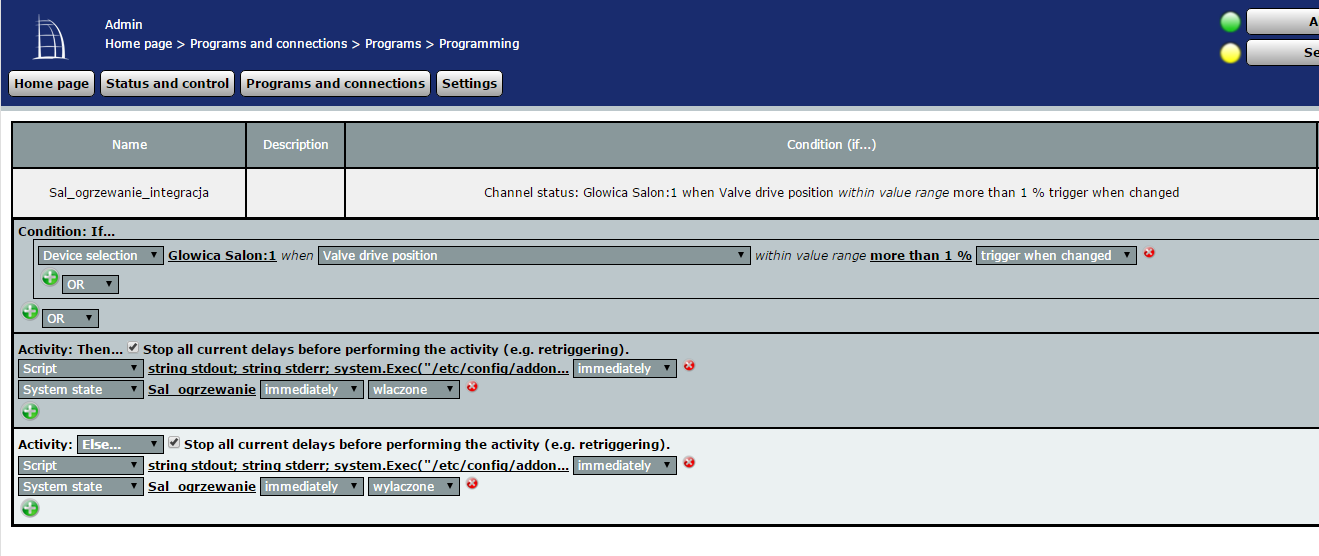
    Preparing a suitable 'programme' will be trivial. I deliberately use inverted commas because it can hardly be called a programme. Such a configuration is clickable. I am attaching a screenshot of such a program (just in the screenshot there is a script call, which in your case will not be necessary).

    The head status is read directly from the head, not from the thermostat. The head is visible from the control unit regardless of the thermostat (but the thermostat can and should be
    (but the thermostat can and should be paired with the head and then the thermostat controls the head without the control unit).

    More problematic will be the control of the furnace. A suitable device for this would be: http://www.elv.de/homematic-funk-schaltaktor-mit-klemmanschluss-zwischenstecker-bausatz.html, but this is only available in a DIY kit and you have to do a bit of soldering and I'm not sure if it has a bistable output, i.e. if it maintains a short circuit (rather yes, all devices have quite a few configuration options). I couldn't find any documentation on the elv website.

    Alternatively, you could use the http://www.elv.de/homematic-132989-funk-schal...enstecker-fuer-smart-home-hausautomation.html device, but you will need some kind of relay that would short-circuit the cooker contacts.

    Regarding range, there is a repeater available in the Homematic system: http://www.elv.de/homematic-selektiver-funk-z...cker-repeater-hm-sys-srp-pl-fertiggeraet.html. Other rulers do not have this function.
    Attachments:
    • HomeMatic - How do I get started with thermostats and a LAN gateway for radiator control? HM_Program.PNG (56.54 KB) You must be logged in to download this attachment.
  • #17 15185566
    Anonymous
    Level 1  
  • #19 17118586
    bzyk_2
    Level 11  
    Posts: 8
    Rate: 1
    Hello, I keep wondering, can I use the head from Max interchangeably with Homematic? They don't write about it anywhere, a lot of information on the forums is unfortunately in German :( - manufacturer the same, they look almost identical :) - I personally opted for !MAX (thermostats, sensors in windows + cube) and I am very satisfied with the system. I integrated this with Domoticz + homebridge (on a rasberry pi 2) - I can control the whole thing natively from my iPhone (set temperature, heating mode, current room temperature (from the head, sometimes it shows more, in the end it is on the radiator :) ....
  • #20 17118634
    Anonymous
    Level 1  
  • #21 17119910
    bzyk_2
    Level 11  
    Posts: 8
    Rate: 1
    Thanks for your reply! I was referring to whether the homematic thermostat can be trimmed to the Max system!
  • #22 17120111
    Anonymous
    Level 1  
  • #23 18208562
    bumble
    Level 40  
    Posts: 7189
    Help: 608
    Rate: 1184
    Refresher.
    I'm facing a purchase and I don't know if just homematic or maybe hanywell? It's all about heating, controlling the radiators and boiler from a smartphone pc and alexy/google. Are the heads normally closed and when the room temperature drops they open and the control panel starts the boiler?
  • #24 18260758
    kabi5766
    Level 11  
    Posts: 95
    Rate: 20
    Hello colleagues
    I am new to HomeMatic and have many questions but one by one.
    I have a CCU3 control panel, thermostats at the HM-IP radiators and a wireless wall thermostat on which I can regulate the temperature. At the moment I have made a one room group consisting of two thermostats (I have two radiators in a room) and a wall controller and an HMIP-PCBS switch board which I put in the gas cooker. Everything works fine, it turns the cooker on and off at set temperatures.
    And the question is do I have to make a group like this for each room?
    Or can I make one group with all the rooms, kitchen and bathroom and will this regulate the temperatures in the different rooms for me at different times?
    Or maybe someone has worked out how to do it so that, for example, the bathroom is heated from 7 to 8 a.m. and the room from 10 to 4 p.m. and the hallway at other times.
    Best regards.
  • #25 18260846
    Anonymous
    Level 1  
  • #26 18260861
    bumble
    Level 40  
    Posts: 7189
    Help: 608
    Rate: 1184
    I have purchased and am using the drayton wiser system. I am satisfied.
  • #27 18260897
    Anonymous
    Level 1  
  • #28 18260935
    bumble
    Level 40  
    Posts: 7189
    Help: 608
    Rate: 1184
    I will be expanding and buying another set for my home in pols. First of all, the price.
    The heart of it is the control panel-hub. It has a built-in relay to control a boiler or two a boiler and hot water in fact just two pairs of contacts. in my case, it controls the boiler. It communicates with radiator thermostats and room thermostats. Communicates with home wifi and drayton wiser cloud. The device can operate independently of an internet connection. Operation from the app.
    Radiator thermostats - heads. Without display. Room thermostats overriding the heads up to a maximum of five thermostats in a room one four radiators and a room thermostat.
    At my place it is like this.
    bathroom thermostat head + room thermostat. The head showed a slightly different temp than was in the room is by the door.
    living room three radiators with heads + room one.
    bedroom 1 - head
    bedroom 2 - head
    The room thermostat in the living room opens the heads and starts the boiler in the bathroom.
    Time schedule in days of the week and hours to be set. Open window detection function. Geofancing - location of occupants.
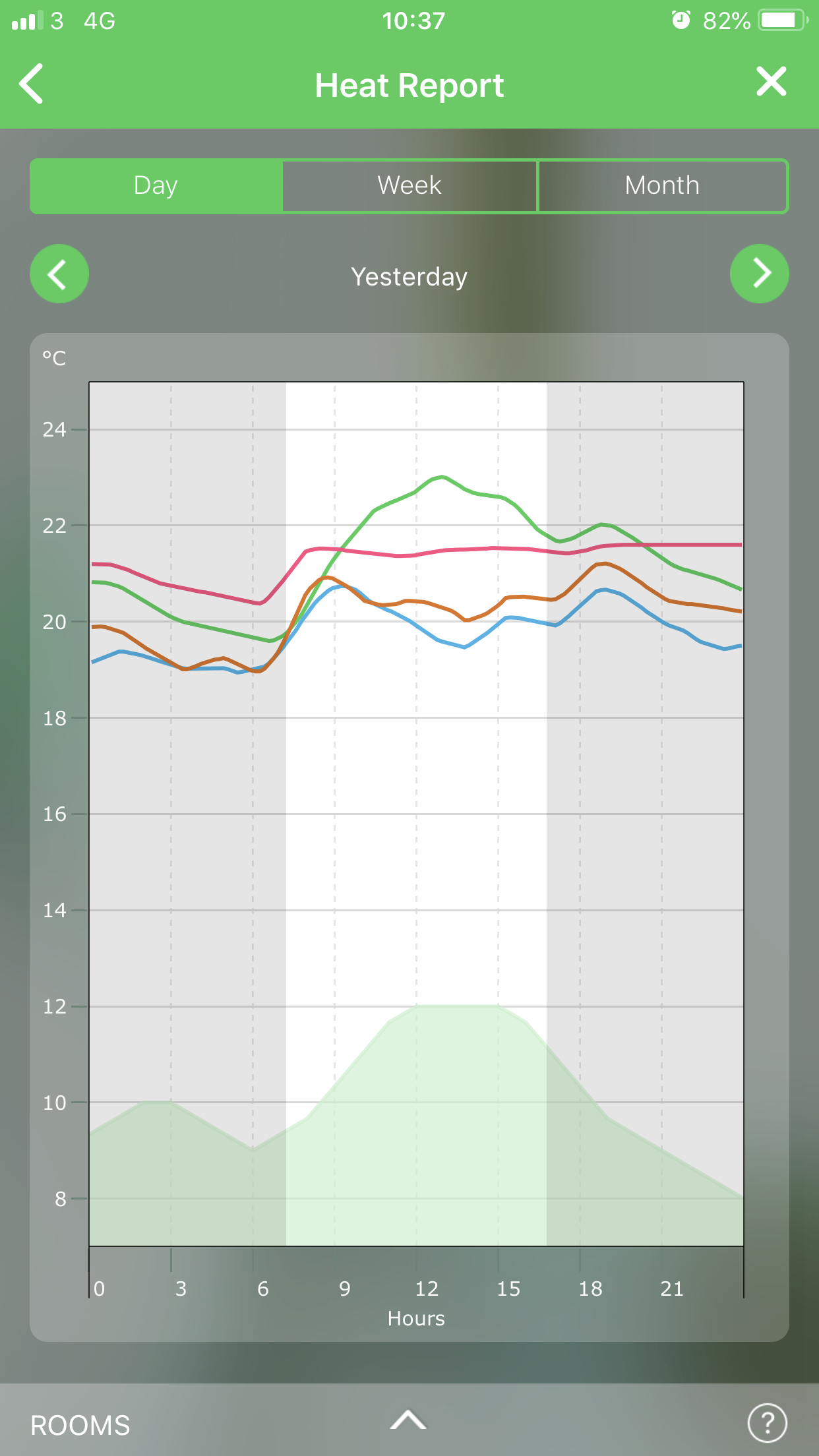
    Preview of room heating on characteristics.
  • #29 18261421
    Anonymous
    Level 1  
  • #30 18261485
    bumble
    Level 40  
    Posts: 7189
    Help: 608
    Rate: 1184
    The open window function has not been tested yet. I don't know if it will work at all at my place because I have radiators on the wall on the other side of the window. Opposite. Well. England. You know two taps and radiators not under the window.
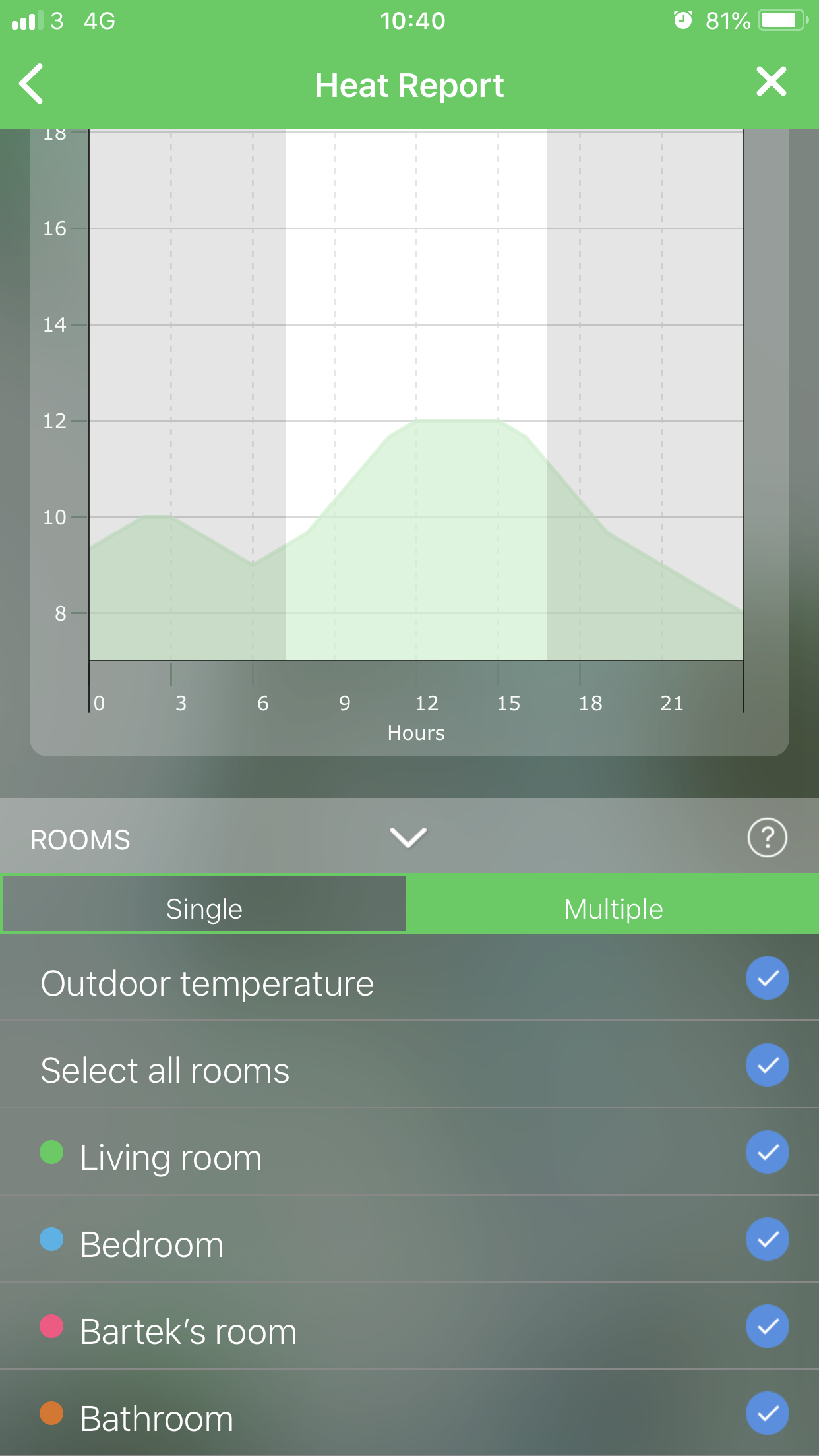
    When it comes to geofancing it works with the life 360 app. all to link together on IFTTT. There you link the wiser app with Life and also, for example, lighting but that's another matter. Life tracks your location and transmits the data to wiser. If you move away from the house in a circle with a defined radius, the heating switches to a low-cost mode, e.g. 16st. Or it switches off completely. Once you are within this circle, the heating starts. This is not a problem for me. There are no harsh winters and I have no underfloor heating. It takes 25-30 minutes for it to be warm. Temperature on the boiler feed water 50st. Application mode comfort. That is, the outside temperature and the characteristics of the flat are taken into account.

    Added after 5 [minutes]:

    This is a characterisation from yesterday for example.
    HomeMatic - How do I get started with thermostats and a LAN gateway for radiator control?

    Added after 1 [minute]:

    HomeMatic - How do I get started with thermostats and a LAN gateway for radiator control?

    Added after 17 [minutes]:

    On the ifttt location app I also have it linked to the lighting which only turns off when I leave. Here it is better to have motion sensors, but this solution costs money. For example, I turn on the alexe radio when I enter the house. This is just for curiosity's sake, because here it is better to have a motion sensor that detects you and is connected to your location. In addition, it still detects movement when you are not there - an uninvited guest.
ADVERTISEMENT