logo elektroda
logo elektroda
X
logo elektroda

Cursor Jumps Unexpectedly While Typing: Solutions to Keyboard & Laptop Sensitivity Issues

Nithya 29184 10
Best answers LABEL_AI_GENERATED

Why does the text cursor jump to the beginning or middle of what I’m typing on a laptop, and how can I stop it?

Disable the touchpad to rule out accidental cursor movement, and if needed use the laptop’s Fn + touchpad-key shortcut to turn it off temporarily [#14529040][#14531586] If the problem still happens in Word, mail, and social sites, the touchpad is probably not the cause [#14531623] Next, check the keyboard itself for stuck or faulty keys using a keyboard tester such as keyboardtester.com [#14535145] If the keyboard test is clean, the thread does not identify a more definite cause.
AI summary based on the discussion. May contain errors.
ADVERTISEMENT
Treść została przetłumaczona polish » english Zobacz oryginalną wersję tematu
  • #1 14529039
    Nithya
    Level 9  
    Posts: 8
    Rate: 4
    when writing text, the cursor suddenly moves somewhere to the beginning or in the middle of the text, I think it must be some function accidentally pressed on the keyboard because it seems as if this skipping has some logic, e.g. returning to the place where the letter a was already written, and I just wrote another sentence for etc. it's hard to tell what it's really about. I've already reduced the sensitivity to hand gestures - that's what it's called, I think :) on a laptop - but that's not it.
    Thanks for any suggestions
  • ADVERTISEMENT
  • #2 14529040
    Asisienka23
    Level 25  
    Posts: 768
    Help: 61
    Rate: 120
    Disable the touchpad for a while and see if the problem persists.
  • #3 14531560
    Nithya
    Level 9  
    Posts: 8
    Rate: 4
    touch pad - is it in the control panel - mouse - click lock? because if so it didn't work
  • ADVERTISEMENT
  • #5 14531586
    VanKiller003
    Level 15  
    Posts: 318
    Rate: 26
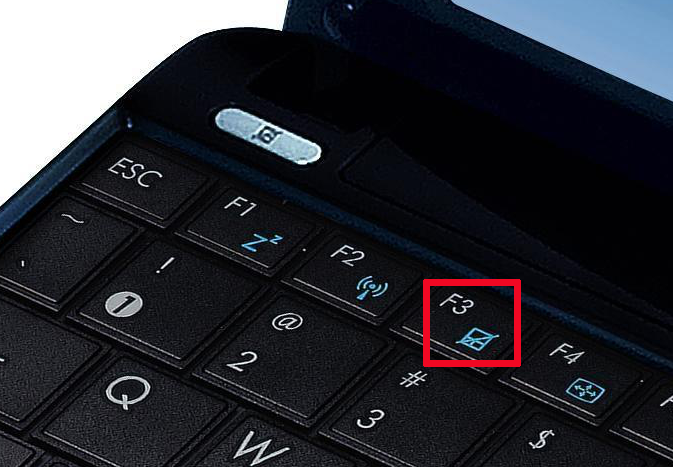
    You can disable the touchpad, e.g. with a keyboard shortcut. You press Fn + its symbol on the keyboard (may be crossed out or not)

    e.g. here Fn+ F3:
    Cursor Jumps Unexpectedly While Typing: Solutions to Keyboard & Laptop Sensitivity Issues
  • #6 14531623
    Nithya
    Level 9  
    Posts: 8
    Rate: 4
    I turned it off and it continues...
    could there be any other reason for this?
  • ADVERTISEMENT
  • #7 14531880
    VanKiller003
    Level 15  
    Posts: 318
    Rate: 26
    Video card problem or virus. Do you have an antivirus?
  • ADVERTISEMENT
  • #8 14532231
    tzok
    VIP Meritorious for electroda.pl
    Posts: 38898
    Help: 3177
    Rate: 6558
    Mouse cursor or text cursor? Does this happen with all programs or just some?
  • #9 14535078
    Nithya
    Level 9  
    Posts: 8
    Rate: 4
    i have an antivirus program
    it's about the text cursor and it happens when typing in word as well as when typing on social networks or in the mail.
  • #11 14535279
    Nithya
    Level 9  
    Posts: 8
    Rate: 4
    the keyboard is ok

Topic summary

LABEL_AI_GENERATED
The discussion revolves around an issue where the text cursor unexpectedly jumps while typing, causing frustration for the user. Initial suggestions include disabling the touchpad to see if the problem persists, with references to control panel settings and keyboard shortcuts for touchpad management. Despite disabling the touchpad, the issue continued, leading to further inquiries about potential causes such as video card problems or viruses. The user confirmed the issue occurs with the text cursor across various applications, including word processing and social media. Additional advice included checking the keyboard functionality, which the user confirmed was not the source of the problem.
AI summary based on the discussion. May contain errors.
ADVERTISEMENT