logo elektroda
logo elektroda
X
logo elektroda

How to connect a digital LED ammeter / voltmeter to the power supply

sofles 44526 20
Best answers

How should I connect a digital LED voltmeter/ammeter module so it shows current instead of постоянно 0.00 A?

You must connect the ammeter part in series with the load, because current only flows in a closed circuit; without a receiver/load the display will stay at 0.00 A [#16631258] For this kind of panel, the current is measured on the negative side through the internal shunt, between the supply negative input and the module’s negative/output lead, so the wiring depends on the exact model but the shunt must be in the load path [#16633103] The module also needs an actual load connected to the converter output; simply changing the buck/boost voltage will not make the current reading change [#16631258][#16633103] If the wiring is correct and it still shows zero with a load, the meter itself may be faulty, for example a broken shunt connection inside the module [#19254449]
Generated by the language model.
ADVERTISEMENT
Treść została przetłumaczona polish » english Zobacz oryginalną wersję tematu
  • #1 16631251
    sofles
    Level 8  
    Posts: 23
    Rate: 8
    Hi, I have a problem.

    I converted the old power supply from a computer, I wanted to build a power supply on which I can set the voltage / current, I bought a buck boost converter in one, I connected the 12V power supply to it and connected a digital LED voltmeter ammeter
    3.1.18. Do not send links that will cease to be active after some time. This will make the discussion meaningless.
    [retrofood]

    everything is ok, I can change the voltage by turning the potentiometer, but I can't change the intensity, it shows 0.00A all the time

    I am adding a diagram of how I connected everything and I would be grateful for any help
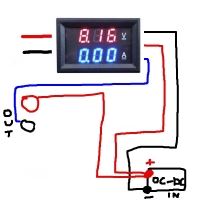
    How to connect a digital LED ammeter / voltmeter to the power supply
  • ADVERTISEMENT
  • #2 16631258
    edberg
    Level 30  
    Posts: 1179
    Help: 133
    Rate: 117
    To measure it (current value) you have to connect in series, i.e. you cut the cable and connect with one end of the ammeter to one part of the cable and with the other end of the ammeter to the other end of the cut cable. Of course, you must have some load connected because the current flows in a closed circuit ;) .
  • ADVERTISEMENT
  • #3 16631264
    Defensore.Puniti
    Level 11  
    Posts: 44
    Rate: 5
    Hello,
    sofles wrote:
    Hi, I have a problem.

    I converted an old power supply from a computer, I wanted to build a power supply on which I can set the voltage / current, I bought a buck boost converter in one, I connected the 12V power supply to it and connected a digital LED voltmeter ammeter https://www.aliexpress.com/item/Free-Shipping -DC-100V-10A-Voltmeter-Ammeter-Blue-Red-LED-Amp-Dual-Digital-Volt-Meter-Gauge / 32694138388.html? Spm = a2g0s.9042311.0.0.czsyKa turning the potentiometer change the voltage but I can't change the current, it shows 0.00A all the time

    I am adding a diagram of how I connected everything and I would be grateful for any help
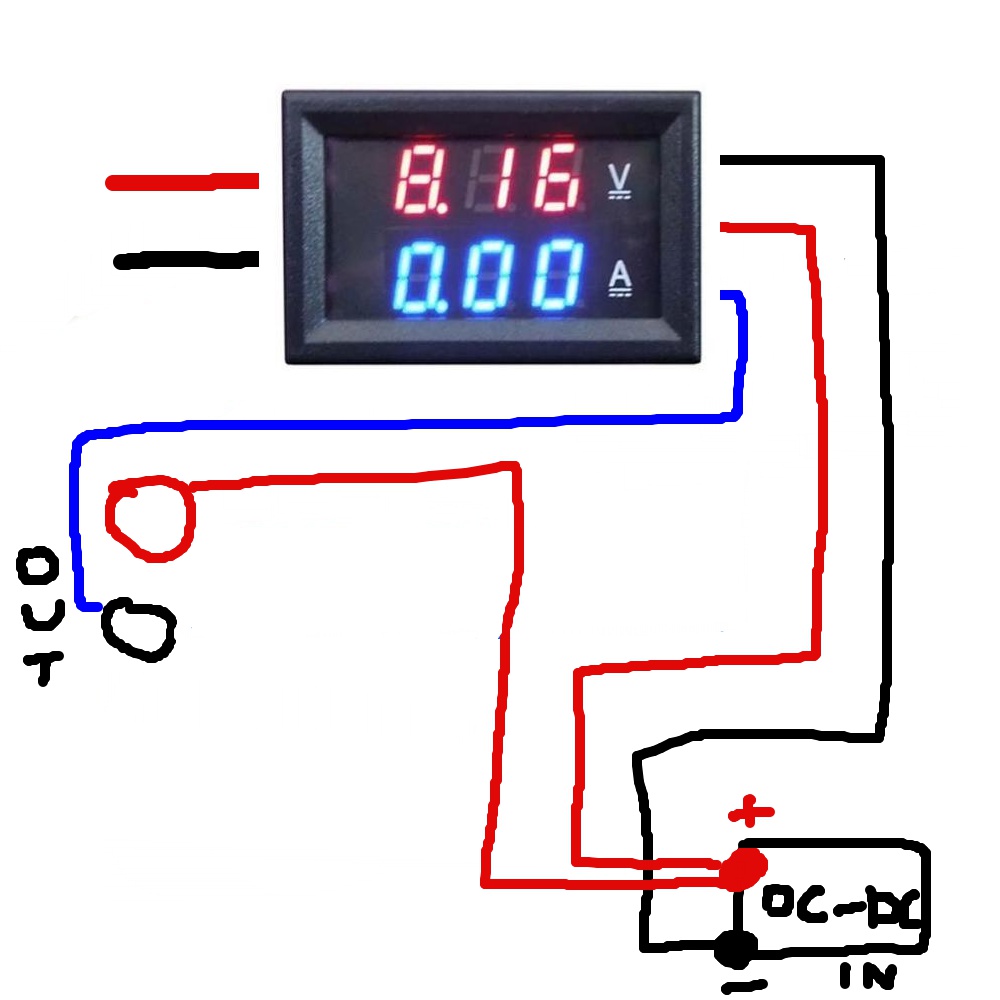
    How to connect a digital LED ammeter / voltmeter to the power supply
    And what kind of 'law' should the ammeter show a value other than zero, since no current flows through it?

    Basics, Fundamentals of Electrical Engineering bow low ... :idea:

    Regards
  • ADVERTISEMENT
  • #4 16631270
    sofles
    Level 8  
    Posts: 23
    Rate: 8
    Except that when I hook up, for example, a led module to the output, I can normally change the voltage that is sent to the diode, but the current is still 0: /
  • #5 16631290
    Freddy
    Level 43  
    Posts: 19997
    Help: 1394
    Rate: 2806
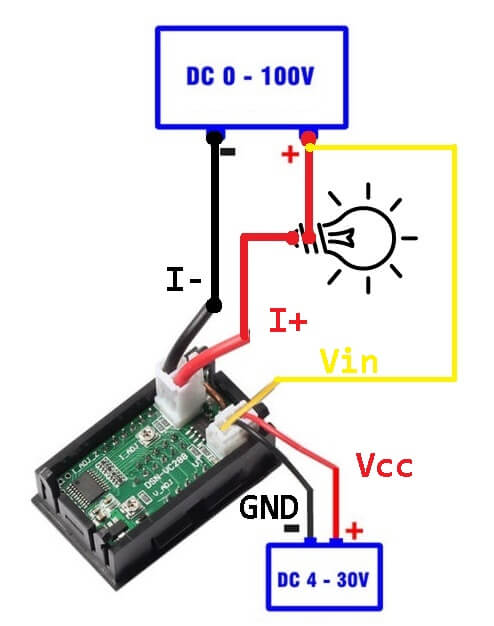
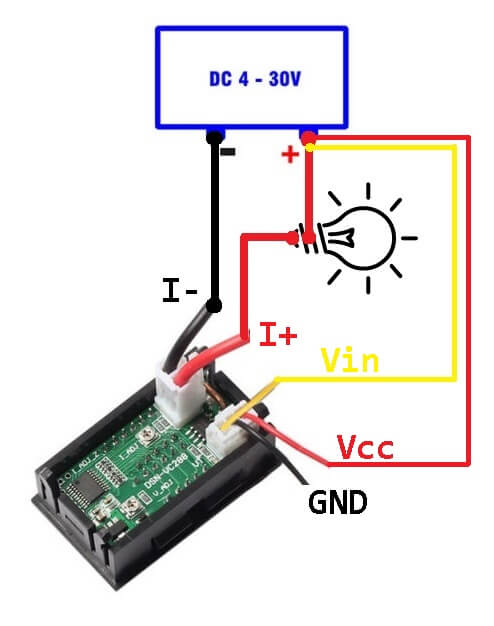
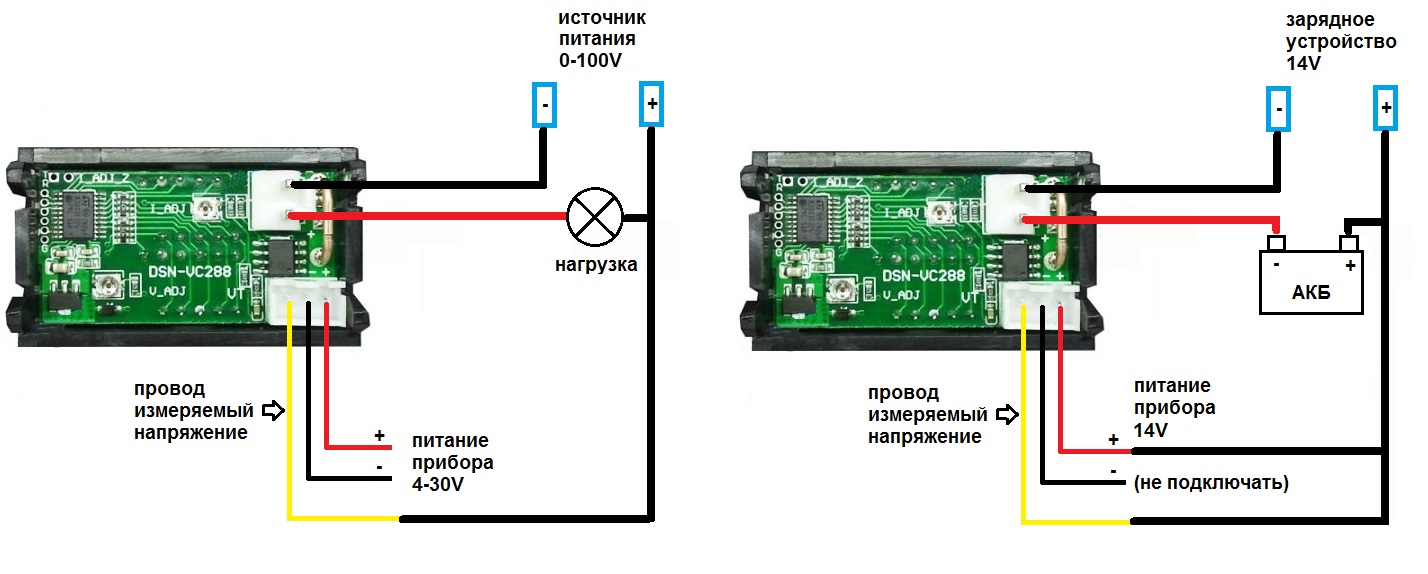
    Is it so hard to check the scheme provided by the sellers?
    How to connect a digital LED ammeter / voltmeter to the power supply How to connect a digital LED ammeter / voltmeter to the power supply
  • #6 16631307
    sofles
    Level 8  
    Posts: 23
    Rate: 8
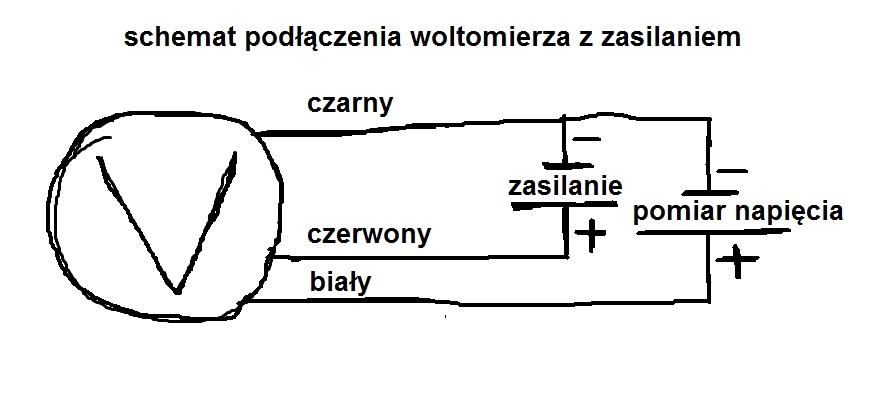
    I have other cables in my own, I do not have yellow, but blue, and I have it plugged in, as recommended by the seller How to connect a digital LED ammeter / voltmeter to the power supply

    unfortunately, it does not do anything, it only measures the voltage
  • #7 16631319
    Freddy
    Level 43  
    Posts: 19997
    Help: 1394
    Rate: 2806
    So what if the color is different, but the outputs are the same.
    Why don't you connect as the seller gave you?
  • #8 16631328
    sofles
    Level 8  
    Posts: 23
    Rate: 8
    I have it connected as in the diagram above and nothing
  • #9 16631345
    Freddy
    Level 43  
    Posts: 19997
    Help: 1394
    Rate: 2806
    You're sure of it because I don't.
    Take a picture of your connection, because the scribble drawing is not very reliable.
  • #10 16631399
    sofles
    Level 8  
    Posts: 23
    Rate: 8
    I have it exactly like this How to connect a digital LED ammeter / voltmeter to the power supply
  • #11 16631415
    Freddy
    Level 43  
    Posts: 19997
    Help: 1394
    Rate: 2806
    You were supposed to take a picture, not a drawing - don't you know the difference?
  • ADVERTISEMENT
  • #12 16633103
    gumisie
    Level 43  
    Posts: 17785
    Help: 1667
    Rate: 2472
    Freddy wrote:
    Is it so hard to check the scheme provided by the sellers?
    Hello.
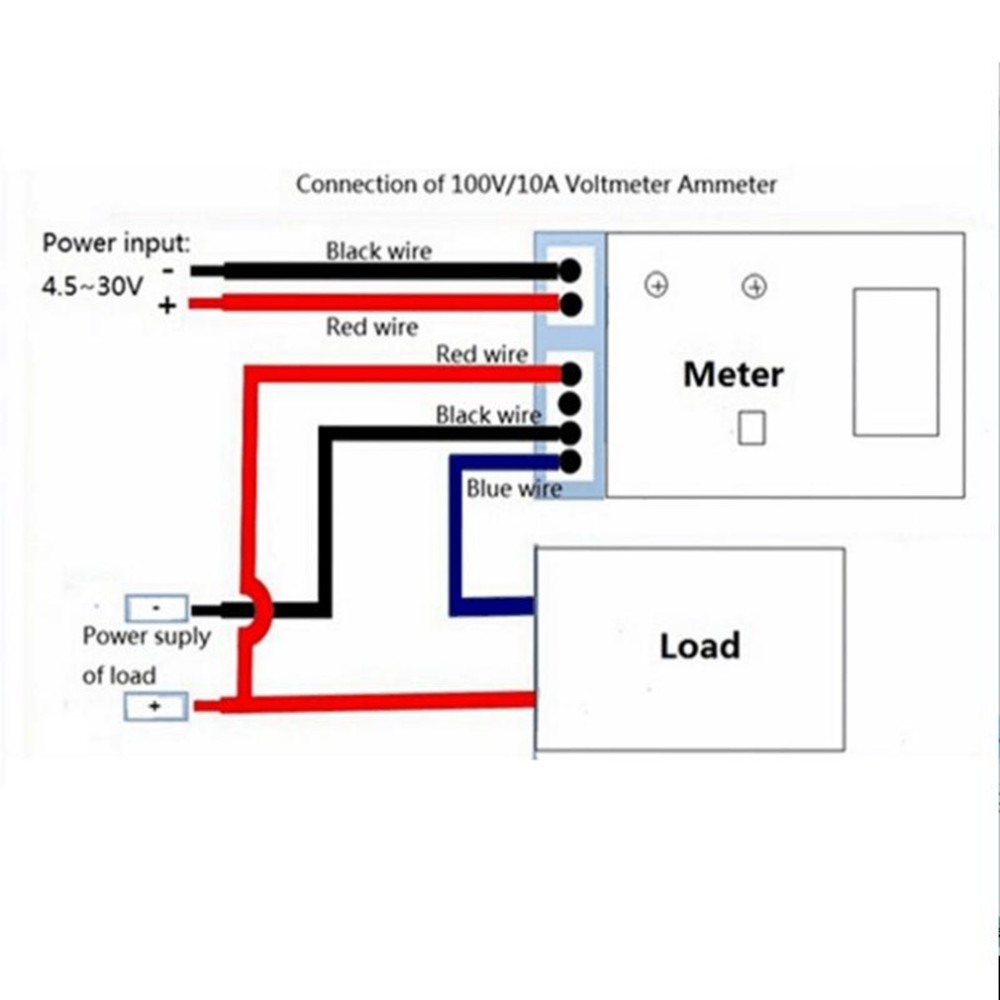
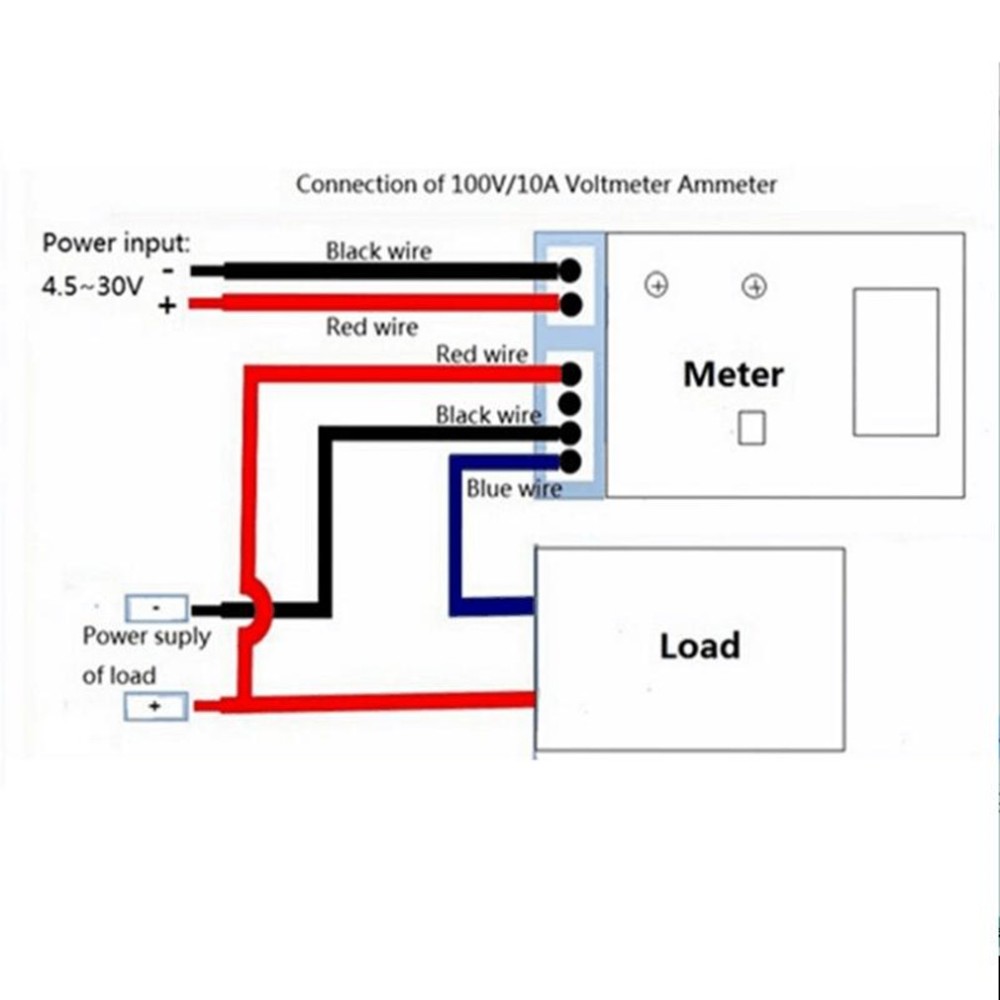
    Freddy the connection you suggested is wrong, regardless of the color of the wire (yellow or blue), this wire is the output power supply (-) current consumption measurement is measured at negative voltage (shunt between - black input and - yellow output).
    The connection shown by col. sofles is correct. Reading the current consumption, as someone has already mentioned above, is possible only after connecting a receiver. This module is quite resistant in the case of low currents (fault of the automation).
    Regards.
  • #13 16633133
    Freddy
    Level 43  
    Posts: 19997
    Help: 1394
    Rate: 2806
    gumisie wrote:
    Freddy, the connection you suggested is wrong
    Since you are sure, I apologize, but it is an image provided by the seller and on the website :) . I still have one.
    How to connect a digital LED ammeter / voltmeter to the power supply
  • #14 16633150
    gumisie
    Level 43  
    Posts: 17785
    Help: 1667
    Rate: 2472
    Freddy wrote:
    If you're sure then I'm sorry
    Hello.
    100%, I use this type of panels because of the fairly affordable price. I have just unscrewed the power supply to make sure.
    Regards.
  • #15 16633165
    Freddy
    Level 43  
    Posts: 19997
    Help: 1394
    Rate: 2806
    No problem, I already wrote that sorry . I also use these modules (100V, 10A).
    I will not unscrew my power supply, because it is too much work. :)
  • #16 16633189
    gumisie
    Level 43  
    Posts: 17785
    Help: 1667
    Rate: 2472
    @ Freddy no one excludes that you are right, the connection issue may arise from the model of this panel. I referred to the YB27VA.
    Regards.
  • #17 16633199
    Freddy
    Level 43  
    Posts: 19997
    Help: 1394
    Rate: 2806
    My panel is DSN-VC288, but 99% is one and the same.

    The problem is that the author, when asked to remove his layout, inserts a diagram, as if he was ashamed of editing :) .
  • #18 16633278
    gumisie
    Level 43  
    Posts: 17785
    Help: 1667
    Rate: 2472
    @sofles, Due to the fact that in the network you can actually find various solutions and it is difficult to find out which is the right one and to which panel they can be used, so in my opinion you can check it by measuring the resistance between the blue and black or red wire.
    Regards.
  • #19 17723136
    Cl20
    Level 8  
    Posts: 9
    Rate: 1
    edberg wrote:
    To measure it (current value) you have to connect in series, i.e. you cut the cable and connect with one end of the ammeter to one part of the cable and with the other end of the ammeter to the other end of the cut cable. Of course, you must have some load connected because the current flows in a closed circuit ;) .

    And is my reasoning correct when it comes to connecting a voltmeter with a measurement of 0-100 V, which requires a power supply, i.e. one with 3 cables?
    How to connect a digital LED ammeter / voltmeter to the power supply
  • #20 19254449
    Fi_eng
    Level 1  
    Posts: 1
    Hope you have already solved this but there are many different types of devices. Some have 3 thin wires in one connector: red, black and yellow and two thick wires of red and black. Another type like yours has 3 thick wires in one connector, red, black and blue. That's why in this discussion there is so much confusion. I dropped to this discussion when trying to find proper documentation for these meters like some value of shunt resistor of ampmeter but no success. Just have to calibrate with more accurate device :(

    3 Thin wires + 2 Thick wires
    Red meter operating voltage +
    Black meter operating voltage -
    Yellow voltage sense - high impedance input
    2 Thick wires
    Black ampmeter negative -
    Red ampmeter positive + (from load)

    2 Thin wires + 3 Thick wires
    Red meter operating voltage +
    Black meter operating voltage -
    3 Thick wires
    Black ampmeter negative -
    Blue ampmeter positive + (from load)
    Red voltage sense - high impedance input

    Your connection is correct, so must have problem inside device lice solder break of shunt wire? If you have solved your probem, please reply, it will help me :)
  • #21 19254473
    brofran
    Level 41  
    Posts: 6609
    Help: 647
    Rate: 1395
    Cl20 wrote:
    And do I think correctly when it comes to connecting a voltmeter with a measurement of 0-100 V?
    Yes, that's the correct connection.

Topic summary

✨ The discussion revolves around connecting a digital LED ammeter/voltmeter to a modified computer power supply using a buck-boost converter. The user successfully adjusts the voltage but encounters an issue where the ammeter consistently displays 0.00A. Responses emphasize the necessity of connecting the ammeter in series with a load to measure current accurately. Various users suggest checking the wiring connections, as incorrect configurations can lead to measurement failures. The importance of following the correct schematic provided by the seller is highlighted, along with the potential differences in wiring colors and configurations among different models of ammeters. Some users mention specific models and the need for calibration with accurate devices.
Generated by the language model.

FAQ

TL;DR: Most panel meters use 3 thick wires (or 3 thin + 2 thick). Connect the ammeter in series on the negative side with a load; “there are many different types of devices.” [Elektroda, Fi_eng, post #19254449]

Why it matters: This FAQ helps DIY power‑supply builders quickly wire and troubleshoot LED volt/amp meters without frying parts or misreading current.

For: Hobbyists converting ATX supplies or adding buck/boost modules who ask “why is my ammeter stuck at 0.00 A?”

Quick Facts

How do I wire the ammeter so it shows more than 0.00 A?

Place the ammeter in series with the load. Cut the negative lead, route the current through the meter’s shunt, and ensure a real load is connected so current flows in a closed circuit. Without a closed loop, current is zero and the display stays 0.00 A. [Elektroda, edberg, post #16631258]

Where exactly is the shunt on these LED meters?

On common panels, the shunt sits on the negative side between the module’s input minus and output minus. That’s why wiring the meter in the negative return is required for current measurement. “Reading the current consumption is possible only after connecting a receiver.” [Elektroda, gumisie, post #16633103]

My seller’s diagram differs—who’s right?

Diagrams vary by panel model. For YB27VA the correct connection measures current on the negative leg across the internal shunt. Some seller drawings show another layout and can mislead. Verify your panel by model marking and the negative‑side shunt path. [Elektroda, gumisie, post #16633103]

What wire colors do these meters use, and what do they mean?

Two families exist. A 3‑thin + 2‑thick type uses thin red/black for power and thin yellow as high‑impedance volt sense; thick red/black carry current. A 2‑thin + 3‑thick type instead uses thick blue for ammeter positive. Your unit may match either set. [Elektroda, Fi_eng, post #19254449]

How can I confirm functions when the colors don’t match?

Measure resistance between the blue wire and the black or red leads to identify which side connects to the shunt. This quick check avoids miswiring when colors differ from online diagrams and helps locate the current path. [Elektroda, gumisie, post #16633278]

Will the meter read tiny currents from LED modules?

Some panels ignore very low currents due to their internal automation. They can display 0.00 A until current rises above a threshold. Test with a known resistive load to verify sensitivity before suspecting a wiring fault. [Elektroda, gumisie, post #16633103]

Could a bad meter cause zero current reading even if wired right?

Yes. Devices can have internal faults like a broken solder joint on the shunt lead. If wiring and load are verified, inspect or replace the meter. “Your connection is correct… problem inside device.” [Elektroda, Fi_eng, post #19254449]

What specs should I expect from common DIY panel meters?

Typical dual displays are rated around 0–100 V and up to 10 A continuous. Builders often use models like DSN‑VC288 and similar variants for ATX or bench supplies. Ensure loads and wiring respect these limits. [Elektroda, Freddy, post #16633165]

How do I wire a 0–100 V, 3‑wire voltmeter correctly?

Power the meter with its red (+) and black (–). Connect the sense lead to the measured point per its diagram. This common three‑wire hookup isolates meter power while reading the target voltage accurately across the range. [Elektroda, brofran, post #19254473]

What is a shunt resistor in these meters?

A shunt is a low‑value resistor inside the meter that the load current passes through. The meter measures voltage across this shunt to compute current. Many panels place the shunt in the negative return path. [Elektroda, gumisie, post #16633103]

Do different models (YB27VA vs. DSN‑VC288) wire the same?

They are very similar, but minor wiring details and color codings can differ. Always follow the model‑specific negative‑side shunt principle and confirm with continuity checks before powering. [Elektroda, Freddy, post #16633199]

Quick 3‑step: how do I add a panel ammeter to my buck‑boost supply?

  1. Insert the meter’s shunt in series with the negative lead to the load.
  2. Connect the meter’s power leads to a suitable supply.
  3. Attach the volt sense lead to the output terminals, then test under load. [Elektroda, edberg, post #16631258]

Why can I change voltage but not current on my module?

Voltage control adjusts output potential, but current depends on the actual load and series path through the shunt. Without proper series wiring and a connected receiver, no current flows, and the display remains at 0.00 A. [Elektroda, Defensore.Puniti, post #16631264]

What’s an edge case that often confuses builders?

Panels may refuse to register sub‑threshold currents, showing 0.00 A even when an LED glows. Use a calibrated resistive load to confirm, or raise current until the meter becomes responsive. [Elektroda, gumisie, post #16633103]

Any sign my harness type is causing the problem?

If your unit has 3 thick wires in one connector (red, black, blue), the blue is typically the ammeter positive from the load. Misplacing this lead prevents current reading even when voltage displays fine. [Elektroda, Fi_eng, post #19254449]
Generated by the language model.
ADVERTISEMENT