


logo elektroda
logo elektroda
X
logo elektroda

Samsung LE37S62B TV: Power Supply and Inverter Issues, LED Blinks 4 Times

jurij1994 15258 14
ADVERTISEMENT
Treść została przetłumaczona polish » english Zobacz oryginalną wersję tematu
  • #1 16673701
    jurij1994
    Level 11  
    Hello.
    Samsung TV - when the power button is pressed, the matrix will flash for a fraction of a second along with the noise in the speakers, after which the stand-by LED will blink 4 times. The TV was dismantled, all electrolytes replaced on the secondary side of the power supply (they were swollen), which gave no change.
    24V power supply reaches the inverter, but I noticed that when the TV is "switched on", when unplugging and fastening the plug from the power supply to the inverter, there appears a backlight and porridge for screens for a fraction of a second, along with quite a large lye on the plug.
    A friend from whom I got the TV said that before he died completely, the picture disappeared and the sound was still there.
    I am asking for help in fixing the fault.
    In the attachment I add a website.
    greetings
    Attachments:
    • samsung_le32s62b-gsa32heu_le37s62b-gsa37heu_le40s62b-gsa40heu.pdf (14.35 MB) You must be logged in to download this attachment.
  • ADVERTISEMENT
  • #2 16673962
    h jaworski
    Home appliances specialist
    Connect, for example, a DVD with a euro-euro cable and check if there is a voice, if there is a voice, look for damage in the inverter. Flashing LED Samsung TV means nothing, in this type of TV the LED always blinks during startup.
  • #3 16674093
    Zbigniew Sekula
    Level 23  
    The power supply probably has a BN44-0157A check the voltage reaching the inverter is 24V
    and what you have on BL / ON is the voltage that turns on the backlight.
    Attachments:
    • samsung_bn44-00157a.pdf (411.63 KB) You must be logged in to download this attachment.
  • ADVERTISEMENT
  • #4 16674208
    jurij1994
    Level 11  
    Hello. Thanks for the answers. I have no way of connecting anything other than a VGA cable that does not send sound anyway.
    Mr. Zbyszek, this is exactly the model of the power supply. The inverter goes with 24V power supply, and the BL / ON pin reaches 5.2V. Voltages already checked on the inverter connector itself.
  • ADVERTISEMENT
  • #5 16674230
    Zbigniew Sekula
    Level 23  
    Well, in my opinion, skip the disc for now because if it is 24V and 5V on BL / ON then
    matrix backlight should be lit.
    If you can't see from the front, look from the back.
    Is that so ?.
  • ADVERTISEMENT
  • #6 16674362
    jurij1994
    Level 11  
    The backlight is visible both from the front and the back and appears only for a split second after switching on the TV with the power button.
    In the meantime, only the STANDBY LED will flash 4 times and the LED will turn off completely as if the TV was working, but nothing is displayed and there is no backlight.
  • #7 16674837
    Zbigniew Sekula
    Level 23  
    Leave the discs as I wrote later, you have to have the matrix illuminated all the time without any blinking.
    The reason is in the inverter or fluorescent lamps. The inverter works so that if there is something wrong with it, it is supposed to turn off.
  • #8 16687134
    jurij1994
    Level 11  
    I connected the image to the TV, which gave "noise on the screen" and after lighting in the matrix it was visible that the matrix works.
    So the Inverter ...
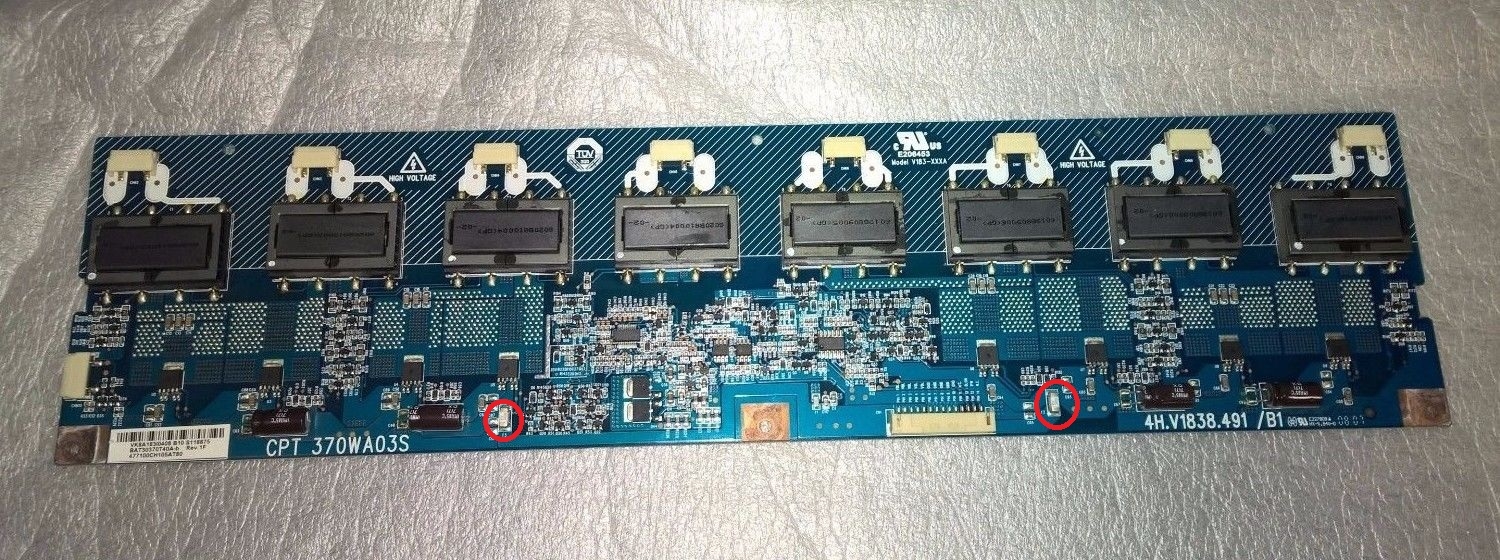
    The inverter is V183 XXXA - it looks like after a moment some Protect started to work.
    I checked the operation of all fluorescent lamps by switching on the TV and unplugging the next ones - all of them are lit, only the upper one looks a little weaker.
    How to at least find the section where the damage is, since the inverter turns off in a split second?
  • #9 16687161
    Zbigniew Sekula
    Level 23  
    If you gently strip the matrices and remove the glass so as not to damage it and not tear the ribbons from the glass, you would get into the fluorescent lamps and you would know almost 100% what is the cause.

    Added after 30 [minutes]:

    Enter all inscriptions from the inverter.

    Added after 8 [minutes]:

    jurij1994 wrote:
    I checked the operation of all fluorescent lamps by switching on the TV and unplugging the next ones - all of them are lit, only the upper one looks a little weaker.

    If you have fluorescent sockets on the cables, try swapping places.
  • #10 16687367
    jurij1994
    Level 11  
    I was hoping to change the plugs of the fluorescent lamps in places, but the cable protrudes by 1 cm and swapping the plugs without total demolition is not an option.
    Other inverter designations: 4h.v1838.491 / b1 and CPT 370WA03S
    At the weekend I should find a little more time to pull the matrix out.
    I checked the Darfons resistance before, which is in the range of 5.2kohm - 5.35kohm on the plugs for fluorescent lamps
  • #11 16687662
    Zbigniew Sekula
    Level 23  
    If the reason is in the inverter then you could buy e.g. the item but this reason is not necessarily in it.
    https://www.google.pl/url?sa=t&rct=j&q=&esrc=...=http%3A%2F%2Fwww.akostv.pl%2Fpl%2Fpodstrony% 2Foferta% 2Fczesci TV-% 2Finwertery% 2F4hv1838491-b1-CPT-370wa03s% 2F & ultrasound = AFQjCNGkdN7RVthxzB8q3Ar5tohBmDv4h
    And if you highlight the matrix from the back without a signal, press the menu on the remote control
    it should be visible.
  • #12 16697568
    jurij1994
    Level 11  
    After replacing 2 fluorescent lamps that were dimmer, the same was still going on, with the difference that the power supply works quietly without squeaking.
    The middle tapping of the darfons comes for the first 2 upper 0.2v, and for the other 0.7-0.8v. How to locate the inverter fault?
    Unless there is a problem in the signal that turns on the inverter?
  • #13 16697839
    Zbigniew Sekula
    Level 23  
    Try to swap fluorescent lamps first and measure if these measurements will be the same.
  • #14 16698570
    h jaworski
    Home appliances specialist
    Measured mate hits the inverter especially secondary winding?
  • #15 17317831
    pawlak932
    Pupil
    You have 2 white smd fuses on the inverter, check them, because one will be burnt.
    Samsung LE37S62B TV: Power Supply and Inverter Issues, LED Blinks 4 Times

Topic summary

✨ The discussion revolves around a Samsung LE37S62B TV experiencing power supply and inverter issues, indicated by a standby LED blinking four times after pressing the power button. The user replaced swollen electrolytic capacitors on the power supply but observed no improvement. The power supply delivers 24V to the inverter, and a 5.2V signal is present on the BL/ON pin, suggesting the inverter should activate the backlight. However, the backlight only flickers briefly upon startup, and the TV fails to display any image. Suggestions include checking the inverter for faults, testing fluorescent lamps, and examining SMD fuses on the inverter. The user confirmed that after replacing dim fluorescent lamps, the issue persisted, indicating a potential inverter fault or signal issue.

FAQ

TL;DR: For Samsung LE37S62B no‑backlight issues, inspect the 2 white SMD fuses on the inverter—“check them, because one will be burnt.” Start here before chasing other boards. [Elektroda, pawlak932, post #17317831]

Why it matters: This FAQ helps DIYers quickly isolate power, inverter, or CCFL faults without guesswork.

Quick Facts

Why does my LE37S62B backlight flash once and the LED blink four times?

That pattern points to the inverter entering protection. The set briefly lights the CCFLs, detects a fault, then shuts the backlight. Users reported a split-second flash followed by four LED blinks, after which the TV appears on but without display. [Elektroda, jurij1994, post #16674362]

Does the blinking standby LED indicate an error code on this Samsung?

No. A contributor notes the LED on this series blinks during startup and “means nothing” by itself. Diagnose using voltages, backlight behavior, and inverter checks rather than LED blink counts. [Elektroda, h jaworski, post #16673962]

What voltages should I see at the inverter connector?

Expect about 24 V supply to the inverter and a BL/ON control line around 5 V when the TV commands backlight on. These readings were confirmed at the inverter plug on this model. [Elektroda, jurij1994, post #16674208]

If 24 V and BL/ON are present, should the backlight stay on?

Yes. With 24 V and roughly 5 V on BL/ON, the matrix backlight should remain lit. If it lights briefly then turns off, focus on the inverter or lamps. [Elektroda, Zbigniew Sekula, post #16674230]

Where are the quick checks on the inverter board?

Check the two white SMD fuses first. A user advises, “check them, because one will be burnt.” Replace if open before deeper diagnostics. [Elektroda, pawlak932, post #17317831]

How do I confirm the panel actually produces an image?

Feed any video and observe the screen with a flashlight or from behind. One tip: light the matrix from the back and press Menu; the OSD should appear faintly if the panel processes video. [Elektroda, Zbigniew Sekula, post #16687662]

Could weak CCFL tubes cause the TV to shut the backlight off?

Yes. The inverter trips protection when lamp current looks abnormal. One report noted the top lamp appeared weaker and protection engaged after a moment. Replacing dim tubes may be required. [Elektroda, jurij1994, post #16687134]

What inverter and panel identifiers should I know when sourcing parts?

Users reported inverter 4h.v1838.491/b1 (V183 XXXA) paired with CPT 370WA03S. Match these IDs when searching replacements or donor boards. [Elektroda, jurij1994, post #16687367]

How can I test whether sound still works without HDMI?

Connect a DVD player via SCART (Euro–Euro) to check audio. If you have sound, suspect the inverter/backlight path rather than main board processing. [Elektroda, h jaworski, post #16673962]

What resistance should I expect on the inverter’s transformer outputs?

Measured secondary resistances around 5.2–5.35 kΩ were reported at the CCFL outputs. Use these as a ballpark to compare channels for outliers. [Elektroda, jurij1994, post #16687367]

How do I systematically localize an inverter or lamp fault?

Try this 3‑step: 1. Verify 24 V and BL/ON at the inverter plug. 2. Inspect/test the two SMD fuses. 3. Compare lamp channels and swap CCFL leads if accessible to see if the fault follows the lamp. [Elektroda, Zbigniew Sekula, post #16687161]

Is it safe to swap CCFL plugs to test?

Yes, if connectors allow. One advisor suggests swapping lamp sockets to see if the dim channel moves. Do not force short leads or disassemble unsafely. [Elektroda, Zbigniew Sekula, post #16687161]

Do I need to strip the LCD to reach the CCFLs?

For definitive lamp testing, carefully strip the matrix to access the tubes and their wiring. Avoid ribbon damage and handle the glass with care. [Elektroda, Zbigniew Sekula, post #16687161]

I replaced two dim CCFLs but the set still shuts down—what next?

Re-check inverter drive balance. One case showed 0.2 V sense on upper channels versus 0.7–0.8 V on others, indicating imbalance. Inspect fuses, transformers, and connectors. [Elektroda, jurij1994, post #16697568]

Could the power board still be faulty here?

If 24 V and BL/ON are solid at the inverter, defer power board replacement. The advisor states the matrix should stay lit; pursue inverter or CCFL issues first. [Elektroda, Zbigniew Sekula, post #16674230]

Any expert rule of thumb for this fault path?

“The inverter works so that if there is something wrong with it, it is supposed to turn off.” Focus on protection triggers from lamps or inverter stages. [Elektroda, Zbigniew Sekula, post #16674837]
ADVERTISEMENT