


logo elektroda
logo elektroda
X
logo elektroda

Samsung UE32D5500 TV - LED Blinks 5 Times, No Sound or Remote Response, PSU Voltages OK

mkpl 21471 12
ADVERTISEMENT
Treść została przetłumaczona polish » english Zobacz oryginalną wersję tematu
  • #1 17310794
    mkpl
    Level 37  
    Posts: 5637
    Help: 306
    Rate: 839
    Hello
    The TV starts up blinks the LED 5 times and it's over.
    The backlight turns on for a moment at full power and dims to a minimum.

    Proven PSU voltages - everything ok.
    I turned on the backlight (by disconnecting the PWM signal) is correct and the voltages are correct.

    No sound or response to the remote. The TV reacts to the local keyboard, i.e. it can be turned off and on as with the above-mentioned effect.

    I don't know anything about how the fault happened.

    On the motherboard, the voltages on the stabilizers make sense. Behind the 6V converter, there are 9, 5, 2.4 and 1.2V linear stabilizers.

    Normal temperature of stabilizers.
    The SEMS21 processor is about 55 * C (it burns after a while) but in total also quite normal.

    LVDS bus waveforms only on EVEN TX4 and ODD TX4.


    Someone from my friends made these TVs? Firmware? Anything else should I check?

    best regards
    Marcin
  • ADVERTISEMENT
  • #2 17311019
    lisek
    Service technician RTV
    Posts: 39712
    Help: 6307
    Rate: 6802
    Quote:
    Phrase: UE32D550 Search found 50 matches (0.27s)

    on this forum

    Start by checking the backlight (Samsung ch-tical 5x blinking)
    - LED lines
  • ADVERTISEMENT
  • #3 17311591
    mkpl
    Level 37  
    Posts: 5637
    Help: 306
    Rate: 839
    The led backlight seems to be working. I ran the power supply itself and the voltage is ok (I described in the first post).
  • ADVERTISEMENT
  • #4 17311676
    mirex
    Level 43  
    Posts: 21794
    Help: 1950
    Rate: 1987
    lisek wrote:
    Start by checking the backlight (Samsung ch-tical 5x blinking)

    Someone will explain what the meaning of this sentence is?
    Because for me it looks like this - if something with the backlight is wrong, Samsung flashes 5 times, which is characteristic (or maybe chaotic?) With such a fault.

    ================
    mkpl wrote:
    I turned on the backlight (by disconnecting the PWM signal)

    I understand you mean the PWM_DIM pin.
    And you can't just boot it up by disconnecting your motherboard?
    It's BN44-00460A? Yes?
    mkpl wrote:
    SAMSUNG UE32D550

    Are you sure it should be so?

    mkpl wrote:
    No sound

    I understand that from all sources.
    mkpl wrote:
    Does not turn on

    Well, it turns on:
    mkpl wrote:
    The backlight turns on for a moment at full power and dims to a minimum.
    mkpl wrote:
    The TV reacts to the local keyboard, i.e. it can be turned off and on

    What happens after unpinning the logic?


    Do you repair "hard" or have you checked the service?
    https://www.elektroda.pl/rtvforum/topic17936-330.html#12464805
    Attachments:
    • UE32D55xx Chassis-U66A U57.pdf (12.13 MB) You must be logged in to download this attachment.
  • #5 17311973
    mkpl
    Level 37  
    Posts: 5637
    Help: 306
    Rate: 839
    I have a service shop. The fact is that you just disconnect the logic and see if the backlight works. I, on the other hand, wanted to see if sometimes the logic incorrectly controls the backlight (because it turned off after a while) and if it displays anything, so it was easier for me to disconnect the control (remove the pin).

    You are right with the model UE32D5500.

    No reaction to the remote control, no content on the matrix (zero control), complete lack of sound and the possibility of changing inputs.

    It only reacts to the on button. In the S-by, the LED lights up red and blinks 5 times after switching on and then goes off.

    What do you mean by unfastening logic? Disconnecting the power supply of the motherboard or matrix LVDS (I also tried with zero result).
  • ADVERTISEMENT
  • #6 17312054
    mirex
    Level 43  
    Posts: 21794
    Help: 1950
    Rate: 1987
    mkpl wrote:
    What do you mean by unfastening logic? Disconnecting the power supply of the motherboard or matrix LVDS (I also tried with zero result).

    Disconnecting the motherboard from the power supply should result in full illumination of the backlight.
    Unplugging the logic from the motherboard is a small test for any surprises from the logic and matrix side.
    If main was good, then it should be fairly normal then. Of course, connected to the power supply.

    Most likely you have a common problem with these boards. It seems that in your terms it remains to buy a used one, if you meet, or contact our forum colleague by email.
  • #7 17312140
    GanCegall
    Level 38  
    Posts: 4281
    Help: 339
    Rate: 1626
    What power supply, main ??? (not to be confused with matrix logic - t-con)
    mkpl wrote:
    What do you mean by unfastening logic? Disconnecting the power supply of the motherboard or matrix LVDS
  • #8 17315552
    mkpl
    Level 37  
    Posts: 5637
    Help: 306
    Rate: 839
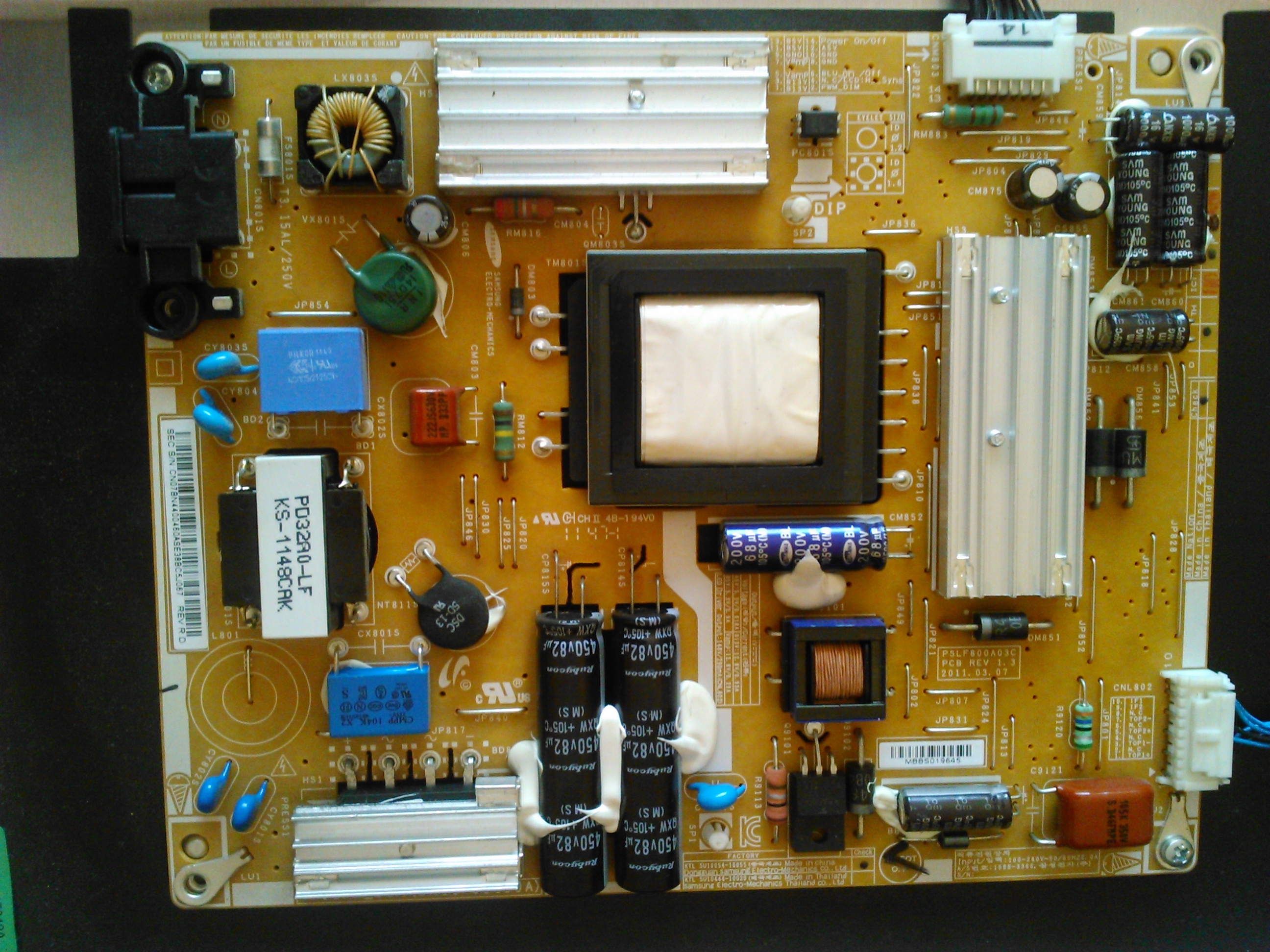
    Motherboard BN41-01660B
    Power Supply
    Samsung UE32D5500 TV - LED Blinks 5 Times, No Sound or Remote Response, PSU Voltages OK
  • #9 17315658
    mirex
    Level 43  
    Posts: 21794
    Help: 1950
    Rate: 1987
    mkpl wrote:
    Motherboard BN41-01660B

    More specifically? Second, more important number?
    mkpl wrote:
    Power Supply
    + picture. And the search engine will read the name from the picture. ;)
    Can't the letters BN44-00460A and / or PD32AF_BSM or PSLF800A03C?
  • #10 17316999
    GanCegall
    Level 38  
    Posts: 4281
    Help: 339
    Rate: 1626
    bogred wrote:
    I would also bet on the replacement of NAND memory.

    You have to start with this, not necessarily through replacement, you can reprogram the old one and it will be ok.
  • #11 17317014
    bogred
    VIP Meritorious for electroda.pl
    Posts: 3971
    Help: 513
    Rate: 276
    GanCegall wrote:
    you can reprogram the old one and it will be ok.

    If it has what. And he should deal with the exchange if necessary :-?
  • #12 17317100
    zdzich42
    Level 41  
    Posts: 8012
    Help: 586
    Rate: 859
    Not further than today I have repaired such a TV with a symptom: smart on the screen and restart. I do not write about the "flashing" of the diode because it is irrelevant in Samsung. I wrote "today I fixed" because yesterday a parcel arrived from Mailo. :D
    After the number of cases, it seems to me that this is one of the most common problems with this album.
  • #13 17318449
    GanCegall
    Level 38  
    Posts: 4281
    Help: 339
    Rate: 1626
    zdzich42 wrote:
    After the number of cases, it seems to me that this is one of the most common problems with this album.

    Right, but not the only one, and in this case it could be something else.
    We still don't know WHAT album we're writing about, Mr. Author!

Topic summary

✨ The Samsung UE32D5500 TV exhibits a 5-blink LED error code upon startup, indicating a potential issue with the backlight or motherboard. The backlight briefly activates at full power before dimming, and there is no sound or remote response, although local controls function. The power supply unit (PSU) voltages are confirmed to be normal, and the motherboard stabilizers show appropriate voltages. Users suggest testing the backlight by disconnecting the logic board and checking for any faults in the control signals. The discussion highlights common issues with this model and suggests potential repairs, including reprogramming the motherboard or replacing it if necessary.
Generated by the language model.

FAQ

TL;DR: Forum search shows 50 matches; "Start by checking the backlight." UE32D5500 with 5 blinks needs LED-line and mainboard isolation checks before suspecting firmware. This quick FAQ helps repairers diagnose no-sound/no-remote cases fast. [Elektroda, lisek, post #17311019]

Why it matters: It speeds up triage for Samsung D‑series techs facing 5‑blink, no‑audio, no‑control faults.

Quick Facts

What does 5 LED blinks on a Samsung UE32D5500 indicate?

On Samsung D‑series, five flashes commonly accompany backlight or LED-line issues. Inspect LED strips, drivers, and PWM_DIM control. “Start by checking the backlight.” If LEDs test fine, proceed to isolate mainboard and panel logic. This sequence avoids chasing false leads from blink counts alone. [Elektroda, lisek, post #17311019]

How common is this UE32D5500 startup fault?

It appears often in community reports. A forum search returned 50 matches for “UE32D550,” indicating recurring cases with similar startup symptoms. Use that as a signal to follow a proven triage path: backlight first, then mainboard and firmware checks. [Elektroda, lisek, post #17311019]

How do I force the backlight on to test it?

Use this quick test:
  1. Disconnect the mainboard harness from the PSU, then apply AC power.
  2. The backlight should light fully if LED strings and PSU are healthy.
  3. Alternatively, isolate PWM_DIM from main to stop dimming during the test. This isolates backlight from mainboard control. [Elektroda, mirex, post #17311676]

What should I expect if I unplug the mainboard from the PSU?

The backlight should illuminate at full brightness. That outcome indicates the LED strings and the PSU’s LED driver are operational. You can then refocus on mainboard or panel logic as the fault source. This is a fast, low‑risk isolation check. [Elektroda, mirex, post #17311676]

Should I disconnect the T‑CON/LVDS to isolate the panel side?

Yes. Unplug the panel logic (T‑CON) from the mainboard and power on. This checks for surprises from the panel side. If the mainboard is healthy, the TV should behave normally aside from no image. Keep the PSU connected for this test. [Elektroda, mirex, post #17312054]

Backlight works but theres no sound, no image, and no remote response—what now?

Focus on the mainboard BN41‑01660B. A frequent remedy is to reprogram or replace the NAND flash that holds firmware. Start with NAND work before sourcing a replacement mainboard. This approach often restores boot and control functions. [Elektroda, GanCegall, post #17316999]

Is NAND flash corruption a known issue on this board?

Yes. Experienced techs report this as “one of the most common problems with this album.” Symptoms include boot loops, stuck logos, or dead control with brief backlight activity. Address the NAND before deeper hardware swaps to save time. [Elektroda, zdzich42, post #17317100]

Can I reprogram the original NAND instead of replacing it?

Yes. “You can reprogram the old one and it will be ok.” Many shops reflash the existing NAND with known‑good firmware dumps. If the chip is physically bad, replace it and program off‑board. This minimizes unnecessary board replacements. [Elektroda, GanCegall, post #17316999]

What is the mainboard part number I should search for?

BN41‑01660B is reported for this UE32D5500 case. Use that identifier when sourcing a donor or when requesting firmware/NAND images. Verify the full suffix on your board for compatibility. [Elektroda, mkpl, post #17315552]

Which power supply board is used with this model?

BN44‑00460A appears in this chassis family, also labeled PD32AF_BSM or PSLF800A03C. Confirm the sticker on your PSU for the exact variant before swapping parts. Matching revisions helps avoid connector or current rating mismatches. [Elektroda, mirex, post #17315658]

What rails and temperatures confirm the mainboard is at least powering?

Reported measurements after the 6 V converter include 9 V, 5 V, 2.4 V, and 1.2 V linear regulators. The SEMS21 SoC around 55°C shortly after power‑on is observed and considered typical here. These signs indicate the board powers but may not boot. [Elektroda, mkpl, post #17310794]

My remote doesnt work but side buttons toggle power—does that implicate the mainboard?

Yes. In this case the TV only reacted to the local keyboard, showed five LED blinks, and then went dark. There was no sound or input changing. That behavior aligns with a mainboard that powers but fails to run properly. [Elektroda, mkpl, post #17311973]

Do Samsung blink counts map to specific fault codes?

No. “The ‘flashing’ of the diode is irrelevant in Samsung.” Treat the five blinks as a hint, not a diagnostic code. Use isolation tests and voltage checks to locate the actual fault domain. [Elektroda, zdzich42, post #17317100]

I see LVDS activity only on EVEN TX4 and ODD TX4; is that useful?

Limited LVDS activity matches a no‑image condition. It suggests the panel is not being fully driven. Combine this with the LVDS unplug test to decide if the mainboard or panel logic is at fault. [Elektroda, mkpl, post #17310794]

The backlight turns on then quickly dims—does that fit this fault profile?

Yes. The described startup shows full backlight that dims to minimum while the set remains unresponsive. That fits a scenario where the mainboard fails to sustain enable or PWM control after initial power‑up. [Elektroda, mkpl, post #17310794]
Generated by the language model.
ADVERTISEMENT