logo elektroda
logo elektroda
X
logo elektroda

Connecting 2 TVs (Samsung 40' & Philips 24') to 1 UPC Decoder: HDMI Cable Setup & Configuration

lajkonik_2005 13200 18
ADVERTISEMENT
Treść została przetłumaczona polish » english Zobacz oryginalną wersję tematu
  • #1 16674975
    lajkonik_2005
    Level 8  
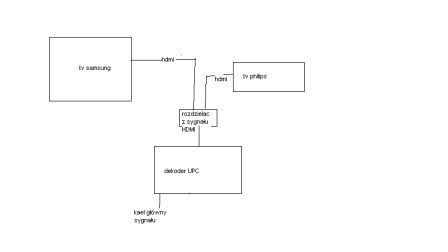
    Hello all. I have a question related to connecting two TVs to one UPC decoder. How do we connect cables so that everything receives programs. According to me .. the main antenna to the decoder and then from the decoder only via HDMI to TV let's call the main .. Samsung 40 'and the second also via HDMI to TV No. 2 philips 24'. I skip the issue of UPC signal blocks and the need to buy a Multi room or something. And further ... the smaller TV has a 20 m HDMI cable ... which extends partially into the wall and sometimes under the skirting boards by the floor. Does it affect the lack of signal and its transmission ...? Of course, I assume that the cable is ok bought at a price ... about 70 PLN. Does the Philips TV settings require any special configuration? Previously, he received terrestrial tv programs on a regular cable and it was ok. Does this philips have to have HDMI cables connected and traditional antenna ones> ??? ... I hope everything is understandable ... I wait for every word that will solve my post-renovation problem . Pozdrawim.
  • ADVERTISEMENT
  • #2 16675003
    Prof. SpecMiernik
    Level 27  
    Does the UPC decoder have x2 HDMI out?
  • ADVERTISEMENT
  • #3 16675049
    lajkonik_2005
    Level 8  
    the decoder has 1 HDMI output
  • ADVERTISEMENT
  • #4 16675096
    Prof. SpecMiernik
    Level 27  
    lajkonik_2005 wrote:
    the decoder has 1 HDMI output

    So how do you want to connect 2 TV?
  • #5 16675098
    lajkonik_2005
    Level 8  
    is this correct? Connecting 2 TVs (Samsung 40' & Philips 24') to 1 UPC Decoder: HDMI Cable Setup & Configuration

    [
  • #6 16675111
    TELMOR_PL
    Level 32  
    If it were that simple, then with a single decoder from the cable it would be possible to create an internal local mini-cable and charge fees to sub-recipients. A system was created to prevent cable operators from leaking sideways.
    Multi room costs a few zeta per month in addition, and in some cables it is included in the subscription price.
  • #7 16675138
    lajkonik_2005
    Level 8  
    It's true ... multi room is ok ... but is it not possible to receive such a scheme? must there be another piece of furniture in the form of a decoder? and more cables?
  • ADVERTISEMENT
  • #9 16675171
    TELMOR_PL
    Level 32  
    I don't have another piece of furniture, only the card on the second TV + installation on the coaxial cable, which needs to be led to the second TV. The HDMI cable must also be pulled by a friend. What's the problem? Mark'o gave the link to the discussion with the rest.
  • #10 16675175
    lajkonik_2005
    Level 8  
    the problem is that I have a small TV in the kitchen and I put the HDMI connector in contact. And now I have no way to pull up another antenna cable there.
  • #11 16675188
    Prof. SpecMiernik
    Level 27  
    lajkonik_2005 wrote:
    the problem is that I have a small TV in the kitchen and I put the HDMI connector in contact. And now I have no way to pull up another antenna cable there.

    Skirting boards.
  • #12 16675193
    TELMOR_PL
    Level 32  
    When creating an RTV / SAT / IT installation (or modernizing it), appropriate cables are placed (e.g. 2x RG6CU + 1 or 2x UTP 5e Cu 4x2x0,5mm in a protective pipe, just in case.
    And what (what need) did a colleague use to make an installation on an HDMI cable?
  • #13 16675248
    lajkonik_2005
    Level 8  
    ... the worst thing was that I had a concentric for "analog" programs and switched HDMI. I thought it would be a better picture because it was a bit snowing. And I guess I remembered: - / And now there is a classic flap ;-( I can't pull the slats ... basically part under and part on the walls "on the view" damn. I'm looking for the golden mean, but I know I have no knowledge in the subject hence I am writing to you here. And it is not about to avoid costs in UPC but for the least collision connection to receive programs even terrestrial TV.
  • #14 16675292
    TELMOR_PL
    Level 32  
    This collision is already there. Whether terrestrial TV or cable TV is practically the same when it comes to connecting receivers. Appropriate installation is needed.
    Without ..... it's only on the room antenna, and somehow this antenna needs to be connected to the TV.
    And who told your friend that the concentrator would only "analog" fly?
  • #15 16676045
    Staszek z Chełma
    Level 19  
    In such a situation, in both TVs the same program, you still need to bypass HDCP protection, maybe this device will meet the requirements.
    Active splitter
  • #16 16676533
    lajkonik_2005
    Level 8  
    Thank you for the tips and advice. So I have to pull the concentric again and hence ... a small demolition on the walls. best regards
  • #17 16676555
    Prof. SpecMiernik
    Level 27  
    Staszek z Chełma wrote:
    In such a situation, in both TVs the same program, you still need to bypass HDCP protection, maybe this device will meet the requirements.

    Have you read the first post?
    lajkonik_2005 wrote:
    And further ... the smaller TV has a 20 m HDMI cable ...


    And according to the specifications:
    Maximum HDMI cable length: 10 meters for 28AWG specification; 15 meters for 26AWG specifications.
    So rather money thrown down the drain.
  • #18 16676858
    lajkonik_2005
    Level 8  
    There was no analysis, now you have to bear the consequences.
  • #19 16676936
    Prof. SpecMiernik
    Level 27  
    lajkonik_2005 wrote:
    There was no analysis, now you have to bear the consequences.

    As a consolation, you are not the first and not the last to remove the walls after renovation. Such a life. You need a lot of experience to predict certain things. Alternatively, design the installation in dedicated software.

Topic summary

✨ The discussion revolves around connecting two TVs, a Samsung 40" and a Philips 24", to a single UPC decoder using HDMI cables. The user inquires about the correct setup, given that the UPC decoder has only one HDMI output. Responses highlight the limitations of using a single decoder for multiple TVs without additional equipment, such as a multi-room setup or an HDMI splitter. Concerns are raised about the signal quality over a 20-meter HDMI cable, especially when routed through walls and skirting boards. The need for proper installation and potential additional cabling is emphasized, as well as the importance of bypassing HDCP protection for simultaneous viewing on both TVs. The user acknowledges the necessity of redoing some installations to accommodate the setup.
Generated by the language model.

FAQ

TL;DR: 20 m HDMI runs exceed spec; "Maximum HDMI cable length: 10 m (28AWG) / 15 m (26AWG)." One UPC decoder has one HDMI output, so two TVs can only mirror the same channel without multiroom. [Elektroda, Prof. SpecMiernik, post #16676555] Why it matters: This helps you decide between an HDMI splitter for mirroring or adding coax/multiroom for independent viewing, and avoid rewiring mistakes.

Quick Facts

How do I connect two TVs to one UPC decoder?

Your decoder has one HDMI output, so it can feed only one display directly. To show the same channel on two TVs, add an active HDMI splitter after the decoder. To watch different channels, you need multiroom or a second card and coax run. [Elektroda, lajkonik_2005, post #16675049]

Can an HDMI splitter let both TVs show the same program?

Yes. Place an active HDMI splitter at the decoder, then run HDMI to each TV. Both screens will mirror the same channel. Some content may not display due to HDCP copy protection, so choose a splitter that handles HDCP correctly. [Elektroda, Staszek z Chełma, post #16676045]

Why does my 20 m HDMI cable give no signal?

It exceeds typical HDMI passive limits. "Maximum HDMI cable length: 10 meters for 28AWG; 15 meters for 26AWG." Long runs need thicker cable, active repeaters, or extenders. This failure is common on 20 m passive leads. [Elektroda, Prof. SpecMiernik, post #16676555]

Do I need multiroom to watch different channels on each TV?

Yes. Without multiroom or a second authorized card, a single decoder can’t independently serve two TVs. Cable systems prevent such redistribution. Multiroom usually adds a small monthly fee and solves this limitation cleanly. [Elektroda, TELMOR_PL, post #16675111]

Is coaxial cable only for old analog TV?

No. Coax carries digital cable and terrestrial signals as well. If you want live TV without the decoder on, your TV needs a coax feed from the antenna or cable outlet. HDMI alone won’t deliver broadcast channels. [Elektroda, TELMOR_PL, post #16675292]

Do Philips or Samsung TVs need special settings for HDMI?

Generally no. Select the correct HDMI input on the TV and ensure the decoder is on. For broadcast reception without the decoder, connect a coax feed and run the TV’s tuner setup. No extra HDMI‑specific tuning is required. [Elektroda, TELMOR_PL, post #16675292]

I can’t pull new coax to the kitchen; any routing tips?

Use skirting boards or surface‑mounted conduit to add coax discreetly. This avoids opening walls again. Plan a gentle path to the TV and protect bends. Many installs retrofit this way after renovations. [Elektroda, Prof. SpecMiernik, post #16675188]

What cabling should I have planned during renovation?

Include at least one or two RG6 coax runs plus Ethernet (e.g., UTP Cat5e) inside protective conduits. This future‑proofs for multiroom, network streamers, or access points. "Appropriate cables are placed... in a protective pipe." [Elektroda, TELMOR_PL, post #16675193]

How do I mirror my main TV to a second TV (same channel)?

  1. Place an active HDMI splitter at the UPC decoder output.
  2. Connect short HDMI from decoder to splitter, then HDMI from splitter to each TV.
  3. Power the splitter and select the HDMI inputs on both TVs. This mirrors one program. [Elektroda, Staszek z Chełma, post #16676045]

Will a pricier 70 PLN HDMI cable fix a 20 m run?

Price doesn’t overcome physics. Passive HDMI beyond 10–15 m often fails, regardless of brand. Use thicker gauge, an active repeater, or HDBaseT/Cat extenders for long distances. Keep runs within spec for reliability. [Elektroda, Prof. SpecMiernik, post #16676555]

Can I send the UPC decoder’s output over coax to another room without extra fees?

No. Providers design systems to stop such redistribution. To watch independently on another TV, order multiroom or a second card and run proper coax. This complies with service terms and works reliably. [Elektroda, TELMOR_PL, post #16675111]

What is HDCP and why does it block my splitter?

HDCP is copy protection on HDMI links. Some splitters fail to authenticate properly, causing black screens. Use an active splitter that handles HDCP or expect certain channels to refuse playback. "You still need to bypass HDCP protection." [Elektroda, Staszek z Chełma, post #16676045]

I buried HDMI in the wall and removed coax. What now?

You will likely need to re‑run coax to the second TV to regain broadcast or multiroom capability. The thread author accepted small demolition to correct this and restore flexibility. Plan conduits next time. [Elektroda, lajkonik_2005, post #16676533]

Can one decoder really operate two TVs at once?

Only for the same channel, and only with extra hardware. A single HDMI output cannot independently drive two displays. Multiroom or a second card is the proper route for separate channel control. [Elektroda, Prof. SpecMiernik, post #16675096]
Generated by the language model.
ADVERTISEMENT