
logo elektroda
logo elektroda
X
logo elektroda
Dostępna jest polska wersja

Czy wolisz polską wersję strony elektroda?

Nie, dziękuję Przekieruj mnie tam

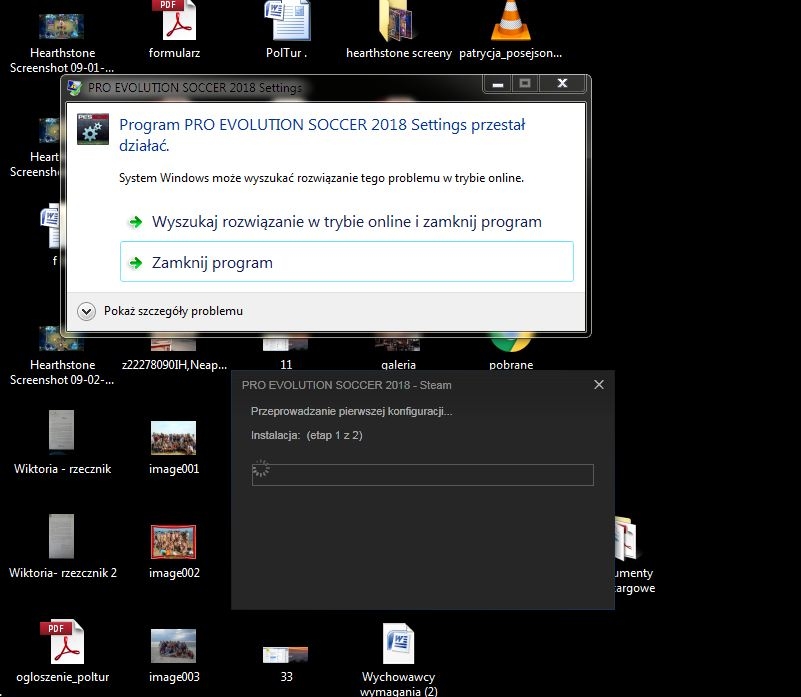
Unable to install Pro Evolution Soccer 2018 - the program has stopped working.

bocianek80 6525 15
ADVERTISEMENT
Treść została przetłumaczona polish » english Zobacz oryginalną wersję tematu
  • #1 16700018
    bocianek80
    Level 9  
    Unable to install Pro Evolution Soccer 2018 - the program has stopped working.

    I am sending a picture, I wanted to install the game, but I have a big problem, what could it be, prose for a signpost.
    It's about the Pro Evolution Soccer 2018 game

  • ADVERTISEMENT
  • ADVERTISEMENT
  • #3 16700054
    bocianek80
    Level 9  
    Problem Signature:
    Problem event name: CLR20r3
    Problem signature: 01: settings.exe
    Problem signature: 02: 1.0.0.0
    Problem signature: 03: 59a37ac3
    Problem signature: 04: Settings
    Problem signature: 05: 1.0.0.0
    Problem signature: 06: 59a37ac3
    Problem signature: 07: 7e
    Problem signature: 08: 20
    Problem signature: 09: System.IO.FileNotFoundException
    Operating system version: 6.1.7600.2.0.0.256.4
    Locale ID: 1045
    Additional information 1: 9816
    Additional information 2: 9816eb613a03e199ce2e07ad653fd9a9
    Additional information 3: 62a3
    Additional information 4: 62a332b4dd391a917f0ea9a75b376ff1

    Read our privacy policy online:
    http://go.microsoft.com/fwlink/?linkid=104288&clcid=0x0415

    If online privacy policies are not available, read our offline privacy policy:
    C: \ Windows \ system32 \ en-US \ erofflps.txt
  • #4 16700065
    sosarek

    Level 43  
    Are you running the installer with Administrator privileges?
    The computer and system meet the minimum game requirements?
    Company Account:
    Z
    Pka, Poznań, 60-850
    Helpful post? Buy me a coffee.
  • ADVERTISEMENT
  • #5 16700087
    bocianek80
    Level 9  
    Yes, the game is installed on Steam, I gave it a go. You should go at least to settings and change the settings to weaker or stronger, but this message is and I don't know why, Windows 7.
  • #7 16700152
    bocianek80
    Level 9  
    I did a consistency check.

    Unable to install Pro Evolution Soccer 2018 - the program has stopped working.

    something pops up when I turn on the pes 2018 apps
  • #9 16700195
    bocianek80
    Level 9  
    unfortunately they still don't work
  • ADVERTISEMENT
  • #11 16700262
    bocianek80
    Level 9  
    and if the graphics card were too weak, then such a message may appear?
  • #13 16707918
    bocianek80
    Level 9  
    of course, I made a mistake in the title, because it's 2018 and not 2017 PEs. Other games like Pes 2017 are no problem. I tried many things. I installed the framework, WMP, nothing helps. Today I intend to install the new system on the C drive, then I will see what happens. If it does not go then the computer is too weak. But in this case there should be no message
  • #14 16717525
    delissimo
    Level 9  
    I have the same problem. Did he find a solution?
  • #15 16717553
    enhanced
    Level 43  
    You haven't entered the PC configuration.

    What's in the REDIST folder where it plays? Try to install everything from there manually.
  • #16 16718933
    mixon78
    Level 1  
    white screen and "program stopped working", all drivers installed! do you have the same? did anyone find a solution to this problem?

Topic summary

✨ The discussion revolves around issues encountered while attempting to install Pro Evolution Soccer 2018, specifically a "program has stopped working" error. The user provided a detailed problem signature indicating a System.IO.FileNotFoundException. Suggestions from other participants included checking if the installer is run with Administrator privileges, verifying that the computer meets the minimum hardware requirements, and performing a file consistency check. The user confirmed the game is installed via Steam and attempted various troubleshooting steps, including installing necessary frameworks and considering a system reinstall. Despite these efforts, the issue persisted, leading to further inquiries about potential solutions and hardware limitations.

FAQ

TL;DR: At least 1/1 posted crash logs show CLR20r3 on Windows 7 (6.1.7600). "Problem event name: CLR20r3." The common fixes are Steam file check, installing VC++/REDIST, and running as admin. [Elektroda, bocianek80, post #16700054]

Why it matters: This FAQ helps Windows 7 Steam users fix PES 2018 crashes at launch or in settings.exe.
Quick Facts

How do I fix PES 2018 crashing with "program has stopped working" on Windows 7?

Start Steam as admin, verify game files, then install all packages from the game’s REDIST folder and reboot. Launch again. [Elektroda, enhanced, post #16717553]

What does CLR20r3 mean in this context?

It indicates a .NET application crash signature. In this thread it appears with settings.exe and System.IO.FileNotFoundException on Windows 7. [Elektroda, bocianek80, post #16700054]

Where is the REDIST folder and why is it important?

REDIST sits inside the game’s install directory and contains required runtimes like VC++ and DirectX. Install everything there manually. [Elektroda, enhanced, post #16717553]

How do I run a Steam file integrity check for PES 2018?

How-To: 1. In Steam, right‑click the game > Properties. 2. Open Installed Files. 3. Click Verify integrity of game files and wait. [Elektroda, sosarek, post #16700108]

Should I install Microsoft Visual C++ Redistributable separately?

Yes. Install the VC++ package the helper linked or the copies in REDIST, then restart and start the game. “Install…Then restart.” [Elektroda, sosarek, post #16700166]

Does a weak graphics card cause this exact CLR20r3 crash?

A weak GPU can block gameplay, but this thread’s crash points to missing files/runtimes rather than only low specs. [Elektroda, sosarek, post #16701139]

I use Windows 7—does that matter for PES 2018 settings.exe?

Yes. The only posted crash log shows Windows 7 (6.1.7600) with CLR20r3 and FileNotFoundException, so install required runtimes. [Elektroda, bocianek80, post #16700054]

The game shows a white screen and then stops—any clue?

One user reported a white screen before the same crash despite installed drivers. Reinstall REDIST and verify files. [Elektroda, mixon78, post #16718933]

Do I need admin rights to install or launch PES 2018 fixes?

Yes. Run the installer and Steam as Administrator to allow REDIST and file repairs to complete properly. [Elektroda, sosarek, post #16700065]

Is verifying Steam files enough to solve this?

It’s the first step suggested by the helper. If issues persist, install all REDIST packages and reboot before retrying. [Elektroda, sosarek, post #16700108]

What if installing frameworks and WMP didn’t help?

In-thread, adding frameworks alone didn’t fix it. A clean OS install was considered only after REDIST and Steam checks. [Elektroda, bocianek80, post #16707918]

Can I confirm minimum requirements inside this thread?

A helper asked to confirm hardware against minimum specs. Check your CPU/GPU/RAM and compare before deeper troubleshooting. [Elektroda, sosarek, post #16700200]

Why does settings.exe crash before I can change graphics options?

Because required files are missing or corrupted, settings.exe fails with FileNotFoundException before loading options. [Elektroda, bocianek80, post #16700054]

What single action helped most users here?

“Perform a file consistency check.” Then install REDIST and reboot. Many launch issues stem from corrupted or missing files. [Elektroda, sosarek, post #16700108]

If I reinstall Windows, will it definitely fix the crash?

Not guaranteed. Try Steam verification and full REDIST install first; a clean OS is a last resort step. [Elektroda, bocianek80, post #16707918]
ADVERTISEMENT
