logo elektroda
logo elektroda
X
logo elektroda

Overcoming False Motion Detection in Hikvision DS-2CD1041 Cameras & DS-7608NI-K2/8P Recorder

mlukjani 14133 19
Best answers

How can I reduce false night-time motion detection on Hikvision DS-2CD1041 cameras with a DS-7608NI-K2/8P recorder, and would a higher Hikvision model detect motion more reliably?

Reduce false night triggers by configuring motion detection on the camera itself, because the DS-7608NI-K2/8P only exposes a basic 0–6 motion menu while the camera has an advanced mode with 0–100 sensitivity and separate day/night settings [#16816719] Enable the recorder’s Virtual Host in Network > Advanced > Other, then open System > Manage Cameras and use the camera link to log into each camera directly [#16816804] After you set the recorder once, set the camera motion settings; the camera configuration overwrites the DVR configuration, though the DVR can occasionally overwrite it and you may need to refresh the camera settings again [#18250589] Night-time motion detection will still be unreliable with simple motion sensing, so Hikvision’s VCA functions like line crossing or intrusion are the better approach for dark conditions [#16812380] Your current DS-2CD1041 does not support those VCA options, so a higher model with those analytics is the relevant upgrade if you want better filtering at night [#16812403]
Generated by the language model.
ADVERTISEMENT
Treść została przetłumaczona polish » english Zobacz oryginalną wersję tematu
  • #1 16811973
    mlukjani
    Level 12  
    Posts: 100
    Rate: 10
    Hello !

    I recently bought such a Hikvision kit:
    DS-2CD1041 cameras
    recorder DS-7608NI-K2 / 8P

    In general, the set meets my expectations, quality is ok in particular when it comes to price. The only problem is motion detection. I set up the recording after detecting motion and if it is ok during the day, at night I have about 20 x 3-5s of recording per hour. It's enough that an insect flies and is already waking up. It makes searching and accessing scenes a little difficult. I skip the issue of cooperation with the alarm, because with such a number of false detections it makes no sense.
    What surprises me in these cameras is the range of sensitivity adjustment, it seems to be from 0-6, where 0- no detection, 1 - the effect I described, higher sensitivity is almost continuous recording. The camera is quite simple and has no available features such as detection of crossing the line or face.
    Now I have to decide whether to buy another same model or buy a higher Hikvision model (I don't want to mix producers any more) for some PLN 600-700. Some cameras in this range already have the function of detecting faces, objects, etc. I do not mean the quality of face detection, but can such a camera have better motion detection than the cheap 2CD1041?
    Maybe someone has experience with cameras such as DS-2CD2035FWD-I, DS-2CD2055FWD-I?
  • ADVERTISEMENT
  • #2 16812380
    GRZEGORZ OST
    Level 17  
    Posts: 253
    Help: 21
    Rate: 31
    At night you will always have detection problems. Try to eat with VCA options "crossing the line" or "intrusion into the area"
  • #3 16812403
    mlukjani
    Level 12  
    Posts: 100
    Rate: 10
    GRZEGORZ OST wrote:
    At night you will always have detection problems. Try to eat with VCA options "crossing the line" or "intrusion into the area"


    The camera listed above does not support this function.
    The question is whether these higher models, among others with this function, have better detection. For me, no matter whether it is an area or a line, it is important that at night at any moth does not detect movement.
  • #4 16812556
    marek216
    Level 43  
    Posts: 17983
    Help: 1076
    Rate: 923
    mlukjani wrote:
    I skip the issue of cooperation with the alarm, because with such a number of false detections it makes no sense.

    This generally doesn't make sense. Note that the external sensors are completely differently constructed than the internal sensors. Dual detectors are mounted outside.
  • #5 16812615
    mlukjani
    Level 12  
    Posts: 100
    Rate: 10
    marek216 wrote:
    mlukjani wrote:
    I skip the issue of cooperation with the alarm, because with such a number of false detections it makes no sense.

    This generally doesn't make sense. Note that the external sensors are completely differently constructed than the internal sensors. Dual detectors are mounted outside.


    It would make sense if it was a gun, e.g. for firing external lighting.
    I just don't know if TTTM or all cameras of this type work in the dark.
  • #6 16816719
    mlukjani
    Level 12  
    Posts: 100
    Rate: 10
    Strange thing with this Hikvision. Today I connected the camera directly to a computer and there are many more options for motion detection. There is a basic and advanced mode, in the latter the sensitivity is 0-100 in steps of 1 (not every 10 as in the DVR), you can set separate sensitivities for the night and day and there are still some percentages.
    When connecting via DVR, I see only the basic mode without these options.
    Why does the DVR cut it?

    By the way, is there any way to get to the cameras connected to the DVR over IP?
    Outside, I can only see IP DVR.
  • ADVERTISEMENT
  • #7 16816753
    marek216
    Level 43  
    Posts: 17983
    Help: 1076
    Rate: 923
    mlukjani wrote:
    By the way, is there any way to get to the cameras connected to the DVR over IP?

    Logic for what?
    From a PC, you can log in to IP cameras bypassing the DVR
  • #8 16816771
    xury
    Automation specialist
    Posts: 7071
    Help: 876
    Rate: 1486
    mlukjani wrote:
    By the way, is there any way to get to the cameras connected to the DVR over IP?
    Outside, I can only see IP DVR.

    Of course it is. Redirect camera ports on the router. Like the recorder ports. Just what for?
  • #9 16816791
    Fotodetektor

    Level 30  
    Posts: 1830
    Help: 101
    Rate: 335
    How is a POE recorder connected to all cameras and net connected to a lan, how does it get on the camera through the recorder?
    It can enter, but it must be set on the recorder and log in via the IP address provided in the recorder.
    No redirections on the router !!!

    On the recorder you need to enable the virtual host and that's it.
    Company Account:
    OMNI-SAT
    WP 11, Wołów, 56-100 | Company Website: www.omnisat.pl
  • ADVERTISEMENT
  • #10 16816795
    mlukjani
    Level 12  
    Posts: 100
    Rate: 10
    marek216 wrote:
    mlukjani wrote:
    By the way, is there any way to get to the cameras connected to the DVR over IP?

    Logic for what?
    From a PC, you can log in to IP cameras bypassing the DVR


    I just can't .. DVR blocks it, IP addresses or even MAC addresses are not visible outside the DVR.
    Yes, I read that the only solution is to leave the LAN DVR port plugged into the router and plug the second cable connecting the DVR switch with the router, then cameras will be available through the router.
    Strange solution ..., there is still a way with virtual host, but I don't know if my DVR supports it.

    Added after 1 [minutes]:

    xury wrote:
    mlukjani wrote:
    By the way, is there any way to get to the cameras connected to the DVR over IP?
    Outside, I can only see IP DVR.

    Of course it is. Redirect camera ports on the router. Like the recorder ports. Just what for?


    It won't do anything since the router can't see these cameras.

    Added after 52 [seconds]:

    Fotodetektor wrote:

    On the recorder you need to enable the virtual host and that's it.


    Do you know how to do it?
  • Helpful post
    #11 16816804
    Fotodetektor

    Level 30  
    Posts: 1830
    Help: 101
    Rate: 335
    Go to my recorder, network tab (advanced), last sub-tab (other). There it will be possible to enable the virtual host (enable this option).
    We go to the system tab, manage cameras and finally there will be a link next to the cameras (redirection to the appropriate port 65001 ...) to each of the cameras.
    Company Account:
    OMNI-SAT
    WP 11, Wołów, 56-100 | Company Website: www.omnisat.pl
  • #12 16816887
    mlukjani
    Level 12  
    Posts: 100
    Rate: 10
    Fotodetektor wrote:
    Go to my recorder, network tab (advanced), last sub-tab (other). There it will be possible to enable the virtual host (enable this option).
    We go to the system tab, manage cameras and finally there will be a link next to the cameras (redirection to the appropriate port 65001 ...) to each of the cameras.


    Thanks, mate !
    I thought that it would have to be activated via ssh :D
    I found according to your description the DVR menu via www, but the link does not show me.
    Most importantly, it works when you enter the IP DVR and ports sequentially from 65001 for subsequent cameras.
    We'll see what the DVR has on how to change the configuration directly in the camera (e.g. add motion detection options)
  • ADVERTISEMENT
  • #13 18250312
    rutra111
    Level 23  
    Posts: 628
    Help: 81
    Rate: 140
    Hello
    Dude Mlukjani, can you reply how the DVR reacted to a change of configuration directly from the camera? (regarding motion detection options)
  • #14 18250589
    mlukjani
    Level 12  
    Posts: 100
    Rate: 10
    rutra111 wrote:
    Hello
    Dude Mlukjani, can you reply how the DVR reacted to a change of configuration directly from the camera? (regarding motion detection options)


    Works fine, camera configuration overwrites the DVR configuration, so you can set different sensitivity at night and day.
    Sometimes it happens that dvr overwrites the configuration and then you need to refresh through the settings in the cameras.
  • #15 18252007
    rutra111
    Level 23  
    Posts: 628
    Help: 81
    Rate: 140
    So from what you write, you need to select the motion detection option in the DVR, then select the minimum sensitivity in the DVR, remember the settings and go to the camera menu and then select the motion detection options, set the sensitivity, etc. at night, day and remember. Only the DVR will overwrite the camera settings ?. Yes?.
    (and you are not allowed to set anything in the DVR anymore because if you change something in the DVR it will be treated as a priority of DVR settings) And we want the priority from cameras.
  • #16 18253135
    mlukjani
    Level 12  
    Posts: 100
    Rate: 10
    rutra111 wrote:
    So from what you write, you need to select the motion detection option in the DVR, then select the minimum sensitivity in the DVR, remember the settings and go to the camera menu and then select the motion detection options, set the sensitivity, etc. at night, day and remember. Only the DVR will overwrite the camera settings ?. Yes?.
    (and you are not allowed to set anything in the DVR anymore because if you change something in the DVR it will be treated as a priority of DVR settings) And we want the priority from cameras.


    I didn't go into the details. After DVR settings, I set cameras and that's it.
  • #17 18416616
    ziemson24
    Level 1  
    Posts: 1
    Hello, I would like to use the topic and develop it a bit.
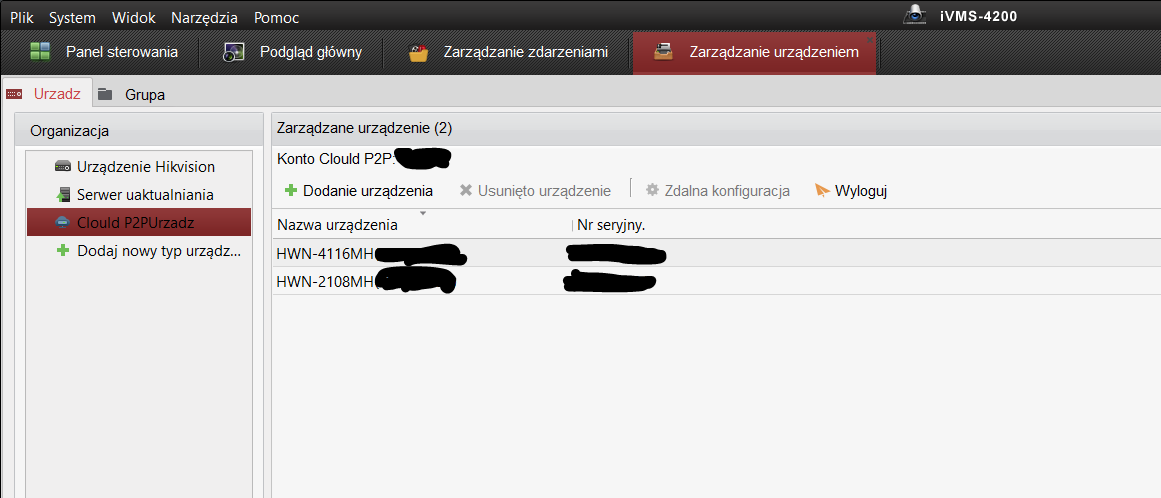
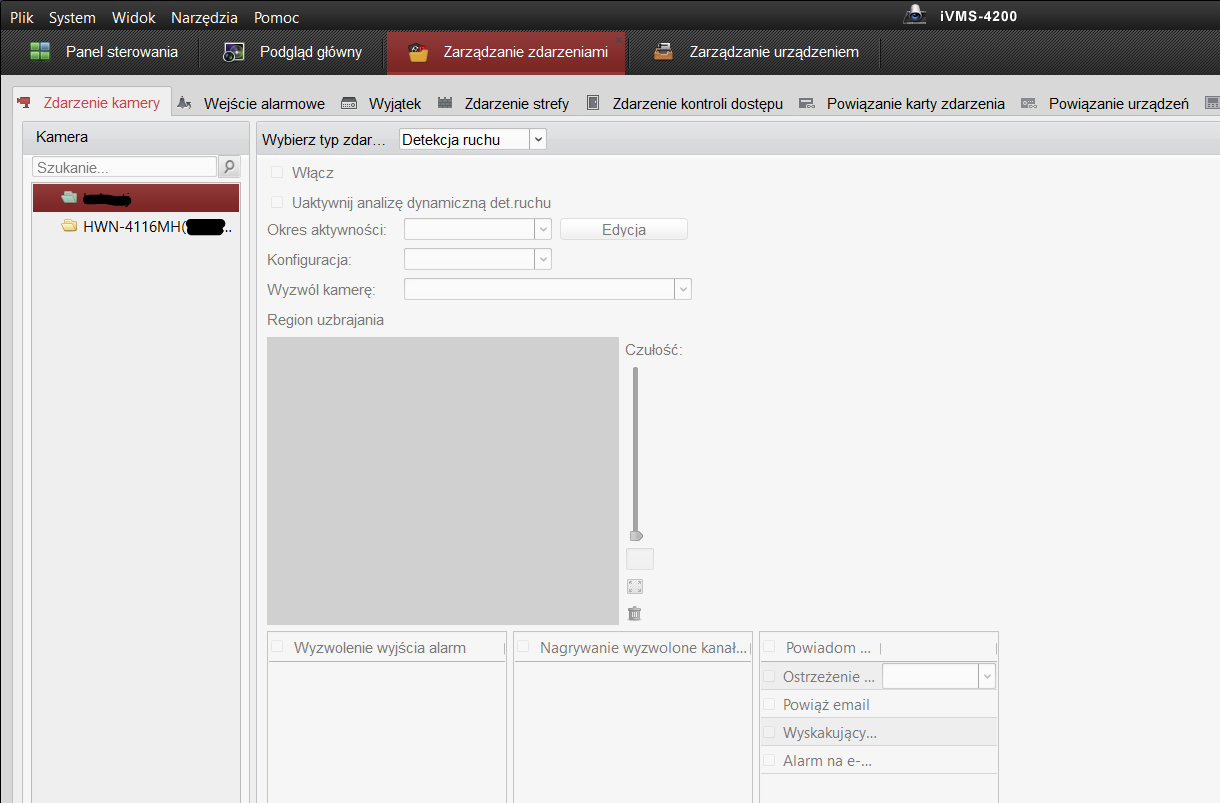
    Recently, I installed the Hikvision camera system with the HWN-4116MH recorder and I have a question whether it is possible to configure the camera settings remotely, i.e. motion detection from the level of iVMS software from a different network than the one in which the recorder works.
    I am logged in to the cloud (photo) and I have live view from all cameras, but when I enter "Event management" iVMS doesn't see any camera, only an empty recorder folder.
    Is it possible to change the motion detection settings from the iVMS level on a PC from another network and so that these settings will be saved in the recorder after "turning off" the computer?
    Thank you in advance for your help

    Overcoming False Motion Detection in Hikvision DS-2CD1041 Cameras & DS-7608NI-K2/8P Recorder Overcoming False Motion Detection in Hikvision DS-2CD1041 Cameras & DS-7608NI-K2/8P Recorder
  • #18 19470630
    ku34
    Level 5  
    Posts: 93
    Rate: 9
    What is your sensitivity setting so that at least during the day it doesn't catch every fly that passes by?
  • #19 19470717
    adwlodar
    Level 28  
    Posts: 1067
    Help: 111
    Rate: 245
    ku34 wrote:
    What is your sensitivity setting so that at least during the day it doesn't catch every fly that passes by?

    I do not know what recorder you have, but I have no problem with the value set at the factory on the iDS-7208HQHI-M1. It's just that all their Motion Detection 2.0 is there
  • #20 19477743
    cichy koksik
    Level 17  
    Posts: 857
    Help: 4
    Rate: 82
    @ Ziemson24
    Did you do something?

    For me, even on the local network, this folder is empty.

Topic summary

✨ The discussion revolves around issues with false motion detection in Hikvision DS-2CD1041 cameras and the DS-7608NI-K2/8P recorder. Users report excessive false alerts at night, primarily triggered by insects, despite adjusting sensitivity settings. Suggestions include exploring higher models with advanced features like line crossing or area intrusion detection, although the current model lacks these capabilities. Some users discovered that connecting the camera directly to a computer provides more granular motion detection settings, including separate sensitivity adjustments for day and night. There are also discussions on accessing camera settings via the DVR and enabling virtual host options for remote configuration. Overall, the conversation highlights the challenges of motion detection in low-light conditions and the potential for improved functionality with different models or configurations.
Generated by the language model.

FAQ

TL;DR: Night motion on Hikvision DS-2CD1041 often yields ~20 × 3–5 s clips/hour; “It makes searching and accessing scenes a little difficult.” Fix it by using camera‑side advanced motion settings, day/night sensitivity, and Virtual Host access. [Elektroda, mlukjani, post #16811973]

Why it matters: This FAQ helps owners cut false alarms, tune motion accuracy, and remotely reach camera settings without exposing the LAN.

Quick Facts

How do I reduce false motion at night on DS‑2CD1041?

Log into the camera directly, switch to Advanced motion detection, and set sensitivity between 0–100. Use lower night sensitivity than day and adjust the detection area. This model lacks smart VCA, so camera‑side tuning is key. “Separate day/night sensitivity helps a lot.” [Elektroda, mlukjani, post #16816719]

Do smarter models with VCA really help with insects and IR noise?

Yes. Use VCA like line crossing or intrusion to filter random motion. These analytics look for object behavior, not pixel noise, so bugs trigger less. “At night you will always have detection problems—use line or area intrusion.” [Elektroda, GRZEGORZ OST, post #16812380]

Why can’t I see advanced motion options when I click through the NVR?

The NVR exposes only basic motion controls. When you connect to the camera directly, you’ll find Advanced mode, 0–100 sensitivity, and day/night profiles. That’s normal behavior on this setup. [Elektroda, mlukjani, post #16816719]

What sensitivity works during the day without catching every fly?

On newer DVRs with Motion Detection 2.0, users report good results at factory defaults. If your recorder supports MD 2.0, start there before customizing. [Elektroda, adwlodar, post #19470717]

Can I access each PoE camera’s web UI behind a Hikvision NVR?

Yes. Enable the NVR’s Virtual Host to expose per‑camera links. You’ll then open each camera’s web UI via unique ports (e.g., 65001…). This avoids direct LAN routing to the PoE ports. [Elektroda, Fotodetektor, post #16816804]

How do I reach a camera by port number (65001, 65002…)?

After enabling Virtual Host, browse to the NVR’s IP with the mapped port. Example: http://NVR_IP:65001 for channel 1, then increment for subsequent cameras. Users confirm this works even when camera IPs aren’t visible. [Elektroda, mlukjani, post #16816887]

Step‑by‑step: How do I enable Virtual Host on a Hikvision NVR?

  1. NVR Web > Network > Advanced > Other: check Enable Virtual Host.
  2. Go to System > Camera Management.
  3. Click the per‑camera link (port 65001, 65002, …) to open the camera UI. [Elektroda, Fotodetektor, post #16816804]

Will camera-side motion settings override the NVR settings?

Generally yes. Configure the NVR first, then set motion on each camera. Camera settings overwrite NVR, but the NVR can occasionally push back. If that happens, reapply from the camera UI. [Elektroda, mlukjani, post #18250589]

Do I need router port forwarding to manage cameras behind the NVR?

No. When cameras are on the NVR’s PoE switch, use Virtual Host instead of port forwarding. “No redirections on the router!!!” Enable Virtual Host and use the provided links. [Elektroda, Fotodetektor, post #16816791]

What is VCA in Hikvision cameras?

VCA means video content analytics, such as line crossing and intrusion detection. These reduce false alarms versus basic pixel‑change detection, especially at night. Upgrade to models with VCA if your camera lacks it. [Elektroda, GRZEGORZ OST, post #16812380]

Why does my iVMS Event Management show an empty recorder folder over the cloud?

Cloud login often exposes only the recorder, not individual cameras for event setup. You may need LAN access, Virtual Host, or direct camera login to change motion. The empty folder symptom matches this limitation. [Elektroda, ziemson24, post #18416616]

Can external sensors help if I want reliable alarms or lighting triggers?

Yes. Outdoor alarm sensors are built differently from indoor ones. Use dedicated dual‑tech outdoor detectors for reliable triggering instead of basic video motion. [Elektroda, marek216, post #16812556]

What is Hikvision Virtual Host?

Virtual Host is an NVR feature that proxies each PoE camera’s web interface to unique TCP ports on the NVR’s LAN IP. It simplifies secure access and per‑camera configuration. [Elektroda, Fotodetektor, post #16816804]

Edge case: Why did my tuned camera sensitivity revert after some days?

The NVR can sometimes overwrite camera parameters. Reopen each camera UI and re‑save motion settings. This restores your day/night sensitivities and areas. [Elektroda, mlukjani, post #18250589]

Is it normal to record ~20 short clips per hour at night on DS‑2CD1041?

Yes, with basic motion at night, insects and IR noise can cause bursts of 3–5 s clips. Reduce sensitivity, tighten areas, or add VCA‑capable models. [Elektroda, mlukjani, post #16811973]

Do DS‑2CD1041 cameras support line‑crossing or face detection?

No. The listed camera lacks those VCA functions. Consider higher models (e.g., FWD series) if you need analytics to cut false alarms. [Elektroda, mlukjani, post #16812403]
Generated by the language model.
ADVERTISEMENT