FAQ
TL;DR: 1 rule applies: "piracy is not tolerated here." To edit a signature‑protected PDF offline, flatten via Print to PDF or rasterize pages, or ask the issuer for an editable copy. [Elektroda, Robert B, post #16871945]
Why it matters: This FAQ helps privacy‑conscious users edit locked PDFs without unsafe uploads while respecting legal and ethical limits.
Quick Facts
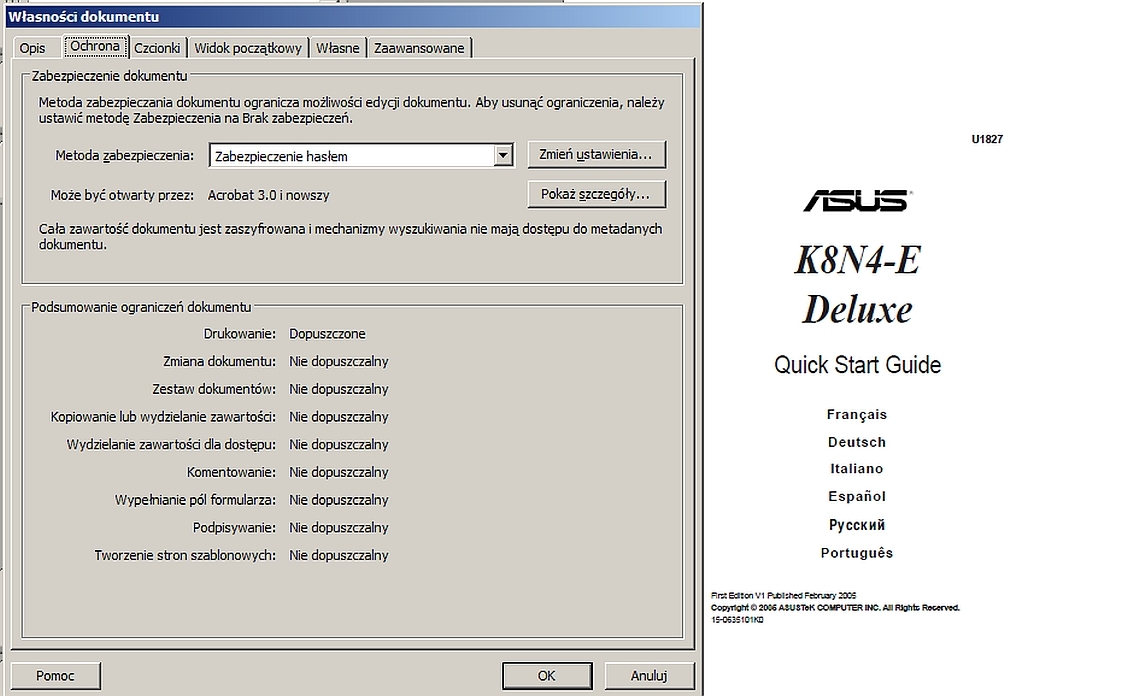
- Adobe Acrobat Pro blocks editing when a digital signature is present; the app warns that editing isn’t possible. [Elektroda, kaffiks, post #16871777]
- Avoid uploading sensitive PDFs to online unlockers if privacy is a concern; the OP required an offline solution. [Elektroda, kaffiks, post #16871612]
- Practical workarounds: Print to PDF, open pages as images in IrfanView, then rebuild the PDF. [Elektroda, Robert B, post #16872494]
- Best practice: request an unsigned or editable source file from the issuer before altering content. [Elektroda, Robert B, post #16871945]
- Some users open certain PDFs in Adobe Illustrator and save as AI for further editing. [Elektroda, safbot1st, post #16872933]
How do I edit a signature‑protected PDF without uploading it?
Use offline workarounds. Try printing the document to PDF to flatten it, or open each page as an image, edit, and rebuild the PDF. This avoids servers and keeps data local. If content must remain live text, ask the issuer for an editable copy. [Elektroda, Robert B, post #16872494]
Is using online unlockers safe for sensitive data?
If the file holds private data, avoid uploads. The OP explicitly sought an offline method due to privacy concerns. That stance fits best‑practice data handling: keep sensitive documents on trusted machines and favor local tools or direct issuer support. [Elektroda, kaffiks, post #16871612]
What does “document is signature protected” mean in Acrobat?
Acrobat detects a digital signature and disables editing to preserve document integrity. You’ll see a message that editing is not possible because of the signature’s security. This is normal behavior when a signature locks content against modification. [Elektroda, kaffiks, post #16871777]
Can I legally remove a digital signature from a PDF I received?
Follow the forum’s ethics: “piracy is not tolerated here.” Ask the document owner for an unsigned or editable version instead. This respects authorship and reduces risk of policy or legal violations. Keep a paper trail of permission when changes are required. [Elektroda, Robert B, post #16871945]
What offline tools were suggested for unlocking or editing?
Users mentioned Smallpdf (online), Icecream PDF Converter, and AbleWord. For privacy, prefer the offline options. Test by converting or importing, then check if text remains editable. If not, use OCR after rasterizing or request the original source file. [Elektroda, Matheu, post #16871649]
How do I flatten a signed PDF via Print to PDF? (3‑step quick guide)
- Open the PDF and choose Print, then select a virtual “Print to PDF” device.
- Print/Save to a new PDF to flatten signatures and form layers.
- Reopen the new PDF and edit or OCR as needed.
This 3‑step approach preserves layout. [Elektroda, Robert B, post #16872494]
How can Illustrator help with a locked PDF?
Some PDFs open in Adobe Illustrator. You can then Save As AI, which allows vector editing of shapes and text layers that import. Results vary by file structure and security settings. Always verify legal permission before altering content. [Elektroda, safbot1st, post #16872933]
What if the PDF is just a scan?
Scanned PDFs are images, not live text. Editing requires cropping, cleanup, and OCR to recover text. As one user noted, scans may be unsuitable for direct text edits, so plan to process images before rebuilding the PDF. [Elektroda, Robert B, post #16872471]
Can I remove a digital signature directly without flattening?
A participant linked a guide claiming signature removal steps. Effectiveness depends on how the PDF was secured and tool capabilities. If integrity protections block direct removal, fall back to flattening or ask the issuer for an unsigned copy. [Elektroda, dt1, post #16871916]
What should I request from the issuer to make edits safely?
Ask for an unsigned PDF, an unlocked revision, or the source document (e.g., Word, InDesign). This keeps edits legitimate and avoids breaking signature integrity. It’s the cleanest path when content changes are required. [Elektroda, Robert B, post #16871945]
Why didn’t Advanced PDF Password Recovery help here?
The OP reported that Elcomsoft Advanced PDF Password Recovery Professional didn’t solve the issue. Signed PDFs can restrict edits without a crackable password, so password tools may not apply. Workflow changes are often required. [Elektroda, kaffiks, post #16871612]
How do I fix mis‑scanned pages (A3 captured for A4 documents)?
Open pages as images, crop excess margins, and correct size before recreating the PDF. This improves readability and print results. It’s common to repair office scans this way before any OCR or layout edits. [Elektroda, icooz, post #16872488]
Can converting PDF to PDF clear odd pages or artifacts?
Yes. One user suggests converting the file from PDF to PDF to remove anomalies like stray white pages. Test with your converter, then verify pagination and text fidelity before sharing. [Elektroda, icooz, post #16871934]
Will text stay editable after rasterizing pages?
No. Converting pages to images flattens text into pixels, removing live text. You’ll need OCR to regain editable text layers after rebuilding the PDF. Keep a backup before rasterizing to avoid accidental data loss. [Elektroda, Robert B, post #16872494]